

Start with the orders that keep arriving
A WooCommerce store must update its shipping extension before a busy period. The team wants to test shipping-fee calculation, payments and confirmations on a private copy. The public site continues receiving orders during preparation. The hosting choice then depends on how changes are published and a stable state recovered if shipping rates stop working.
We compare Kinsta Launch Plus and WP Engine's entry-level Essential configuration for one installation. Resources and billing units differ. Use these two configurations to request proposals for the same site, with its volumes, external services and recovery needs. Quoted prices and terms were recorded on November 10, 2026. The comparison relies on official pages and catalogue listings.
Identify the authoritative data for each operation. An order is recorded in the store, the payment provider retains collection status and the shipping service may keep its own reference. Restoring WordPress does not synchronise these systems. Before choosing, determine how many sales could be reconstructed and who could reconcile data after an outage.
Compare before you choose
The offers at a glance
Find the use case and budget that fit, then read the details to see the limitations and any components you may need.
On smaller screens, the table scrolls horizontally. With a keyboard, press Tab to focus the table, then use the left and right arrow keys.
| Offer | Best for | Pricing and billing | Renewal and support |
|---|---|---|---|
 Kinsta Launch PlusRead the details | Store tracking server bandwidth and coordinating maintenance in French. | USD 531 excluding taxes for the first annual cycle. Monthly: USD 29.50 excluding taxes/month for three months. Prepaid annual or monthly payment depending on the route. New-customer campaign until December 1, 2026. International storefront excluding taxes. Separate options and overages. | USD 59 excluding taxes/month displayed after the monthly discount. Confirm annual renewal. French technical chat advertised on an active paid plan. |
 WP Engine Essential — entry configurationRead the details | Team seeking to isolate preparation and able to manage environment copies. | From USD 336 prepaid for the first year, equivalent to USD 28/month. Entry-level annual cycle displayed. Check monthly-paid price and options. Taxes and possible overages. Check the order-specific total. | Confirm renewal amount. Automatic same-duration renewal by default according to terms. Continuous chat advertised on Essential. |
Kinsta Launch Plus at USD 531 excluding taxes for the first annual cycle
The Black Friday grid indicates USD 531 excluding taxes billed annually for Launch Plus. On the monthly path, Kinsta displays USD 29.50 excluding taxes per month for the campaign's first three monthly payments, then USD 59 excluding taxes per month as the reference rate. The campaign is reserved for new customers and its end is advertised as December 1, 2026. The first free month is displayed for Launch, a different tier.
The crossed-out USD 708 in the annual column corresponds to twelve monthly payments of USD 59. Launch Plus's annual renewal amount and date still need to be obtained. To place the monthly path's cost in context, three months at USD 29.50 followed by nine months at USD 59 gives USD 619.50 excluding taxes over twelve months, with an unchanged reference rate and excluding options and overages. The calculation describes this path. The annual offering corresponds to a first cycle paid in advance.
Launch Plus displays one site, 25 GB of storage, 25 GB of server bandwidth and 250 GB of CDN bandwidth per month. The displayed 125,000 monthly visits are an estimate. For this plan, the server-bandwidth counter and CDN and disk allowances are the items to track in MyKinsta.
WP Engine Essential from USD 336 for the first year
The international storefront presents Essential from an annual equivalent of USD 28 per month, or USD 336 for the first prepaid year. Introductory prices and coupons are reserved for eligible new Essential customers, for one subscription and without combination with another offer. Check the monthly-paid price and total with taxes and options. The entry configuration displays one site, 25,000 monthly visits and 10 GB of storage.
The range comparison displays 75 GB of monthly bandwidth for Essential. Documentation describes a counter including compressed server and CDN transfers as well as transfers from different environments. Check the chosen configuration's allowance. Also request the visit-overage rate schedule. The public USD 2 per thousand rate names offerings such as Startup and Agency Essentials, whose titles differ.
The recurring amount depends on the rate applicable at renewal and the contract. General terms default to a subsequent cycle of the same duration, with notice at least thirty days before expiry to oppose renewal. They also provide for a charge up to one week before expiry. Request the date and rate for your configuration. If the need exceeds Essential's shared environment, obtain pricing for a suitable proposal before comparing budgets.
To compare the initial twelve months, retain the annual bases of USD 531 excluding taxes at Kinsta and the displayed USD 336 at WP Engine. Confirm the latter amount's tax treatment for the account holder: no tax-inclusive total or net saving can be inferred from these two numbers alone. Then request the same options and recovery objective. A twenty-four-month budget remains incomplete until both annual renewals are priced.
Read counters alongside store data
A cached product page and a logged-in cart place different demands on hosting. Use measurements from the existing site. Note peak periods, imports, stock calls and search operations. Monthly volumes provide context, while slowness or errors observed during imports indicate application workload. Compare both proposals using the same observations.
At Kinsta, Launch Plus bills on server bandwidth and separately tracks CDN and disk. Documentation displays USD 0.50 per excess GB of server bandwidth, USD 0.05 per additional CDN GB and USD 2 per excess disk GB per month, prorated by overage days. Keep a record of all three counters to identify which could change the invoice.
WP Engine calculates billable visits from unique IP addresses per UTC day, with exclusions for static resources alone and certain bots. Ask how to locate the site's consumption and that of its copies. A visit in the analytics tool and a visit in the billing counter may mean different things. Sizing must also cover store operations consuming resources without adding many visits, such as updating a catalogue.
Separate copy frequency from retention duration
Kinsta advertises daily backups retained for fourteen days on Launch Plus. The WP Engine guide describes thirty days of restore points, while the storefront advertises thirty to sixty days' retention. Use dates visible in the portal to establish the recovery plan. Longer retention helps locate an older version. Loss between the latest copy and an outage depends on restore-point frequency and orders received during that interval.
Kinsta displays two per-site options: a copy every six hours at USD 20 per month or an hourly copy at USD 100 per month. These additional points are retained for twenty-four hours. At an unchanged rate, twelve months of the six-hour option represents USD 240. For WP Engine Essential, the guide documents automatic daily points and creation of manual points. Availability and price of a higher frequency remain to be confirmed.
If the store sets a two-hour maximum interval of data to reconstruct, the daily rhythm and six-hour option leave a longer interval. An hourly copy provides a more frequent point, subject to its execution and availability. In all cases, prepare an inventory of sales and collected payments after the selected point. A manual point just before the update reduces the interval around this operation. Recovery of sales arriving afterwards must also be planned.
Export a working copy and restore outside production first
Before restoring the store onto a copy, prepare isolation with the maintainer: private access, stopped scheduled triggers and exchanges with payments, stock, shipping and real recipients blocked or replaced by test destinations. Password protection alone does not disable server tasks. Restoration may reintroduce production keys and settings; keep blocks in place during this operation. If the account cannot provide this isolation from copy creation, examine the archive in a separate environment without access to real services before starting WordPress.
On Kinsta, the panel allows generation of a downloadable files-and-database archive once per week. It remains available for forty-eight hours. Record redirects and platform settings separately. To examine a live-site restore point, first create a staging target. In site backups, choose the point, then Restore to and the target. Documentation states that restoration can reinstate files, database and MyKinsta settings including domains.
On WP Engine, open the environment, then Backups. The point's menu lets you prepare a complete or partial ZIP. The prepared file is accessible for up to seven days. Database export through this route covers the whole database. To examine a point in another environment, use Push to copying. Choose the target, Custom type and Backup point as source. From a backup point, including the database takes all its tables; table-by-table selection applies to copying the current state. Confirm date and scope before executing the copy. Restoration within the same environment may delete files absent from the chosen point.
On the restored copy, disable real payments, customer messages and tasks contacting stock or shipping services. Open an old order and check its state with test data. Also check files needed by the extension. Record the point used and missing elements. This step helps decide whether returning to production requires a complete restore or recovery of a targeted component.
Deploy the update while retaining production data
Kinsta's standard staging lets you prepare a copy. In MyKinsta, deployment can target files, folders or tables. However, source environment settings are copied to the destination even in selective deployment. Check redirects, PHP settings, geolocation and Nginx rules before confirming. The guide notes a possible brief interruption at the end of deployment to the live site.
The WP Engine portal distinguishes production, staging and development according to created environments. Custom copying of the current state can include selected tables. From a backup point, the included database remains whole. Selected tables already present at the destination are replaced. A partial ZIP and selective table copying serve different operations. Also check server rules, media potentially stored elsewhere and services tied to the staging domain.
For the shipping update, first check whether the change resides in extension files or requires data migration. If the update can be replayed on a retained production database, apply the documented change and check the result. If tables must be transferred, identify where orders and associated data are stored. WooCommerce can use dedicated tables with HPOS. Extensions may add their own data. Have the scope validated by the person maintaining the store.
- Before deployment, create a current restore point and record the latest order number, status and payment reference.
- On the private copy, check shipping fees and the complete journey using test data and a test payment method.
- At the chosen time, apply the targeted change and check a product, the cart, administration and expected notifications.
- If the check fails, retain the recent state and record new orders before any database recovery. Restore the affected component if that suffices.
Define what managed updates cover
WordPress core, extensions and sales settings require different validations. Record the shipping extension version, dependencies, configured zones and taxes. Confirm compatibility constraints for the cache, security and backup features used today. Kinsta documents extension-specific restrictions. For WP Engine, request confirmation for components the store depends on.
WP Engine presents Smart Plugin Manager as an option on Essential. The guide describes automatic verification and rollback when an anomaly is detected. For fee calculations or stock synchronisation, retain a store-specific check. An identical display can accompany a calculation error. Price licences needed per environment and confirm features included in both selected offerings.
Plan who handles incidents on deployment day
Kinsta advertises continuous technical chat in French for customers with an active paid plan. Sales, billing and migration teams have their own hours. WP Engine advertises continuous chat on Essential. Availability of a French-speaking human contact under this contract remains to be confirmed. For both offerings, check the channel the team can access on update evening.
A payment incident, incorrect shipping rule and inaccessible site may involve different parties. Name the person contacting the host, extension publisher and payment provider. To request intervention, gather time, environment, latest change and affected step. Check resolution timeframes and scope for your incident in support terms.
Include messaging, licences and recovery in the budget
The business mailbox and WooCommerce receipt sending are two services to price separately. Kinsta documents transactional sending within certain limits and does not provide mailboxes. WP Engine recommends a specialist sending provider for tracking and reliability needs. Check the current service sending confirmations and the return-address setting before moving the site.
Add licences needed for the public site, test copy and catalogue monitoring. For frequent-copy requirements, record price, accessible dates and recovery time needed. An initial USD 336 or 531 cost alone prices neither options nor interventions. Renewals for both offerings remain open. Keep a per-cycle budget and a separate line for the store's recurring fees.
Migrate the site while keeping a register of recent sales
Kinsta documents a WordPress migration service. WP Engine documents a transfer extension and manual route, with technical prerequisites. Confirm assistance scope for the chosen configuration. Inventory media, scheduled tasks, integrations and access before transfer. For an open store, agree when the source stops receiving orders and how to recover changes since the first copy.
Prepare a control destination without public traffic. Keep old hosting during checks. Test pages, downloads and administrative actions using test methods. Record the date of the last transferred order and confirm paid orders with the payment provider. Switch once useful data has been transferred and the destination verified.
If the site temporarily returns to the old destination, record which orders arrived on each side. Reconcile order and payment states before reopening order intake on the chosen destination. When leaving later, export files, SQL and platform settings while access remains active. The site owner retains control of the domain, fallback access and licences.
Choose according to update and recovery scope
Launch Plus is an option if the store can quantify server transfers, French chat facilitates coordination and frequency options match copy requirements. For selective publication, require checks of environment settings before choosing this route. Essential is an option if entry-level resources suit the site and the team can use environments and custom copies. Confirm the visit-rate schedule, support channel and necessary licences.
Request two proposals with the same feature list and recovery threshold. Record the first cycle, next charge date and renewal price. Select a protocol feasible on both offerings, with an independent copy and a way to reconstruct sales arriving after the chosen point. The decision concerns the capacity and cost of the existing site as well as work the team can actually perform during an incident.
Further reading
Sources and references
Use these references to check the features, requirements and limitations described. Reading documentation is not a practical test.
View 23 references
- Kinsta Launch Plus — Kinsta — pricing and resources ↗ — Documentation consulted:
- Kinsta Launch Plus — Kinsta — choosing the plan metric ↗ — Documentation consulted:
- Kinsta Launch Plus — Kinsta — backups and archives ↗ — Documentation consulted:
- Kinsta Launch Plus — Kinsta — selective deployment ↗ — Documentation consulted:
- Kinsta Launch Plus — Kinsta — support ↗ — Documentation consulted:
- Kinsta Launch Plus — Kinsta — email ↗ — Documentation consulted:
- Kinsta Launch Plus — Kinsta — prohibited or incompatible plugins ↗ — Documentation consulted:
- Kinsta Launch Plus — Kinsta, server, CDN and storage overages ↗ — Documentation consulted:
- Kinsta Launch Plus — Kinsta, standard staging environment ↗ — Documentation consulted:
- Kinsta Launch Plus — Kinsta, WordPress migration ↗ — Documentation consulted:
- WP Engine Essential — configuration de départ — WP Engine — pricing and configuration ↗ — Documentation consulted:
- WP Engine Essential — configuration de départ — WP Engine — backups ↗ — Documentation consulted:
- WP Engine Essential — configuration de départ — WP Engine — copying between environments ↗ — Documentation consulted:
- WP Engine Essential — configuration de départ — WP Engine — support ↗ — Documentation consulted:
- WP Engine Essential — configuration de départ — WP Engine, general terms and renewal ↗ — Documentation consulted:
- WP Engine Essential — configuration de départ — WP Engine, billable visits ↗ — Documentation consulted:
- WP Engine Essential — configuration de départ — WP Engine, bandwidth and storage ↗ — Documentation consulted:
- WP Engine Essential — configuration de départ — WP Engine, overages and named plans ↗ — Documentation consulted:
- WP Engine Essential — configuration de départ — WP Engine, environment management ↗ — Documentation consulted:
- WP Engine Essential — configuration de départ — WP Engine, Smart Plugin Manager ↗ — Documentation consulted:
- WP Engine Essential — configuration de départ — WP Engine, WordPress transfer ↗ — Documentation consulted:
- WP Engine Essential — configuration de départ — WP Engine, transactional email ↗ — Documentation consulted:
- WP Engine Essential — configuration de départ — WooCommerce, HPOS order storage ↗ — Documentation consulted:
Uses, prices and what to check
2 offers in detail
Compare the features you need and the terms of each offer. The order of these entries does not indicate a ranking.
Kinsta Launch Plus
 Kinsta logotype from the official press kit. — Image: Kinsta.
Best forStore tracking server bandwidth and coordinating maintenance in French.
Launch Plus hosts one WordPress site with separate counters for server, CDN and disk. The store benefits from standard staging and must check settings carried over during deployment.
Offer pricing
USD 531 excluding taxes for the first annual cycle. Monthly: USD 29.50 excluding taxes/month for three months.
Billing: Prepaid annual or monthly payment depending on the route. New-customer campaign until December 1, 2026.
Renewal and support: USD 59 excluding taxes/month displayed after the monthly discount. Confirm annual renewal. French technical chat advertised on an active paid plan.
International storefront excluding taxes. Separate options and overages.
Checked on .
Strengths
- 1 site, 25 GB server per month, 250 GB CDN per month and 25 GB disk.
- Standard staging and file or table selection documented.
- Restoration to existing staging and frequency options documented.
What to consider
- The 125,000 visits are an estimate.
- Environment settings overwritten by selective deployment.
- Price backup options and annual renewal.
Pricing terms and compatibility
Understanding the offer
- Price at the time of review
- USD 531 excluding taxes for the first annual cycle. Monthly: USD 29.50 excluding taxes/month for three months.
- Currency
- USD
- Billing
- Prepaid annual or monthly payment depending on the route. New-customer campaign until December 1, 2026.
- Renewal and support
- USD 59 excluding taxes/month displayed after the monthly discount. Confirm annual renewal. French technical chat advertised on an active paid plan.
- Taxes and fees
- International storefront excluding taxes. Separate options and overages.
- Commitment and terms
- Annual cycle for USD 531. Monthly payment available depending on the chosen route.
- Date checked
Compatibility and components
- WordPress and WooCommerce according to installed versions and extensions.
- Check compatibility rules and payment, stock and shipping dependencies.
WP Engine Essential — entry configuration
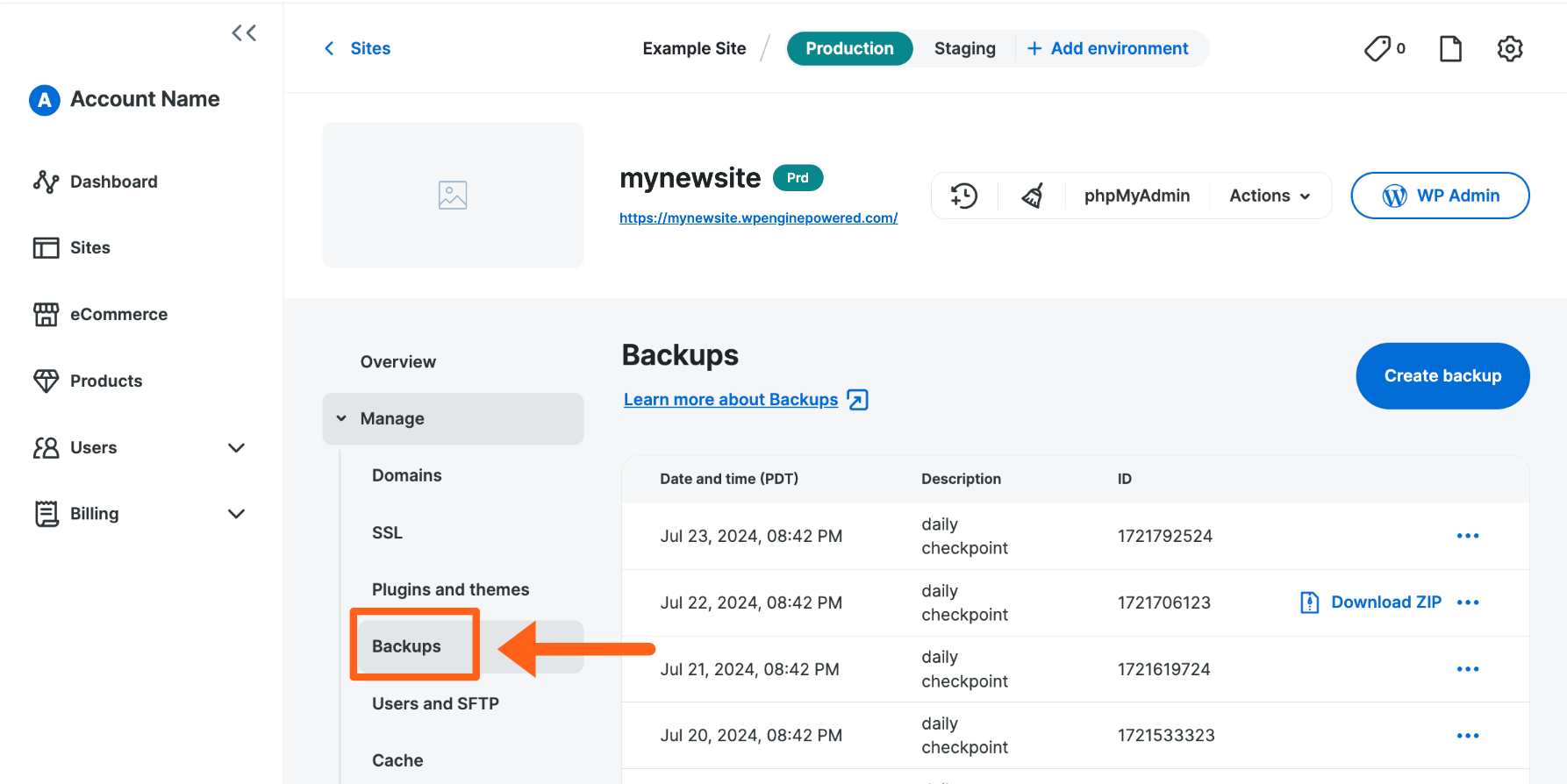 Backup points for an example site in the WP Engine portal. — Image: WP Engine.Open full-size screenshot ↗
Best forTeam seeking to isolate preparation and able to manage environment copies.
Essential displays an annual introductory price and separates production, staging and development. The store must assess the visit cap and copy scope protecting recent data.
Offer pricing
From USD 336 prepaid for the first year, equivalent to USD 28/month.
Billing: Entry-level annual cycle displayed. Check monthly-paid price and options.
Renewal and support: Confirm renewal amount. Automatic same-duration renewal by default according to terms. Continuous chat advertised on Essential.
Taxes and possible overages. Check the order-specific total.
Checked on .
Strengths
- 1 site, 25,000 monthly visits and 10 GB at entry level. 75 GB bandwidth displayed for Essential.
- Production, staging and development environments documented.
- Backup-point copying and ZIP documented; table selection for the current state only.
What to consider
- Confirm renewal price and visit-rate schedule for the configuration.
- Copied tables replace destination tables; from a backup point, the included database is whole.
- Assess French-speaking human support and application options.
Pricing terms and compatibility
Understanding the offer
- Price at the time of review
- From USD 336 prepaid for the first year, equivalent to USD 28/month.
- Currency
- USD
- Billing
- Entry-level annual cycle displayed. Check monthly-paid price and options.
- Renewal and support
- Confirm renewal amount. Automatic same-duration renewal by default according to terms. Continuous chat advertised on Essential.
- Taxes and fees
- Taxes and possible overages. Check the order-specific total.
- Commitment and terms
- Twelve months for the recorded price. Check non-renewal notice and charge date.
- Date checked
Compatibility and components
- WordPress and WooCommerce according to configuration and extension requirements.
- Check scheduled tasks, sending services and domain-related integrations.