

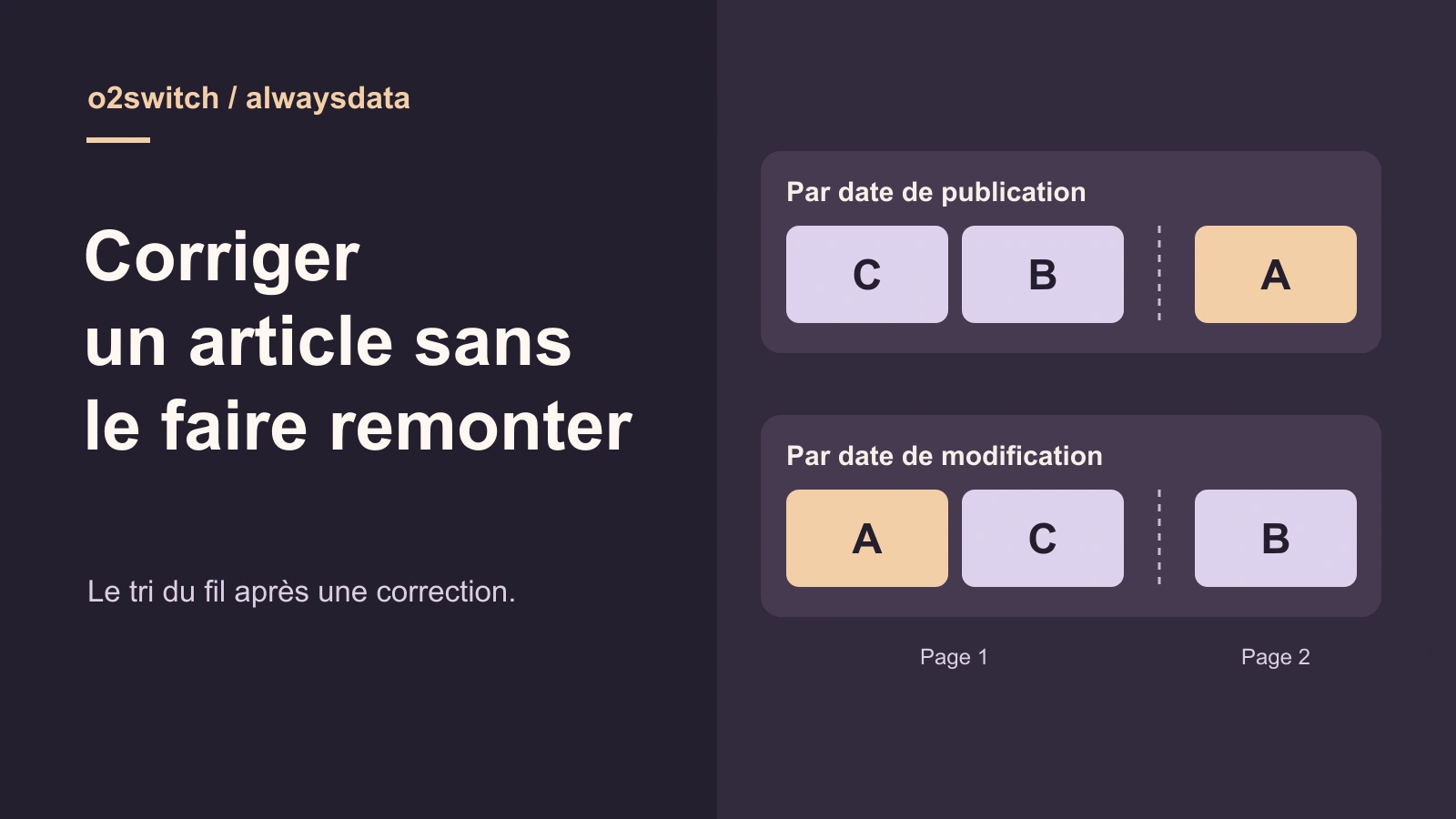
Why an older post moves up after a correction
Fixing the sort order is a matter of the WordPress query or component that displays the feed. Changing hosting providers does not replace that setting. This comparison looks at o2switch and alwaysdata for preparing and checking a working copy; if your current hosting already provides a usable copy, start there.
An editorial team corrects the opening hours in an older WordPress post. The text is up to date, but the post moves above more recently published news. Another news item disappears from the first page and moves to the second. Before changing the post’s date, record the criterion used by the feed. It may sort posts by publication date or by last modification date.
WordPress keeps these dates in separate fields. When the API saves a correction without a requested change to the publication date, that date can remain unchanged while the modification timestamp advances. A WP_Query sorted by modified uses this second timestamp. A query sorted by date uses the publication date. The same posts can therefore appear in a different order without any of them being republished.
This comparison concerns a feed the team wants to display from most recently published to oldest. An area called Latest updates may follow a different rule. The test uses WordPress core with two queries that differ only in their sorting criterion. The o2switch and alwaysdata workflows prepare the copy on which the team can then check the actual feed.
- Identify the feed page and where its sorting is configured before editing a post.
Compare before you choose
The offers at a glance
Find the use case and budget that fit, then read the details to see the limitations and any components you may need.
On smaller screens, the table scrolls horizontally. With a keyboard, press Tab to focus the table, then use the left and right arrow keys.
| Offer | Best for | Pricing and billing | Renewal and support |
|---|---|---|---|
 o2switch GrowRead the details | A team that wants to reproduce the site’s loop from a clone managed in cPanel. | Monthly equivalent of €7 excluding tax, or €84 excluding tax for twelve months Twelve months at signup at the displayed price Prices exclude tax; tax-inclusive total at checkout | €84 excluding tax for annual renewal at the displayed price |
 alwaysdata Cloud Public Plus SmallRead the details | A team that explicitly manages the copy’s address, files and database. | €5 excluding tax per month with annual billing, or €60 excluding tax for twelve months; €6 excluding tax with monthly billing Annual or monthly payment Prices exclude tax | Check the renewal cycle and amount in the billing record |
Identify the feed, its sorting rule and its first two pages
Start by identifying the component that displays the list. It could be the site’s posts index, a block, or a loop added by a theme or plugin. Open the template or configuration that generates the list. Record the content types, statuses, page size, category filters and sticky posts. These settings can explain an unexpected order independently of the date criterion.
Write down the IDs in the order they appear on the first two pages. A move can go unnoticed if you only check whether the corrected post is present. The first page has a fixed size. When a post moves into the visible group, another may move to the next page. Record the results for both pages and use the same number of posts per page in successive tests.
For the post you will correct, record the publication and modification dates in the same time zone before and after saving. In the lab, the report expresses dates in UTC. On the test site, also record what the theme displays to readers. An update notice and the feed order may be handled by two different components. You can keep the notice while sorting the feed by publication date.
- Record the filters, results per page and IDs in order on the first two pages.
Create control posts that distinguish a correction from a new publication
Prepare three fictional posts, A, B and C, published in that order on three different dates. A contains outdated opening hours. Limit the feed to two posts per page. Sorting by publication should put C then B on the first page and A on the second. Add a recent draft and a more recently published page. They must stay out of the published-post feed. Distinct dates make the results easier to interpret.
Before changing the hours, save A by passing its current title without touching the text. In this exercise, that API operation alone updates its modification timestamp and moves it up in the feed sorted by that timestamp. The result reveals the technical criterion used by the list. Moving up this feed does not, by itself, establish that the content received a substantive correction.
Then correct the time from eight to nine o’clock and check both lists. On a site copy, also record the order before updating any theme or plugin involved in the feed. You can then compare results even if a customization changes several parameters. The acceptance goal is to retain the correction and the approved publication order, with the same posts and filters.
o2switch Grow: test the sorting in a WP Tiger staging site
At o2switch, open WP Tiger from cPanel and select the installation to check. The tool’s guide describes creating a staging clone at a technical address on wptiger.fr. The clone is password protected. Check the address in your browser before opening WordPress administration, and identify the template that displays the feed. The change you are testing concerns this copy and the targeted feed.
This route suits a feed that depends on a theme, block or plugin already present on the site. First compare the copy’s first two pages with the initial record. Reproduce the correction on a fictional post, then check the sorting without changing the other filters. On the copy, disable any outgoing actions the test could trigger against a live service, such as a publication notification or editorial synchronization.
The Grow plan advertises eight CPU threads, 16 GB of RAM and 16 MB/s of I/O. NVMe storage is advertised without a capacity ceiling, and the plan page lists daily backups retained for thirty days. The “moon” subaccounts share the main account’s resources on Grow. Creating a full copy depends on the volume of files and data. The fictional post set is sufficient to measure the change in order.
- Open the WordPress installation detected in WP Tiger and create the staging site.
- Record the clone’s address and check the first and second pages of the feed.
alwaysdata Plus Small: prepare a PHP site and a separate database
In the alwaysdata panel, Web then Sites lets you define a site and its type. Create a PHP entry for the test address and specify a directory reserved for that installation. Prepare a dedicated database in the databases section. In WordPress, check that the copy uses this database and opens its own dashboard. To examine a real feed’s behavior, reproduce the template and query that supply it.
Cloud Public Plus Small’s 50 GB covers the account’s files, email and databases together. Before duplicating the site, check the available space and the size of the database and media library. The alwaysdata documentation describes account-level isolation. A dedicated directory and database reduce destination mistakes during this test. They need suitable access controls and settings as well if different people administer the environments.
This workflow gives you control over the directory, configured site and test database. Include these three references in the maintenance record. A test URL may still lead to the live site if the copy retains an old configuration. From the feed, open the second page and the control post to check that you remain at the expected address. Restrict access to the copy before loading internal content into it.
- Define the test address in Web → Sites and select PHP as the type.
- Identify the copy’s database and directory before repeating the test.
Read prices in terms of the billing cycle and shared quota
As of November 13, 2026, o2switch Grow lists a monthly equivalent of €7 excluding tax, or €84 excluding tax for twelve months at signup. The plan page advertises the same €84 excluding tax for annual renewal. Check the total in the order summary. The domain included at signup is limited to the extensions listed by the host. Its own renewal can change the account’s total cost.
The Cloud Public price list shows alwaysdata Plus Small at an annual-billing equivalent of €5 excluding tax per month, or €60 excluding tax for twelve months, or €6 excluding tax per month with monthly payment. The price depends on the selected cycle. In the subscriptions or billing record, check the period, total payable and renewal terms. The 50 GB quota applies to all the account uses described.
For a short intervention, compare the cost of the period you will pay for with the time needed to obtain a usable copy. Grow provides a documented cloning workflow in WP Tiger. Plus Small lets you explicitly prepare the PHP site and its database. If the site already has a protected copy, first check that it reproduces the feed before taking out another subscription.
Apply publication-date sorting only to the relevant list
When the feed should reflect new publications, choose the publication date for that list. In code that builds a WP_Query instance, set orderby to date and order to DESC to display recent publications first. If the feed is defined in a block or the theme options, check how the proposed setting behaves on the copy. The meaning of “recent” may depend on the component.
Keep selection parameters identical between the two tests. The lab requests type post, status publish and two results per page. It neutralizes sticky-post behavior to isolate sorting. On the site, retain or restore the sticky-post rules already intended. If two publications share a timestamp and the team requires a stable order, define a deterministic secondary criterion. The lab uses the ID in descending order after the primary criterion.
Place the change where this feed is configured. A global query change could also reorder archives, a secondary home page or a post list in another section. Open both feed pages and then a list that should retain its own sorting. Check the results using IDs. Finally, open the corrected post and inspect the text and publication date displayed by the theme.
- Change the target feed’s criterion and record its first two pages.
- Check another list to confirm that the change is limited to the intended feed.
Restore the intended order while retaining the correction
Before intervening, keep a copy of the setting or code fragment that defines the feed. Record its version and where it is used. Also keep the reference state, including the list of IDs on the first two pages. In the test, reverting restores publication-date sorting without touching A’s text. The same principle lets you reverse a test in a theme or block by restoring its previous configuration.
If sorting remains incorrect after reverting, reread the effective configuration and check which template is actually loaded. A second loop may use a different order on another page. Also check the page number and page size. Comparing the rendered list before and after helps establish whether the change comes from sorting, filtering or a different list.
Avoid rewriting a post’s publication date just to return it to its position. That date may be used by archives or by the post URL when the site uses date-based permalinks. Restoring the entire database could lose posts published since the backup. First check the feed setting and restore only the change responsible. The corrected text and its modification timestamp remain available.
- Restore the feed setting and check that the publication date and corrected text are preserved.
Repeat the ZIP’s ten checks and read both lists
The ZIP contains a launcher, the PHP script and instructions with the versions and hashes of the official dependencies. The test was repeated from the extracted archive on Windows with WordPress 7.1.4 and a temporary SQLite database. The queries use WordPress core and do not load a hosted site’s theme or plugins. Three published posts, a draft and a page serve as controls.
Initially, the first page displays C and B under both sorting methods, and A appears on the second page. Saving A with its unchanged title changes the modification timestamp in this test. After correcting the time, modification-date sorting displays A then C, and B moves to the second page. Publication-date sorting still displays C then B, and A stays on the second page. Each list includes each of the three published posts exactly once.
The report confirms that A’s publication date is stable and that the corrected time remains nine o’clock after reverting to publication-date sorting. It retains both dates recorded in UTC and the order observed on each page. On your copy, supplement this check with the theme’s feed, its filters and any sticky posts. The steps for preparing copies at o2switch and alwaysdata come from their public documentation.
- Compare the first two pages under each sorting method and check A’s content after reverting.
Sources and references
Use these references to check the features, requirements and limitations described. Reading documentation is not a practical test.
View 11 references
- o2switch Grow — Grow annual signup and renewal, €84 excluding tax each ↗ — Documentation consulted:
- o2switch Grow — Grow page, annual payment and resources ↗ — Documentation consulted:
- o2switch Grow — WordPress cloning in WP Tiger ↗ — Documentation consulted:
- alwaysdata Cloud Public Plus Small — Plus Small, €60 excluding tax per year or €6 excluding tax per month ↗ — Documentation consulted:
- alwaysdata Cloud Public Plus Small — Plus plans sales page ↗ — Documentation consulted:
- alwaysdata Cloud Public Plus Small — Configure the copy as a PHP site ↗ — Documentation consulted:
- alwaysdata Cloud Public Plus Small — Prepare a separate database ↗ — Documentation consulted:
- alwaysdata — Billing and contracts ↗ — Documentation consulted:
- WordPress — WP_Query parameters ↗ — Documentation consulted:
- WordPress — Updating a post ↗ — Documentation consulted:
- WordPress — Reading the modification date ↗ — Documentation consulted:
Uses, prices and what to check
2 offers in detail
Compare the features you need and the terms of each offer. The order of these entries does not indicate a ranking.
o2switch Grow
 Check the feed in WP Tiger — Illustration by BlogPasCher and official imageOpen full-size illustration ↗
Best forA team that wants to reproduce the site’s loop from a clone managed in cPanel.
Clone WordPress in WP Tiger and check the feed in the protected copy.
Offer pricing
Monthly equivalent of €7 excluding tax, or €84 excluding tax for twelve months
Billing: Twelve months at signup at the displayed price
Renewal and support: €84 excluding tax for annual renewal at the displayed price
Prices exclude tax; tax-inclusive total at checkout
Checked on .
Strengths
- Documented WP Tiger staging
- Daily backups retained for thirty days
What to consider
- Eight CPU threads, 16 GB of memory and 16 MB/s of I/O
- Subaccount resources are shared on Grow
Pricing terms and compatibility
Understanding the offer
- Price at the time of review
- Monthly equivalent of €7 excluding tax, or €84 excluding tax for twelve months
- Currency
- EUR
- Billing
- Twelve months at signup at the displayed price
- Renewal and support
- €84 excluding tax for annual renewal at the displayed price
- Taxes and fees
- Prices exclude tax; tax-inclusive total at checkout
- Commitment and terms
- Twelve-month cycle for the quoted price
- Date checked
Compatibility and components
- WordPress
- WP Tiger
- cPanel
alwaysdata Cloud Public Plus Small
 Check the feed on a test PHP site — Illustration by BlogPasCher and official imageOpen full-size illustration ↗
Best forA team that explicitly manages the copy’s address, files and database.
Define a PHP site and prepare its test database to reproduce the list.
Offer pricing
€5 excluding tax per month with annual billing, or €60 excluding tax for twelve months; €6 excluding tax with monthly billing
Billing: Annual or monthly payment
Renewal and support: Check the renewal cycle and amount in the billing record
Prices exclude tax
Checked on .
Strengths
- 50 GB for files, email and databases
- Documented site and database configuration
What to consider
- Disk quota shared across account uses
- Account-level isolation
Pricing terms and compatibility
Understanding the offer
- Price at the time of review
- €5 excluding tax per month with annual billing, or €60 excluding tax for twelve months; €6 excluding tax with monthly billing
- Currency
- EUR
- Billing
- Annual or monthly payment
- Renewal and support
- Check the renewal cycle and amount in the billing record
- Taxes and fees
- Prices exclude tax
- Commitment and terms
- Depends on the selected cycle
- Date checked
Compatibility and components
- WordPress
- PHP
- Databases