Web hosting
1984 Hosting for WordPress in Iceland: pricing and backups
1984 Hosting’s WordPress plans in Iceland, initial and renewal terms, migration, the Security Pack and backup limitations.
Read more →

Site appearance
Web hosting
A WordPress platform aimed at professional operations, to be chosen based on the exact contractual and optional scope.
Source published: · Source updated: · Editorial policy
Visit the official WP Engine website ↗
This profile is based on published offers and documentation. No new hosting benchmark or support test was performed for this translation.
Prices retain the market, currency and billing period described in the French source. Translation does not update a commercial quote. Confirm the final price, taxes and options before ordering.
| Plan | Price and billing | Resources and limits |
|---|---|---|
| Essential | From 28 USD/month displayed for the first year, with 336 USD billed annually. Renewal: Renewal amount and term must be confirmed for the configuration. First-year price reserved for new customers. Storefront entry price in USD for an initial annual cycle. Monthly payment amount, taxes and options must be confirmed. | 1 site, 25,000 visits/month displayed and 10 GB at entry level. Essential table lists 75 GB bandwidth per month. Backups, staging, SSL, SSH and 24/7 chat. Confirm configuration quotas and visit-overage rates. Options and taxes change the total. |
| Business | By quote. Renewal: According to quote and contractual terms. Clarify scope, currency, taxes, term and options. | Isolated resources, chat and phone, assisted migrations and an advertised 99.99% SLA subject to terms. Resources, region, service level and licences must be checked in the proposal. |
| Enterprise | By quote. Renewal: According to custom contract. Negotiated term, currency, taxes and scope. | Account team, launch assistance and high-traffic options. Architecture, capacity, licence scope and specific commitments must be defined. |
WP Engine offers managed hosting for WordPress. The portal supports multiple environments, preparing an update and restoring a backup point. Design choices, plugin code and validation of business features remain responsibilities to organize with the team managing the site.
This documentary review of November 10, 2026 examines the international table in US dollars. It distinguishes Essential, Business and Enterprise commercial terms from procedures still using older names. For a store, identify from the outset who owns orders, the backup scope and the ability to restore service after an error.
Essential offers a shared environment, daily backups, SSL and SSH, managed versions of WordPress, PHP and MySQL, and technical chat access. The selector’s entry configuration includes one site, 25,000 visits per month and 10 GB storage. The selector also shows configurations up to three sites with 75,000 visits and 15 GB, ten sites with 100,000 visits and 20 GB, and thirty sites with 400,000 visits and 50 GB. These configurations must be priced separately.
Business advertises isolated resources, phone access, assisted migrations and a 99.99% uptime SLA subject to applicable terms. That figure concerns the contract and its remedies. Enterprise offers personalized launch and operational assistance. Both families are priced by quote. Ask particularly about installation count, assigned infrastructure, resource limits and included platform-extension licences.
Support documents also use Startup, Professional and Premium. Use the name on the proposal or account invoice. Similar labels may cover different commercial versions and pricing schedules.
The international table displays Essential from 28 USD per month with an annual payment of 336 USD. The page terms reserve the first-year price and associated coupons for new Essential customers. The discount is advertised for one subscription only and cannot be combined with another offer. The displayed monthly price therefore corresponds to a prepaid year. The table also has a monthly selector whose configuration-specific total is not established here.
Renewal is priced separately at the rate then applicable. The general terms provide for automatic renewal for a term equal to the previous cycle unless notice is given at least thirty days before its end. They also provide for charging up to one week before the due date. Check those dates and your proposal’s terms. Taxes, options and overages may change the amount. To track the budget, record the displayed 336 USD for the entry-level first year, then request the amount and date of the next charge for the same configuration. Also check pricing if adding a site requires moving tiers.
For Business and Enterprise, request a quote separating the initial term, renewal, licences, support level and any migration fees. The storefront allows several currencies, including euros. A euro price, applicable taxes and invoiced total depend on the selected proposal.
WP Engine defines a billable visit from unique IP addresses over a twenty-four-hour period. The calculation excludes some purely static requests, recognized bots and requests considered automated. It can therefore differ from sessions or users shown by an audience measurement tool. Use the portal counter to track the plan allowance. Visit overages are calculated monthly, including when a subscription is paid annually.
Help lists 2 USD per thousand additional visits for Startup, Professional, Growth, Scale and certain named Agency offerings. It does not explicitly associate that amount with current Essential. For Essential, check contractual rates, alerts and counter scope before costing an overage. An agency should also ask whether visits across installations are combined and how portal data can allocate them by customer.
Bandwidth measures transferred data. Documentation explains that the counter includes compressed server and CDN traffic, plus traffic from different environments. It describes caps for shared and Premium plans and states that bandwidth overages do not create automatic charges, with possible contact, usage reduction or a plan change. The commercial comparison associates 75 GB per month with Essential, 550 GB with Business and at least 550 GB with Enterprise. Confirm the volume specified for your configuration. The help table citing Startup uses another range’s names.
Storage aggregates files and databases across account environments. Automated backups are excluded from this calculation according to help. A working copy containing several gigabytes of media can therefore consume space even without visitors. Before launch, consider dynamic pages, imports, automated tasks and copy volume. Plan the procedure if the plan reaches its limit during copying or restoration.
The User Portal manages sites, environments and hosting operations. WordPress remains the interface for content and plugins. Documented screens mainly use English. We have not established a fully French-translated panel or continuously available French-speaking human assistance.
A French path on some commercial pages does not demonstrate complete translation of all services. For a team uncomfortable with English, request explicit confirmation of possible communication before subscribing. Browser translation may help read a screen but does not replace a support commitment in your language.
Essential advertises continuous chat. Business adds phone support. Access to different channels depends on the contract. General support availability does not mean that every development, graphic-design or plugin-modification request is included. Also prepare contact details for the professional responsible for site code.
A WP Engine site can have production, staging and development environments. This separates the visitor-facing service, release preparation and more experimental work. It becomes useful when several people contribute or changes are frequent.
The copy-between-environments button must not be interpreted as data merging. An older staging database can replace recent production orders, registrations or comments if copied in full. The selected scope must match the work performed. Copying can be limited to certain tables. Those already at the destination are replaced by the selected tables. Also distinguish this environment copy from downloading a partial backup, which does not offer table-by-table selection.
A simple workflow retrieves recent data into the working copy, then delivers necessary code changes to production. Content or configuration changes stored in the database require a suitable method. Before any copy, clearly identify source and destination, prepare a current backup and plan the checks that will confirm successful deployment.
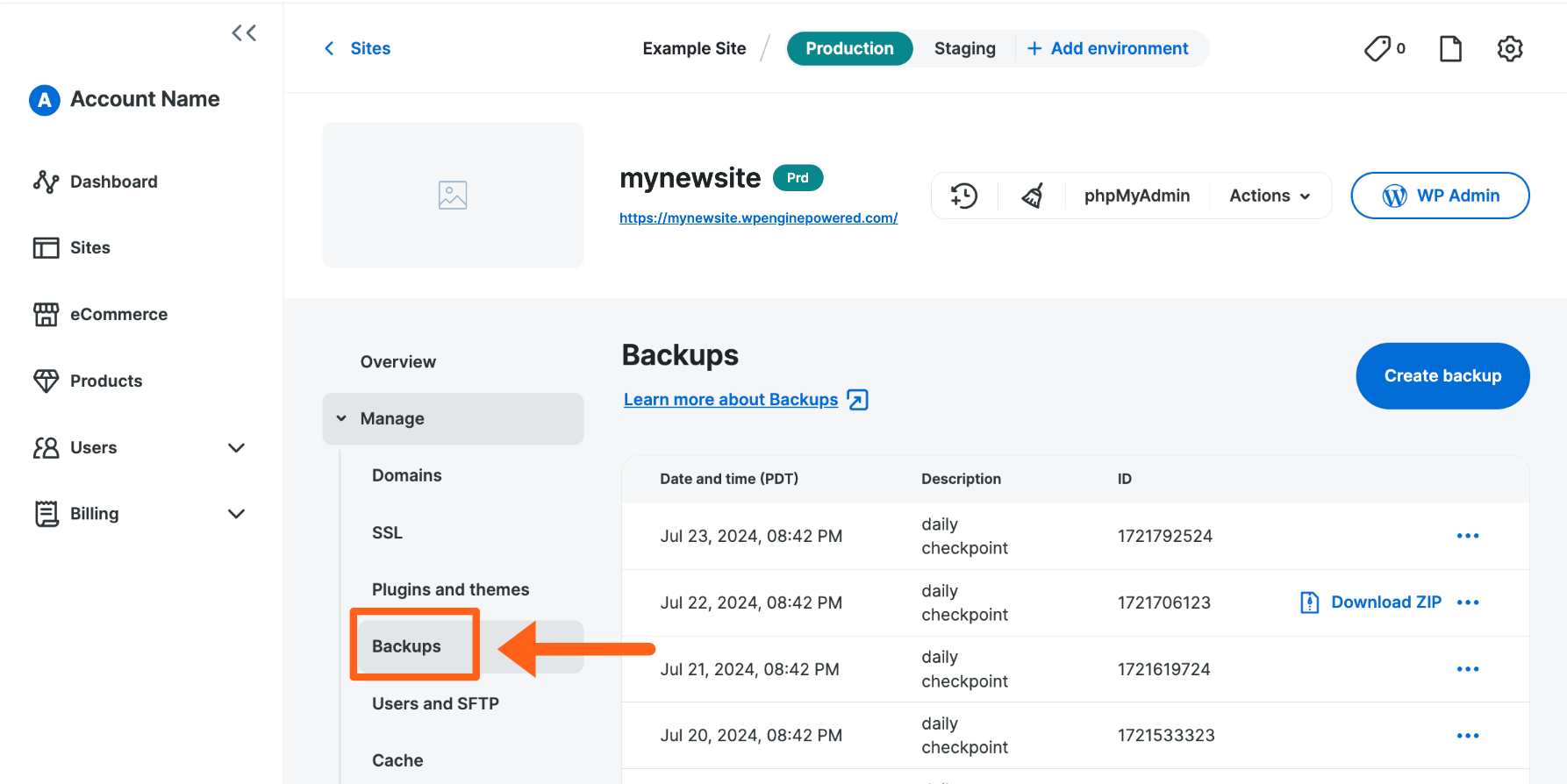 Backup points for an example site in the WP Engine portal. — Image: WP Engine.Open full-size screenshot ↗
WP Engine automatically creates daily backup points and allows manual points. The portal guide describes thirty days of points and off-site storage in AWS data centers. The commercial comparison states retention between thirty and sixty days. To prepare recovery, rely on dates visible in the portal and ask support whether an older point can be recovered. Ask where your region’s copies are located when the project has a location requirement. Before an intervention, start a manual point and wait for confirmation.
Restoration replaces data in the selected scope with the chosen point’s data. Files absent from the point may be deleted. To inspect an older version in another environment, help directs users to the copy feature in custom mode, choosing the backup point as source. Check the destination before starting the copy and disable real sending on that target.
In the portal, choose the site, environment and Backups section. The point’s menu offers Prepare ZIP to prepare a full or partial archive. The download link can remain available for up to seven days after preparation. Download a copy into private storage and check for required files and SQL. Identify provider exclusions, such as logs or cache files, and separately export platform settings that must be reproduced elsewhere.
The platform manages several technical components, including WordPress, PHP and MySQL within the advertised scope. Plugins and themes benefit from a separate tool, Smart Plugin Manager. Essential presents it as optional. The commercial table advertises one included licence for Business and Enterprise. Help describes one licence per tool installation. For several sites or environments, check required licence count and cost. Smart Plugin Manager theme updates are disabled by default and cover only supported public themes from the WordPress directory, not all private or manually updated themes.
The tool prepares a backup, performs updates and runs checks, including visual checks. It can revert when a problem is detected. Documentation nevertheless acknowledges that these checks do not detect every anomaly. A page retaining its appearance can still calculate incorrectly or fail during a specific operation.
On a store or membership-site copy, test login, search, cart and payment in test mode. Disable real notifications. Also examine rollback consequences for data received in the meantime. Automation provides a procedure but must not be presented as an absolute guarantee of no failures after every update.
EverCache and content-distribution features form part of the WP Engine environment. Additional protections and optimizations may be optional. Ask which are included in your configuration rather than attributing every product named in the commercial site menu to the entry plan.
The November 2 review noted a prohibited-plugin list. Its page failed to load on that date and the list has not been rechecked for this version. Request confirmation for plugins supporting your cache, exports or business operation before scheduling migration.
Replacing a plugin can change how a cache is purged, a site is exported or a form is handled. Document these changes for the team. To measure a change’s effect, compare the same pages before and after an isolated modification under comparable conditions.
The assistance workflow documents Willa, an AI assistant displayed in portal chat that points to support resources. Documentation explains that requesting support in chat reaches the human team. It also describes separate conversational search. For an urgent request, specify the site, environment and incident time to help an agent take over.
Smart Plugin Manager automates part of updates and visual checks. Its cost and inclusion depend on plan and licences. Smart Search AI is a separate product with semantic or hybrid search and documented WooCommerce uses. The licence activates for authorized environments and can also be used on a WordPress site hosted elsewhere. Documentation mentions Premium and Headless licences. Scope, price and quotas offered to a new customer must be confirmed.
Help documents an MCP server for accessing Smart Search product functions through a compatible tool, with an environment-specific endpoint and token. Before enabling search, choose content types and fields to index. Check for private data and behavior after deactivation. An included writing assistant in Essential is not established by the table. Search, assistance and update checks serve different uses.
WP Engine documents a migration plugin and manual process. The guide requires an active WordPress REST API and lists WordPress 5.0, PHP 7.4 and MySQL 8.0 as minimums for this route. Check current requirements and site compatibility before transfer. The guide calls for preparing the destination, installing the plugin at the source and entering connection information. Business advertises assisted migration. Clarify who handles transfer and checks.
Migration copies content and database to a destination. It does not necessarily resolve special redirects, external tasks, theme dependencies or message reception. Examine rules specific to the old server. If you use an .htaccess file, record rules to reproduce in WP Engine’s supported mechanism.
Check a public page, administrator access, forms and associated messages. Also test payment if the site requires it. For an active store, agree on handling new orders during transfer. Do not cancel source hosting before checking the copy and preparing the DNS change.
WP Engine is not presented as a mailbox service. Professional email must be arranged with an appropriate provider, while DNS generally remains managed by the domain or DNS provider. This separates services but requires knowing who holds each access.
WordPress notifications are another separate subject. Documentation recommends a specialist sending service for tracking and reliability needs. A professional address receiving email correctly does not prove that the site’s order confirmations or password resets also arrive.
During migration, retain necessary email records and avoid replacing the whole DNS zone without an inventory. An email subdomain may depend indirectly on an address that changes. After cutover, check reception and sending with authorized test messages, along with essential site notifications.
Documentation states that shared plans are created on Google Cloud by default. It lists Belgium, London and the Netherlands among other locations. Frankfurt appears with an asterisk for availability conditions, and some Premium offerings may open other regions or infrastructure. The consulted list does not establish a Paris region on Essential.
Ask for the region assigned to the account before switching a domain. Separately check the site origin, backup location, CDN distribution points and added services. Regional relocation requires a planned migration with support. Depending on the network used, it may also require DNS changes and an intervention window.
For a French readership, check which region can be reserved on the chosen configuration and the support workflow in your language. The portal and help pages consulted mainly document English. A location clause should correspond to the components your organization actually wishes to govern.
You can retrieve your WordPress files and database, including through a backup archive. To prepare departure, inventory cache, redirects, server rules, security settings and additional products managed by the platform. These elements must be reproduced or replaced at the new destination.
Check licences for themes, plugins and tools before deleting the subscription. Exported content is not a usage licence for every associated service. Similarly, a site archive does not necessarily carry account settings or configurations managed outside WordPress.
To request cancellation, help identifies the portal’s Billing section, then the cancellation link in Modify plan. Wording distinguishes shared-server plans from Premium accounts. Keep confirmation and have the treatment of prepaid amounts checked for your package. Check the new site and its email before closure, then verify that options no longer needed have stopped being billed.
WP Engine may suit a team running WordPress with regular changes and clearly defined responsibilities. Separate environments, backups and update tools then have practical value. Business and Enterprise address needs that must be described in a quote rather than inferred from a simple page count.
For a small site on a tight budget, carefully examine what you will actually use and external costs, particularly email. If your team depends on French for work, the absence of an established language guarantee is a criterion to address before purchase. It may matter more than another technical feature.
A sound decision rests on the chosen configuration, renewal terms, included tools and departure procedure. Request these in writing, then check your own site’s workflows after installation. Record included features and limits in the site’s tracking procedure.
Use these references to check the features, requirements and limitations described. Reading documentation is not a practical test.
English translation of the reviewed French edition. Code examples retain their original identifiers, comments and output strings for reproducibility. Linked exercise files and original screenshots may contain French. No new practical tests or price checks are implied by translation.
1984 Hosting’s WordPress plans in Iceland, initial and renewal terms, migration, the Security Pack and backup limitations.
Read more →Compare 34SP.com WordPress containers, shared memory, staging copies, downloadable snapshots and site migration.
Read more →Compare AEserver’s managed WordPress prices and check whether your network must be split into independent installations before migration.
Read more →