

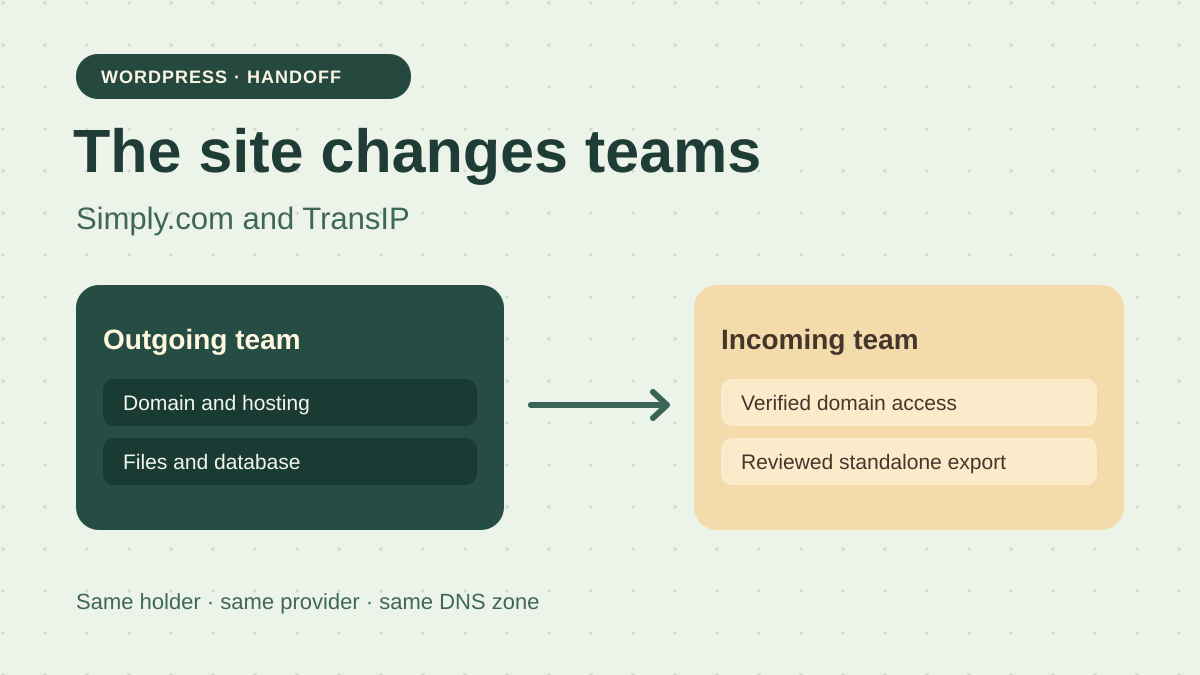
Hand over domain management while the site remains live
An organisation entrusts its WordPress site to a new team. Its domain name and hosting are currently administered through the outgoing team's customer account. The organisation remains the domain registrant. The provider, nameservers and site destination remain unchanged during the handover. On handover day, the incoming team must be able to open the panel with its own credentials, see renewal dates and hold a copy from which it can restart if it changes providers later.
A site that continues responding can conceal an incomplete handover. Sometimes the new team has received a WordPress role while the domain, renewal notices and account recovery still depend on the former provider. An export held only in the original panel may become inaccessible after the handover. The check therefore targets three separate things: the right to manage the domain, access to the WordPress service and the ability to read a copy outside the original account.
Simply.com Basic Suite and TransIP Managed WordPress 20 GB document transfers within their own platforms. Simply.com starts with products to select in the panel. TransIP starts with the domain and describes moving its linked services along with it. Compare what is actually handed over, what must be prepared beforehand and what the new account can control afterwards. The example's management transfer leaves the registrant person or organisation unchanged.
Compare before you choose
The offers at a glance
Find the use case and budget that fit, then read the details to see the limitations and any components you may need.
On smaller screens, the table scrolls horizontally. With a keyboard, press Tab to focus the table, then use the left and right arrow keys.
| Offer | Best for | Pricing and billing | Renewal and support |
|---|---|---|---|
 Simply.com Basic SuiteRead the details | An organisation that wants to confirm each product handed over and retrieve its export directly. | EUR 5.88 excluding VAT for the first year, then EUR 83.88 excluding VAT per year in the EUR view. Twelve-month periods paid in advance according to the terms. EUR pricing excluding VAT. Check the transferred account's currency and tax treatment in the summary. | EUR 83.88 excluding VAT per year in the EUR view. The next renewal date of the transferred product remains to be confirmed. |
 TransIP Managed WordPress 20 GoRead the details | An organisation that wants to hand over the domain and linked services together and can prepare a plugin-based export. | EUR 3.99 excluding VAT per month for three months, then a reference price of EUR 12.50 excluding VAT per month. Monthly equivalents from the pricing card. Confirm the transferred service's billing cycle. Public prices excluding VAT. Invoiced total depends on the registrant. | The guide states that discounts do not follow the Handover. Reference price of EUR 12.50 excluding VAT/month; check the next invoice. |
Distinguish rights over the name, account and site
In the inventory, create one row for the domain and another for hosting. For the domain, record the displayed registrant, the account administering the product, the contact used for follow-up and the next renewal date. For the site, note the billed account, WordPress administrators and access to files or the backup mechanism. If a customer account contains other sites, mark the products that must remain with the outgoing team. An overly broad transfer can affect a service outside the handover.
Before the operation, verify the incoming account with the person who will control it. Login, the second factor and recovery must be usable without asking the outgoing team for a code. Display the invoice or renewal section once the product has been received, and assign responsibility for payment to someone. Keep a recovery address controlled by the organisation. Using one mailbox for the domain, site and recovery can complicate recovery if it becomes unavailable.
Capture the nameservers and relevant records before the transfer. At minimum, record the site's addresses, mail entries and other values the organisation depends on. If the zone is elsewhere, ask its manager to confirm that it remains accessible. Include DNSSEC status if enabled. The post-handover check compares values and proves access to their panel. It does not require changing a record to demonstrate that you can.
Prepare an export that survives the account change
Have the copy created while the outgoing team still has the necessary access. Identify the installation and export date. Keep the relevant files, media, plugins, theme and database corresponding to that state. The content-export tool's XML file can move certain posts or pages. To restart the complete site, check the additional data and settings required by its theme and plugins. A migration tool's archive may contain them, depending on the options selected.
Deliver the copy into storage controlled by the organisation and record the format, size and reading method. Separate credentials, transfer codes and keys from files intended for the handover dossier. The incoming person must be able to open an archive with their own access. Calculate a checksum after downloading to verify that the same file is handed over. Then check the contents, because a checksum cannot tell whether a forgotten export was missing from the outset.
Prepare a protected verification destination with sufficient capacity. Open at least one published item, a media file chosen from the inventory and the restored WordPress administration. A copy deposited in the same account or a link received at the agency's address does not meet this independence criterion. Prepare the cost of temporary storage and the right to use the theme or import tool on that target before the handover date.
Simply.com and selecting the products to hand over
In the outgoing account, have an account administrator open Account Administration and then Transfer products. Simply.com documents full access for this role. If another role opens the panel, check that the transfer command is available to it before scheduling the handover. The help documentation allows one or more products to be selected and sent to an existing or new Simply.com account. For this scenario, first prepare the organisation's account. Compare the transfer-screen list with the inventory. Check the domain, hosting and associated services such as email separately. Basic Suite advertises daily backups. Confirm with the provider whether existing restore points remain accessible to the incoming account, and keep the independent export in all cases. If an expected product is missing or another customer appears in the selection, stop before confirming.
Simply.com distinguishes the account managing products from the contact associated with the domain. After the handover, the incoming account must display the domain and its expected contact. Also check that the team can open the relevant DNS zone and view the next renewal date. If a contact change is needed, handle it through the process for that domain extension. In our scenario, the organisation remains the reference contact. Keep a record of the values and confirm permissions without changing the registrant to test the button.
The guide notes that product passwords follow the transfer and recommends changing them before and afterwards. Plan this rotation with people using FTP, the database or mail. For a MySQL password, coordinate the change with the WordPress configuration and check the site immediately afterwards. Remove roles that are no longer needed once the incoming team has validated its access. In Basic Suite, the file manager, file transfer and phpMyAdmin provide separate routes for retrieving files and exporting the database, subject to account permissions.
TransIP and handing over the domain with linked services
TransIP's Dutch guide describes an internal Handover requiring agreement from both accounts. In the outgoing panel, open Domein, tick the domain and choose Handover. Enter the incoming account's username. In that account, open Mijn Account, Handovers and the corresponding request. Check the domain and listed services before Accepteren. The guide states that nameservers, DNS and WHOIS information are retained. The procedure covers services linked to the domain, including forwarding, E-mail Only and hosting plans with the relevant email addresses, databases and files. Check that the Managed WordPress plan and every expected service appear in the bundle. If the request is blocked by the payment method, the help page requires a valid method in each account.
The guide also states that the hosting service's historical backups are not transferred. The incoming account then creates new restore points. Prepare the export file before the outgoing account loses access. Billing history stays in the outgoing account. The help page states that the incoming account takes over the current contract and the obligation to pay for the domain and linked services. Discounts are not transferred. Keep relevant invoices before the handover, record amounts due and ask for the next amount in the incoming account. The Dutch guide also distinguishes Sectigo certificates linked to the old account, which do not follow this transfer. If the site uses one, prepare its replacement and check HTTPS after the handover.
For Managed WordPress, TransIP describes exporting through a plugin inside WordPress. Its guide names UpdraftPlus for retrieving files and the database separately, and All-in-One WP Migration for a file to reimport using the corresponding tool. On this offering, direct file and database access differs from WordPress Hosting. Ask the administrator to verify that the selected format can be imported outside the account and that the options include the required content. If the domain was registered or transferred recently, account for the seventeen-day waiting period. TransIP states that it can intervene before that period with explicit agreement sent from each account.
Make a handover fail while the site remains visible
The acceptance-test ZIP supplies two fictional snapshots. Both report the same domain, the same registrant, the same DNS zone and a visible site. The first indicates that the expected accounts and export are under the organisation's control. The second leaves the domain and billing in the outgoing account, retains old access and keeps the export dependent on that account. This shows why observing the homepage alone does not prove the handover.
The script opens both exports and imports the demonstration SQL into an in-memory SQLite database. It verifies that the volunteering page can be read, then checks for the referenced media file. The incomplete dossier contains the page row, but the media is missing. All eleven checks pass in the validated dossier. In the other, five discrepancies appear despite the site being declared visible. Accounts, permissions, DNS and site statuses come from the simulation snapshots.
The example files let you rerun the check after extraction. The SQL is deliberately limited to one demonstration table. In a real handover, repeat the check with the import method appropriate to your archive on a protected WordPress instance. Have the incoming team open the panel and record confirmation of each access, in addition to checking the page and file.
- Download the handover acceptance test in “Further reading”, extract the ZIP and run python exercice.py from the extracted folder.
- Compare the result with attendu.json. Run python exercice.py --cas incomplete to display only the five discrepancies in the incomplete dossier.
Plan for the next renewal of an existing service
The Basic Suite pricing table consulted shows EUR 5.88 excluding VAT for the first year and EUR 83.88 excluding VAT per year thereafter. A separate storefront observation showed USD 7.06 and USD 107.28 excluding VAT for the same cycles. These amounts come from separate pricing tables. Use the account's currency in your budget. The terms describe twelve-month periods paid in advance. For a product already in service, confirm the currency, renewal date and amount the incoming account will have to pay.
TransIP lists Managed WordPress 20 GB at €3.99 excluding VAT per month for the first three months, then a reference price of €12.50 excluding VAT per month. This gives €124.47 over twelve months in a calculation applying the discount three times and the normal rate nine times. For a Handover, the guide states that discounts do not follow the transfer. At €12.50 for twelve months, the reference is therefore €150 excluding VAT for hosting, subject to the applicable rate and billed cycle.
To compare the two handover processes, use the next invoice for the existing service rather than the initial price of a new order. Add the domain line, taxes applicable to the registrant and, if needed, the cost of storage for verifying the export. Check who is responsible for invoices already issued. An introductory offer can explain the difference in the pricing table, but must not become a price promise to the account taking over the site.
Verify the handover from the incoming account
Log in with the incoming credentials and open the domain. Record the registrant and compare the next renewal date with the one noted before the handover. Check where renewal notices are sent and the authorised payment method. Open the DNS zone that actually serves the domain. Compare nameservers, site and mail values, and DNSSEC status if included in your inventory. If part of the DNS belongs to a third party, have the same elements confirmed from its panel.
In WordPress, check that the incoming team has a named account and can open administration. From a visitor session, open the homepage and an internal URL, then check a media file. This check detects a service interruption, while reading the export establishes the ability to restart elsewhere. Have the incoming team download the archive and review the restoration report. Record the filename and verification date in the handover record.
Then remove provider roles that no longer need to remain, including in WordPress and linked services. Identify product passwords, tokens or file access the provider knew. Change them in the planned order and check the functions they support. For each action, record the service, time and responsible person. The handover record contains the results, while secrets remain in the organisation's access-management tool.
Decide when the handover can be closed
Simply.com is worth examining when the team must select specific products and wants to create its own copy through files and the database. Check the account's exact permissions and the list of products transferred. TransIP is worth examining when the domain and linked services must move together and the administrator can export WordPress through a plugin. The practical difference appears if the organisation requires the provider's historical restore points or if its export tool depends on a permission that will no longer be available after the handover.
Set a stopping point before confirmation. If hosting is missing from the bundle, the registrant does not match or the export could not be read, correct the inventory and retain the starting situation during verification. After confirmation, report an account discrepancy to the provider before changing DNS or ordering a second product. Returning products may depend on both accounts' permissions and the provider's rules. Keep the operation references and backup contact.
Close the handover when the incoming team controls the domain, knows where and when to pay and has checked the export in storage it controls. The expected registrant, domain and DNS must be observable after the handover. If a task remains with the former provider, record its scope and deadline with limited access for the time needed to complete it. The organisation can then decide on a future migration using a dossier it can open.
Further reading
Sources and references
Use these references to check the features, requirements and limitations described. Reading documentation is not a practical test.
View 12 references
- Simply.com Basic Suite — EUR Basic Suite storefront, initial twelve-month period ↗ — Documentation consulted:
- Simply.com Basic Suite — Simply.com and its WordPress overview ↗ — Documentation consulted:
- Simply.com Basic Suite — Simply.com and its terms of service ↗ — Documentation consulted:
- Simply.com Basic Suite — Simply.com and product transfers ↗ — Documentation consulted:
- Simply.com Basic Suite — Simply.com and domain contacts ↗ — Documentation consulted:
- Simply.com Basic Suite — Simply.com and shared access ↗ — Documentation consulted:
- Simply.com Basic Suite — Simply.com and the file manager ↗ — Documentation consulted:
- Simply.com Basic Suite — Simply.com and phpMyAdmin ↗ — Documentation consulted:
- TransIP Managed WordPress 20 Go — Managed WordPress 20 GB card, promotional monthly equivalent ↗ — Documentation consulted:
- TransIP Managed WordPress 20 Go — TransIP and account-to-account handovers ↗ — Documentation consulted:
- TransIP Managed WordPress 20 Go — TransIP and plugin-based exports ↗ — Documentation consulted:
- TransIP Managed WordPress 20 Go — TransIP and export scope ↗ — Documentation consulted:
Uses, prices and what to check
2 offers in detail
Compare the features you need and the terms of each offer. The order of these entries does not indicate a ranking.
Simply.com Basic Suite
 Editorial illustration based on the official documentation. — Illustration by BlogPasCher.Open full-size illustration ↗
Best forAn organisation that wants to confirm each product handed over and retrieve its export directly.
WordPress hosting with per-product transfers and separate file and database access.
Offer pricing
EUR 5.88 excluding VAT for the first year, then EUR 83.88 excluding VAT per year in the EUR view.
Billing: Twelve-month periods paid in advance according to the terms.
Renewal and support: EUR 83.88 excluding VAT per year in the EUR view. The next renewal date of the transferred product remains to be confirmed.
EUR pricing excluding VAT. Check the transferred account's currency and tax treatment in the summary.
Checked on .
Strengths
- Product selection during account-to-account transfer.
- File retrieval and database management documented.
What to consider
- Product passwords follow the handover and must be managed.
- Check the domain contact and details of the products actually transferred.
Pricing terms and compatibility
Understanding the offer
- Price at the time of review
- EUR 5.88 excluding VAT for the first year, then EUR 83.88 excluding VAT per year in the EUR view.
- Currency
- EUR
- Billing
- Twelve-month periods paid in advance according to the terms.
- Renewal and support
- EUR 83.88 excluding VAT per year in the EUR view. The next renewal date of the transferred product remains to be confirmed.
- Taxes and fees
- EUR pricing excluding VAT. Check the transferred account's currency and tax treatment in the summary.
- Commitment and terms
- Annual period. Check the transferred product's renewal date and price in the account.
- Date checked
Compatibility and components
- Basic Suite with WordPress, file access and phpMyAdmin according to permissions.
TransIP Managed WordPress 20 Go
 Official TransIP monogram (Apple Touch icon). — Image: TransIP.
Best forAn organisation that wants to hand over the domain and linked services together and can prepare a plugin-based export.
Managed WordPress offering. Handover of the domain and linked products with agreement from both accounts.
Offer pricing
EUR 3.99 excluding VAT per month for three months, then a reference price of EUR 12.50 excluding VAT per month.
Billing: Monthly equivalents from the pricing card. Confirm the transferred service's billing cycle.
Renewal and support: The guide states that discounts do not follow the Handover. Reference price of EUR 12.50 excluding VAT/month; check the next invoice.
Public prices excluding VAT. Invoiced total depends on the registrant.
Checked on .
Strengths
- The procedure states that DNS and WHOIS are retained.
- Plugin-based export documented for the managed plan.
What to consider
- Historical backups and discounts are not transferred.
- Limited direct file and database administration on Managed WordPress.
Pricing terms and compatibility
Understanding the offer
- Price at the time of review
- EUR 3.99 excluding VAT per month for three months, then a reference price of EUR 12.50 excluding VAT per month.
- Currency
- EUR
- Billing
- Monthly equivalents from the pricing card. Confirm the transferred service's billing cycle.
- Renewal and support
- The guide states that discounts do not follow the Handover. Reference price of EUR 12.50 excluding VAT/month; check the next invoice.
- Taxes and fees
- Public prices excluding VAT. Invoiced total depends on the registrant.
- Commitment and terms
- The contract linked to the domain follows the internal handover according to the guide.
- Date checked
Compatibility and components
- Managed WordPress 20 GB. Confirm the linked service in the transfer bundle.