Web hosting
1984 Hosting for WordPress in Iceland: pricing and backups
1984 Hosting’s WordPress plans in Iceland, initial and renewal terms, migration, the Security Pack and backup limitations.
Read more →

Site appearance
Web hosting
Managed WordPress with a test environment and writing assistant. Recovery and export options depend on the plan and available access.
Source published: · Source updated: · Editorial policy
Visit the official TransIP website ↗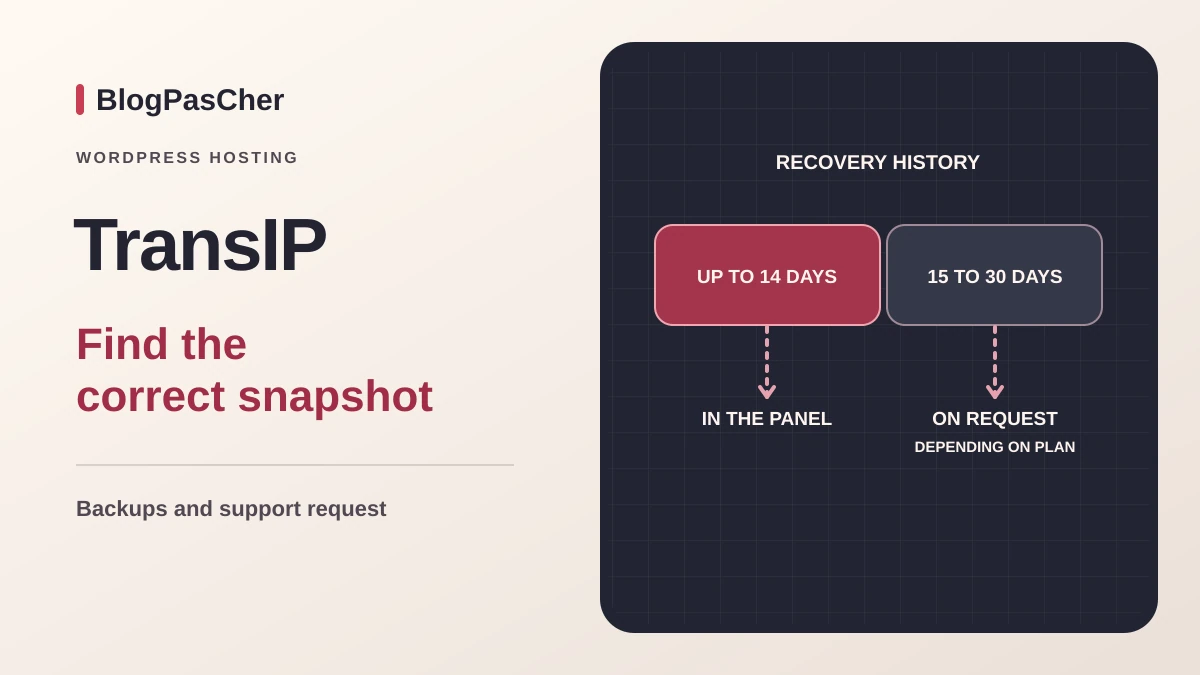
This profile is based on published offers and documentation. No new hosting benchmark or support test was performed for this translation.
Prices retain the market, currency and billing period described in the French source. Translation does not update a commercial quote. Confirm the final price, taxes and options before ordering.
| Plan | Price and billing | Resources and limits |
|---|---|---|
| Managed WordPress 20 GB | Offer information corrected: 3.99 EUR excluding tax/month for 3 months on the direct page Renewal: 14.99 EUR excluding tax/month at the reference rate Reduced price for the first three months. Contract term, billing date and taxes depend on the account holder. | 1 test environment, 5 mailboxes of 2 GB, 64 MB cache 14 days of restore points. No direct SFTP, SSH or database management access. |
| Managed WordPress 250 GB | Offer information corrected: 4.99 EUR excluding tax/month for 3 months on the direct page Renewal: 24.99 EUR excluding tax/month at the reference rate Reduced price for the first three months. Contract term, billing date and taxes depend on the account holder. | 2 test environments, 10 mailboxes of 2 GB, 128 MB cache 30 days of restore points. Days 15 to 30 on request. No direct SFTP, SSH or database management access. |
| Managed WordPress 300 GB | Offer information corrected: 9.99 EUR excluding tax/month for 3 months on the direct page Renewal: 39.99 EUR excluding tax/month at the reference rate Reduced price for the first three months. Contract term, billing date and taxes depend on the account holder. | 3 test environments, 25 mailboxes of 2 GB, 256 MB cache 30 days of restore points. Days 15 to 30 on request. No direct SFTP, SSH or database management access. |
 Official TransIP monogram (Apple Touch icon). — Image: TransIP.
In the Netherlands, TransIP offers conventional web hosting, a WordPress plan with a prepared installation, and two managed ranges for WordPress and WooCommerce. The managed service mainly appeals to a team that manages content through WordPress and wants to delegate compatible updates. Conventional hosting remains relevant for a team requiring SFTP access, a file manager or direct database administration. The conversion guide states that these access methods are lost when switching to managed hosting. Have the person who usually resolves site incidents check this point. A Git deployment, PHP configuration change or overnight export over SSH may depend on these tools.
Coverage of the core, theme and plugins applies to components supported by the provider. Record active plugins, their licenses, distribution methods and the contact who can fix them. For a business integration, ask what happens if an update breaks a function and whether the previous version remains available. If your organization requires pinned versions, scheduled interventions or scripted deployment, check that its process matches the plan’s capabilities. A test copy is useful for this work but grants no additional system access.
The commercial site advertises data centers in Amsterdam and Delft. The precise location of an instance, restore point and any support-related processing still needs clarification if it affects your choice. The availability policy lists 99.99% per calendar month for the listed services. Use the document applicable to the contract to assess interruptions, the procedure and compensation. This contractual threshold does not indicate store-page response times or the time needed to fix a plugin.
On November 13, 2026, the direct page lists three starting prices for Managed WordPress: €3.99, €4.99 and €9.99 excluding tax per month for the first three months. The reference prices displayed after the discount are €14.99, €24.99 and €39.99 excluding tax per month. The promotional window indicates how many months receive the reduced price. The public summary of terms separately describes a one-month term, renewed monthly, for services other than domains and SSL certificates. Check the selected order’s terms, the first charge and the period actually billed; the discount period does not establish them.
With three discounted months and nine months at the reference rate, one year would amount to €146.88, €239.88 or €389.88 excluding tax. Twelve months at the subsequent reference rate yield €179.88, €299.88 and €479.88 excluding tax. These calculations exclude the domain, additional services and taxes. The billing guide states that TransIP issues invoices on the 1st and 15th of the month, while the contract period starts on the purchase date. Record the start date, end of the discount and first invoice at the regular rate separately.
The cards indicate 20, 250 and 300 GB of storage and one, two or three possible test copies. They list five, ten or twenty-five mailboxes of two gigabytes each. The Varnish volumes of 64, 128 and 256 MB refer to the cache. For a store, also size operations that query the database on every request. If mailbox size is the only limit encountered, price email and a plan upgrade separately.
In the TransIP panel, open WordPress, then choose the domain under Producten. The Beheer je website button leads to the installation’s dashboard. On a new project, first check the administrator account holder, language, permalinks and address receiving technical messages. After setting up the domain, open the home page and an internal page over HTTPS. If you are replacing a public site, preserve its destination and prepare the new installation separately. Keep the old folder and database available while checking redirects, important pages and forms.
Site Assistent is documented for Managed WordPress and Managed WooCommerce. It can suggest a layout and prepare pages based on the activity and goals entered. This startup workflow suits an empty installation. Keep a copy of the initial state and check generated content before opening it to the public. When working on an existing site, first create a draft on a protected copy. The guide locates writing assistance in the page editor through the star button, with options to shorten, lengthen, regenerate or reject text. Review claims and contact details before inserting the result.
TransIP states that text entered for the request is sent to ChatGPT through a dedicated connection. The guide describes what is sent according to the provider, without establishing the exact model version, quota, retention or continuity of the assistant after migration here. Test portability on a copy if the site relies on layouts or plugins added during assistance. For a pricing page or product profile, keep reference values outside the generator and reinsert them from validated data. Customer information and API secrets have no place in a text draft.
The panel provides WordPress, the product associated with the domain, then Geavanceerde instellingen and Testomgevingen. Select Een nieuwe testomgeving maken, enter the name and a subdomain intended for testing, then create the copy. The guide gives an indicative time of about fifteen minutes. The Beheer je testwebsite option opens the copy. Apply the credential protection offered by the panel and check in an anonymous browser that the page cannot be freely viewed. Access protection does not neutralize outbound calls. Disable sending, live payment keys, webhooks and synchronization tasks before running a simulation.
For a plugin update, compare before and after on the copy. Check administration, pages using the plugin and data that must remain editable. If the test fails, preserve production and reset the copy with Back-up terugzetten vanaf live after retaining diagnostic evidence. The Vervang live-omgeving door testomgeving command replaces the public environment. Reserve it for a scenario where you have documented what may be replaced, planned a copy of the public site and frozen writes if necessary. An active store may receive orders during testing. Instead, reproduce the validated setting or update on the public site, then check that new orders remain in place.
After the change, open the site while logged out and in administration. Check media, a deep URL and a controlled write action. If you need to roll back, choose a point from before the intervention and preserve subsequent writes in a separate export. A full rollback may return the database and files to an earlier date. If the problem is limited to a setting, undo that setting first if administration remains available. This reduces the amount of data to reconcile.
The first tier advertises fourteen days of backups and the next two thirty days. The shared help explains that the panel provides access up to fourteen days. For days fifteen to thirty on the relevant plans, restoration must be requested through Neem contact op. The guide describes one point per hour for the latest day, then one per day. For email, it specifies a separate request and availability depending on existing copies. The help also excludes stored procedures and custom database functions from these backups. If your application uses them, plan their export with an appropriate method.
In the panel, open WordPress, select the domain under Producten, then Website and Back-ups. Choose the point preceding the incident and check the scope before Herstellen. The help states that automatic restoration returns the plan’s files and databases to the selected time. It may therefore affect other sites or subsites in the same plan. For an incident limited to one site or file, the guide points to Handmatige back-ups, with file and SQL downloads. Check the options available on your plan. Restoring a single file depends on your access to the destination, and the guide describes SQL import with phpMyAdmin for products where that access exists.
The export guide specifies a WordPress plugin for downloading the complete site from Managed WordPress. SFTP and phpMyAdmin belong to the WordPress Hosting workflow, with different access rights. Prepare the export plugin, check the archive size and reimport it onto a protected target to verify that files and SQL are present. A content export from Tools remains useful for posts, but plugins, media and configuration have their own scope.
Before any full restoration, keep a current export. On a transactional site, record orders and forms saved after the selected point. After recovery, check a public page, the dashboard and the affected business function. If recovery fails, use the copy taken before the intervention and reconcile new writes separately.
For a supported WordPress plan, open the target in the panel, then Geavanceerde instellingen and WordPress. The guide places the migration plugin download on this screen and asks you to confirm that the destination may be overwritten. Make a copy of the target if it contains content to preserve. The downloaded module contains the migration token. Transfer it only to the source administrator and avoid keeping it in a code repository. On the source WordPress installation, go through Plugins, Add New, Upload Plugin. Install the file provided by the panel, then start the transfer from the module. Check the result before moving traffic.
For general-purpose hosting, the guide provides for manual migration. Download the files and export the database on the source. Upload files over SFTP to the target, import SQL into a dedicated database and adapt wp-config.php to the destination settings. Use the test address specified by TransIP or private local name resolution where appropriate. Check site URLs, media and payment dependencies before opening the site. On a project whose domain changes, use an address replacement method compatible with serialized data. Keep the replacement report and check a page whose settings are stored by the theme or a builder.
Keep the original DNS, relevant certificates and old service during the switchover window. If email stays on the old platform, preserve MX entries and authentication records. Check responses on the new server after the change. If it fails before the first writes, restore the old web values. If the target has received orders, export them and reconcile the data before redirecting users again. Remove the transfer plugin and its temporary access once migration is validated.
The contact page advertises a response within an hour during service hours. The support guide specifies 9 to midnight on weekdays and 11 to 19 on weekends and public holidays, with a 90-minute target during those latter periods. Check the applicable hours and time zone. It also lists phone support for domains and web hosting on weekdays. Have the channel and hours applying to your product clarified. Distinguish network incident monitoring from resolving a WordPress incompatibility. The documentation and workflows consulted are in Dutch. Availability of a French-speaking contact remains to be checked. To speed up diagnosis, include the date and time zone, affected path, exact message and latest changes, after masking secrets.
Before cancellation, export the site and test restoration, then copy messages using an email client and export contacts if necessary. Record aliases, rules and DNS entries. The guide warns that associated services become inaccessible after the plan stops. If you need to retain email with TransIP, its workflow provides for creating the email product after hosting stops. Plan continuity and a backup before accepting this sequence. Check that archives can be opened outside the account and that new mailboxes receive expected messages. Distinguish hosting termination from domain management and record the confirmed expiry date.
In Diensten, choose Einde contract to stop renewal at expiry. The Direct option closes the service immediately, and the guide excludes refunds for the remaining period. The guide specifies a general notice period of one month before renewal. The summary of terms states that a service with a one-month contract period can be canceled from the first day. Check your plan’s term and the applicable deadline in the contract. Check the proposed date and listed services before confirming. Retention periods mentioned in the guide and destruction provisions after contract termination are not a recovery method. Keep copies in an independent location and ensure a second responsible person knows where they are.
Use these references to check the features, requirements and limitations described. Reading documentation is not a practical test.
English translation of the reviewed French edition. Code examples retain their original identifiers, comments and output strings for reproducibility. Linked exercise files and original screenshots may contain French. No new practical tests or price checks are implied by translation.
1984 Hosting’s WordPress plans in Iceland, initial and renewal terms, migration, the Security Pack and backup limitations.
Read more →Compare 34SP.com WordPress containers, shared memory, staging copies, downloadable snapshots and site migration.
Read more →Compare AEserver’s managed WordPress prices and check whether your network must be split into independent installations before migration.
Read more →