Web hosting
1984 Hosting for WordPress in Iceland: pricing and backups
1984 Hosting’s WordPress plans in Iceland, initial and renewal terms, migration, the Security Pack and backup limitations.
Read more →

Site appearance
Web hosting
Danish host with a proprietary control panel, one-click WordPress installation and several AI tools. Compare annual costs in your currency and the scope of support.
Source published: · Source updated: · Editorial policy
Visit the official Simply.com website ↗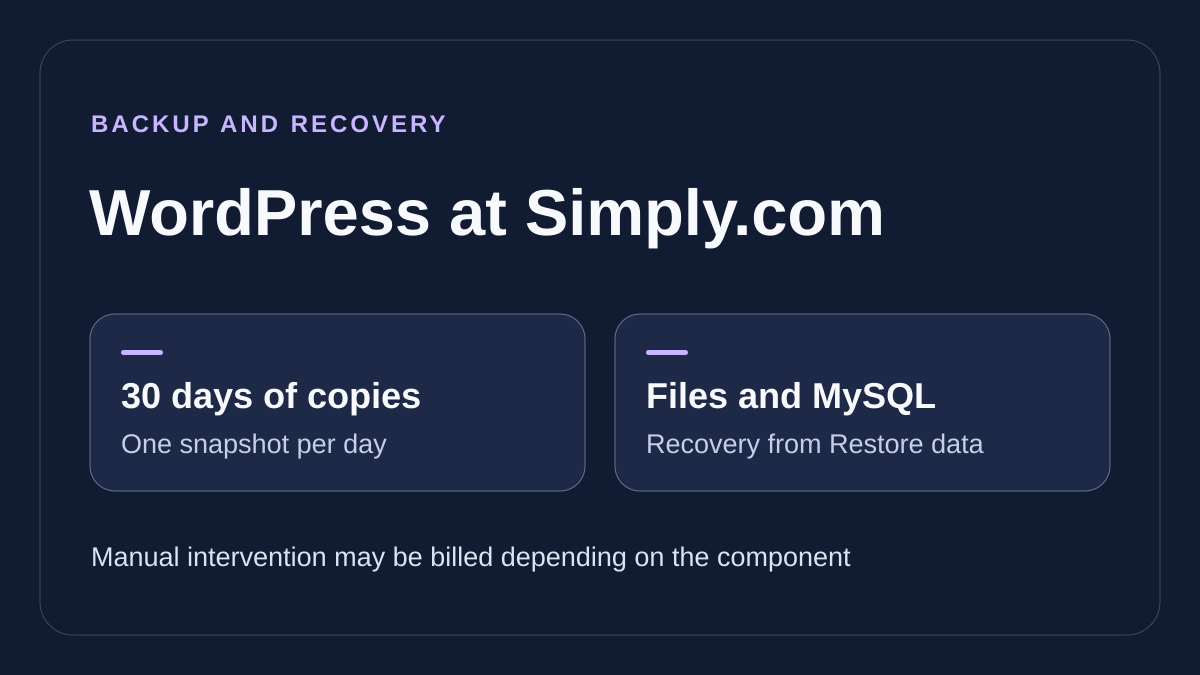
This profile is based on published offers and documentation. No new hosting benchmark or support test was performed for this translation.
Prices retain the market, currency and billing period described in the French source. Translation does not update a commercial quote. Confirm the final price, taxes and options before ordering.
| Plan | Price and billing | Resources and limits |
|---|---|---|
| Basic Suite | 7.06 USD excluding tax for the first year (USD pricing of November 10, 2026) Renewal: 107.28 USD excluding tax per year in the same record. Confirm in your quote. Twelve months upfront according to the terms. Currency and tax depend on context. | 10 GB web and 512 MB memory No WordPress test environment in the table |
| Standard Suite | 7.63 USD excluding tax for the first year (USD pricing of November 10, 2026) Renewal: 200.88 USD excluding tax per year in the same record. Confirm in your quote. Twelve months upfront according to the terms. Currency and tax depend on context. | 20 GB web and 1024 MB memory 1 WordPress test environment |
| Pro Suite | 43.20 USD excluding tax for the first year (USD pricing of November 10, 2026) Renewal: 302.40 USD excluding tax per year in the same record. Confirm in your quote. Twelve months upfront according to the terms. Currency and tax depend on context. | 100 GB web and 1536 MB memory 3 WordPress test environments, telephone during opening hours |
| Enterprise Suite | 57.60 USD excluding tax for the first year (USD pricing of November 10, 2026) Renewal: 460.80 USD excluding tax per year in the same record. Confirm in your quote. Twelve months upfront according to the terms. Currency and tax depend on context. | 200 GB web and 2048 MB memory 8 WordPress test environments, telephone during opening hours |
Simply.com A/S is based in Skanderborg, Denmark. It brings hosting, domains, mail and creation tools together in its own control panel. For WordPress, the range notably includes Basic, Standard, Pro and Enterprise Suite. The choice should consider cost after the first year, site capacity and the need for telephone support or a test environment.
The provider offers several paths: WordPress with an AI assistant, a separate website designer and Macaly AI for generating sites or applications. These products do not automatically share licenses, quotas, backups and transfer options. A standalone WordPress requirement should therefore remain identified in the order, even when several tools appear under the same brand.
Pricing, terms and public workflows were reread on November 10, 2026. The following offerings concern a WordPress installation on Simply.com PHP hosting. Identify the page’s family and currency before comparing a price or feature with another plan.
Public amounts vary by regional context, including within the same language. The English table reread on November 10 displays five levels from Starter to Enterprise in a USD tax-exclusive context. The WordPress page and four Basic-to-Enterprise levels are the reference here. Starter at 5.88 USD for the first year and 47.88 USD at renewal appears in one catalog variant. Check Starter’s WordPress features in the context where it is offered before comparing it with the other four.
Displayed annual prices for Basic, Standard, Pro and Enterprise are 7.06, 7.63, 43.20 and 57.60 USD excluding tax respectively for the first year. At renewal, the same table lists 107.28, 200.88, 302.40 and 460.80 USD excluding tax per year. It shows zero setup fees for these levels. Monthly amounts are rounded equivalents. Moving from Basic to Standard adds only 0.57 USD in the first year in this context, then 93.60 USD annually at the displayed renewal rate. This difference matters when deciding whether Standard’s included staging avoids another cost.
Another record from the same day, taken on a French version in a Danish context, displayed starting monthly prices of 4.95 DKK for Basic and Standard, 29.95 for Pro and 37.95 for Enterprise. Basic explicitly shows 69.95 DKK per month at renewal there. Other cards present 129.95, 199.95 and 299.95 DKK per month as crossed-out reference prices. For Basic, multiplying these equivalents by twelve gives 59.40 DKK for the first year and 839.40 DKK at renewal under that table. Check the twelve-month total, tax and associated domain in the currency offered to your account holder. Website language therefore determines neither currency nor the domain applicable to the holder. The DKK context was not reproduced during this rereading.
The billing guide distinguishes individuals and businesses according to country and VAT number. A non-Danish individual is charged the rate of their country of residence. For a European business, VIES number validation determines the treatment provided by the supplier. An invalid number may cause Danish tax billing; correcting status does not alter invoices already issued.
Terms provide advance payment in twelve-month periods. The monthly card on the commercial page therefore describes a price equivalent, not proof of monthly billing. Creation of a product has an advertised fourteen-day withdrawal period, while ordered or renewed domains have separate exclusions.
Card renewal can be enabled in the panel. According to help, the process starts fourteen days before product or domain expiry. Manual payment for products to retain goes through Administration. Check site and domain dates separately, then decide before the renewal window begins. A refund after charging depends on order terms. The terms state that remaining prepaid time is generally not refunded.
Basic provides 10 GB for the site, Standard 20 GB, Pro 100 GB and Enterprise 200 GB in the observed table. MySQL database counts are two, five, ten and fifteen respectively. Database volume and statistics are advertised separately from the web quota. Mail also has a per-mailbox quota: 2, 8, 16 or 64 GB by package, with mailbox count advertised without a limit.
This separation helps size a media-rich WordPress site or several mail archives. It does not remove other limits. The guide specifies at most five million files or inodes per hosting account; many small files may therefore cause problems before total volume. Advertised unlimited bandwidth remains subject to acceptable use and service stability.
Before migration, measure files, databases and each mailbox rather than adding their commercial capacities. A database advertised without a storage limit does not become a dedicated SQL server. Access and execution resources remain tied to the chosen product. Backups added by the customer within web space must also count toward its usage.
The table assigns one, two, three or four CPU cores by package, with 512, 1,024, 1,536 or 2,048 MB memory. It distinguishes the PHP limit: 512 MB on Basic, then 1,024 MB on the other three. Higher total memory therefore does not mean each PHP execution can use all of it. No visitor count or load result was measured here.
Processing documentation specifies servers and data in Denmark in team.blue Denmark centers. The provider offers a processing agreement to accept through the panel. This location is relevant to a Nordic project without alone demonstrating compliance of your entire application, its plugins and external services it calls.
The website exists in Danish, English and French. The panel is proprietary to Simply.com. Reread guides allow following English labels such as Website, Restore data and Administration. The help form is available in French and the WordPress page advertises a Danish team. Check which language that team can use for a WordPress incident. A French-speaking team can retain original labels in its operations file with each menu’s role and the hosting reference.
Quick installation is included in PHP hosting. In the Simply.com panel, open Website > 1-Click, choose WordPress, enter administrator credentials, then Address / URL. Advanced options let you choose the database and table prefix. Two installations within one database require different prefixes: the guide warns that reusing a prefix can overwrite existing tables.
To prepare a new site without touching the public site, create a working subdomain and select it as destination. The provider recommends this route over a subdirectory. If the domain has not yet transferred, Use temporary URL allows starting with the address in the welcome message or Administration.
After installation, check address, HTTPS, administrative login and a page preview. The guide specifies Website > WordPress > Change Site URL to correct the address after transfer. Preserve files and database before any modification to an existing installation. To cancel a test, remove only its identified files and tables after exporting useful data. The installer handles setup; updates and application maintenance still need organizing.
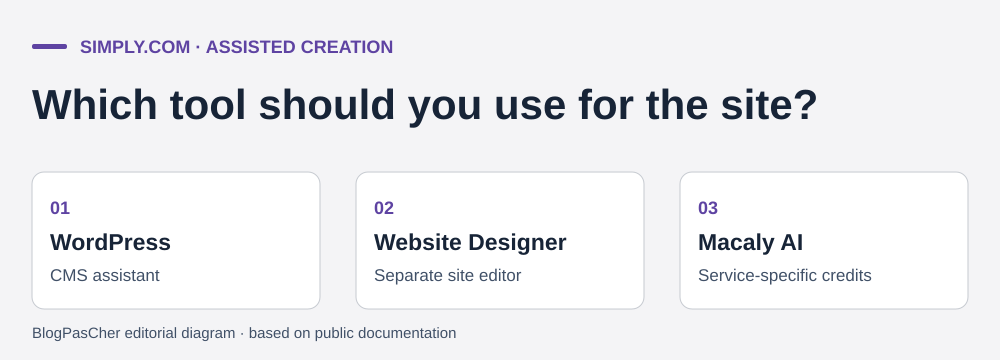 Editorial illustration based on the official documentation. — Illustration by BlogPasCher.Open full-size illustration ↗
The WordPress assistant helps prepare a presentation after selecting business type, goals and design. Feature pages also describe Ask AI in the editor for text, component suggestions and page assistance. These are creation aids: they guarantee neither content accuracy, store compliance nor absence of editorial work.
The Macaly AI builder is another service, presented with a Free plan included in packages and its own credits. Its credits are not treated here as a WordPress assistant quota. Likewise, Website Designer page limits concern that designer, not the number of pages WordPress can manage. Identify the tool before interpreting a commercial table.
Simply.com’s FAQ states that its AI features process data within its EU-based systems and it does not use them to train models without consent. Check terms applicable to the tool you activate. Public sources consulted do not specify the model, quantified WordPress assistant quota or usage rights after departure. For a product page, prepare the reference description before requesting a variant. Review facts, licenses and image alt text. If the tool suggests a plugin, check that plugin’s own rights and costs before deploying it.
The range distinguishes WordPress test environments: none in Basic according to the table, one in Standard, three in Pro and eight in Enterprise. The WordPress page describes copying the site to try changes before release. Copy count should therefore be checked at package level; a general WordPress overview does not automatically give Basic that feature.
Before creating a copy, prepare a backup and identifiable destination. Disable real payments, emails, business synchronizations and tasks that may write into production systems on the copy. Also check access and indexing. A working copy may contain the same personal data as the active site and needs appropriate protection.
Test one change at a time and check relevant pages and business journeys. The record does not specify an automatic deployment button whose database effects were verified. Do not replace an entire active store with an old copy to transfer a simple setting. Rollback should rely on a backup and a clear decision about writes made between the two versions.
The restoration guide advertises daily server copies retained for thirty days, generally taken between 1 h and 3 h in the morning. They allow finding an earlier state when a file or database was changed by mistake. This frequency does not provide a copy of every order up to the moment of failure: a store must organize protection suited to recent writes.
Web files, mail and databases are not necessarily recovered through the same workflow. Keep an independent file and database copy before an update or restoration. Store archives outside the public directory and check readability. An archive present only within site space may disappear with service and also consume its quota.
Website Designer has a different rule: its help states there are no automatic backups and requires manual creation in Settings > Backup & Restore. The general guide’s thirty days should therefore not be promised for a site built with that tool. Macaly and third-party services must also be examined within their own scope, without automatically assigning them the hosted WordPress backup.
In the panel, open Website, then Restore data. The guide advertises free recovery of folders or files and a MySQL database from this screen. Choose the site and database while checking their names. Before confirming the point, export the current state. For an incident limited to a media directory, start with that scope if the panel allows. If the problem stems from a database change, find a point consistent with the file and plugin versions you intend to retain. The WordPress page also presents a file and database repair tool. Use a dated Restore data point if the need is to recover a past state.
The same guide mentions manual intervention for mail, MS SQL, specific tables and certain individual files. It then lists 25 EUR when the loss is attributable to the customer. The mention of files in both free recovery and manual scope needs clarification according to the requested granularity. Confirm amount, currency and taxes for intervention; do not present all assisted restoration as included.
After recovery, check administration, pages, media and business data. Verify orders or messages present before the operation and those to reintegrate. The copy created immediately before recovery supplies the rollback path if the selected point is unsuitable. This profile describes checks without claiming restoration of a real account or verification of execution time.
The migration guide first requires an export from the source provider, then preparation of the Simply.com account. Files can be imported with File Manager from an FTP server. Databases can be imported from a remote server if access is authorized, or from an SQL file using phpMyAdmin. This route avoids adding a migration plugin when necessary access is available.
Prepare an identified database, adjust the WordPress connection using supplied values and test through the temporary address before changing DNS. File paths and stored addresses must match the actual project. Keep the source active and plan a final synchronization of writes for a store or site receiving requests.
In Mail Administration, create mailboxes, then use Import mail to retrieve messages through IMAP. Then verify sending and receipt. Domain transfer copies neither mail nor database. The commercial FAQ advertises free transfer assistance. The guide describes a procedure where customers prepare exports and use import tools. Clarify who performs each action, especially the final copy, mailbox synchronization and DNS switch. Keep the old site accessible while verifying the target receives expected traffic.
Telephone is restricted to Pro and Enterprise according to the specific guide. Customers must log in, display their personal PIN, then call during opening hours. Published general hours are Monday to Friday from 9 h to 15 h 30, closed on weekends. Basic and Standard use the ticket system; a highly technical telephone question may also be redirected to a ticket.
The installer FAQ limits assistance to its installation function and does not promise complete guidance using the installed system. Compare this limit with the commercial presentation of WordPress help. Define who handles a theme issue, payment gateway or third-party plugin before counting on a fix by the host.
For a ticket, specify the domain, date with time zone, exact message and last known change. For restoration, add the desired point date and component to recover. For manual intervention, ask the price and effect on newer data. The French form allows a general request. It offers account identification for domain-related requests.
The renewal guide allows canceling a product through the panel: select the product, choose Cancel, then follow instructions. Cancellation can be revoked until expiry. Check hosting, domain and card option separately, since their dates may differ. Automatic renewal starting fourteen days before the end requires an early decision.
Before closure, export the site, database, useful mail and DNS settings, then validate the copy with the destination provider. The guide states that a nonrenewed product is suspended for fourteen days, then deleted; this period is not backup space on which to plan a transfer. Keep confirmations and do not delete the domain or account while essential services remain attached.
Simply.com may suit independently managed WordPress, with separate capacities for site, databases and mail. Standard adds a test copy; Pro and Enterprise notably add telephone and more headroom. The final decision depends on annual pricing in the right currency, VAT and restoration scope. If choosing this service for a French-speaking team, confirm the language of support exchanges. For a project depending on the assistant, record the quota, continuity terms and export procedure before defining your workflow.
Use these references to check the features, requirements and limitations described. Reading documentation is not a practical test.
English translation of the reviewed French edition. Code examples retain their original identifiers, comments and output strings for reproducibility. Linked exercise files and original screenshots may contain French. No new practical tests or price checks are implied by translation.
1984 Hosting’s WordPress plans in Iceland, initial and renewal terms, migration, the Security Pack and backup limitations.
Read more →Compare 34SP.com WordPress containers, shared memory, staging copies, downloadable snapshots and site migration.
Read more →Compare AEserver’s managed WordPress prices and check whether your network must be split into independent installations before migration.
Read more →