

On the first morning, check what the job actually produced
A magazine has just moved its WordPress site. For two nights, the old instance remains accessible to the team to make diagnosis easier. The new instance’s first automatic job finishes. A file named dernier-export.zip is indeed present in independent storage. It opens, but its contents correspond to the site before the switchover. It may have been uploaded later by the old instance, overwriting the new instance’s first correct export.
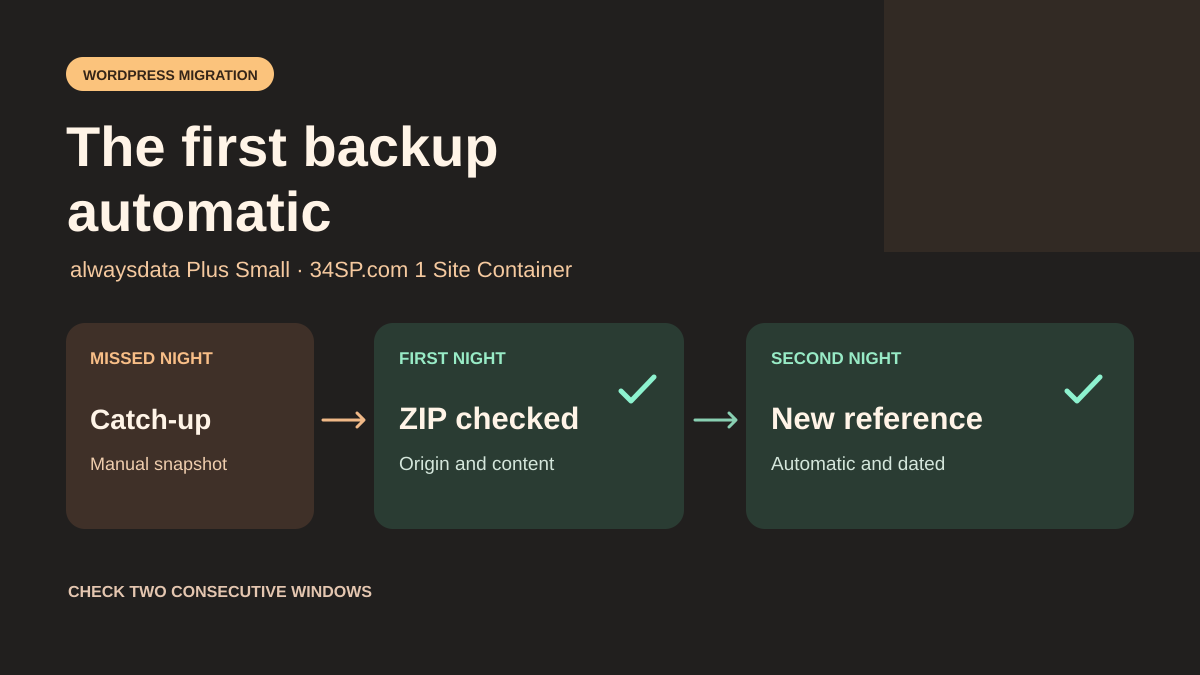
To decide whether the handover is effective, the team chooses two consecutive backup windows. Each morning, it checks independent storage for a dated archive, its origin, its hash and a content marker written after the switchover. The first scheduled run demonstrates the change of origin. The second demonstrates that the scheduler continues working without intervention. If the first occurrence was skipped, a manual catch-up helps recover a backup point, while automatic continuity remains to be demonstrated.
This comparison pits alwaysdata Cloud Public Plus Small against 34SP.com WordPress Hosting 1 Site Container. The first lets you recreate a panel job with its command and environment. The second documents server execution of WordPress events every five minutes. In both offers, provider backups have a separate scope. The check here concerns the independent archive the team expects to receive after changing hosting.
Compare before you choose
The offers at a glance
Find the use case and budget that fit, then read the details to see the limitations and any components you may need.
On smaller screens, the table scrolls horizontally. With a keyboard, press Tab to focus the table, then use the left and right arrow keys.
| Offer | Best for | Pricing and billing | Renewal and support |
|---|---|---|---|
 alwaysdata Cloud Public Plus SmallRead the details | A backup that depends on a command and an environment to reproduce. | €5 excluding tax per month with annual payment or €6 excluding tax monthly Annual or monthly. €60 excluding tax per year with annual payment. Prices exclude tax. VAT and final amount depend on the invoice. | Renewal for an equivalent term under the applicable contract. |
 34SP.com WordPress Hosting 1 Site ContainerRead the details | A WordPress backup scheduled by a compatible, tested plugin. | GBP 11.95 including VAT per month or GBP 143.40 including VAT per year Monthly or annual in the purchase selector. VAT included according to the pricing policy. | Automatic renewal by default for the same period. Possible plan change according to disk usage. |
Compare costs and the scope of both offers
alwaysdata lists Plus Small at €5 excluding tax per month with annual payment, or €60 excluding tax per year, and €6 excluding tax with monthly payment, or €72 excluding tax over twelve months at the same price. The price list advertises 50 GB shared between files, databases and emails, 1 GB of RAM, one CPU and seven rolling days of provider backups. The quota therefore also includes space used by a temporary export placed on the account. The applicable price and VAT appear on the customer’s summary.
alwaysdata’s billing guide states that deleting an account before its end date does not entitle you to a refund. The public shared hosting contract dated 2022 provides for renewal for the same term. Check the document actually accepted and the cancellation date in the customer area, particularly if the site is migrating from an older plan. The current price list provides seven days of backups for Small. The documentation describes read-only copies of files, databases and emails. Check the backup points accessible in your account.
34SP.com lists 1 Site Container at GBP 11.95 including VAT per month or GBP 143.40 including VAT per year. For one site and 25 GB of storage, the purchase selector shows 2.27 GB of memory and the technical specifications show 1.25 GB. Ask the provider which limit applies to the container before sizing the export. The terms provide for automatic renewal by default for an equivalent period, with the option to disable it before expiry. They state that exceeding storage at renewal triggers a switch to the nearest plan covering usage, at that plan’s rate. If archives are first placed on the account, record peak space occupied during their preparation.
34SP.com WordPress backups are daily and retained for 28 days. The provider describes SQL exports, the /httpdocs and /wp-content directories, and restoration upon request to support. The /wp directory is excluded. This frequency does not specify a fixed time and does not prove that the team’s independent copy has been deposited. For each offer, include the cost of external storage, the coexistence period and the time needed to verify the first backup point.
Distinguish the job, its trigger and the destination
Record what starts the export before copying WordPress. A plugin can register a WordPress event in the database. A panel job can call a script, a URL or the WP-Cron queue. An external service can also act at a scheduled time. Transferring files and the database can preserve the hook and its parameters while leaving the external trigger on the old account. A line in an event list therefore does not guarantee execution.
Document the command or hook, execution user, interpreter, working directory, destination, retention and temporary paths. Record the scheduled time in the trigger’s time zone and the expected UTC time. For a business deadline in local time, also check dates when the offset changes. A recurrence of 86,400 seconds can shift the local time across a daylight saving change.
Define the minimum evidence required. In this example, the destination must receive the SQL, a small marker file and a manifest linking the site, environment, window and content. The marker comes from the active database at export time. Use a value without personal data, created after the switchover. Also keep a readable initial export to cover the period before the first night.
Recreate the right command at alwaysdata
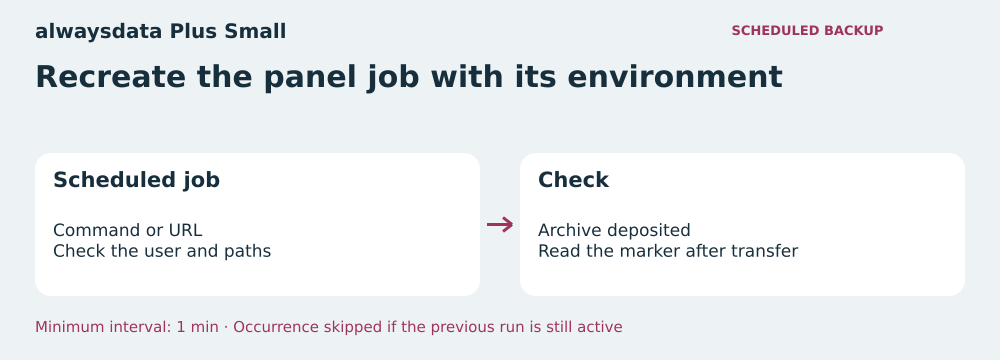
The alwaysdata panel documents scheduled jobs by command or URL. For an export started by a command, recreate the entry in the target account’s administration area. Check the absolute path, current directory, user and language versions selected by the environment. For a job that triggers WP-Cron, check that the command targets the migrated WordPress installation. A command that responds at an old URL after redirection may leave a trace without reading the right database.
The documentation advertises a minimum interval of one minute and no maximum duration specific to the scheduler. On Cloud Public, it asks for reasonable resource usage. An occurrence is skipped if the previous execution of the same job is still running. This rule matters if an export takes longer than expected or an external upload slows down. A more frequent cron does not produce a new archive on every pass. Size the interval using observed durations and trigger an alert when an expected backup point is missing.
Compare start and end times in alwaysdata’s job logs with the artifact received at the destination. If the log reports a completed command but the file is absent or truncated, trace local writing and upload separately. For a low-traffic site, observe a scheduled run without visits or manual execution. The measurement that matters is the arrival of a readable backup point within the expected window, even if the process returned a success code.
Resume the WordPress event at 34SP.com
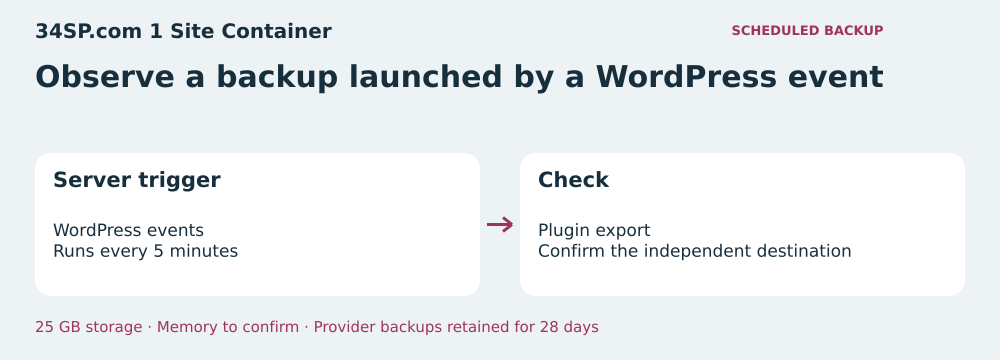
34SP.com says its WordPress offer replaces the built-in visit-based trigger with a server crontab that processes events every five minutes. A plugin alert stating that WP-Cron is disabled can therefore reflect the expected configuration. Check that your plugin’s event is present and has produced a backup point. Wait for a normal scheduler pass and allow for production and transfer time.
For an independent command, 34SP.com also documents the Manage Crons panel for its WordPress offers. Recreate the job in that panel if the target account allows it, then check the path, interpreter, permissions and execution trace. You can also reconfigure the export in a compatible WordPress plugin and observe its result. 34SP.com documents export plugins it has tested, including UpdraftPlus for scheduled backups and third-party storage. Check the version, configuration and scope actually backed up.
Avoid reactivating a second trigger on the strength of a plugin alert. Two instances may each have the job and credentials for the same destination. The old version can produce the ZIP with the latest arrival time while reading old data. Leave it accessible for reading during acceptance testing and remove its right to write to the production archive repository. Use separate permissions for staging.
Finalize a backup point before announcing it
First write to a temporary location or an object in preparation. Generate a list of expected items with their hashes and a capture marker. From the destination, verify the received file’s contents and the final archive’s hash. Open the SQL in an isolated database to read the marker. An archive is usable for this check if the marker comes from the right database and the expected components are accessible. A full restoration then checks the dependencies the marker does not cover.
Give the backup point a stable name tied to a window and an origin. Keep validation evidence separately, with the reading date. If there is a second attempt within the same window, keep the first validated point and record the new result in the log. On object storage, verify that conditional creation or an equivalent mechanism prevents replacement. If you display a link to the latest point, update it after validation and also protect that update against writes from the old origin.
The marker must have been introduced after the switchover and appear in the corresponding export. Check it against a reference retained outside the archive. A manifest announcing “new” is insufficient if the command exports a test database or an outdated copy. Do not infer capture time from the ZIP’s modification time either. A downloaded or recopied file can have a recent date while its contents are old.
Measure capture and arrival separately
Record the scheduled time, the database reading time and the time when the complete file becomes accessible in the repository. Record the last one directly at the destination or in its write trace. The date declared by the producer describes capture. It does not prove that a ZIP arrived before the deadline. A file captured at 03:14 UTC and received at 04:10 UTC misses a deadline set at 04:00, even if its SQL is recent.
For example, if you want a backup point available at 04:00 UTC, a job started at 03:10 leaves fifty minutes. Suppose the scheduler pass takes up to five minutes in the observed configuration, the export takes twenty minutes and the transfer ten. Fifteen minutes remain to verify the archive and report an incident. Measure these durations again the next day. An average alone hides a slow execution. Set the alert threshold early enough to leave time to start a catch-up.
When a backup point is missing, first find where the trace stops. No start indicates a trigger or environment problem, or a skipped occurrence. A start without a deposit requires checking the exit code, temporary space and destination permissions. A late deposit remains a possible recovery copy if its contents have been verified. Record it separately to keep the automatic window’s failure visible.
Expose false successes
The acceptance-test ZIP contains three fictional windows. In the first, the mockup simulates an occurrence skipped because the previous job is still active. A manual launch then produces a ZIP, but it is not accepted as automatic evidence. The next two windows each produce a backup point under the new instance’s name. The creation command runs as a subprocess. The repository and times are local and the triggers are simulated.
During the first compliant night, the mockup also presents a valid archive from the old site, an archive from the new site containing an outdated marker, an export captured outside the window and an on-time capture deposited late. The check detects these four anomalies separately. Another command finishes with code zero and deliberately produces a truncated ZIP. The file is rejected on opening. Errors appear in the report even if the producer reported success.
The script reopens the SQL from accepted backup points and rereads the expected markers. A second deposit in an already validated window does not replace the published point. The report contains the size and hash of both archives. Compare it with the execution log to distinguish attempts from effective backup points. The exercise validates this workflow using fictional data. Scheduling and full WordPress restoration belong to acceptance testing on your installation.
- Extract the acceptance-test ZIP into an empty folder, then run python recette.py with Python 3.10 or later.
- In the report, locate rejected attempts, the two validated windows and their archive hashes.
- Repeat these checks on a copy of your installation with a separate destination before validating real backups.
Choose according to the job you need to maintain
alwaysdata Plus Small is suitable if the team needs control over a command, its interpreter and its schedule. The panel and logs make it easier to reconstruct a job independent of WordPress. Leave enough space for local preparation and observe what happens if an export exceeds the interval. If the job fails to start at the next scheduled time, establish a new observation window after catching up.
34SP.com 1 Site Container is suitable if the export workflow relies on a WordPress plugin that works in this environment and a pass every five minutes leaves enough time to finish before the deadline. Confirm support for any remaining shell jobs. The provider backup retention period is longer on the compared offer. For the independent export, set the desired retention on the team’s storage and compare it with recovery needs.
Before permanently disabling the old account, record the two verified automatic backup points and the time its write permissions were removed. Keep the first migration export during the transition. If a scheduled point is missing, correct the trigger or deposit, produce a manual point if necessary and restart observation. For a site that backs up nightly, two consecutive points reveal a wrong origin, an interruption and a job that only ran on demand.
- Set two windows and an independent marker for each.
- Remove the old instance’s deposit permission.
- Open the received backup points and reread the marker in an isolated environment.
- Validate continuity after two scheduled runs without intervention.
Further reading
Sources and references
Use these references to check the features, requirements and limitations described. Reading documentation is not a practical test.
View 17 references
- alwaysdata Cloud Public Plus Small — Monthly price excluding tax ↗ — Documentation consulted:
- alwaysdata Cloud Public Plus Small — alwaysdata, Cloud Public Plus offer ↗ — Documentation consulted:
- alwaysdata Cloud Public Plus Small — alwaysdata, scheduled tasks ↗ — Documentation consulted:
- alwaysdata Cloud Public Plus Small — alwaysdata, public shared hosting agreement ↗ — Documentation consulted:
- alwaysdata Cloud Public Plus Small — alwaysdata, billing questions ↗ — Documentation consulted:
- alwaysdata Cloud Public Plus Small — WordPress, connecting to a system scheduler ↗ — Documentation consulted:
- alwaysdata Cloud Public Plus Small — WordPress, creating a recurring event ↗ — Documentation consulted:
- alwaysdata Cloud Public Plus Small — alwaysdata, backup scope ↗ — Documentation consulted:
- 34SP.com WordPress Hosting 1 Site Container — Monthly price including tax ↗ — Documentation consulted:
- 34SP.com WordPress Hosting 1 Site Container — 34SP.com, WordPress Hosting ↗ — Documentation consulted:
- 34SP.com WordPress Hosting 1 Site Container — 34SP.com, pricing policy ↗ — Documentation consulted:
- 34SP.com WordPress Hosting 1 Site Container — 34SP.com, terms ↗ — Documentation consulted:
- 34SP.com WordPress Hosting 1 Site Container — 34SP.com, cron events and jobs ↗ — Documentation consulted:
- 34SP.com WordPress Hosting 1 Site Container — 34SP.com, platform copies ↗ — Documentation consulted:
- 34SP.com WordPress Hosting 1 Site Container — 34SP.com, backup plugins ↗ — Documentation consulted:
- 34SP.com WordPress Hosting 1 Site Container — 34SP.com, WordPress specifications ↗ — Documentation consulted:
- 34SP.com WordPress Hosting 1 Site Container — 34SP.com, managing account cron jobs ↗ — Documentation consulted:
Uses, prices and what to check
2 offers in detail
Compare the features you need and the terms of each offer. The order of these entries does not indicate a ranking.
alwaysdata Cloud Public Plus Small
Editorial backup diagram — BlogPasCher editorial illustration.Open full-size illustration ↗Best forA backup that depends on a command and an environment to reproduce.
French Cloud Public hosting with a documented panel job and shared resources.
Offer pricing
€5 excluding tax per month with annual payment or €6 excluding tax monthly
Billing: Annual or monthly. €60 excluding tax per year with annual payment.
Renewal and support: Renewal for an equivalent term under the applicable contract.
Prices exclude tax. VAT and final amount depend on the invoice.
Checked on .
Strengths
- Command or URL in the panel’s scheduled jobs
- Job start and end logs
- 50 GB shared, 1 GB of RAM, 1 CPU
What to consider
- Occurrence skipped if the previous execution of the same job is active
- Seven rolling days of provider backups on Small
- Quota shared with databases and emails; reasonable usage requested
Pricing terms and compatibility
Understanding the offer
- Price at the time of review
- €5 excluding tax per month with annual payment or €6 excluding tax monthly
- Currency
- EUR
- Billing
- Annual or monthly. €60 excluding tax per year with annual payment.
- Renewal and support
- Renewal for an equivalent term under the applicable contract.
- Taxes and fees
- Prices exclude tax. VAT and final amount depend on the invoice.
- Commitment and terms
- Check the accepted contract and end date. Early deletion without refund according to the help page.
- Date checked
Compatibility and components
- Self-hosted WordPress
- SSH and scheduled jobs
- PHP and WP-CLI depending on configuration
34SP.com WordPress Hosting 1 Site Container
Editorial backup diagram — BlogPasCher editorial illustration.Open full-size illustration ↗Best forA WordPress backup scheduled by a compatible, tested plugin.
British WordPress container with server processing of WordPress events.
Offer pricing
GBP 11.95 including VAT per month or GBP 143.40 including VAT per year
Billing: Monthly or annual in the purchase selector.
Renewal and support: Automatic renewal by default for the same period. Possible plan change according to disk usage.
VAT included according to the pricing policy.
Checked on .
Strengths
- WordPress events processed every five minutes according to the guide
- 25 GB of storage for one site and documented Manage Crons panel
- Daily WordPress backups retained for 28 days
What to consider
- RAM to confirm: 2.27 GB in the purchase selector and 1.25 GB in the technical specifications
- Provider backup restoration must be requested from support
- Upgrade provided for if storage is exceeded at renewal
- Custom commands, their permissions and execution times still need to be checked on the account.
Pricing terms and compatibility
Understanding the offer
- Price at the time of review
- GBP 11.95 including VAT per month or GBP 143.40 including VAT per year
- Currency
- GBP
- Billing
- Monthly or annual in the purchase selector.
- Renewal and support
- Automatic renewal by default for the same period. Possible plan change according to disk usage.
- Taxes and fees
- VAT included according to the pricing policy.
- Commitment and terms
- Renewal can be disabled before expiry.
- Date checked
Compatibility and components
- Managed WordPress
- Compatible export plugins
- Documented WP-CLI