Web hosting
1984 Hosting for WordPress in Iceland: pricing and backups
1984 Hosting’s WordPress plans in Iceland, initial and renewal terms, migration, the Security Pack and backup limitations.
Read more →

Site appearance
Web hosting
Three packages managed in WebAdmin, with shared space for the site, databases and email. The WordPress edition with an assistant is documented separately.
Source published: · Source updated: · Editorial policy
Visit the official Websupport website ↗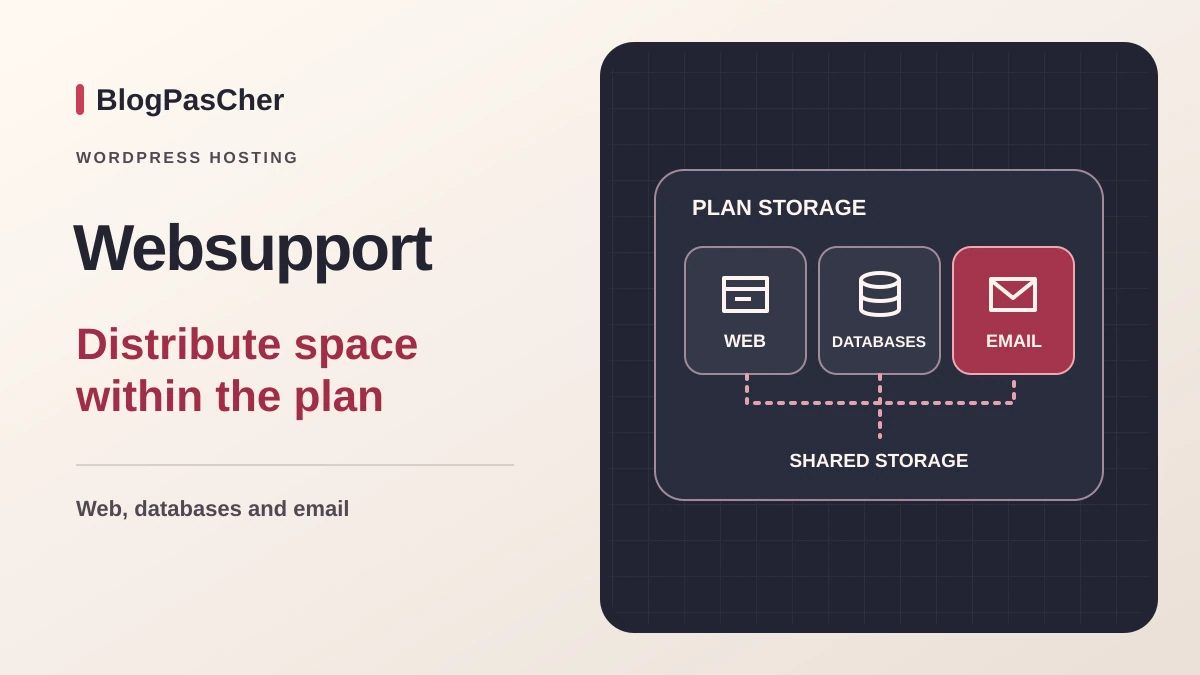
This profile is based on published offers and documentation. No new hosting benchmark or support test was performed for this translation.
Prices retain the market, currency and billing period described in the French source. Translation does not update a commercial quote. Confirm the final price, taxes and options before ordering.
| Plan | Price and billing | Resources and limits |
|---|---|---|
| Simple | €2.99 excluding VAT/month equivalent for the first twelve months, approximately €35.88 excluding VAT. Renewal: €3.99 excluding VAT/month equivalent for another annual cycle, approximately €47.88 excluding VAT. Cycles of 1, 3 or 6 months at €4.99 excluding VAT/month. Calculated total excludes options. VAT and billed amount depend on account holder and cycle. | 1 GB shared and 1 domain. Storage expansion up to 3 GB. 25 PHP workers advertised. Disk shared between web, databases and email. |
| Smart | €4.99 excluding VAT/month equivalent for the first twelve months, approximately €59.88 excluding VAT. Renewal: €5.99 excluding VAT/month equivalent for another annual cycle, approximately €71.88 excluding VAT. Cycles of 1, 3 or 6 months at €6.99 excluding VAT/month. Calculated total excludes options. VAT and billed amount depend on account holder and cycle. | 20 GB shared and 3 domains. Options up to 50 GB and 5 domains. 25 PHP workers advertised. Disk shared between web, databases and email. |
| Super | €10.99 excluding VAT/month equivalent for the first twelve months, approximately €131.88 excluding VAT. Renewal: €13.99 excluding VAT/month equivalent for another annual cycle, approximately €167.88 excluding VAT. Cycles of 1, 3 or 6 months at €15.99 excluding VAT/month. Calculated total excludes options. VAT and billed amount depend on account holder and cycle. | 100 GB shared and 10 domains. Options up to 300 GB and 100 domains. 25 baseline PHP workers. Ten additional workers available for €7 excluding VAT/month. |
 Mascot for Websupport’s WordPress offering. — Image: Websupport.
Websupport s.r.o. offers the Simple, Smart and Super packages in Slovakia, managed from WebAdmin. The documentary review of November 10, 2026 concerns this catalogue and its WordPress tools. To choose a package, first check the number of domains, combined file and email volume, then the operations the team wants to delegate.
The same catalogue presents a separate builder, Macaly AI and professional email products. WordPress installation with an assistant follows its own path in WebAdmin. Selected features and extra services should appear in the proposal if the team needs them.
The provider publishes an address in Bratislava. For a project with a location requirement, ask for the service region, backup region and data-return terms. This check must concern the proposed account.
The official price list associates Simple with 1 GB and one domain, Smart with 20 GB and three domains, and Super with 100 GB and ten domains. WordPress cards present configurations up to 3, 50 and 300 GB. Smart and Super display up to five and one hundred slots according to options. To compare amounts, distinguish base resources from the configuration actually ordered.
Space is shared between web files, databases and email. As a mailbox’s archives grow, they leave less space for WordPress, media and a temporary copy. Also measure test directories. Before restoration, check remaining headroom to copy the current state. A package that fits the operational site may lack space during this operation.
The specification displays twenty-five PHP workers, expandable to thirty-five for Super, along with a PHP limit of 512 MB and an upload ceiling of 256 MB. Worker count describes concurrent PHP processing. Concurrency depends on request duration and caching, among other factors. The provider recommends databases no larger than 2 GB. For a store retaining a long history, check database size and how imports are handled before choosing.
The Slovak price list consulted on November 10 displays €2.99, €4.99 and €10.99 excluding VAT per equivalent month for the first twelve months of Simple, Smart and Super. Multiplying the monthly amounts gives €35.88, €59.88 and €131.88 excluding VAT. For the following twelve months, published references are €3.99, €5.99 and €13.99 excluding VAT per month, or approximately €47.88, €71.88 and €167.88 excluding VAT per year.
One-, three- or six-month cycles display €4.99, €6.99 and €15.99 excluding VAT per month respectively according to package. Thus, three months of Smart cost about €20.97 excluding VAT. A team planning to move a site after a quarter can compare this initial expense with a prepaid year. For a lasting site, add the following cycle and domain renewal price to the calculation.
The table also publishes a column including local VAT. Simple displays €3.68 per month for the first year and €4.91 for the following annual reference. The total and VAT applicable to a French account holder remain to be confirmed. Check the invoice amount, options and cycle actually selected. Public references may change before the next due date.
The price list displays €1 excluding VAT per month for an increment of 1 GB on Simple, 5 GB on Smart or 10 GB on Super. The table also charges for additional domains and lists €7 excluding VAT per month for ten extra PHP workers on Super. Extended support for older PHP versions is priced separately at €1, €3 or €5 excluding VAT per month on these tiers. Before adding this option, assess plugins preventing a move to a maintained version and test them on a copy.
The provider presents a fourteen-day trial without payment on the WordPress page. It also advertises a free domain for the first year for certain extensions on an annual cycle. Price domain renewal and check account-holder-specific terms before adding it to the project.
The November 3 review described a migration offer tied to eligibility conditions. It distinguished self-service transfer from assistance limited to one site and its email. Promotional details could not be reread on November 10. For the current budget, confirm the service price, required evidence and covered scope. Keep migration costs separate from hosting cycles.
The guide documents two installation modes. Classic WordPress suits a team that already has its theme and tools. The assistant edition adds guided creation, text-editing features and the Extendable theme. Help describes specialized agents for editing content and style from the site interface, along with image generation in WordPress using GPT Image 1.
Macaly AI product credits appear in a separate pricing section. The examined pages do not establish the WordPress assistant’s quotas, overage price or feature continuity after transfer. Before intensive use, confirm access scope and transmitted data. Before launch, check contact details, text, theme rendering and rights to generated media.
For an existing installation, prepare a copy before changing the theme or editorial tools. Check WordPress update settings and designate who checks plugins and licences. Site changes must be recoverable from a copy of files and database.
For a new site, have WebAdmin access and a domain linked to the correct hosting. Open Služby, select the domain, then Pokročilá konfigurácia and CMS. Choose WordPress with an assistant or the classic version. Check the address before continuing. The first field determines the subdomain in particular, and the second any subfolder.
Enter the site name, administrator address, username and a unique password. The documented installer offers Slovak, English and Hungarian. Support languages must be confirmed separately. Confirm Nainštalovať only at a location whose existing content has been preserved. Then check the site and its /wp-admin access.
The expected result is an installation at the chosen address without replacing the previous public site. To try AI on an existing site, use a separate copy. Reinstallation can delete content. To undo a test creation, retain useful data and remove only that identified instance.
The provider’s guides state daily web-file and database backups retained for fourteen days. For email, documentation describes five available daily copies, replacing the mailbox with its state at the selected date. Fourteen days of history must therefore not automatically be attributed to all content.
Copies in WebAdmin do not remove the need for an independent export. An error discovered after rotation, account closure or an operation affecting several services can exceed their scope. Keeping files and database from the same period on separate storage simplifies recovery and departure to another provider.
The tools also allow additional backups before an operation. Check remaining space before creating a copy that uses account storage. A running task is not yet a completed backup. Exact location and backup-return guarantees must be clarified for critical needs.
To recover email, first check the restore-point date and messages received since then. Copy recent messages to an independent location before reverting to an older state. After restoration, check folders and reimport only required items. If the problem affects only the site, choose the file or database restoration path and preserve current email.
For a targeted fix, open WebAdmin, Služby, the domain, then Pokročilá konfigurácia, Web and Záloha a Obnova. Choose Nová obnova. Select adresár for a folder or súbor for a file, then the date and affected items. The guide requires identical source and destination to preserve the site’s original structure.
Preserve the current state before Obnoviť. The Zálohovať aktuálny priečinok option creates an additional folder copy. Check free space to avoid restoration failure. Consult the operation history and status before reloading the site. Then check the page or feature that failed.
This restoration does not change the database. It suits an incorrect file edit when content remains healthy. To revert, use the copy made immediately before the intervention. To download a copy, choose Vyžiadať zálohu in the same section. Enter the date, folder and address that will receive the link.
In Služby, choose the domain, then Pokročilá konfigurácia, Databázy, the database’s three-dot menu and Zálohy. The guide recommends Vytvoriť aktuálnu zálohu before restoring an earlier state with Obnoviť. Identify the correct WordPress database, especially if several sites or subdomains use the account.
Database restoration returns posts, settings, orders and registrations to the selected point’s state. More recent writes may be lost. For a store, pause writes for the necessary time and preserve new data before acting. Restoring into a separate copy lets you check the state before touching production. Check available capacity and the site’s database connection.
Files are not restored with the database. For full recovery, coordinate versions and dates. If the database was deleted, the guide says a new name must be used. Then change the restored WordPress configuration. Do not delete a healthy database to attempt a rollback. Keeping its current export allows restoration of the state before the trial.
For assisted migration, agree on the number of sites, mailboxes and domains, authorized access and treatment of unusual applications. Prepare files, databases, PHP and SQL versions, licences and mailbox list before handing over access. Duration and price depend on the accepted scope.
Keep the old service active, with its exports and DNS records, until the new site has been checked. Check media, forms, login, email and commerce features before cutover. Price migration assistance separately from hosting cycles.
For a test environment, choose a distinct address and include its copy in storage calculations. Disable messages, payments and synchronization with real services, then protect access. Copying the entire database to production can erase recent writes. Plan a backup immediately before relaunch and retain the previous production state as a rollback point.
The site and guides for the Slovak offering are in Slovak. The WordPress installer documents Slovak, English and Hungarian. The contact page advertises phone and chat from 8 to 20 every day. French availability in WebAdmin or from a technician remains to be confirmed for the service.
The specification lists temporary one-hour SSH access with 256 MB memory and a permanent access option with 1 GB. WP-CLI access is advertised for WordPress. For a long task, check the permitted duration, access to the correct installation and available permissions. Maintenance across several sites may require a different organization from a one-off fix.
SFTP access and email may be subject to geographical or IP-address rules. Before migration, check restrictions for the people involved and retain a recovery method independent of hosted email. A support request benefits from specifying the domain, time, original message and preceding change.
The general terms default to an indefinite contract unless otherwise agreed. For this arrangement, they describe one month’s notice starting on the first day of the month following receipt of cancellation. They distinguish fixed-term contracts. Separately check the contractual duration, paid period and payment settings.
Before requesting cancellation, download files and export the database, retain necessary email, DNS, scheduled tasks and licences. Test restoration at the destination, then confirm the closure date for the specific services. A domain transfer moves neither WordPress nor messages. Keeping account-holder and recovery access avoids dependence on an account about to close.
Websupport may suit a Slovak project or small portfolio able to share its space and work with its documentation. Points to confirm are the configuration actually ordered, recurring amount, customer taxation, AI scope and backup location.
Use these references to check the features, requirements and limitations described. Reading documentation is not a practical test.
English translation of the reviewed French edition. Code examples retain their original identifiers, comments and output strings for reproducibility. Linked exercise files and original screenshots may contain French. No new practical tests or price checks are implied by translation.
1984 Hosting’s WordPress plans in Iceland, initial and renewal terms, migration, the Security Pack and backup limitations.
Read more →Compare 34SP.com WordPress containers, shared memory, staging copies, downloadable snapshots and site migration.
Read more →Compare AEserver’s managed WordPress prices and check whether your network must be split into independent installations before migration.
Read more →