

Size capacity for the period when two sites coexist
The magazine publishes photo reports in WordPress and wants to validate a new presentation on a private copy. Older articles, captions and galleries must be examinable while public publishing continues. The hosting choice hinges on the moment both versions coexist, after another year of publishing. The public site may fit alone on a plan that no longer allows creating the copy in the same account.
Disk space and filesystem entry count answer different questions. A multi-megabyte original is large but represents one file. Many small variants may use little space yet rapidly increase file count. Directories also count towards the inode quota described by Zone.ee. A disk gauge far below maximum therefore does not authorise starting a clone.
The scenario compares a public WordPress site and a temporary copy on the same subscription, without moving the site or changing the production theme during acceptance testing. The copy must allow two editors to check templates and the administrator to return to the initial situation by removing only the private instance. Choose the plan from this task and the volume it requires, without inferring audience capacity from disk space.
Compare before you choose
The offers at a glance
Find the use case and budget that fit, then read the details to see the limitations and any components you may need.
On smaller screens, the table scrolls horizontally. With a keyboard, press Tab to focus the table, then use the left and right arrow keys.
| Offer | Best for | Pricing and billing | Renewal and support |
|---|---|---|---|
 Websupport SuperRead the details | A team able to clarify account limits that needs more than 20 GB as standard. | Calculated €131.88 excluding VAT for Super's first twelve months. Published annual equivalent of €10.99 excluding VAT per month for the first cycle; monthly, quarterly and half-yearly cycles at €15.99 excluding VAT/month. Calculation excluding VAT, domain and options; confirm invoice VAT. | Calculated €167.88 excluding VAT for the following annual cycle at the recorded rate. |
 Zone.ee Starter, Business et PRORead the details | A team wanting to size peak file usage against a published limit. | Calculated €119.40 / €202.80 / €360 excluding VAT over twelve months for Starter / Business / PRO. Published annual equivalents: €9.95, €16.90 and €30 excluding VAT per month; €11.95, €18.90 and €33 excluding VAT on the monthly cycle. Calculation excluding VAT. Confirm VAT treatment and first invoice for the account holder. | No first-year discount established; same reference if rates remain unchanged. |
Measure the variants that actually exist
Start with an export of the site's directory tree and account-counter readings taken at the same time. In WordPress, the usual media directory is wp-content/uploads; check its location if configuration has changed. One media-library item can correspond to several files: the original, derived sizes and sometimes a version created by an optimisation tool. Local backups, caches and other sites may also count even when absent from the media library.
Sample a few recent and older reports. In the export, find their originals and variants actually present. Count files and their total size separately. Repeat on a test copy after displaying the planned pages: some tools add files when a gallery opens. An average based only on recently uploaded images may overlook an older generation of thumbnails still on disk.
Note what the panel counts alongside files. The size of a database exported as an SQL file, for example, does not always match the active database's volume or billing treatment. Likewise, a host's quota may cover directories absent from the export. When the two numbers differ, use the contractual counter as the plan reference and the export to identify items the team can act on.
Repeat the estimate with an editable file
The downloadable bundle contains a readable model, a dependency-free Node.js command and its expected result. The example starts with twelve thousand media items and adds two hundred and fifty per month for twelve months: fifteen thousand at the chosen horizon. It assigns ten variants to each original, plus eighteen thousand other entries per instance for directories and non-media files. These are simulation data. The script connects to no host and creates no WordPress copy.
The model assigns seven hundred thousand bytes to the average original and one hundred and twenty thousand to a variant. It adds three billion bytes per installation outside media and two billion of shared account overhead. This shared overhead represents bytes reserved in the scenario; shared entry count is set to zero for the example. In your budget, add files from other services or their allowance when the counter includes them. The two measurements must remain separate.
By default, the exercise reserves fifteen per cent of each known limit for discrepancies, caches and writes at the end of testing. This reserve is the fictional magazine's choice, unrelated to any host rule. The report distinguishes “exceeds the limit”, “fits, but uses the reserve” and “fits with the reserve”. When a limit is missing, it writes “limit not established”. It never interprets a missing value as no limit.
- Download and extract “Calculate peak usage for a photo-magazine copy” in “Further reading”, then run node capacite.mjs from the resulting folder.
- Compare the displayed result with attendu.json, then modify assumptions in modele.json or pass another model's path as an argument.
- Keep a copy of the model and the panel-reading date so you can repeat the calculation before acceptance testing.
Three ways to prepare the same acceptance test
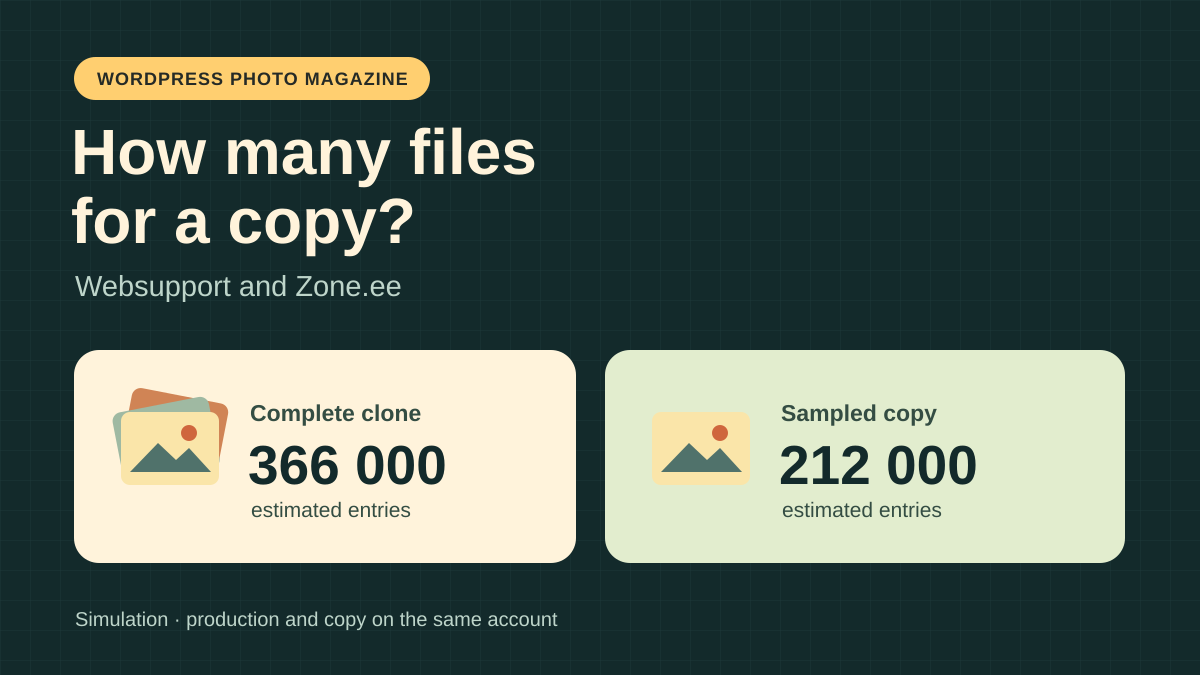
The full clone reproduces all fifteen thousand media items and their variants. The calculated peak is 366,000 entries and 65 decimal GB for both installations and their shared overhead. This approach allows checking for regressions in any older report. It consumes twice the files outside shared services and requires sufficient reserve during copying. If a temporary archive is written to the account, add its size and intermediate files to the peak.
A private copy with one thousand representative media items retains those items' variants and leaves production unchanged. The projection drops to 212,000 entries and 38.4 GB. Choose series in different formats, reports with many images and pages where an older template invokes a gallery. Pages absent from the sample remain outside validation. Prepare this copy from a backup on a working destination; if you first create a full clone and trim it afterwards, you will still incur the full peak.
A complete copy where each instance had only six variants per media item would give 246,000 entries and 50.6 GB. This is a future-capacity scenario: limiting new variants does not delete old files. Consider this option after auditing formats in use and testing on an independent copy. It does not justify deleting files from the public site to gain just enough margin before testing. If a useful crop disappears, retain the original configuration and files.
Zone.ee: inodes distinguish the plans
The Zone.ee table checked on November 10, 2026 advertises 256,000 inodes and 256 GiB of disk space for Starter. With the full clone, the scenario exceeds the inode limit by 110,000 while remaining far below the volume limit. The sampled copy leaves 44,000 entries before the limit, of which 38,400 form the selected reserve. Only 5,600 entries therefore remain before using that reserve. An extracted archive or larger-than-expected cache warrants recalculation.
The six-size variant would leave ten thousand entries free on Starter, far short of the fifteen-per-cent reserve. Business advertises 384,000 inodes and 512 GiB: the full clone remains 18,000 entries below the limit, but not below the working threshold of 326,400. PRO lists 512,000 inodes and 1,024 GiB; in this model, the full clone retains the reserve on both counters. Check cumulative database capacity separately: comparing disk space and inodes does not validate MariaDB space for the second installation.
For an authorised full copy whose capacity has already been assessed, the listing documents My Zone, Webhosting, Web applications, My installs, then Settings and Copy. Check the private address, empty root folder and compatible PHP versions before opening the wizard. For the sample, prepare a targeted backup at a separate destination and restore that selection; do not use Copy to create the entire site first on a plan lacking sufficient margin.
Zone.ee also advertises a cumulative MariaDB database limit: 4 GiB on Starter, 6 GiB on Business and 12 GiB on PRO. The script result does not account for this limit. Add active databases and the test database using the provider's counters; do not infer available space solely from the exported SQL file's size.
Websupport: shared disk space is not enough to conclude
The Slovak pricing table advertises 20 GB as standard for Smart and 100 GB for Super, shared by web files, databases and email. Base Smart is too small for every simulated peak, and even for the projected public site plus shared overhead. Smart's advertised maximum of 50 GB requires paid expansions. Under the model's decimal convention, it would rule out the 65 GB full clone and would need separate pricing if considering only the sample.
On base Super, all three peaks fall below the volume reference with the model's reserve. The verified evidence provides no numeric limit for files and directories on this plan. The result therefore remains to be confirmed, including for the sampled copy. Ask for the counter actually applicable to the account, treatment of caches and copies, and whether copy creation uses intermediate storage. Provide your calculated peak and expected margin to obtain an actionable answer.
In WebAdmin, the documentation describes file-backup access through Služby, the domain, Pokročilá konfigurácia, Web, then Záloha a Obnova. The Vyžiadať zálohu option requests a download; plan a separate database export. Keep these files on separate storage before preparing the sample. Being able to download files and the database establishes neither free space for an in-account copy nor support's ability to build that selection.
Compare the first cycle and the next
At Websupport, November 10 pricing gives Super an equivalent of €10.99 excluding VAT per month for the first twelve months, or a calculated €131.88 excluding VAT. The reference for the following annual cycle rises to €13.99 excluding VAT per month, or €167.88 excluding VAT. At unchanged rates, the two-year sum is €299.76 excluding VAT. Multiplying annual equivalents gives Smart €59.88 excluding VAT, then €71.88 excluding VAT, without options; Smart's lower price does not resolve the model's disk shortfall.
Zone.ee displays annual equivalents of €9.95 excluding VAT per month for Starter, €16.90 excluding VAT for Business and €30 excluding VAT for PRO. Twelve-month references are respectively €119.40, €202.80 and €360 excluding VAT. The checked table distinguishes monthly from annual pricing without an established first-year-only discount. The reference over two cycles is therefore €238.80, €405.60 or €720 excluding VAT if rates remain unchanged. The English FAQ mentions a first invoice for thirty days; the Estonian version distinguishes thirty days or a year according to the selected cycle. Request the first-invoice amount for the chosen annual cycle before comparing payments.
These references compare annual hosting costs excluding VAT. Paid amounts and applicable taxes depend on the invoice. Views including local VAT do not determine VAT on your order. Request the first total and the next for the same account holder, cycle and capacity. Separate the domain, storage options, cost of a second destination and sample preparation. If comparing one month of work with a prepaid cycle, state the payment due separately, even if you remove the copy after a few days.
Prepare the copy without exposing editorial work
Choose pages to check before creating the private instance. The record may include a section page, recent report, older article, mobile gallery and cropped featured image. For each, state the expected result, formats to display and presence of credit and caption. For a sample, verify that the export contains the selected articles' files and data. A file present on disk does not guarantee that the gallery can find it.
For a sampled copy, gather selected articles, their images and settings needed for their galleries in a workspace. A WordPress content-export XML file does not contain photo binaries. If using this export, also retain associated files and check restoration of links and fields used by the theme. If your galleries store data outside posts, first test recovery with one report. Photos must load from the copy with matching captions, without depending on a production request.
Identify the subdomain, destination folder and dedicated database. Before restoring content, restrict access using the host's staging mechanism, such as server-level authentication. While logged out, verify that the URL displays no article, gallery or backup file. Asking search engines not to index a site is not access protection. Also disable sending and synchronisations that must not leave the test. Record counters before copying, during coexistence and after opening galleries. If a task fails for lack of space, avoid repeatedly rerunning it without checking files it has already written.
At the end of testing, first verify that the public site still serves the same articles and no production configuration has changed. Keep editors' feedback and useful settings outside the copy. Then remove only the private instance, its dedicated database and identified temporary files. Check the counter decrease in the panel and re-examine a public article. If a path belongs to both installations or the database is not clearly identified, pause cleanup until the inventory is complete.
Choose according to what editors must validate
If editors accept limiting tests to representative reports, Zone.ee Starter satisfies both numeric limits in the model, with 5,600 entries of margin beyond the reserve. Repeat the estimate with account figures and check that the second database fits. If all reports must be available in the copy, Business accepts the raw peak but consumes the chosen reserve; PRO is the first compared Zone.ee tier that preserves it. Separate storage for the copy can also avoid a production peak; it requires its own budget and checks.
Websupport Super has enough volume under the model's convention. Before selecting it, establish the entry limit and what the counter includes. Provide the current entry count, expected peak, type of copy and desired margin. Ask which actions support handles and which remain the team's responsibility. Websupport's page advertises phone and chat from 8 to 20 every day; Zone.ee's page places phone service from 9 to 17 on working days, Estonian time. These hours guarantee neither a response time, clone intervention nor a French-speaking technician.
To decide, retain both counters, growth horizon and expected test-page results with the budget. Support was not contacted and no actual quota was tested. If a limit remains unknown, intermediate files consume the margin or the test database does not fit, choose another copying method or request confirmation before subscribing. You can then repeat the calculation with a clearly documented price, scope and renewal date.
Further reading
Sources and references
Use these references to check the features, requirements and limitations described. Reading documentation is not a practical test.
View 13 references
- Websupport — WordPress hosting — Websupport — WordPress hosting ↗ — Documentation consulted:
- Websupport — pricing and cycles — Websupport — pricing and cycles ↗ — Documentation consulted:
- Websupport — technical specifications — Websupport — technical specifications ↗ — Documentation consulted:
- Websupport — general terms — Websupport — general terms ↗ — Documentation consulted:
- Websupport — contacts — Websupport — contacts ↗ — Documentation consulted:
- Websupport — file backup — Websupport — file backup ↗ — Documentation consulted:
- Websupport — database backup — Websupport — database backup ↗ — Documentation consulted:
- Zone.ee — hosting and pricing — Zone.ee — hosting and pricing ↗ — Documentation consulted:
- Zone.ee — comparison and resources — Zone.ee — comparison and resources ↗ — Documentation consulted:
- Zone.ee — current general terms — Zone.ee — current general terms ↗ — Documentation consulted:
- Zone.ee — contacts and opening hours — Zone.ee — contacts and opening hours ↗ — Documentation consulted:
- Zone.ee — Zone+ manager — Zone.ee — Zone+ manager ↗ — Documentation consulted:
- Zone.ee — Estonian FAQ and first invoice — Zone.ee — Estonian FAQ and first invoice ↗ — Documentation consulted:
Uses, prices and what to check
2 offers in detail
Compare the features you need and the terms of each offer. The order of these entries does not indicate a ranking.
Websupport Super
 Mascot for Websupport’s WordPress offering. — Image: Websupport.
Best forA team able to clarify account limits that needs more than 20 GB as standard.
100 GB as standard, shared by web files, databases and email. The estimated volume fits; the file limit remains to be established.
Offer pricing
Calculated €131.88 excluding VAT for Super's first twelve months.
Billing: Published annual equivalent of €10.99 excluding VAT per month for the first cycle; monthly, quarterly and half-yearly cycles at €15.99 excluding VAT/month.
Renewal and support: Calculated €167.88 excluding VAT for the following annual cycle at the recorded rate.
Calculation excluding VAT, domain and options; confirm invoice VAT.
Checked on .
Strengths
- 100 GB advertised as standard on Super.
- File and database exports documented in WebAdmin.
What to consider
- Super's file limit not quantified in the sources used.
- Storage shared with databases and email; confirm French-language support and work on the copy.
Pricing terms and compatibility
Understanding the offer
- Price at the time of review
- Calculated €131.88 excluding VAT for Super's first twelve months.
- Currency
- EUR
- Billing
- Published annual equivalent of €10.99 excluding VAT per month for the first cycle; monthly, quarterly and half-yearly cycles at €15.99 excluding VAT/month.
- Renewal and support
- Calculated €167.88 excluding VAT for the following annual cycle at the recorded rate.
- Taxes and fees
- Calculation excluding VAT, domain and options; confirm invoice VAT.
- Commitment and terms
- First compared cycle of twelve months. Check the renewal date and next-invoice amount.
- Date checked
Compatibility and components
- Websupport hosting in Slovakia with WordPress and WebAdmin.
Zone.ee Starter, Business et PRO
 Official logo of Zone.ee. — Image: Zone.ee.
Best forA team wanting to size peak file usage against a published limit.
Zone.ee's table quantifies both disk space and inodes. Starter suits the model's sample; PRO preserves the full clone's reserve.
Offer pricing
Calculated €119.40 / €202.80 / €360 excluding VAT over twelve months for Starter / Business / PRO.
Billing: Published annual equivalents: €9.95, €16.90 and €30 excluding VAT per month; €11.95, €18.90 and €33 excluding VAT on the monthly cycle.
Renewal and support: No first-year discount established; same reference if rates remain unchanged.
Calculation excluding VAT. Confirm VAT treatment and first invoice for the account holder.
Checked on .
Strengths
- 256,000, 384,000 and 512,000 inodes according to tier.
- Application-copy feature documented in My Zone.
What to consider
- MariaDB databases: 4, 6 or 12 GiB in total according to tier. The model checks neither this quota nor actual temporary volume.
- Support timing, language and service for the copy not established.
Pricing terms and compatibility
Understanding the offer
- Price at the time of review
- Calculated €119.40 / €202.80 / €360 excluding VAT over twelve months for Starter / Business / PRO.
- Currency
- EUR
- Billing
- Published annual equivalents: €9.95, €16.90 and €30 excluding VAT per month; €11.95, €18.90 and €33 excluding VAT on the monthly cycle.
- Renewal and support
- No first-year discount established; same reference if rates remain unchanged.
- Taxes and fees
- Calculation excluding VAT. Confirm VAT treatment and first invoice for the account holder.
- Commitment and terms
- Annual cycle compared; check the starting amount and billing schedule.
- Date checked
Compatibility and components
- Shared hosting with My Zone and the Zone+ application manager.