

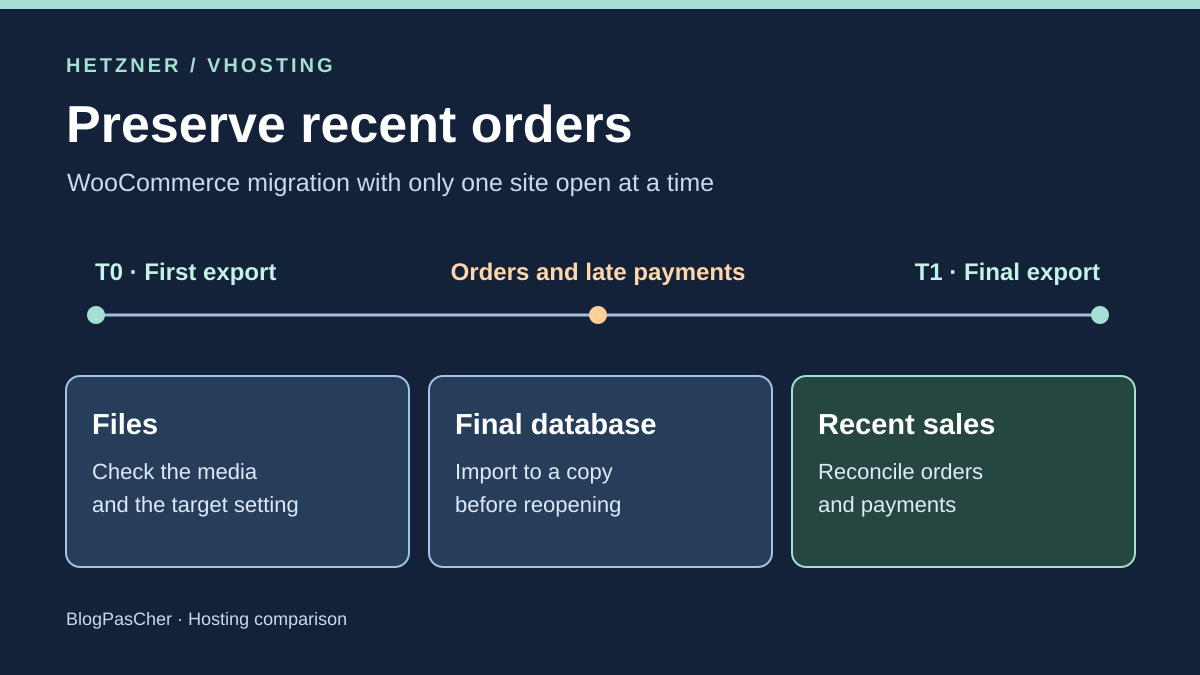
Keep only one store accepting orders
A store prepares a WordPress migration while sales continue. The first export is used to build a copy and check PHP versions, the theme and plugins. During this work, the old store receives new orders. Payments and refunds may also change the status of orders that already existed at the first export. A copy that opens in the browser may therefore be technically ready while lagging behind sales.
The team chooses the authoritative instance from the outset. Until acceptance testing is approved, only the original store accepts orders. The target remains private or unable to accept real writes. Tests use fictional accounts and a sandbox payment flow. Before importing final data, plan to remove these tests or use a separate empty database for the version intended for production.
Set two dated reference points in the same time zone. T0 marks the first export; T1 marks the point when writes have been stopped or handled and the final database is exported. Prepare a minimal register of differences between these points. Record order references, time, currency, amounts, status and transaction identifiers needed for reconciliation. Restrict export access and avoid using customer data in a simulation.
Compare before you choose
The offers at a glance
Find the use case and budget that fit, then read the details to see the limitations and any components you may need.
On smaller screens, the table scrolls horizontally. With a keyboard, press Tab to focus the table, then use the left and right arrow keys.
| Offer | Best for | Pricing and billing | Renewal and support |
|---|---|---|---|
 HetznerRead the details | A team wanting isolated restoration and able to choose between phpMyAdmin and a plan with SSH. | Webhosting M capped at 4.12 EUR excluding VAT per month, L at 8.32 EUR excluding VAT Hourly price capped at the monthly price according to the plan EUR pricing excludes VAT. VAT depends on country and tax status; domain separate. | Current usage rate and domain on a separate renewal schedule |
 VHostingRead the details | A team wanting to work from a JetBackup point and retain a separate copy before restoring. | Cloud WordPress 01 at 47 EUR excluding VAT per year and WordPress+ 03 at 73 EUR excluding VAT per year Annual hosting price displayed in the pricing table VAT extra. Staff restoration listed at 25 EUR + VAT on an active service. | Same recurring price advertised excluding discounts. Terms provide for the rate applicable at renewal. Domain separate. |
Inventory three recovery scopes
Files include code, the theme, plugins and media. They also contain environment-specific settings in files such as wp-config.php. Media or code can be recovered separately if versions remain compatible. An original file must not replace target-specific connection credentials or keys. Check downloadable documents or plugin-related attachments whose links may depend on a directory or external storage.
The database includes orders and their relationships, as well as products, settings, accounts and deferred tasks. Record the authoritative WooCommerce order storage and check whether HPOS is used with or without compatibility mode. In WooCommerce, compatibility mode synchronizes two representations within one store. It does not reconcile writes from two separate stores after cutover.
The third scope is the log of changes since T0. Compare the state of old orders as well as the list of new ones. You must be able to explain line items, statuses and payment events, plus stock or plugin effects when they form part of the scenario. Full recovery from a backup predating T1 risks erasing these changes. Choosing the source and recovery point must therefore precede the restore command.
Hetzner Webhosting and restoration destinations
The Webhosting S, M, L and XL guide advertises a nightly backup retained for fourteen days in another data center. In konsoleH, select the relevant account, then Services and Backup. Choose the date and scope. For public_html, the guide describes selecting files or subdirectories and restoring them to a new folder. It also describes operations that overwrite or delete existing files. For acceptance testing, a separate destination allows comparison before copying the file to the right place.
Database restoration is a separate choice. Hetzner documents creating a new database from a copy and overwriting an existing database. For SQL from another host, the migration guide suggests creating an empty database, importing the file and then updating the WordPress connection. PhpMyAdmin suits an import within the interface limits. Hetzner recommends the command line for larger files when the plan provides SSH access. SFTP transfers files but does not provide a terminal.
On November 10, 2026, the EUR pricing table’s monthly caps are 1.60 for S, 4.12 for M, 8.32 for L and 16.72 for XL, excluding VAT. For a customer resident in France without a valid intra-community VAT number, caps calculated with 20% VAT are 1.92, 4.94, 9.98 and 20.06 EUR including VAT. Hourly billing up to the cap applies to partial months. Check the VAT applicable to your account and the domain price. SSH is listed for L and XL, while S and M must be assessed using the panel and local SQL processing. S provides one database. Check the quota if you want to retain a production database and a test database in the same account. The domain and any fees have their own due dates.
VHosting Cloud WordPress and JetBackup scope
The WordPress pricing table advertises daily JetBackup. Plans 01 and 02 display thirty days of file and database retention. Plans 03 and 04 display sixty. Email retention, fourteen days on these cards, is separate. The page also mentions hourly replication for infrastructure recovery. Check the application restore point available in JetBackup, because retention duration and replication do not give the time of the latest usable export of your orders.
In cPanel, the VHosting guide opens JetBackup 5, then Restore & Download. The Home Directory section allows a date and file selection. The Databases section allows selecting a database and its copy. Prefer downloading and then importing into an empty database when you need a separate destination. The cPanel guide documents database creation and import or export with phpMyAdmin. The WordPress cards display SSH. The account’s user, permissions and limits still need checking.
On November 10, 2026, VHosting displays 47 and 62 EUR excluding VAT per year for Cloud WordPress 01 and 02, then 73 and 89 EUR excluding VAT per year for Cloud WordPress+ 03 and 04. The FAQ advertises the same recurring price excluding first-year discounts. The general terms provide for the rate applicable at renewal and possible revisions. Check the amount in the renewal summary. A domain potentially included for the first year is billed separately at renewal. The published 25 EUR plus VAT rate applies to restoration performed by the VHosting team on an active service. Self-service downloads of available backups are not billed under this service. Incoming migration covers one eligible site. The page describes a plugin-based copy or file-and-database transfer, to be requested within thirty days of purchase. It requires source access and excludes WordPress Multisite among other cases. Confirm in advance which temporary access is sufficient. Plan separately for orders and payments arriving after this copy.
Close the divergence window before the final export
Agree with the store team and payment operator on the time to stop new orders. Also identify API creation, subscription tasks, stock imports and manual changes. Website maintenance mode is insufficient if these channels continue writing. In-progress payments require explicit handling. Some events arrive after the checkout page closes. Keep a controlled receiving channel or a queue intended for recovery, depending on provider capabilities. Check pending transactions and notification errors before setting T1.
When writes are stopped or reconciled, export a consistent final database from the authoritative instance. Record capture date, tables, method and file hash. If possible, compare the export with orders, the payment register and stock. Compare totals by currency and do not infer that every line is present from an equal total. Also check the states of changed older orders and transaction references used to reconcile notifications.
Import this final database into an isolated destination without overwriting the old store or a target that has already received sales. This method retains relationships existing in the source. If timing requires incremental migration, test a tool compatible with the version and plugins that can replay events without duplication. Simply filtering by creation date or order number does not cover late changes.
Check data and effects before reopening
Check the version sequence. The first copy may have used a test theme or an updated plugin that changed the schema. Verify compatibility with the latest source export before connecting the target WordPress installation. Prepare media added since T0 and check that a database import does not reset the site to its old address. Retain a copy of each environment’s settings before any targeted replacement.
On the still-closed target, open sample orders. Check the item, quantity, status, currency and amount. Verify expected stock and relevant plugin effects, including download permissions, notes, refunds or shipment tracking. Also compare task queues with the operations team. A copy may have inherited a task intended to send a notification or launch a shipment. Reactivate real processes only on the designated instance.
Stop criteria are set before testing. A payment event without an explained order, an order missing its lines, inconsistent stock, an incomplete export or uncertainty about target writes blocks reopening. Keep logs and both states accessible. A missing media file can be corrected without database restoration if code and references remain compatible. Then check the same samples again.
Replay recent orders and media restoration
The ZIP provides an initial T0 export, subsequent writes and a separate file for late payments. SQLite actually loads the SQL. The T0 database contains two orders. The source then receives two orders, followed by two late confirmations, including one for an existing order. The scenario checks the link between fictional payment references and orders, with currency and amount. A candidate omitting these events stops, even if it already has the four-order list.
The script creates a final point and restores it into a separate database. It checks lines, stock, separate EUR and CHF totals and database constraints. A variant removes a line while retaining amounts and events. It fails reconciliation. The script repeats the import on this acceptance-test destination without adding duplicates. This result concerns replacing an isolated database with its copy and does not demonstrate that an incremental order import would be replayable.
The file component compares two versions of a media file, copies the final version into a temporary folder and checks that the database and target setting are retained. The sixteen checks include the three rollback decisions: before any new write, after an order on the target and after both sides diverge. Amounts, statuses and events are fictional data. The SQLite model verifies differences and overwrite effects without reproducing WooCommerce’s schema or tasks.
- Download the ZIP exercise under “Further reading”, extract the archive into a separate folder, then run python exercice.py.
- Compare the 16 checks with attendu.json. Identify order CIBLE-105, then the collision between SRC-105 and CIBLE-105 requiring reconciliation before recovery.
Organize rollback before and after the first sales
Before any target write, rollback is possible if the old store remains usable and contains the reconciled final state. Keep both sites closed to orders during the routing change. Check the public hostname, certificate, media and order state on the original before reopening. Depending on propagation, visitors may still reach the target. Keep it closed to writes until the team has checked routing.
After the first target sale, a DNS rollback to the old database would abandon part of the data. Close order intake and agree on handling pending notifications. Export both databases and retain payment references, task-execution data and useful stock information. If the target has become the sole writing source and is consistent, recovery may involve rebuilding the old environment from this state in an isolated copy. Then repeat checks before changing routing.
If both sides have accepted writes, prepare reconciliation before merging. The same internal identifier may belong to two different orders. A payment or store reference identifies some cases but does not remove the need to check lines, refunds and effects on other systems. The simulation marks this case as a stop. In production, merging would require a method validated with the versions and plugins used, plus a way to avoid duplicate notifications, refunds and shipments.
Choose the plan according to the recovery your team can verify
Hetzner Webhosting suits a team wanting the separate destinations described in konsoleH and able to handle SQL imports with the plan’s access. Moving from M to L notably changes SSH availability. A fourteen-day backup window may suffice to recover the selected file, subject to checking its time and content. The final store capture remains an operation to prepare outside the nightly backup.
VHosting suits a team wanting to download a JetBackup point and find separate components in cPanel. Choosing between thirty and sixty days can extend the file and database recovery window. This difference says nothing about a payment arriving minutes before cutover. Check the plan, cPanel and SSH permissions, test-database availability and any restoration service before establishing cost.
In both cases, panel access does not automatically grant WooCommerce administration, payment-provider access or DNS editing. Assign these permissions before the freeze. Identify who approves the final export and who decides to reopen or roll back. The best evidence is a set of orders and events the team can find after restoration, with the reference file and correct site state.
Further reading
Sources and references
Use these references to check the features, requirements and limitations described. Reading documentation is not a practical test.
View 18 references
- Hetzner — Webhosting S and the monthly cap in the EUR pricing table ↗ — Documentation consulted:
- Hetzner — Hetzner Webhosting features and backups ↗ — Documentation consulted:
- Hetzner — Backing up and restoring in konsoleH ↗ — Documentation consulted:
- Hetzner — Hetzner database migration ↗ — Documentation consulted:
- Hetzner — Hetzner FTP and SFTP ↗ — Documentation consulted:
- Hetzner — Hetzner billing ↗ — Documentation consulted:
- Hetzner — WordPress backup ↗ — Documentation consulted:
- Hetzner — WooCommerce order storage ↗ — Documentation consulted:
- Hetzner — Authoritative WooCommerce tables ↗ — Documentation consulted:
- Hetzner — WooCommerce order diagnostics ↗ — Documentation consulted:
- Hetzner — WooCommerce webhooks ↗ — Documentation consulted:
- Hetzner — Hetzner, VAT according to residence and tax status ↗ — Documentation consulted:
- VHosting — Cloud WordPress 01 and the annual listed price ↗ — Documentation consulted:
- VHosting — Restoration intervention on an active service ↗ — Documentation consulted:
- VHosting — VHosting, using JetBackup ↗ — Documentation consulted:
- VHosting — VHosting, cPanel guide ↗ — Documentation consulted:
- VHosting — VHosting WordPress migration ↗ — Documentation consulted:
- VHosting — VHosting, renewal terms, article 5.3 ↗ — Documentation consulted:
Uses, prices and what to check
2 offers in detail
Compare the features you need and the terms of each offer. The order of these entries does not indicate a ranking.
Hetzner
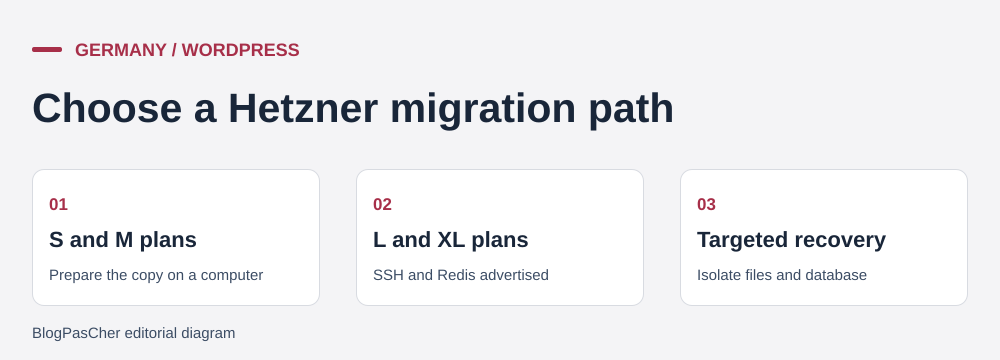 Reference points taken from the offer cards. — Illustration by BlogPasCher.Open full-size illustration ↗
Best forA team wanting isolated restoration and able to choose between phpMyAdmin and a plan with SSH.
Webhosting separates file and database recovery in konsoleH, with the option to restore to a separate destination.
Offer pricing
Webhosting M capped at 4.12 EUR excluding VAT per month, L at 8.32 EUR excluding VAT
Billing: Hourly price capped at the monthly price according to the plan
Renewal and support: Current usage rate and domain on a separate renewal schedule
EUR pricing excludes VAT. VAT depends on country and tax status; domain separate.
Checked on .
Strengths
- Restore files or folders to a new location
- Documented option to create a new database from a backup
- SFTP and SSH depending on the plan for transfers or imports
What to consider
- Nightly backups and 14-day retention. Arrange the final export.
- SSH is listed on L and XL. Check database quota.
- Import does not reconcile writes from two stores.
Pricing terms and compatibility
Understanding the offer
- Price at the time of review
- Webhosting M capped at 4.12 EUR excluding VAT per month, L at 8.32 EUR excluding VAT
- Currency
- EUR
- Billing
- Hourly price capped at the monthly price according to the plan
- Renewal and support
- Current usage rate and domain on a separate renewal schedule
- Taxes and fees
- EUR pricing excludes VAT. VAT depends on country and tax status; domain separate.
- Commitment and terms
- The pricing page advertises no minimum term. The cap covers a full month.
- Date checked
Compatibility and components
- Webhosting with konsoleH
- MariaDB or MySQL and phpMyAdmin
- SFTP for files, SSH on compatible plans
VHosting
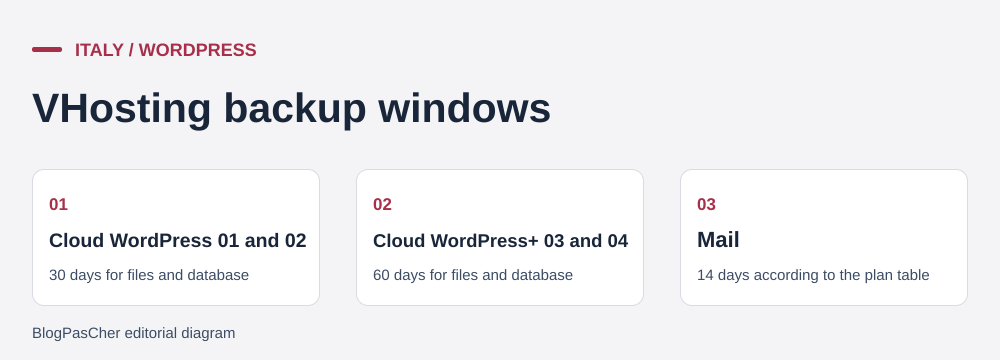 Reference points taken from the offer cards. — Illustration by BlogPasCher.Open full-size illustration ↗
Best forA team wanting to work from a JetBackup point and retain a separate copy before restoring.
JetBackup in cPanel downloads or restores selected components. The plan determines file and database retention.
Offer pricing
Cloud WordPress 01 at 47 EUR excluding VAT per year and WordPress+ 03 at 73 EUR excluding VAT per year
Billing: Annual hosting price displayed in the pricing table
Renewal and support: Same recurring price advertised excluding discounts. Terms provide for the rate applicable at renewal. Domain separate.
VAT extra. Staff restoration listed at 25 EUR + VAT on an active service.
Checked on .
Strengths
- JetBackup 5 with file and database selection
- File and database retention of 30 or 60 days depending on plan
- Database import and export documented in cPanel
What to consider
- The daily backup does not contain events occurring after its capture.
- Staff restoration is a separate service.
- Incoming migration does not guarantee recovery of recent orders.
Pricing terms and compatibility
Understanding the offer
- Price at the time of review
- Cloud WordPress 01 at 47 EUR excluding VAT per year and WordPress+ 03 at 73 EUR excluding VAT per year
- Currency
- EUR
- Billing
- Annual hosting price displayed in the pricing table
- Renewal and support
- Same recurring price advertised excluding discounts. Terms provide for the rate applicable at renewal. Domain separate.
- Taxes and fees
- VAT extra. Staff restoration listed at 25 EUR + VAT on an active service.
- Commitment and terms
- Annual plans in the Cloud WordPress range
- Date checked
Compatibility and components
- WordPress and WooCommerce
- cPanel, JetBackup and phpMyAdmin
- SSH advertised on plan cards; verify access and permissions