Web hosting
1984 Hosting for WordPress in Iceland: pricing and backups
1984 Hosting’s WordPress plans in Iceland, initial and renewal terms, migration, the Security Pack and backup limitations.
Read more →

Site appearance
Web hosting
Four annual Cloud WordPress plans, a cart-isolation exercise and a recovery workflow using JetBackup.
Source published: · Source updated: · Editorial policy
Visit the official VHosting website ↗
This profile is based on published offers and documentation. No new hosting benchmark or support test was performed for this translation.
Prices retain the market, currency and billing period described in the French source. Translation does not update a commercial quote. Confirm the final price, taxes and options before ordering.
| Plan | Price and billing | Resources and limits |
|---|---|---|
| Cloud WordPress 01 | €47 excluding tax/year before discounts. Renewal: €47 excluding tax/year as an undiscounted reference. Check the current price list. Domain separate. Annual total recorded on November 10, 2026, excluding VAT. A .it or .eu domain is free for the first year subject to eligibility. | 10 GB web and a separate 20 GB email allowance, 2 vCPU and 2 GB RAM. One hostable domain, JetBackup 30 days for files and database, 14 days for email. |
| Cloud WordPress 02 | €62 excluding tax/year before discounts. Renewal: €62 excluding tax/year as an undiscounted reference. Check the current price list. Domain separate. Annual total recorded on November 10, 2026, excluding VAT. A .it or .eu domain is free for the first year subject to eligibility. | 15 GB web and a separate 20 GB email allowance, 2.5 vCPU and 3 GB RAM. One hostable domain, JetBackup 30 days for files and database, 14 days for email. |
| Cloud WordPress+ 03 | €73 excluding tax/year before discounts. Renewal: €73 excluding tax/year as an undiscounted reference. Check the current price list. Domain separate. Annual total recorded on November 10, 2026, excluding VAT. A .it or .eu domain is free for the first year subject to eligibility. | 25 GB web and a separate 20 GB email allowance, 2.5 vCPU and 3 GB RAM. One hostable domain, JetBackup 60 days for files and database, 14 days for email. |
| Cloud WordPress+ 04 | €89 excluding tax/year before discounts. Renewal: €89 excluding tax/year as an undiscounted reference. Check the current price list. Domain separate. Annual total recorded on November 10, 2026, excluding VAT. A .it or .eu domain is free for the first year subject to eligibility. | 35 GB web and a separate 20 GB email allowance, 3 vCPU and 4 GB RAM. One hostable domain, JetBackup 60 days for files and database, 14 days for email. |
VHosting markets four Cloud WordPress plans in Italy with cPanel, LiteSpeed server and JetBackup backups. The word gestito covers hosting and maintenance functions specified in the table. A team running a store must also know who configures plugins, payment methods, caching and page-specific exceptions. These settings are part of the business’s daily operation.
The fictitious situation concerns a stationery store in Bologna. Its catalog is public and can serve the same content to multiple people. The cart and customer area, however, depend on the session. The team must be able to verify that the catalog page becomes reusable while keeping two carts distinct as visits alternate. It prepares demonstration products and accounts, with an expected reference for each cart.
The local exercise compares an intentionally overbroad configuration with a policy reserving shared caching for public responses. It documents the exact expected result before changing WooCommerce caching. The profile also examines second-year costs, the capacity actually available for the site and email, then operations for recovering or moving the store. The offering becomes usable when these points can be checked with the access available to the team.
On November 10, 2026, VHosting displayed €47 excluding tax per year for Cloud WordPress 01, €62 for 02, €73 for WordPress+ 03 and €89 for WordPress+ 04. The cards give an annual euro total to which VAT is added, indicated by + IVA. The plan FAQ states that the hosting rate stays the same at renewal, and the home page specifies that this rule excludes discounts. These amounts provide an undiscounted second-year reference. The general terms provide for the current price list and allow an annual adjustment. Check the next cycle’s amount in the summary. Check the tax-inclusive total applicable to the billing profile and the due date stated in the quote.
The .it or .eu domain is free for the first year according to the WordPress listing. The FAQ states that its renewal is added to the hosting price. The public renewal price is €8.50 for .it and €8 for .eu in the reviewed price list. For the fictitious stationery store, record the first year as hosting at €47 excluding tax and a .it domain eligible for inclusion. For the second year, price hosting at the applicable rate and .it renewal separately. Keep the domain’s VAT status separate in the quote.
The migration quote also distinguishes one-off support services. The offering advertises an incoming migration of one WordPress installation. The intervention price list describes possible costs for manual work and conditions for resynchronization or an additional transfer. Identify what the included migration covers and when orders must stop being accepted on the old site. An initial store copy made two days before switchover leaves an interval that may contain sales and stock changes. The budget must account for work associated with this interval and the rollback plan.
The four plans show combined totals of 30, 35, 45 and 55 GB on their cards. The table details 10, 15, 25 and 35 GB of web space and a separate 20 GB for email on each plan. These spaces are advertised as separate and non-poolable. A store whose catalog occupies 13 GB of images and files must therefore consider at least tier 02 for web space, even if its mailboxes are nearly empty. Also allow room for a working copy, logs and temporary files during an export.
Displayed CPU capacities are 2, 2.5, 2.5 and 3 vCPU. Advertised memory is 2, 3, 3 and 4 GB. The table lists one hostable domain for each plan and distinguishes this domain from subdomains and the ability to install sites on them. The stationery store must choose its main domain and check how to create a private copy. Check process, entry and input/output limits in the table before increasing media or scheduling a large import. A resource limit can affect the store long before storage is full.
VHosting advertises databases and mailboxes without a count limit, within effective storage and resource limits. Email has a sending limit of 60 per hour in the table. For order notifications, also check receipt, rejections and separation between site messages and marketing campaigns. All plans list LiteSpeed and LSCache. WordPress+ tiers 03 and 04 add Redis. Page-cache and object-cache settings address different needs. For the stationery store, cart behavior under page caching must be checked from the first tier, before deciding to increase resources.
VHosting describes managed infrastructure in Italy, daily backups, update functions and protection mechanisms. WordPress installation is documented through Softaculous in cPanel. The team retains control of plugin settings, WooCommerce pages, the change schedule and verification of every update. When changing versions or caching, choose the rollback point, check the result using test sessions and record the activated version. An automatic backup and an automatic update may occur at different times. Record those times before attributing a regression to a plugin.
Protection against AI bots listed in the table concerns traffic filtering. The provider separately documents SoftWP and its generation features in the editor, with an indicative quota of 3,000 free tokens per day for an active Softaculous license. Have the offering’s eligibility, current quota and what follows the site after transfer confirmed. Prepare a short product description using invented data and check measurements, materials and price before publication. On an exit copy, open the text in WordPress and check blocks and media.
The commercial page and help consulted are in Italian. The table advertises technical support 24 hours a day throughout the year. Languages available on tickets, especially French or English, remain to be confirmed. A useful incident report specifies the domain, plan, affected page, time, test cookies as names without real values, then the observed difference between two sessions. Support can examine the service. WooCommerce settings and validation of the ordering journey remain the responsibility of the team operating the store.
The attached PHP script executes two reference requests with the overbroad rule, then twelve with the corrected rule. URLs and cookies are fictitious. It starts neither a server nor WordPress. The first policy caches everything under a key built from the method and URL. The first cart writes CARNET-A into the shared cache. The second browser requests the same URL with another session and receives CARNET-A even though its cart should contain PLUME-B. The recorded result distinguishes the response produced by the origin from the one served again from the cache.
The second policy preserves shared caching for the public catalog viewed without a session. It bypasses that cache for the cart, checkout and customer area, for requests with a session or login, for actions identified in parameters and for methods other than GET. The first catalog call produces a MISS. The second serves the expected page with a HIT. Both carts remain different and the anonymous session sees an empty cart. The authenticated account and logged-out visitor receive different responses. The script also checks add-to-cart, the simulated AJAX request and POST. The PHP script is in the “Prepare your site” ZIP. The JSON result contains every expected response.
LiteSpeed documents default WooCommerce exclusions for cart, checkout and account pages. On a working copy, check the URLs actually selected by WooCommerce and any custom paths. In WordPress, LiteSpeed Cache, Cache, Excludes lets you examine path and cookie exclusions. Review response headers and compare two isolated browsers and an anonymous visitor. An intermediate cache or custom rule may change the behavior. If a session page is shared, disable the affected layer, purge its entries and rerun the check before re-enabling the catalog. The PHP model serves as a logical reference and does not establish a VHosting server’s configuration.
If cart content appears outdated after adding an item, follow the guide “Empty or outdated WooCommerce cart: find the session and refresh the data”.
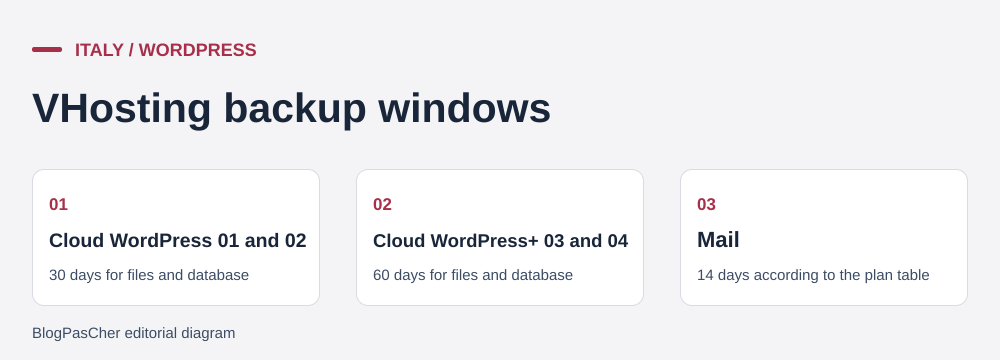 Reference points taken from the offer cards. — Illustration by BlogPasCher.Open full-size illustration ↗
The table specifies daily JetBackup backups. Plans 01 and 02 list thirty days for files and databases. Plans 03 and 04 list sixty. Email retains fourteen days in the table. Hourly replication to another center belongs to the infrastructure’s recovery system. For store recovery, use the dates visible in JetBackup. Provider replication does not automatically supply an hourly restore point selectable by the customer.
In cPanel, open JetBackup 5, then Restore & Download. The guide distinguishes Full Backups, Home Directory and Databases. Identify the desired date and item. For files, selection can target a specific folder. For the database, first identify the one corresponding to the installation. Check the task queue after making the request. The panel guide also describes downloading copies and components according to available options. On a working copy, open the received file, review the database and validate the presence of the reference media item before any store restoration.
A cache problem may be corrected by adjusting exclusions and purging responses. If an update changed the schema or orders, assess the effect of restoring files and database. First preserve the list of orders received after the selected point, with their statuses and reconciliation in the payment gateway. Repeat the cart and notification test after recovery. To distinguish an account copy, database, media and independent export, see the selection “25 WordPress backup tools by recovery need”.
Prepare departure while the account is active. Export site files and the database, then reload them onto an isolated target. The inventory includes the PHP version, plugins, cache rules, scheduled tasks and SMTP configuration. During WooCommerce verification, read a reference order, open a catalog media item and check tax and shipping settings. Disable outbound sending and live payments on the working copy. Then test the cart before changing DNS.
The included migration covers an incoming site. When leaving the offering, distinguish moving the site from renewing or transferring the domain. Inventory DNS entries and mailboxes, and check whether messages must be copied to another service. Webmail, aliases, forwarding and reception rules are checked independently of WordPress. Confirm access to the transfer code according to the extension and reserve a contact address independent of the domain being moved.
The general terms describe renewal for the same period unless terminated with at least fifteen days’ notice, and a setting to disable automatic renewal in the customer area. Review the offering’s terms and effective date before acting. The technical sheet separately addresses what happens to data after expiry. For the store, the verifiable exit point remains a copy tested during the active period and a schedule separating domain expiry, transfer and mail switchover.
The store selects the tier whose web space and compute allowance cover measured needs. Cloud WordPress 01 remains the reference to examine if the site, maintenance operations and any copy fit within its 10 GB web space. The next tier becomes relevant if measured files and the required margin exceed that allowance. A need for Redis or longer file retention concerns WordPress+ plans. The annual price includes hosting and its environment, while domain renewal has its own line item.
Before opening the catalog, have the person configuring the cache record three results. Two successive anonymous visits must show the expected public content, even after a purge. Two demonstration shopping sessions must retain distinct carts, and private account state must remain linked to its session. A dated copy of files and database must be accessible and documented by its download path. The demonstration checkout journey stops before any charge. A separate check can verify receipt of a test notification.
If a change appears only for some visitors, identify the layer serving the response before purging. The browser, server cache and any CDN each have their own state. Record the first and subsequent access, with and without a test session. If the catalog changes price or availability, check that purging also covers categories and the product page. Resume with only one layer active to isolate a discrepancy and re-enable the others after checking. Follow the guide “WordPress change not visible: find and clear the right cache”.
Going live ultimately also depends on the person responsible for operations. Technical support receives incidents related to the platform. The Bologna team retains the test matrix, export access and WooCommerce rollback procedure. If the theme, payment method or cache rule changes, it can rerun the same checks before reopening checkout.
The technical sheet provides for at most thirty days of suspension from the due date. If the customer pays for renewal during this period, reactivation and any recovery incur no additional technical fees. The domain may have its own fees. After this period without payment, account data and copies are deleted. Manual rescue from the recovery system remains paid and depends on feasibility. Request a quote if the provider can still find the data. The contact guide distinguishes the continuously accessible technical ticket from commercial channels. These periods and channels help organize departure and escalate an incident, while the export validated during the active period provides the store with an independent recovery point.
Use these references to check the features, requirements and limitations described. Reading documentation is not a practical test.
English translation of the reviewed French edition. Code examples retain their original identifiers, comments and output strings for reproducibility. Linked exercise files and original screenshots may contain French. No new practical tests or price checks are implied by translation.
1984 Hosting’s WordPress plans in Iceland, initial and renewal terms, migration, the Security Pack and backup limitations.
Read more →Compare 34SP.com WordPress containers, shared memory, staging copies, downloadable snapshots and site migration.
Read more →Compare AEserver’s managed WordPress prices and check whether your network must be split into independent installations before migration.
Read more →