

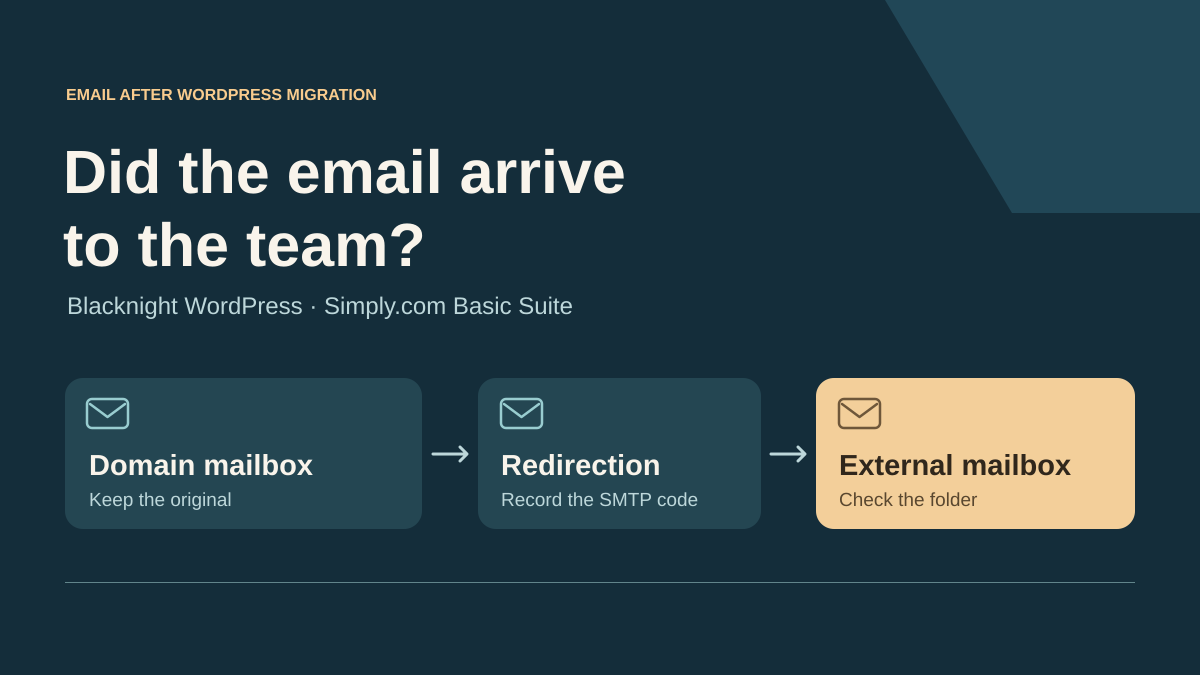
The message reaches the domain but not the team
An association moves its WordPress site and recreates its public contact address on the new hosting account. Its team handles inquiries in an external mailbox it has used for years. The new webmail receives a test inquiry. The forwarded copy also arrives in the external mailbox. The next day, a reply to a WordPress notification remains visible in the domain mailbox but never appears in the queue the volunteers check.
The scenario starts with the target MX in service. It follows the route between reception on the domain and the external mailbox. For each test message, record the UTC time, receiving address, identifier and result at each stage. Distinguish the message being written to the local mailbox, the forwarding attempt and its presence in the processing folder. A WordPress SMTP plugin’s test button generally only observes the sending route it triggers.
Blacknight Web Hosting for WordPress and Simply.com Basic Suite offer mailboxes on the domain and a forwarding feature. Blacknight documents forwarding in cPanel. Simply.com explains its configuration, authentication problems after external forwarding and its email antispam logs. The configuration that suits the team depends on being able to reread the original messages when the external destination makes a different decision.
Compare before you choose
The offers at a glance
Find the use case and budget that fit, then read the details to see the limitations and any components you may need.
On smaller screens, the table scrolls horizontally. With a keyboard, press Tab to focus the table, then use the left and right arrow keys.
| Offer | Best for | Pricing and billing | Renewal and support |
|---|---|---|---|
 Blacknight Web Hosting for WordPressRead the details | A team that wants to read the local mailbox and trace forwarding from cPanel. | €0.99 excluding tax for the first month, then €14.99 excluding tax per month Promotional monthly pricing card. €164.89 excluding tax on the displayed annual cycle. Prices exclude tax. Applicable rate depends on the invoice. | €14.99 excluding tax per month after the monthly promotion. Check service renewal. |
 Simply.com Basic SuiteRead the details | A team that needs to check received email placement and retain local access. | €5.88 excluding tax for the first year, then €83.88 excluding tax per year Twelve months in advance under the terms. Amount excludes tax in the recorded EUR context. VAT depends on the customer and country. | €83.88 excluding tax on renewal in the recorded EUR price list. Check the account’s price and currency. |
Compare plans and the backup mailbox’s capacity
Blacknight lists its standard WordPress hosting at €0.99 excluding tax for the first month on the monthly pricing card, with no setup fee advertised on that card, then €14.99 excluding tax per month. Twelve months at this rate total €165.88 excluding tax before any activation fees. The annual card lists €164.89 excluding tax for the year. The general price list gives an activation price of €14.99 for the standard monthly plan, while the promotional card states a waiver. Have the promotion’s applicability confirmed when ordering.
The Blacknight plan advertises one site, 100 GB of disk space, 2 GB of RAM, mailboxes with no stated numerical limit and 1 GB per mailbox. It mentions capacity upgrades of 10 to 50 GB. For email retrieval, the per-mailbox ceiling matters more than the plan’s 100 GB. Leave room for history and new messages while the mailbox serves as a recovery point. The terms describe renewal according to the service and payment method. Check the deadline and renewal status in the panel.
Simply.com Basic Suite lists €5.88 excluding tax for the first year and €83.88 excluding tax on renewal in the recorded EUR price list. Monthly equivalents of €0.49 and €6.99 are displayed for periods billed twelve months in advance. The provider publishes price lists that vary with regional context. Confirm the currency, taxes and total specific to your account. The terms say the contract ends if it is not extended. Check any payment or renewal mechanism enabled for the service. The local capture of the same page showed USD 7.06 excluding tax for the first year and USD 107.28 excluding tax on renewal. These amounts correspond to another public price list. The table uses EUR prices for both offers.
Basic Suite lists 10 GB for the web and 2 GB per mailbox, with no advertised numerical limit on email accounts. Each mailbox’s quota is separate from the site’s storage. On both offers, record the contact mailbox’s actual size and folder retention rules. Keeping a local copy only helps if the team can still open the mailbox, read messages and act before a quota is reached.
Follow two routes with the same test message
Use test addresses controlled by the team. Create a unique identifier for each message and note what should reach the domain mailbox and then the external destination. A direct test to the external mailbox, from the same sender and with comparable content, provides a comparison. Then test the route through the domain address. In the real environment, repeat the test with several authorized senders that do not all use the same configuration.
In the domain mailbox, open the message, record its folder and retain the useful headers. In the external mailbox, search for the identifier in the inbox and spam through webmail. If the search fails, request a delivery trace or rejection code. The headers of the locally received message document the first leg. They do not establish the outcome of the second.
For a WordPress notification that someone needs to answer, also check the address actually offered by the Reply button. A Reply-To problem sometimes sends the reply elsewhere before forwarding even occurs. Once that destination is confirmed, focus acceptance testing on the mailbox receiving the reply and the forwarded copy. Keep identifiers and technical codes in the acceptance log and leave message content out of screenshots intended for support.
Read authentication at the right point in the route
The external destination’s filter examines the domain of the author address in the From field. DMARC can pass if SPF passes for an aligned domain or if at least one valid DKIM signature is aligned. Strict alignment requires the same domain. In relaxed mode, different domains may align according to the organizational domain determined by the standard. Record the applicable mode if the message uses a subdomain.
After forwarding, the server connecting to the external destination has changed. If it reuses the original sender’s envelope, SPF may fail. If it rewrites the envelope using its own domain, SPF may pass for that domain without aligning with From. A valid, aligned DKIM signature can still allow DMARC to pass. An addition to the body or a change to a signed field may invalidate the signature, depending on what it covers.
Use authentication results issued within the trust chain of the destination that evaluated the forwarding. On rejection, you may only have a nondelivery report, a code and a time. A 5xx rejection proves a permanent failure of the observed transaction, with the cause to be confirmed in its text and the traces. A 250 success on the second leg establishes SMTP acceptance at that point. Look for evidence of mailbox placement before concluding that the message is available to the team.
A restrictive DMARC policy can influence placement or delivery. The receiving service also applies its own policy and other filters. A message that passes DMARC can end up in spam. A message received on the domain may have passed authentication at the first hop and failed at the next. Record both observations and their sources before attributing rejection to a particular mechanism.
Prepare forwarding and the local copy at Blacknight
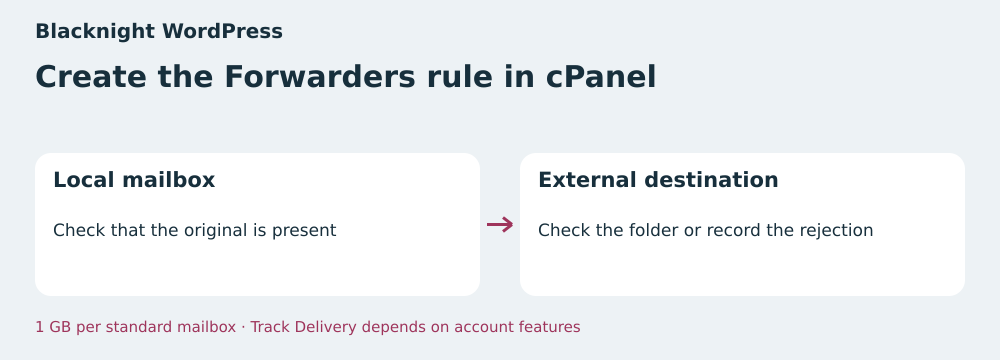
Blacknight describes creating forwarding in cPanel’s Forwarders section. On the test domain, first create an actual mailbox at the address that should receive messages. Configure forwarding for that address alone. The cPanel documentation states that an email account configured for forwarding keeps a copy. Open webmail and verify this behavior on the actual account, particularly if the address is an alias or email is managed on a separate platform.
If the panel exposes Track Delivery, search for the attempt by recipient and time. cPanel says the provider can enable or hide this screen. Ask support for the trace corresponding to the attempt if you cannot see it. Supply the UTC time, both test addresses and the identifier. For the final hop, compare this record with the external mailbox’s webmail or log that you can access.
A team planning to keep originals must plan to handle them and monitor the standard mailbox’s 1 GB quota. Measure available space before acceptance testing and open messages with their attachments through webmail. If the mailbox approaches its limit, check the price and terms of the capacity upgrade with Blacknight. The rollback plan must allow forwarding to be disabled while keeping the public address and original mailbox usable.
Locate the filter with Simply.com
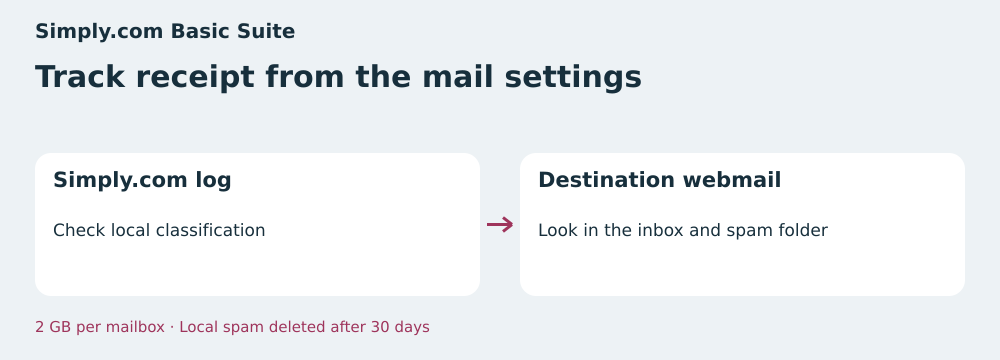
The Simply.com guide places forwarding in the email domain settings. It allows forwarding from an address with or without an account. For this acceptance test, use an actual mailbox and verify that a copy remains accessible there. Simply.com explicitly documents the SPF, DKIM and DMARC risks of external forwarding. The check covers a test address before applying the rule to the public address.
The antispam guide points to the panel’s email logs to explain placement and states that emails in the Spam folder are automatically deleted after thirty days. A message reported as delivered by Simply.com may have been moved by the email client. First open the receiving mailbox’s webmail to locate the message. If that mailbox belongs to a third party, its own logs and rules determine final visibility.
Basic Suite’s 2 GB per mailbox provides more room for the local copy than Blacknight’s standard quota. Still record actual usage. If you find a case in external spam, compare the headers issued by the destination and its placement rules. Avoid changing the association domain’s SPF to compensate for the route of a third-party sender whose domain and envelope you do not manage.
Replay the cases without touching a domain
The ZIP creates sixteen EML files in temporary folders and rereads the body and attachment using the Python library. It compares hashes before and after forwarding. SMTP codes, placement and SPF and DKIM results are acceptance-test data. The model applies strict alignment to these results. The script runs offline. Sending an email, verifying DKIM signatures, DNS lookups and delivery at a hosting provider are checked during real acceptance testing.
A direct test message reaches the external mailbox. In a second case, the relay’s SPF domain differs from From but an aligned DKIM signature allows DMARC to pass, and the message reaches the expected folder. In a third case, a footer changes the body and the supplied DKIM result is a failure. The destination rejects the message and the acceptance test finds the intact attachment in the local copy.
A fourth case has a positive DMARC result and ends up in spam. In the fifth, the only external evidence is a 250 code. The exercise leaves this case open. The report shows the identifier, code and hashes at every stage. It distinguishes a content change, observed placement and delivery for which final proof is missing.
- Download the ZIP from the article’s resources and extract it into an empty folder.
- With Python 3.10 or later, run python recette.py or py recette.py on Windows.
- Check that the report shows eleven passed checks for the five cases and sixteen EML files created and then deleted.
- Then repeat the check on test mailboxes you administer and record the delivery folder actually observed.
Find the first stage without evidence
When an inquiry disappears from the working mailbox, start by searching for the test message in the domain mailbox’s webmail. If you find it, keep the original and look for the forwarding attempt. If the log shows a temporary rejection, check the next attempt and its result before closing the incident. If the log shows a permanent rejection, send the exact code to the team managing the destination and handle the message from the local copy.
If the external server accepted the message and its webmail shows it in spam, the observed folder indicates where to intervene. Check that mailbox’s filters and rules with its administrator. If the copy is also missing from webmail, ask the external provider to trace the delivery identifier. A single record from the WordPress host may be insufficient when processing ends elsewhere.
If the test message is already missing from the domain mailbox’s webmail, look for the first leg’s result and envelope recipient. An alias pointing to another account, a full mailbox or a local placement rule changes the next diagnostic steps. Once the test message is found, keep the same identifier in the acceptance log to connect proof of receipt to the case followed by the team.
Decide who will read the local copy
If test messages succeed on both routes, record the folders, times and person responsible for checking the local copy during the transition. Set how long a missing reply can remain unhandled. For an urgent inquiry, a backup address is useful only if a person or authorized tool checks it within that period.
If forwarding fails for some senders, have the team process the domain mailbox directly or use authenticated retrieval of that mailbox by the processing tool, if supported. Check access rights, reading of the complete message and attachments. To handle a message already present locally, open the original and attach it to the tracking case. Avoid resending it unchanged through the rule that just failed.
Blacknight is suitable if the team can check the cPanel copy and has the necessary trace or assistance. Simply.com is suitable if its reception logs and Basic Suite quota meet the acceptance test’s needs. On both offers, close the migration when useful messages are visible where they will be handled and the fallback route has been opened and verified.
- Send a direct test message and one through the domain address.
- Find each test message in local webmail and the external mailbox.
- Compare the final hop’s authentication results and observed folder.
- Verify access to the original and attachment for each rejected case.
Further reading
Sources and references
Use these references to check the features, requirements and limitations described. Reading documentation is not a practical test.
View 16 references
- Blacknight Web Hosting for WordPress — Promotional first month excluding tax ↗ — Documentation consulted:
- Blacknight Web Hosting for WordPress — Annual price excluding tax ↗ — Documentation consulted:
- Blacknight Web Hosting for WordPress — Blacknight, terms of service ↗ — Documentation consulted:
- Blacknight Web Hosting for WordPress — Blacknight, cPanel forwarding ↗ — Documentation consulted:
- Blacknight Web Hosting for WordPress — cPanel, Forwarders ↗ — Documentation consulted:
- Blacknight Web Hosting for WordPress — cPanel, Track Delivery ↗ — Documentation consulted:
- Simply.com Basic Suite — First year excluding tax in the EUR pricing table ↗ — Documentation consulted:
- Simply.com Basic Suite — Simply.com, WordPress ↗ — Documentation consulted:
- Simply.com Basic Suite — Simply.com, terms ↗ — Documentation consulted:
- Simply.com Basic Suite — Simply.com, VAT ↗ — Documentation consulted:
- Simply.com Basic Suite — Simply.com, forwarding ↗ — Documentation consulted:
- Simply.com Basic Suite — Simply.com, antispam ↗ — Documentation consulted:
- RFC 9989, DMARC ↗ — Documentation consulted:
- RFC 7960, indirect email flows ↗ — Documentation consulted:
- RFC 8601, Authentication-Results ↗ — Documentation consulted:
- RFC 5321, SMTP ↗ — Documentation consulted:
Uses, prices and what to check
2 offers in detail
Compare the features you need and the terms of each offer. The order of these entries does not indicate a ranking.
Blacknight Web Hosting for WordPress
Editorial email-route diagram — BlogPasCher editorial illustration.Open full-size illustration ↗Best forA team that wants to read the local mailbox and trace forwarding from cPanel.
Irish WordPress plan with 1 GB mailboxes and cPanel forwarding.
Offer pricing
€0.99 excluding tax for the first month, then €14.99 excluding tax per month
Billing: Promotional monthly pricing card. €164.89 excluding tax on the displayed annual cycle.
Renewal and support: €14.99 excluding tax per month after the monthly promotion. Check service renewal.
Prices exclude tax. Applicable rate depends on the invoice.
Checked on .
Strengths
- 1 GB mailboxes with advertised capacity upgrades
- Forwarding documented in cPanel
- 100 GB disk space for the standard WordPress offer
What to consider
- Track Delivery may depend on account features
- Compare the monthly price list’s activation fees with the promotional card
- Check the forwarding result separately at the external recipient
Pricing terms and compatibility
Understanding the offer
- Price at the time of review
- €0.99 excluding tax for the first month, then €14.99 excluding tax per month
- Currency
- EUR
- Billing
- Promotional monthly pricing card. €164.89 excluding tax on the displayed annual cycle.
- Renewal and support
- €14.99 excluding tax per month after the monthly promotion. Check service renewal.
- Taxes and fees
- Prices exclude tax. Applicable rate depends on the invoice.
- Commitment and terms
- Choice of billing cycles. Confirm the activation fee waiver on the monthly card.
- Date checked
Compatibility and components
- WordPress
- cPanel
- IMAP and webmail
Simply.com Basic Suite
Editorial email-route diagram — BlogPasCher editorial illustration.Open full-size illustration ↗Best forA team that needs to check received email placement and retain local access.
Plan with 10 GB web storage, 2 GB per mailbox and a documented reception log.
Offer pricing
€5.88 excluding tax for the first year, then €83.88 excluding tax per year
Billing: Twelve months in advance under the terms.
Renewal and support: €83.88 excluding tax on renewal in the recorded EUR price list. Check the account’s price and currency.
Amount excludes tax in the recorded EUR context. VAT depends on the customer and country.
Checked on .
Strengths
- Two GB per mailbox and ten GB for the web
- Documented email antispam logs
- Domain-level forwarding rules
What to consider
- Check that the rule leaves an original in an actual mailbox
- Local spam is purged after thirty days
- The external destination’s filters remain separate
Pricing terms and compatibility
Understanding the offer
- Price at the time of review
- €5.88 excluding tax for the first year, then €83.88 excluding tax per year
- Currency
- EUR
- Billing
- Twelve months in advance under the terms.
- Renewal and support
- €83.88 excluding tax on renewal in the recorded EUR price list. Check the account’s price and currency.
- Taxes and fees
- Amount excludes tax in the recorded EUR context. VAT depends on the customer and country.
- Commitment and terms
- Twelve-month period. Check which extension method is enabled.
- Date checked
Compatibility and components
- WordPress
- Simply.com panel
- IMAP and webmail