

Choosing a transport based on the messages the site sends
A WordPress site sends reset links, form confirmations and order-related messages. These messages may come from the same account or several senders. Before choosing a plugin, identify the service that agrees to deliver each message to its recipient. The extension connects WordPress to the chosen transport. The provider then decides whether the message can be accepted, depending on the account, domain and volume.
WP Mail SMTP suits a team wanting to start with a wizard and establish a primary connection first. The Pro pricing table includes backup connections and Smart Routing, which selects a connection based on conditions. FluentSMTP offers multiple connections and routing by sender address free of charge. These are not identical rule engines. A single sender may need only one connection; a form and a shop that must follow separate paths require a more precise record of addresses.
Make a short list of messages with the component triggering each one, the expected sender address, reply address and transport. An order may need to come from commandes on the site’s domain, while a form uses contact. Different recipients do not necessarily mean two transports are required. If one provider accepts both senders and volumes are low, start with a single connection.
Define a result the team can check. A test visible in the inbox is only one step. The expected result also includes the sender address, reply handling, the behaviour of messages generated by plugins and returning to the previous configuration on failure. It must be possible to explain the chosen configuration to the next person managing the site.
- Inventory messages and senders.
- Choose a single connection if it covers the needs.
- Identify features that might justify a second route.
Compare before you choose
The offers at a glance
Find the use case and budget that fit, then read the details to see the limitations and any components you may need.
On smaller screens, the table scrolls horizontally. With a keyboard, press Tab to focus the table, then use the left and right arrow keys.
| Offer | Best for | Pricing and billing | Renewal and support |
|---|---|---|---|
 WP Mail SMTPRead the details | A team wanting a wizard followed by conditional rules if needed. | Free Lite. Pro at 49 USD for the first year, reference price 99 USD. Annual for Pro. Check taxes in the offering. | Renewal at full price according to the pricing table. |
 FluentSMTPRead the details | A site wanting to connect several senders to their transports. | Free plugin. Price the transport contract separately. No plugin subscription. | Terms for any paid plans were unavailable at the time of review. |
Preparing an environment that separates the site from email
On a protected copy, isolate scheduled messages and use only recipients whose inboxes the team controls. If the copy reuses a production licence or transport key, check how to prevent its messages or volume from mixing with those of the live site. Use a test connection or the simulation feature when it meets the test’s purpose. Simulation lets you check a local path. Checking receipt requires an inbox the test is authorised to contact.
Have the person responsible for the domain record the addresses the provider accepts for sending. From is the address the recipient sees as the sender. Reply-To is the address that receives a reply when the message specifies one. In a form, use a domain address authorised by the transport as the sender and consider the visitor’s address as the reply destination. The chosen service may require a specific address even if WordPress allows another to be entered.
If the provider requires DNS records, prepare the values according to its documentation. Have them checked against the settings already used for the same domain. An incorrectly changed authentication record can affect services beyond WordPress. Keep a record of the entries and people authorised to change them. Connection credentials remain in the designated secrets tool, out of screenshots and acceptance-test sheets.
Identify plugins already involved in WordPress sending. The aim is to put a single transport plugin in charge of the same flow. A newsletter extension may use its own channel. Test that channel separately if the site uses it. Before disabling an old transport on the copy, record the method used, forced addresses and test recipients.
- Prepare a test inbox and account.
- Check the senders authorised by the provider.
- Retain the current configuration and protect credentials.
Configuring a primary connection in WP Mail SMTP
Install WP Mail SMTP on the copy, then open WP Mail SMTP → Settings. Launch the wizard if starting without a configuration. Choose the service you actually use. For a provider supported by a dedicated connector, follow its authorisation screen. For a generic SMTP transport, use the provider’s documented settings, including server, port and protection method. Do not mix values from two services.
Enter the authorised sender address and its display name. Decide whether to force this address across the site. This option can correct a form selecting an incompatible sender, but it can also prevent another route that relies on a different address. Start with a single test page. Compare the sender intended by the component with the one in the received email. Check that replies reach the right place.
In WP Mail SMTP → Tools → Email Test, enter the test address and send a message. Then open the inbox. Compare receipt, sender and the plugin’s indications. The direct test bypasses the form or WooCommerce. Therefore, follow it with the workflow that triggers the message, such as a test submission or a reset for a synthetic account. If only this workflow fails, check triggering in its component before replacing the connection.
For a second provider in WP Mail SMTP Pro, create an additional connection, then check it with Email Test. For backup, open Settings → General → Backup Connection, select this connection and save. For a conditional route, open Settings → Smart Routing, enable the feature, choose a connection and a condition, then save. Documentary example: From Email Is commandes@example.test for the shop’s transport. Replace this example address with the authorised test sender. A direct connection test demonstrates neither application of this condition nor activation of backup.
- Configure the provider and authorised address.
- Send a test, then reproduce a WordPress trigger.
- Try the second connection before configuring a rule or backup.
Configuring connections and senders in FluentSMTP
On the other copy, activate FluentSMTP, then open the initial setup wizard. Choose a provider, save the connection and confirm its associated From address. In the plugin’s Settings screen, check the Active Email Connections list. Identify the route marked Default. According to the documented behaviour, it provides the path for messages that do not match an address associated with another connection.
For a different address, create the appropriate connection and specify its sender. Check that the originating component uses this address. FluentSMTP directs messages matching a connection’s own address to that connection; others go through Default. The documentation describes Fallback when Default fails. Therefore, do not promise that backup automatically takes over every explicit route. The three-dot menu allows Set as Default or Set as Fallback; a connection cannot hold both roles.
Use Send Test Email in the plugin bar, then check the recipient inbox. Next reproduce the real workflow with a test account. In Email Logs, correlate the time, sender and transport response. The documentation says Log Emails is enabled by default, with a retention period configurable in Delete Logs. Check the data actually retained before choosing the period or disabling logging. Email Simulation prevents delivery and marks simulated messages; this mode therefore provides no evidence of receipt.
To undo a setting, make the previous connection Default again and restore the selected address on the test page. Keep connections that are still needed until rollback is validated. According to the documentation, deleting a connection sends its senders back to Default, or causes failure if no connection remains. Repeat the form and shop workflows: changing a connection can affect several components.
- Create a primary connection, then a secondary one if necessary.
- Check the route for each address and the fallback behaviour.
- Restore the previous connection and repeat tests on rollback.
Interpreting test results and limiting duplicates
For each scenario, record the event, recipient, time, observed sender and received message. A form action that never called sending differs from a transport that rejected the message. The log may show an authentication, connection or address error. If the provider accepted the message but it did not arrive, consult the provider’s information and the inbox classification before adding another rule.
For backup, check what the plugin considers a failure. A success response from the primary provider followed by classification as spam does not necessarily trigger backup. An outage simulation must affect the copy and must not invalidate the live site’s access. Check that a message sent once arrives once. If duplication occurs, correlate the time and identifiers from the logs instead of repeating the send.
The two providers may impose different rules for the domain, name or replies. Test each sender that backup might take over. An address accepted on the first connection is not necessarily authorised on the second. If backup must use another address, document this change for the team and check replying from the test inbox.
Also check a form that should not email the visitor, such as an internal contact form without an acknowledgement. A routing rule is not intended to create a message that does not exist. The expected result comes from the business scenario. This check avoids attributing to the transport a difference caused by the component building the email.
- Compare triggering, transport and receipt.
- Test backup in an isolated environment.
- Find the source of a duplicate before resending.
Budgeting for the licence, transport and maintenance time
The WP Mail SMTP pricing table consulted November 4, 2026 lists Pro for one site at 49 USD for the first year, with 99 USD as the normal price and renewal at full price. If this rate remains unchanged, three years total 49 + 99 + 99 = 247 USD, excluding taxes and transport. This is a conditional projection, not a guaranteed price. FluentSMTP presents itself as entirely free, without a Pro edition. A dated commercial proposal is still needed before committing expenditure.
Email costs remain separate. A provider may charge by sends, accounts, volume or particular tracking options. For the reference site, first estimate ordinary messages over a month and a credible peak, such as after a campaign. Check whether transactional messages use the same quota as other sends. A free extension can be paired with paid transport, while a Pro licence does not replace the provider’s subscription.
Also compare the cost of two connections. Backup is useful if a second provider is already authorised and monitored. If it is never tested and its credentials expire, it does not deliver the expected result. Check the route with a test inbox after changing the domain or sender. Document the terms of the plan that includes additional connections and the conditional rule if the team needs them.
For a single-sender configuration, first try the free foundation with the chosen provider. For a wider configuration, compare licence cost and the ability to understand routes. The decisive criterion is that the right message leaves from the right sender and the team knows how to trace an error.
- Separate the licence, provider subscription and backup cost.
- Confirm the features included in the chosen offering.
- Plan a check after every sender change.
Comparing free limits and declared versions
For the need described, WP Mail SMTP Lite covers one connection and sending tests with the services available in this edition. Full email logging, backup and Smart Routing are in Pro. Some connectors are also paid: the official listing notably marks Amazon SES, Microsoft One-Click and Zoho Mail as Pro. Do not infer from a provider’s name appearing that all its authentication methods are free. Match the desired method, licence and account actually available.
In FluentSMTP, the official catalogue advertises multiple connections, sender-based routing, logs and backup free of charge. This addresses the simple case where contact and commandes use two different addresses. If the decision depends on the recipient, a header or the component producing the email, describe that rule before choosing: WP Mail SMTP’s Smart Routing documentation describes these conditions, whereas the FluentSMTP workflow selected here relies on the From address. Similar marketing vocabulary does not establish functional equivalence.
The WordPress.org listings archived November 3 and cross-checked November 4, 2026 declare WP Mail SMTP 4.10.3, minimum WordPress 5.5 and minimum PHP 7.4; FluentSMTP 2.4.1, minimum WordPress 6.5 and minimum PHP 7.4. Both display “tested up to” WordPress 7.1.4. These are publisher statements, not tests conducted for this comparison. They do not prove compatibility with your combination of form, shop, hosting and transport.
Record the pilot site’s versions before starting. On the copy, keep the same form and shop extensions as on the intended site, along with options that change the sender. Updating the plugin and changing providers simultaneously makes failures harder to interpret. Change only one setting at a time and record the expected result in the acceptance-test sheet. This text describes a protocol to perform; no message, authentication or practical test was carried out for this review.
- Match each feature to the edition providing it.
- Record WordPress, PHP and the pilot site’s components.
- Separate changing transport from updating the plugin.
Switching a flow while retaining a way back to the previous transport
Before switching, note the last reference send and keep the previous configuration in a protected location. Disable the competing transport plugin for the same flow using the method validated on the copy. Apply the primary connection, then check a representative site message. Check the provider and inbox before enabling additional rules. If the site handles several components, repeat each workflow in a known order.
On failure, suspend the change and restore the previous transport. Note which messages were sent during the test before resending them. An order or reset request may have been transmitted despite a tracking error. The decision to resend must rely on the transport trace and the message context. Do not resend all emails from the period in bulk.
Keep an operations sheet with authorised addresses, the primary and backup routes, tested components and log locations. The team can then check one rule at a time. If the provider changes, compare the domain, sender and reply handling before removing old access. This preparation makes the next migration as verifiable as the first.
- Validate one flow before expanding routes.
- Reconcile sends before any recovery.
- Keep a configuration sheet the team can use.
Checking the reply address after changing the sender
On the copy, have the form filled in with a test address different from the sender address. Once the message arrives, use the inbox’s Reply command. Check the proposed address before confirming. If it is the shop inbox while the team expects a reply to the visitor, open the form’s notification settings and check its Reply-To field. Keep the provider-authorised address in From. The two values can differ.
Repeat the check from the order message. In this second scenario, replies may need to reach the service responsible for follow-up. A general rule forcing the sender may be desirable to retain the validated domain, while the form and shop can keep different reply addresses. Compare both messages after enabling a backup route. If a provider rewrites the fields, note what changes and decide whether backup can handle this flow.
In the acceptance-test record, note the component setting From, the one setting Reply-To and the connection sending the message. If a user later reports that replies reach the wrong inbox, you will know which setting to check before touching the licence or DNS. This separation is particularly useful when a forms plugin and a shop service share the same WordPress installation.
- Compare replies to a form message and an order message.
- Identify the component setting each address.
- Check both addresses after changing transport.
Restoring only the settings of the flow that regressed
Consider a shop whose form works after the switch but whose order confirmations use the wrong sender. Stop adding new rules. Retain the demonstration order’s identifier, time and transport trace. First compare the From field built by the shop, the option forcing the sender and the routing condition. Restore the previously recorded value for this flow alone. A full database rollback could erase orders or changes received in the meantime without explaining the regression.
If the failure affects all messages, return to the old transport plugin using the workflow rehearsed on the copy: disable the new transport, reactivate the old one, restore its known connection and check a test followed by an actual demonstration trigger. Keep the new plugin’s settings for analysis rather than immediately uninstalling it. The provider credentials must still be valid; deleting a key before acceptance testing finishes can make the planned rollback impossible.
The final check covers two positive cases and one negative case. The form must reach the internal inbox with replies directed to the test address; the order must arrive only once with its intended sender; a message not matching the rule must remain on the primary or default connection. Record observations only once these tests have been performed. For a message already accepted by the provider, decide whether to resend case by case, taking account of its validity and business effect.
- Restore the identified rule, sender or connection.
- Preserve orders and data received during the switch.
- Validate both flows and the no-match case before closing the incident.
Further reading
Sources and references
Use these references to check the features, requirements and limitations described. Reading documentation is not a practical test.
View 10 references
- WP Mail SMTP pricing ↗ — Documentation consulted:
- WP Mail SMTP wizard ↗ — Documentation consulted:
- WP Mail SMTP sending test ↗ — Documentation consulted:
- WP Mail SMTP backup ↗ — Documentation consulted:
- WP Mail SMTP routing ↗ — Documentation consulted:
- FluentSMTP installation ↗ — Documentation consulted:
- FluentSMTP settings ↗ — Documentation consulted:
- FluentSMTP transport ↗ — Documentation consulted:
- WP Mail SMTP — listing and compatibility ↗ — Documentation consulted:
- FluentSMTP — listing and compatibility ↗ — Documentation consulted:
Uses, prices and what to check
2 offers in detail
Compare the features you need and the terms of each offer. The order of these entries does not indicate a ranking.
WP Mail SMTP
 Vendor image
Best forA team wanting a wizard followed by conditional rules if needed.
WP Mail SMTP guides connection setup and provides a test-sending screen. Start with the selected provider and check a message actually triggered by the site. If the team needs multiple connections, check the licence including backup and conditional rules before defining the route.
Offer pricing
Free Lite. Pro at 49 USD for the first year, reference price 99 USD.
Billing: Annual for Pro.
Renewal and support: Renewal at full price according to the pricing table.
Check taxes in the offering.
Checked on .
Strengths
- Wizard and sending test in Lite.
- Backup and conditional rules included in Pro according to the November 4, 2026 pricing table.
What to consider
- Pro licence required for backup, Smart Routing and full email logging.
- Some connectors are restricted to Pro; transport, quotas and taxes remain separate.
Pricing terms and compatibility
Understanding the offer
- Price at the time of review
- Free Lite. Pro at 49 USD for the first year, reference price 99 USD.
- Currency
- USD
- Billing
- Annual for Pro.
- Renewal and support
- Renewal at full price according to the pricing table.
- Taxes and fees
- Check taxes in the offering.
- Commitment and terms
- One site for Pro in the record.
- Date checked
Compatibility and components
- WordPress.org declaration as of November 4, 2026: plugin 4.10.3, WordPress ≥ 5.5, PHP ≥ 7.4, tested up to WordPress 7.1.4.
- Publisher metadata, without a practical test of the site’s combination of WordPress, PHP and extensions.
FluentSMTP
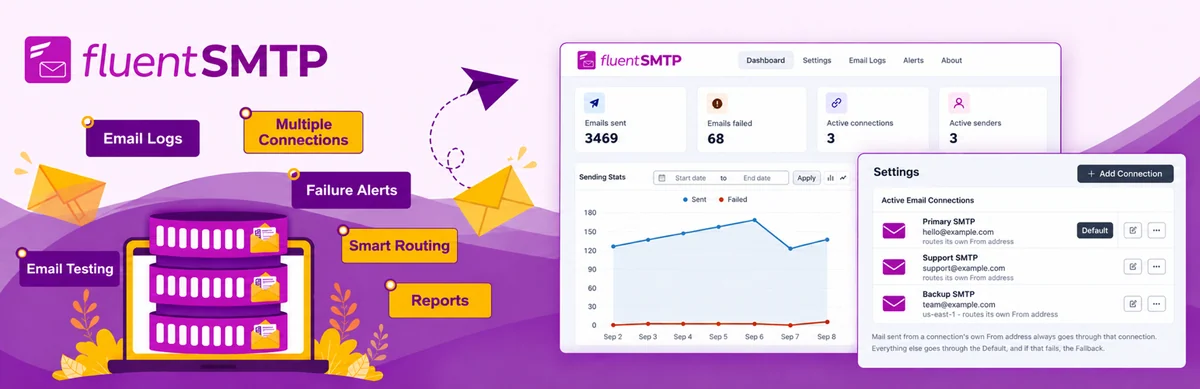 Official FluentSMTP presentation; claims, figures, reviews and any promotions belong to the developer, with no test by our editorial team.
Best forA site wanting to connect several senders to their transports.
FluentSMTP connects multiple sender addresses to their connections within a free foundation. Its model prioritises the From address, then Default for other messages. The documented fallback concerns failure of Default. Separately check each sender, the inbox result and traces before entrusting it with shop messages.
Offer pricing
Free plugin. Price the transport contract separately.
Billing: No plugin subscription.
Checked on .
Strengths
- Multiple connections, logs and sender-based routes in the free foundation.
What to consider
- Fallback is documented for Default failure; coverage of explicit routes must be tested separately.
- No guarantee of final receipt or general equivalence with Smart Routing conditions.
Pricing terms and compatibility
Understanding the offer
- Price at the time of review
- Free plugin. Price the transport contract separately.
- Currency
- Unspecified. Confirm for the offer you choose.
- Billing
- No plugin subscription.
- Renewal and support
- Unspecified. Confirm for the offer you choose.
- Taxes and fees
- Unspecified. Confirm for the offer you choose.
- Commitment and terms
- Quotas and fees depend on the provider.
- Date checked
Compatibility and components
- WordPress.org declaration as of November 4, 2026: plugin 2.4.1, WordPress ≥ 6.5, PHP ≥ 7.4, tested up to WordPress 7.1.4.
- Publisher metadata, without a practical test of the site’s combination of WordPress, PHP and extensions.