

When the received theme has the right size and the wrong content
Proof of transfer comes from comparing approved and received files, not from the host’s name. alwaysdata and PlanetHoster are compared here for site and directory access. If the existing account already allows this reading, first correct the transfer rule that left the old version on the target.
You have approved a new child-theme version in a staging environment. You then send the modified files to the site that will take over. The transfer client finishes without error. Yet on the staging page, the team still sees the old button color. Before clearing caches or changing theme settings, download the target’s style.css file and compare its hash with the approved file’s hash. If the hashes differ, you have a disk discrepancy to correct before resuming browser-side checks.
Changing #123456 to #654321 preserves file length. If the modification date is also identical, for example because two exports retain the same timestamp, an incremental transfer comparing those two metadata values may miss the difference. The file is present in the correct directory. A change to another theme file may even have transferred in the same operation, leaving a mixture of versions on the target.
The choice between alwaysdata and PlanetHoster here concerns how to find the correct site, authorize access to the right directory, and reread what it received. Both providers document SFTP access. Integrity evidence comes from your approved version and reading remote files. A transfer, page preview, and integrity check therefore each have a result to record separately.
Compare before you choose
The offers at a glance
Find the use case and budget that fit, then read the details to see the limitations and any components you may need.
On smaller screens, the table scrolls horizontally. With a keyboard, press Tab to focus the table, then use the left and right arrow keys.
| Offer | Best for | Pricing and billing | Renewal and support |
|---|---|---|---|
 alwaysdata Cloud Public Plus SmallRead the details | A team that knows its sites’ WordPress roots and wants a monthly option. | €5/month excluding VAT with annual billing or €6/month excluding VAT with monthly billing Annual or monthly Prices exclude VAT | Check the period and rate in the account |
 PlanetHoster The World, pack of ten Standard Web ProjectsRead the details | A team wanting to record theme checks by project. | €5.49/month introductory price over 24 months for the pack 24-month cycle for the quoted introductory rate Prices include tax according to PlanetHoster’s terms. Check the cart total for France. | Automatic by default. Record the amount and due date at checkout. |
Two commercial scopes to compare as of November 11, 2026
At alwaysdata, Public Cloud Plus Small is listed at €5 excluding VAT per month with annual billing, or €60 excluding VAT for twelve months. With monthly billing, the table lists €6 excluding VAT per month, or €72 excluding VAT if the same rate applies for twelve months. It also lists 50 GB for the account and resources of 1 GB RAM and 1 CPU for Small. Account storage serves several uses. Before choosing this level, count the site files, databases, and emails actually taking up space there, along with files you plan to retain for staging.
At PlanetHoster, The World presents, as of November 11, an introductory rate of €5.49 per month over a 24-month cycle for the pack of ten Standard Web Projects. The equivalent over that cycle is €131.76, calculated from the displayed rate. PlanetHoster’s terms state that prices include all taxes. For an order intended for France, check the total including tax, payment schedule, and renewal price at checkout. The plan details list 10 GB NVMe/SSD per Standard project and present N0C object storage separately. To size staging, count the WordPress directory and theme against the relevant project’s disk.
The amounts use different bases: an account with a choice of billing duration at alwaysdata, and a two-year pack at an introductory price at PlanetHoster. Record the first-cycle total, renewal price, and tax treatment in the same cart before calculating a per-site cost. The comparison remains useful if you use only one project from the pack: then note the total cost committed and the location where you will check files. PlanetHoster’s terms provide for automatic renewal by default and require disabling it no later than 30 days before expiry if you wish to stop the service. At alwaysdata, consult the approved contract version under Subscriptions → Contracts.
Freeze the approved version before starting the copy
Create a release directory for the child theme under a version identifier the team can find. Use the atelier-enfant directory as the root and record every relative path with its SHA-256 hash in a manifest file kept beside the approved archive. style.css and assets/menu.js must have those same paths when reread on the target. If you start inventory at the WordPress root on one server and the theme root on the other, you will get path discrepancies even with identical files.
The approved directory may contain CSS, scripts, PHP templates, or compiled assets. If your procedure builds files from sources, inventory them after building and transfer the approved results. For a child theme, also identify the parent-theme directory declared by the Template field in the style.css header. Check that the required parent is present on the target and that its version has been validated there. Place this check alongside the manifest: the parent theme has its own scope.
For a transfer limited to the theme, identify WordPress files remaining under the destination environment’s responsibility. wp-config.php, plugins, uploads, and the database each have their own production deployment cycle. Keep a copy of the theme version already working on the target and associate a separate manifest with it. If you need to roll back, you can verify restored files using the same process, including files the new version may have added.
- Identify the active-theme directory and expected parent-theme version.
- Keep the approved archive and its relative-path manifest together.
- Capture the theme version working on the target before any writing.
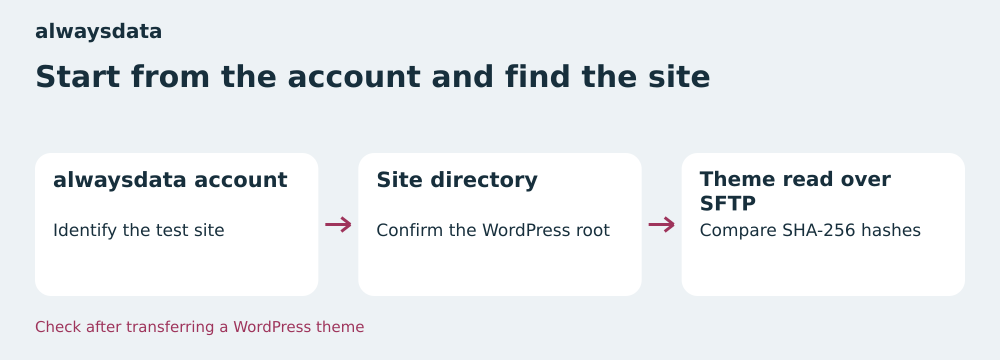
At alwaysdata, connect the SFTP account to the site directory
In alwaysdata administration, first open the staging site configuration and record the directory it points to. Under Remote Access → SSH/SFTP, obtain the authorized username and server-key fingerprint. The documentation specifies a host in the form ssh-[compte].alwaysdata.net and port 22. Once connected, trace back from wp-content/themes to the root recorded in administration to verify that you are in the intended site. Several sites within an account may contain a theme with the same name.
For SSH, the documentation states that users can access the entire account even if their starting directory is lower down. The SFTP-only shell option enforces documented isolation. Using the intended username, check which directories are actually visible. For work limited to staging, it must be possible to read the theme with this same access. If you have only SFTP, download the received directory into an empty local directory and calculate hashes on that copy.
If several alwaysdata sites share the same release, make a record per site and theme path. Validation on the first site does not describe the second site’s state. Keep a line with the account identifier, verified root, approved version, and result. Other paths visible in the SFTP session remain outside the operation.
At PlanetHoster, identify the project before the theme directory
In the PlanetHoster Client Area, open the staging Web Project details. The SFTP/SSH access section displays the server name, username, and port. The documentation specifies port 5022 for The World on N0C. Match the staging domain, selected project, and WordPress installation path. If several projects reuse the same child theme, the presence of atelier-enfant alone does not confirm the project. Record these three pieces of information together so the person reviewing the operation can find the same directory.
The pack’s value for a team managing several sites lies in its division into Web Projects. A transfer result can be associated with a specific project, with connection details found in its record. In return, the record must be repeated for each project where the theme is deployed. A report covering one staging URL is insufficient to sign off the whole pack, even if every project starts from the same archive.
In both interfaces, the panel helps locate access and the correct directory. If your team has an SSH session and hashing tools, it can produce an inventory directly in that directory. Availability of rsync and sha256sum depends on the session used. Check commands before including them in the procedure. With SFTP access alone, rereading into a fresh local directory allows the same reconciliation of downloaded bytes.
Distinguish pre-transfer selection from post-transfer proof
If you use rsync, its manual states that the usual quick check relies on size and modification time. The --checksum option asks it to compare checksums before selecting files to transfer. A simulation with --dry-run --itemize-changes --checksum makes this choice visible before any writing. Allow time to read files on both sides if the directory is large. Limit the check to the theme directory and explicitly state the transfer direction.
With an SFTP client, check the mode used during synchronization or when a file of the same name exists. If the chosen mode skips files with the same size and date, explicitly replace paths flagged by the manifest. Then repeat the remote-directory inventory. Downloading into a local directory already containing files can reintroduce a filter or conceal a deletion. Therefore start rereading into a new directory, then calculate a recursive inventory including hidden files if they belong to the approved version.
The publication manifest enables another check: does content reread on the target still match the approved version? If you regenerate it after a source change, the comparison may approve a version the team never signed off. Keep the first manifest with the release. Compare the upload directory against that manifest before transfer, then the target after the final write. If deployment preparation produces variable files in place, define when the theme becomes verifiable and have the scope approved before restarting the copy.
- In PowerShell, from each of the two theme directories, run
Get-FileHash -LiteralPath ./style.css -Algorithm SHA256. Compare theHashcolumn. To sign off the release, apply the check to every path in the manifest.
Handle every discrepancy and check rollback
Classify discrepancies by path: missing file, different hash, or extra file. Restore a missing file from the approved archive. For a different hash, first compare the upload file with the archive, then replace the affected file on the target. For an extra path, check whether the theme still references it or it results from local generation. In the latter case, determine whether its location should change or its presence belongs to an approved, documented scope. Once a file is confirmed obsolete, back it up outside the served tree before removing it and repeat the inventory.
Plan for requests to arrive while files are being replaced. On private staging, you can check the final version after the operation. For production, use the procedure validated by your team, such as a maintenance window or a previously tested directory switch where the environment allows it. Account for permissions and the path WordPress reads. If a copy stops after the first file, resume from the frozen manifest and reread the entire theme. The transfer log indicates what the client attempted, while the inventory gives the resulting state.
If you choose to roll back, restore the saved version with its own manifest. In particular, check that a file added in the new version has disappeared from the restored scope. Then open a page using the theme and check the functions that prompted the change. For CSS, also check the network response actually consumed by the browser. If the disk file is correct but the old color remains, inspect the loaded stylesheet’s URL, version, and cache layers before copying again.
- Compare the target with the manifest and record every differing path.
- Correct files from the approved version and record the decision on extra files.
- Repeat verification across the whole theme and check a representative page.
What the local acceptance test repeated on November 11 shows
The attached exercise creates two fictional WordPress directory trees and performs real file copies with Python. Both versions of style.css have the same size and timestamp. On the first pass, assets/aide.css, absent from the target, is added, and assets/menu.js, whose size changed, is updated. The filter leaves style.css in place. The SHA-256 comparison flags this file as different and also identifies obsolete.css, which belongs to the previous version.
The script then forces a copy of style.css. It rereads the tree and finds that the extra file remains. After setting that specific file aside, the target matches the manifest. The script then alters the source while keeping the same metadata. The target remains compliant with the approved version and the source fails the check, blocking its reuse for a new deployment. Finally, the test restores the previous version from its backup, checks its inventory, and compares the fictional configuration file with its initial state.
The nine checks succeeded with Python 3.14.4 from the extracted archive. The ZIP contains the script and instructions. Its report shows the two different style.css hashes and paths recorded at each stage. The size/date filter is modeled in Python. Copying and rereading operations took place on local disk. Connections to the two plans are based on their public documentation.
- Extract the ZIP and run
python recette.pyfrom the extracted directory. - Compare
apres_transfert,apres_reprise_css, andapres_mise_a_partin the JSON report. - Check the source-drift and rollback fields before adapting the exercise to an authorized staging environment.
Choose according to how the team operates its sites
Choose the alwaysdata Plus Small scope if you want to manage staging within an account and its resources cover the sites, databases, and other uses you place there. For the receipt procedure, note the directory configured for each site and choose SFTP access appropriate to the people involved. Monthly billing provides a priced starting point for short-term staging. If the account also hosts production sites, confirm visible paths and permissions from the intended access before issuing transfer instructions.
Examine PlanetHoster The World if your team wants to organize tracking by Web Project. The pack of ten Standard projects is useful if you have planned uses for several projects and the per-project disk suits your installations. Compare the introductory rate with your usage duration and have this pack’s renewal cost confirmed. In the staging report, associate each project with a domain, WordPress directory, and inventory result. For a single site, compare the whole pack’s cost with the configuration you need.
To approve a transfer, require the same evidence in both cases: a manifest signed or archived with the version, identification of the directory actually reread, and a record with no missing, different, or extra files. Add the result of a page check, then keep the identifier of the verified previous version. Another person can then repeat the steps from the same approved file, even if the transfer client, panel, or host changes.
Further reading
Sources and references
Use these references to check the features, requirements and limitations described. Reading documentation is not a practical test.
View 11 references
- alwaysdata Cloud Public Plus Small — Small package annual and monthly prices ↗ — Documentation consulted:
- alwaysdata Cloud Public Plus Small — SFTP access and port ↗ — Documentation consulted:
- alwaysdata Cloud Public Plus Small — Billing and access to contracts ↗ — Documentation consulted:
- PlanetHoster The World, ten Standard Web Projects — Standard package introductory price and scope ↗ — Documentation consulted:
- PlanetHoster The World, ten Standard Web Projects — Tax-inclusive pricing and renewal ↗ — Documentation consulted:
- PlanetHoster The World, ten Standard Web Projects — SFTP and SSH access per Web Project ↗ — Documentation consulted:
- alwaysdata, Public Cloud Plus plan ↗ — Documentation consulted:
- alwaysdata, SSH access ↗ — Documentation consulted:
- PlanetHoster, Web Project details ↗ — Documentation consulted:
- rsync, manual and file selection ↗ — Documentation consulted:
- WordPress, child themes ↗ — Documentation consulted:
Uses, prices and what to check
2 offers in detail
Compare the features you need and the terms of each offer. The order of these entries does not indicate a ranking.
alwaysdata Cloud Public Plus Small
 Start from the account and find the site — BlogPasCher editorial illustration.Open full-size illustration ↗
Best forA team that knows its sites’ WordPress roots and wants a monthly option.
Transfer management by account and site directory.
Offer pricing
€5/month excluding VAT with annual billing or €6/month excluding VAT with monthly billing
Billing: Annual or monthly
Renewal and support: Check the period and rate in the account
Prices exclude VAT
Checked on .
Strengths
- SSH/SFTP documented
- Two priced billing cycles
What to consider
- 50 GB at account level
- SSH users can access the entire account
Pricing terms and compatibility
Understanding the offer
- Price at the time of review
- €5/month excluding VAT with annual billing or €6/month excluding VAT with monthly billing
- Currency
- EUR
- Billing
- Annual or monthly
- Renewal and support
- Check the period and rate in the account
- Taxes and fees
- Prices exclude VAT
- Commitment and terms
- According to the selected cycle
- Date checked
Compatibility and components
- WordPress
- SFTP
- SSH
PlanetHoster The World, pack of ten Standard Web Projects
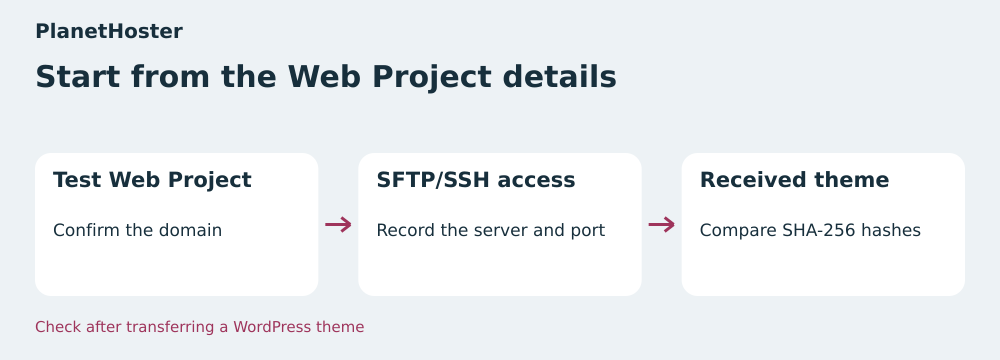 Start from the Web Project profile — BlogPasCher editorial illustration.Open full-size illustration ↗
Best forA team wanting to record theme checks by project.
SFTP/SSH access and transfer tracking from each Web Project.
Offer pricing
€5.49/month introductory price over 24 months for the pack
Billing: 24-month cycle for the quoted introductory rate
Renewal and support: Automatic by default. Record the amount and due date at checkout.
Prices include tax according to PlanetHoster’s terms. Check the cart total for France.
Checked on .
Strengths
- Each Web Project’s access details in its record
- Staging directory identifiable by project
What to consider
- 10 GB NVMe/SSD per Standard project
- Quoted rate for the pack over 24 months
Pricing terms and compatibility
Understanding the offer
- Price at the time of review
- €5.49/month introductory price over 24 months for the pack
- Currency
- EUR
- Billing
- 24-month cycle for the quoted introductory rate
- Renewal and support
- Automatic by default. Record the amount and due date at checkout.
- Taxes and fees
- Prices include tax according to PlanetHoster’s terms. Check the cart total for France.
- Commitment and terms
- 24 months at the quoted introductory rate
- Date checked
Compatibility and components
- WordPress
- SFTP
- SSH on The World N0C