Web hosting
1984 Hosting for WordPress in Iceland: pricing and backups
1984 Hosting’s WordPress plans in Iceland, initial and renewal terms, migration, the Security Pack and backup limitations.
Read more →

Site appearance
Web hosting
SiteGround WordPress plans combine Site Tools, backups and an AI agent. GrowBig adds staging and included manual backups.
Source published: · Source updated: · Editorial policy
Visit the official SiteGround website ↗
This profile is based on published offers and documentation. No new hosting benchmark or support test was performed for this translation.
Prices retain the market, currency and billing period described in the French source. Translation does not update a commercial quote. Confirm the final price, taxes and options before ordering.
| Plan | Price and billing | Resources and limits |
|---|---|---|
| StartUp | €1.99/month excluding VAT equivalent over 12 months, or €23.88 excluding VAT prepaid. Renewal: €15.99/month excluding VAT displayed over 12 months, or €191.88 excluding VAT at the recorded rate. Early Black Friday offer, French pricing of November 10, 2026. Tax-inclusive prices and options to check before ordering. | 1 site, 10 GB; SSL, CDN, email and daily backups. No staging or five included manual backup slots. |
| GrowBig | €3.99/month excluding VAT equivalent over 12 months, or €47.88 excluding VAT prepaid. Renewal: €27.99/month excluding VAT displayed over 12 months, or €335.88 excluding VAT at the recorded rate. Early Black Friday offer, French pricing of November 10, 2026. Tax-inclusive prices and options to check before ordering. | Unlimited sites advertised, 50 GB, staging, on-demand backups. Shared resources and finite storage; technical staging limits. |
| GoGeek | €5.99/month excluding VAT equivalent over 12 months, or €71.88 excluding VAT prepaid. Renewal: €39.99/month excluding VAT displayed over 12 months, or €479.88 excluding VAT at the recorded rate. Early Black Friday offer, French pricing of November 10, 2026. Tax-inclusive prices and options to check before ordering. | 100 GB, staging with Git, white-label client access, priority support. Shared resources and staging limits. Resolution time to confirm depending on the request. |
SiteGround particularly targets people wanting to manage WordPress with a coherent hosting panel without administering a server themselves. Its value is not limited to installing software. Backups, technical settings, collaborator access and, depending on the plan, a working copy help organize the site’s life after launch.
A personal blog, service site and store nevertheless do not justify the same subscription. The first may mainly seek predictable costs. The second may save time with a preparation environment. The store must examine checkout operations, available resources and how to restore data. A plan name alone does not answer those questions.
This presentation combines documents initially recorded on November 2, 2026 with targeted checks of offers and procedures on November 10. It presents neither a load test, purchase nor availability measurement performed by our team. Assessments concern the fit between documented features and a concrete use.
The observed WordPress range includes StartUp, GrowBig and GoGeek. StartUp accepts one site and advertises 10 GB storage. GrowBig provides 50 GB and several sites, with an unlimited-site commercial label. GoGeek increases storage to 100 GB and adds features particularly aimed at professionals.
All three include routine operating components: SSL certificate, email, CDN and daily backups. GrowBig is the first tier combining included manual backups and WordPress staging. GoGeek notably adds Git in the staging workflow, white-label client access and priority support.
A useful choice starts from an operation actually needed. If you never prepare changes on a copy, staging has little immediate value. If preparing major changes to a store, an isolated copy becomes useful; real payments and sending must be disabled before tests. Upgrading for an identified feature is more defensible than paying for a list of benefits nobody will use.
During the November 10, 2026 check, the French storefront displayed an early Black Friday offer: StartUp at €1.99 excluding VAT per month, GrowBig at €3.99 and GoGeek at €5.99. Twelve months are prepaid. For hosting alone, calculated first-cycle totals are €23.88, €47.88 and €71.88 excluding VAT. Check taxes and options according to the holder before confirming.
The same table displays renewal at €15.99, €27.99 and €39.99 excluding VAT per month over twelve months. At recorded rates, that represents €191.88, €335.88 and €479.88 excluding VAT respectively. Pricing documentation also presents other terms with different monthly rates. Help advertises automatic annual renewal for shared plans, with an option to prepay two years. Record the cycle and charge date specific to the account.
The international storefront recorded separately on November 2, 2026 displayed promotional monthly rates of 1.99, 3.99 and 5.99 USD over twelve months and 17.99, 29.99 and 44.99 USD for renewal over the same term. That record concerns another table. To compare two offers, keep the same market and term, then add domain and options at their own due dates. The free domain on the French storefront is subject to eligible extensions and the advertised duration.
An unlimited advertised site count does not turn GrowBig or GoGeek into an uncapped server. Files, databases and preparation copies occupy finite storage. Simultaneous activity also consumes resources. A cached static page and a complex store search do not impose the same load.
To prepare your choice, record actual installation volume, database size, busy periods and important automated tasks. A newsletter bringing many readers at once may be more demanding than regular visits spread across the day. Visit estimates in sales advice are not guaranteed capacity for your application.
Request an explanation of limits for the selected account if your site has a large catalog, members’ areas or extensive background processing. A more expensive plan does not replace analysis of a plugin making costly queries.
SiteGround uses its Site Tools panel. It is separate from WordPress administration: the former manages hosting, files, databases and technical services; the latter remains the editorial interface for writing posts and managing plugins. This separation is useful when a problem prevents opening WordPress itself.
The commercial website, customer area and Site Tools have French versions. Support can also communicate in French, but some exchanges use automatic translation. Documentation describes a translation indication and the ability to retrieve the original message. Distinguish this language availability from a guarantee of a native French-speaking contact.
For a technical request, write short sentences, provide the affected page address and keep the exact error text. A setting name, file path or server message should not be rephrased until its meaning is lost. This method reduces misunderstandings with or without translation.
Advertised support operates continuously, with priority for GoGeek. This does not mean every request will be resolved within the same time, or that custom theme creation is included. Support scope distinguishes hosting tools from work involving site development.
Managed WordPress installations and updates provide real convenience. However, they do not remove responsibility for checking a form, payment or registration journey after a change. A commercial plugin may also depend on a license held with its own publisher.
Before buying, describe your need with a precise example: “my plugin produces an error after the PHP update” leads to a more useful discussion than “will my site be supported?” For a business, also identify who can work on code if the incident exceeds the host’s scope.
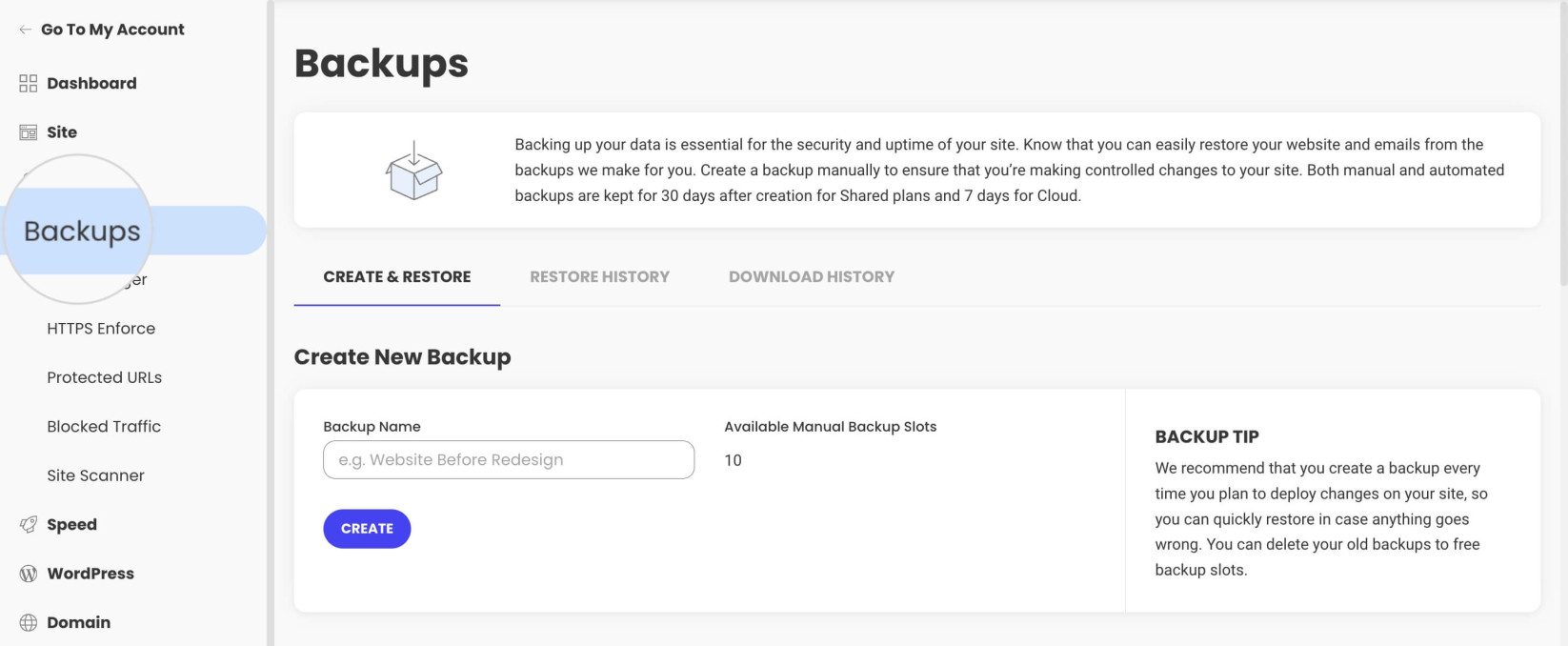 Backups in Site Tools: this example displays ten manual slots, depending on the plan and backup option. — Image: SiteGround.Open full-size screenshot ↗
On shared hosting, documentation advertises up to thirty daily backups available. GrowBig and GoGeek also have five manual backup slots. This distinction matters before intervention: waiting for the next daily copy does not necessarily provide a state immediately before your change.
Restoration can cover files, databases or email depending on the scope offered under Site Tools, Security, then Backups. Choose the smallest scope that resolves the problem. Returning an entire database to an older date may delete orders or comments received since. Before the operation, also keep a usable current state to recover recent data. Daily points are accessible in the corresponding tab. Open the selected point’s action menu and check scope before confirming. Documentation states that the tool cannot preview a version before restoring it.
Direct archive downloading through the backup tool belongs to Premium Backup, a separate option. Without it, documentation explains manual file and database export. For an independent copy, retain both parts together with their date in a private location outside the hosting account.
GrowBig and GoGeek staging creates a WordPress copy for preparing changes. It opens from Site Tools, under WordPress, then Staging. This is a useful option for checking a theme, plugin or site change before showing visitors.
Full deployment replaces production files and database with those from the copy. It does not automatically merge new orders with an old test database. Custom deployment allows choosing items, but table selection requires understanding affected data and dependencies.
Deployment must be preceded by a current backup and followed by checking forms, logins and recent data. Creation documentation also imposes size, free-space and table-count conditions; WordPress Multisite is unsupported. Creation and deployment guides now specify a database under 5 GB and fewer than 500 tables, more than 51% free space and more than 20% free inodes. They advertise up to ten environments per account and fifteen daily operations. Check these conditions for the site before relying on staging for deployment.
SiteGround supplies WordPress security and optimization tools alongside its hosting services. Certificates, cache and CDN contribute to site operation. They do not automatically make every plugin safe, image lightweight or page fast on a phone.
The right method is to check already active features before adding a second pursuing the same goal. Two systems simultaneously modifying JavaScript files or cache rules can complicate diagnosis. A cart, logged-in area and form must remain functional after any settings change.
We do not repeat commercial gains as results obtained on your site. Relevant measurement compares your pages under consistent conditions before and after an isolated change. For security, keep individual accounts, appropriate permissions and an access-removal procedure when a provider leaves the project.
The SiteGround WordPress migrator provides a free automated method. It transfers an existing installation into the destination account using a token. The source site must be accessible and compatible with the documented workflow; a local environment or complete Multisite network is not handled like ordinary WordPress.
The storefront advertises a free transfer for a limited time and the European commercial FAQ presents a first migration performed by its team as free. The help base classifies standard manual transfer as paid. Clarify the applicable offer, eligible site count and team scope. For an active site, agree on the switching window and how new data will be recovered.
Transferring site files does not automatically transfer domain registration, all mailboxes or all external services. Before changing DNS, check the copied site, forms and message receipt. Keep old hosting active during validation and prepare a return to it if needed.
The official data center list includes Paris and several European, American and Asian locations. For a mainly French readership, the option to select Paris deserves examination when opening the site. The most relevant location nevertheless depends on visitors, application processing and external services used.
Separate this technical location from company identity and offices. An international operator may offer a French server without becoming a French company. Likewise, the primary server’s country alone does not reveal where every copy, support message or CDN-distributed item passes.
Documentation locates Paris server backups in Madrid. Choosing Paris therefore does not mean keeping every copy in France.
If your project requires a precise location, request confirmation covering the server, backups and enabled services. Read the data processing agreement applicable to the account. Choosing a city is useful information but alone does not legally validate the project.
AI Agent for WordPress connects to AI Studio through a plugin and can act on site elements. Documentation notably describes content, plugins, users and certain WooCommerce operations. Its role therefore goes beyond a simple tool proposing a paragraph to copy.
For hosting customers, the included AI Studio Essential plan is documented with twenty thousand monthly tokens. The standalone agent trial, advertised on its own page with twenty thousand starting tokens, follows a different commercial route. This volume does not correspond to a fixed page or request count: consumption varies with instructions and requested work. Check the allocated quota in AI Studio’s usage section. Operations may consume tokens at every step and higher plans have their own pricing.
The connection notably requires an HTTPS-accessible site. High-impact operations require Power Mode, disabled by default. Activation is site-specific and persists until manually disabled. The agent supports standalone WordPress installations. Before authorizing deletion or a broad modification, have a recent backup and verify the requested scope. An agent response does not replace checking the actual result.
AI Studio is a collection of tools and agents. The WordPress-connected agent acts on a WordPress installation. SiteGround Website Builder and Coderick AI represent other creation workflows. A demonstration in one does not prove the same feature exists in the others.
This distinction matters when preparing to leave hosting. A conventional WordPress site retains its files, database and plugin dependencies. A project made with another builder may have different export terms. Ask for the procedure applicable to the actual product chosen before building the entire site in that environment.
For an editorial project intended to evolve with several providers, identify from the start who owns the domain, licenses and administrator access. Also keep original images and text in an independent space. AI in the offering replaces neither this organization nor a strategy for preserving work.
You can leave WordPress hosting with files and database, but transfer must be organized before account deletion. SiteGround states that backups associated with a deleted site cease to be accessible. An independent copy is therefore more useful before cancellation than attempted recovery afterward.
The refund contract distinguishes products and periods. The initial shared hosting guarantee is thirty days; it does not cancel every ancillary expense. Domains and certain services have exclusions. A free domain may also result in a deduction under the stated terms. Check the exact treatment of your order rather than assuming a full refund.
Before departure, transfer the site and check DNS, messages and any paid services still active. Keep the invoice and cancellation confirmation. Do not delete the old service until the new installation has been verified using your own essential journeys.
SiteGround has value when features combined in Site Tools match how you work. GrowBig may notably be justified by staging and manual backups. GoGeek becomes more relevant when client access, Git or support priority address identified professional needs.
For a simple, rarely changed site, the gap between first year and renewal may outweigh these tools. For an active store, plan cost should be compared with time spent on updates, order monitoring and restoration procedures. None of these cases establishes one plan as ideal for everyone.
Before choosing, assemble a two-period budget, a list of genuinely required features and an exit procedure. Then check cart terms. This approach provides a defensible decision without attributing unestablished measured performance to the provider or confusing a temporary promotion with a lasting cost.
Use these references to check the features, requirements and limitations described. Reading documentation is not a practical test.
English translation of the reviewed French edition. Code examples retain their original identifiers, comments and output strings for reproducibility. Linked exercise files and original screenshots may contain French. No new practical tests or price checks are implied by translation.
1984 Hosting’s WordPress plans in Iceland, initial and renewal terms, migration, the Security Pack and backup limitations.
Read more →Compare 34SP.com WordPress containers, shared memory, staging copies, downloadable snapshots and site migration.
Read more →Compare AEserver’s managed WordPress prices and check whether your network must be split into independent installations before migration.
Read more →