Web hosting
1984 Hosting for WordPress in Iceland: pricing and backups
1984 Hosting’s WordPress plans in Iceland, initial and renewal terms, migration, the Security Pack and backup limitations.
Read more →

Site appearance
Web hosting
Four managed WordPress plans and a local targeted-change exercise preserving requests received after cloning.
Source published: · Source updated: · Editorial policy
Visit the official Natro website ↗
This profile is based on published offers and documentation. No new hosting benchmark or support test was performed for this translation.
Prices retain the market, currency and billing period described in the French source. Translation does not update a commercial quote. Confirm the final price, taxes and options before ordering.
| Plan | Price and billing | Resources and limits |
|---|---|---|
| Başlangıç 5 GB | 0.99 USD per month displayed, crossed-out amount 5.99 USD. Renewal: Confirm separate renewal amount. Monthly equivalent recorded on 10 November 2026. Confirm duration, total, charging currency and KDV. | 5 GB SSD, 1 site, 10 mailboxes and 1 MySQL database of 500 MB. Backup and staging rows blank on the card. |
| Başlangıç 20 GB | 1.19 USD per month displayed, crossed-out amount 6.99 USD. Renewal: Confirm separate renewal amount. Monthly equivalent recorded on 10 November 2026. Confirm duration, total, charging currency and KDV. | 20 GB SSD, 1 site, 20 mailboxes and 1 MySQL database of 1 GB. 7 days of backups and 1 staging environment advertised. |
| Profesyonel | 2.29 USD per month displayed, crossed-out amount 11.99 USD. Renewal: Confirm separate renewal amount. Monthly equivalent recorded on 10 November 2026. Confirm duration, total, charging currency and KDV. | 50 GB SSD, 1 site, 50 mailboxes and 1 MySQL database of 3 GB. 14 days of backups and 2 staging environments advertised. |
| Kurumsal | 2.49 USD per month displayed, crossed-out amount 14.99 USD. Renewal: Confirm separate renewal amount. Monthly equivalent recorded on 10 November 2026. Confirm duration, total, charging currency and KDV. | 150 GB SSD, 1 site, mailboxes without a numerical cap and 1 MySQL database of 5 GB. 28 days of backups and 3 staging environments advertised. |
Natro presents WPMax+ as managed WordPress hosting for the Turkish market. Plans above the first tier advertise backups and staging space. For a business changing a theme or form while the site continues receiving requests, the question is how to publish tested elements while preserving recent data. The panel and quote must clarify rollback scope.
The case concerns a practice revising its appointment page. A private copy may be created in the morning, then receive a corrected theme and an update. Meanwhile, new requests arrive in production. If the operator replaces the whole database with the copy’s database, those requests may be lost. This profile’s local exercise reproduces the difference with synthetic data and verifies a procedure preserving new entries.
The profile separates cycle price and renewal, backup scope by card and team responsibilities. It also examines the AI-assisted builder and elements to take away for restoration elsewhere. Panel descriptions are documentary. The exercise takes place outside the provider’s infrastructure.
On 10 November 2026, the WPMax+ grid displayed four monthly headline prices in US dollars: 0.99, 1.19, 2.29 and 2.49 USD, alongside crossed-out amounts of 5.99, 6.99, 11.99 and 14.99 USD. It also displays Turkish lira equivalents. At the 10 November recheck, displayed equivalents were 49.70, 59.74, 114.95 and 124.99 TRY per month. Variation between the two readings calls for using the quote’s value. The first two cards share the Başlangıç label. Distinguish them by 5 or 20 GB storage before recording a budget reference.
The headline price is a displayed monthly equivalent. Establishing initial expenditure requires knowing how many months are billed together and the total payable. The Turkish label Yenileme fiyatları denotes renewal. A crossed-out card figure remains a commercial reference until the renewal grid or a quote for the same plan confirms its correspondence to a duration. The public review leaves promotional duration, renewal total and KDV treatment to be confirmed. The WPMax contract requires written notice seven days before expiry, with confirmation, to avoid renewal. It also provides that data may be deleted within fifteen days after termination. Plan export while service remains active. The scenario targets the 20 GB card. Its costing sheet must state initial total, duration, renewal price for the same duration, taxes, charging currency and domain cost at its own expiry. Retain a date and exact service designation on this sheet.
For the Izmir workshop, three lines suffice to compare quotes. The first isolates hosting. The second covers the domain, certificates and mailboxes actually needed. The third covers export and human recovery time. This breakdown reveals costs that may change the decision even when the subscription seems modest. If a free certificate appears elsewhere in the grid, ask for its inclusion on the chosen card with the number of covered domains and applicable renewal.
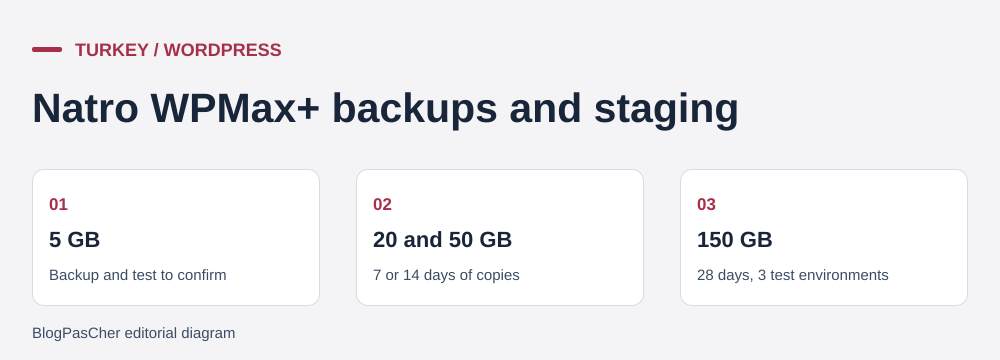 Reference points taken from the offer cards. — Illustration by BlogPasCher.Open full-size illustration ↗
All cards advertise one WordPress site and one MySQL database. SSD storage allowances are 5, 20, 50 and 150 GB, and displayed database sizes are 500 MB, 1, 3 and 5 GB. Advertised mailboxes rise from 10 to 20, 50 and then a count presented as unlimited. Grid CPU percentages distinguish plans. They do not convert the offer into a reserved-core count. The 20, 50 and 150 GB cards add Varnish with 64 MB and show one, two and three staging environments respectively. Listed backup durations are seven, fourteen and twenty-eight days for those same cards. All three present one-click restoration. The 5 GB entry tier leaves these rows blank.
The 20 GB plan addresses the specific need for one working copy to test the theme. Before choosing, record database and file sizes on the existing site, especially images. Then ask whether working copies and provider-created backups count against the same storage allowance, whether staging slots can be reused after deletion and whether deployment allows selecting files or tables. The grid confirms commercial capacities. It alone does not establish transfer details or actual headroom during cloning.
Staging for a visual modification should retain just enough content to test the change. Use a few fictional photos, different name lengths and Turkish labels to inspect line breaks. On a real clone, decide beforehand how to filter private requests, disable outgoing email, hide the copy from the public and limit access. The request table should not become the theme-validation mechanism. The useful deployment criterion is that requests already received, and those arriving since the copy was created, remain accessible after the change.
The managed offer advertises automatic installation and updates. The FAQ explicitly confirms WordPress core updates. For themes, plugins and PHP versions, record starting versions and, after changes, verify the form, expected receipt, homepage and an interior page. Caching adds a simple check. Compare a private browser window with administration to see whether the theme actually served matches the expected version. Attach the test time and modified filename to the record.
The consulted commercial pages, contract and help center are in Turkish. Customer-channel requests are documented in Natro’s knowledge base. Natro advertises general assistance 24 hours a day. Check English support and the response time for the WPMax+ channel. For a recovery incident, supply the offer name, URL, time with time zone, latest change and data scope to preserve. A targeted request describes whether the blockage affects only the WordPress dashboard, provider panel or also the public site. This helps support distinguish lost access from a site whose database has already changed.
Natro help distinguishes WPMax+ from standard WordPress. It states that managed WPMax+ provides no direct FTP, SSH, file-manager or phpMyAdmin access. Standard WordPress documents FTP or SFTP, a file manager, phpMyAdmin and optional SSH. For a managed site, ask how to obtain a complete export and what the panel allows you to transfer. The operator must therefore obtain a workable procedure for applying and reversing a small theme change through the panel, WordPress or support. If a contributor can test but cannot intervene on the public site, separately assign the person accepting the change and the person applying it. The exit method must also match access actually available on WPMax+.
The ZIP available in “Prepare your site” contains a reproducible PHP exercise creating two small SQLite databases and two CSS files on D:. The databases represent a site’s and its staging copy’s request tables. The CSS represents the theme file the workshop wants to modify. The exercise uses invented data and deliberately separates files from the database to make each action’s effect measurable. It does not reproduce the WPMax+ panel, plugins, hooks or MySQL database of a complete WordPress site.
At copy time, production contains request RDV-001. The script clones its database, then records RDV-002 only in production. At that point, the clone still knows only RDV-001. The script then copies the test database into a third disposable file to simulate full replacement. That copy no longer shows RDV-002. The database representing the active site remains in place, and its two rows provide the reference for subsequent steps. The dangerous effect is measured on the disposable file, with the record showing which references are present at each stage.
The script then transfers only the CSS file onto the copy representing production. It verifies that the resulting file’s hash matches the prepared change and that both requests remain present. It then restores the initial CSS and repeats both checks. A valid result shows a changed theme hash, return to the initial hash and the same two references during both targeted operations. The JSON result retains these observations and PHP and SQLite versions. To replay, invoke PHP with the supplied script and a fresh path on D:, with PDO SQLite available.
To transpose the test to a real site, determine precisely where the change is stored. A child-theme file and a style set in the WordPress editor may produce changes in different locations. List the scope to apply and check requests immediately before and after transfer. If the panel offers only full cloning, ask how to publish the change within the required scope or replay a small modification without touching data. The local exercise demonstrates why this distinction matters.
Natro documentation describes the backup manager, manual copy creation and selection of a restore point. The grid specifies that automatic backups apply to certain plans and advertises one-click recovery for those plans. The workshop’s procedure fits on one sheet. Record the recovery point’s time, time zone and latest legitimate change, then determine whether restoration should target the modified file or entire site. If several requests arrived after the available point, identify how to preserve or reenter them after full recovery.
A copy accessible in the panel allows a return to an earlier state. To change hosts, the workshop also needs a set it can open in another installation. Natro’s introductory FAQ presents Tools, Export and Import in WordPress. This route transfers editorial content in a WXR export. To reproduce operational state, separately inventory files, media, themes, plugins, relevant settings and form data. Ask whether WPMax+ provides files and a usable database, through which channel, within what time and until what date after cancellation. Mailboxes and the DNS zone each need their own export or inventory.
Test exit before making the workshop dependent on the offer. Define a reference page with media, a recent reference, a form setting and a known theme version. In an isolated environment, reconstruct these four elements from the exported set. Record missing elements and who can retrieve them. Also check destination PHP and MySQL requirements, especially if the site uses an older plugin or specific cache engine. The original site remains the reference until the exported set passes these checks.
The name Yapay Zeka Site Asistanı appears on all four cards. The WPMax contract describes a content-and-image generation service with an associated plugin. The provider’s website-creation offer presents several products. For WPMax+, connect the test to the WordPress site in this profile and the assistant associated with that service. The consulted public sources cannot certify a generation count, generation languages or assistant availability after transfer away from Natro.
The editorial test uses an opening-hours page for the fictional workshop. Prepare a Turkish draft announcing two invented opening periods and an appointment button. Verify consistency between title, hours, address and button. Then compare what WordPress stores in blocks with what requires a plugin for rendering. During destination testing, reload the page, follow the button and open images after the URL change. Portability evidence concerns the published page and its dependencies.
Received requests, addresses and free-text notes stay out of the instructions used for this draft. If the workshop plans to use real data, it first needs to know which function would receive those data, what is retained and which terms apply to its account. A static test page already reveals Turkish generation errors and mobile display problems. Record the plugin’s name and version to distinguish it from the theme and provider panel.
For the Izmir workshop case, the 20 GB card becomes usable if four points are documented together: dated pricing for the first and following periods, a deployment method limited to the desired change, an accessible rollback copy and a complete export the team knows how to reopen. The local record shows exactly the risk addressed by the second point. When requests keep arriving, compare references at deployment time. Postpone the change if an operation requires replacing the database without a method for preserving new rows.
The general Natro page associates its hosting with Istanbul. Exact assignment of servers and backups for the WPMax+ plan remains to be confirmed separately if it is part of the specification.
Before selecting this offer, ask who supplies files and the database when the WordPress dashboard is inaccessible. Also confirm whether deployment can be limited to the tested change or requires a complete transfer. If the CSS file represents a database-stored modification on your real site, keep a record of settings to replay, then verify on the copy that another team member can find them.
Use these references to check the features, requirements and limitations described. Reading documentation is not a practical test.
English translation of the reviewed French edition. Code examples retain their original identifiers, comments and output strings for reproducibility. Linked exercise files and original screenshots may contain French. No new practical tests or price checks are implied by translation.
1984 Hosting’s WordPress plans in Iceland, initial and renewal terms, migration, the Security Pack and backup limitations.
Read more →Compare 34SP.com WordPress containers, shared memory, staging copies, downloadable snapshots and site migration.
Read more →Compare AEserver’s managed WordPress prices and check whether your network must be split into independent installations before migration.
Read more →