Web hosting
1984 Hosting for WordPress in Iceland: pricing and backups
1984 Hosting’s WordPress plans in Iceland, initial and renewal terms, migration, the Security Pack and backup limitations.
Read more →

Site appearance
Web hosting
Swedish shared hosting with cPanel and WordPress AI. Renewal prices and recovery terms are distinguished from first-cycle advertising.
Source published: · Source updated: · Editorial policy
Visit the official Miss Hosting website ↗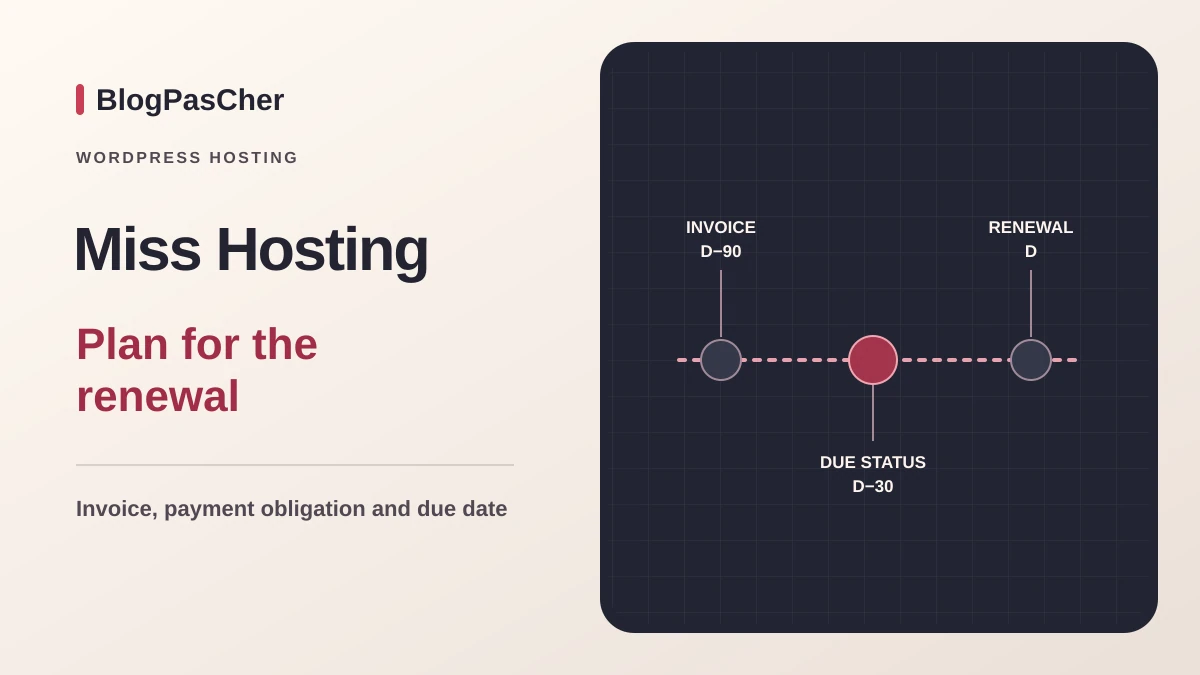
This profile is based on published offers and documentation. No new hosting benchmark or support test was performed for this translation.
Prices retain the market, currency and billing period described in the French source. Translation does not update a commercial quote. Confirm the final price, taxes and options before ordering.
| Plan | Price and billing | Resources and limits |
|---|---|---|
| Web hosting Small | Equivalent to 32 SEK/month before tax over the first twelve-month cycle, approximately 384 SEK before tax. Renewal: 1,548 SEK per year before tax in the public selector, equivalent to 129 SEK/month before tax. Other cycles and expiry according to contract. Twelve months prepaid. Initial total and tax depend on the owner. | 100 GB, 3 mailboxes on the card, 1 site, 200,000 inodes and 1 database according to the comparison. Comparison shows no plan backup. Clarify infrastructure backup. |
| Web hosting Medium | Equivalent to 59.70 SEK/month before tax over the first twelve-month cycle, approximately 716.40 SEK before tax. Renewal: 2,388 SEK per year before tax in the public selector, equivalent to 199 SEK/month before tax. Other cycles and expiry according to contract. Twelve months prepaid. Initial total and tax depend on the owner. | 150 GB, 5 mailboxes on the card, 5 sites, 300,000 inodes and 10 databases according to the comparison. Black Month campaign. Comparison shows no plan backup. |
| Web hosting Large | Equivalent to 262 SEK/month before tax over the first twelve-month cycle, approximately 3,144 SEK before tax. Renewal: 4,188 SEK per year before tax in the public selector, equivalent to 349 SEK/month before tax. Other cycles and expiry according to contract. Twelve months prepaid. Initial total and tax depend on the owner. | 200 GB, 25 mailboxes on the card, 500,000 inodes and 20 databases according to the comparison. Daily backup in the comparison. Confirm retention and restoration. |
 Official logo of Miss Hosting. — Image: Miss Hosting.
Miss Hosting offers the Small, Medium and Large shared hosting plans in Sweden with cPanel and WordPress AI. The documentary review dated 10 November 2026 covers these three cards, the comparison and terms. For an existing site, evaluate storage limits, renewal cost and restoration scope before preparing transfer.
The storefront advertises hosting in Sweden. Backup location and the location of any data sent to the assistant must be checked separately. Cards, the technical table and some general paragraphs give different values. This profile links each figure to its source and specifies discrepancies affecting plan choice.
On 10 November 2026, the Swedish page shows a first twelve-month cycle at 32 SEK per month for Small, 59.70 SEK for Medium and 262 SEK for Large, excluding VAT. Medium is presented with a Black Month campaign. Its card juxtaposes two discount percentages. For comparison, the displayed amount in kronor is the chosen benchmark. Multiplying the monthly equivalents by twelve gives approximately 384, 716.40 and 3,144 SEK before tax. Confirm the first billed amount and campaign end date.
The selector published in the page code shows annual renewal of 1,548 SEK for Small, 2,388 SEK for Medium and 4,188 SEK for Large. Monthly equivalents are 129, 199 and 349 SEK before tax. The comparison states that discounts cover the first year and products renew at full price. For Medium, the 3 November review recorded 50 SEK per month in the first cycle. The Black Month price recorded on 10 November is a new commercial benchmark.
Two- or three-year cycle amounts depend on the published selection and customer terms. Annual pricing cannot reconstruct their totals. To budget Medium’s first two annual cycles at observed prices, allow approximately 3,104.40 SEK before tax, domains, options and fees. This projection assumes the displayed annual renewal and a first amount matching the calculation. The terms specify a 30 SEK administration fee when invoice payment is selected. Check the owner’s tax treatment and first total charged.
The cards show 100 GB and three email accounts for Small, 150 GB and five accounts for Medium, and 200 GB and twenty-five accounts for Large. The technical table repeats the three disk capacities. Some paragraphs still describe 200 GB for Medium, unlimited disk for Large and uncapped email accounts. For budgeting and organization, request confirmation of the selected plan’s limits.
The comparison specifies one site, five sites and a site count presented as unlimited. Inode limits are 200,000, 300,000 and 500,000. It also specifies one, ten and twenty databases and limits of ten, twenty-five and fifty MySQL connections respectively. A staging copy adds files and a database. Before planning a second environment on Small, check how to separate it within the one-database, one-site limit.
The comparison specifies one processor core for Small and Medium, three for Large, and Memory Limit settings of 768, 1,024 and 3,072 MB. Confirm actual allocated memory and processing concurrency for the account. Displayed traffic quotas are 750, 1,500 and 3,000 GB per month, while the general presentation says unlimited traffic. Clarify counting and overage terms before a campaign or large transfer.
The terms reserve the plan for the owner’s sites: they prohibit hosting sites for other companies or individuals. The advertised site count therefore does not authorize hosting several clients. Ask the provider to specify an appropriate plan for that use.
The comparison describes cPanel, phpMyAdmin, FTP accounts with SSL, scheduled tasks and installation tools. The commercial page mentions Installatron. The current help guide describes WordPress Manager in cPanel. Check which tool appears in your account.
The PHP versions displayed at the bottom of the comparison include older versions. This list does not establish which currently maintained versions are available on a new account. Before transferring an existing WordPress site, record core, theme and plugin requirements, then check the version actually offered. General WordPress compatibility does not guarantee every combination works.
The cards include SSL, and some feature LiteSpeed. They present Let’s Encrypt on Small and other references on higher plans. Confirm what will be provided for the relevant domain. The certificate protects transport. Updates, access and backup follow separate procedures.
This workflow suits the owner of an active plan with access to Kundzon, the client area, and cPanel. The quick-login guide asks users to locate the plan in the service list, then click the cPanel login button to its right. Explaining this route does not require giving an operator the account’s main password.
In cPanel, open Software, then WordPress Manager. Click Install, select the destination domain and complete installation with the Install button at the bottom. Check the path and destination folder’s state before confirming. Verify the destination and do not run this operation on an active installation to preserve.
The expected result is WordPress accessible on the chosen domain with administration available. Check login, URL, certificate and a simple page before adding tools. If the workflow fails or the domain is missing, check the service and configuration instead of repeating installation at another random destination. To abandon a trial, keep the old site intact and remove only the identified new resources.
The WordPress AI page presents an assistant included with the displayed hosting offers. It describes a guided start using the site name, activity and desired tone, followed by suggestions for design, text, images and translations. These elements can be edited afterward on the site. The comparison also shows AI creation for all three reviewed plans.
Quotas, underlying models, transmitted data and tool behavior after changing hosts remain to be confirmed. Before creating a client site, define what information to transmit. Check text, visuals, translations and links before going live. To prepare an exit, retain media and content in formats recoverable independently of the assistant.
The comparison specifies daily backup for Large and leaves the backup row blank for Small and Medium. A commercial page describes a nightly copy of the server environment. Confirm individual recovery points accessible to the owner, their retention, location and restoration time. Website-builder backup appears on a separate row.
Clause 7.7 of the terms states 950 SEK per hour started for restoration performed by Miss Hosting. Confirm cost, scope and the available recovery point before requesting intervention. Creating and downloading an archive from cPanel follows a separate workflow.
For a store, identify the functions to restore and date of the last healthy state. Restoring the entire site may return a database to a state preceding the latest orders. Keep a recent export and define how to recover transactions received after the chosen point. If only one file changed, favor targeted recovery of that file when a copy permits it.
The help guide describes a method requiring no new WordPress plugin, intended for a customer already using cPanel. Under Files, open Backups. Under Full Backup, click Generate/Download a Full Website Backup. Choose Home Directory as the destination. You can enter a notification address. Then click Generate Backup to start creation.
Wait for completion before considering the result available. The guide states that a .tar.gz file appears in the home directory and can be downloaded through cPanel or FTP. Verify that the archive is complete, nonempty, associated with the correct account and stored off-server. Allow enough temporary space for creation and protect the download, since it may contain sensitive data and configuration.
The guide explains archive creation and retrieval. Confirm who can restore a full archive on the plan. Before an important operation, establish how to reimport it at an authorized destination and verify the site on an isolated copy. Partial recovery or support intervention may have a different scope and higher cost. If export creation fails, preserve existing data and check permissions and free space before retrying.
The migration page advertises free assistance after subscribing and allows requests to transfer several sites or domains. It excludes direct transfer from certain proprietary platforms and WordPress.com. For self-hosted WordPress, confirm access, mailbox count, total volume and covered data. Code or license adaptations need their own pricing.
Prepare an independent copy of files and the database, the domain list and PHP and SQL versions. On the protected target, check media, administration, forms and email receipt. Disable real sends and payments on the copy. For a store, organize recovery of transactions entered between export and the DNS change.
Retain the source service and old records during validation. If the new site must be removed, restore previous entries and reconcile transactions recorded after the switch before reopening the source. Check email, domain and site availability separately.
Commercial pages advertise continuously available chat, phone and email support. The help center offers Swedish and English among other languages, plus a Norwegian entry. This does not demonstrate that each channel operates in all those languages at every hour. For a French-speaking account, ask which channels allow contact with a technician in French. Plan for someone able to describe an incident in English or Swedish.
The commercial presentation includes an availability rate of 99.9%. The selected sources do not establish a complete credit procedure, precise exclusions or a guaranteed resolution time for every WordPress outage. This is neither an account measurement nor assurance that the site will always be accessible.
Hosting support and application work must be distinguished. An incompatible plugin, content error, external payment service and infrastructure outage require different interventions. The owner must clarify the included service and possible costs before relying on assistance for every site change.
Clause 4.1 provides for a renewal invoice issued ninety days before service expiry. Payment must occur no later than thirty days before that expiry. Written cancellation must also arrive by the invoice due date to avoid renewal. Waiting until the final day of use may therefore be too late.
The terms state that stored cards are charged on the due date. They also provide a forty-five-day commercial guarantee for hosting, excluding domain and SSL certificate fees. This guarantee should not become a promise to refund every service or remaining period. Other clauses limit refunds after closure or tier changes.
Keep the confirmation date, chosen cycle, invoice and cancellation acknowledgment. A domain requires a separate check of renewal and ownership. Reconcile these deadlines with the applicable invoice and contract.
The exit guide describes Kundzon, then Mina tjänster, the relevant service and its name at top right. Choose Uppsägning av konto, then Omedelbart for immediate termination or Vid periodens slut for the end of the period. Confirm using the cancellation button. Before actual confirmation, finish exports and check consequences for the site, mailboxes and other services.
The guide and terms also mention two weeks of file retention after termination, but the terms reserve deletion possibilities as well. This period therefore constitutes neither a backup strategy nor a recovery guarantee. Complete the exit before closure, with a verified independent copy and functioning destination.
Miss Hosting may interest a Sweden-focused project wanting cPanel and an AI-assisted WordPress start. Before transfer, confirm contractual resources, recovery cost, available PHP versions and assistant exit terms. Recurring pricing and anticipating renewal matter as much as the promotion.
Use these references to check the features, requirements and limitations described. Reading documentation is not a practical test.
English translation of the reviewed French edition. Code examples retain their original identifiers, comments and output strings for reproducibility. Linked exercise files and original screenshots may contain French. No new practical tests or price checks are implied by translation.
1984 Hosting’s WordPress plans in Iceland, initial and renewal terms, migration, the Security Pack and backup limitations.
Read more →Compare 34SP.com WordPress containers, shared memory, staging copies, downloadable snapshots and site migration.
Read more →Compare AEserver’s managed WordPress prices and check whether your network must be split into independent installations before migration.
Read more →