Web hosting
1984 Hosting for WordPress in Iceland: pricing and backups
1984 Hosting’s WordPress plans in Iceland, initial and renewal terms, migration, the Security Pack and backup limitations.
Read more →

Site appearance
Web hosting
Configurable Linux VPS in Serbia. Server images and WordPress exports cover different recovery needs.
Source published: · Source updated: · Editorial policy
Visit the official mCloud website ↗
This profile is based on published offers and documentation. No new hosting benchmark or support test was performed for this translation.
Prices retain the market, currency and billing period described in the French source. Translation does not update a commercial quote. Confirm the final price, taxes and options before ordering.
| Plan | Price and billing | Resources and limits |
|---|---|---|
| mServer Linux | From 1,366 RSD per month. Renewal: Future per-configuration price not published. Check terms and notice period in the quote. Monthly benchmark recorded on 10 November 2026. Check commitment and tax treatment in the quote. | Configurable Linux VPS. Specify disk, memory and CPU. Starting price displayed on the WordPress page. |
| Cloud VPS Performance Max | From 1,500 RSD per month. Renewal: Future per-configuration price not published. Check terms and notice period in the quote. Monthly benchmark recorded on 10 November 2026. Check commitment and tax treatment in the quote. | Configurable VPS, choice of operating system. Unmanaged by default. Price options and licenses. |
| CloudReady | From 1,680 RSD per month. Renewal: Future per-configuration price not published. Check terms and notice period in the quote. Monthly benchmark recorded on 10 November 2026. Check commitment and tax treatment in the quote. | VPS preinstalled with a chosen environment, including WordPress. Check the panel, system maintenance and license. |
mCloud presents virtual servers in Serbia for WordPress projects needing more control. Its mServer Linux allows resource selection and server management. Image backups and site exports address two different incidents. An image helps when the entire machine needs to return to a previous state. Recovering a file or database requires a way to extract those elements without erasing newer data.
The case concerns a technical team hosting a booking site that wants to change PHP configuration or update a system component. It can prepare an image before intervention and a database export just before the change. If the service no longer starts, the recovery point must be identifiable. If the system works but one component is faulty, reverting the whole machine may erase requests received since the image.
The profile distinguishes a customer-administered VPS, panel-equipped offers and supplementary backup services. The choice depends on who maintains Linux and WordPress, how many versions must be retained and acceptable recovery time. Repeat the described operations on a test target before incorporating them into an incident procedure.
On 10 November 2026, the WordPress page displayed mServer Linux from 1,366 RSD per month. The Cloud VPS Performance Max page advertises another entry point, from 1,500 RSD per month, and preinstalled CloudReady from 1,680 RSD per month. These three benchmarks do not describe identical configurations. Have the selected machine’s price, VAT and licenses specified in one quote. Ask for the cost of CPU, memory, disk, address and backup storage actually allocated. A starting-price presentation is insufficient to infer the total for a WordPress server with a panel and assistance.
The backup price list states 463.75 RSD per month including VAT for 50 GB of mServer space and 2,100 RSD per month including VAT for an additional 50 GB HDD. The R1Soft option with a license and 1 TB of storage is listed at 3,750 RSD per month including VAT. These items serve different functions and do not imply that 50 GB is enough for a given server’s rotation. Extracting a component from an image on a separate server is presented as engineering work. The intervention rate is 5,808 RSD per hour including VAT, which does not establish the hours required for a case.
The consulted general terms cover a resource-rental contract and exclude individuals acting as consumers. They describe a twelve-month commitment renewed unless notice is given at least thirty days before expiry. The management panel presents the server’s monthly or annual cost. The displayed monthly amount and contract duration are separate details to verify for the selected quote. Ask for option costs at renewal and the notice deadline. In case of suspension, the contract provides thirty days’ retention from suspension before possible deletion of content and backups. The team must therefore retain an export it can open without the portal.
The WordPress page mixes presentation of panel-equipped hosting with a customer-administered virtual server. For this case, explicitly choose a Linux VPS with administrator access. The Cloud VPS page describes a service unmanaged by default and a managed variant by agreement. It also lists CloudReady with a preinstalled environment, including WordPress, LAMP or LEMP and various panels. A preinstalled panel simplifies some operations. Ask who maintains the system, panel and CMS after installation. WordPress Premium shared hosting, described on another page with cPanel, follows a different contract.
To size the machine, record media space, database size, logs and site tasks. Choose resources allowing for the load of an export, update installation and private restoration. A site displaying a calendar may receive few visits yet stress the database when several requests arrive together. Observe limits in a rehearsal with test data before changing server size. mCloud documentation specifies that disk expansion may involve interruption. Plan this operation and retain a copy before authorizing it.
The Linux choice should follow versions the team knows how to maintain and that WordPress dependencies support. Check the web server, PHP, PHP extensions and database engine. If migrating from shared hosting, record functions previously handled by its panel, such as certificates, log rotation and scheduled tasks. On the VPS, assign an operator responsible for each before switching.
In the portal, the guide specifies Moje usluge then Cloud Server. Open the relevant server by name. Its page presents networking, storage, usage, SSH keys and billing. Record the machine name, owner and fallback access methods. On the system, prepare a named administration account with an SSH key and verify access before removing a previous method. Keep the route to the portal console if a network change disconnects SSH. WordPress and server administrative access represent separate roles.
Install or verify a web server, compatible PHP environment and database dedicated to the site. On a test copy, check the certificate, administrative access, permalinks and processing of a booking request. Also document scheduled-task settings, the media folder and email destination. Test before moving DNS. After the change, monitor errors and verify that requests still arrive correctly. If a configuration prevents web access, use the console and restore the previous file before deciding whether a full image is necessary.
The team must plan disk monitoring and Linux patches. After a version upgrade, verify service restarts and review alerts. If booking is the essential function, keep a record of requests received during the change window. An off-account database copy before each important modification provides a comparison point. Data written afterward can then be identified before any machine rollback.
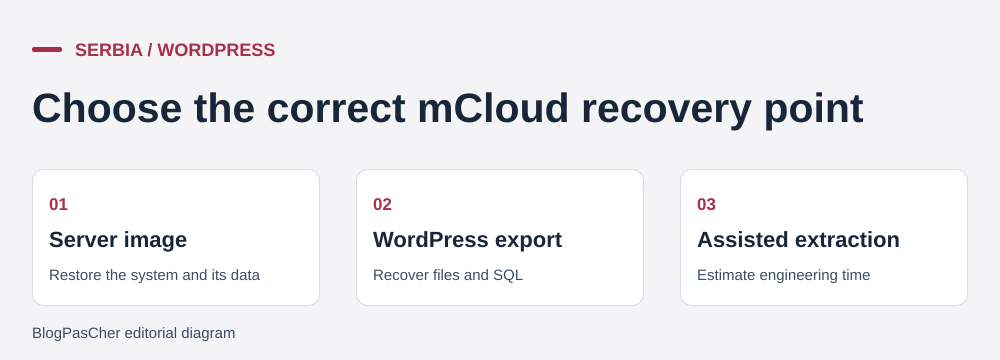 Editorial illustration of the recovery process. — Illustration by BlogPasCher.Open full-size illustration ↗
In the portal, open Cloud Server and select the mServer. The activation guide specifies Storage then Disks, where the automatic option can be enabled after obtaining the required storage. The guide describes a daily point replaced every day and a weekly point replaced the following week. The pricing page calls for storage sized for these two points and a third rotation slot. Confirm how the calculation applies to the disk and how much space a manually created point occupies. An image taken before a useful change must remain identifiable by date and server even while automation continues producing points.
For a machine failure, record the last working state, image time and writes received afterward. Preserve the current state if the machine still permits copying, and suspend writes during the decision. mCloud describes returning a server image to production through the panel. Check the label available in the portal and the machine impact before launching the action. The rollback affects the entire server, including its system and data. After recovery, check startup, SSH access, certificate, web service, database and a fictional booking. If recovery does not restore the expected function, keep the image and preserved state to compare logs on another target.
If only one file is missing, avoid replacing the running machine. The provider states that targeted extraction from an image uses a separate server, billed by engineering time. Specify the image, folder path or database and request a quote before intervention. A second route uses the files and SQL retained by the team. It may be quicker when the faulty component is known and no recent data needs replacing.
To leave the service or recover a single site, keep WordPress files and a logical database export. Record the root used by the web server and DB_NAME in wp-config.php. Download the public and private files needed by the site through SFTP or a compatible encrypted channel. Export the database to an SQL file using an administration or backup tool compatible with the engine, within a window consistent with the file copy. Also retain tasks, PHP versions and web-server settings needed for reconstruction. Do not attach private keys or secrets to the procedure file supplied to the client.
On a private target, create an empty database and import SQL. Adapt permissions and access in the configuration copy. Check the web server, media readability and handling of a fictional request with real email disabled. To extract one file, retrieve the desired version and compare its contents and permissions before applying it. For database recovery, determine which data changed since export and check consistency before replacement. If testing fails, return to the intact copy and correct the engine version or exported scope without modifying the active site.
The R1Soft service describes incremental backup with file or database selection depending on the service. Public documentation advertises rotation of seven daily points and four weekly points in the described configuration. Confirm the history included in the quote and export arrangements after service ends. An additional disk can serve as a technical destination for a script. Check that a copy of these data exists elsewhere and that the team can read it even if the VPS and disk become inaccessible together.
The WordPress page highlights Serbian and round-the-clock assistance. The support price list describes basic-tier consultations and diagnostics by ticket on business days from 9 to 17. Portal guides exist in Serbian and English. Confirm the language and escalation channel applying to the machine. The price list also shows 1,040 RSD including VAT for a targeted troubleshooting ticket, with duration and scope limits. This ticket and the engineering hour concern different interventions. If the team administers the VPS, agree on tasks it retains and the expected response time for those it delegates.
mCloud advertises servers in Serbia on the Cloud VPS pages. Obtain the assigned machine’s region and backup location for the selected option. R1Soft is presented with possible storage on physically separate servers and a remote copy. This description alone does not establish the country for a particular quote. If email is outsourced, document its region and access separately. A recovery test must verify that the certificate, DNS and notification system can be restored from retained elements.
The WordPress VPS offer documents describe no included generative AI assistant. mCloud also presents GPU servers for computing or AI uses in a separate section. GPU capacity does not grant a license for a WordPress tool. If the application uses an external service, include the settings to recreate and how to remove access from the private copy in the recovery file.
The mCloud VPS suits a team able to maintain Linux, monitor logs and check backups. A preinstalled WordPress configuration may reduce initial work. Compare its price and responsibilities with those of the selected mServer Linux. If no operator can intervene after a restart or restore a database on a private target, price a managed plan or support scope before committing. The machine’s monthly cost is then only part of the budget.
Perform two exercises in a test environment. For the first, record the machine’s state before a change, create an image and verify that it appears among usable recovery points. For the second, start only from a WordPress folder and SQL export. Restore the site on a target separate from production and measure the time required to process a fictional booking. An exercise requiring support must specify what the engineer will extract and at what rate.
For ongoing service, keep an external copy, fallback-access procedure and notice dates. Repeat testing when the machine or database engine changes. If a whole image is needed, the team must identify requests arriving after the chosen point. If only one component is affected, the targeted export must remain available. These two routes provide recovery matched to the incident’s scope.
Use these references to check the features, requirements and limitations described. Reading documentation is not a practical test.
English translation of the reviewed French edition. Code examples retain their original identifiers, comments and output strings for reproducibility. Linked exercise files and original screenshots may contain French. No new practical tests or price checks are implied by translation.
1984 Hosting’s WordPress plans in Iceland, initial and renewal terms, migration, the Security Pack and backup limitations.
Read more →Compare 34SP.com WordPress containers, shared memory, staging copies, downloadable snapshots and site migration.
Read more →Compare AEserver’s managed WordPress prices and check whether your network must be split into independent installations before migration.
Read more →