Web hosting
1984 Hosting for WordPress in Iceland: pricing and backups
1984 Hosting’s WordPress plans in Iceland, initial and renewal terms, migration, the Security Pack and backup limitations.
Read more →

Site appearance
Web hosting
Three WordPress plans and a local exercise checking the files listed in a content export.
Source published: · Source updated: · Editorial policy
Visit the official Caja Negra RD website ↗
This profile is based on published offers and documentation. No new hosting benchmark or support test was performed for this translation.
Prices retain the market, currency and billing period described in the French source. Translation does not update a commercial quote. Confirm the final price, taxes and options before ordering.
| Plan | Price and billing | Resources and limits |
|---|---|---|
| Básico | 6.50 USD per month and 63.88 USD listed as payable upfront. Confirm the period covered by the total. Renewal: 71.88 USD displayed. Confirm duration, arrangements and tax treatment. Recorded on November 10, 2026. USD according to the portal. Prices exclude applicable taxes. Check ITBIS according to the billing profile and the final total. | 5 GB SSD. One site and 2 MySQL databases. Backups advertised. Confirm frequency, retention and restoration. CodeGuard is presented separately. |
| Profesional | 11.50 USD per month and 110.88 USD listed as payable upfront. Confirm the period covered by the total. Renewal: 119.88 USD displayed. Confirm duration, arrangements and tax treatment. Recorded on November 10, 2026. USD according to the portal. Prices exclude applicable taxes. Check ITBIS according to the billing profile and the final total. | 10 GB SSD. Ten sites and 20 MySQL databases. Backups advertised. Confirm frequency, retention and restoration. CodeGuard is presented separately. |
| Ilimitado | 19.50 USD per month and 143.88 USD listed as payable upfront. Confirm the period covered by the total. Renewal: 179.88 USD displayed. Confirm duration, arrangements and tax treatment. Recorded on November 10, 2026. USD according to the portal. Prices exclude applicable taxes. Check ITBIS according to the billing profile and the final total. | 40 GB SSD. No numerical limit on site or database counts in the table. Backups advertised. Confirm frequency, retention and restoration. CodeGuard is presented separately. |
Caja Negra RD sells three WordPress plans in the Dominican Republic with cPanel, an installer and advertised migration assistance. A fictional workshop in Santo Domingo needs to transfer its catalogue and photos. It has a WordPress content export and a file copy. An image entry may exist in the export even when the corresponding file is missing from the delivered folder.
The workshop checks files against an attachment list, then opens the test catalogue without depending on the source server. The local exercise detects a missing image while confirming that the content list remains readable. The decision to close the old hosting account depends on recovered files and functions checked at the destination.
The profile separates public-site prices, prices visible in the portal and what remains to be confirmed on the invoice. It examines backups, data location and cPanel’s scope before describing the exit steps.
On November 10, 2026, the public site displayed 6.50 per month for Básico, 11.50 for Profesional and 19.50 for Ilimitado. The cards also list upfront amounts of 63.88, 110.88 and 143.88, then renewal amounts of 71.88, 119.88 and 179.88. The cards use the dollar symbol. The linked portal displays USD, and another offer on the public site explicitly labels its dollars as USD. The cards do not provide the duration associated with the three pairs of WordPress amounts, and the first Básico portal step observed concerns the domain. It confirms neither duration nor final amount.
The monthly figures do not yield the total by simply multiplying by twelve months. For Básico, twelve times 6.50 USD would give 78 USD. For Profesional, the calculation gives 138 USD, and for Ilimitado 234 USD. These amounts differ from the advertised initial and renewal sums. Do not infer an annual commitment from this comparison. For each plan, record the initial amount, amount due at renewal, duration and cancellation rule. The renewal method and its deadline were not established in the sources consulted.
The Dominican tax authority states a general ITBIS rate of 18%. The WordPress page footer specifies that prices exclude applicable taxes and any domain-related ICANN fees. If the initial 63.88 USD amount is subject to the general rate, the calculation gives 75.38 USD after rounding, before possible domain-related fees. This example is a conditional calculation. The total depends on the invoice, and the cost in pesos also depends on the payment and conversion method. The provider advertises payment by card, PayPal, bank transfer and local methods.
Básico lists one WordPress site, 5 GB SSD and two MySQL databases. Profesional displays ten sites, 10 GB and twenty databases. Ilimitado advertises sites and databases without a displayed numerical limit, with 40 GB SSD. All three cards advertise mailboxes and bandwidth without quantified limits. This establishes neither storage per mailbox, computing limits nor usage terms. The workshop must calculate the size of photos and their variants, the database, email and temporary files. The total may constrain a copy even when the stated site count remains sufficient.
The provider presents an offer for the Dominican Republic and advertises local payment methods. The pages consulted do not specify the assigned server’s country, city or backup location. Ask for an answer by plan reference if file or database residency is a criterion. If the site uses a network cache or external media storage, separately record the components passing through those services. The market served and data country are two pieces of information to obtain.
The cards include an SSL certificate. To check the copy, verify that the test hostname and image links point to the intended destination. A page may display while the browser retrieves its photos from the old site. Media verification therefore checks addresses and files actually available at the destination as well as opening the page. The plan decision must leave enough space to download and then verify these files.
The page advertises preinstalled WordPress, Softaculous, a WordPress toolkit, cPanel and free migration. It also mentions TurboHub and managing several sites. Check which panel will actually be delivered, the permissions and whether a test copy can be opened on the plan. Features offered by the WP Toolkit publisher depend on the provider’s deployment. A site count on a card does not establish support for WordPress network mode or an extraction operation.
The sales page and first portal screen are in Spanish with some English labels. The product FAQ advertises continuous support by chat, email or ticket. Team languages, cPanel languages and restoration intervention time remain to be confirmed. Before transfer, prepare the file and database inventory to specify what you are asking the provider to do. Distinguish a full-site transfer from a post import.
The FAQ mentions help integrating ChatGPT into a site or store. It documents no AI license, credits or quota bundled with the three WordPress plans. The Extras catalogue also presents separate services. Before planning an integration, obtain the identity of the publisher providing access, license details and message-processing terms. For the workshop, any such service forms a separate budget line. Media migration must remain verifiable using the export and file folder, regardless of how a page was created.
The cards advertise free backups. They provide no capture schedule, number of points, location or detailed restoration procedure per plan. The portal sells CodeGuard separately. That service’s features do not establish retention or restoration for the backups advertised with the WordPress cards. For a catalogue being transferred, obtain the scope of files, database and mailboxes, plus the price or timeframe for making them available if intervention is required. A copy ready to open elsewhere remains necessary before closing access. WordPress content export, SQL and the media directory serve different purposes.
On a cPanel account where the provider exposes Files > Backup Wizard, the publisher’s documentation describes downloading a full copy and partial items such as the home directory and MySQL databases. It states that automatic restoration of the full archive is handled through WHM. cPanel’s presence on the card does not prove all these options are available to the customer. Check menus on the account, then choose components to export and a destination that can open them. For an independent exit, keep the site and domain list with each installation’s files.
In WordPress, Outils > Exporter produces a WXR XML file describing content and metadata. It does not carry the bytes of referenced files. During migration, preserve the media directory or external storage copy and inventory images linked to catalogue pages. Keep the database and files of a complete installation if themes or plugins contain useful data. Migration assistance is advertised on the cards. The sources do not set the number of sites handled, accepted formats or work to be done on missing media.
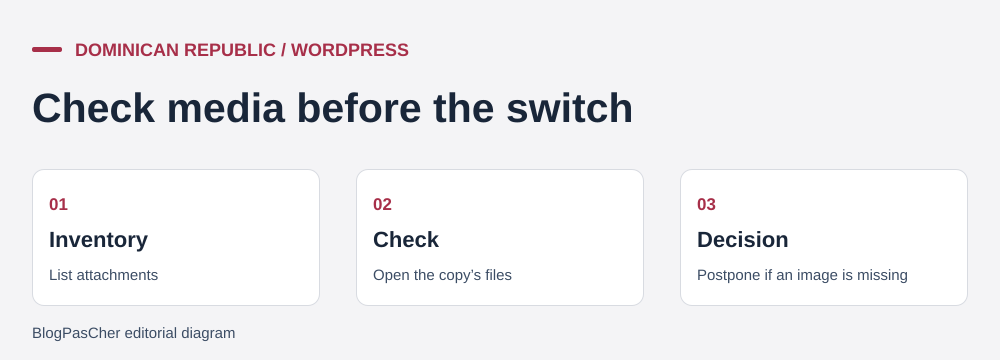 Three checks before transferring a catalog. — Illustration by BlogPasCher.Open full-size illustration ↗
The ZIP under “To prepare your site” contains EXERCICE-CAJA-NEGRA-RD.php. The exercise record indicates execution with PHP 8.4.8 and SimpleXML. Pass the path of a local directory that does not yet exist, where the script will create fictional files. The script writes a fictional WXR export with one page and two attachments, then creates three test media directories. It reads relative paths declared in _wp_attached_file. Export URLs use the fictional domain atelier.example.test. No request is sent to that domain. The test opens only files created by the script.
In the JSON result, the page and both attachments always remain in the inventory. The complete copy contains 2026/11/facade.png and 2026/11/catalogue.png, whose headers are recognized as PNG. The incomplete copy lacks the second file. A third copy contains the correct path with content that has no valid PNG header. The model accepts the first and rejects the other two with distinct reasons. It tests presence and a header check. It verifies neither every image variant, full file decoding nor WordPress import.
To adapt this decision, prepare a list of expected paths and addresses for important pages. If media exists at the source but is missing from the package, export it again and then verify the copy. If a file exists with unreadable content, return to another copy or the original. A file unrecognized in the test is not necessarily missing. Examining the inventory helps choose the correct recovery action before repeating the entire import.
php .\EXERCICE-CAJA-NEGRA-RD.php 'D:\CODEX_STORAGE\tmp\caja-negra-rd-essai-01'In the private WordPress destination, open Outils > Importer > WordPress to restore an editorial export. The importer can attempt to download attachments when available. If the source is inaccessible, the XML export and local file copy must be handled together. Use a file and database restore if the expected result is full site recovery with settings. For a catalogue exported into a new installation, also check authors, taxonomies and settings of blocks displaying images.
Choose a sample of the main pages and follow their direct image links. Read the request address, open the file at the destination and check the content, type and variants used on the page. Examine the gallery, thumbnails and mobile version. A successful CDN response may come from a cache or the original source. The workshop must know where the bytes originate before releasing the old storage. If media is hosted separately, document that dependency and ensure access permissions will remain valid.
Keep the XML file, archives and import logs with the date and expected media count. Before a second import, avoid mixing the first attempt’s result with the new trial. Start again from a known test destination or precisely record items created by the first attempt. If the public site has already changed, revert to the previous route or keep the old hosting active until missing resources are recovered. Restoration must preserve new content created during transfer.
Básico may suit a single catalogue if the files, database and transfer headroom fit within its 5 GB. If the destination must receive several sites or their image volume is larger, compare Profesional and Ilimitado using quotas and first-invoice and renewal amounts. The marketing term “unlimited” concerns the counts advertised on the card. The 40 GB remains a sizing figure. Ask for the actual period covered, tax treatment, renewal mechanism and exit procedure before choosing a plan.
If the workshop retains only posts, pages and some attachments, an editorial export and media copy form a first route. If the destination must recover configuration, theme and plugin data, a file and database copy provides the starting point. In both cases, check the media folder and open reference pages. The difference between these routes must appear in the migration request, with a list of items to check and someone who knows how to find them.
The workshop accepts closure of the old account when it can open content, media and main functions at the destination and restore a sample from a copy it owns. A readable XML list with a missing image calls for recovering that file. An image at the correct path but unreadable calls for finding a healthy version and checking its rendering. If a page still uses a source domain whose subscription will expire, identify where the bytes come from and move the file or document storage that will remain accessible. The exercise’s two reference files help set these decisions before the change.
During switchover, record who retains access permissions to the old account and until what date. Release access only after checking the site, any linked email and a possible rollback. If a check fails, keep the old hosting, locate the dependency and repeat the trial with an identified copy. For the final check, use a browser that has not loaded the original catalogue. Cached history can hide a missing file at the new destination.
Use these references to check the features, requirements and limitations described. Reading documentation is not a practical test.
English translation of the reviewed French edition. Code examples retain their original identifiers, comments and output strings for reproducibility. Linked exercise files and original screenshots may contain French. No new practical tests or price checks are implied by translation.
1984 Hosting’s WordPress plans in Iceland, initial and renewal terms, migration, the Security Pack and backup limitations.
Read more →Compare 34SP.com WordPress containers, shared memory, staging copies, downloadable snapshots and site migration.
Read more →Compare AEserver’s managed WordPress prices and check whether your network must be split into independent installations before migration.
Read more →