

Define what the cache can share
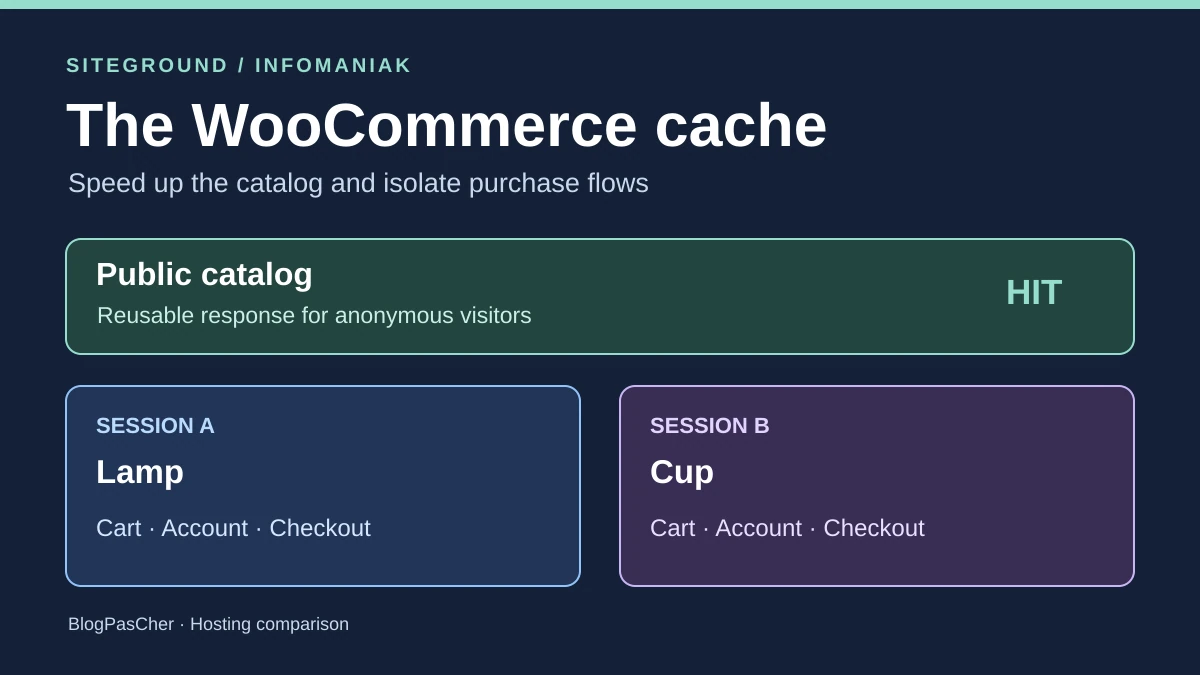
A WooCommerce store wants to reduce response times for categories and product pages. Two visitors can receive the same catalog if price, displayed stock and content are identical for them. Once the response contains a cart, address, orders or payment methods calculated for the session, it must remain visitor-specific. A faster-displaying page may hide an error if it reuses an old cart or content prepared for someone else.
The starting point is the list of assigned WooCommerce pages with their actual URLs. A store may call its pages /panier/, /mon-compte/ and /commande/, or use other paths and languages. Also record routes derived from these pages, such as viewing an order or editing an address. Labels used by a host in its rules do not alone prove that every store variant is covered.
Specify what the storefront contains. A public catalog may display a mini-cart through a separate request. If HTML already contains a cart, a role-specific rate or a currency-specific price, the same document no longer suits every visitor. You must then separate the personalized part, exclude the affected visitors or use a cache variant the team can verify. This comparison starts with a shared anonymous storefront and three session-specific dynamic routes.
Compare before you choose
The offers at a glance
Find the use case and budget that fit, then read the details to see the limitations and any components you may need.
On smaller screens, the table scrolls horizontally. With a keyboard, press Tab to focus the table, then use the left and right arrow keys.
| Offer | Best for | Pricing and billing | Renewal and support |
|---|---|---|---|
 SiteGroundRead the details | A team wanting to diagnose a server page cache through its headers and test on an integrated copy. | GrowBig at 3.99 EUR excluding VAT per month over twelve months, then 27.99 EUR excluding VAT per month over the same duration 47.88 EUR excluding VAT paid upfront in the pricing consulted, then a reference of 335.88 EUR excluding VAT over twelve months Excluding taxes. Check the actual amount and account taxation. | Annual by default. Automatic renewal 15 days before expiry for a period of twelve months or more. |
 InfomaniakRead the details | A team preferring caching within WordPress, or with the skills to manage Cloud Varnish routing and rules. | Web Hosting from 10.91 CHF per month excluding VAT and Managed Cloud Server from 38.41 CHF per month excluding VAT Equivalents of 130.92 CHF and 460.92 CHF over twelve months at the displayed starting prices Excluding VAT; check Cloud configuration and renewal price. | Product amount and due date in the Manager. First attempt 14 days before expiry if automatic renewal is enabled. |
Identify every cache that can respond
A page cache reuses an HTML response. An object cache reuses data the application has calculated or read. The browser and a CDN may also retain responses. A correct rule in the WordPress plugin covers only what that plugin controls. If a CDN or proxy can reuse the response before WordPress runs, also check that layer’s rules and purge order.
For each layer, inventory its operator, diagnostic indicators and how to remove a cached response. On the catalog, the team looks for an initial load followed by a reused response, with correct price and availability. For the cart, account and checkout, it looks for a dynamic response whose content matches the session. Cache status and content must be checked together. An application response may still be incorrect because of a session, plugin or object cache.
Record a baseline before adding a plugin or enabling a CDN. Note cookies present in a session without a cart, after adding an item and after login. WooCommerce documentation describes cookies associated with the cart and its session, among others. Use two independent browser profiles to avoid shared cookies or local data. Any evidence containing a session identifier must remain in a private log and be redacted before sharing.
SiteGround starts with an active server page cache
SiteGround describes Dynamic Caching as a full-page NGINX cache enabled by default. Its documentation lists URL and cookie exclusions. It notably cites cart, my-account, checkout and add-to-cart, plus wordpress_logged_in_, wp_woocommerce_session and cart cookies. The documented patterns provide a starting point. Check results on actual paths, including translations and plugins adding a checkout flow or customer access.
In WordPress, current documentation places exclusions under Speed Optimizer, Caching, then Exclude URLs from Caching. This option covers Dynamic Caching and the plugin’s file cache. Compare the paths displayed in WooCommerce with exclusions. If the account is actually at /mon-compte/, check that path and its subroutes. The interface accepts an exact path and an asterisk for subpaths, for example /mon-compte/*. Test both cases after purging. File caching is disabled by default and depends on Dynamic Caching at SiteGround. Leave this layer out of the first test to isolate server-cache behavior. Memcached requires activation in Site Tools and then the plugin, and concerns object caching.
To read the server layer, SiteGround documents x-proxy-cache and values HIT, MISS and BYPASS. After a purge, an eligible page may produce MISS followed by HIT for comparable requests. For private content, check that a response never becomes HIT and contains the correct customer’s data. Purges are available in Speed Optimizer and in Site Tools under Speed, then Caching. If a CDN is active, identify its own rules, because a plugin exclusion does not demonstrate its behavior.
Infomaniak separates application caching from the Varnish option
On Infomaniak Web Hosting, the optimization guide presents caching through a WordPress plugin and notably cites WP Super Cache. This plugin generates HTML files. WooCommerce documents its integration to exclude assigned cart, checkout and account pages. Nevertheless, check actual URLs, store plugins and custom requests. On this plan, start by checking the installed plugin’s settings and diagnostics. The SiteGround header is not a reference for this process.
Managed Cloud Server offers another path. Infomaniak lists Varnish in Fast Installer and provides a sample VCL configuration with an origin server and restricted purging. For redirecting web traffic to an application port, a separate guide requires a site and HAProxy. It states that Fast Installer configuration targets the primary domain, with separate handling for aliases. Check the actual request path before writing a rule. Installing software confirms neither its inclusion in the HTTP path nor a ready-to-use WooCommerce policy.
On this Cloud path, appoint someone responsible for VCL rules and purging. Examine uncached passage of private paths, authenticated requests and actions changing the session. Preserve cookies and headers required for payment. Redis and Memcached are among Cloud Server options. Their availability does not provide HTML exclusions. If an object cache is added, separately test session continuity and data updates.
Compare plans over the same duration
The French SiteGround pricing table consulted on November 10 displays StartUp at 1.99 EUR per month initially and 15.99 EUR per month at renewal, GrowBig at 3.99 then 27.99 EUR, and GoGeek at 5.99 then 39.99 EUR. Over twelve months, displayed or calculated totals are 23.88 then 191.88 EUR, 47.88 then 335.88 EUR, and 71.88 then 479.88 EUR, excluding taxes. Confirm the introductory price in the summary, because promotional pricing may vary. The introductory rate is a monthly equivalent for twelve months paid upfront. The official regular-price table also depends on the prepaid duration. Shared-hosting renewal is annual by default, and SiteGround states automatic billing fifteen days before expiry for a period of twelve months or more.
Multilevel caching is advertised on all three WordPress plans in this table. GrowBig and GoGeek display integrated staging. GrowBig therefore serves as the reference when the team wants this tool to check exclusions before touching the live store. On StartUp, the team must provide a separate test environment if it needs a copy. Include that environment’s cost and any plugins in the comparison.
The Swiss Infomaniak pricing table displays Web Hosting from 10.91 CHF per month and Managed Cloud Server from 38.41 CHF per month, excluding VAT. Over twelve months, these references represent 130.92 CHF and 460.92 CHF by multiplying the displayed price. Shared hosting is billed annually by default. Monthly and quarterly billing depend on a threshold, and Cloud configuration affects the invoice. The pricing table does not separate a promotional price from a guaranteed renewal price. The Manager shows the actual due date. When automation is enabled, the first payment attempt is advertised fourteen days before that date. Keep currencies and taxes separate until obtaining a quote.
Also protect cart and checkout actions
Read network requests as both sessions add an item, change quantity, log in and reach checkout. Depending on the theme and blocks, a screen uses initial HTML and calls reloading the mini-cart, shipping or payment methods. Check calls carrying tokens, request bodies or cookies, as well as those returning customer-specific data. Excluding the HTML document does not automatically protect these responses.
For a store using the WooCommerce Store API, distinguish public product routes from cart and checkout routes. Record calls actually emitted, for example /wp-json/wc/store/v1/cart and /wp-json/wc/store/v1/checkout. A GET cart read is also session-specific. Documentation specifies that cart POST writes and Store API checkout requests require a nonce or use a Cart-Token depending on the flow. Avoid sharing session responses or removing necessary headers. Also check classic cart-update and order-validation calls if the store uses them. Keep token validation active during testing.
Finally, test plugins changing price, taxes or stock. A catalog identical when cold and warm must be valid for its intended audience. If price depends on the customer or currency, test different states in both sessions. Then change test data, purge the relevant layer and check that category, product page and cart become consistent. This verifies price freshness as well as visitor separation.
What the two fictional sessions demonstrate
In the exercise, two anonymous catalog URLs each have their own key. A first read produces MISS, the second HIT. The lamp price changes from 24 to 29 in the fictional store. A response may still show the old price while the copy remains in memory. After purging, the read returns 29 and subsequent reads reuse that version. A parameterized URL is excluded from caching in the model, as is the storefront requested with a session. This choice keeps the test simple and does not prescribe a general policy for every store.
Sessions A and B each add their fictional item. The three routes are read in A, B, A order with different order references. The check verifies exact content, BYPASS state and the private, no-store header. It then rejects an A token presented by B, records one simulated payment per session and verifies that modifying A’s cart leaves B’s cart unchanged. The compliant candidate passes twenty-one checks.
In the faulty variant, a rule treats the three private GET requests as shareable responses. B receives three HIT responses and gets A’s fictional cart, order reference and checkout form. Results are reproducible in Python with in-memory objects. There is no HTTP server, WooCommerce installation or provider-performance test. Tokens are session markers intended solely to demonstrate the risk, and payments remain local counters.
- Download the ZIP exercise under “Further reading”, extract the archive, then run python exercice.py.
- Compare the 21 checks and the faulty rule’s three private responses with attendu.json.
Replay the journey on a copy at the provider
Use an isolated copy reproducing the store’s URLs, active plugins, theme, protocol and cache layers. Prepare two fictional customers with easily distinguishable content, such as a lamp and a mug, and two test orders. Use independent browser profiles. Put the payment provider in sandbox mode and disable real customer notifications. Measure the cold catalog and then the warm catalog separately, recording the responding layer. Keep the URL, anonymous profile and measurement parameters constant.
In each session, add an item, open the cart, change quantity and check the account and checkout. Alternate A, B, A and reload screens after navigating back. Check that the mini-cart, shipping charges and payment methods match the correct session. Replay access to account subroutes, asynchronous calls, confirmation and the sandbox return. Check order status in the test store. A price or stock change on the copy must also propagate to the storefront at the intended time.
At SiteGround, record x-proxy-cache and any upstream cache. At Infomaniak, record the chosen plugin’s indicator or the one the team configured for Varnish, and confirm traffic reaches it. If headers and markers conflict, identify the layer supplying the response before concluding. Record the path, action, test session, expected content and result. Do not copy tokens, cookies or personal data.
Decide what to purge and when to stop testing
A’s content visible to B, private data served from a shared cache or a test order with divergent status is enough to stop the test. Remove the rule caching these responses and purge layers that may have retained them. Keep a redacted record of the cause. Then check all three routes and associated calls in fresh sessions before reactivating optimization. A warm catalog is useful only if these checks pass.
When separation holds but a price stays old, identify the layer serving the copy and check how a product change triggers its purge. A correct product-page price and obsolete category price indicate different update cycles for the two representations. Also check the mini-cart, which may be populated by a separate call. Add another layer only when you can identify its role and how to invalidate it.
SiteGround suits a team wanting to check and adjust an already supplied server cache. GrowBig’s value in this scenario comes from staging and the tests the team can run there. Infomaniak Web Hosting suits a team wanting to manage page caching at WordPress level. Managed Cloud Server enables Varnish if someone can administer its rules and routing. The decision depends on the invoice at renewal and the full journey’s result on the copy.
Further reading
Sources and references
Use these references to check the features, requirements and limitations described. Reading documentation is not a practical test.
View 20 references
- SiteGround — StartUp and the first prepaid cycle in the French pricing table ↗ — Documentation consulted:
- SiteGround — StartUp and the displayed twelve-month renewal price ↗ — Documentation consulted:
- SiteGround — SiteGround, shared hosting renewal schedule ↗ — Documentation consulted:
- SiteGround — SiteGround, automatic payment ↗ — Documentation consulted:
- SiteGround — SiteGround, Dynamic Caching configuration ↗ — Documentation consulted:
- SiteGround — SiteGround, Speed Optimizer settings ↗ — Documentation consulted:
- SiteGround — SiteGround, purging in Site Tools ↗ — Documentation consulted:
- SiteGround — WooCommerce, cache exclusions ↗ — Documentation consulted:
- SiteGround — WooCommerce, assigned pages and advanced settings ↗ — Documentation consulted:
- SiteGround — WooCommerce, Store API nonces ↗ — Documentation consulted:
- SiteGround — WooCommerce, Store API cart tokens ↗ — Documentation consulted:
- SiteGround — Automattic, WP Super Cache ↗ — Documentation consulted:
- Infomaniak — Web Hosting and the displayed starting monthly price ↗ — Documentation consulted:
- Infomaniak — Infomaniak, Web Hosting ↗ — Documentation consulted:
- Infomaniak — Infomaniak, Managed Cloud Server ↗ — Documentation consulted:
- Infomaniak — Infomaniak, enabling a WordPress cache ↗ — Documentation consulted:
- Infomaniak — Infomaniak, Fast Installer ↗ — Documentation consulted:
- Infomaniak — Infomaniak, using Varnish ↗ — Documentation consulted:
- Infomaniak — Infomaniak, routing to a web service ↗ — Documentation consulted:
- Infomaniak — Infomaniak, expiry and automatic renewal ↗ — Documentation consulted:
Uses, prices and what to check
2 offers in detail
Compare the features you need and the terms of each offer. The order of these entries does not indicate a ranking.
SiteGround
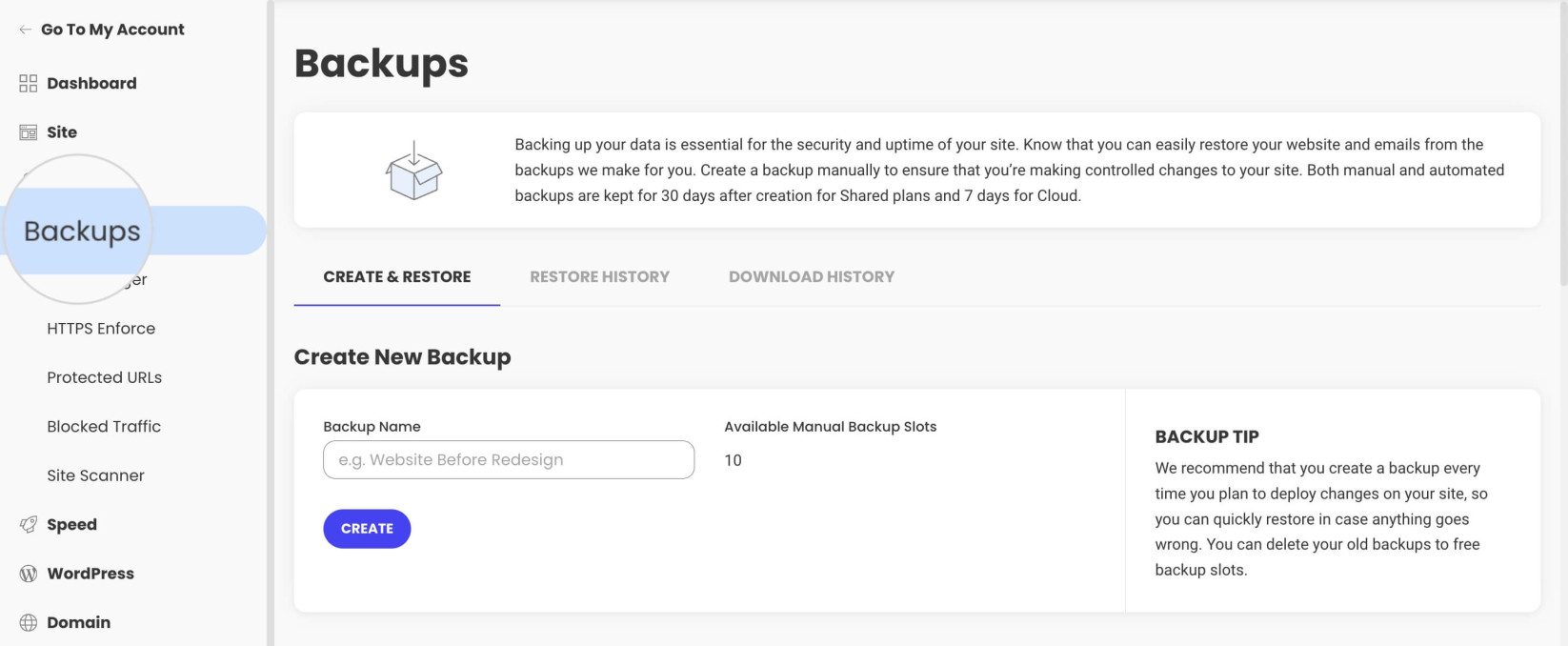 Backups in Site Tools: this example displays ten manual slots, depending on the plan and backup option. — Image: SiteGround.Open full-size screenshot ↗
Best forA team wanting to diagnose a server page cache through its headers and test on an integrated copy.
Dynamic Caching is documented as active by default. GrowBig provides integrated staging to check WooCommerce paths and cache rules.
Offer pricing
GrowBig at 3.99 EUR excluding VAT per month over twelve months, then 27.99 EUR excluding VAT per month over the same duration
Billing: 47.88 EUR excluding VAT paid upfront in the pricing consulted, then a reference of 335.88 EUR excluding VAT over twelve months
Renewal and support: Annual by default. Automatic renewal 15 days before expiry for a period of twelve months or more.
Excluding taxes. Check the actual amount and account taxation.
Checked on .
Strengths
- NGINX cache and exclusions documented
- x-proxy-cache header and purge in Site Tools
- Staging displayed on GrowBig and GoGeek
What to consider
- Localized paths and plugins must be tested on a copy.
- A CDN requires checking its own rule.
- StartUp does not list integrated staging.
Pricing terms and compatibility
Understanding the offer
- Price at the time of review
- GrowBig at 3.99 EUR excluding VAT per month over twelve months, then 27.99 EUR excluding VAT per month over the same duration
- Currency
- EUR
- Billing
- 47.88 EUR excluding VAT paid upfront in the pricing consulted, then a reference of 335.88 EUR excluding VAT over twelve months
- Renewal and support
- Annual by default. Automatic renewal 15 days before expiry for a period of twelve months or more.
- Taxes and fees
- Excluding taxes. Check the actual amount and account taxation.
- Commitment and terms
- French introductory offer prepaid for twelve months
- Date checked
Compatibility and components
- WordPress and WooCommerce
- Speed Optimizer for cache settings
- Memcached after activation in Site Tools and then the plugin
Infomaniak
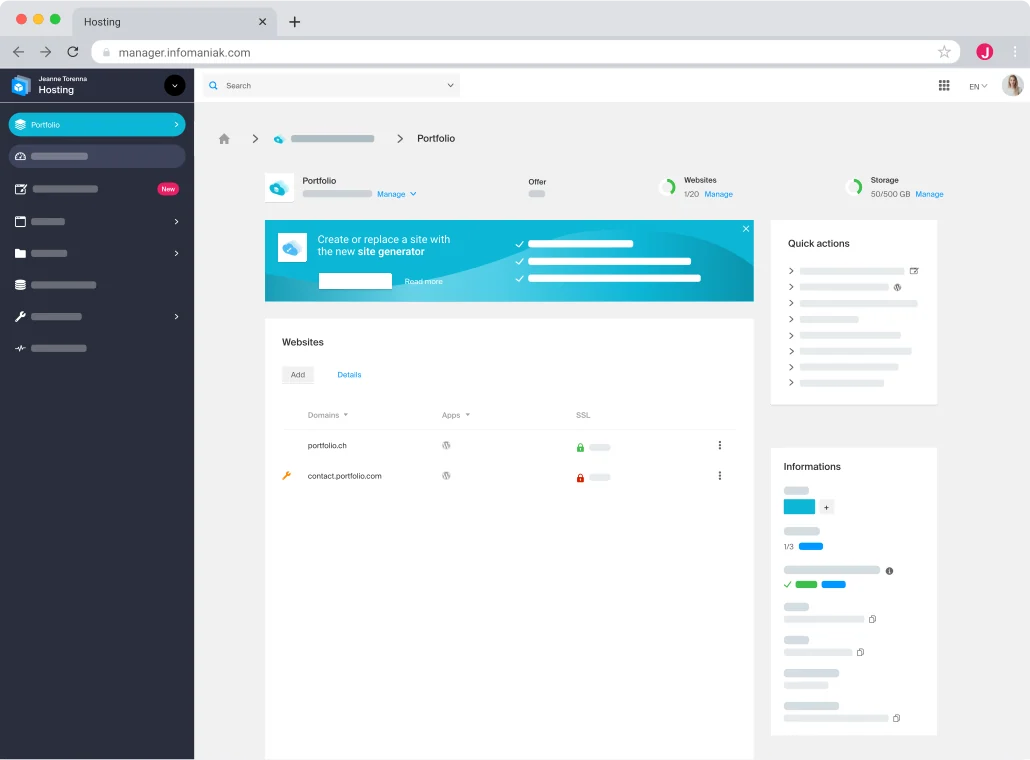 Developer presentation image: illustrative mock-up of the Web panel.
Best forA team preferring caching within WordPress, or with the skills to manage Cloud Varnish routing and rules.
Web Hosting supports a WordPress cache-plugin strategy. Varnish follows a separate path on Managed Cloud Server.
Offer pricing
Web Hosting from 10.91 CHF per month excluding VAT and Managed Cloud Server from 38.41 CHF per month excluding VAT
Billing: Equivalents of 130.92 CHF and 460.92 CHF over twelve months at the displayed starting prices
Renewal and support: Product amount and due date in the Manager. First attempt 14 days before expiry if automatic renewal is enabled.
Excluding VAT; check Cloud configuration and renewal price.
Checked on .
Strengths
- Page caching through a WordPress plugin documented
- Varnish and object caches available on Cloud Server
- Varnish configuration and purging documented
What to consider
- The plugin guide does not confirm coverage of store customizations.
- Varnish caching requires site-appropriate rules and routing.
- The starting Cloud rate depends on the selected configuration.
Pricing terms and compatibility
Understanding the offer
- Price at the time of review
- Web Hosting from 10.91 CHF per month excluding VAT and Managed Cloud Server from 38.41 CHF per month excluding VAT
- Currency
- CHF
- Billing
- Equivalents of 130.92 CHF and 460.92 CHF over twelve months at the displayed starting prices
- Renewal and support
- Product amount and due date in the Manager. First attempt 14 days before expiry if automatic renewal is enabled.
- Taxes and fees
- Excluding VAT; check Cloud configuration and renewal price.
- Commitment and terms
- Shared hosting annual by default. Alternative frequencies depend on the amount.
- Date checked
Compatibility and components
- WordPress and WooCommerce on the Web Hosting plan examined
- WP Super Cache is a documented example
- Varnish on Managed Cloud Server depending on installation and routing