

Designing a front page that presents the right story at the right time
A newsroom highlights an audio interview in the morning, then publishes a feature that needs to take the lead. By the end of the day, the front page still contains the first link in two places and the feature appears under a different headline from its own page. This update is the work to compare between Pressroom and Newsblock. The front page should signal what matters now, present the different formats and continue to work when a reader opens an article directly.
Pressroom describes magazine components, several post formats and bundled WPBakery. It merits examination if the newsroom wants to regularly assemble articles, audio and video. Newsblock describes magazine layouts, archive options and a dark mode. Customizer settings are an avenue for a team that wants to stabilise the presentation and primarily change the selected content. In both cases, a position visible in a demo needs to be matched to the mechanism feeding it.
These exercises are for a team using self-hosted WordPress. Use a test copy protected by access controls, with post permissions and, to change the presentation, the permissions required for the template. Have these permissions confirmed for a managed or multisite installation. The scenario can use test media files and local links instead of external services. You can examine the writing of headlines and summaries before configuring a player.
Compare before you choose
The offers at a glance
Find the use case and budget that fit, then read the details to see the limitations and any components you may need.
On smaller screens, the table scrolls horizontally. With a keyboard, press Tab to focus the table, then use the left and right arrow keys.
| Offer | Best for | Pricing and billing | Renewal and support |
|---|---|---|---|
 PressroomRead the details | Editorial portal with several post formats | 79 USD Regular — recorded November 2, 2026 One-time purchase of the offering. Taxes and handling fees excluded; cart not checked. | Six months of support; optional paid extension. |
 NewsblockRead the details | Magazine organised into categories | 69 USD Regular — recorded November 2, 2026 Payment when purchasing the offering, not a monthly rate. Taxes and handling fees excluded according to ThemeForest; final cart amount not checked. | Six months of support advertised; optional paid extension, amount not recorded. Mandatory theme renewal not advertised. |
Documented prices and terms
The Regular offerings recorded November 2, 2026 list Pressroom at 79 US dollars and Newsblock at 69 dollars. The ten-dollar difference concerns the theme before taxes and any fees. To budget for a multimedia front page, separate theme configuration, content preparation and audio and video delivery costs. A theme price tells you nothing about the cost of external hosting or the rights to use the assets shown in the demo. These are dated prices, not confirmation of the price when you order. Both themes are paid; no purchase, installed trial or benchmark was conducted for this comparison.
The Pressroom listing advertises bundled WPBakery and its own editorial elements. Its displayed update date is September 12, 2026 and the latest recorded WordPress tag is 7.0.x. The Newsblock listing describes the block editor, Customizer settings and Elementor and Elementor Pro compatibility. The Pro offering is not assumed to be included. Its displayed update is dated August 24, 2026 and the recorded tag goes up to 7.0.x. PHP versions and exact combinations still need checking on the intended site.
The higher-contrast variants mentioned for Pressroom and the dark mode advertised for Newsblock are presentation features. To choose, examine the newsroom’s actual headlines, captions and links in the selected modes. The Newsblock montage presents several layouts and marketing messages. The Pressroom banner shows previews on several devices. These promotional illustrations belong to the sellers, with their original marketing text. They provide neither performance measurements nor an accessibility assessment of your front page.
The records mention six months of support for each theme. Support extension is optional and paid; its amount is not established here. Mention of future updates does not set a guaranteed maintenance period. Keep the distinction between the theme licence, the licence of a separately purchased extension and rights to images or recordings. Support does not automatically include building your layout or administering the delivery service.
Deciding what goes on the front page
Prepare four fictional posts. The main article has a long headline and a photo. The audio story has a summary and a duration. The video report has introductory text. The brief has no image. Note each one’s category, format and status. Define a lead area, a list of recent stories and, if needed, an area dedicated to audio and video formats. Ask the person responsible for the front page to explain how each area selects its content.
Two methods can coexist. A manual area allows a feature to be fixed in the lead position. An automatic list can draw on posts from a category. If the same article qualifies for both, decide whether repetition is useful. Sometimes its reappearance in the latest articles list is expected. Elsewhere it occupies two adjacent positions and hides another story. Prepare an example where the lead headline moves down into the list after a new publication. This scenario helps you choose between manual selection and category rules.
Workflow 1. Assemble a working front page without a new component
This approach suits a newsroom that wants to define its areas before choosing a magazine template. It requires a private copy and permission to create a page and posts. The working version can use the existing editor. It should allow readers to find the lead story and distinguish the available formats. The person changing the order should be able to explain it. This assembly helps decide on areas and links; it does not prove the automatic features of Pressroom or Newsblock. Also check that the test copy sends no real notifications and integrates no paid service for this exercise.
- In Posts > Add New Post, prepare the four fictional drafts with categories, headlines and summaries. Add test media where its presence helps check the format.
- In Pages > Add New Page, create a working front page with a main story and a short list. To check ordinary permalinks in a reader session, publish the four fictional posts and this page only on the protected test copy. Drafts require previews and appropriate permissions; they should not be used as evidence of a working public journey.
- Replace the main story with the fictional feature. View the list on a narrow screen and check that it does not hide an expected story. If you keep two links to the same article, give each an editorial reason.
- Restore the previous selection or return the page to draft. Keep the table of areas and content. It lets you request the same operation in each theme’s template.
Workflow 2. Identify the source of a template area
This variant suits a candidate theme and its authorised layout already installed on a copy. It requires permissions for the target area and an appropriate backup. Pressroom advertises WPBakery and its editorial components. Newsblock documents Customizer settings. The screen’s label and availability vary with the demo. Ask the provider where the template selects the story and how to retrieve the text when it changes.
- On the copy, open the editor for the page containing the area or the panel specified in the template documentation. Record the lead article, selected category, number of items, their order and any manual selection. If these settings are absent, identify the component actually supplying this area before changing anything.
- Change a single area in the documented template. Open the home page and category archive. Check whether the order or selection changed anywhere beyond the front page.
- Change the headline of the fictional article published on the copy and save its update, then reload its card. Editing a separate draft does not change the published article. If the card retains different wording, compare the source field and manual copy, then the test copy’s cache, before changing a shared template.
- Restore the recorded values. Add the area’s name, owner and source to the register. Ask how to restore the old front page if the next update affects several positions.
Workflow 3. Check the formats and both presentation modes
This workflow is useful if the home page mixes formats or uses an additional colour mode. It requires a private copy with authorised settings, internal test links and fictional media. The expected result is that readers know what they are opening, can understand the story by reading the text and can find the link even if the media is unavailable.
Also compare editing permissions. Sign in with the role actually assigned to the person on duty and change only the headline or selection they must maintain. If that person can update an article but cannot open the builder, plan a daily workflow through fields they can access. Do not grant full administration solely to move a story. Structural changes and content corrections can have different owners.
- On the copy, prepare an audio card and a video card with a summary and an explicit label. Add enough textual introduction to the test page to understand the story without playing the media.
- Open the front page in a wide then a narrow view. Locate playback and return links. If the template has a dark mode, reread headlines, captions and navigation elements in that mode and in light mode.
- On the copy’s test page, remove the fictional media block without deleting its file from the media library, then save this test page. Reload the card and its article to check that the summary and a valid link remain understandable. This check with the block absent simulates neither an external service outage nor a player network error.
- Restore the fictional media block and colour settings. Navigate the links with Tab and Shift+Tab, activate a link with Enter and check that focus remains visible in both modes. Then separately check the controls of the actual intended player; these few actions do not constitute a full accessibility audit.
Preparing for days without media and team changes
A front page that requires a video in the lead position can become hard to update when the newsroom produces none. Prepare a variant where the area holds an illustrated article or a brief. Ask the provider what the demo displays when the category has no recent content. On the copy, check that the empty area does not leave a label promising a missing format. If the template has no fallback, give the team a procedure to remove the position or use an already published, clearly dated item.
An important feature may remain in the lead position longer than other stories. Note who decides to keep it there and when it should be reviewed. If this decision is recorded in an internal tool, ensure the person maintaining the front page can find it without inspecting the builder. In an absence, a short reference sheet allows the automatic list to be restored or the selection changed manually. In a small newsroom, a list of three named areas and each one’s source may suffice.
Before a redesign, retain a copy of headlines, summaries, categories and credits. Separate file addresses from player settings. When the layout contains theme-specific blocks, ask how to recover the content if the component is no longer installed. A WordPress export can help inventory articles. Recovering front-page areas and their selections requires a separate check. Note what the team wants to keep identical and what it accepts rebuilding.
Choosing a presentation the newsroom can maintain
Shortlist Pressroom if the advertised components match the newsroom’s formats and the team can maintain the chosen WPBakery page. Shortlist Newsblock if the priority is a stable presentation, archives and dark mode. In both cases, request a front-page change using a fictional story. The person who will perform it must be able to explain which areas update together and how to return them to their previous state.
Also compare the journey of a reader opening an audio or video page directly. The headline and summary should explain the story without assuming they have seen the front page. A category link can help them find other posts. The prices, components and versions stated correspond to the listings consulted November 2, 2026. The procedures still need to be performed on a copy suited to the project, and the attributed visuals serve as presentation references.
If the team wants to reduce daily work, start by measuring how many places it corrects when a story moves. A list fed by a category can simplify an operation. Manual selection can address an editorial priority that the date alone does not reflect. The choice should account for this decision before multiplying page variants.
Following through on a correction after publication
A newsroom may correct the headline or description of a story already appearing in three areas. On the copy, take the fictional feature and record its headline on the front page, in the archive and on the article page. Change a single wording, then look for the update in all three places. In an area fed by article data, check which text actually appears. A card may display a field other than the headline. In a manual area, note the second correction required and who makes it.
For a replaced audio recording, also examine the displayed summary and duration. A card citing an old duration can mislead readers even if the correct media is available on the page. Keep the story identifier and credit where they remain valid. If media is removed from the story, check that no playback button without a destination remains. Then restore the test state. Operations on the delivery service should be documented separately by the team managing it.
Finally, prepare a rule for stories removed from the front page but still present in their category. The feature does not need deleting from the site to give up its position. On the copy, remove the link from the lead area and open the old address as well as the category. Both journeys can remain relevant. Note what the template does by default and how to undo a selection changed too early. This record will help the editor on duty handle a correction with their available permissions.
In the front-page register, also specify which area to check after an urgent correction. If two people change the selection simultaneously, ask the editor on duty to reread all three views before confirming the version in use.
Further reading
Sources and references
Use these references to check the features, requirements and limitations described. Reading documentation is not a practical test.
View 2 references
- Pressroom — official listing in the November 2, 2026 record (archived offering and price) ↗ — Documentation consulted:
- Newsblock — official listing in the November 2, 2026 record (archived offering and price) ↗ — Documentation consulted:
Uses, prices and what to check
2 offers in detail
Compare the features you need and the terms of each offer. The order of these entries does not indicate a ranking.
Pressroom
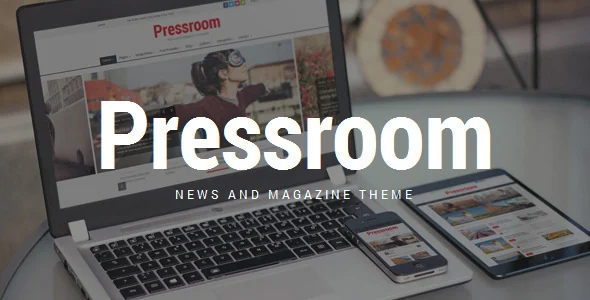 Official Pressroom promotional banner by QuanticaLabs, with desktop, phone and tablet presentation.
Best forEditorial portal with several post formats
Pressroom may suit a portal alternating news, videos, galleries and audio content. The listing advertises bundled WPBakery and components for organising articles. Dark and higher-contrast variants offer presentation options, without constituting accessibility certification. Compare categories and search using your real content, then check keyboard navigation. For taking over a site, also plan to maintain pages built with theme-specific components.
Offer pricing
79 USD Regular — recorded November 2, 2026
Billing: One-time purchase of the offering.
Renewal and support: Six months of support; optional paid extension.
Taxes and handling fees excluded; cart not checked.
Checked on .
Strengths
- WPBakery advertised as bundled
- Multimedia formats and contrast variants
What to consider
- Dependency on the theme’s WPBakery components
- Accessibility and media behaviour not tested
Pricing terms and compatibility
Understanding the offer
- Price at the time of review
- 79 USD Regular — recorded November 2, 2026
- Currency
- USD
- Billing
- One-time purchase of the offering.
- Renewal and support
- Six months of support; optional paid extension.
- Taxes and fees
- Taxes and handling fees excluded; cart not checked.
- Commitment and terms
- Regular License; check the end-product terms.
- Date checked
Compatibility and components
- Last displayed update: 2026-09-12
- Latest displayed WordPress version: 7.0.x
- Editor and dependencies: bundled WPBakery; specific Pressroom components.
- Advertised included components: WPBakery and editorial components advertised as included.
- Separate purchases or services: video and audio hosting and third-party commercial extensions are separate.
- Unverified items: no installation or measurements; PHP and extension versions to be confirmed.
Newsblock
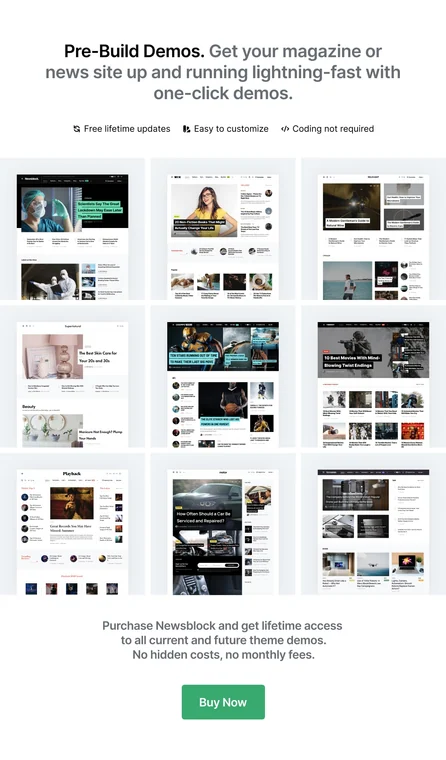 Official Newsblock promotional montage showing several demos. Speed or lifetime-update promises in the image belong to the vendor, without independent validation.
Best forMagazine organised into categories
Newsblock offers a magazine presentation with dark mode and different archive formats. The listing states that settings can use the WordPress Customizer. This avenue suits a newsroom wanting to structure content without designing every page. Check the readability of links and images in both colour modes. Additional features, including AMP or forms, should be attributed to their actual extension rather than WordPress core.
Offer pricing
69 USD Regular — recorded November 2, 2026
Billing: Payment when purchasing the offering, not a monthly rate.
Renewal and support: Six months of support advertised; optional paid extension, amount not recorded. Mandatory theme renewal not advertised.
Taxes and handling fees excluded according to ThemeForest; final cart amount not checked.
Checked on .
Strengths
- Automatic or manual dark mode described
- Grid, list and full-width archives
What to consider
- AMP requires the component specified by the publisher
- Versions and exact list of builder extensions to be confirmed
Pricing terms and compatibility
Understanding the offer
- Price at the time of review
- 69 USD Regular — recorded November 2, 2026
- Currency
- USD
- Billing
- Payment when purchasing the offering, not a monthly rate.
- Renewal and support
- Six months of support advertised; optional paid extension, amount not recorded. Mandatory theme renewal not advertised.
- Taxes and fees
- Taxes and handling fees excluded according to ThemeForest; final cart amount not checked.
- Commitment and terms
- Regular License, one end product according to the displayed offering; check suitability for the project.
- Date checked
Compatibility and components
- Last displayed update: 2026-08-24
- Latest displayed WordPress version: 7.0.x
- Editor and dependencies: block editor, Elementor and Elementor Pro declared compatible; Customizer settings described.
- Advertised included components: dark mode and archive options advertised; complete set of supplied extensions not checked.
- Separate purchases or services: Elementor Pro, demo images and external services not assumed to be included.
- Unverified items: no package installed; full PHP matrix, all extension versions and practical outcome not checked.