

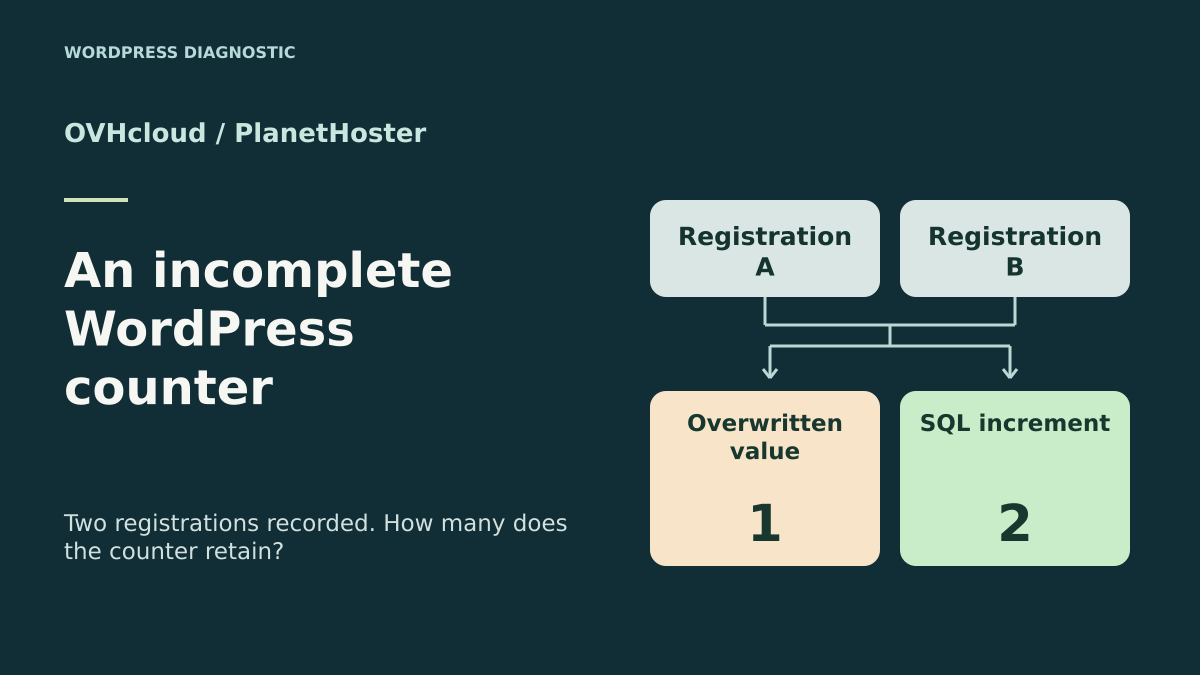
Two registrations are recorded and the counter increases only once
A lost update requires correcting how the counter is written and checked. Changing hosting plans does not prove a fix. The OVHcloud–PlanetHoster comparison covers access, the database and the copy needed to run this check; start by reproducing the defect in the existing environment.
A WordPress plugin keeps a registration counter for an event. When two requests arrive almost simultaneously, both records are in the register, but the displayed total has increased by only one. The first check is to compare the identifiers actually recorded with the total in the database. If the stored total is already one while the register contains two distinct registrations, the discrepancy occurs before display.
A common way to create this discrepancy is to read the counter, calculate the new total in PHP and write that value. If both processes read zero, each prepares the same total of one. The second write then leaves the first value in place. The engine can complete both SQL statements without an error, even if the second changes no rows. This case is called a lost update.
The comparison concerns a counter maintained by a plugin or custom code. The WordPress functions get_option() and update_option() illustrate the two steps of reading and writing an option. The exercise reproduces the mechanism on a dedicated table without loading WordPress. It then compares an increment executed in the database and a register where each registration has a unique identifier.
Compare before you choose
The offers at a glance
Find the use case and budget that fit, then read the details to see the limitations and any components you may need.
On smaller screens, the table scrolls horizontally. With a keyboard, press Tab to focus the table, then use the left and right arrow keys.
| Offer | Best for | Pricing and billing | Renewal and support |
|---|---|---|---|
 OVHcloud PersoRead the details | A site already on Perso whose team can identify the database and test copy. | €35.88 excluding VAT for the first twelve months, equivalent to €2.99 excluding VAT/month. Twelve months at the displayed introductory rate €3.59 including VAT/month displayed initially; tax-inclusive total to confirm in the cart | €5.99 excluding VAT/month at renewal, equivalent to €71.88 excluding VAT over twelve months at this rate. |
 PlanetHoster The World — ten Standard Web ProjectsRead the details | A team maintaining several installations and linking each record to its project. | €5.49 including VAT/month over twenty-four months, equivalent to €131.76 including VAT at this rate. Twenty-four-month cycle for the promotion Site prices include VAT under the terms | Automatic renewal by default. Can be disabled no later than thirty days before expiry. Amount to confirm in the contract. |
Prove the difference between a registration and its counter
Work on a private copy and prepare two distinct fictional registrations with easily recognizable identifiers. Note the starting total and check that each is recorded by the intended process. Then record the total in the table actually used by the plugin. If a registration is missing from the register, examine its validation. If both registrations are present and the total has lost one, examine the writes maintaining that total.
A manual test with requests far apart may succeed every time. Ask the maintainer to record, for both processes, the value read before writing and the proposed value. In the exercise, both reads finish before the first write. This provides a reproducible order without generating significant load. The fictional identifiers let you reconcile results without recording registrants’ data.
Also check the scope of the updated row. If an event has several counters or the plugin operates across several sites, check the identifier in the query condition. An inconsistent result can also come from a row different from the one the page reads. Once the correct scope is confirmed, compare the value before and after, the number of rows changed and the register of both registrations.
- Create two control registrations and check their identifiers in the register.
- Record the value read by each process and the stored total after both writes.
Separate the lost update from the retry
Two different requests can overlap and overwrite a calculated value. A request already processed may also be retried because of a display error or delay. These are two distinct situations. Incrementing in the database can correctly count two different requests. If the first request is replayed without a stable identifier, the same increment also adds a third unit. The resulting number no longer represents two unique registrations.
Before changing the code, define what the total represents. If it counts distinct accepted registrations, the plugin’s register provides a reference. If it counts only occurrences and every call must increase the total, an increment on the dedicated row may be sufficient. For a registration, retain the same identifier during a retry. The register lets you distinguish an already processed operation from a new registration.
For the acceptance-test record, first trigger two distinct operations. Then replay just one operation with the same identifier. Check the results separately. A rule that is correct for concurrency may still be insufficient for retries. Also create a control where a query finds no counter row. The application must know whether to create that row under its procedure or report a discrepancy to correct.
OVHcloud Perso for locating the site’s database
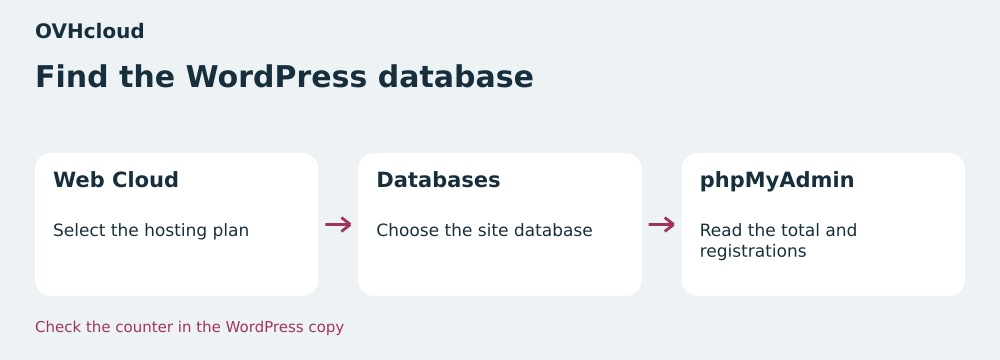
For WordPress already hosted at OVHcloud, start from the hosting service and record the database name used by the test copy. In the customer area, open Web Cloud, then Hosting plans. Select the required service and open the Databases tab. The database menu provides access to phpMyAdmin. Match the displayed name to the one WordPress uses, then check the table prefix. Two sites on the same hosting account can look similar in the manager.
Use phpMyAdmin’s SQL tab to record the server version and the counter table’s engine. Reading the counter and register is enough to establish the initial finding. Compare the results with what the application records during the two control requests. The included-database documentation restricts direct access from outside the hosting environment. The exercise’s MariaDB client therefore targets its local server. On the hosting side, choose phpMyAdmin or a check run from the site by its maintainer.
The Perso plan in the Eco range advertises five databases of 1 GB each, 100 GB of web SSD storage and up to fifteen sites. A new table for the counter and its register shares the quota of the WordPress database containing it. Record the space used by that database before importing a copy. For a single site already on Perso, direct access from the panel and the ability to keep a separate test database are the useful criteria, depending on the databases still available in the account.
- Identify the service, database and prefix used by the WordPress copy.
- Open phpMyAdmin from the database row, then check the version and engine using read-only queries.
PlanetHoster The World for linking the diagnosis to the right project
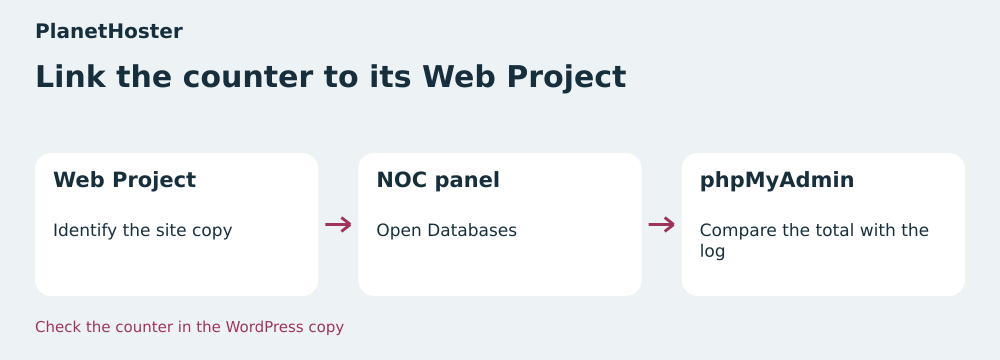
In The World, start by identifying the Web Project hosting the WordPress copy. Give this copy a recognizable name and check its test domain. Then open that project’s N0C panel. The N0C documentation gives the path Databases, then PhpMyAdmin. In the tool’s tree, select the database used by WordPress and check the prefix before recording the two values. Note the project name and database name together in the report.
The plan studied includes ten Standard Web Projects. The sales page displays 10 GB NVMe or SSD per Standard project. This capacity describes project storage and does not, by itself, provide an independent SQL quota. If the register will grow, check the limits applying to the project database in the panel and measure the size of the test dataset. Also identify the SQL account associated with the application. Operations available in the administrator panel and permissions actually granted to WordPress must be checked separately.
Linking results to the project makes handover easier when a team maintains several installations and must identify the one producing the number. To test a retry, always use the same database and fictional identifier. A counter recorded on one project and a register consulted on another produce a discrepancy that cannot be interpreted. In the test record, state the test domain, selected database, prefix and table whose engine was recorded. Keep login credentials out of the report.
- Open N0C in the test Web Project, then choose Databases and PhpMyAdmin.
- Record the project and database with both the counter and register readings.
Compare prices over their duration and limits within their scope
In the November 11, 2026 record, OVHcloud Perso displays €2.99 excluding VAT per month and a displayed equivalent of €3.59 including VAT per month. The page gives an introductory total of €35.88 excluding VAT for twelve months. The displayed renewal is €5.99 excluding VAT per month, or €71.88 excluding VAT for twelve months at this rate. The displayed monthly tax-inclusive equivalent is rounded. To know the tax-inclusive amount charged, use the total shown in the cart.
PlanetHoster displays an introductory offer of €5.49 per month on a twenty-four-month cycle. It applies to the ten Standard Web Projects plan studied here and to a separate Ultra configuration. The terms specify that site prices include VAT. At the displayed rate, the calculation gives €131.76 including VAT for twenty-four months. This plan’s renewal amount still needs checking in the cart or member area. The terms provide for automatic renewal by default and deactivation no later than thirty days before expiry.
For a purchase decision, write the upfront amount, covered duration, tax treatment and renewal on separate lines. OVHcloud’s five databases and PlanetHoster’s ten projects describe two different units. For this specific incident, choose the service where the copy can be identified, SQL reads are possible and the team controls its plugin’s table. Staying on the current service often lets you validate the fix before undertaking a migration.
Apply the increment in the plugin’s dedicated table
If each distinct operation must add exactly one and the counter row already exists, have the database calculate the new total. The principle is UPDATE compteur SET total = total + 1 WHERE id = 1, with a counter identifier supplied by the application and bound in a prepared query in the real code. The illustrated table belongs to the plugin. With InnoDB, concurrent changes to the targeted row proceed in sequence under a lock. The second statement adds one to the value left by the first.
Start by confirming that the table uses InnoDB, the condition targets the row’s key and the column is initialized with an integer. Include creation of the counter row in the plugin’s installation. After each test operation, check that the query changed one row. In this setup, zero changed rows means the target and initialization must be checked. An SQL error must be returned to the caller with the operation context so the maintainer can decide what to do next.
Inventory the processes that write this total. An old task that rereads the counter and rewrites a calculated value can undo a correct increment if it remains active. General WordPress settings retain their usual APIs. For a counter currently stored as an option, moving to a dedicated table requires a plugin change that switches reading and writing together. On the copy, check the starting value, both operations and then the displayed value after writes finish.
- Check the engine, row key and starting value before testing the prepared query.
- Run both control operations and check that each changes one row.
Count distinct registrations from their register
If a registration can be retried, use the same identifier for all attempts at that registration. Enforce uniqueness with a key in the register table. On a site managing several events, the key may include the event identifier and registration identifier. The plugin then calculates the total by counting the event’s rows using the criteria defining an accepted registration. If the business register already contains this data, start from that register.
Treat a uniqueness conflict on the intended key as a reason to reread the existing row. If it corresponds to the same operation, the application can reuse the result already recorded. If business data differs for that identifier, report the conflict. Other SQL errors follow the normal failure path. In the lab, a primary key on the identifier is sufficient because both registrations belong to the same fictional group. The third insertion reuses the first key and MariaDB returns error 1062. If the plugin must also maintain a stored counter, record the new registration and its increment in the same transaction on transactional tables. On failure, roll back everything. An attempt already recorded retrieves its result without another increment. This workflow must be checked in the plugin.
To repair a site’s total, record the old number and calculate the total from the authoritative registrations. Note the cutoff date and check the rule applied to canceled, pending or imported registrations. If writes continue during the correction, coordinate pausing them or a consistent switchover with the maintainer to account for arrivals during the period. Keep the table backup and pre-intervention record. If part of the register is missing, have the discrepancy approved before changing the total.
- Replay a registration with its original key and check that the number of accepted registrations stays the same.
Repeat the local acceptance test and validate retry behavior on a copy
The ZIP contains the Python script and its Windows instructions. Extract it on the working drive and specify the bin folder of a portable MariaDB distribution. The script starts a temporary server on the loopback address, creates two InnoDB tables and uses independent connections. The data is fictional. The archive was extracted and rerun with Python 3.14.4 and MariaDB 10.11.14. The attached report retains the eight checks and the result of each step.
In the first case, both clients read zero and propose one. One write changes the row and the other leaves the value in place. The observed total is one. After resetting to zero, both increments each change one row and the total reaches two. An additional increment without an identifier raises the total to three. In the register, replaying one of the two keys triggers the expected conflict and the count remains two. These observations measure the lab’s operations with its table and engine.
To finish on the WordPress copy, validate a simple case, two distinct overlapping requests and a retry of the first request. After each case, reconcile the screen, register and counter row if it remains. Also check that returning to the previous version preserves registrations made since the backup. The hosts’ menus and limits come from their documentation. Validating the fix in the plugin and hosting account belongs to this acceptance-test stage.
- Note the three expected values before the acceptance test and reconcile each result with the register.
Further reading
Sources and references
Use these references to check the features, requirements and limitations described. Reading documentation is not a practical test.
View 11 references
- OVHcloud Perso — Initial twelve-month price ↗ — Documentation consulted:
- OVHcloud Perso — Identifying the database and accessing phpMyAdmin ↗ — Documentation consulted:
- OVHcloud Perso — External connection limits ↗ — Documentation consulted:
- PlanetHoster The World, Standard package — Twenty-four-month promotional equivalent ↗ — Documentation consulted:
- PlanetHoster The World, Standard package — Tax treatment, expiry and renewal ↗ — Documentation consulted:
- PlanetHoster The World, Standard package — Access to phpMyAdmin in N0C ↗ — Documentation consulted:
- WordPress — get_option() reference ↗ — Documentation consulted:
- WordPress — update_option() reference ↗ — Documentation consulted:
- MariaDB — UPDATE statement ↗ — Documentation consulted:
- MariaDB — InnoDB locking ↗ — Documentation consulted:
- MariaDB — SQL constraints ↗ — Documentation consulted:
Uses, prices and what to check
2 offers in detail
Compare the features you need and the terms of each offer. The order of these entries does not indicate a ranking.
OVHcloud Perso
 Find the WordPress database — BlogPasCher editorial illustration.Open full-size illustration ↗
Best forA site already on Perso whose team can identify the database and test copy.
In Web Cloud, open the hosting plan and Databases tab, then phpMyAdmin for the selected database. Check the copy’s prefix and reconcile the counter row with the registration register.
Offer pricing
€35.88 excluding VAT for the first twelve months, equivalent to €2.99 excluding VAT/month.
Billing: Twelve months at the displayed introductory rate
Renewal and support: €5.99 excluding VAT/month at renewal, equivalent to €71.88 excluding VAT over twelve months at this rate.
€3.59 including VAT/month displayed initially; tax-inclusive total to confirm in the cart
Checked on .
Strengths
- Five included databases of 1 GB each
- phpMyAdmin access from the database
What to consider
- 100 GB web SSD, up to fifteen sites
- External connections unavailable for included databases
Pricing terms and compatibility
Understanding the offer
- Price at the time of review
- €35.88 excluding VAT for the first twelve months, equivalent to €2.99 excluding VAT/month.
- Currency
- EUR
- Billing
- Twelve months at the displayed introductory rate
- Renewal and support
- €5.99 excluding VAT/month at renewal, equivalent to €71.88 excluding VAT over twelve months at this rate.
- Taxes and fees
- €3.59 including VAT/month displayed initially; tax-inclusive total to confirm in the cart
- Commitment and terms
- Twelve months at the quoted rate
- Date checked
Compatibility and components
- WordPress
- phpMyAdmin
PlanetHoster The World — ten Standard Web Projects
 Link the counter to its Web Project — BlogPasCher editorial illustration.Open full-size illustration ↗
Best forA team maintaining several installations and linking each record to its project.
Locate the Web Project serving the copy, then open the database in N0C. Record the project and prefix with both results. Storage per project and the database quota must be checked separately.
Offer pricing
€5.49 including VAT/month over twenty-four months, equivalent to €131.76 including VAT at this rate.
Billing: Twenty-four-month cycle for the promotion
Renewal and support: Automatic renewal by default. Can be disabled no later than thirty days before expiry. Amount to confirm in the contract.
Site prices include VAT under the terms
Checked on .
Strengths
- Ten Standard Web Projects in the plan studied
- phpMyAdmin from the project panel
What to consider
- 10 GB NVMe or SSD per Standard project
- Project SQL quota and renewal rate to check
Pricing terms and compatibility
Understanding the offer
- Price at the time of review
- €5.49 including VAT/month over twenty-four months, equivalent to €131.76 including VAT at this rate.
- Currency
- EUR
- Billing
- Twenty-four-month cycle for the promotion
- Renewal and support
- Automatic renewal by default. Can be disabled no later than thirty days before expiry. Amount to confirm in the contract.
- Taxes and fees
- Site prices include VAT under the terms
- Commitment and terms
- Twenty-four months at the quoted rate
- Date checked
Compatibility and components
- WordPress
- N0C
- phpMyAdmin