

A plugin breaks, but new registrations still exist
A cultural center updates its WordPress registration plugin. A workshop’s public page no longer displays correctly. Between the previous day’s backup and the report, a new registration arrived and an existing registration changed time. The team wants to recover the form and retain both changes. It must determine whether rollback can be limited to plugin files, whether the previous version no longer understands the database or whether a full restoration would remove useful data.
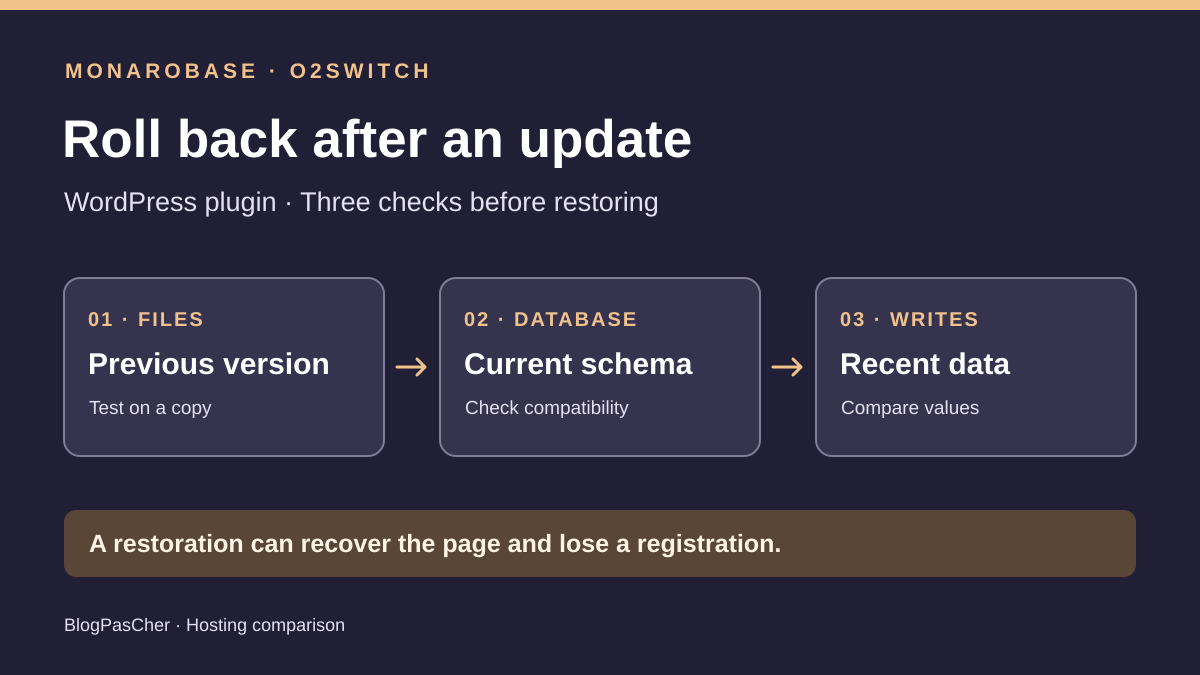
The pre-update point and current state serve different purposes. The former provides the old working version. The latter contains the update’s result and registrations to protect. Make two identified copies and keep the public site out of testing. Compare the plugin version, expected schema, business content and recent changes. A working homepage validates none of these four pieces of evidence.
Monarobase Classic and o2switch Grow provide documented routes to isolate testing. At Monarobase, guides describe restoring WordPress to another location and an option to recover a database with a suffix. At o2switch, help distinguishes JetBackup download from overwrite, and WP Tiger offers staging. The comparison uses these tools to prepare rollback evidence without restoring a real account.
Compare before you choose
The offers at a glance
Find the use case and budget that fit, then read the details to see the limitations and any components you may need.
On smaller screens, the table scrolls horizontally. With a keyboard, press Tab to focus the table, then use the left and right arrow keys.
| Offer | Best for | Pricing and billing | Renewal and support |
|---|---|---|---|
 MonarobaseRead the details | A team favoring recovery of a backup point to a separate destination and able to confirm its permissions. | Classic from EUR 5.95 excluding tax for one month Reference of EUR 71.40 excluding tax for twelve months at the same price. Contractual cycle to confirm. EUR 7.14 including VAT for one month or EUR 85.68 including VAT for twelve months at the same price if VAT is 20%. | Equivalent period in the terms. Automatic renewal presented differently in the terms and FAQ. |
 o2switchRead the details | A team wanting to handle separate exports and isolate testing through WP Tiger or a subaccount. | Grow, EUR 84 excluding tax paid for twelve months EUR 7 excluding tax monthly equivalent. Annual payment. EUR 100.80 including 20% VAT if applicable. | EUR 84 excluding tax for one year at the recorded public rate. Automatic if enabled. |
Define what the update changed
Record the previous and problematic versions, update time and latest available point before it. Determine where the plugin writes. It may manage options, metadata, its own tables, attachments or deferred jobs. The WordPress development manual describes a plugin upgrading its table structure. Depending on the plugin, migration may occur during a visit or scheduled job. File modification dates alone cannot date the migration.
Establish two business checks. The first is an operation known before the incident, such as opening a registration and reading its time. The second is a record of writes to retain after the backup. It must distinguish additions, changes and cancellations. A new registration may have the same name as an old one. A change can alter a time without changing row count. Use a stable identifier and expected values, with synthetic data during acceptance testing.
Check release notes and whether the publisher provides a rollback procedure. Disabling a plugin, removing its files and uninstalling it have different effects. Uninstallation may delete options or tables if the plugin provides for it. Before any action, preserve current files and the recent database. If failure follows a security fix, avoid exposing an old version again. Prepare a compatible fix or temporarily disable the affected function.
Monarobase Classic and recovery to another target
Classic lists 1 CPU, 2 GB RAM, 50 GB SSD NVMe, 20 MB/s I/O and 1 TB monthly transfer. The card states one cPanel account with two additional sites, Installatron, WP Toolkit and preinstalled WP-CLI. Additional sites are not independent cPanel accounts. Check that files, both databases and temporary exports fit in the allocated space. The number of points you can examine also depends on the account holder’s access.
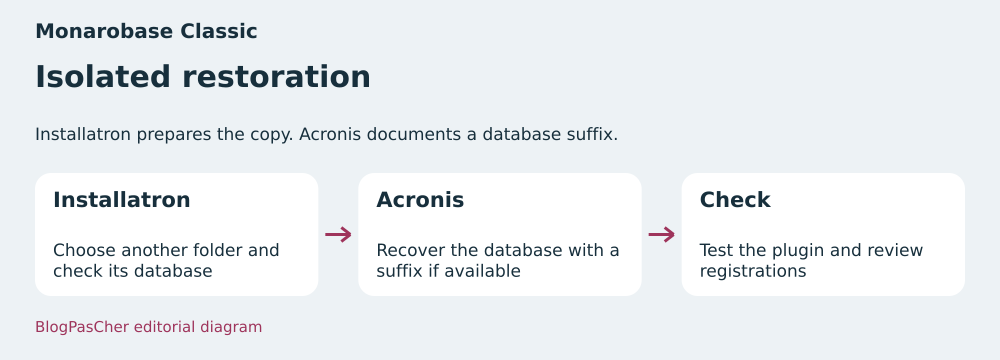
The price list advertises a daily off-server copy of files, databases and emails, plus self-service restoration of files and databases. WordPress help states seven daily, four weekly and two monthly points. It shows creating a manual copy in Installatron and restoring to the original or another location. Choose the test folder and check its associated database before starting. A different folder name does not prove SQL credentials changed. Confirm retention and visible tools on the selected Classic plan. The terms make the customer responsible for keeping regular copies.
The cPanel Acronis guide shows two menus, files and databases. It describes file selection and a suffix for recovering a database without overwriting the existing one. The latter helps keep an old point beside the current copy. Record the resulting name and check permissions. The Acronis guide describes returning selected files to their original location and an option to delete content already there. To diagnose without touching the live site, recover files to a separate target using the documented Installatron mechanism or use an independent copy whose contents you have verified. The suffix applies to the database. Check access to it in the Classic panel before building the procedure around that option.
The contact page advertises phone support Monday to Friday from 09:00 to 19:00 and Saturday from 09:00 to 14:00, plus email replies within twenty-four hours. Help is in French and the page says the team also speaks English. Ask about the exact scope of recovery assistance. Being able to open a ticket does not prove an operator can reconcile the plugin’s registrations.
o2switch Grow and the distinction between downloading and restoring
Grow advertises 8 CPU threads, 16 GB RAM, 16 MB/s I/O and four cPanel subaccounts called moons. Their resources remain shared with the main account on Grow. A moon can separate test access, but check its limits and backups accessible on the target. The offer documents thirty days of daily backups for files, databases and emails. This gives an advertised day count without establishing each component’s exact instant.
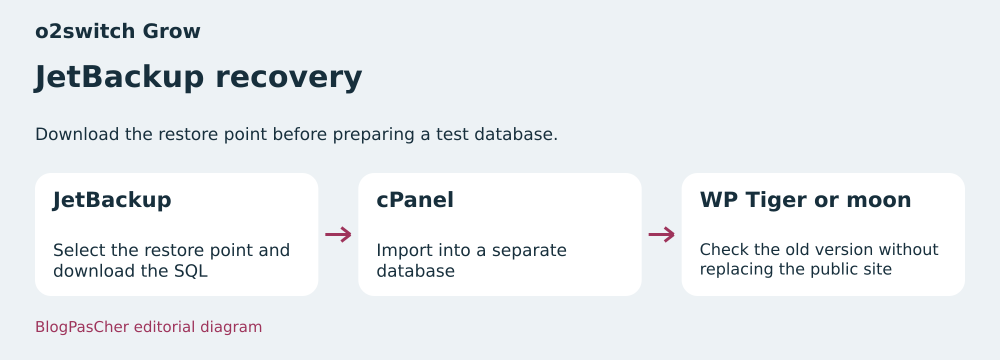
JetBackup provides separate file and database categories. In Home Directory, Change Files Selection limits selection before download. Without explicit selection, Restore starts restoring all files. Help states that the tool deletes account contents before copying them back, potentially affecting mail and recent files. For acceptance testing, download the selection with Download and extract the archive separately. In the database category, Download retrieves the point while Restore overwrites the selected database. Download SQL, create a test database and import the file there. phpMyAdmin help documents this route. For a large export, help recommends another import method beyond its 250 MB reference point.
WP Tiger can create staging at a technical address and describes password protection. Its guide states that the Publish command replaces the public site and deletes staging. Keep it as a test environment until the write record is reconciled. WP Tiger also documents an on-demand backup stored for up to 220 days. This mechanism is separate from Grow’s thirty-day daily backups. WP Tiger’s restore command also replaces the affected site. Verify a point exists and its recovery method on the account.
o2switch publishes help in French and advertises continuous technical support by email and ticket. The contact page also mentions phone support. Confirm the channel for your time slot and permissions the operator needs. cPanel access, the ability to import the database and plugin-publisher availability are three separate needs.
Read pricing and renewal terms
Monarobase Classic is displayed from EUR 5.95 excluding tax for one month. At 20% VAT, this is EUR 7.14 including VAT. Twelve months at the same amount provide a reference of EUR 71.40 excluding tax or EUR 85.68 including VAT. The price list is insufficient to confirm the purchased cycle, renewal, domain or options. The general FAQ states that a domain is not included in its hosting offers. Request a total for Classic and the intended test destination.
Monarobase’s terms associate renewal with an equivalent period and describe automatic charging for card payments, plus cancellation by ticket at least seven days before renewal. The general FAQ states no tacit renewal and an automatic option on request. Both texts must be reconciled with accepted terms and the registered payment method. The next cycle’s exact amount remains to be confirmed.
o2switch Grow displays EUR 7 excluding tax as a monthly equivalent with annual payment of EUR 84 excluding tax, or EUR 100.80 including 20% VAT for a mainland France invoice. Grow help also displays EUR 84 excluding tax for one-year renewal at the recorded rate. An eligible domain is free for the first year, then billed separately. If automatic renewal is enabled, help describes grouped scheduling before expiry and a charge 14 days before the earliest expiry. Check the amount and option status before adopting the budget.
Decide whether the old plugin can read the current database
Build a test environment from the current state. Protect access and isolate its database, scheduled processing and integrations. Record the plugin’s exact folder, table prefix and PHP version actually used. Check a control page and registration read. If you suspect a deferred migration, also retain a job record. A test immediately after installation does not cover a change occurring on the first processing run.
On the copy, restore the previous version’s files from an authorized, identified source. Keep the copy’s current database. Check the form, reading and a synthetic write, then reread registrations to preserve. If the schema remains compatible and checks agree, a file rollback may be a candidate. If old code expects a renamed column or a changed value format, file rollback fails on this database even if archives are complete.
If the database changed, try a fix compatible with its current state or a publisher-documented procedure on the copy. If you must start from the old point, define how to recover recent data before any replacement. Correcting a plugin table may affect linked objects, metadata or external identifiers. Use the application’s intended import format and route. Merging tables without validating their relationships risks registrations that appear present but are unusable.
- Clone the recent state to a protected target. Check that the copy uses a separate database and sends no email or calls to live-site integrations.
- Check the version and source of previous files. Try replacing them on the copy without changing the database.
- Check reading and a fictional write. Record a schema error or business discrepancy before choosing targeted rollback or a fix.
Measure what a full rollback would lose
Restore the pre-update point to another location. Check that it pairs the expected files and database and displays the control registration. Then compare it with the current copy. In our example, registration A changed time and B was added. A full rollback would restore A’s old time and remove B. Simply comparing row counts would miss the time change. The record must state identifiers, affected fields and the decision for each.
Preserve a current export before intervention and note its time zone and coverage. The time displayed in a backup list does not prove all write channels were included. A registration may come from the form, administration or a job. If the site still accepts writes, agree on a suspension window covering the form, jobs and integrations. Take a dated export within that window before intervention and compare identifiers to retain. In the test environment, redirect or disable emails and webhooks before testing a write. Also record messages already sent and uploaded documents when part of the function.
Treat full restoration as blocked while any useful difference cannot be reconciled. If the old-point test displays the page but loses a registration, evidence of functional recovery and evidence of preservation have different outcomes. Production deployment is acceptable only after both are validated together. Keep both states and the report so another operator can explain the choices.
Replay three choices on isolated databases
The ZIP exercise creates a previous backup and two synthetic current states with SQLite. It separates code profiles from data. In the first state, old-version files can still read and write. The test preserves the changed time and new registration in the copy. In the second state, a migration renamed a column. The old query genuinely fails in SQLite and the test rejects a files-only rollback.
A full restoration is opened in a third copy. The old version again reads the reference registration, but value comparison identifies the overwritten time and missing registration. The report blocks this option. A fix profile compatible with the current column is then tested on the recent-database copy. It reads the correct time and new registration. The exercise runs neither WordPress nor a remote SQL server and checks that files representing sources remain intact.
On a real account, replay these criteria with the exact plugin version and authorized data. A query failing in the mockup illustrates a structural change. Some real incompatibilities appear only as incorrect values or deferred processing. Read the business result, check traces and retain evidence that recent writes remain accessible.
- Extract the ZIP into an empty folder. With Python 3.11 or later, run python -X utf8 exercice.py.
- Compare output with attendu.json. Check blocking after the schema change, loss of B and A’s old time at the full point.
- Reproduce the criteria in your isolated WordPress acceptance environment with the plugin’s actual versions and settings.
Choose the tool according to the evidence sought
Choose Monarobase Classic if the team favors Installatron and the documented ability to recover a database under another name through Acronis. Confirm the account allows this recovery and the space needed for copies. A single cPanel interface may suit when the account holder performs operations and precisely verifies the test scope.
Choose o2switch Grow if the team prefers downloading SQL from JetBackup, importing it into a new database and using WP Tiger or a moon to isolate testing. Check file-restoration scope and resource sharing. The annual price is documented. WP Tiger’s publish command must remain pending until data differences have been resolved.
With both offers, the post-incident choice primarily depends on the acceptance-test result. A previous version reading the current schema and preserving control data warrants considering a targeted rollback. An incompatible schema points toward a fix or publisher-documented rollback. A recent write absent from the old point is enough to block complete replacement until preservation is decided.
Further reading
Sources and references
Use these references to check the features, requirements and limitations described. Reading documentation is not a practical test.
View 23 references
- Monarobase — Public starting price for one month ↗ — Documentation consulted:
- Monarobase — Monarobase, WordPress backups ↗ — Documentation consulted:
- Monarobase — Monarobase, Acronis ↗ — Documentation consulted:
- Monarobase — Monarobase, cloning WordPress ↗ — Documentation consulted:
- Monarobase — Monarobase, terms ↗ — Documentation consulted:
- Monarobase — Monarobase, renewal FAQ ↗ — Documentation consulted:
- Monarobase — Monarobase, support ↗ — Documentation consulted:
- Monarobase — French Directorate General of Public Finances, VAT rate ↗ — Documentation consulted:
- Monarobase — WordPress, backups ↗ — Documentation consulted:
- Monarobase — WordPress, creating and updating tables ↗ — Documentation consulted:
- Monarobase — WordPress, uninstalling ↗ — Documentation consulted:
- o2switch — Public price for annual payment ↗ — Documentation consulted:
- o2switch — Public price for annual renewal ↗ — Documentation consulted:
- o2switch — o2switch, hosting provider ↗ — Documentation consulted:
- o2switch — o2switch, JetBackup ↗ — Documentation consulted:
- o2switch — o2switch, WP Tiger ↗ — Documentation consulted:
- o2switch — o2switch, creating a lune ↗ — Documentation consulted:
- o2switch — o2switch, phpMyAdmin import ↗ — Documentation consulted:
- o2switch — o2switch, importing a large database ↗ — Documentation consulted:
- o2switch — o2switch, automatic renewal ↗ — Documentation consulted:
- o2switch — o2switch, billing ↗ — Documentation consulted:
- o2switch — o2switch, domain ↗ — Documentation consulted:
- o2switch — o2switch, support ↗ — Documentation consulted:
Uses, prices and what to check
2 offers in detail
Compare the features you need and the terms of each offer. The order of these entries does not indicate a ranking.
Monarobase
Editorial restoration diagram — BlogPasCher editorial illustration.Open full-size illustration ↗Best forA team favoring recovery of a backup point to a separate destination and able to confirm its permissions.
Classic documents Installatron and recovery of an Acronis database under another name.
Offer pricing
Classic from EUR 5.95 excluding tax for one month
Billing: Reference of EUR 71.40 excluding tax for twelve months at the same price. Contractual cycle to confirm.
Renewal and support: Equivalent period in the terms. Automatic renewal presented differently in the terms and FAQ.
EUR 7.14 including VAT for one month or EUR 85.68 including VAT for twelve months at the same price if VAT is 20%.
Checked on .
Strengths
- Installatron, cPanel and WP-CLI advertised
- Acronis suffix documented for a separate database
- Support in French and English advertised
What to consider
- 50 GB, 1 CPU, 2 GB memory and one cPanel
- Self-service file and database restoration advertised. Access to the suffix option and available points to confirm on Classic.
- Renewal method to check in the contract
Pricing terms and compatibility
Understanding the offer
- Price at the time of review
- Classic from EUR 5.95 excluding tax for one month
- Currency
- EUR
- Billing
- Reference of EUR 71.40 excluding tax for twelve months at the same price. Contractual cycle to confirm.
- Renewal and support
- Equivalent period in the terms. Automatic renewal presented differently in the terms and FAQ.
- Taxes and fees
- EUR 7.14 including VAT for one month or EUR 85.68 including VAT for twelve months at the same price if VAT is 20%.
- Commitment and terms
- Term depends on the chosen offer. Domain separate according to the general FAQ.
- Date checked
Compatibility and components
- WordPress on Classic
- Separate acceptance testing through Installatron
- Selective recovery according to permissions and destination
o2switch
Editorial restoration diagram — BlogPasCher editorial illustration.Open full-size illustration ↗Best forA team wanting to handle separate exports and isolate testing through WP Tiger or a subaccount.
Grow documents downloading JetBackup SQL, separate importing and WP Tiger staging.
Offer pricing
Grow, EUR 84 excluding tax paid for twelve months
Billing: EUR 7 excluding tax monthly equivalent. Annual payment.
Renewal and support: EUR 84 excluding tax for one year at the recorded public rate. Automatic if enabled.
EUR 100.80 including 20% VAT if applicable.
Checked on .
Strengths
- JetBackup distinguishes categories and the SQL download action
- WP Tiger and four Grow subaccounts advertised
- Technical support by ticket and email 24/7
What to consider
- Resources shared between the main account and Grow moons
- Restore overwrites the database and WP Tiger publishing replaces the public site
- Access scope and each component’s date to check
Pricing terms and compatibility
Understanding the offer
- Price at the time of review
- Grow, EUR 84 excluding tax paid for twelve months
- Currency
- EUR
- Billing
- EUR 7 excluding tax monthly equivalent. Annual payment.
- Renewal and support
- EUR 84 excluding tax for one year at the recorded public rate. Automatic if enabled.
- Taxes and fees
- EUR 100.80 including 20% VAT if applicable.
- Commitment and terms
- Twelve months. Eligible domain free for the first year.
- Date checked
Compatibility and components
- WordPress on Grow
- SQL import into a test database
- WP Tiger staging or separate acceptance testing