

The download is current, but resuming still displays the old edition
An association publishes a PDF guide in WordPress. It replaces the file after correcting an appendix, keeping the same address. A full download gives the correct edition. On a computer that had started reading the guide, the embedded reader still displays old pages or reports an unreadable document when jumping to the appendix. It may request byte ranges instead of reloading the whole document in one block.
In this acceptance test, the reference evidence is the new edition’s source file. Compare full and partial responses from the origin and public address. A partial response can have the correct length and position while containing bytes from the old version. The expected result is consistent reading from end to end, even if a cache has already served the old edition.
The comparison is between LWS Starter, offered on LWS’s WordPress page, and o2switch Grow. Both hosts document cache diagnostic tools. The test concerns a public document served through a direct URL. For a plugin controlling download access, authentication rules and any redirects must be checked in its own flow.
Compare before you choose
The offers at a glance
Find the use case and budget that fit, then read the details to see the limitations and any components you may need.
On smaller screens, the table scrolls horizontally. With a keyboard, press Tab to focus the table, then use the left and right arrow keys.
| Offer | Best for | Pricing and billing | Renewal and support |
|---|---|---|---|
 LWS Starter for WordPressRead the details | A team wanting to compare ranges using LWS Panel cache settings. | Promotional €3.49 per month excluding VAT Monthly reference on the card. Check duration and amount in the quote. The card displays €4.19 including VAT for the promotional monthly rate. | Standard reference displayed at €5.99. Automatic renewal according to the service setting. |
 o2switch GrowRead the details | A team able to identify and test the public domain’s cache. | €84 excluding VAT for twelve months Annual, at a reference rate of €7 per month excluding VAT. Displayed price excludes VAT. | €84 excluding VAT for one year according to Grow help. Check the service’s due date and rate. |
Prices, capacities, and acceptance-test scope
LWS lists Starter at a promotional €3.49 excluding VAT per month, with €4.19 including VAT for the displayed monthly price and a crossed-out reference of €5.99. The rate schedule explains the transition from promotional to standard pricing at the end of the first period. Over twelve months at a constant rate, these references correspond to €41.88 excluding VAT and €71.88 excluding VAT. The billed amount and duration depend on the order form. Help states that automatic renewal is enabled by default at ordering, with settings per service.
Starter advertises 200 GB storage, ten sites, and twenty-five email addresses. The overall quota indicates capacity for keeping several editions. For a large document, also check the individual-file limit and transfer method. LWS shared-hosting terms specify a maximum individual file size of 500 MB. This contractual cap may exceed the WordPress upload limit on your account.
o2switch lists Grow at €7 excluding VAT per month for twelve months, or €84 excluding VAT, and the same reference for a one-year renewal. Help advertises eight CPU threads, 16 GB memory, 16 MB/s I/O, and four “moon” subaccounts sharing the main account’s resources. The plan advertises unlimited disk space. This provides neither guaranteed download throughput nor a measurement of behavior for a file served behind a cache.
Check domain and hosting renewal dates and modes separately. For o2switch, the documentation explains selecting renewal per service and states that saving a card can enable it at ordering. The quoted prices and resources were recorded on November 11, 2026. When choosing, focus on which process lets you observe the file through the layers that will deliver it publicly.
Compare bytes from the same representation
On an authorized private copy, download the new edition’s complete version and calculate its SHA‑256 hash. Record the length, content type, and ETag if present. Then test the intended public address, noting redirects to the final address. The WordPress page containing the reader and the PDF file may follow different routes. Sampling must target the address actually requested by the reader.
Request two short ranges at distinct positions, for example bytes 0 through 1023 and then 8192 through 9215 on a sufficiently large document. Request identity encoding to compare raw file bytes if the server accepts that representation. A 206 response’s Content-Range header must give the inclusive start and end, followed by total size. Also check that the received length matches the interval and compare bytes with the same positions in the reference.
A server may ignore Range and return the whole file with 200. Then check the complete body and observe whether the reader can resume or must download everything. A 416 is consistent when a range starts beyond the end. Correct home-page display or an Accept-Ranges announcement does not establish the response to a partial file request.
In the Network tab, record the final URL, headers, and request timeline after jumping to a later page. If the reader always retrieves the entire file, check that the displayed document contains the new edition. A second test in a session that previously opened the old version reveals resumption with prior state. Also test a fresh session to distinguish browser state from a stale response served to several visitors.
Check the validator before resuming reading
Record the old edition’s ETag before changing it, if the server supplies one. In a Range request, If-Range indicates that the client wants a range from that edition. Use a strong ETag for this test. A value prefixed W/ is weak and unsuitable for If-Range. If the validator matches the new edition, a 206 response can continue reading its bytes. If the validator has changed, a full response for the new edition allows restarting with a single representation.
The HTTP standard permits a cache to combine ranges sharing the same strong validator. After replacing a file at the same address, compare validators and range bodies. Files of the same length can have different contents. If you find the same ETag for different bodies, report the inconsistency with two hashes and recording times.
For a sufficiently small staging PDF, download all consecutive ranges and reconstruct the file. A sequence of 206 responses may look correct even though one fragment is stale. Compare the reconstruction’s hash with the original file’s hash. For a large document, sample a range at the start and ranges covering a modified section. Note test coverage and also check opening the appendix in the reader actually used.
Isolate the route and cache at LWS
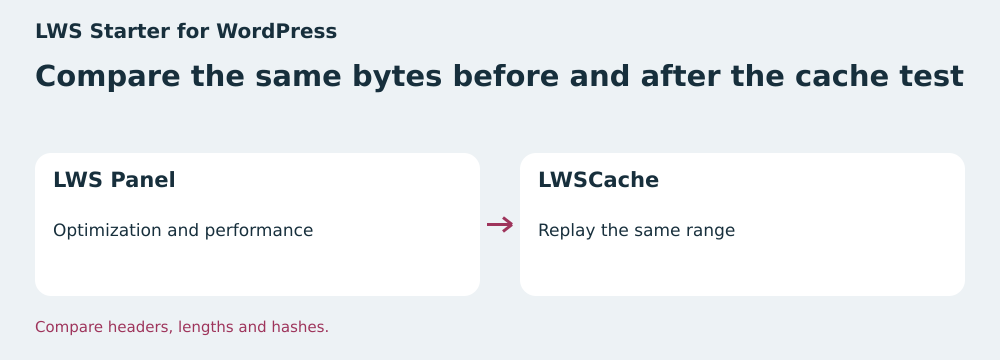
In LWS Panel, help specifies Optimization and performance, then LWSCache (Varnish). It documents cache clearing and temporary deactivation. On a copy reserved for acceptance testing, record the same URL’s headers before and after changing only that setting. Use the name presenting the correct certificate and the same file path. If the document also passes through a CDN, record its role before drawing conclusions about the host’s cache.
Then test the new edition directly and within the WordPress page. If direct access returns the correct bytes but the reader still requests the old path, correct the link or page containing the reader. If the requested path is correct but ranges are old, retain headers and hashes before clearing the cache. After purging, repeat the same requests twice to observe the first and a later access.
Starter advertises WordPress Manager. The WordPress page presents cloning and staging among its tools. Check that a staging copy can reach the same delivery layers as the future public name. Then reenable the cache setting used by the site and rerun the check. If the private copy uses a different cache path, repeat a targeted test on the public address when publication of the edition is authorized.
Distinguish the o2switch tools used by the domain
At o2switch, identify the tool actually active in cPanel. If it is XtremCache, the guide describes checking a URL, clearing cache per domain, and temporarily disabling it without changing IP. It distinguishes this deactivation from resetting, which changes the domain’s address. To diagnose a file, start with an acceptance test on the test domain and compare the same range with cache active and then temporarily disabled.
If the domain uses LiteSpeed LSCache through WebADC, follow its specific process. The documentation states that activation may change the IP address, the cPanel tool does not apply to subdomains, and combining it with Cloudflare is unsupported. Avoid changing activation on a public domain solely for a range test. Note the address actually used, check headers, and plan architecture changes separately.
Grow advertises four “moons,” separate cPanel accounts sharing resources. You can prepare a copy away from production. If it uses a subdomain or another cache route, its result validates the copy’s files and links. To verify actual delivery, also run the range test on the name that will serve the document to visitors.
Publish the edition at a new address and retain a rollback
Give the new edition a distinct filename, such as guide-2026-11.pdf. Upload it, then open its public address and check ranges before changing the WordPress page. One address per edition avoids reusing a cache entry created for other bytes. A parameter added to the same URL may be ignored or normalized by an intermediary depending on configuration. Check actual behavior if using that approach.
Replace the link in the button, File block, and any embedded readers intended to target the current edition. Then check the page as a visitor and in a session that already opened the old edition. A page cache may still serve an old link even though the versioned file is correct. If you need a stable address to share, link from a stable page to the current edition’s file and check the displayed date.
Keep a reference to the previous version and the link published before modification. If there is a regression, restore that link if the old edition can still be distributed. If a regulatory or editorial correction requires its withdrawal, agree on treatment of old addresses and caches with the site manager. Check redirects and the version read after every correction.
Repeat responses before working on the site
The ZIP starts an HTTP server on loopback. It creates two binary editions of the same size and injects an old range at the public address. The full download returns the new edition. Yet the second 206 presents the correct interval and length for stale bytes. The script compares each range’s hash and then the reconstructed file’s hash.
The test resumes with the current validator, then the old version’s validator. It observes a 206 for the correct range and a full 200 when the validator has changed. It also checks the 416 for a range outside the file and a path ignoring Range and returning the entire file. With the versioned address, the four ranges reconstruct the reference.
To apply the same check to an authorized copy, use the browser’s Network panel or an HTTP request saving headers and body separately. On Windows, for example, use curl.exe with -D for the header file, -o for bytes, and -H to define Range and Accept-Encoding. Compare the range with that of the file downloaded through a reference channel. The test bench works on fictional bytes. PDF rendering and cache behavior still need checking on the actual path.
Choose according to the route the team can verify
LWS Starter suits a team using LWS Panel and able to repeat the same recording before and after changing LWSCache. The 200 GB provides a reference for retaining useful editions. Confirm the promotional duration, file limit, and publication method on the account. A simple page-cache purge must be followed by checking the PDF URL.
o2switch Grow suits a team working in cPanel and able to identify the domain cache and scope of its settings. Temporarily disabling XtremCache facilitates comparison on a constant route when this tool is active. If the site uses WebADC, account for documented domain and CDN constraints before any change. The moons’ shared resources must also be included in acceptance-test scheduling.
Validate the update when the page points to the correct edition, observed ranges contain expected bytes, and the reader can reach the modified section. Keep hashes, the ETag if present, times, and final URLs. If a discrepancy persists, leave the validated link in place while isolating the faulty layer and retain traces before purging.
- Download and identify the reference version.
- Compare the full file and ranges on the final route.
- Check resumption behavior with a strong validator.
- Test the reader on the WordPress page and check the rollback link.
Further reading
Sources and references
Use these references to check the features, requirements and limitations described. Reading documentation is not a practical test.
View 13 references
- LWS Starter — WordPress Starter offer and displayed price ↗ — Documentation consulted:
- LWS Starter — Price list and standard rate ↗ — Documentation consulted:
- LWS Starter — LWSCache settings ↗ — Documentation consulted:
- o2switch Grow — Grow offer and annual price ↗ — Documentation consulted:
- o2switch Grow — Grow resources and renewal ↗ — Documentation consulted:
- LWS, renewal help ↗ — Documentation consulted:
- LWS, shared-hosting terms ↗ — Documentation consulted:
- o2switch, renewal ↗ — Documentation consulted:
- o2switch, billing ↗ — Documentation consulted:
- o2switch, XtremCache ↗ — Documentation consulted:
- o2switch, LiteSpeed LSCache ↗ — Documentation consulted:
- IETF, RFC 9110, HTTP semantics ↗ — Documentation consulted:
- IETF, RFC 9111, HTTP caching ↗ — Documentation consulted:
Uses, prices and what to check
2 offers in detail
Compare the features you need and the terms of each offer. The order of these entries does not indicate a ranking.
LWS Starter for WordPress
 Verification diagram — BlogPasCher editorial illustration.Open full-size illustration ↗
Best forA team wanting to compare ranges using LWS Panel cache settings.
LWS Panel plan with 200 GB storage and a documented LWSCache process.
Offer pricing
Promotional €3.49 per month excluding VAT
Billing: Monthly reference on the card. Check duration and amount in the quote.
Renewal and support: Standard reference displayed at €5.99. Automatic renewal according to the service setting.
The card displays €4.19 including VAT for the promotional monthly rate.
Checked on .
Strengths
- 200 GB storage and ten sites advertised
- LWSCache purging and temporary deactivation documented
- WordPress Manager advertised
What to consider
- Check the individual-file limit according to contract and account
- The account’s cache setting does not control a third-party CDN
- Confirm the promotional cycle
Pricing terms and compatibility
Understanding the offer
- Price at the time of review
- Promotional €3.49 per month excluding VAT
- Currency
- EUR
- Billing
- Monthly reference on the card. Check duration and amount in the quote.
- Renewal and support
- Standard reference displayed at €5.99. Automatic renewal according to the service setting.
- Taxes and fees
- The card displays €4.19 including VAT for the promotional monthly rate.
- Commitment and terms
- Initial promotional period. Check the proposed contract and cycle.
- Date checked
Compatibility and components
- WordPress
- LWS Panel
- LWSCache
o2switch Grow
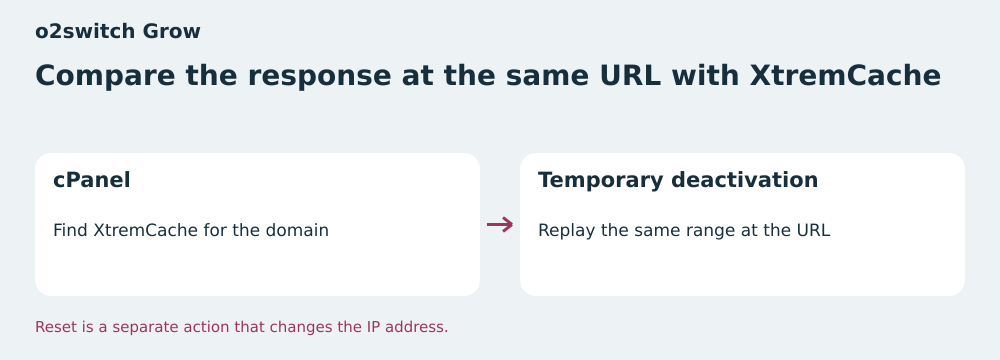 Verification diagram — BlogPasCher editorial illustration.Open full-size illustration ↗
Best forA team able to identify and test the public domain’s cache.
Annual cPanel plan with XtremCache controls and a separate LiteSpeed process.
Offer pricing
€84 excluding VAT for twelve months
Billing: Annual, at a reference rate of €7 per month excluding VAT.
Renewal and support: €84 excluding VAT for one year according to Grow help. Check the service’s due date and rate.
Displayed price excludes VAT.
Checked on .
Strengths
- Eight CPU threads, 16 GB RAM, and 16 MB/s I/O
- Four moons with shared resources
- XtremCache diagnosis and temporary deactivation documented
What to consider
- WebADC can change the IP, and the cPanel tool does not cover subdomains
- Combining WebADC and Cloudflare is unsupported
- Check range behavior on the actual route
Pricing terms and compatibility
Understanding the offer
- Price at the time of review
- €84 excluding VAT for twelve months
- Currency
- EUR
- Billing
- Annual, at a reference rate of €7 per month excluding VAT.
- Renewal and support
- €84 excluding VAT for one year according to Grow help. Check the service’s due date and rate.
- Taxes and fees
- Displayed price excludes VAT.
- Commitment and terms
- Twelve months. Automatic renewal according to settings and payment method.
- Date checked
Compatibility and components
- WordPress
- cPanel
- XtremCache or LiteSpeed depending on the domain