

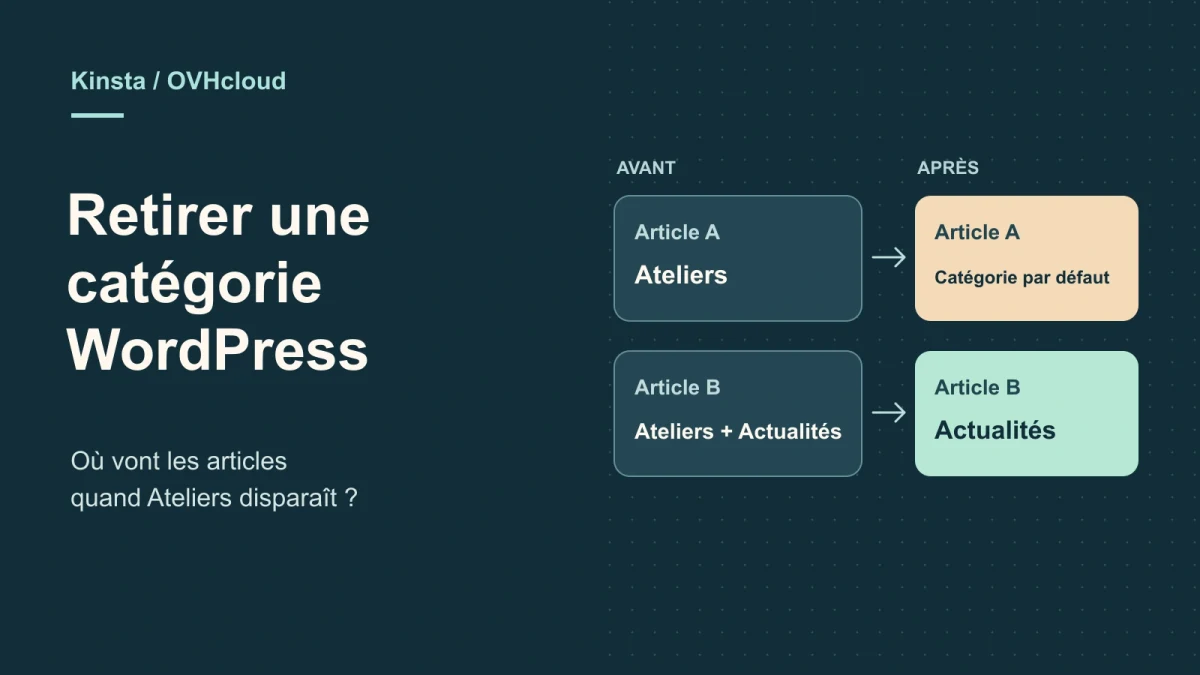
What happens to a post when its category is removed
Deleting and restoring a category is a WordPress operation. Kinsta and OVHcloud are compared here for preparing the copy and the access required, without assuming a new subscription would be useful. If you already have a suitable staging environment, recording assignments and checking the resulting classification remain the first steps.
A team removes the Workshops category from its WordPress site after reorganizing the guides. After deletion, one post ends up in Temporary classification, another stays in News, and Introduction appears under a different parent. The post texts are still present. The difference comes from the associations between posts and the deleted category, and from that category’s position in the hierarchy.
In WordPress, ordinary category deletion treats two posts differently depending on their original assignments. If a post belonged only to the removed category, WordPress assigns the default category. If it had another category, it keeps that one. In a hierarchy, direct children are reassigned to the deleted category’s parent. If that category was at the root, its direct children move to the root.
This case covers native WordPress post categories. It concerns deleting a term across the site. Removing a category from one post, changing a term’s parent, or removing a navigation link are separate operations. Before choosing, identify what the team wants to remove from the classification, what should remain visible, and which posts it intends to move to a specific destination.
- Record the default category in Settings → Writing.
- Identify the category to remove, its parent, its direct children and its associated posts.
Compare before you choose
The offers at a glance
Find the use case and budget that fit, then read the details to see the limitations and any components you may need.
On smaller screens, the table scrolls horizontally. With a keyboard, press Tab to focus the table, then use the left and right arrow keys.
| Offer | Best for | Pricing and billing | Renewal and support |
|---|---|---|---|
 Kinsta Single 20GBRead the details | A team that prefers selecting and cloning its copy from the same panel. | First month at USD 0, then USD 17.50 excluding tax per month for three months. Monthly payment. Promotion reserved for eligible new customers. Total of USD 52.50 excluding tax over the three paid promotional months. Prices displayed in USD excluding tax | USD 35 excluding tax per month after the monthly promotion ends |
 OVHcloud ProRead the details | A team able to explicitly manage the copy’s subdomain, directory and database. | €23.88 excluding tax for twelve months, or €1.99 excluding tax per month at the introductory rate. Twelve months at the displayed introductory rate Displayed introductory price of €2.39 including tax per month; tax-inclusive total at checkout | €9.99 excluding tax per month, or €119.88 excluding tax for twelve months at that rate |
Create a reusable record before deleting the category
On a private copy, record the category’s name, ID, slug, description and parent. Record the same information for the children whose placement you want to retain. For posts, export their IDs and their complete category assignments. A simple total on the Categories screen indicates a volume. The assignment record lets you reconstruct the classification before the change, post by post.
Plan four controls. Post A belongs only to Workshops. Post B belongs to Workshops and News. Post C belongs only to News and acts as a control outside the affected set. Post D belongs to Introduction, a child category of Workshops. Guides is the parent of Workshops. Set Temporary classification as the copy’s default category so automatic reassignment is easy to spot. If you are working on a real copy, first record the existing setting and use appropriate controls.
Add the visible dependencies maintained by the team to the record. Navigation may link to the category archive. A built page may filter a list by that term. An integration may store its ID. Note the links and filters to test after deletion. For comparing assignments, the post ID is more useful than a title that might change or be shared by several pieces of content.
- Export the complete category list for each post in the target set.
- Keep the archive references and navigation settings associated with the term.
Choose between explicitly reassigning posts and relying on the default category
If all Workshops posts should now appear in Guides, explicitly assign that destination on the copy before removing Workshops. For a post such as B, also retain News if that association remains relevant. Check the resulting list for each control. If you prefer a queue for posts that lose their only category, observe which ones move to Temporary classification, then assign the intended classification.
Avoid temporarily changing the default category on the live site just to carry out one operation. Other publications may also use that value, and ordinary deletion does not automatically add it to posts that already have another category. Keep a setting consistent with the site’s publication process, then document the posts to move. The category currently set as default is protected against ordinary deletion.
Also validate the structure the team wants to retain for child categories. Post D can keep exactly the same Introduction category while that category’s position changes. If archives follow a hierarchical structure, check their addresses before and after. The local test compares term hierarchy and associations in the database. On a site copy, you must also open the navigation pages or archives readers use.
Kinsta Single 20GB: clone the site in MyKinsta
In MyKinsta, open Sites and select the relevant installation. From the environment selector, create a new Standard environment. Choose to clone the existing environment if the test needs to reproduce the site’s posts, menus and settings. To repeat only the fictional case, an empty WordPress installation is enough. Use the staging URL and confirm the environment name before editing categories.
Kinsta documents one free standard staging environment per installation. The Single 20GB plan lists one WordPress installation, 20 GB of server bandwidth per month and 10 GB of storage. The number in the product name refers to server bandwidth. Standard staging has two PHP processes and may go to sleep after twenty-four hours of inactivity. The test needs only a few posts. A full site copy, however, may include a large media library and plugins.
After cloning, check access to the copy and disable actions that could leave the test scope, such as a notification sent by a plugin. Kinsta states that transactional email is enabled by default on staging. Compare categories and navigation pages in this copy. Once the change list is approved, transfer only the planned editorial operations. Pushing the entire staging database can overwrite posts or changes created on the live site in the meantime.
- Create or select standard staging and open its WordPress administration.
- Check the default category and prepare the assignment record in this copy.
OVHcloud Pro: separate the copy’s directory and database
In the OVHcloud customer area, open Web Cloud, then Hosting plans. The Multisite tab lets you attach a domain or subdomain to a root folder on the hosting account. Prepare a separate folder for the copy’s files. This feature concerns several sites on one hosting account. A test WordPress installation can retain its own files and database. If you restore an existing site, check that its configuration points to the destination database.
OVHcloud documentation also covers duplicating one database’s contents into another. Use a destination database reserved for the test, preferably with the same database-management-system version as the source. Duplication overwrites data already in the destination, so confirm its name before starting the copy. A test site accessible through its subdomain may retain links to the live domain if the copy’s addresses were not adjusted correctly. Open the copy’s administration, check its address and identify the menus and pages to verify before any deletion.
The Pro plan lists 250 GB of SSD storage, ten 2 GB databases and up to one hundred sites. The database quota and file-storage quota are separate. Measure the copy you will import and check the databases available under the contract before creating it. This workflow suits a team that can maintain an identifiable test directory, database and URL. Keep those three references in the maintenance record without attaching login credentials.
- Prepare the subdomain, root folder and a separate test database.
- Confirm the file and database destinations in the WordPress copy.
Compare pricing with the correct cycle and currency
As of November 11, 2026, Kinsta lists Single 20GB on monthly billing with a first month at USD 0 for eligible new customers, then USD 17.50 excluding tax per month for three months and USD 35 excluding tax per month on renewal. The three paid promotional months total USD 52.50 excluding tax. The page states that the offer ends on December 1, 2026. According to the billing guide, the free first month applies to a new customer’s first WordPress plan. Check the cycle details and applicable total in the order summary.
OVHcloud Pro lists €1.99 excluding tax per month, with a displayed €2.39 including tax per month and €23.88 excluding tax for the first twelve months. The stated renewal price is €9.99 excluding tax per month, or €119.88 excluding tax for twelve months at that rate. Retain the period total displayed by the host. The displayed tax-inclusive monthly amount is rounded, and the order total must be read in the summary.
To choose a test workflow, first check the resources included in the existing account. Kinsta’s Standard environment brings cloning and copy selection together in the same panel. OVHcloud Pro lets you create a test site with a separate directory and database within the contract’s quotas. Storage limits, currencies and billing cycles describe different things. Compare the invoiced total and the cost of a copy the team can actually use.
Delete the category on the copy and check the effects
In the copy’s administration, open Posts then Categories. Check that the term to remove is Workshops and the default term is Temporary classification. After saving the record, delete Workshops. Reopen all four posts and compare their associations with the record. A should be in Temporary classification. B should retain News, and C should keep its initial state. Post D should still belong to Introduction.
Also check the category tree. Before deletion, Introduction is under Workshops, which is under Guides. After deletion, Introduction should be directly under Guides. Open the corresponding archive on the copy and check its address. If the site uses the category in its post permalink structure, also check affected post addresses. Perform this check under the conditions in which readers use the site, particularly while logged out of administration.
If the site has menus or filtered post lists, check every item recorded before removal. You may need to replace a link to the old archive or change the term used by a block. An archive, a built page and a menu link can display similar wording while relying on different settings. Agree with the team on the intended destination for the old URL before intervening on the live site.
- Compare A, B, C and D with the initial record.
- Check Introduction’s parent and the pages that depended on Workshops.
Restore assignments even if the recreated category receives a new ID
Recreating Workshops with the same slug makes the term available again. In the test, WordPress gives it a different ID, and the posts retain the assignments observed after deletion. To return to the initial state, reconstruct each post’s associations from the record. Post A must regain Workshops and leave Temporary classification if it did not have that category initially. Post B must regain Workshops while keeping News.
Also restore Introduction’s parent using the recreated term’s ID. An integration that stores the old ID may need its filter updated. Check the archive address and navigation elements separately. In the exercise, WordPress functions restore the assignments and hierarchy. The checks also compare text hashes to confirm that reassignment preserved the content.
Before a targeted rollback on a site that has continued receiving changes, compare the record with the current classification. Check whether a post has intentionally received a new category in the meantime. Decide which associations to restore and which to retain. Restoring the entire database would also return other data to the backup date. The post-by-post record lets you prepare a more precise correction.
- Reassign posts using the record and restore the necessary parents.
Repeat the eleven checks on a disposable WordPress installation
The test starts from WordPress and SQLite directories extracted from their official archives. A Python launcher initializes a temporary database, and the PHP script creates four fictional posts. It uses WordPress functions to create and delete categories, list assignments and restore classification. The instructions provide versions, hashes and paths to adapt. The test was repeated from the ZIP on Windows with WordPress 7.1.4.
The report confirms that the default category is protected and that deleting Workshops reassigns only A to Temporary classification. B retains News, C remains unchanged, and D keeps Introduction while that category moves up under Guides. The report also retains the Workshops IDs before and after recreation. Recreation alone changes no assignment. The eleven checks include restoring the initial classification and verifying all four posts’ content.
On a hosted copy, reuse the same checklist and add site-specific checks. For example, a plugin may store a primary category separately from native associations. A post list may also retain a filter specific to its template. Record who controls those dependencies and which addresses must remain available. The Kinsta and OVHcloud workflows rely on their public documentation. The local test measures WordPress core behavior with fictional data.
- Compare the report’s four states: before deletion, after deletion, after recreation and after restoration.
Sources and references
Use these references to check the features, requirements and limitations described. Reading documentation is not a practical test.
View 8 references
- Kinsta Single 20GB — First month for eligible customers ↗ — Documentation consulted:
- Kinsta Single 20GB — First-month eligibility and plan limits ↗ — Documentation consulted:
- Kinsta Single 20GB — Standard staging cloning and limits ↗ — Documentation consulted:
- OVHcloud Pro — Displayed initial price for twelve months ↗ — Documentation consulted:
- OVHcloud Pro — Subdomain directory and Multisite configuration ↗ — Documentation consulted:
- OVHcloud Pro — Database duplication and overwriting the destination ↗ — Documentation consulted:
- WordPress — wp_delete_category() reference ↗ — Documentation consulted:
- WordPress — wp_delete_term() reference ↗ — Documentation consulted:
Uses, prices and what to check
2 offers in detail
Compare the features you need and the terms of each offer. The order of these entries does not indicate a ranking.
Kinsta Single 20GB
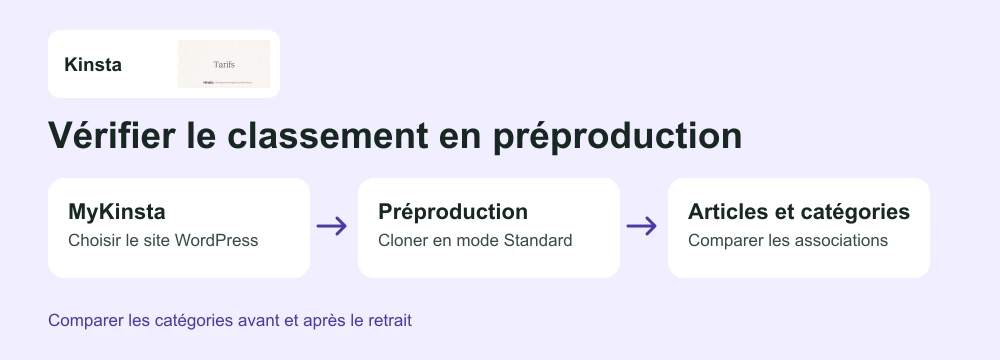 Check category assignments on staging — Illustration by BlogPasCher and official imageOpen full-size illustration ↗
Best forA team that prefers selecting and cloning its copy from the same panel.
Clone a site into Standard staging from MyKinsta. Single 20GB includes 20 GB of server bandwidth per month and 10 GB of storage.
Offer pricing
First month at USD 0, then USD 17.50 excluding tax per month for three months.
Billing: Monthly payment. Promotion reserved for eligible new customers. Total of USD 52.50 excluding tax over the three paid promotional months.
Renewal and support: USD 35 excluding tax per month after the monthly promotion ends
Prices displayed in USD excluding tax
Checked on .
Strengths
- Standard environment included per installation
- Cloning documented in MyKinsta
What to consider
- One WordPress installation and 10 GB of storage
- 20 GB of server bandwidth per month
- Standard staging limited to two PHP processes
- WordPress multisite excluded from the plan
Pricing terms and compatibility
Understanding the offer
- Price at the time of review
- First month at USD 0, then USD 17.50 excluding tax per month for three months.
- Currency
- USD
- Billing
- Monthly payment. Promotion reserved for eligible new customers. Total of USD 52.50 excluding tax over the three paid promotional months.
- Renewal and support
- USD 35 excluding tax per month after the monthly promotion ends
- Taxes and fees
- Prices displayed in USD excluding tax
- Commitment and terms
- Offer displayed until December 1, 2026; check terms when ordering
- Date checked
Compatibility and components
- WordPress
- MyKinsta
OVHcloud Pro
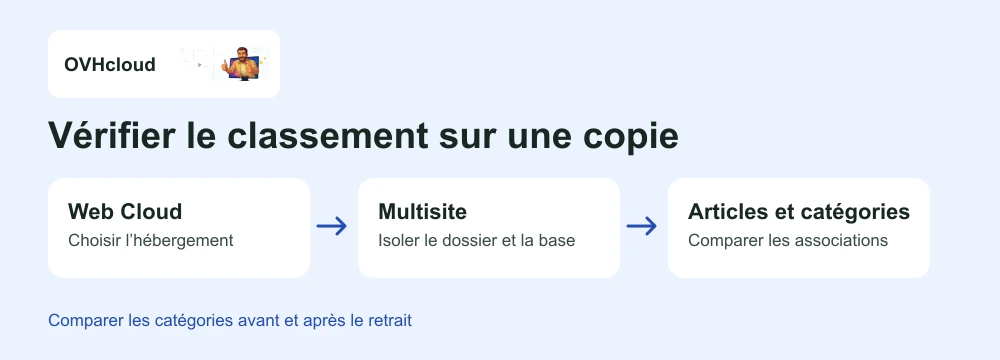 Check category assignments on a copy — Illustration by BlogPasCher and official imageOpen full-size illustration ↗
Best forA team able to explicitly manage the copy’s subdomain, directory and database.
Test site in a separate directory and database on the hosting account.
Offer pricing
€23.88 excluding tax for twelve months, or €1.99 excluding tax per month at the introductory rate.
Billing: Twelve months at the displayed introductory rate
Renewal and support: €9.99 excluding tax per month, or €119.88 excluding tax for twelve months at that rate
Displayed introductory price of €2.39 including tax per month; tax-inclusive total at checkout
Checked on .
Strengths
- 250 GB of SSD storage
- Ten 2 GB databases and up to one hundred sites
What to consider
- The test site needs an available directory and database
- Check the size of the database to duplicate
Pricing terms and compatibility
Understanding the offer
- Price at the time of review
- €23.88 excluding tax for twelve months, or €1.99 excluding tax per month at the introductory rate.
- Currency
- EUR
- Billing
- Twelve months at the displayed introductory rate
- Renewal and support
- €9.99 excluding tax per month, or €119.88 excluding tax for twelve months at that rate
- Taxes and fees
- Displayed introductory price of €2.39 including tax per month; tax-inclusive total at checkout
- Commitment and terms
- Twelve months for the quoted price
- Date checked
Compatibility and components
- WordPress
- OVHcloud Multisite