

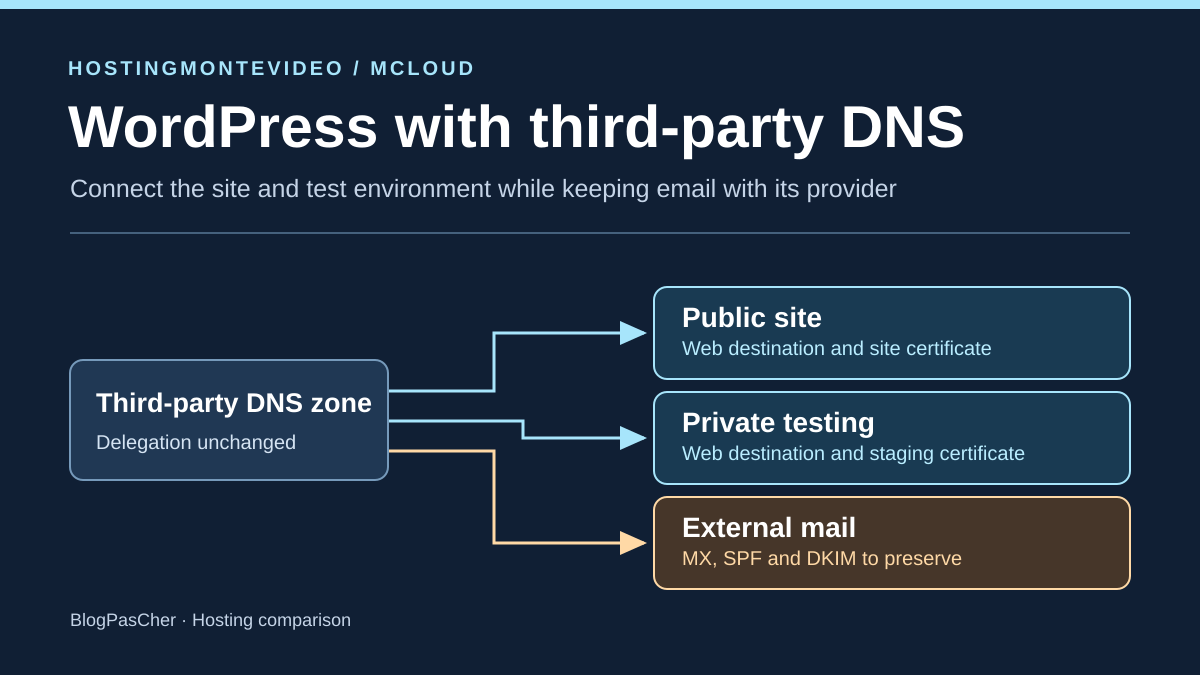
Connect two names without moving the zone or email
A small team must connect its public WordPress site and private copy at a new web host. A third party already administers the domain, DNS zone and email. The public site must respond at its usual name and staging needs its own subdomain, with a certificate covering that name. The team wants to prepare the subdomain before redirecting the site. Existing email stays with its provider throughout the operation.
Domain delegation, managed at the registrar, determines which nameservers are authoritative for the zone. The third party’s DNS editor then allows changes to web records. The WordPress host must also recognize both names and serve the correct installation for each. These tasks may depend on three accounts and different people. Opening the web-server panel does not necessarily grant permission to edit authoritative DNS.
HostingMontevideo presents a WordPress offer on cPanel. mCloud offers several virtual-server environments, including WordPress. This comparison concerns required access and documented certificate procedures. For each destination, obtain account-specific connection values, confirm who validates the domain and check that certificate renewal works with the zone retained at the third party.
Compare before you choose
The offers at a glance
Find the use case and budget that fit, then read the details to see the limitations and any components you may need.
On smaller screens, the table scrolls horizontally. With a keyboard, press Tab to focus the table, then use the left and right arrow keys.
| Offer | Best for | Pricing and billing | Renewal and support |
|---|---|---|---|
 HostingMontevideoRead the details | A team already holding third-party DNS access and wanting to work in cPanel. | WP Mini at 11.99 USD for one month. Reference of 69 USD excluding VAT over twelve months. Public prices recorded November 10, 2026. The quote specifies the due date and region. Check final amount according to region and account | Exact renewal price to be confirmed |
 mCloudRead the details | A team able to identify access and the server-configuration operator. | mServer Linux from 1,366 RSD per month Starting price on the WordPress page Final amount depends on options, licenses and account taxation | Exact renewal price to be confirmed |
Inventory the zone before changing web records
Export the zone if the panel permits. Otherwise, record useful record values and cache durations with a date. Note current delegation, site IPv4 and IPv6 addresses, the www destination, email records and any CAA restriction. Also identify names indirectly used for email, such as a mail host referenced by an MX. Keeping the MX while moving that host may change email destination.
Prepare one change per name. An A record specifies an IPv4 address and AAAA an IPv6 address. A CNAME points to another DNS name. Use only the type and value the host supplied for the destination. An old AAAA may continue sending some visitors to the old server after changing A. Record both values and check whether the new destination actually provides IPv6. For the root domain, follow a connection method compatible with the existing zone.
First add the staging subdomain to the web configuration at its private location, and protect access before placing data there. Only then create its record at the third party. Ensure its directory, database and sending settings are separate from the public site. When the DNS administrator is unavailable, keep the public site at its original destination. A change in a local server zone has no public effect if that zone is not authoritative.
Separate email settings from the WordPress connection
MX indicates where sending servers should deliver domain-addressed messages. SPF publishes the policy authorizing servers to send for the domain used in message transport. DKIM allows recipients to verify a signature using a public key published under a DNS selector. In this scenario, the email platform stays in place. Include existing records and their targets in the inventory and have their owner approve any sending-policy change.
A web-server change alone does not require rewriting SPF or DKIM. If WordPress sends notifications through a third-party service, check the service actually used and retain its intended values. Avoid creating a second SPF record at the same name. Also check existing DMARC and the presence of DKIM keys in use. DNS may remain correct while WordPress attempts to send through another channel. Therefore distinguish record retention from form configuration.
On a copy, disable real sending and tasks contacting users. For the local comparison, the email check verifies route and parameter continuity in fictional zone files. In a real operation, the email owner must be able to verify reception and sending from their own service. A site displaying its homepage over HTTPS provides no evidence of message delivery.
Establish the certificate and validation for each name
List names presented to visitors, even when one immediately redirects to another. If www remains accessible over HTTPS, the certificate must cover it before the server can return a redirect. Perform the same check for the public domain and staging. A certificate may cover several names. A wildcard certificate for subdomains does not automatically cover the root domain. You must also know which certificate the server selects for each name.
A public authority requires proof of control. With HTTP-01, the authority must read a token on port 80 under /.well-known/acme-challenge/. If public traffic still reaches the old server, proof must be served where the authority arrives. A local setting or hosts file changes nothing for the authority. Staging protection must allow validation to work if this method is selected. Check with the operator how this path is handled without making staging data public.
With DNS-01, proof uses a TXT record published under _acme-challenge for the relevant name in the authoritative zone. Ask who can publish it and repeat the operation at renewal. Restricted access to the validation name may suffice if the provider and third-party DNS support that arrangement. CAA may limit authorities permitted to issue certificates. Check any restriction before requesting a certificate, even if the token is correct. Successful initial issuance and working renewal are two points to confirm separately.
HostingMontevideo and cPanel with an external zone
HostingMontevideo describes two ways to point a domain. The one matching this scenario retains current nameservers and uses an A record pointing to the supplied IP. Configure names on the hosting account and have changes applied in the third-party zone. The cPanel domain guide describes creating a domain or subdomain with a separate document root. WP Mini displays one site. Before selecting it, check that the plan accepts the intended isolated staging setup and obtain confirmation of permitted WordPress installations and databases.
HostingMontevideo’s public SSL guide presents AutoSSL and manual installation in cPanel. The general-hosting page also mentions Let’s Encrypt. For the chosen WordPress plan, clarify activation on both names, the proof method accepted with an external zone, when issuance can begin and responsibility for renewal. A certificate menu in cPanel does not establish these conditions for the selected account.
If WordPress notifications pass through the cPanel server, check the route it uses for your domain’s recipients. cPanel documentation distinguishes Remote Mail Exchanger, intended when domain incoming email is handled elsewhere. It states automatic detection relies on the local zone. If this setting is available and relevant, verify it with the host. At third-party DNS, MX, its targets and authentication entries remain the responsibility of current operators.
mCloud and the selected server panel
mCloud presents several WordPress hosting configurations. Use mServer Linux as a reference and identify the panel installed on the actual selected configuration. When FastPanel is used, the mCloud subdomain guide says to create the subdomain in the panel, then add an A record. With an external zone, this second operation belongs to the third-party DNS administrator. Check where staging files and database will be isolated before entering the name. An alias attached to the same site does not provide this separation.
In its FastPanel site-settings guide, mCloud documents the SSL certificate (https) menu for selecting an issued certificate. Its DNS migration guide also describes web validation’s dependency on pointing and possible DNS validation depending on configuration. These indications do not guarantee issuance before cutover or establish automatic renewal. Identify who requests the certificate, who intervenes if validation fails and whether the chosen method works at the current DNS manager.
To retain email, mCloud’s migration guide recommends limiting changes to site-related entries when other services stay elsewhere. mCloud DNS is a separate service. In this scenario, the web-server address and certificate information are sent to the existing DNS operator. The email team retains its mailboxes, destinations and settings. Ask the WordPress server owner to confirm the application’s sending route separately.
Replay the zone and TLS checks locally
The simulation uses .test names and documentation addresses. In the initial zone, the public domain has A and AAAA records, while www follows the root domain. Email arrives at a separate mail host. In the candidate zone, the site A points to the new address, the old AAAA is removed because the fictional destination provides only IPv4, and staging receives its own A. The MX and its target address remain identical. SPF, DKIM and DMARC values remain in place.
Download the ZIP under “Further reading”, extract it and run the Python script from that folder. The valid scenario performs fifteen checks. For each name, two TLS objects exchange data in memory with a test authority loaded solely for the exercise. Once the certificate is checked, the client reads a fictional HTTP response. It must find WP-PUBLIC on the public site and WP-RECETTE on the staging subdomain. The script installs nothing in the certificate store, and HTTP responses replace a WordPress application.
The faulty scenario retains old IPv6 and the MX line but points that MX target to the web server. It introduces a second SPF record, omits the expected DKIM selector and presents the public-site certificate to staging. The script identifies six discrepancies, including certificate rejection and no staging response after rejection. The public site remains green in this variant. Email checks compare routes and zone values without an SMTP connection. This check identifies configuration errors before launch.
Check staging before public cutover
Reconcile the zone export and change plan before intervening. If reducing TTL, account for the previously published cache duration. Prepare the server and attach each name to its location. In an actually accessible environment, first check staging under its own name with protection, access and certificate. A temporary address checks content. To test the future address before changing DNS, direct a request to the new server while retaining the intended HTTPS name. This tests the server and certificate it presents. Then query the authoritative DNS server to validate public pointing separately.
Then check authoritative-zone responses and several resolvers after the cache window. For the public domain, www and staging, verify expected record types, absence of an old IPv6 route and the browser’s final destination. Check the covered name, certificate chain and expiry, then identify the installation served by each name. Postpone forced HTTPS redirection and HSTS activation until every relevant name is confirmed working.
Separately compare MX records, target resolution and email entries existing before cutover. If SPF contains mechanisms tied to domain addresses, also check whether their result changes after the web connection. Operational acceptance testing may include checks agreed with the email owner from their service. In this guide, testing remains local. Note each check’s time and result to distinguish a still-cached response from an incorrect zone value.
- Adapt the fictional names and address. If curl is installed, test the server and certificate with
curl --resolve recette.atelier.example.test:443:192.0.2.31 https://recette.atelier.example.test/. - From a terminal with dig, check A and then AAAA at the zone operator. For example,
dig @ns1.example.test atelier.example.test AAAA +shortidentifies an old IPv6 address. Also check MX and then A and AAAA for its named host.
Decide on cutover or return to the previous zone
Agree stop criteria with owners before the change. A subdomain showing production, a missing certificate, an old IPv6 address or a changed MX target are discrepancies requiring correction. If zone access, validation method or staging permissions remain uncertain, await confirmation before redirecting the public domain. A staging problem should first be resolved under its own name and in its own location.
Retain the previous destination and web values throughout the agreed rollback window. If the public-site check fails after changing, restore only affected web records from the validated inventory. If email is affected, identify the exact changed entry or dependency and agree restoration with its owner. Replacing the entire zone with an old export may erase an intervening correction. Account for caching and check public responses after rollback. If the site accepts writes, also determine how to handle data created during cutover before redirecting visitors again.
The November 10, 2026 record gives 11.99 USD for one month of WP Mini and a reference of 69 USD excluding VAT over twelve months in the selector. The Mini Uruguay annual total and next cycle still need a quote. At mCloud, 1,366 RSD per month is the displayed mServer Linux starting price. Price the server, panel and support actually selected. HostingMontevideo provides a documented path for external pointing and adding names in cPanel. Check its ability to host your staging separately and renew certificates. mCloud documents adding a subdomain and selecting a certificate for FastPanel configurations. Clarify the panel and issuance operator for the selected server. In both cases, email continuity depends on values and routes retained at the third party.
Further reading
Sources and references
Use these references to check the features, requirements and limitations described. Reading documentation is not a practical test.
View 15 references
- HostingMontevideo — WP Mini, displayed one-month price ↗ — Documentation consulted:
- HostingMontevideo — Pointing a domain to HostingMontevideo ↗ — Documentation consulted:
- HostingMontevideo — Configuring domains in cPanel at HostingMontevideo ↗ — Documentation consulted:
- HostingMontevideo — Configuring SSL in cPanel at HostingMontevideo ↗ — Documentation consulted:
- HostingMontevideo — HostingMontevideo general web hosting ↗ — Documentation consulted:
- mCloud — mServer Linux, starting monthly price ↗ — Documentation consulted:
- mCloud — Creating a subdomain in FastPanel at mCloud ↗ — Documentation consulted:
- mCloud — Configuring a site in FastPanel at mCloud ↗ — Documentation consulted:
- mCloud — Checking DNS during a migration at mCloud ↗ — Documentation consulted:
- mCloud — mCloud DNS service ↗ — Documentation consulted:
- Email routing in cPanel ↗ — Documentation consulted:
- Let’s Encrypt validation methods ↗ — Documentation consulted:
- CAA authorization at Let’s Encrypt ↗ — Documentation consulted:
- SPF in RFC 7208 ↗ — Documentation consulted:
- DKIM in RFC 6376 ↗ — Documentation consulted:
Uses, prices and what to check
2 offers in detail
Compare the features you need and the terms of each offer. The order of these entries does not indicate a ranking.
HostingMontevideo
 Editorial illustration of the recovery process. — Illustration by BlogPasCher.Open full-size illustration ↗
Best forA team already holding third-party DNS access and wanting to work in cPanel.
External A-record pointing and name configuration in cPanel are documented. Check permissions for independent staging and TLS validation for both names.
Offer pricing
WP Mini at 11.99 USD for one month. Reference of 69 USD excluding VAT over twelve months.
Billing: Public prices recorded November 10, 2026. The quote specifies the due date and region.
Renewal and support: Exact renewal price to be confirmed
Check final amount according to region and account
Checked on .
Strengths
- A-record pointing while retaining external nameservers
- Adding names and choosing the root documented in cPanel
What to consider
- WP Mini displays one site. Confirm capacity for a second independent installation.
- Confirm issuance and renewal for both names with the external zone.
Pricing terms and compatibility
Understanding the offer
- Price at the time of review
- WP Mini at 11.99 USD for one month. Reference of 69 USD excluding VAT over twelve months.
- Currency
- USD
- Billing
- Public prices recorded November 10, 2026. The quote specifies the due date and region.
- Renewal and support
- Exact renewal price to be confirmed
- Taxes and fees
- Check final amount according to region and account
- Commitment and terms
- Different durations by offer. Mini Uruguay annual price remains to be confirmed.
- Date checked
Compatibility and components
- WordPress and cPanel
- External DNS zone if its administrator can apply the pointing
- Third-party email with local-route verification if used
mCloud
 Editorial illustration of the recovery process. — Illustration by BlogPasCher.Open full-size illustration ↗
Best forA team able to identify access and the server-configuration operator.
FastPanel guides cover the subdomain and selection of an issued certificate. The chosen configuration determines the panel and the team’s issuance role.
Offer pricing
mServer Linux from 1,366 RSD per month
Billing: Starting price on the WordPress page
Renewal and support: Exact renewal price to be confirmed
Final amount depends on options, licenses and account taxation
Checked on .
Strengths
- Subdomain creation documented for FastPanel
- HTTPS settings and validation during migration documented
What to consider
- Check panel and administration scope according to configuration.
- The documented HTTPS setting concerns an issued certificate. Confirm issuance and renewal arrangements.
Pricing terms and compatibility
Understanding the offer
- Price at the time of review
- mServer Linux from 1,366 RSD per month
- Currency
- RSD
- Billing
- Starting price on the WordPress page
- Renewal and support
- Exact renewal price to be confirmed
- Taxes and fees
- Final amount depends on options, licenses and account taxation
- Commitment and terms
- Confirm configuration duration and options
- Date checked
Compatibility and components
- WordPress according to the selected environment
- FastPanel if installed on the server
- Third-party zone and email with targeted web-record changes