

A choice of structure at the same price
A building company can have beautiful photos and a website that offers prospects little help. Visitors see projects but do not understand which service to request, what work was performed or whether the company serves their area. Constructo and TheBuilt approach this problem through service pages and references. The useful choice is to determine how this information will be connected, then maintained by the person receiving new project files.
Constructo merits shortlisting when the team wants to present services, projects and staff together, using a familiar page builder. TheBuilt merits shortlisting when references must carry the case and their different presentations matter greatly. These directions come from retained listings, without a comparative installation. They do not prove that either theme has the best classification, most effective form or fastest speed.
Both Regular licences were recorded at 59 US dollars on November 3, 2026. The base price therefore does not distinguish the products. This comparison mainly examines the work required to prepare a reference, correct information and replace demo elements. The workflows concern self-hosted WordPress with existing administration access. On WordPress.com or a multisite network, first check that your plan or permissions allow the theme and its components. Do not order the theme only to discover this restriction afterwards.
Compare before you choose
The offers at a glance
Find the use case and budget that fit, then read the details to see the limitations and any components you may need.
On smaller screens, the table scrolls horizontally. With a keyboard, press Tab to focus the table, then use the left and right arrow keys.
| Offer | Best for | Pricing and billing | Renewal and support |
|---|---|---|---|
 ConstructoRead the details | Presenting services, construction projects and the team | 59 USD — Regular Theme purchase; any modules and services cost extra. Excluding taxes and any handling fees. | Six months of support advertised; paid extension to be confirmed. Updates separate from support. |
 TheBuiltRead the details | Putting references at the centre of the business website | 59 USD — Regular Theme purchase; any modules and services cost extra. Excluding taxes and any handling fees. | Six months of support advertised; paid extension to be confirmed. Updates separate from support. |
Documented costs and dependencies
The prices in the listings below are not a website quotation. For both themes, the record distinguishes the Regular price, the advertised six months of support, paid extension whose amount remains to be confirmed, taxes and any fees. A support period alone does not describe the duration of updates. Hosting, photo preparation and provider involvement also remain outside the displayed price.
The Constructo listing advertises Elementor and WPBakery; WPBakery is stated to be included. That does not make every demo interchangeable between the tools or prove that all Pro offerings are included. For TheBuilt, the archived official listing advertises included WPBakery and Slider Revolution. A bundled component does not automatically provide a standalone licence, direct support from its publisher or all premium libraries. The update channel normally goes through the package supplied by the theme author; have the relevant versions and template specified.
A difference in components can create more work than a difference in price. If a slideshow requires another extension while three still photos adequately explain the project, ask what that component adds to the reference. Selecting a simpler presentation is a possible editorial decision, not a particular feature guaranteed by either theme. TheBuilt’s promotional speed scores and Constructo’s variable demo counts are therefore not used as numerical criteria in this comparison.
Separating services, references and media
A service describes what the company offers on an ongoing basis: interior renovation, insulation or new construction, for example. A reference describes a specific intervention. A photo is one part of that reference, with context and permission for use. Bringing these three levels together on one large page may suffice initially but makes corrections difficult as the catalogue grows. Plan their relationship before selecting a grid or animation.
For each reference, gather an understandable title, the relevant service, a publishable geographical area, the initial need, scope of work and selected visuals. The examples here are fictional. Do not add a client name, precise address or numerical result unless you can publish and substantiate it. A sentence about project constraints often helps more than a sequence of uncaptioned photos. It connects the completed work to the service being sought.
Keep this information in a theme-independent reference sheet, alongside original files. The theme may use pages, a “project” content type or an extension-supplied component; their exact organisation remains to be checked in the delivered version. The independent file avoids trapping the only descriptions in a gallery or slideshow. It also lets you compare Constructo and TheBuilt with identical information, without favouring a demo that simply has better photographs.
Workflow 1: prepare three comparable references
This workflow suits a company that owns its photos and wants to test its content structure before importing a demo. It requires an account authorised to create pages and add media, plus a working site copy. No new extension is required. The aim is to prepare three representative references: a short intervention, a project with several stages and work with few publishable images.
Use ordinary pages for this first set of files. This choice does not simulate a theme’s proprietary portfolio; it establishes reference content you can later transfer into the chosen template. If administration opens a builder instead of the WordPress editor, retain this documentary organisation without assuming the same commands will be available. “Pages” remains the starting point, but the internal tools depend on the installation.
- In Pages > Add New Page, create a draft reference. Give it a factual title, then add three parts: initial request, work performed and associated service. Keep the original text in your independent file.
- In Media > Add New Media File, upload only photos authorised for this working copy. Open each item in the media library and enter descriptive alternative text when the image conveys information. Do not turn this field into a keyword list.
- Add images and captions to the page, then a link to the corresponding service page if it already exists. Repeat for the other two references, keeping the same section headings.
- Use Preview and check all three references on a narrow and a wide screen. Readers must identify the nature of the intervention, its context and the service to contact without relying on text embedded in a photograph.
- If a reference remains unclear, correct its content before comparing themes. To undo, leave these new pages as drafts and remove only their links from the working copy; do not delete media potentially shared with other pages.
Comparing layouts with the same reference file
The portfolio variants documented for TheBuilt are relevant when references truly differ: a rehabilitation project may need a chronology and several views, while a one-off intervention fits a short description. This diversity can also multiply layout decisions. Ask whether the person responsible for corrections will know how to find the right template and replace a photo without changing other references. A large presentation library does not answer that question for them.
The consulted listing presents Constructo more as a set of services, projects and team sections. Its Classic preview notably shows service blocks and a completed-project area. This image allows examination of visual hierarchy, but not filter behaviour or the project-entry method. Do not attribute this preview’s organisation to every demo. Select the precise template matching the chosen builder and actual volume of references.
Using the three prepared references, outline the same visitor journey for both candidates: completed-project list, project details, linked service, then contact. At each transition, check which information is repeated and which should remain unique. The same date copied into a card and text creates a double correction. An overly vague category such as “miscellaneous” makes a grid less useful, however polished it looks.
Prefer labels that help visitors choose an intervention without revealing information the company does not want public. If visitors mainly search by service, a list classified that way may suffice. If they seek examples of similar constraints, detailed descriptions become more important. Neither Constructo’s nor TheBuilt’s listing demonstrates here that all these search methods exist natively. This evaluation framework prepares acceptance testing for the chosen template.
Workflow 2: correct a reference everywhere
This workflow concerns a business website already populated with content. It requires content-editing permissions and a working copy with an appropriate backup. Take a fictional case: a reference is presented as complete when only a first phase is finished. The correction must affect the description and every card or page repeating that claim. The desired outcome is consistent information without changing the structure of the entire site.
A theme may automatically generate some cards from a reference while other blocks contain manually entered text. Identify this difference before acting. The verified information does not establish portfolio-specific paths for Constructo and TheBuilt; do not look for an invented menu. First identify the page’s actual source or ask the provider to name it in the handover documentation.
- Note the reference detail URL and those of lists presenting it. From Pages > All Pages, search for the corresponding ordinary pages. If the detail comes from a component-added “project” type, identify its source in administration before changing anything.
- On the working copy, correct the progress statement and its caption at the identified source. Retain a copy of the earlier text; if the editor displays Revisions and a relevant version exists, identify it for possible rollback.
- Next open each previously recorded card. If it reflects the correction automatically, do not create a second manual text. If it contains an independent old wording, change only that occurrence.
- Check the details, linked service page and affected lists in preview. The same progress state must appear everywhere, without broken links or a photo assigned to another project. A contradictory occurrence indicates an incomplete check.
- If several references are unexpectedly affected, restore the text or available revision and leave the correction on the copy. Investigate the shared part of the template before touching the public site. A full restoration is useful only if the change extends beyond the targeted content.
Builders and business website maintenance
The Elementor and WPBakery alternatives advertised for Constructo mainly interest a team already familiar with one tool. They do not constitute content conversion. Before selecting a demo, have its builder, theme-specific elements and required components identified. If your site already uses WPBakery, starting again in Elementor may require rebuilding pages, even if the new theme advertises both names in its compatibility list.
TheBuilt advertises bundled WPBakery and Slider Revolution. This provides a way to match the tool with the team’s skills while distinguishing inclusion from standalone extension purchases. For each candidate, ask how theme-related and extension-related parts will be updated. Distinguish the ability to receive an update, the right to support and possible access to a template library. These cannot be inferred from a single builder logo.
The consulted listing shows an update observed on October 30, 2026 for Constructo and September 9, 2026 for TheBuilt. These dates describe recorded information, not a maintenance trial. The latest WordPress tag in both listings is 7.0.x. It defines neither a compatibility ceiling nor incompatibility of unlisted versions. Check the combination actually delivered: WordPress, theme, builder and other active extensions. WooCommerce and WPML lists do not prove that your specific shop or translation works without configuration. Do not install these components for a simple business website that does not need them.
Workflow 3: replace demo media
This workflow suits an authorised import on a working copy where pages exist but still present fictional projects. It requires page and media permissions, replacement files and their publication context. The aim is not to reproduce every demo decoration: it is to show only references the company can present as its own. According to the archived listing, TheBuilt’s demo images are not supplied for reuse. For Constructo, their rights are not established by the theme price alone. Therefore prepare your own authorised media in both cases.
Replacement in the media library does not necessarily update a background stored in a builder or an image selected in a slideshow. Identify visible occurrences before deleting anything. Retain imported media until you know whether it is shared; deleting it too early can leave empty frames that are difficult to locate.
- Browse the working copy and list images still from the demo: home page, cards, service pages and reference details. Assign each occurrence an authorised photo or a decision to remove the block.
- Add replacements in Media > Add New Media File. Choose understandable names and retain original files outside the theme. For each photo, record the reference and publication conditions in your tracking file.
- Open the page from Pages > All Pages or its identified source. Replace the image in the existing block. For a background or slideshow managed elsewhere, use the component already installed and documented; if its location remains unknown, leave that occurrence pending rather than randomly modifying a global element.
- Check the narrow preview: project framing, readability of headings and captions, and view order. Correct any photo hiding the main subject or still carrying a fictional project name before integration.
- To undo, restore the previous media in the targeted block or restore its working version. Do not delete any shared original. The workflow is complete when the occurrence list is resolved and detail links open the correct references.
Checking the template before purchase
Constructo’s official preview shows an orange and grey presentation with a large photograph, services and completed projects. TheBuilt’s is a yellow and black montage bearing “New 2.0”. This phrase belongs to the original banner; it does not indicate the version of the package available today. These illustrations allow examination of presentation without demonstrating form operation.
Commercial information underwent documentary verification on November 3, 2026. No theme was installed, no demo imported and no loading speed measured for this comparison. Before purchase, check the exact template and bundled versions; the absence of reusable TheBuilt demo images is already flagged. You can prepare your own references without waiting to resolve these questions.
For later acceptance testing, keep three simple criteria: finding a reference from a service, understanding its intervention without vague promotional language and changing information without contradictions in lists. Add a form check only after identifying its extension and neutralising sends from the working copy. The theme alone does not establish that enquiries reach the right person. A visible button invites a check of this journey; it is not proof that it works.
Choosing for the person updating the site
Shortlist Constructo if you want a business website connecting services, projects and team, and if an advertised builder already matches the maintainer’s habits. Shortlist TheBuilt if detailed references are central to your case and portfolio variants address genuinely different project files. In both cases, require a demonstration of the precise template using your three references, followed by a component list and their update terms.
With identical Regular prices in the record, the best choice depends on the quality of that handover. A site with understandable references, correctly attributed photos and repeatable corrections will be easier to run than an almost untouched demo. If neither candidate yet allows you to identify a content source and its correction workflow, retain the prepared sheets and defer purchase. You will have progressed on useful information without committing to an organisation your team cannot maintain.
Sources and references
Use these references to check the features, requirements and limitations described. Reading documentation is not a practical test.
Uses, prices and what to check
2 offers in detail
Compare the features you need and the terms of each offer. The order of these entries does not indicate a ranking.
Constructo
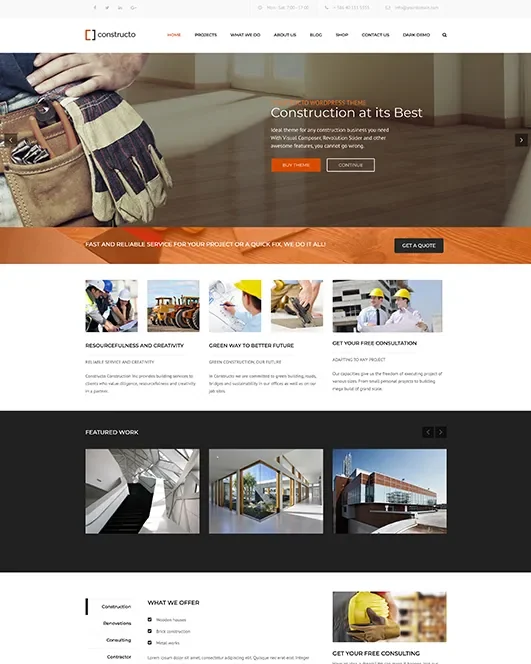 Classic demo published by AnpsThemes for Constructo; demonstration content.Open full-size screenshot ↗
Best forPresenting services, construction projects and the team
Constructo targets construction and renovation companies with services, projects and team sections. The page advertises Elementor and WPBakery, with the latter stated as included. This alternative interests a company already trained in one of these tools. However, check the selected demo’s builder: content does not automatically become interchangeable. Demo counts vary in the description; they are not used here to define the purchase scope.
Offer pricing
59 USD — Regular
Billing: Theme purchase; any modules and services cost extra.
Renewal and support: Six months of support advertised; paid extension to be confirmed. Updates separate from support.
Excluding taxes and any handling fees.
Checked on .
Strengths
- Service, project and team presentations advertised
- Choice of Elementor or WPBakery variants; WPBakery advertised as included
What to consider
- Demos do not automatically convert between builders
- Demo media rights and Pro components to be confirmed
Pricing terms and compatibility
Understanding the offer
- Price at the time of review
- 59 USD — Regular
- Currency
- USD
- Billing
- Theme purchase; any modules and services cost extra.
- Renewal and support
- Six months of support advertised; paid extension to be confirmed. Updates separate from support.
- Taxes and fees
- Excluding taxes and any handling fees.
- Commitment and terms
- Regular licence for a freely accessible end product; a separate paid service alone does not require Extended. Check paid site access and component licences.
- Date checked
Compatibility and components
- Elementor and WPBakery; WooCommerce advertised
- Seller declarations: Elementor, Elementor Pro, WooCommerce 9.x.x, WooCommerce 8.x.x, WooCommerce 7.x.x, WooCommerce 6.x.x, WPBakery Page Builder, WPML, Bootstrap 4.x; latest displayed WordPress tag: 7.0.x; no compatibility tested or incompatibility inferred for unlisted versions.
- Last displayed update: October 30, 2026. Recorded November 3, 2026.
TheBuilt
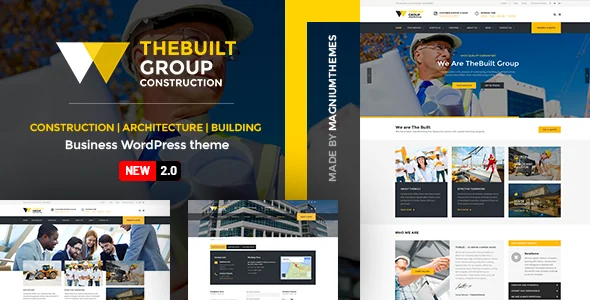 Official TheBuilt presentation; “New 2.0” belongs to the historical image and does not identify the version currently supplied.
Best forPutting references at the centre of the business website
TheBuilt highlights numerous portfolio variants and global presentation options. It merits shortlisting for a company wanting to explain completed work in detail. The listing advertises included WPBakery and Slider Revolution; identify their versions and update channels. Demo images are not supplied for reuse. The seller’s displayed speed scores cannot predict those of your photos, hosting or final site.
Offer pricing
59 USD — Regular
Billing: Theme purchase; any modules and services cost extra.
Renewal and support: Six months of support advertised; paid extension to be confirmed. Updates separate from support.
Excluding taxes and any handling fees.
Checked on .
Strengths
- Portfolio variants and global presentation options advertised
- WPBakery and Slider Revolution advertised as included
What to consider
- Demo images not supplied for reuse
- Bundled inclusion without an assumed standalone licence or direct support
Pricing terms and compatibility
Understanding the offer
- Price at the time of review
- 59 USD — Regular
- Currency
- USD
- Billing
- Theme purchase; any modules and services cost extra.
- Renewal and support
- Six months of support advertised; paid extension to be confirmed. Updates separate from support.
- Taxes and fees
- Excluding taxes and any handling fees.
- Commitment and terms
- Regular licence for a freely accessible end product; a separate paid service alone does not require Extended. Check paid site access and component licences.
- Date checked
Compatibility and components
- WPBakery and Slider Revolution advertised as included; WPML compatible
- Seller declarations: WooCommerce 10.x.x, WooCommerce 9.x.x, WooCommerce 8.x.x, WooCommerce 7.x.x, WooCommerce 6.x.x, WooCommerce 5.x.x, WPBakery Page Builder, WPML; latest displayed WordPress tag: 7.0.x; no compatibility tested or incompatibility inferred for unlisted versions.
- Last displayed update: September 9, 2026. Recorded November 3, 2026.