

A WordPress report can succeed with an incomplete list
A custom plugin exports references from a WordPress catalog for stock reconciliation. Each report row contains a family and a list of references in the same cell. When opening the file, you find all the families. Yet a reference is missing from the largest one and the last exported value appears cut off. Before rerunning the export or changing PHP memory, compare the string produced by the SQL query with the file’s contents. The file may have faithfully reproduced a result already truncated in the database.
The check concerns a catalog report built by a plugin. For an SQL backup intended to restore the site, separately check file integrity and its ability to restore the database. Here, the comparison is between source rows, their aggregation, and the cell in the delivered file.
This comparison concerns queries that build the list with GROUP_CONCAT. The function concatenates a group’s values and applies a byte limit, group_concat_max_len. When this limit is reached, the engine may return the aggregate row with an incomplete string. The report’s row count still matches the number of families. If the application records neither the SQL warning nor the expected reference count for each family, it may present this file as complete.
The diagnosis applies to a plugin, report query, or export task whose scope you control. Identify the component creating the list. For a third-party export, first ask whether grouping happens in SQL, PHP, or the software reading the CSV. If the query returns one row per reference, the GROUP_CONCAT limit matters only if a later stage uses the function. Locate where values first diverge before correcting the processing.
Compare before you choose
The offers at a glance
Find the use case and budget that fit, then read the details to see the limitations and any components you may need.
On smaller screens, the table scrolls horizontally. With a keyboard, press Tab to focus the table, then use the left and right arrow keys.
| Offer | Best for | Pricing and billing | Renewal and support |
|---|---|---|---|
 alwaysdata Cloud Public Plus SmallRead the details | A team using MariaDB and tracking a shared account’s resources. | €5/month excluding VAT with annual billing or €6/month excluding VAT with monthly billing Annual or monthly Prices exclude VAT | Check the amount and period in the contract |
 OVHcloud Perso, Eco rangeRead the details | A team tracking quotas per database and able to test from the staging site. | €2.99/month excluding VAT initially, or €35.88 excluding VAT over twelve months Starting price displayed over twelve months €3.59/month including VAT displayed for the initial period | €5.99/month excluding VAT listed, or €71.88 excluding VAT over twelve months at that rate |
Check the engine, session, and byte length
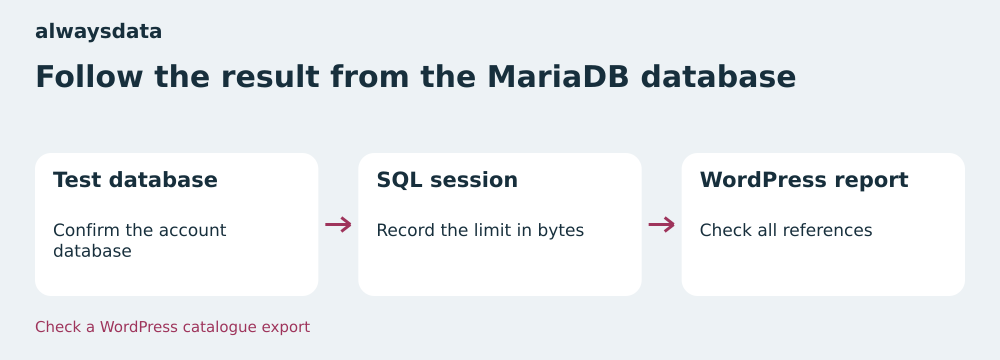
On a staging copy, record the engine and session value with SELECT VERSION(), @@SESSION.group_concat_max_len. If possible, use the connection executing the report. A phpMyAdmin session’s value may differ from the one WordPress uses, particularly if the plugin initializes its own settings or opens another connection. Avoid attributing the problem to the engine based solely on the plan’s name. Two installations at the same host may use different versions or connection modes.
Prepare a sample family for which you know the references and their order. With a comma separator, add the bytes of the values and the required number of commas. In SQL, OCTET_LENGTH gives the size in bytes. CHAR_LENGTH counts characters. An accented reference may have a different length depending on the measurement. Then compare the raw string and its length with the expected result. A value interrupted in the middle of a reference is an additional signal, even if the string does not exactly fill the limit.
Execute SHOW WARNINGS immediately after the aggregate query in the same session, before running other check queries. The local result shows code 1260 when the string is cut off. In a tool distributing execution across several connections, keep both statements in the same execution or ask the team maintaining the report to capture this warning. Also record the family, session value, and source-row count to avoid repeating the test on real stock data.
Rule out filtering and file-reading errors
First compare the references actually entering the aggregation. Repeat the same joins and filters on the sample family as ordered rows. If the reference is already missing from that list, examine status filters, joins, and read permissions used by the report. If the detail contains all references but the SQL aggregate loses some, compare the limit and warnings. The exported file can then be checked against a reproduced SQL result instead of serving as the sole starting point.
Check null values and duplicates according to the report’s specification. GROUP_CONCAT ignores null values. Count non-null references with COUNT(reference) if you want to check the actual list. COUNT(*) remains useful for tracking all source rows. If the query uses DISTINCT, compare the number of distinct values using the same logic. For a list whose order is specified, put an explicit order inside the aggregation and add a stable tie-breaker.
Finally, open the CSV with a reader respecting the agreed encoding and delimiters. A comma inside a list cell and the file’s column separator can coexist if the cell is properly quoted. Counting commas in the raw file alone cannot count references. Compare the raw SQL result with the cell after reading the CSV. If the SQL result is complete and the parsed cell differs, correct the file generator or reader.
alwaysdata Plus Small: start from the account’s MariaDB database
In alwaysdata administration, open Databases → MySQL. The documentation states that this service’s databases use MariaDB and that phpMyAdmin is available. Identify the staging database, server, and user intended for the test. If your working procedure uses the SQL client through SSH, alwaysdata also documents this route. Use an account authorized only for the staging database. The database identifier and server name confirm the target before executing the query.
MariaDB documentation lists a default of 1 MiB for group_concat_max_len. Record your session’s actual value and engine before inferring report capacity. In a small catalog, all families may fit below the limit. After adding a new collection, a single family may exceed it. Use the longest family in the staging dataset or prepare a fictional family representing your volume. The difference will appear in the aggregate content before becoming visible in the CSV.
At alwaysdata, the account disk includes files, email, and databases, among other things. If the report writes a CSV on the server, also count its working space. Separately check file size, disk quota, and each aggregate cell’s length. A database that fits the plan can still produce a truncated cell. A complete list cell can also lead to a file the receiving software can no longer read if its own limit is reached.
OVHcloud Perso: check the included database and WordPress connection
In the OVHcloud control panel, open Web Cloud → Hosting plans, select the hosting plan, then Databases. From the staging database’s menu, open phpMyAdmin. The documentation distinguishes included databases from the Web Cloud Databases offer. For a database included with web hosting, it states that access from an external server is unavailable. Use the route provided for this plan, then reproduce the check in the WordPress connection context if the report uses its own settings.
The MySQL 8.4 manual lists a default of 1,024 bytes for group_concat_max_len and also mentions the bound related to max_allowed_packet. This explains why a query designed with a comfortable value in one environment may produce a shorter list elsewhere. The engines’ documented values serve as reference points. For the OVHcloud site, record the engine and session value returned by the database actually used. The plan’s price and gigabyte quota do not reveal these two values.
A comparison in phpMyAdmin helps determine whether the query can produce the error. To sign off on the correction, also observe the query actually executed by the export. If the tool opens a second connection when generating the file, a setting previously made in phpMyAdmin does not apply to it. Record results as engine, session value, expected size, and obtained size. These four elements allow the diagnosis to be reproduced even if another team member takes over the report.
Plans and billing cycles checked on November 11, 2026
alwaysdata Public Cloud Plus Small lists €5 excluding VAT per month with annual payment, or €60 excluding VAT for twelve months. Monthly billing is listed at €6 excluding VAT per month, or €72 excluding VAT if the rate remains unchanged for twelve months. The account advertises 50 GB disk, 1 GB RAM, and 1 CPU. Prices come from the public pricing table. Before ordering, record the amount payable, applicable VAT, and billing cycle in your account. Under Subscriptions → Contracts, alwaysdata help explains where to view the approved version and contracts awaiting approval.
OVHcloud Perso, in the Eco range, is listed at €2.99 excluding VAT per month and €3.59 including VAT per month for the presented initial period. The page lists €35.88 excluding VAT for twelve months and renewal at €5.99 excluding VAT per month, or €71.88 excluding VAT over twelve months at that rate. The plan advertises 100 GB disk and five databases of 1 GB each. At checkout, check the cycle, total including VAT, and renewal date. For an older contract, consult the renewal rate associated with your plan and commitment.
In this scenario, compare the cycle’s cost and the means available to reproduce the report query. Hosting may offer more disk without allowing a longer aggregate cell. A staging database, documented access, and a test in the same session matter more for diagnosing a partial export. For budget comparison, keep the initial amount and renewal amount on two separate lines and add the options actually involved in your project.
Export references as rows when the recipient allows it
If the receiving software accepts one row per reference, remove aggregation from the export query. Return the family identifier, sort key, and reference, then sort on those keys. In the exercise, the SQL client returns five rows and the script writes them to a CSV with three columns. It then rereads the CSV and compares the four catalog references, along with the coffee family’s reference. The export no longer depends on a GROUP_CONCAT cell’s maximum size.
On a WordPress copy, build this variant from the same filters as the initial report. Choose a stable sort key to distinguish two references with the same position. If the catalog is large, export by identifier ranges or use a read method suited to the volume and available memory. A catalog modified between several reads can introduce discrepancies. For reconciliation that must be exact at a given moment, start from a frozen copy or the consistent-read mechanism approved by your team. The CSV row count must match the number of references selected at that moment.
Retain the old format while validating the detailed file and have the receiving software read the new file. Check that it reconciles rows by family identifier and accepts several rows for the same family. To return to the previous format, redirect the import to the previous report version only after checking its completeness or limiting its scope to families whose lists fit that format. Keep the test details with the new file so you can identify a family if the reader reports a duplicate row.
- Return one row per reference and retain a stable family key.
- Compare the reread CSV with source references, then validate the format with the receiving software.
If a single cell is required, limit the change to the session
A partner may require one row per family and a list in one cell. In this case, measure the largest useful result and define a justified byte value. In the exercise, four eight-byte references plus three commas make 35 bytes. The 128-byte test limit covers the list with room to spare. For the real catalog, calculate the maximum per family from byte lengths, using the report’s filter and null-value or duplicate rules. Separator length also counts.
If the engine and user allow it, read and save the starting value, then apply SET SESSION group_concat_max_len = 128 for the exercise’s sample. In practice, replace 128 with your justified limit. The setting and query must use the same connection. Query warnings immediately after the query. If the result is cut off, mark the export incomplete and keep the last validated file. Also check engine and CSV-reader limits. Raising the session limit does not remove the other caps.
In code keeping the connection open, restore the initial value at the end, including when an error interrupts processing. If using a dedicated connection, close it after the export. Retain reference-by-reference result checks and a length measurement in acceptance testing. If the site refuses the change or the receiving software fails with the longer cell, return to the previously validated file and work with the recipient on a detailed export or explicit batch split. A file generated after a truncation warning must be flagged before distribution.
- Record the initial limit, modify the staging session, and compare the list with the detail.
- Check warnings, restore the starting setting, and reread the file in the receiving software.
Acceptance-test results and the hosting choice
The attached acceptance test starts an isolated MariaDB 10.11.14 instance on Windows and submits a real SQL batch to it. With a 21-byte limit, both families remain present and the catalog family still reports four source rows. Yet its string is SKU-0001,SKU-0002,SKU. MariaDB issues warning 1260. With a 128-byte limit, all four references become readable in the aggregate again and the warning disappears. The test also confirms that the accented reference CAFÉ-01 contains seven characters and eight bytes.
The script checks the detailed export reread as CSV and restoration of the session value. The ZIP provides the SQL, a Python launcher, and reproduction instructions. The eight checks were repeated with Python 3.14.4 from the extracted archive. The acceptance test uses fictional data and executes the MariaDB engine, while information on MySQL and hosting access comes from public manuals. Perform the session check on your installation before applying a correction to the WordPress report.
alwaysdata Plus Small suits a team wanting to locate a MariaDB database within an account and track a shared disk quota. OVHcloud Perso suits a team using separate included databases with their own quotas and able to check the export from the web environment. In both cases, require the same result to validate the choice: a long family compared with source detail, checked warnings, a file reread by the recipient, and restoration of the starting value if a session setting was tested.
Further reading
Sources and references
Use these references to check the features, requirements and limitations described. Reading documentation is not a practical test.
View 8 references
- alwaysdata Cloud Public Plus Small — Small annual price ↗ — Documentation consulted:
- alwaysdata Cloud Public Plus Small — Viewing the contract ↗ — Documentation consulted:
- alwaysdata Cloud Public Plus Small — Access to the MariaDB database ↗ — Documentation consulted:
- OVHcloud Perso, gamme Eco — Initial twelve-month price ↗ — Documentation consulted:
- OVHcloud Perso, gamme Eco — Access to databases and phpMyAdmin ↗ — Documentation consulted:
- OVHcloud Perso, gamme Eco — Shared SQL access scope ↗ — Documentation consulted:
- MariaDB, GROUP_CONCAT function ↗ — Documentation consulted:
- MySQL 8.4, aggregate functions ↗ — Documentation consulted:
Uses, prices and what to check
2 offers in detail
Compare the features you need and the terms of each offer. The order of these entries does not indicate a ranking.
alwaysdata Cloud Public Plus Small
 Follow the result from the MariaDB database — BlogPasCher editorial illustration.Open full-size illustration ↗
Best forA team using MariaDB and tracking a shared account’s resources.
Documented MariaDB with database access from the panel or through the SQL client.
Offer pricing
€5/month excluding VAT with annual billing or €6/month excluding VAT with monthly billing
Billing: Annual or monthly
Renewal and support: Check the amount and period in the contract
Prices exclude VAT
Checked on .
Strengths
- MariaDB and phpMyAdmin documented
- Annual or monthly cycle
What to consider
- Shared storage quota
- Record the SQL session value on the site
Pricing terms and compatibility
Understanding the offer
- Price at the time of review
- €5/month excluding VAT with annual billing or €6/month excluding VAT with monthly billing
- Currency
- EUR
- Billing
- Annual or monthly
- Renewal and support
- Check the amount and period in the contract
- Taxes and fees
- Prices exclude VAT
- Commitment and terms
- According to the selected cycle
- Date checked
Compatibility and components
- WordPress
- MariaDB
- phpMyAdmin
OVHcloud Perso, Eco range
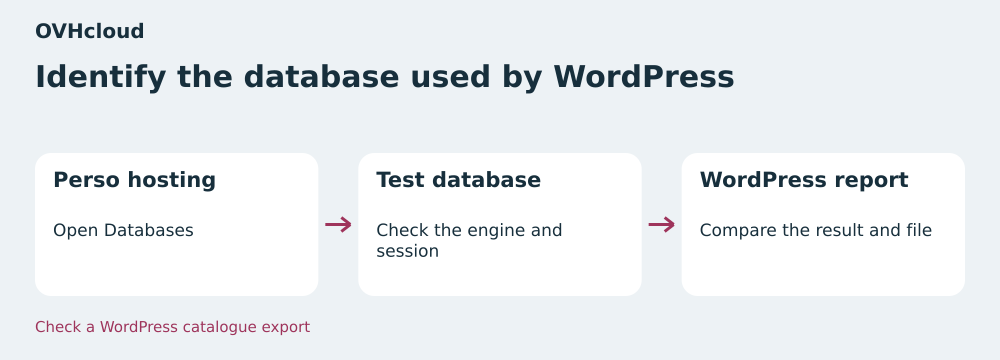 Identify the database used by WordPress — BlogPasCher editorial illustration.Open full-size illustration ↗
Best forA team tracking quotas per database and able to test from the staging site.
Included databases and session checks through the web environment.
Offer pricing
€2.99/month excluding VAT initially, or €35.88 excluding VAT over twelve months
Billing: Starting price displayed over twelve months
Renewal and support: €5.99/month excluding VAT listed, or €71.88 excluding VAT over twelve months at that rate
€3.59/month including VAT displayed for the initial period
Checked on .
Strengths
- Five 1 GB databases advertised
- phpMyAdmin available
What to consider
- External access to the included database unavailable
- Check the engine and session value
Pricing terms and compatibility
Understanding the offer
- Price at the time of review
- €2.99/month excluding VAT initially, or €35.88 excluding VAT over twelve months
- Currency
- EUR
- Billing
- Starting price displayed over twelve months
- Renewal and support
- €5.99/month excluding VAT listed, or €71.88 excluding VAT over twelve months at that rate
- Taxes and fees
- €3.59/month including VAT displayed for the initial period
- Commitment and terms
- Check the cycle and actual amount in the summary
- Date checked
Compatibility and components
- WordPress
- phpMyAdmin