

Restore an article and retain a way back
An association has lost the expected version of a WordPress page after an editorial intervention. It has a database backup from the previous day. Files, theme and plugins have already been checked and a private site copy is available. The team wants to know whether the backup recovers the content, then demonstrate that it can return the copy to its starting database. Acceptance testing remains isolated and the trial data is fictitious or prepared for this purpose.
The account owner retains restoration and configuration permissions. Another person receives only SQL credentials permitted to read both test databases. They check reference items and sign off the result. This separation limits the impact of a verification error. It also reveals a common testing problem: a page displays while the site still points to the old database.
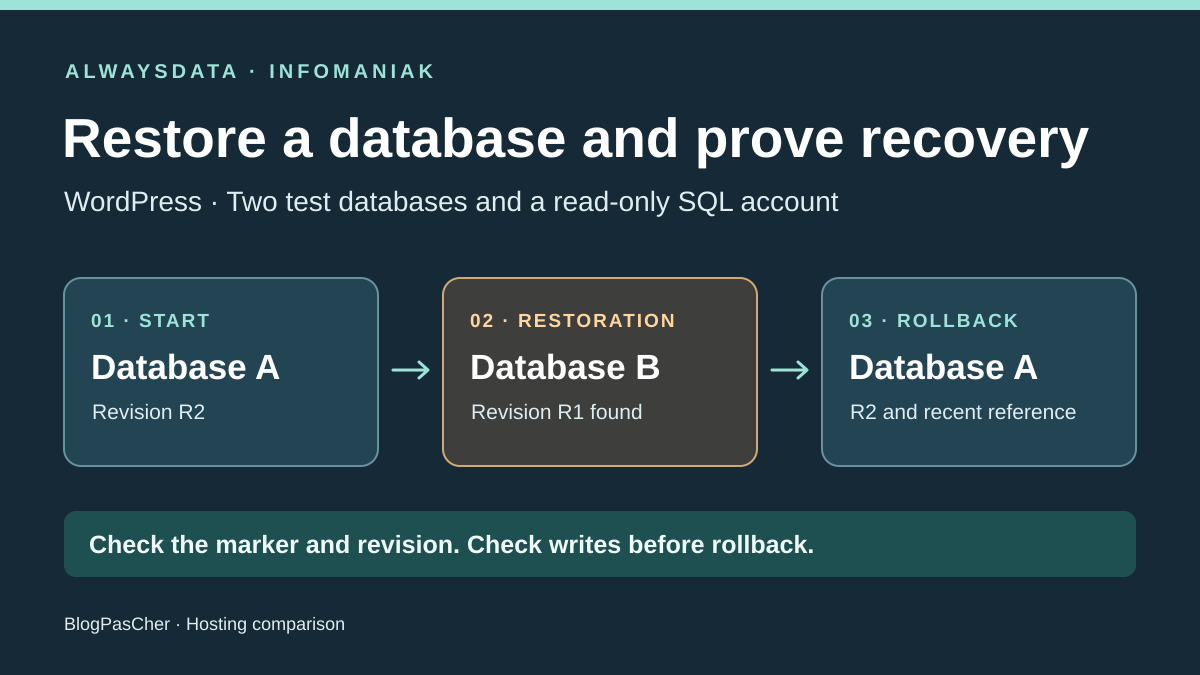
Call the copy’s current database A and the candidate database from the backup B. Preserve A during import and while reading B. The test starts on A, moves to B and returns to A. At each stage, require proof of the target and proof of the content. If a write reached B during the trial window, suspend the return until its fate has been decided.
Compare before you choose
The offers at a glance
Find the use case and budget that fit, then read the details to see the limitations and any components you may need.
On smaller screens, the table scrolls horizontally. With a keyboard, press Tab to focus the table, then use the left and right arrow keys.
| Offer | Best for | Pricing and billing | Renewal and support |
|---|---|---|---|
 alwaysdataRead the details | A team able to prepare and import SQL into a separate test database. | Small, 6 EUR excluding VAT monthly or 60 EUR excluding VAT annually 6 EUR excluding VAT for one month or 5 EUR excluding VAT per month with annual payment. Thirty free days advertised. With 20% if applicable, examples are 7.20 EUR including VAT monthly or 72 EUR including VAT over twelve months. | Renewal for the same duration under shared-hosting terms. Confirm the future price. |
 InfomaniakRead the details | A team prioritizing guided import, with the holder operating Manager and a read-only SQL auditor. | Web Hosting from 10.91 CHF excluding VAT per month Annual by default. Quarterly or monthly depending on the amount. Twelve months at this rate total 130.92 CHF excluding VAT. At 8.1% if applicable, approximately 141.52 CHF including VAT over twelve months. The billing profile determines currency and taxes. | Automatic by default if the payment method permits. First attempt at D−14 if enabled and valid. Rate in force at billing. |
Assign permissions to three uses
The hosting account holder creates databases and starts the import. They choose an empty target sharing neither its name nor write credentials with A. The read account is separate from WordPress’s account. The verifier must be able to read the expected page and database identifier without opening the account administration panel, creating SQL objects or importing a file. They have no rights to the public site database or other sites on the plan.
WordPress uses an application account specific to the destination. Its needs differ from verification needs. Normal operations, including options, sessions or plugin management, may write to the database. On the copy, control writes by blocking editorial use and disabling tasks or integrations likely to generate them during the test. Simply opening a page in a browser does not guarantee that the site writes nothing.
Read permission grants access to data within the authorized scope. A WordPress database may contain addresses, forms or confidential settings. If the auditor needs only a few reference items, prepare a sanitized test environment or have the account holder record them. Send identified results instead of a full export. After the session, remove temporary permission and verify the result by opening a new connection authorized for this check.
alwaysdata Small: hand a backup file to an operator
Small advertises 50 GB SSD, 1 GB of memory and one CPU. Databases and sites are advertised without a number limit. Disk space covers files, email and databases. Check room for A and B and for the temporary file if the operator copies it into the account. Backups managed by alwaysdata are outside the quota. A copy the operator places in current storage must be budgeted separately.
MariaDB documentation offers three levels per database and user: all permissions, read-only and no permissions. It warns that confirmation through the interface or API resets permissions to panel-defined states if changed with another tool. For reproducible acceptance testing, save permissions through the interface and check them after creating B. Give the verification account read access to A and B and none elsewhere. The importing account has necessary permissions on B only.
alwaysdata exposes daily backups read-only within the account as Zstandard-compressed SQL files for MariaDB. The holder can retrieve the dated archive and import it into a separately created database B. They record the folder date, selected file and destination before importing. The SQL-only verification account receives no SSH access to the backup directory. If nobody on the team can prepare the archive or manage an import, this documented route is insufficient to organize the intervention.
The panel also offers Advanced then Backup Restoration. The holder chooses a date and checks the database to restore. Documentation warns that this overwrites existing data. To keep A available during comparison, use the dated SQL archive and direct manual import to B. Record file and SQL dates if the test depends on media added since the backup.
The Small table and technical documentation advertise a rolling seven days. Shared-hosting terms, article 4.6, mention thirty days. To plan an exercise on Small, use the visible seven-day window and obtain written confirmation of contractual retention. The contact page lists support through administration and telephone for sales inquiries during business hours. Help is available in French and English. Urgent tickets reserved for Dédié and Gold servers are not part of Small.
Infomaniak Web Hosting: create the target from Manager
Shared Web Hosting displays 250 GB SSD and twenty PHP sites included in its starting configuration, with unlimited numbers of MySQL or MariaDB databases advertised. Manager separates database and user management. Its help describes reading with SELECT, writing through a separate privilege group and administration through structural operations. Certain routine, trigger or event permissions are reserved for Cloud Server. According to the guide, an account with no permissions on a database cannot see it in phpMyAdmin.
The import guide documents selecting a source from automatic backups or files. The holder can target a new database or replace an existing one. Select creation for B. For a file uploaded from the workstation, the documented limit is 300 MB. Beyond that, the guide provides for a file placed on hosting outside public directories or an SSH method. For SSH import, prepare B and import permissions before connecting. It warns that views or triggers may need handling. If a plugin uses them, check required objects and available permissions before choosing shared hosting.
The advanced-restoration guide describes the requested date, displayed nearest backup date and completion email. The email confirms task completion, after which the holder checks the target name, integrity and reference items. The offering presents recovery up to seven days back and a backup in another Swiss data center. Import duration depends on size and method. No execution time was measured for this comparison.
At the time recorded, the support page advertised telephone support Monday to Friday from 09:00 to 18:00, chat Monday to Friday from 06:00 to 19:00 and email seven days a week from 06:00 to 21:00. The help center is available in French and support is presented as multilingual. Web Hosting terms exclude website-development requests. Manager automates execution of the holder’s chosen import. The WordPress team retains validation of data, target and rollback.
Compare the invoice in its own currency and cycle
alwaysdata Small costs 6 EUR excluding VAT when paid monthly or 5 EUR excluding VAT per month when paid annually, totaling 60 EUR excluding VAT for twelve months. At the standard French 20% rate if applicable to the invoice, examples are 7.20 EUR including VAT for one month and 72 EUR including VAT for the year. The offer page states thirty free days. Clarify their effect on the first payment and next cycle date. Quoted amounts exclude any second test-account cost.
alwaysdata shared-hosting terms describe a minimum one-month or one-year term after initialization depending on the plan, followed by renewal for the same duration. Article 7 requires termination by registered letter with acknowledgment of receipt at least one month before the anniversary date. Check applicable dates and methods in the contract displayed under Subscriptions. Billing help distinguishes deleting the account before expiry, without refund, from access to contracts. Confirm the future price.
For Infomaniak Web Hosting, the consulted table displays a starting rate of 10.91 CHF excluding VAT per month and annual billing by default. Monthly or quarterly billing may be available depending on configuration value. Twelve months at the displayed price total 130.92 CHF excluding VAT. With the standard Swiss 8.1% rate if applicable to the organization, this is approximately 141.52 CHF including VAT on that basis. Checkout amount, taxation and currency depend on the organization. General terms distinguish the price billed according to address and status. CHF amounts are the Swiss reference.
Infomaniak advertises thirty free days requiring a valid card to start the trial. General terms provide for a first debit attempt fourteen days before trial end if the service is retained. Check this date at signup. They also provide for automatic renewal enabled by default when the payment method permits. With an associated valid payment method, the first attempt occurs fourteen days before expiry when automatic renewal applies. The billed rate is the one in force at billing time. Check the renewal invoice amount and payment method in Manager.
Prepare both proofs before changing the connection
On A, record an article with a stable identifier and content added after the backup. Note a marker absent from B, such as a test identifier kept in a trial log or synthetic object created for the session. An article title shared by both databases is a poor target reference. It may display on both copies. Keep evidence of the database name actually selected by the connection, verified by the operator through a private tool.
On B, check the page to recover and the exact version of the expected passage. Check that the character set, table prefix and site settings match the copy. If the site contains serialized data or several languages, the holder prepares safe URL adaptation and checks that the copy does not redirect to the real site. Media and code were checked initially. Without this prerequisite, an SQL import alone does not cover site recovery.
Document a test window and thresholds. For example, allow ten minutes to return to A after the rollback decision, including two successful reads after the change. Record the time zone, backup dates and verification times. Measure the time needed to import B separately. This separates preparation time from acceptable interruption time with objectives suited to the site.
Switch staging, then verify that it really returns to A
The holder keeps a protected copy of the initial connection profile. In a standard WordPress installation, database settings are in wp-config.php or injected by the environment. Record the database name, host, application user and table prefix. Keep secrets in the mechanism intended for them. The read account receives only its own credentials. Check that both profiles point to staging and no public route receives the change.
On the copy, apply profile B and check a fresh connection. Record the target with the private checking tool, then the restored page through the site. A page or object cache can hide the switch. Bypass or reset the copy’s cache for verification and check that no redirect leads to the public address. Separately confirm through the read-only SQL account that B contains the expected revision. A read query in phpMyAdmin does not prove which database WordPress uses.
Before returning, check whether B received useful writes since the trial opened. Depending on the site, these include registrations, forms and automatic tasks. If uncertain, keep both databases and suspend the change while establishing what must be preserved. If the window remained free of writes to retain, reapply profile A. Open a new connection and check that marker A and recent content reappear. Then check that B remains available for analysis and revoke audit access at the end.
Replay checks in an offline mockup
The supplied exercise creates two SQLite databases from local datasets, plus an out-of-scope database. It opens A and B read-only for the auditor. A control write genuinely fails in SQLite on the test database. A mockup guard refuses the third database before opening it. Verify actual MariaDB, Manager and alwaysdata panel privileges separately on authorized staging.
A functional read simulates the active profile. The shared title is visible on A and B, demonstrating that a title-only check would accept the wrong target. The complete check combines marker and revision. The test then goes A, B, A. It checks the return of recent content and both file hashes. In a second journey, a fictitious write is added to B after the change. Rollback is blocked and both databases are retained.
In the folder extracted from the ZIP, run “python -X utf8 exercice.py” and compare the report with “attendu.json.” Review the ZIP’s result after execution and record checks the team will reproduce on hosting. The program starts neither WordPress nor a network service. The simulated refusal to return after a write is a procedural choice for the exercise. On a real copy, implement a mechanism recording useful writes and an explicit decision about retaining them.
Choose who prepares B and who signs off the return
Choose alwaysdata Small if an operator understands SQL archives and wants to select, retain and import a dated file themselves. Both test databases must fit the shared quota with the margin needed for import. Clarify Small retention if the required point exceeds the displayed seven-day window. The auditor can remain read-only and deliver results on A and B to the holder.
Choose Infomaniak Web Hosting if the holder prefers selecting the backup and creating the candidate database through Manager. Documentation describes this route and the three SQL permission families. Check database format, size and objects, then choose the import channel. This plan suits the scenario as long as auditing stays within SQL and Manager actions remain with the holder.
In both cases, ask the signatory to provide the three observed states and write inventory. If the team also needs to delegate restoration to the same SQL account, the read-only scenario no longer covers the need. Designate a separate operator or control temporary permission on B, then verify its removal. Return is proven when the copy again serves data specific to A and B remains available to explain the discrepancy.
Further reading
Sources and references
Use these references to check the features, requirements and limitations described. Reading documentation is not a practical test.
View 22 references
- alwaysdata — Small public price with monthly payment ↗ — Documentation consulted:
- alwaysdata — alwaysdata Plus ↗ — Documentation consulted:
- alwaysdata — alwaysdata, MariaDB and permissions ↗ — Documentation consulted:
- alwaysdata — alwaysdata, backups ↗ — Documentation consulted:
- alwaysdata — alwaysdata, shared hosting terms ↗ — Documentation consulted:
- alwaysdata — alwaysdata, billing help ↗ — Documentation consulted:
- alwaysdata — alwaysdata, contact ↗ — Documentation consulted:
- alwaysdata — alwaysdata, urgent ticket ↗ — Documentation consulted:
- alwaysdata — French VAT, standard rate ↗ — Documentation consulted:
- alwaysdata — WordPress, database configuration ↗ — Documentation consulted:
- alwaysdata — alwaysdata, restoration in the panel or over SSH ↗ — Documentation consulted:
- Infomaniak — Displayed starting monthly price for Switzerland, annual billing by default ↗ — Documentation consulted:
- Infomaniak — Infomaniak Web Hosting ↗ — Documentation consulted:
- Infomaniak — Infomaniak, MySQL users ↗ — Documentation consulted:
- Infomaniak — Infomaniak, SQL import ↗ — Documentation consulted:
- Infomaniak — Infomaniak, advanced restoration ↗ — Documentation consulted:
- Infomaniak — Infomaniak, general terms ↗ — Documentation consulted:
- Infomaniak — Infomaniak, Web Hosting terms ↗ — Documentation consulted:
- Infomaniak — Infomaniak, support ↗ — Documentation consulted:
- Infomaniak — Infomaniak, invoices and currency ↗ — Documentation consulted:
- Infomaniak — Swiss VAT, standard rate ↗ — Documentation consulted:
- Infomaniak — Infomaniak, SQL actions and shared hosting limits ↗ — Documentation consulted:
Uses, prices and what to check
2 offers in detail
Compare the features you need and the terms of each offer. The order of these entries does not indicate a ranking.
alwaysdata
 Official publisher logo.
Best forA team able to prepare and import SQL into a separate test database.
Small provides access to the dated SQL archive, with import into a separate database and integrated restoration overwriting the selected target.
Offer pricing
Small, 6 EUR excluding VAT monthly or 60 EUR excluding VAT annually
Billing: 6 EUR excluding VAT for one month or 5 EUR excluding VAT per month with annual payment. Thirty free days advertised.
Renewal and support: Renewal for the same duration under shared-hosting terms. Confirm the future price.
With 20% if applicable, examples are 7.20 EUR including VAT monthly or 72 EUR including VAT over twelve months.
Checked on .
Strengths
- Read-only SQL role per database
- Dated SQL archive accessible to the holder and restoration through the panel
- 50 GB SSD and a French guide
What to consider
- 50 GB shared between files, email and databases
- Seven days displayed for Small and thirty in shared-hosting terms
- Urgent ticket reserved for Dédié and Gold
Pricing terms and compatibility
Understanding the offer
- Price at the time of review
- Small, 6 EUR excluding VAT monthly or 60 EUR excluding VAT annually
- Currency
- EUR
- Billing
- 6 EUR excluding VAT for one month or 5 EUR excluding VAT per month with annual payment. Thirty free days advertised.
- Renewal and support
- Renewal for the same duration under shared-hosting terms. Confirm the future price.
- Taxes and fees
- With 20% if applicable, examples are 7.20 EUR including VAT monthly or 72 EUR including VAT over twelve months.
- Commitment and terms
- One month or one year after initialization, depending on the plan.
- Date checked
Compatibility and components
- WordPress on MariaDB
- Zstandard-compressed SQL
- Separate candidate database and separate read account
Infomaniak
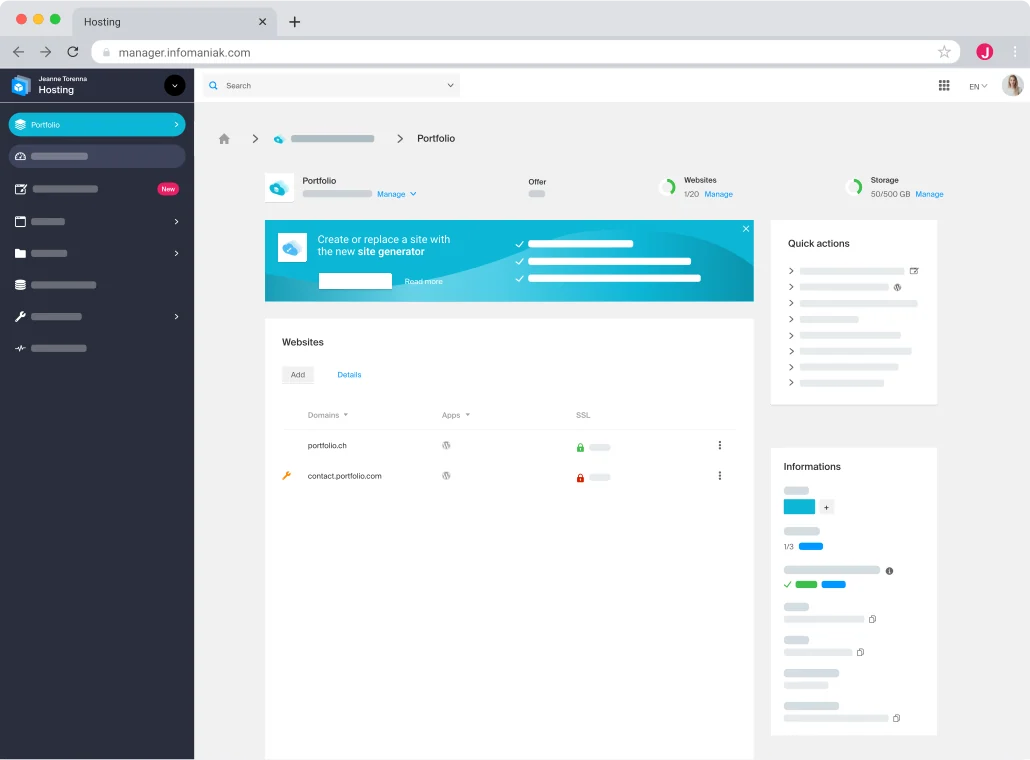 Developer presentation image: illustrative mock-up of the Web panel.
Best forA team prioritizing guided import, with the holder operating Manager and a read-only SQL auditor.
Web Hosting documents importing a backup into a new database in Manager.
Offer pricing
Web Hosting from 10.91 CHF excluding VAT per month
Billing: Annual by default. Quarterly or monthly depending on the amount. Twelve months at this rate total 130.92 CHF excluding VAT.
Renewal and support: Automatic by default if the payment method permits. First attempt at D−14 if enabled and valid. Rate in force at billing.
At 8.1% if applicable, approximately 141.52 CHF including VAT over twelve months. The billing profile determines currency and taxes.
Checked on .
Strengths
- Import into a new database in Manager
- Documented read-only SQL permissions
- 250 GB and twenty PHP sites included in the starting configuration
What to consider
- 300 MB for direct upload of an import file
- Permissions on certain SQL objects reserved for Serveur Cloud
- Web Hosting support does not cover site development
Pricing terms and compatibility
Understanding the offer
- Price at the time of review
- Web Hosting from 10.91 CHF excluding VAT per month
- Currency
- CHF
- Billing
- Annual by default. Quarterly or monthly depending on the amount. Twelve months at this rate total 130.92 CHF excluding VAT.
- Renewal and support
- Automatic by default if the payment method permits. First attempt at D−14 if enabled and valid. Rate in force at billing.
- Taxes and fees
- At 8.1% if applicable, approximately 141.52 CHF including VAT over twelve months. The billing profile determines currency and taxes.
- Commitment and terms
- Cycle selected at order. Thirty-day trial advertised with a valid card. First debit attempt at D−14 before trial end if the service is retained.
- Date checked
Compatibility and components
- WordPress on MySQL or MariaDB
- Import from backup or file
- Separate target and read verification