Web hosting
1984 Hosting for WordPress in Iceland: pricing and backups
1984 Hosting’s WordPress plans in Iceland, initial and renewal terms, migration, the Security Pack and backup limitations.
Read more →

Site appearance
Web hosting
Four shared hosting plans and a local exercise checking a business function after an update.
Source published: · Source updated: · Editorial policy
Visit the official mixhost website ↗
This profile is based on published offers and documentation. No new hosting benchmark or support test was performed for this translation.
Prices retain the market, currency and billing period described in the French source. Translation does not update a commercial quote. Confirm the final price, taxes and options before ordering.
| Plan | Price and billing | Resources and limits |
|---|---|---|
| Light | 7,128 JPY including tax over twelve months or 17,820 JPY including tax over thirty-six months, calculated totals. Renewal: 11,616 JPY including tax over twelve months or 26,928 JPY including tax over thirty-six months under the displayed rates. Recorded on 10 November 2026. JPY, prepaid cycles of 3, 6, 12, 24 or 36 months. Consumption tax of 10% in the comparison. | 100 GB disk space. 100,000 inodes. Automatic provider backups and Smart Update absent from this plan. |
| Standard | 11,616 JPY including tax over twelve months or 30,888 JPY including tax over thirty-six months, calculated totals. Renewal: 18,216 JPY including tax over twelve months or 46,728 JPY including tax over thirty-six months under the displayed rates. Recorded on 10 November 2026. JPY, prepaid cycles of 3, 6, 12, 24 or 36 months. Consumption tax of 10% in the comparison. | No numerical disk cap, subject to usage policy. 200,000 inodes. Daily backups advertised for 14 days. Smart Update starts at Premium. |
| Premium | 12,936 JPY including tax over twelve months or 34,848 JPY including tax over thirty-six months, calculated totals. Renewal: 20,856 JPY including tax over twelve months or 54,648 JPY including tax over thirty-six months under the displayed rates. Recorded on 10 November 2026. JPY, prepaid cycles of 3, 6, 12, 24 or 36 months. Consumption tax of 10% in the comparison. | No numerical disk cap, subject to usage policy. 400,000 inodes. Daily backups advertised for 14 days and Smart Update, subject to space and inode availability. |
| Business | 19,536 JPY including tax over twelve months or 50,688 JPY including tax over thirty-six months, calculated totals. Renewal: 31,416 JPY including tax over twelve months or 78,408 JPY including tax over thirty-six months under the displayed rates. Recorded on 10 November 2026. JPY, prepaid cycles of 3, 6, 12, 24 or 36 months. Consumption tax of 10% in the comparison. | No numerical disk cap, subject to usage policy. 600,000 inodes. Daily backups advertised for 14 days and Smart Update, subject to space and inode availability. |
mixhost offers shared hosting in Japan supporting WordPress in cPanel. Its Smart Update tool notably compares rendering and errors before and after an update applied to a copy. A fictional Osaka workshop wants to verify a function beyond appearance. Its form may remain identical and confirm a request even when that request no longer reaches the register.
The decision rests on two separate observations. The page must remain usable, and a test request must reach its destination. The local exercise reproduces both signals and shows a case where only the first is correct. It supplies a stopping criterion the workshop can apply before returning a request-receiving site to service.
The profile compares pricing cycles and Smart Update’s scope. It distinguishes the copy created for testing, the backup allowing recovery and verification of business functions. Plan choice depends on these access capabilities and available testing space.
On 10 November 2026, the shared hosting grid presented Light, Standard, Premium and Business with cycles of three, six, twelve, twenty-four and thirty-six months. Prices are in Japanese yen. Over twelve months, displayed tax-inclusive monthly equivalents initially then on renewal are respectively 594 then 968 JPY, 968 then 1,518 JPY, 1,078 then 1,738 JPY, and 1,628 then 2,618 JPY. The provider specifies that the entire period is prepaid. Over twelve months, calculated tax-inclusive totals are 7,128 then 11,616 JPY for Light, 11,616 then 18,216 JPY for Standard, 12,936 then 20,856 JPY for Premium and 19,536 then 31,416 JPY for Business.
Over thirty-six months, tax-inclusive monthly equivalents initially then on renewal are 495 and 748 JPY for Light, 858 and 1,298 for Standard, 968 and 1,518 for Premium, and 1,408 and 2,178 for Business. Calculation gives first-cycle totals of 17,820, 30,888, 34,848 and 50,688 JPY including tax, then 26,928, 46,728, 54,648 and 78,408 JPY including tax on renewal at the displayed rates. The grid distinguishes before-tax amounts and amounts including consumption tax, with a 10% difference. For Light over thirty-six months, 450 JPY before tax gives 495 JPY including tax per month in the first cycle.
The discount is advertised for the initial period. Help states automatic renewal for contracts paid by card or PayPal and a reminder fourteen days before the end for bank transfers. To avoid automatic renewal, the procedure requires cancellation no later than the previous day. Keep server and domain renewal dates separate. For the Osaka workshop, compare Premium’s additional cost over an identical duration with the work the update check must actually handle.
The comparison specifies 100 GB for Light and presents disk volume without a numerical cap for Standard, Premium and Business, referring to the usage policy. Help sets limits of 100,000, 200,000, 400,000 and 600,000 inodes for new contracts. These notably limit file and folder counts. A WordPress copy consumes entries as well as bytes. Measure both before testing, accounting for derived images and plugin files. Shared resources remain subject to usage policy, including CPU.
This profile covers the web hosting range of Japanese provider Azpocket, headquartered in Osaka. The provider distinguishes an international range in its catalog. The shared-hosting server-location help page mentions a major data center without specifying the city or contractual assignment. The presentation also mentions backups kept in a separate center. For residency requirements, ask for the country and city assigned to the site, then the countries used for backup and email storage. Azpocket’s address does not establish server location.
The workshop must allow space for the copy and for a backup downloaded or generated on the account. In cPanel, the disk-usage page reports usage by folder. In WordPress, Outils > Santé du site > Informations gives folder and installation sizes. Also record the account’s inode count. If the testing tool needs more room, choose a separate target or postpone the operation before deleting a useful backup.
mixhost advertises quick installation, LiteSpeed Cache, WP Toolkit and WordPress Manager. The comparison specifies Smart Update from Premium upward in this range. Documentation describes AI-assisted analysis of appearance and errors before and after updating a copy. It warns that not every problem is detected and calls for a separate backup. Jetpack AI Assistant is a separate monthly option for writing and translating in WordPress. As of 10 November 2026, mixhost listed 600 JPY before tax, or 660 JPY including tax, per month and up to twenty trial uses. The presented license notably excludes Multisite networks, sites whose address differs from the installation address and sites hosted elsewhere. For the workshop, the first need is to know whether the form delivers data to the register, even with a satisfactory visual report.
The website, guides and support are in Japanese. The policy states weekday support from 10 to 18, excluding holidays and closures, and notably excludes phone and other languages from routine support. The grid lists email and chatbot and provides up to two Zoom sessions per month for Premium and Business. This does not establish a resolution time for a plugin. The advertised panel is cPanel. The language available or selected in the account must be checked separately.
The comparison advertises a daily file-and-database copy on a separate server, retained for fourteen days from Standard upward. The Light column marks the feature absent. Help explains that a restoration date can be chosen without specifying a time within that day. It warns that some paths are excluded and that every daily recovery point is not guaranteed. Database restoration overwrites the database with the same name. To preserve the active version, download the archive and open it with test credentials. Before returning to a point, export the current version and record requests received since the copy date. For accounts with JetBackup5 available, the guide describes downloading the chosen point as an archive. Verify the interface in your own account before relying on this procedure.
The workshop prepares an independent copy of files and the database before every major update. mixhost’s cPanel help explains the Files > Backup menu for account exports. The provider also documents a WordPress migration tool to mixhost and an inbound service depending on the plan. Its guide specifies that the tool does not copy UpdraftPlus backup history. For exit, keep files and a database that open without the original panel and inventory the domain, mailboxes and associated rules. Validating a cloned site does not validate backup-tool history or email availability.
Open exported elements in an environment where PHP version, plugins and data can be checked without sending notifications to customers. The reference archive must match the version whose functionality you want to restore. Record its time, database name and rollback method in the workshop’s file. Distinguish this point from the temporary copy used to run Smart Update.
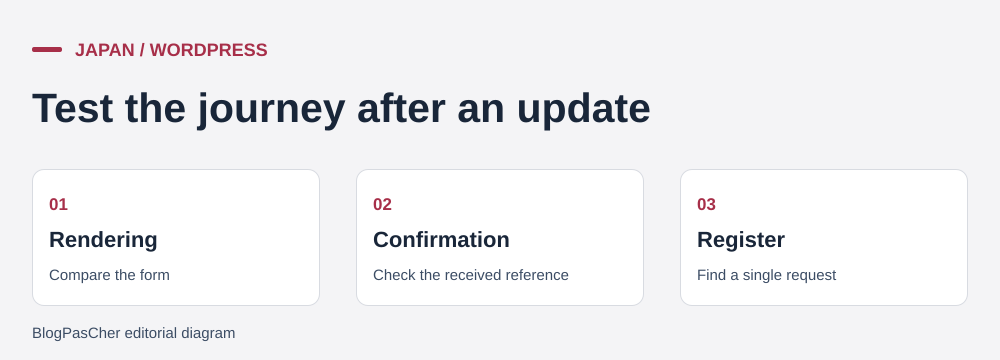 Three checks to validate an update. — Illustration by BlogPasCher.Open full-size illustration ↗
The ZIP in “Prepare your site” contains EXERCICE-MIXHOST.cjs, which runs with Node.js without a server. The supplied result was obtained with Node 22.16.0. The model contains an HTML string for a form, a response with a status and reference, and an in-memory register. It checks three separate signals. The string’s SHA-256 hash provides a strict content indicator, the response indicates what the application returns, and the register indicates whether a write occurred. A string hash is not a pixel comparison. The test does not measure what Smart Update detects on a real site.
The test reference is OSAKA-042. In the baseline, the form returns status 202 and the same identifier, which then appears exactly once in the register. In identicalButLost, HTML and confirmation remain identical. The request does not appear in the register and the rule rejects the update. The validated case preserves all three signals and is accepted. The visibleChange control records the request but changes the button label. The model’s strict rule rejects it for review. On a real site, an expected text change may be accepted after manual verification.
On the WordPress copy, define beforehand the result the workshop must be able to read using its normal access. This may be a row in plugin administration or an application test register. Use a unique fictional reference and note row counts before and after. A confirmation page or status is insufficient when the next step is essential. If it fails, identify the first divergent signal and keep the test on the copy. Another run with a different reference lets you compare a corrected setting without mixing two tests.
node .\EXERCICE-MIXHOST.cjsOn a mixhost server with WP Toolkit and Smart Update available, open cPanel and WordPress Management. The guide asks you to verify that Smart Update is active, open the update button and choose themes or plugins to test. Testing runs on a copy. The report provides a view of issues and a tab for accessing the test site. Verify that opened addresses belong to that copy before submitting a fictional request. The apply button at the end of the report updates the public site. Wait until the business result has been checked before using it.
The guide warns that HTTP authentication may prevent testing and custom .htaccess configuration may prevent startup. For sites or data that must remain private, retain protection and test manually on an isolated copy. Check access, disable external sends and give the form a test destination. On the same PHP version, check the page, processing and presence of exactly one write. If the result is wrong, retain useful details, cancel application and delete the test copy according to the procedure.
Make only one modification at a time when several changes are planned and record every component’s version. A PHP upgrade and a plugin update may produce the same symptom. If the form fails, compare the register, relevant logs and destination settings between baseline and copy. Once the problem is isolated, rerun the test from a known state. On a site with cached pages, distinguish what the cache serves from what processing records.
Choose the tier according to the testing workflow. Standard advertises fourteen-day automatic copies. Premium adds Smart Update on servers equipped with WP Toolkit and allows version comparisons on a copy created for testing. Over the twelve-month cycle, the calculated tax-inclusive difference between Premium and Standard is 1,320 JPY initially, then 2,640 JPY at renewal under the displayed rates. For the workshop, the extra cost’s value depends on update frequency and a method for checking the form’s destination. A manually prepared copy remains possible when the automatic tool is unavailable.
Before applying the update, open the backup point, record versions and choose a time when someone can check the register. Identify the test reference in the report and keep it distinct from customer requests. Have a second person confirm the business result if the form is the only contact channel. Approve the change when page access, confirmation and expected write have all been verified. If the tool flags an expected presentation change, review the page at relevant screen sizes and document the difference before proceeding.
After application, replay a controlled test and watch the register during the planned window. If the form returns confirmation without a write, interrupt the affected journey and record the period when requests may have been missed. Return to a compatible code state from the chosen point. If database rollback becomes necessary, back up the current state and handle newer writes before replacing it. Fourteen-day backups provide possible recovery points. They do not recreate a request whose processing never saved its data. The workshop’s file must distinguish this case from a simple display problem.
Finish the check by verifying that the site owner can find the Japanese procedure and open exports without immediate help. Support hours may matter if the workshop updates outside its working day. Keep settings, copies and responsibilities together, along with the decision to apply, wait or return to the previous state.
Use these references to check the features, requirements and limitations described. Reading documentation is not a practical test.
English translation of the reviewed French edition. Code examples retain their original identifiers, comments and output strings for reproducibility. Linked exercise files and original screenshots may contain French. No new practical tests or price checks are implied by translation.
1984 Hosting’s WordPress plans in Iceland, initial and renewal terms, migration, the Security Pack and backup limitations.
Read more →Compare 34SP.com WordPress containers, shared memory, staging copies, downloadable snapshots and site migration.
Read more →Compare AEserver’s managed WordPress prices and check whether your network must be split into independent installations before migration.
Read more →