Web hosting
1984 Hosting for WordPress in Iceland: pricing and backups
1984 Hosting’s WordPress plans in Iceland, initial and renewal terms, migration, the Security Pack and backup limitations.
Read more →

Site appearance
Web hosting
Six Managed WordPress packages in Sri Lanka and a local exercise checking three PHP contexts.
Source published: · Source updated: · Editorial policy
Visit the official HostHere.lk website ↗
This profile is based on published offers and documentation. No new hosting benchmark or support test was performed for this translation.
Prices retain the market, currency and billing period described in the French source. Translation does not update a commercial quote. Confirm the final price, taxes and options before ordering.
| Plan | Price and billing | Resources and limits |
|---|---|---|
| WP Essential | 449 LKR per month displayed; VAT to be confirmed. Renewal: Renewal amount and method to be confirmed. Price reviewed on November 10, 2026. Monthly price displayed. Twelve-month projection at this amount: 5,388 LKR. | 1 GB NVMe, 2 vCPU, 2 GB RAM and 20 GB traffic displayed. 1 WordPress installation and 1 business mailbox advertised. Standard weekly backup and four generations up to 7 GB used. Above that, the standard copy becomes unavailable. EP, inodes and I/O to be confirmed. |
| WP Starter | 749 LKR per month displayed; VAT to be confirmed. Renewal: Renewal amount and method to be confirmed. Price reviewed on November 10, 2026. Monthly price displayed. Twelve-month projection at this amount: 8,988 LKR. | 3 GB NVMe, 2 vCPU, 2 GB RAM and 60 GB traffic displayed. 2 WordPress installations and 1 business mailbox advertised. Standard weekly backup and four generations up to 7 GB used. Above that, the standard copy becomes unavailable. EP, inodes and I/O to be confirmed. |
| WP Growth | 1,049 LKR per month displayed; VAT to be confirmed. Renewal: Renewal amount and method to be confirmed. Price reviewed on November 10, 2026. Monthly price displayed. Twelve-month projection at this amount: 12,588 LKR. | 5 GB NVMe, 2 vCPU, 2 GB RAM and 100 GB traffic displayed. 3 WordPress installations and 1 business mailbox advertised. Standard weekly backup and four generations up to 7 GB used. Above that, the standard copy becomes unavailable. EP, inodes and I/O to be confirmed. |
| WP Business | 1,349 LKR per month displayed; VAT to be confirmed. Renewal: Renewal amount and method to be confirmed. Price reviewed on November 10, 2026. Monthly price displayed. Twelve-month projection at this amount: 16,188 LKR. | 10 GB NVMe, 4 vCPU, 4 GB RAM and 200 GB traffic displayed. 5 WordPress installations and 2 business mailboxes advertised. Standard weekly backup and four generations up to 7 GB used. Above that, the standard copy becomes unavailable. EP, inodes and I/O to be confirmed. |
| WP Pro | 1,649 LKR per month displayed; VAT to be confirmed. Renewal: Renewal amount and method to be confirmed. Price reviewed on November 10, 2026. Monthly price displayed. Twelve-month projection at this amount: 19,788 LKR. | 20 GB NVMe, 4 vCPU, 4 GB RAM and 300 GB traffic displayed. 7 WordPress installations and 2 business mailboxes advertised. Standard weekly backup and four generations up to 7 GB used. Above that, the standard copy becomes unavailable. EP, inodes and I/O to be confirmed. |
| WP Premium | 1,949 LKR per month displayed; VAT to be confirmed. Renewal: Renewal amount and method to be confirmed. Price reviewed on November 10, 2026. Monthly price displayed. Twelve-month projection at this amount: 23,388 LKR. | 50 GB NVMe, 4 vCPU, 4 GB RAM and 500 GB traffic displayed. 10 WordPress installations and 2 business mailboxes advertised. Standard weekly backup and four generations up to 7 GB used. Above that, the standard copy becomes unavailable. EP, inodes and I/O to be confirmed. |
HostHere.lk offers six Managed WordPress plans on cPanel in Sri Lanka. The page advertises staging, backups and WordPress tools. A fictional Colombo store wants to update a plugin used during page display, a terminal check and scheduled processing. It must verify that all three routes use a compatible PHP environment. A home page opening does not prove that nightly processing can run the same code.
The decision therefore concerns the update and access needed to rehearse it. The team may control a domain’s PHP version without the same setting for the terminal binary or a cron command. Another case occurs if the site delegates tasks to a web call instead of executing PHP directly. The profile separates these mechanisms before comparing packages.
The exercise compares fictional local inventories. No remote PHP, provider terminal or WordPress site is opened. Results prepare acceptance testing on a private copy and identify evidence to seek if a task stops running after an update.
The Managed WordPress table displays monthly amounts in Sri Lankan rupees. Offer profiles distinguish the published monthly price from the projection obtained by multiplying it by twelve. The projection informs budgeting. It is neither a published annual offer nor a guaranteed price at expiry. Renewal conditions, possible setup fees and annual-cycle price must come from the proposal corresponding to plan and region.
The Inland Revenue Department publishes a standard VAT rate of 18%. The HostHere.lk table does not specify whether amounts include this tax. If 449 LKR excludes tax and the standard rate applies, the reference total is 529.82 LKR per month. If displayed prices already include tax, this calculation does not apply. Have the paid price, VAT and any domain or additional-copy fees confirmed on separate lines.
The general SLA describes billing cycles and service rules. The WordPress SLA specifies that backups may be deleted after suspension or service termination. Current range and SLA pages quantify no separate renewal rate and set no commercial cancellation notice specific to these six offers. Have the schedule, renewal and last file-access date specified before choosing a cycle. For the store, keep a copy usable elsewhere before closure, even if the account still allows downloading a point on the test date.
Essential, Starter and Growth display identical CPU and RAM values but different disk and traffic volumes. Business, Pro and Premium increase to four vCPU and 4 GB RAM. SSD ranges from 1 to 50 GB. Detailed per-plan inode, entry-process or I/O limits are not quantified in the consulted public table. For a store using administration, terminal and a scheduled task, ask which operations are allowed, which PHP version is accessible and whether limits are shared between the site and copy. Advertised cache-engine speed does not determine the PHP used by these operations.
The page names Germany, Finland, the United States and Singapore for all six plans. Colombo is the setting for the customer’s activity. The table does not present Sri Lanka as a region for this range. Check assigned region, plan availability there and backup storage locations. If the store has customers near Singapore, it may consider it among advertised production regions. Measurements of dynamic workflows and data-processing terms must still be checked separately.
Before choosing a plan, count site files, database, data generated during a task and working-copy size. Larger packages have more storage, but standard backup inclusion follows its own 7 GB SLA threshold. A site can therefore fit the 10 GB Business offer while already exceeding standard backup scope. Compare this threshold with actually used account space, not just the volume of products the team is about to import.
The range uses cPanel with a WordPress-focused interface, AccelerateWP, Redis, NGINX caching and a Cloudflare integration option. It advertises cloning, staging, transfer tools and WordPress administrator access. Pages provide neither every PHP version nor actual terminal or cron availability for each account. The proposed check applies to a store able to verify these contexts in a test environment. The WordPress SLA distinguishes service administration from customized site elements. Keep acceptance testing of the plugin and its tasks within your team’s responsibility.
The website and SLAs consulted are in English. The panel is cPanel. Available languages depend on installation and sources do not guarantee Sinhala or Tamil support. The page displays permanent WordPress support, while the general SLA provides guaranteed coverage Monday to Saturday from 10 to 22, Sri Lanka time. Sundays and public holidays follow best-effort arrangements. For a late update, establish when a response is SLA-covered and record the designated channel, such as a ticket.
HostHere.lk advertises AI-assisted website creation in WordPress and Extendify blocks. Extendify’s publisher separately documents setup and agent capabilities. The table specifies neither included credits, availability of every feature nor brief-processing conditions for each tier. For an existing store, retain a separate copy before trying a template or block. A page produced with this tool must be reviewed like any other. Creation AI does not change the PHP requirements of the plugin the team wants to deploy.
The Managed WordPress SLA describes default weekly incremental backups, four generations and included scope up to 7 GB per cycle. When used space exceeds the threshold, default backup is no longer available until usage returns within scope or capacity is increased. Restoration or download may use the panel if enabled, or support. Assistance targets four business hours from confirmation during guaranteed coverage and according to capacity. Fees may apply after two restoration requests in the same billing cycle. The SLA states that this copy is a supplementary service with no guaranteed availability or integrity. Check the visible point’s date and keep your own file and database copy.
Prepare a rollback point identifying plugin version, settings, database and files. An update may change data, such as stored fields or structure used by a task. Restoring the old plugin directory may then leave the database in its new state. Decide in advance whether rollback requires consistent restoration and how to retain orders or forms received since the copy. Real purchases and messages must remain outside rehearsal.
Distinguish tasks triggered by a web request, by WP-Cron and by a PHP or WP-CLI command in the scheduler. Cron calling a URL triggers web-side execution. Cron directly launching an executable uses that command’s binary and environment. For testing, first disable external or real tasks on the copy. Then enable only one test trigger and record what it executed. Keep the backup outside the staging account if it must survive service deletion.
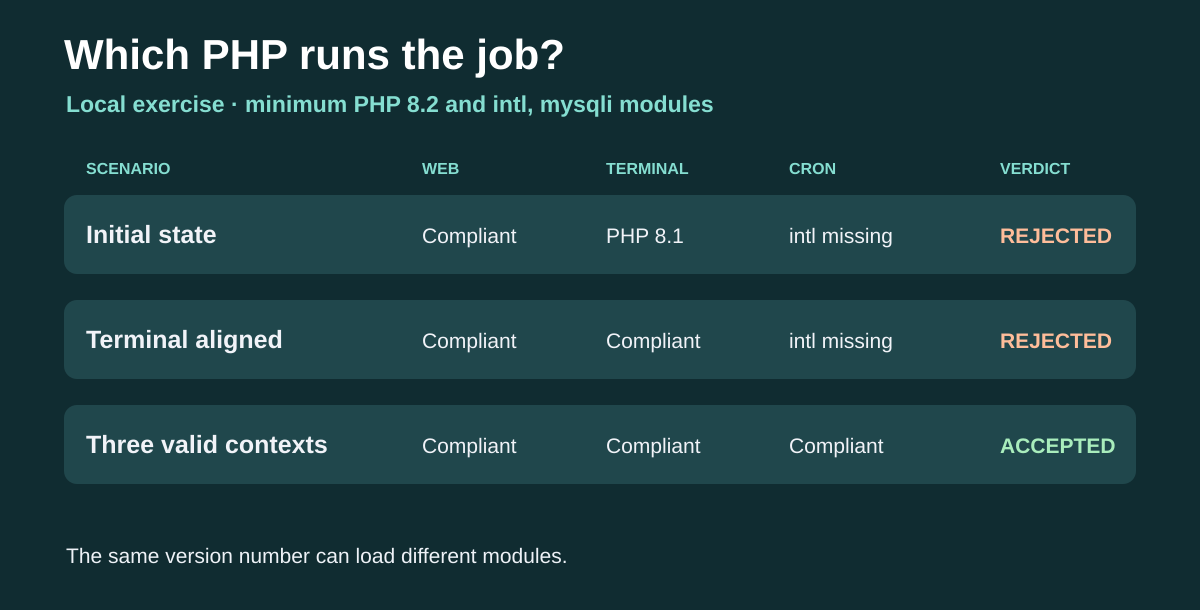 The exercise separately tests PHP version and modules on the web, in the terminal and in cron. — Illustration by BlogPasCher.Open full-size illustration ↗
In the extracted ZIP directory, run node EXERCICE-HOSTHERE-LK.cjs. The program uses Node.js and its supplied assertion module. It compares versions and module lists declared in the script. It starts no PHP binary and accesses no panel. The file RESULTAT-HOSTHERE-LK.json records three observation sets and a verdict per context. The fictional plugin requires PHP 8.2 or later and the intl and mysqli modules. These requirements are specific to the exercise.
The first set places the Web on PHP 8.2 with both modules, the terminal on PHP 8.1 and cron on PHP 8.2 without intl. The check accepts the Web and identifies two distinct causes for the other contexts. The second set aligns the terminal. It remains insufficient because cron still does not load intl. The third set passes all three checks. Assertions verify that first-set rejection is attributed to the terminal version and cron module.
To repeat the test, first record requirements published by the real plugin’s developer. If a maximum or minimum patch version matters, add it explicitly to the model. Take the module list from the same context as the version. Then write a case where the Web works but scheduled processing fails. The verdict must remain blocking while that task belongs to update scope. If your store does not use direct cron, adapt the matrix to the actual method. The expected result is a decision explained by each workflow and its own inventory.
On the WordPress copy, open Tools, Site Health, Info and locate PHP version and server information. If the panel offers MultiPHP Manager or an equivalent selector, record the version assigned to the test domain. In the relevant test-environment terminal, php -v, php --ini and php -m give version, loaded configuration and modules respectively. A reading on your computer describes only its PHP, not the server’s. For processing through WP-CLI, wp --info shows PHP associated with that command. Compare these readings before changing a setting. To locate differences, run these commands in the copy’s terminal and compare the PHP path returned by WP-CLI with the scheduled task’s path.
If the scheduled task launches PHP directly, record its executable path and arguments. Run the check with that binary in the same environment as the task, on an authorized test destination. If access is unavailable, ask support for the cron-context reading; a local copy does not prove server configuration. For a scheduled check in a private environment, write output to a private log, then remove the sample task. Avoid exposing configuration information on a public page. In cPanel, Cron Jobs is under Advanced if enabled by the host. Its documentation recommends an absolute command path. If the scheduler triggers a URL, check the copy’s address and domain, then observe the result in WordPress logs instead of assuming it uses terminal PHP.
After the test update, verify a web workflow using the plugin, run the terminal check if required, then wait for the sole trial trigger to execute. Record time, exit code or task state and the expected effect on a test record. Absence of an error matters only if the result exists. If a task still fails, revert the copy’s previous configuration and retain both readings to isolate the difference.
php -v
php --ini
php -m
wp --infoFor the store, approval must fit an acceptance record with one line per context. State the plugin requirement, observed value, setting or path used, execution result and copy identity. Version and modules play different roles. If Web and terminal are compatible but the task fails, first check the trigger’s binary and configuration. If all three pass at PHP level but the task produces nothing, check test data, trigger and expected result before changing plans.
Choose the package after measuring space needed for the store and rehearsal. Moving from Starter to Growth adds SSD and traffic but retains CPU and memory values. It guarantees neither an active terminal, access to a particular PHP version nor backups beyond the included 7 GB threshold. If staging and production cannot coexist with their copies, use a separate environment or obtain additional backup conditions compatible with the budget. Attach region, PHP configuration, renewal date and recovery procedure to the quote.
If the update fails on the copy, keep production at the previous point. Correct one setting at a time, rerun the check and repeat the task with identical data. If the plugin requires configuration unavailable in the account, compare the cost of a suitable option with another environment before committing to the update. In production, rollback must distinguish files, database and possible recent writes. Prepare a window with someone able to confirm success or stop the operation.
Finally, keep readings outside the site, removing details useful only during execution. For a future update, use the same method to check whether the environment changed, then replace plugin values with actually published requirements. The decision belongs to the store, with an observable result for every selected workflow.
Use these references to check the features, requirements and limitations described. Reading documentation is not a practical test.
English translation of the reviewed French edition. Code examples retain their original identifiers, comments and output strings for reproducibility. Linked exercise files and original screenshots may contain French. No new practical tests or price checks are implied by translation.
1984 Hosting’s WordPress plans in Iceland, initial and renewal terms, migration, the Security Pack and backup limitations.
Read more →Compare 34SP.com WordPress containers, shared memory, staging copies, downloadable snapshots and site migration.
Read more →Compare AEserver’s managed WordPress prices and check whether your network must be split into independent installations before migration.
Read more →