

Record the operation interrupted on screen
You start a WordPress import, wait a long time, and receive a Cloudflare page showing 524. Yet some posts appear in administration. During an export, the browser may instead receive an error page in place of the expected file. Record the operation, file or batch used, start time, and cutoff time. Keep the request address and displayed Ray ID when available. Check the downloaded file’s type before treating it as an export. A file named XML may contain an HTML error page.
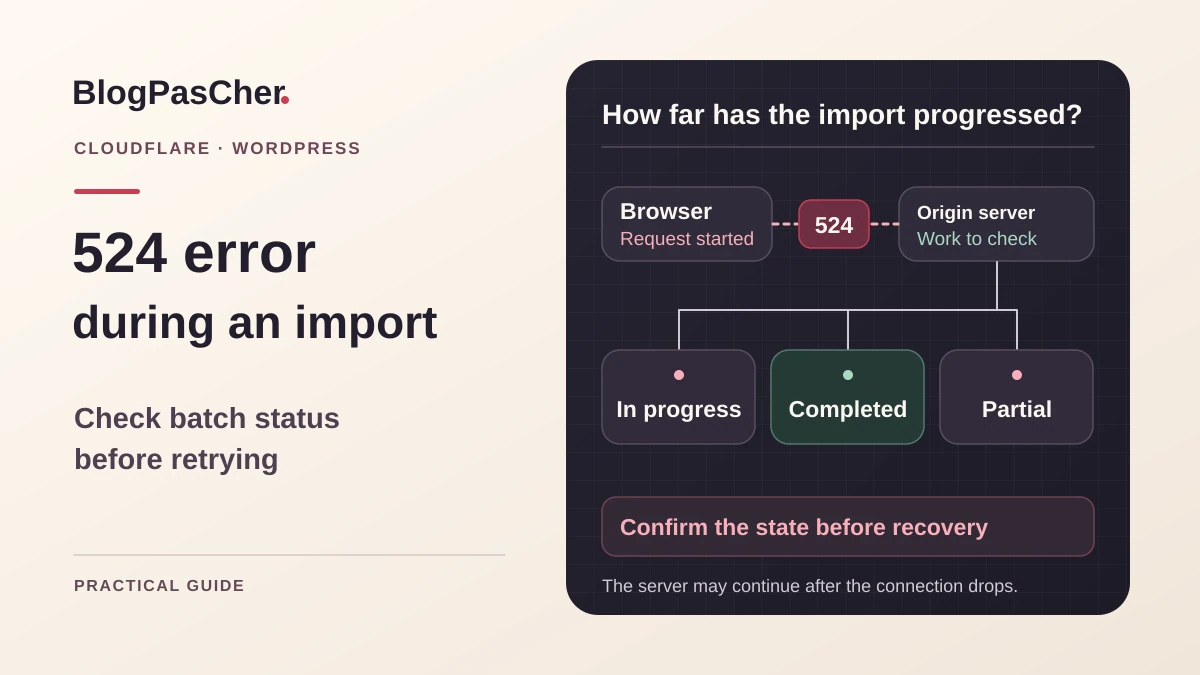
The result to establish is the processing state after this cutoff. Depending on tool and environment, processing may stop, continue, or leave partial writes. The browser response does not distinguish these cases. Avoid reruns during the initial record. Ask the site operator for access to import status and logs if you have only the administration screen. An account authorized to import and a private copy suffice to prepare reproducible recovery.
Connect status 524 with the proxy timeout
Cloudflare describes 524 as a connection established to the origin whose response arrives too late. Documentation recorded on November 4, 2026 specifies a default read timeout of 125 seconds. Check the plan’s effective value at diagnosis time. It also describes a separate write timeout when sending to the origin does not complete within the allowed time. Compare observed duration with request type. A long download, export preparation, and large file upload do not necessarily hit the same blocking point. Record the origin server’s status at the same time if available.
The PHP limit, web-server timeout, and proxy timeout are different settings. Changing one value may move the failure point. Before requesting a change, check whether the server remains busy, an SQL query runs for a long time, or the import waits for remote media. If work starts quickly and then stops progressing, that stage becomes the lead. If the operation progresses but regularly exceeds the window, splitting it or using tracked processing better suits the need. Keep your plan’s and configuration’s effective values in the report.
Check whether processing continues after the cutoff
In the tool that started the operation, look for history, a log, or a processing queue. Record the job ID and last completed stage. Wait an appropriate checking period, then reread the same state. Progressing counters or a new log entry shows that processing is still advancing. Absence of progress does not immediately demonstrate that it stopped. The maintainer can check processes and server logs to correlate the request with the ongoing operation.
For a native import through Tools, Import, WordPress, examine recognizable content from the file. Compare the beginning, middle, and end of the batch, along with expected attachments. The total post count is insufficient if the site already contained items. Record created IDs and visible errors. For an export, check whether a complete file exists in the location announced by the tool or whether the browser received only an incomplete stream. One file or control post being present does not validate the whole batch.
Preserve a comparison point before resuming
Prepare a consistent copy of the post-incident state and find the restore point preceding the operation if available. Keep the original input file, its fingerprint, and import settings. Record author mapping, attachment options, and content-update rules. If an integration sent data to an external service, also check effects already produced. A new import may repeat these actions even if some posts are recognized as existing.
Before any import on the copy, neutralize or redirect emails, webhooks, synchronizations, and other outgoing actions to a test route. A site copy may retain active destinations and secrets; being private alone does not isolate these effects.
On this prepared copy, compare content actually imported with the batch inventory. Choose how to recognize an already processed row, such as a stable importer key identifying source content. A title alone may match several posts. If the tool offers neither controlled resumption nor a reliable key, return the copy to the point before the batch and repeat with a smaller scope. On an active site receiving other writes, have targeted rollback defined before any restoration. Data arriving since the starting point must be preserved.
Resume only work identified as missing
When the tool offers documented resumption, use the existing job ID and intended options. Check whether resumption continues a queue or restarts the entire file. In the latter case, examine matching rules and repeated effects. On the copy, prepare a small sub-batch containing one already processed row and one missing row. Verify both results before expanding the scope. A content update and a creation must remain distinguishable in the importer report.
If using the native importer without suitable resumption for the case, prepare a new valid WXR file for the scope confirmed missing or restart on a test destination restored to its initial state. Avoid cutting XML at an arbitrary line. Authors, terms, and media references are part of import context. After the first small batch, check a page, its author, links, and images. If the result is consistent, retain the same mechanism for subsequent batches and mark each complete before starting another.
Reduce an export’s scope from administration
In Tools, then Export, choose the content type and filters available for that source. A post export can be split into consecutive, non-overlapping periods according to offered filters. Record boundaries and expected content counts per period. The same filters are not available for every content type. Check the file obtained for each segment and keep its name with the scope it represents. This method applies when each segment can finish within the server and proxy window.
Before using the files for import, check that the set covers the need. WXR carries content and references. Media files and site settings require their own migration checks. For a segment still failing, correlate the time with logs and look for content or media blocking within that scope. Reducing the segment helps locate the stage but may retain the same problematic item. Keep the rejected segment and its log instead of multiplying exports whose overlap becomes hard to track.
Prepare export through the existing terminal
If the site already has WP-CLI and authorized terminal access, a command-line export avoids this web request’s timeout. First check the server, WordPress directory, and target site. The command below is an example to adapt in the maintainer’s terminal. Replace the path and output directory with verified locations in your installation. Prepare a private directory accessible to this account with enough space. In a multisite network, add the intended subsite URL according to the team’s targeting procedure.
The max_file_size option of wp export limits the target WXR file size in megabytes and may produce several files. It sets neither request execution time nor media size. Keep all generated files and command completion information. Check the content list and perform a control import on the copy before processing everything. Command-line PHP process limits, available resources, and remote reads still need monitoring. A different execution route still requires validation of the obtained content.
wp --path=/chemin/verifie/wordpress export --dir=/repertoire/prive/exports --max_file_size=10Choose processing with an inspectable state
For an integration maintained by your team that regularly handles large volumes, prepare limited batches and inspectable progress state. The browser starts a task, receives its ID, and then makes short status requests. The background operation retains the completed-item list and next stage. The maintainer must define what happens after interruption and how a new request recognizes an already started job. This changes the tool’s behavior and must be tested on a copy with a representative batch.
If the importer already has this mechanism, check its task trigger and queue log. An error on the tracking screen does not mean work has stopped. Conversely, a displayed queue without progress requires checking execution. Retain a stable ID to correlate screen and log. The expected result is an operation that can be observed, interrupted through its intended method, and resumed without replaying completed items. A simple “started” response must be followed by a final result the team can check.
Evaluate a different route with the hosting owner
Cloudflare documentation also presents options specific to long-running tasks and certain plans, including an unproxied subdomain or a limit adjustment on a plan supporting it. These choices require intervention by the domain and origin owners. A separate administrative address must retain suitable protection, a valid certificate, and necessary access rules. Have the route confirmed before modifying a zone or sending a secret. Another server’s timeout ahead of PHP may still apply.
For a one-off operation, the already authorized terminal or controlled batching may suffice. For a recurring need, asynchronous tracking may be more appropriate. Choose according to access and the work actually involved. If slowness comes from a database query or remote media, address that stage too. A longer window may allow an expensive process to finish while retaining excessive load. Keep the original limit and rollback procedure for any change the operator deems necessary.
Restore the affected data and settings
A failed export may leave an incomplete file. Keep the received original as evidence, then separately retain the valid file obtained through the new route. Before removing a private output file, check that no migration stage still references it. For a partial import, use the list of created or modified items to prepare targeted rollback on the copy. If the importer offers an undo log, check its scope and limitations before applying it.
Restoring the entire database would also return recent orders, registrations, and content to an earlier date. Have their preservation established if considering that rollback on the active site. A timeout, execution-mode, or import-setting change has its own rollback. Restore its previous value, then check the public page and administrative access. If background work is still active, use its documented stop mechanism before starting recovery from another state. Two processes on the same batch can make the outcome impossible to interpret.
Validate the batch and accompanying effects
Prepare an inventory of expected items and values identifying them. Check the beginning, end, and an example of each content or media type. For an update, check one changed value and one value that should have been preserved. Global counts help identify a discrepancy, then IDs explain it.
- Check that the original job is complete or stopped according to the tool’s procedure.
- Compare processed items with the file scope and retained settings.
- Check a creation, an update, and expected author or media associations.
- Check export files through a test import on a prepared copy.
- Check any external effects in their test environment and correlate IDs.
- Record completed batches, batches needing resumption, and the restore point to use to undo only the affected operation.
Keep a checking scenario for the next volume
Keep the batch size, type, observed duration, and validated execution route. Add the tool owner, where to read progress, and the method recognizing an already processed item. The next incident can begin with these references. After importer or hosting changes, retry a small batch containing a creation and an existing item. Check that resumption retains its behavior.
Cloudflare and WP-CLI contribute information at different stages. The first reports the proxied request’s timeout. The second offers an export route when the team already has terminal access. An additional plugin is useful only if it genuinely supplies the needed resumption or tracking and its format matches the need. Keep plan terms and verified limits in your site’s technical report. The completion criterion remains the obtained content and expected effects, with an explicit state for every batch.
Distinguish missing, present, and uncertain batch items
Before resuming, classify every identifiable batch item into one of three states: confirmed processed, confirmed absent, or uncertain. Use the importer’s matching key and created ID when known; an identical title is insufficient. Add attachments and useful relationships to the check, since a present post may still lack an image.
On the isolated copy, a small test batch can contain an already processed item and an absent one. Check whether the importer updates the first, leaves it intact, or duplicates it, then observe creation of the second. This determines whether recovery can use the existing mechanism or requires a file prepared only for missing items. Do not generalize this behavior to another importer or matching option.
For uncertain cases, consult progress and logs before rerunning. A 524 cutoff does not undo an already completed write or confirm process termination. Two simultaneous processes on the same batch can make comparison harder and repeat external effects.
The free method under Tools → Export can split an export into segments; WP-CLI provides another route when access already exists. Neither guarantees completeness without a final inventory. After recovery, ID reconciliation, media checks, and an explicit task state constitute evidence of completion. To undo it, use the prepared targeted rollback; do not restore an old database over new orders without a preservation plan.
Related comparisons
WordPress migration, staging and imports: choose the right tool
Compare supported formats and the limits of import and migration tools.
Sources and references
Use these references to check the features, requirements and limitations described. Reading documentation is not a practical test.