

Defining the marketplace before choosing its storefront
Urna and Wolmart can be considered for presenting a catalogue involving several sellers, but the theme alone does not supply every rule for this activity. Urna notably advertises SKU search and several mini-cart presentations. Wolmart claims a marketplace focus with search, filters and lists. These differences offer avenues to check; they do not demonstrate operation of a seller area or payouts.
Start by writing what the storefront must explain: who sells each product, how to distinguish offerings and what arrives in the cart. A catalogue shared by several sellers is more than multiplying product cards. Customers must understand the selected offering, and the team must know which component manages displayed data. A theme compatible with an extension does not establish inclusion of its professional edition.
The scenario proposed here uses two fictional sellers and a few products on an isolated copy. This is not an operational marketplace. No seller account, order, commission or payout was executed. If your project is a store run by one merchant, do not choose a multivendor setup solely to obtain a grid or search: evaluate the simpler journey first.
Compare before you choose
The offers at a glance
Find the use case and budget that fit, then read the details to see the limitations and any components you may need.
On smaller screens, the table scrolls horizontally. With a keyboard, press Tab to focus the table, then use the left and right arrow keys.
| Offer | Best for | Pricing and billing | Renewal and support |
|---|---|---|---|
 Urna — thembayRead the details | Comparing catalogue journeys and documented multivendor projects. | 59 USD — Regular License one-time theme purchase Taxes and processing fees excluded. | Six months of support; optional extension at an unrecorded rate. Support period separate from updates. |
 Wolmart — don-themesRead the details | Multivendor project whose rules and modules have already been assessed. | 79 USD — Regular License one-time theme purchase Taxes and processing fees excluded. | Six months of support; optional extension at an unrecorded rate. Support period separate from updates. |
Interpreting previews and dated information
Listings and commercial terms underwent documentary verification on November 2, 2026. Prices remain dated to that record, without a guarantee about the offering available at purchase. Compatibility statements come from sellers: no software combination or multivendor journey was tested for this comparison.
Urna’s official preview shows an Elementor interface on the left and a shop on the right, with categories, furniture recommendations and a cart in the header. It illustrates a page composition. Visible prices, discounts, ratings and quantities belong to the demo and do not constitute current offers.
Wolmart’s preview shows a food shop with search, promotions, product cards and categories. It shows neither a seller area, order splitting nor a payout service. Its polished appearance does not imply those features. Identify the necessary component and edition, then check the journey on a copy before committing.
Identifying modules and editions before quoting
Urna lists Dokan, MultiVendorX, WCFM and WC Vendors as compatible. Wolmart also lists WCFM, Dokan, WC Vendors and MultiVendorX. These lists do not prove that every extension must be installed together or that their features are interchangeable. The project must choose a precise architecture with the edition required for its rules. The theme licence remains separate from seller components and external services.
Prepare a responsibility table before budgeting: offering presentation, seller management, product assignment, order rules and any payouts. For each row, identify the intended component and what remains undocumented. Verified information does not detail each module’s menus or capabilities. It therefore cannot guarantee a particular setting, automation or seller registration procedure.
Urna mentions HUSKY Professional compatibility without confirming provision of that licence; WPML is explicitly not included. For Wolmart, no third-party professional package is guaranteed. An agency must retain these unknowns in its estimate instead of absorbing them into the theme price. If an essential feature cannot be assessed from available material, the mock-up remains conditional and scope must be reduced.
Fixing the builder and preparing a simple handover
Urna’s and Wolmart’s documentation lists Elementor and WPBakery as compatible. Urna also mentions Slider Revolution, but inclusion and standalone rights must be confirmed. Wolmart Core appears in Wolmart’s consulted changelog. Before any import, identify the demo’s exact builder and required components. Advertised compatibility does not promise direct page conversion between editors.
Urna’s official preview does show an Elementor composition with elements bearing the theme name. It proves neither that all demos share this foundation nor that every premium service is supplied. For the chosen copy, prepare a limited handover task: edit a category introduction, replace a banner and correct a link. The team must distinguish page content from product and seller information.
Then document only screens actually observed during upcoming checks. No administration menu specific to these themes or multivendor extensions is invented here. A short procedure verified on the selected installation will be more useful than a list of possibilities borrowed from several demos. Also retain the active-component list and backup point to reproduce this composition without touching a public site.
Preparing two sellers and an identifiable fictional catalogue
To compare storefronts, prepare two fictional sellers, each associated with a few distinct products. Add two similar offerings whose difference needs explanation, such as dimensions or packaging. Retain stable identifiers, recognisable images, test prices and consistent stock. The same base must serve both themes so you compare presentation rather than two catalogues of different quality.
Write the expected result for each card and product page: product name, offering sold, seller identity if the scenario requires it and a link to continue. How these data are assigned will depend on the selected module. This report confirms neither a product-sharing system between sellers nor automatic merging of offerings; do not build a commercial promise around an undocumented feature.
Add an unavailable product and an offering with deliberately missing information. These cases examine interface clarity and necessary correction work. Do not use real customer data for these checks. Before trials, isolate the copy, neutralise payments, emails, webhooks and integrations, then retain a backup. No account or product creation was performed while writing this report.
Checking Urna’s SKU search and Wolmart’s lists
Urna advertises SKU search, providing a concrete scenario for someone who knows the desired product reference. Prepare a valid code, a nonexistent code and a more general text search. Note expected results before testing. Do not credit the theme with reliable search simply because an input field appears in an image; this feature still needs checking in the selected configuration.
For a multivendor catalogue, define identifier scope before comparing results. Two sellers may use similar conventions: nevertheless assign distinct SKUs to this scenario’s fictional products to identify results unambiguously. Verified information does not document a particular mechanism for sharing identifiers between sellers. Do not claim that an internal reference automatically distinguishes every offering. Identify the catalogue component and establish its rules before preparing final data.
Wolmart advertises search, filters and lists. Prepare a selection returning several offerings, a precise selection and an empty state. Examine labels, visibility of active choices and the return to the full catalogue. The same scenarios can serve Urna where its configuration permits. No relevance ranking, search speed or performance advantage was measured here; the criteria concern expected, understandable results.
Preparing variations without assuming multivendor management
The fictional catalogue must include a product with several options actually sold. The workflow below concerns a copy administrator and the classic WooCommerce editor displaying the Product data panel. It does not describe a seller interface supplied by Dokan, WCFM or another module. If that interface differs, have its procedure identified before reproducing the same data.
In a multivendor project, it remains to determine who can create or edit these offerings and through which interface. Theme compatibility lists do not answer this question. Separately check the module’s role and its edition’s capabilities, without attributing unestablished permission management to the theme. An operation performed with the administrator account does not prove that the seller account has the same rights.
The expected result on the copy is an offering whose variation is identifiable in the card, product page and cart. An unavailable choice must not appear purchasable; exact presentation depends on stock settings and theme. To undo, restore recorded values or the copy’s backup point. Never restore this fictional data over recent orders and accounts on the live site.
- In Products > Add New, create the fictional product, then choose Variable product in Product data. Enter its name and a description distinguishing it from other products in the scenario.
- Open Attributes, add or select the relevant attribute and its values. In this editor, tick Used for variations for each attribute that should define a sold offering, then save attributes. A purely descriptive characteristic does not need to create variations.
- Open Variations and add the combinations sold. Automatic generation can create every attribute combination: for this small scenario, instead add offerings individually or check the list before keeping it.
- Open each variation and enter a price. An empty value is not a zero price and does not make the offering purchasable. Prepare one available and one unavailable offering using the chosen stock mode: quantity if stock management is enabled, otherwise stock status. Do not claim tracked stock merely because a number appears in text.
- Save variations, then the product. On the isolated copy, choose each combination on the product page and check the displayed offering before any addition to the test cart. Place no order for this presentation check.
Examining the mini-cart and offerings from several sellers
Urna advertises several mini-cart presentations. Judge their usefulness by useful content: product reference, selected option, quantity and amount. Prepare adding an offering from the first seller, then one from the second, if the chosen system permits this scenario. Define before testing what customers must understand. The theme alone does not guarantee how an order will subsequently be split or processed.
On the copy, check panel opening and closing, returning to the product page and correcting a quantity according to documented features. Plan keyboard and narrow-screen checks. The offering’s name and options must remain understandable. These checks are not obtained accessibility results; no interactive interface was navigated while writing this report.
For Wolmart and Urna alike, also record the cart and checkout mode used, with blocks or classic templates. The scenario may require distinguishing sellers or explaining several delivery terms; exact possibilities depend on chosen components. General WooCommerce compatibility does not prove them. Announce neither automatic grouping, split payment nor a particular calculation solely from the storefront’s appearance.
Assigning responsibilities before opening seller accounts
A multivendor storefront requires knowing who corrects visible information. Prepare a fictional title-change task, another to update stock and a third to withdraw an offering. For each, name the expected owner and desired approval. Verified information confirms neither available permissions in each module nor their configuration: this table defines a need, not a capability already supplied by Urna or Wolmart.
Also prepare the journey for a customer enquiry: find the relevant offering, identify the seller and know where to ask a question. A seller name on a product page does not demonstrate messaging, dispute resolution or returns management. Identify these features separately if needed. No account, exchange or post-order handling was tested in this comparison.
For an initial check, limit profile numbers and use fictional data. Describe what a seller should see, edit and leave to the administrator. Permissions must be checked with the chosen component and edition on a copy. If this scope remains undetermined, a visual mock-up can be prepared, but it must not be presented as a marketplace with verified operation.
Retaining advertised versions and preparing updates
Urna’s consulted description advertises WooCommerce 11.2.x, WordPress 7.1.x and PHP 8.3. Its listing has a last update of October 8, 2026; retained tags mention WordPress 7.0.x and WooCommerce 10.x.x. These fields are distinct and remain attributed to their source. They constitute neither a list of recommended current versions nor proof that every cited multivendor integration works.
For Wolmart, the listing advertises WooCommerce up to 11.2 with version 1.10.5. The stated last update is October 20, 2026, with WordPress 7.0.x and WooCommerce 10.x.x tags. Wolmart Core is mentioned in the changelog. No combination with Elementor, WPBakery or a seller module was installed here. Version recording must therefore precede trials on the future copy.
Prepare a check order after updating: catalogue display, search, variation selection, cart, then seller features within scope. Identify responsible components and retain a recovery point. HPOS, cart blocks and gateways require their own assessment; a general WooCommerce claim does not automatically validate them. Do not later copy an old test database onto a live site and overwrite recent orders.
Comparing archived prices and budgeting for the complete setup
As of November 2, 2026, verified listings state 59 USD for Urna and 79 USD for Wolmart under Regular License. The 20 USD difference concerns the initial theme purchase on that date, excluding taxes and handling fees. It is insufficient to estimate a marketplace’s cost. Rates and terms must be rechecked before purchase; the amount remains that of the dated record.
Both records state six months of support and an optional extension whose price was not retained. Professional seller-module licences, external services and configuration work must remain separate items when needed. For Urna, HUSKY Professional compatibility does not mean a licence is supplied, and WPML is not included. For Wolmart, no third-party professional package is assumed guaranteed.
Then budget editorial and operational work: preparing offerings, checking seller data, correcting errors and maintaining associations between components. No actual time is measured here. A theme with a lower initial purchase price may require different scope, without establishing a higher or lower final cost. The decision must compare identical needs and assessed services, with a date for each commercial information item.
Choosing an avenue and setting acceptance conditions
Urna is an avenue when the project wants to evaluate several catalogue and mini-cart presentations with a product-reference search scenario. Wolmart is an avenue when a marketplace presentation is already the defined need, with advertised search, filters and lists. These positions guide comparison; they establish neither a winner nor equivalence between compatible seller modules.
Before selecting a configuration, reconcile the copy’s expected results: identifiable offering, understandable seller identity, consistent search, exact variation and explicable cart. Add only seller features whose component and edition are documented. Record discrepancies with fictional data allowing reproduction. A visually satisfactory storefront must not hide an unresolved question about responsibilities or order processing.
The report ends at this preparation. It retains archived terms and versions, two official images actually inspected and the limits of available evidence. It reports no sale, registration, commission, support experience or conversion measurement. If a simple shop meets the need, keep that option in the decision. Otherwise, choose the avenue whose dependencies can be identified, checked on a copy and maintained by the team before going live.
Sources and references
Use these references to check the features, requirements and limitations described. Reading documentation is not a practical test.
View 11 references
- WooCommerce: official extension and engine scope ↗
- WooCommerce: categories and attributes ↗
- WooCommerce: classic or block cart and checkout ↗
- WooCommerce: HPOS storage ↗
- WooCommerce: test orders and side effects ↗
- ThemeForest: licence terms and GPL clauses ↗
- ThemeForest: support policy ↗
- Envato: bundled extensions and standalone licences ↗
- Urna — thembay — retained reference ↗
- Wolmart — don-themes — retained reference ↗
- WooCommerce — Variable products ↗ — Documentation consulted:
Uses, prices and what to check
2 offers in detail
Compare the features you need and the terms of each offer. The order of these entries does not indicate a ranking.
Urna — thembay
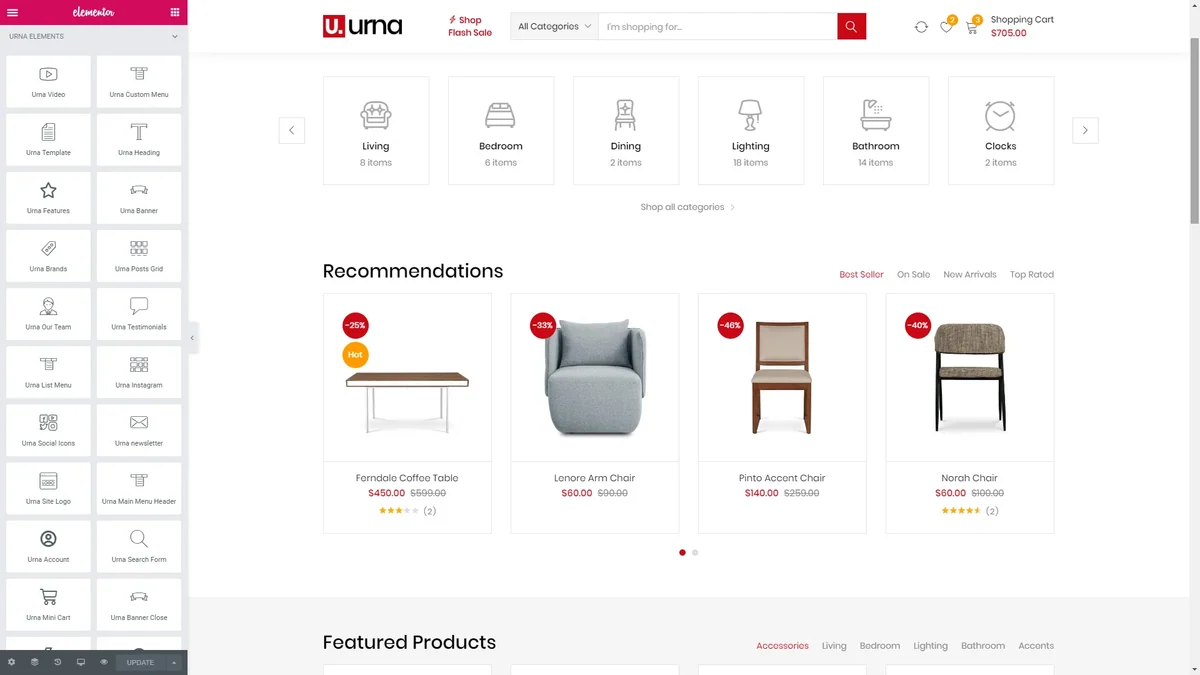 Official preview of Urna — thembay supplied by the developer. Visible text, figures and offers belong to the demo.
Best forComparing catalogue journeys and documented multivendor projects.
Urna advertises SKU search, several mini-carts and compatibility with several multivendor extensions. It offers an avenue for a storefront whose product references and seller responsibilities are already defined. Compatibility with HUSKY Professional does not guarantee the licence, and WPML is explicitly not included. Required module and service costs remain separate; visual presentation proves no automatic commission or payout processing.
Offer pricing
59 USD — Regular License
Billing: one-time theme purchase
Renewal and support: Six months of support; optional extension at an unrecorded rate. Support period separate from updates.
Taxes and processing fees excluded.
Checked on .
Strengths
- SKU search and mini-cart advertised
- Several multivendor integrations listed
What to consider
- Current premium bundle inventory not confirmed
- WPML explicitly not included
Pricing terms and compatibility
Understanding the offer
- Price at the time of review
- 59 USD — Regular License
- Currency
- USD
- Billing
- one-time theme purchase
- Renewal and support
- Six months of support; optional extension at an unrecorded rate. Support period separate from updates.
- Taxes and fees
- Taxes and processing fees excluded.
- Commitment and terms
- Regular offering; no HUSKY Pro or multivendor licence assumed supplied.
- Date checked
Compatibility and components
- Elementor, WPBakery and Slider Revolution appear as compatible; inclusion and standalone rights to be confirmed.
- The description advertises WooCommerce 11.2.x, WordPress 7.1.x and PHP 8.3; no practical test.
- Dokan, MultiVendorX, WCFM and WC Vendors compatible; HUSKY Professional compatibility does not mean a licence is supplied.
- Last listing update: 2026-10-08. Latest displayed tags: WordPress 7.0.x, WooCommerce 10.x.x. Versions advertised in text or changelog are stated separately above; no combination was tested here.
- Version tags do not define a compatibility ceiling; no incompatibility is inferred for absent versions.
Wolmart — don-themes
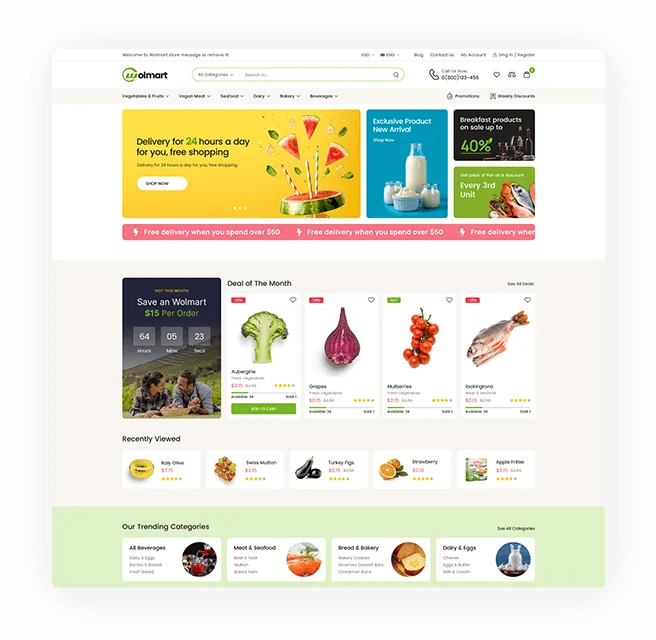 Official preview of Wolmart — don-themes supplied by the developer. Visible text, figures and offers belong to the demo.
Best forMultivendor project whose rules and modules have already been assessed.
Wolmart targets marketplace presentation, with advertised search, filters and lists. It merits shortlisting when the project already has seller rules and an identified module. Elementor and WPBakery are declared compatible; choose the demo builder before handover. Third-party professional editions and payout services are not assumed supplied, even when a module appears in the compatibility list.
Offer pricing
79 USD — Regular License
Billing: one-time theme purchase
Renewal and support: Six months of support; optional extension at an unrecorded rate. Support period separate from updates.
Taxes and processing fees excluded.
Checked on .
Strengths
- Explicit marketplace focus
- Search, filters and lists advertised
What to consider
- Multivendor complexity to be budgeted
- No third-party professional package guaranteed
Pricing terms and compatibility
Understanding the offer
- Price at the time of review
- 79 USD — Regular License
- Currency
- USD
- Billing
- one-time theme purchase
- Renewal and support
- Six months of support; optional extension at an unrecorded rate. Support period separate from updates.
- Taxes and fees
- Taxes and processing fees excluded.
- Commitment and terms
- Theme licence separate from seller modules and payout services.
- Date checked
Compatibility and components
- Elementor and WPBakery declared compatible; Wolmart Core mentioned in the changelog. Standalone premium inventory not confirmed.
- The listing advertises WooCommerce up to 11.2 for version 1.10.5.
- WCFM, Dokan, WC Vendors and MultiVendorX compatible according to the listing, without an assumed included premium licence.
- Last listing update: 2026-10-20. Latest displayed tags: WordPress 7.0.x, WooCommerce 10.x.x. Versions advertised in text or changelog are stated separately above; no combination was tested here.
- Version tags do not define a compatibility ceiling; no incompatibility is inferred for absent versions.