

Choosing a selection journey before an appearance
Riode and Elessi offer two ways to evaluate a WooCommerce catalogue. Riode advertises several presentations, including grid and list, filters and a catalogue mode. Elessi highlights comparison and side panels for the cart or wishlist. These claims let you prepare different scenarios; they do not prove that either makes shopping easier in every store.
Imagine a small lighting collection with several similar models. Customers must distinguish each product’s dimensions, colour and intended use before selecting a variation. A list may make certain characteristics visible sooner. A comparison tool can bring several products together. The choice depends on useful information and its quality in the catalogue, not just the number of controls displayed on screen.
This comparison helps prepare checks on a site copy. It reports no installation, order test or performance measurement. First write the three decisions visitors must be able to make: find a family, understand a difference, then choose a purchasable offering. Each additional feature must contribute to one of these decisions.
Compare before you choose
The offers at a glance
Find the use case and budget that fit, then read the details to see the limitations and any components you may need.
On smaller screens, the table scrolls horizontally. With a keyboard, press Tab to focus the table, then use the left and right arrow keys.
| Offer | Best for | Pricing and billing | Renewal and support |
|---|---|---|---|
 Riode — don-themesRead the details | Versatile catalogue with a choice of grid or list presentation. | 59 USD — Regular License one-time theme purchase Taxes and processing fees excluded. | Six months of support; optional extension at an unrecorded rate. Support period separate from updates. |
 Elessi — NasaThemeRead the details | Catalogues with variations using comparison and side panels. | 59 USD — Regular License one-time theme purchase Taxes and processing fees excluded. | Six months of support; optional extension at an unrecorded rate. Support period separate from updates. |
Interpreting previews and dated information
Information about Riode and Elessi underwent documentary verification on November 2, 2026. Prices and compatibility remain dated to that record; they do not guarantee the offering available at purchase. No theme was installed and no checkout journey tested for this comparison. An unconfirmed characteristic remains a question to resolve before choosing.
Riode’s official preview shows a shop banner with editing bars and controls. It illustrates a page presentation without proving which builder your template will use. Visible promotions belong to the demo and are not current sales terms.
Elessi’s preview shows a page titled Projects, categories and a portfolio grid. It does not show a working product comparison tool or side cart. It allows examination of a presentation example but is insufficient to verify the described shopping journey. Keep this distinction when evaluating features useful to your store.
Preparing a fictional catalogue that reveals differences
Before comparing themes, prepare six fictional products in one family. Give them distinct names, identifiable images, consistent dimensions and truly comparable characteristics. Add a product outside the family and an unavailable offering. These cases help check result relevance and understanding of an absence, without importing a complete catalogue or exposing customer data.
Keep identical fictional prices, attributes and stock on both copies. Two nearly identical products should differ in one useful respect, such as size. A third can serve another use. The comparison then becomes explainable: readers should not have to guess what values mean or reconcile incompatible units. The theme alone cannot correct missing data or unstable naming.
Isolate the copy and neutralise payments, emails, webhooks and integrations before the planned trials. If isolation is not confirmed, limit work to preparing the content file and perform no interactive action. Retain a backup and a list of initial versions and components. If two demos are imported successively, restart from a controlled state to avoid attributing the first theme’s settings to the second. These precautions describe preparation to perform; no copy was installed or manipulated here.
Checking the grid and list offered by Riode
Riode can first be evaluated on how visibly it distinguishes products. Prepare two presentations of the same small catalogue if the template and its documented configuration allow. In a grid, see whether the image and name suffice to distinguish products. In a list, look for characteristics reducing unnecessary product-page openings. Do not fill every card with an identical description.
Then ask a reader to find the product matching specific dimensions and colour. Note what information they must open and any hesitation. This scenario will let you examine each presentation’s value on the real site; no search time is measured in this report. A denser list is useful only if the data remains readable, particularly on a narrow screen.
The advertised catalogue mode also needs defining before checks. Do you want only to present products, display prices or retain a shopping journey? Write the expected result, then check the exact capabilities of the documented mode. The mere presence of this name confirms neither quotation management, business accounts nor private pricing. These additional needs are not established by the verified information.
Evaluating Elessi’s advertised comparison
Elessi advertises a comparison feature that may interest a collection with shared characteristics. Define necessary fields before choosing the display: dimension, material, use or other decisive information from the fictional catalogue. Identical labels must refer to identical data for every product. A table full of empty cells does not simplify the decision, however polished its appearance.
On the copy, select two similar products, then a third meeting another need. The expected result is to find useful differences without losing the link to the full product page. Check how to remove a product and return to the catalogue according to the component’s documented behaviour. Elessi-specific configuration menus are not described in the available evidence: no administration path is invented to replace them.
The comparison tool must be examined with variations. A characteristic shared by the product does not necessarily describe every offering sold. If a dimension changes with the chosen option, check what comparison displays and what it asks users to specify. Do not present general data as a guarantee about the variation. No result from this scenario was obtained here; it is a concrete acceptance criterion.
Fixing the builder before importing a demo
Riode declares Elementor and WPBakery compatible; Riode Core is mentioned in the consulted changelog. Elessi advertises Elementor compatibility and bundled WPBakery with proprietary elements. Compatibility does not mean every demo exists in every editor or that a template transfers between them without rework. Identify the chosen demo’s exact builder before defining pages to produce.
Then write a short handover task: change a category introduction, replace an image and correct a link on the copy. The future maintainer must be able to find these elements and understand what belongs to a page, template or product data. The editing screens actually present must guide the final procedure. The retained official images are insufficient to describe the entire interface.
WPBakery updates mentioned in Riode’s changelog do not confirm all standalone premium rights. Elessi mentions Revolution Slider, but no separate personal licence is assumed included. Elementor compatibility also does not establish provision of a Pro subscription. Record the source of each required component, its update channel and services actually accessible with the chosen purchase.
Building attributes before judging filters
A useful filter relies on stable vocabulary. In the fictional catalogue, choose a few distinct values for dimensions and colours, then assign them consistently. Avoid giving the same value several spellings if they should produce a shared result. This preparation concerns WooCommerce data; it does not prove that all theme-advertised filters use the same settings.
Prepare three expected searches: a selection returning several products, a combination returning only one and a combination with no result. Record expected products before testing. On the copy, then check offered values, clarity of active choices and the ability to return to a broader list. An empty state must remain understandable; it must not suggest the whole shop is unavailable.
WooCommerce documentation covers WooCommerce categories and attributes but does not provide menus specific to Riode or Elessi filter engines. The component and its interface need identifying in the selected configuration. Therefore promise neither searching by any data, superior speed nor measured accuracy. The expected evaluation first concerns results and labels for the small product dataset.
Distinguishing descriptive attributes from variations sold
Comparison information can describe a product without constituting a purchase choice. Options actually sold are prepared in a variable product. The workflow below concerns WooCommerce’s classic product editor, recognisable by the Product data panel, and an account authorised to edit products. It takes place on the isolated, backed-up copy described above, with a fictional product; it is not Riode’s or Elessi’s proprietary menu.
Distinguish product data from the visitor’s active choice. A colour visible on a card does not guarantee it is selected on the product page. A shared description may suit the entire product while size, price or image differs for a variation. During checks, compare each display with saved data; do not infer the active choice solely from a swatch’s appearance.
After saving, the expected result is an identifiable offering: label, price, stock status and options consistent between product page and cart, without placing an order. Examine the full page and any quick view separately. To undo a change, restore previous values on the copy or its backup point. Do not replace a live shop’s database with this working copy; its recent orders must remain intact.
- In Products > Add New, create the fictional product, then choose Variable product in Product data. Enter its name and a description distinguishing it from other products in the scenario.
- Open Attributes, add or select the relevant attribute and its values. In this editor, tick Used for variations for each attribute that should define a sold offering, then save attributes. A purely descriptive characteristic does not need to create variations.
- Open Variations and add the combinations sold. Automatic generation can create every attribute combination: for this small scenario, instead add offerings individually or check the list before keeping it.
- Open each variation and enter a price. An empty value is not a zero price and does not make the offering purchasable. Prepare one available and one unavailable offering using the chosen stock mode: quantity if stock management is enabled, otherwise stock status. Do not claim tracked stock merely because a number appears in text.
- Save variations, then the product. On the isolated copy, choose each combination on the product page and check the displayed offering before any addition to the test cart. Place no order for this presentation check.
Checking side panels on small screens and by keyboard
The side cart and wishlist advertised by Elessi may keep some actions close to the catalogue. Their value depends on what they show and how users exit. On the copy, prepare opening from a card and then a product page, where these actions exist in the selected configuration. Look for the name, variation, quantity and price needed to understand the displayed content.
Plan a keyboard pass: reach the opening control, move through elements, close the panel and return to a logical continuation point. On a small screen, check that useful information and the close action remain accessible. These are checks to perform; no accessibility compliance has been established in this report. Elessi’s official preview does not show this behaviour and cannot serve as evidence of it.
Also include acceptance of a case where an action fails or still requires an option. Quick view must not imply that an incomplete offering was added. Keep an understandable route to the product page when the choice needs more explanation. To compare Riode and Elessi, use the same data and record the components responsible for each panel: a configuration difference must not become a general conclusion about the theme.
Retaining version declarations without turning them into tests
The Riode documentation advertises version 1.6.33 as compatible with WooCommerce up to 11.2 and WordPress 7.0. The indicated last listing update is October 21, 2026; tags mention WordPress 7.0.x and WooCommerce 10.x.x. Claims in text or changelog and tags remain separate fields. Retaining them does not constitute practical validation of every intermediate combination.
For Elessi, changelog 6.6.4.1 of October 10, 2026 advertises WooCommerce 11.2.0 and WordPress 7.1.3, with PHP 8.x declared compatible. Retained tags mention WordPress 7.0.x and WooCommerce 10.x.x. This information is reproduced as archived declarations, not current software versions or installation recommendations. No environment was set up to verify them.
Before checking the actual journey, record theme, WooCommerce, builder and comparison or filter component versions. Specify whether cart and checkout use blocks or classic templates. HPOS and gateways must be examined within their own scope. General WooCommerce compatibility does not confirm every interaction; no results for these combinations are available here.
Comparing two archived prices and useful dependencies
Verified listings state 59 USD for Riode and 59 USD for Elessi under Regular License as of November 2, 2026. This equality concerns the initial recorded price, excluding taxes and handling fees. It does not demonstrate identical total costs. No current rate is promised: amounts, terms and any offers must be rechecked before purchase.
Both records state six months of support with an optional extension whose price was not retained. Distinguish this assistance from integration work, content and catalogue maintenance. The standalone premium inventory remains incomplete: a bundled feature and a personal key granting access to provider services are not equivalent. Nor should you add a supposedly mandatory subscription without identifying the component actually needed.
Build a budget around a reduced journey: catalogue, useful filter, variation choice, then cart. Next price additions justified by the scenario, retaining each information item’s date. A marketplace demo does not suffice to provide a complete multivendor system in Riode. That project would require other components and rules; it is unnecessary for comparing products in a conventional shop.
Deciding from the successful task and its maintenance
Riode is an avenue to evaluate when the primary need is selecting a catalogue presentation, particularly grid versus list, with a precisely defined catalogue mode. Elessi is an avenue when comparison and side panels solve an identified problem. An advertised feature’s presence does not remove the need to prepare data and check its behaviour in the selected configuration.
Record expected results in a small sheet: find the correct family, distinguish two products, understand an option, select a variation and check the cart. After trials on the copy, note discrepancies and the component involved. A poorly understood feature may justify simplifying the page rather than adding another panel. The number of possible actions does not prove ease of use for your collection.
For handover, ask the catalogue maintainer to correct a value, then find its effect in the list and comparison. Prepare recovery from backup and retain necessary settings. The final decision will depend on the verified journey and its maintenance. This report supplies criteria, two inspected official illustrations and dated information; it attests to neither performance, an order nor a conversion gain.
Sources and references
Use these references to check the features, requirements and limitations described. Reading documentation is not a practical test.
View 11 references
- WooCommerce: official extension and engine scope ↗
- WooCommerce: categories and attributes ↗
- WooCommerce: classic or block cart and checkout ↗
- WooCommerce: HPOS storage ↗
- WooCommerce: test orders and side effects ↗
- ThemeForest: licence terms and GPL clauses ↗
- ThemeForest: support policy ↗
- Envato: bundled extensions and standalone licences ↗
- Riode — don-themes — retained reference ↗
- Elessi — NasaTheme — retained reference ↗
- WooCommerce — Variable products ↗ — Documentation consulted:
Uses, prices and what to check
2 offers in detail
Compare the features you need and the terms of each offer. The order of these entries does not indicate a ranking.
Riode — don-themes
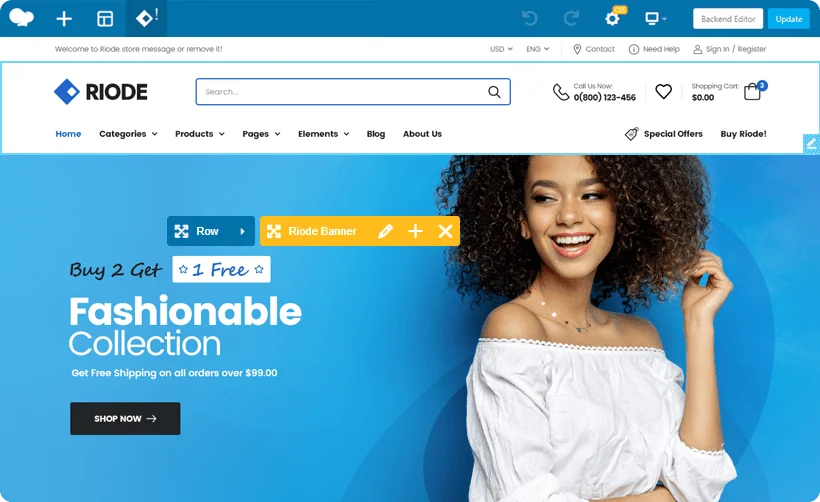 Official preview of Riode — don-themes supplied by the developer. Visible text, figures and offers belong to the demo.
Best forVersatile catalogue with a choice of grid or list presentation.
Riode advertises grid or list presentations, filters and a catalogue mode. This combination lets you prepare selection based on differences between products, provided consistent attributes are entered. Identify the demo’s builder and required components. Catalogue mode must be precisely defined: this name does not guarantee quotation management, private pricing or multiple sellers.
Offer pricing
59 USD — Regular License
Billing: one-time theme purchase
Renewal and support: Six months of support; optional extension at an unrecorded rate. Support period separate from updates.
Taxes and processing fees excluded.
Checked on .
Strengths
- Grid, list and filters advertised
- Catalogue mode
What to consider
- Complete premium inventory not confirmed
- Marketplace dependent on additional modules
Pricing terms and compatibility
Understanding the offer
- Price at the time of review
- 59 USD — Regular License
- Currency
- USD
- Billing
- one-time theme purchase
- Renewal and support
- Six months of support; optional extension at an unrecorded rate. Support period separate from updates.
- Taxes and fees
- Taxes and processing fees excluded.
- Commitment and terms
- Regular offering; budget separately for any third-party modules and services.
- Date checked
Compatibility and components
- Elementor and WPBakery declared compatible; Riode Core mentioned in the changelog.
- The listing advertises Riode 1.6.33 as compatible with WooCommerce up to 11.2 and WordPress 7.0.
- WPBakery updates appearing in the changelog do not guarantee every standalone premium right; package and keys to be confirmed.
- Last listing update: 2026-10-21. Latest displayed tags: WordPress 7.0.x, WooCommerce 10.x.x. Versions advertised in text or changelog are stated separately above; no combination was tested here.
- Version tags do not define a compatibility ceiling; no incompatibility is inferred for absent versions.
Elessi — NasaTheme
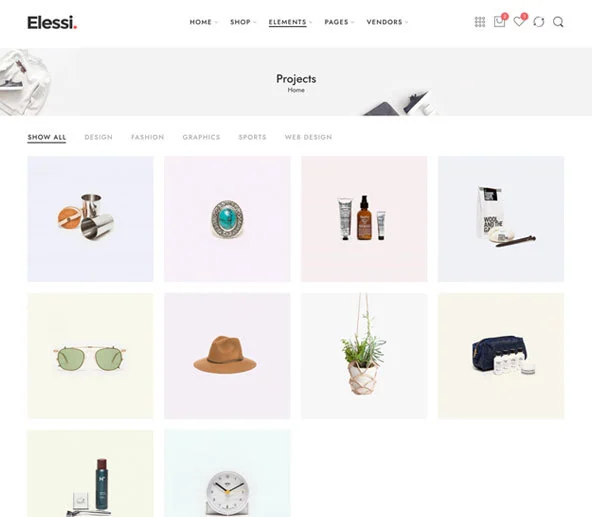 Official preview of Elessi — NasaTheme supplied by the developer. Visible text, figures and offers belong to the demo.
Best forCatalogues with variations using comparison and side panels.
Elessi advertises comparison, filters and side panels for cart or wishlist. These features interest a collection whose characteristics genuinely compare. Variations and panel closing on small screens need a dedicated check. Elementor is declared compatible and WPBakery bundled with proprietary elements; the demo’s builder and premium rights still need identifying. The official preview illustrates a portfolio without demonstrating these interactive features.
Offer pricing
59 USD — Regular License
Billing: one-time theme purchase
Renewal and support: Six months of support; optional extension at an unrecorded rate. Support period separate from updates.
Taxes and processing fees excluded.
Checked on .
Strengths
- Comparison advertised
- Filters and side cart
What to consider
- Plan mobile and keyboard checks
- Standalone premium inventory not confirmed
Pricing terms and compatibility
Understanding the offer
- Price at the time of review
- 59 USD — Regular License
- Currency
- USD
- Billing
- one-time theme purchase
- Renewal and support
- Six months of support; optional extension at an unrecorded rate. Support period separate from updates.
- Taxes and fees
- Taxes and processing fees excluded.
- Commitment and terms
- Regular offering; keep unverified additional component licences separate.
- Date checked
Compatibility and components
- Elementor advertised as compatible; WPBakery advertised as bundled with proprietary elements. Fix the demo builder before import.
- Changelog 6.6.4.1 of October 10, 2026 advertises WooCommerce 11.2.0 and WordPress 7.1.3; PHP 8.x also declared compatible, without testing here.
- Revolution Slider is listed among components; no standalone licence or Elementor Pro subscription is assumed supplied.
- Last listing update: 2026-10-10. Latest displayed tags: WordPress 7.0.x, WooCommerce 10.x.x. Versions advertised in text or changelog are stated separately above; no combination was tested here.
- Version tags do not define a compatibility ceiling; no incompatibility is inferred for absent versions.