

Start with access and protections already available
You see login attempts, an unknown account or a modified-file alert. The desired result depends on the symptom: limiting automated attempts, requiring a second proof of login, understanding a modification or handling an incident. These twenty-five families cover these different roles. Their free and paid editions are combined; they are not a list of twenty-five tools to install together.
Before any installation, examine Users in the administration area with an authorised account. Check who has administrator rights and ask the person responsible for confirmation when an account is unknown. Do not blindly delete its content or continue with simple hardening if an intrusion seems plausible. Also check updates offered in Dashboard, hosting access and recovery of the owner’s email account.
A distinct password, an individual account for each contributor, suitable permissions and monitored updates form an initial approach without a new plugin. Ask the host which protections it already applies and how to recover access after a block. An independent, recoverable backup complements this organisation. It does not prevent intrusion, but avoids depending solely on the website to recover data.
This article concerns self-hosted WordPress and environments where plugin installation is authorised. On WordPress.com, check plan capabilities and integrated protections before choosing a plugin. In multisite, a website administrator does not necessarily have network permissions: shared rules and their recovery must be decided at that level.
Compare before you choose
The offers at a glance
Find the use case and budget that fit, then read the details to see the limitations and any components you may need.
On smaller screens, the table scrolls horizontally. With a keyboard, press Tab to focus the table, then use the left and right arrow keys.
| Offer | Best for | Pricing and billing | Renewal and support |
|---|---|---|---|
 WordfenceRead the details | Centralising filtering, scans and access, with someone responsible for alerts | Free foundation; Premium at 149 USD/year per installation. Annual Tax treatment not established; check the total for the billing country. | Automatic renewal; disable at least three days before the period ends. Future price not guaranteed. |
 Sucuri SecurityRead the details | Distinguishing free monitoring, remote firewall and cleanup intervention | Free plugin; Basic Platform listed at 229 $/year for one website; Firewall Basic at 9.99 $/month. Annual Platform; displayed monthly Firewall rate, exact billing to confirm. Tax treatment not established; check the total for the billing country. | Renewal terms and amount not established on the page consulted. |
 All-In-One SecurityRead the details | Gradually hardening one or two websites with a firewall and second factor already available free | Free; Personal Premium at 44.50 USD for the first year for two websites. Annual USD price from the public display without a specified local tax. The website adapts the total to the country; a German display included VAT, without establishing the French total. | 89 USD/year displayed for Personal renewal; 50% discount limited to the first year. |
 Defender SecurityRead the details | A team using WPMU DEV that wants to automate scans and reports | Free; WPMU DEV Pro Basic suite at 50 USD/year for one website, including Defender Pro. Annual Tax treatment not established; check the total for the billing country. | Renewal terms and amount not established on the page consulted. |
 MalCareRead the details | Explicitly choosing between connected monitoring and cleanup included in Repair or Fortify | Free available; Protect 99 USD/year, Repair 299 USD/year and Fortify 499 USD/year for one website. Annual Tax treatment not established; check the total for the billing country. | Next renewal cancellable from the dashboard; local pricing and offers applied at payment. |
 Security NinjaRead the details | Moving from configuration checks to scheduled scans and reports | Free; Pro at 119 USD/year for one website or 259 USD/year for five websites. Annual Tax treatment not established; check the total for the billing country. | The fourteen-day trial triggers annual billing if retained; subsequent renewal terms to confirm. |
 BBQ FirewallRead the details | Adding a targeted request filter when scans and access management are already covered | Free; BBQ Pro Personal listed at 30 $/year or 50 $ for a Lifetime licence for one website. Annual or one-time payment according to the licence Tax treatment not established; check the total for the billing country. | Annual: recurring, cancellable before the due date; on expiration, updates and support stop. Lifetime: lifetime of the product, without an annual deadline. |
 WP fail2banRead the details | An administrator or host able to connect WordPress events to fail2ban | Free; Premium Bronze at 53.89 EUR/year or 6.29 EUR/month for a single-site installation. Annual or monthly Taxes calculated at payment according to billing address. | Automatically renewed subscription, manageable in the member area; future price not guaranteed. |
 Limit Login Attempts SecurityRead the details | Limiting login attempts and considering a cloud service when this traffic becomes substantial | Free; Personal listed at the equivalent of 1.25 EUR/month for the first year, billed annually, for one domain. Annual, price presented as a monthly equivalent Tax treatment not established; check the total for the billing country. | Discount limited to the first year; reference price displayed at 2.50 EUR/month with annual billing. |
 LoginizerRead the details | Targeted login protection, with Pro options if they actually replace other tools | Free; Personal listed at 24 $/year for one website. Annual Tax treatment not established; check the total for the billing country. | Renewal terms and amount not established on the page consulted. |
 Two-FactorRead the details | A small team on a compatible WordPress version, able to configure its accounts individually | Free plugin; no paid edition necessary for the methods described. No plugin subscription Not applicable to the free plugin. | Not applicable to the free scope described. |
 WP 2FARead the details | A team wanting to enforce 2FA and organise user enrolment | Free; Premium at 79 USD/year for one website, 99 USD/year for up to five websites. Annual Tax treatment not established; check the total for the billing country. | Automatic renewal, cancellable in the account; future price not guaranteed. |
 miniOrange Two Factor AuthenticationRead the details | A project with a specific authentication method or form to connect | Free; Starter 69 USD/year, Enterprise 99 USD/year, All Inclusive 149 USD/year for one instance. Annual Tax treatment not established; check the total for the billing country. | Renewal terms and amount not established on the page consulted. |
 WPS Hide LoginRead the details | Reducing attempts at the usual login address alongside genuine access controls | Free for the URL-changing feature described. No plugin subscription Not applicable to the free plugin. | Not applicable to the free scope described. |
 WP Activity LogRead the details | An editorial team or provider needing to attribute changes and organise alerts | Free; Premium at 139 USD/year for one website; Enterprise at 189 USD/year for one website. Annual Tax treatment not established; check the total for the billing country. | Annual subscription automatically renewed according to the FAQ, cancellable from the account; future price not guaranteed. |
 WP Guard — Antonov_WEBRead the details | An administrator wanting to examine filtering reasons and manage targeted blocks. | CodeCanyon Regular License: 49 USD recorded November 10, 2026. Licence purchased upfront; no annual plugin subscription indicated. Price in USD excluding taxes and handling fees according to the listing. | Future updates advertised as included; six months of support from Antonov_WEB. Paid support extension separate. |
 Password ProtectedRead the details | A simple content access screen without a strong requirement for file confidentiality | Free; Basic 59.99 USD/year, Professional 79.99 USD/year and Business 99.99 USD/year for one website. Annual for the three offerings cited Tax treatment not established; check the total for the billing country. | Renewal terms and amount not established on the page consulted. |
 Really Simple SecurityRead the details | An administrator already using Really Simple who wants to combine HTTPS and hardening | Free; Personal Pro at 49 USD for the first year for one domain. Annual Tax treatment not established; check the total for the billing country. | Discount limited to the first year; reference price displayed at 69 USD/year for Personal. |
 PatchstackRead the details | An agency monitoring components across several websites and organising fixes | Free alerts; Developer listed at 69 USD/month, billed 828 USD/year, for twenty-five website licences. Annual; monthly equivalent displayed VAT calculated at payment. | Renewal terms and amount not established on the page consulted. |
 Anti-Malware SecurityRead the details | Scanning and correction supervised by someone able to recognise legitimate code | Free; one-time contribution of 29 $ advertised by the author for current premium features. One-off contribution for the scope currently unlocked Tax treatment not established; check the total for the billing country. | No subscription advertised for this contribution; future services could be billed separately. |
 CAPTCHA4WPRead the details | A form needing an anti-bot control compatible with its builder | Free; Premium displayed as “39 per year” and Enterprise “59 per year” for one website, currency not established. Annual Tax treatment not established; check the total for the billing country. | Automatic renewal, cancellable from the account; future amount to confirm. |
 NinjaFirewallRead the details | Filtering before WordPress on Unix hosting with controlled PHP configuration | Free WP; WP+ Plan 1 at 99 USD per domain per year. Annual licence Tax treatment not established; check the total for the billing country. | Manual renewal through account credit; no recurring charge advertised. |
 WP CerberRead the details | A suite with local scans, provided the official update channel is followed | Free; Pro at 99 USD/year or 29 USD/quarter for one website. Annual or quarterly Tax treatment not established; check the total for the billing country. | Subscription automatically renewed unless cancelled during the period; future price not guaranteed. |
 Security by CleanTalkRead the details | A small website accepting a cloud subscription and verification of features retained after the trial | Limited local base according to the FAQ; Security service at 9 USD/year for one website after the trial. Annual for one website; monthly for the unlimited plan Tax treatment not established; check the total for the billing country. | Renewal terms and amount not established on the page consulted. |
 WP ArmourRead the details | Reducing spam on a compatible form without adding a visible challenge | Free; Extended Personal at 19.99 USD/year for one website. Annual Tax treatment not established; check the total for the billing country. | Manual renewal advertised, without automatic renewal; future price to confirm. |
Choose between a suite, authentication and a log
A suite combines several features: filtering, scans, login restrictions or alerts. It suits situations where someone monitors settings and incidents. A specialised tool addresses a specific gap, for example a second factor missing from current protection. A log records events for later examination. It can help date a modification without itself preventing its execution.
An application firewall filters requests according to rules. A service placed in front of the server and a plugin running in WordPress do not intervene in the same place. The former may require network or DNS configuration; the latter depends on website execution and its environment. A vulnerability alert indicates that a component needs examination. Temporary rule-based protection does not replace fixing or replacing the affected component.
Choose a primary suite, then check its modules before adding another tool. Two login limits, two anti-bot challenges or two URL changes may block the same person differently. A button enabled without an error is insufficient: examine the access routes, automated tasks, forms and integrations actually used. Keep a list showing which tool owns each rule.
The entries distinguish advertised features from evidence of effectiveness. No penetration test, cleanup or load test was performed here. Full prices not established remain unknown; a free download does not mean the remote service, additional methods or support are included. Compare website count, useful features and renewal terms in the chosen offering.
Choose the control based on the observed symptom
A series of login failures first requires distinguishing attempted usernames, addresses and times. If the same address represents several employees behind a shared network, blocking it may cut off the whole office. An attempt limit and a second factor address different needs: the former slows attempts, the latter protects the account when the password is known. Therefore check address forwarding with the host before choosing a threshold or geographical block.
A form rejected immediately after a new rule calls for a different process. Record its URL, the affected field and the received message, then find the corresponding request in the firewall log. If no event appears there, rejection may come from another layer: the host, delivery network or form plugin. Installing a second suite does not identify which one is blocking. Ask the person responsible for that layer to compare times before changing rules.
Finally, a new redirect or unknown administrator requires incident investigation, not simply another filter. Preserve available evidence and have the cause examined. To choose a tool, write a verifiable expected result: identifying who made a change, protecting a specific role or preserving a legitimate form. This formulation avoids purchasing cleanup when the need concerns authentication, or believing that a log prevents an action it merely records.
Prepare the second factor and account recovery
Two-factor authentication requires additional proof after the password. A temporary code supplied by an app is one example; available methods vary by edition. First enable the mechanism on an authorised account, retain recovery codes outside WordPress and check a new login before requiring the same configuration from the entire team. Share neither the setup secret nor a backup code in a public ticket.
Immediate enforcement for every role may prevent a contributor or customer from logging in. Plan an enrolment period, a help procedure and someone responsible for recovery. Custom forms, shop logins and automated access deserve separate checks. Protecting the login screen does not demonstrate that all other access methods are covered.
For IP-based limits, ask how the visitor address is forwarded behind a proxy or delivery network. Incorrect detection may group every visitor under one address. Avoid arbitrary thresholds and overly broad exclusion lists. If a legitimate user is blocked, record the time, form and affected rule to correct that point without removing all protection.
- Check independent access to the hosting panel and identify the person able to restore a login rule.
- Test a new session with the prepared account; keep the configuration session open until confirmation.
- If it fails, use the product’s documented recovery methods; do not disable security globally based on an assumption.
Evaluate connected services and retained data
A remote scan, malicious address list or anti-bot challenge involves an external service. Identify the provider, account used and exchanged data before confirming the connection. A free plugin may require keys, a subscription or service-specific terms. Do not infer location, retention duration or privacy commitments from the word security alone in a listing.
Logs may contain usernames, IP addresses and action details. Restrict viewing to those responsible for monitoring and define a retention period matching the need. Check which events are actually recorded and what leaves the hosting environment. A log export intended for support must be examined and reduced to useful information before transmission.
For a paid offering, request a written scope: covered websites, features, support, initial cost and renewal. A cleanup intervention, storage or messaging method may incur an additional fee. Unknown price fields in entries do not mean a zero rate. They avoid inventing an unverified currency, tax or subscription condition.
A name or ownership change does not allow equivalence to be inferred between all historical offerings. Use the current official channel, documentation matching your edition and an accessible update method. Avoid pirated licence archives and copies whose origin you cannot establish; otherwise, you would entrust a sensitive function to an uncontrolled component.
Deploy a rule and check useful journeys
First prepare a suitable working copy when the setting changes login, PHP or filtering. External access, payments and messages from this copy must be disabled according to your organisation. A backup alone is not a rollback plan: also identify the modified file, option or configuration and the person able to restore it if the administration area stops responding.
Enable one feature at a time. Check an administrator login and affected journeys: registration, public form, customer account or communication with an authorised tool. On the live website, do not send a real payment or message solely for this check; use the provided test methods. Examine recorded events to understand the rule applied.
The success criterion is preserved legitimate behaviour with identifiable protection, not a high block counter. If access is denied, record the rule and undo the last targeted change. An exclusion must be limited and explained, never blanket permission for all traffic. For a server or remote firewall, involve the person responsible for that layer rather than multiplying plugins.
After validation, record the enabled feature, edition, date, recovery access and person responsible for alerts. Re-examine these points after a change of theme, form, proxy or login method. A correct configuration today does not guarantee that components added tomorrow will follow the same route.
Prepare filtering acceptance checks on an isolated copy
Before first loading the copy, disable its production emails, payments, tasks and external connections. Keep separate access to the hosting panel and identify the exact directory of this installation. A copy connected to the real messaging service may send alerts as soon as it opens. Then reproduce settings needed for diagnosis, replacing accounts and customer data with fictional examples.
Prepare a small journey matrix: an administrator logs in through a new session; a visitor submits an acceptance-test form; an authorised application request uses its intended authentication mechanism. For each case, record the expected response and event to find in the log. Do not send an attack to increase a counter. The aim of this first check is to identify false positives and missing recovery access before any change on the live website.
With Wordfence, Firewall then All Firewall Options lets you view Web Application Firewall Status. Learning Mode learns exceptions and does not provide the same protection as Enabled and Protecting; the publisher advises against it during an attack or after an intrusion. If this mode is chosen for the copy, set its end date, perform the planned journeys, review parameters added to the allowlist, then return to Enabled and Protecting. Manual activation without a date may leave learning open. Find an isolated rejection under Tools then Live Traffic, using the Blocked by Firewall filter: allow only the identified legitimate parameter.
Check second-factor recovery before enforcing it
For WP 2FA, first prepare an authorised acceptance-test account and choose a method available in your edition. Under Sitewide 2FA Policies, Backup methods lets you enable backup codes. These single-use codes are available in the free edition; the backup code sent by email belongs to Premium. Keep codes in a controlled location outside the website, without attaching them to a support case or screenshot.
Keep the configuration session open and open another session to check the password, second factor and then a backup code in succession. Treat the used code as consumed. Record the result without retaining the secret. Separately check a custom login form if your website has one. If email is the primary method, its delivery becomes a dependency: a success screen in WordPress does not prove receipt.
Then define who must enrol and the planned assistance period. In WP 2FA, leaving 2FA optional and excluding a user are not equivalent: an excluded user cannot configure it. Therefore, do not use a permanent exclusion to conceal a failed acceptance check. Correct the method or recovery before enforcing it more widely.
Undo a change without disabling the entire website
Before the change, record the rule value, plugin version and any modified files. If the legitimate journey fails but your session still works, first undo only that rule or the recently created exception, then check a new login. Do not delete the plugin and its data merely to undo a setting. If several people work on the website, also compare changes made since your record to avoid overwriting their configuration.
When a PHP error prevents the administration area from loading, WordPress may send the website manager a Recovery Mode link. This mechanism concerns a fatal error, not every firewall block. Use the component identified in the message to prepare targeted deactivation. For an ordinary plugin, WordPress documentation also describes renaming only its directory through the file manager or SFTP. Locate the actual directory in the correct installation; do not rename the entire plugins directory.
A firewall loaded before WordPress requires an additional precaution. Wordfence Extended Protection uses auto_prepend_file and may modify .user.ini, .htaccess or php.ini. When administration remains accessible, its Remove Extended Protection procedure removes this configuration after backing up the affected files. Wait for the requested period and check the state change before removing a firewall file. If access is unavailable, involve the host with the record of changes: blindly renaming a directory can leave PHP loading a file that is no longer found.
After recovery, check administration, the affected form and essential tasks. Keep the failing rule out of service until a corrected acceptance check; then restore only validated protections. None of these procedures was executed on an actual WordPress installation for this article.
Handle an alert without promising complete cleanup
If an unknown administrator, unexpected redirect or suspicious file appears, retain the time and useful evidence in a protected space. Contact the host or person responsible for security. Do not turn detection into automatic deletion of every affected file. Legitimate code may resemble a suspicious pattern, and deletion may lose evidence or make the website unavailable.
An incident requires examining access, components, data and the initial cause. Restoring a copy without correcting that cause may reintroduce the problem. A scan without findings likewise does not demonstrate the absence of intrusion. The person responsible must define restoration of service, post-fix checks and rotation of access credentials from a trusted environment.
Finally, choose the smallest set capable of meeting your actual need. A primary suite may handle filtering; a second-factor tool and log are added only if these features are missing. For an established incident or unusual server configuration, involve someone able to examine the context. The catalogue helps choose a role and its dependencies, not replace that intervention.
Sources and references
Use these references to check the features, requirements and limitations described. Reading documentation is not a practical test.
View 88 references
- Wordfence: official features, terms or pricing ↗
- Sucuri Security: official features, terms or pricing ↗
- All-In-One Security: official features, terms or pricing ↗
- Defender Security: official features, terms or pricing ↗
- MalCare: official features, terms or pricing ↗
- Security Ninja: official features, terms or pricing ↗
- BBQ Firewall: official features, terms or pricing ↗
- WP fail2ban: official features, terms or pricing ↗
- Limit Login Attempts Security: official features, terms or pricing ↗
- Loginizer: official features, terms or pricing ↗
- Two-Factor: official features, terms or pricing ↗
- WP 2FA: official features, terms or pricing ↗
- miniOrange Two Factor Authentication: official features, terms or pricing ↗
- WPS Hide Login: official features, terms or pricing ↗
- WP Activity Log: official features, terms or pricing ↗
- Simple History: official features, terms or pricing ↗
- Password Protected: official features, terms or pricing ↗
- Really Simple Security: official features, terms or pricing ↗
- Patchstack: official features, terms or pricing ↗
- Anti-Malware Security: official features, terms or pricing ↗
- CAPTCHA4WP: official features, terms or pricing ↗
- NinjaFirewall: official features, terms or pricing ↗
- WP Cerber: official features, terms or pricing ↗
- Security by CleanTalk: official features, terms or pricing ↗
- WP Armour: official features, terms or pricing ↗
- WordPress: hardening, updates, backups and logging ↗
- MalCare: difference between free scanning and paid cleanup ↗
- BulletProof Security: download closure status consulted ↗
- CodeCanyon: Hide My WP, update date and declared versions ↗
- Wordfence: official features, terms or pricing ↗
- Wordfence: official features, terms or pricing ↗
- Sucuri Security: official features, terms or pricing ↗
- All-In-One Security: official features, terms or pricing ↗
- Defender Security: official features, terms or pricing ↗
- MalCare: official features, terms or pricing ↗
- Security Ninja: official features, terms or pricing ↗
- BBQ Firewall: official features, terms or pricing ↗
- BBQ Firewall: official features, terms or pricing ↗
- WP fail2ban: official features, terms or pricing ↗
- Limit Login Attempts Security: official features, terms or pricing ↗
- Loginizer: official features, terms or pricing ↗
- WP 2FA: official features, terms or pricing ↗
- miniOrange Two Factor Authentication: official features, terms or pricing ↗
- WP Activity Log: official features, terms or pricing ↗
- Simple History: official features, terms or pricing ↗
- Password Protected: official features, terms or pricing ↗
- Really Simple Security: official features, terms or pricing ↗
- Patchstack: official features, terms or pricing ↗
- Anti-Malware Security: official features, terms or pricing ↗
- Anti-Malware Security: official features, terms or pricing ↗
- CAPTCHA4WP: official features, terms or pricing ↗
- NinjaFirewall: official features, terms or pricing ↗
- WP Cerber: official features, terms or pricing ↗
- WP Cerber: official features, terms or pricing ↗
- wp-cerber: verified maintenance status ↗
- WP Cerber: official features, terms or pricing ↗
- Security by CleanTalk: official features, terms or pricing ↗
- Security by CleanTalk: official features, terms or pricing ↗
- WP Armour: official features, terms or pricing ↗
- wordfence: verified maintenance status ↗
- sucuri: verified maintenance status ↗
- aios: verified maintenance status ↗
- defender: verified maintenance status ↗
- malcare: verified maintenance status ↗
- security-ninja: verified maintenance status ↗
- bbq: verified maintenance status ↗
- wp-fail2ban: verified maintenance status ↗
- limit-login-attempts: verified maintenance status ↗
- loginizer: verified maintenance status ↗
- two-factor: verified maintenance status ↗
- wp-2fa: verified maintenance status ↗
- miniorange: verified maintenance status ↗
- wps-hide-login: verified maintenance status ↗
- wp-activity-log: verified maintenance status ↗
- simple-history: verified maintenance status ↗
- password-protected: verified maintenance status ↗
- really-simple-security: verified maintenance status ↗
- patchstack: verified maintenance status ↗
- gotmls: verified maintenance status ↗
- captcha4wp: verified maintenance status ↗
- ninjafirewall: verified maintenance status ↗
- cleantalk-security: verified maintenance status ↗
- wp-armour: verified maintenance status ↗
- Primary offering and documentation for the targeted replacement ↗ — Documentation consulted:
- Primary acceptance-testing or recovery procedure ↗ — Documentation consulted:
- Primary acceptance-testing or recovery procedure ↗ — Documentation consulted:
- Primary acceptance-testing or recovery procedure ↗ — Documentation consulted:
- Primary acceptance-testing or recovery procedure ↗ — Documentation consulted:
Uses, prices and what to check
25 offers in detail
Compare the features you need and the terms of each offer. The order of these entries does not indicate a ranking.
Wordfence
 Publisher-provided presentation image: Wordfence promotional banner, without a settings screenshot or test result.
Best forCentralising filtering, scans and access, with someone responsible for alerts
Wordfence can serve as a primary suite when you want to combine a firewall, file scanning and login protection. The free edition includes a second factor and attempt limits among other features. Premium delivers new rules and signatures without the free edition’s thirty-day delay, an updated malicious address list and a remote log. Choose it if someone monitors scans and interprets alerts. A Premium licence is not a cleanup service: retain a separate process for a confirmed incident.
Offer pricing
Free foundation; Premium at 149 USD/year per installation.
Billing: Annual
Renewal and support: Automatic renewal; disable at least three days before the period ends. Future price not guaranteed.
Tax treatment not established; check the total for the billing country.
Checked on .
Strengths
- Free: firewall, scans, second factor and login restrictions.
- Premium: real-time rules and signatures, country blocking and audit log retained for thirty days in Wordfence Central.
What to consider
- Free rules and signatures arrive with a thirty-day delay.
- Premium does not include incident response services sold in other offerings.
Pricing terms and compatibility
Understanding the offer
- Price at the time of review
- Free foundation; Premium at 149 USD/year per installation.
- Currency
- USD
- Billing
- Annual
- Renewal and support
- Automatic renewal; disable at least three days before the period ends. Future price not guaranteed.
- Taxes and fees
- Tax treatment not established; check the total for the billing country.
- Commitment and terms
- One licence per installation; a multisite network uses one installation. Corresponding development and staging copies authorised under the terms.
- Date checked
Compatibility and components
- Monitor resources consumed by scans and check the login forms used.
- Directory checked 2026-11-03: version 9.0.2, updated 2026-09-30, minimum WordPress 4.7, declared tested up to 7.1.4, minimum PHP 7.0. Publisher declarations, not tests performed here.
Sucuri Security
 Official Sucuri Security banner supplied by the developer; promotional content.
Best forDistinguishing free monitoring, remote firewall and cleanup intervention
Sucuri Security provides activity logs, integrity checking and hardening settings free of charge. This plugin alone does not place your website behind Sucuri’s remote firewall. For this upstream filtering, you must subscribe to the service and configure traffic routing. Basic Platform adds cleanup interventions among other features, while Firewall Basic is a different offering. Therefore choose according to the actual need: monitoring a website, filtering before hosting or having an infection treated.
Offer pricing
Free plugin; Basic Platform listed at 229 $/year for one website; Firewall Basic at 9.99 $/month.
Billing: Annual Platform; displayed monthly Firewall rate, exact billing to confirm.
Renewal and support: Renewal terms and amount not established on the page consulted.
Tax treatment not established; check the total for the billing country.
Checked on .
Strengths
- Free plugin: log, file integrity and hardening options.
- Basic Platform: remote WAF and manual cleanups advertised; Firewall Basic sold separately.
What to consider
- The external scanner does not replace examination of private server files.
- The advertised first response is not a guaranteed resolution time; network connection necessary for the WAF.
Pricing terms and compatibility
Understanding the offer
- Price at the time of review
- Free plugin; Basic Platform listed at 229 $/year for one website; Firewall Basic at 9.99 $/month.
- Currency
- Unspecified. Confirm for the offer you choose.
- Billing
- Annual Platform; displayed monthly Firewall rate, exact billing to confirm.
- Renewal and support
- Renewal terms and amount not established on the page consulted.
- Taxes and fees
- Tax treatment not established; check the total for the billing country.
- Commitment and terms
- Basic Platform covers one website. ISO code for the $ symbol not established on the page consulted.
- Date checked
Compatibility and components
- Sucuri account and access to DNS or network configuration for the remote service.
- Directory checked 2026-11-03: version 2.8.1, updated 2026-10-14, minimum WordPress 6.0, declared tested up to 7.1.4, minimum PHP 7.4. Publisher declarations, not tests performed here.
All-In-One Security
 Official All-In-One Security banner supplied by the developer; promotional content.
Best forGradually hardening one or two websites with a firewall and second factor already available free
All-In-One Security suits an administrator wanting to organise hardening through a suite without activating every restriction at once. The free version already includes login limits, a second factor, firewall rules and an event log. Premium adds weekly malware scanning, geographical blocking and uptime monitoring among other features. Its entry plan covers two websites. Start with access control; a better internal score does not justify blocking a legitimate task or service.
Offer pricing
Free; Personal Premium at 44.50 USD for the first year for two websites.
Billing: Annual
Renewal and support: 89 USD/year displayed for Personal renewal; 50% discount limited to the first year.
USD price from the public display without a specified local tax. The website adapts the total to the country; a German display included VAT, without establishing the French total.
Checked on .
Strengths
- Free: login restrictions, 2FA, log and PHP/.htaccess rules depending on the environment.
- Premium: weekly scanning, country blocking and uptime monitoring.
What to consider
- .htaccess rules require a server that uses them; do not blindly transpose them to Nginx.
- The first-year promotional price does not match renewal.
Pricing terms and compatibility
Understanding the offer
- Price at the time of review
- Free; Personal Premium at 44.50 USD for the first year for two websites.
- Currency
- USD
- Billing
- Annual
- Renewal and support
- 89 USD/year displayed for Personal renewal; 50% discount limited to the first year.
- Taxes and fees
- USD price from the public display without a specified local tax. The website adapts the total to the country; a German display included VAT, without establishing the French total.
- Commitment and terms
- Two website licences, one year of updates and Premium support.
- Date checked
Compatibility and components
- Check login recovery and server rules before changes.
- Directory checked 2026-11-03: version 5.5.1, updated 2026-10-30, minimum WordPress 5.3, declared tested up to 7.1.4, minimum PHP 7.4. Publisher declarations, not tests performed here.
Defender Security
 Official Defender Security banner supplied by the developer; promotional content.
Best forA team using WPMU DEV that wants to automate scans and reports
Defender offers on-demand scans, login restrictions, a second factor and several hardening settings free of charge. It becomes particularly relevant if you already manage your websites in WPMU DEV and want to combine alerts and configuration. Scheduled scans, automated reports and audit logs are presented with Defender Pro. The quoted price corresponds to a plan including several WPMU DEV plugins, not a standalone Defender licence. Compare this cost with your needs before multiplying modules.
Offer pricing
Free; WPMU DEV Pro Basic suite at 50 USD/year for one website, including Defender Pro.
Billing: Annual
Renewal and support: Renewal terms and amount not established on the page consulted.
Tax treatment not established; check the total for the billing country.
Checked on .
Strengths
- Free: on-demand scans, second factor and login protections.
- Pro: scheduling, reports and audit log within the WPMU DEV ecosystem.
What to consider
- Login limits and blocking rules may overlap with another suite’s.
- The catalogue mixes local features and Hub services: confirm enabled modules in the chosen plan.
Pricing terms and compatibility
Understanding the offer
- Price at the time of review
- Free; WPMU DEV Pro Basic suite at 50 USD/year for one website, including Defender Pro.
- Currency
- USD
- Billing
- Annual
- Renewal and support
- Renewal terms and amount not established on the page consulted.
- Taxes and fees
- Tax treatment not established; check the total for the billing country.
- Commitment and terms
- Pro Standard: 75 USD/year for three websites; Pro Plus: 100 USD/year for ten websites. Price of a plugin suite.
- Date checked
Compatibility and components
- Declared minimum PHP 8.0 for the current version; check hosting before updating.
- Directory checked 2026-11-03: version 6.3.0, updated 2026-09-29, minimum WordPress 6.4, declared tested up to 7.1.4, minimum PHP 8.0.0. Publisher declarations, not tests performed here.
MalCare
 Official MalCare banner supplied by the developer; promotional content.
Best forExplicitly choosing between connected monitoring and cleanup included in Repair or Fortify
MalCare now distinguishes four tiers that do not provide the same service. Free includes a weekly scan, basic firewall and second factor for two administrators. Protect adds daily scans and advanced protection rules, but does not clean malware. Repair includes cleanup; Fortify increases frequency and intervention scope. If the website is already infected, buying Protect therefore does not meet the repair need. Also examine data sent to the external service.
Offer pricing
Free available; Protect 99 USD/year, Repair 299 USD/year and Fortify 499 USD/year for one website.
Billing: Annual
Renewal and support: Next renewal cancellable from the dashboard; local pricing and offers applied at payment.
Tax treatment not established; check the total for the billing country.
Checked on .
Strengths
- Free: weekly scans, vulnerability alerts, basic firewall and 2FA for two administrators.
- Protect: daily scans and protection rules; Repair: cleanup and scans every twelve hours.
What to consider
- Neither Free nor Protect includes cleanup.
- Expert response times do not guarantee complete resolution within the same period.
Pricing terms and compatibility
Understanding the offer
- Price at the time of review
- Free available; Protect 99 USD/year, Repair 299 USD/year and Fortify 499 USD/year for one website.
- Currency
- USD
- Billing
- Annual
- Renewal and support
- Next renewal cancellable from the dashboard; local pricing and offers applied at payment.
- Taxes and fees
- Tax treatment not established; check the total for the billing country.
- Commitment and terms
- Prices for one website; Protect also available at 299 USD/year for five websites. Cleanup from Repair.
- Date checked
Compatibility and components
- MalCare account and service required; analyse the scope of transferred data.
- Directory checked 2026-11-03: version 6.81, updated 2026-10-30, minimum WordPress 4.0, declared tested up to 7.1.4, minimum PHP 7.0. Publisher declarations, not tests performed here.
Security Ninja
 Official Security Ninja banner supplied by the developer; promotional content.
Best forMoving from configuration checks to scheduled scans and reports
Security Ninja helps examine configuration and components before choosing corrections to apply. The free version includes security checks, vulnerability checks, core integrity, events and basic filtering. Pro adds malware scanning, scheduling and login protections with a second factor among other features. It may suit someone wanting to move from manual checks to organised monitoring. A check result still needs interpretation: it does not demonstrate the absence of intrusion.
Offer pricing
Free; Pro at 119 USD/year for one website or 259 USD/year for five websites.
Billing: Annual
Renewal and support: The fourteen-day trial triggers annual billing if retained; subsequent renewal terms to confirm.
Tax treatment not established; check the total for the billing country.
Checked on .
Strengths
- Free: configuration checks, vulnerabilities, core integrity and basic firewall.
- Pro: Cloud Firewall, malware scans, 2FA, events and WooCommerce restrictions.
What to consider
- Free checks and Pro malware scanning have different scopes.
- The Pro trial requires a payment method and becomes paid after fourteen days without cancellation.
Pricing terms and compatibility
Understanding the offer
- Price at the time of review
- Free; Pro at 119 USD/year for one website or 259 USD/year for five websites.
- Currency
- USD
- Billing
- Annual
- Renewal and support
- The fourteen-day trial triggers annual billing if retained; subsequent renewal terms to confirm.
- Taxes and fees
- Tax treatment not established; check the total for the billing country.
- Commitment and terms
- Website count chosen at checkout; white labelling starts with twenty-five-site plans.
- Date checked
Compatibility and components
- Examine rules applied to forms and checkout before activation on a shop.
- Directory checked 2026-11-03: version 5.307, updated 2026-10-28, minimum WordPress 4.7, declared tested up to 7.1.4, minimum PHP 7.4. Publisher declarations, not tests performed here.
BBQ Firewall
 Official BBQ Firewall banner: barbecue illustration, with no interface screenshot.
Best forAdding a targeted request filter when scans and access management are already covered
BBQ Firewall addresses a targeted need: filtering requests matching suspicious patterns without installing a complete suite. The free version works without a configuration screen; Pro lets you edit rules, examine their counters, define address exceptions and receive alerts. This control suits situations where you understand the rule to adjust. It does not search for already infected files or replace a second factor. For a rejected form, identify the pattern before disabling the entire filter.
Offer pricing
Free; BBQ Pro Personal listed at 30 $/year or 50 $ for a Lifetime licence for one website.
Billing: Annual or one-time payment according to the licence
Renewal and support: Annual: recurring, cancellable before the due date; on expiration, updates and support stop. Lifetime: lifetime of the product, without an annual deadline.
Tax treatment not established; check the total for the billing country.
Checked on .
Strengths
- Free: pattern filtering in requests, without an .htaccess dependency.
- Pro: customisable rules, counters, IP exceptions and email alerts.
What to consider
- This filter is neither a file scanner nor a cleanup service.
- An overly broad rule may reject a legitimate request; check each exception.
Pricing terms and compatibility
Understanding the offer
- Price at the time of review
- Free; BBQ Pro Personal listed at 30 $/year or 50 $ for a Lifetime licence for one website.
- Currency
- Unspecified. Confirm for the offer you choose.
- Billing
- Annual or one-time payment according to the licence
- Renewal and support
- Annual: recurring, cancellable before the due date; on expiration, updates and support stop. Lifetime: lifetime of the product, without an annual deadline.
- Taxes and fees
- Tax treatment not established; check the total for the billing country.
- Commitment and terms
- One website. ISO code for the $ currency not established; price before any promotional code.
- Date checked
Compatibility and components
- Apache, Nginx and Windows advertised; do not confuse with NinjaFirewall’s Unix requirements.
- Directory checked 2026-11-03: version 20260809, updated 2026-08-09, minimum WordPress 4.7, declared tested up to 7.1.4, minimum PHP 5.6.20. Publisher declarations, not tests performed here.
WP fail2ban
 Official WP fail2ban banner supplied by the developer; promotional content.
Best forAn administrator or host able to connect WordPress events to fail2ban
WP fail2ban mainly interests administrators whose hosting already has fail2ban. The plugin turns login failures and other WordPress behaviours into events that the server service can use to block an address at the firewall. Without this integration, the free version may log without performing these blocks itself. Premium adds a more complete address list and structured history among other features. It also has controls inside WordPress: it would therefore be inaccurate to say that all its features depend on the server service.
Offer pricing
Free; Premium Bronze at 53.89 EUR/year or 6.29 EUR/month for a single-site installation.
Billing: Annual or monthly
Renewal and support: Automatically renewed subscription, manageable in the member area; future price not guaranteed.
Taxes calculated at payment according to billing address.
Checked on .
Strengths
- Free: login events, comment abuse and signals intended for fail2ban.
- Premium: complete address list, structured history and additional controls within WordPress.
What to consider
- Firewall blocking requires fail2ban configuration by the server administrator.
- Addresses forwarded by a proxy must be recognised correctly.
Pricing terms and compatibility
Understanding the offer
- Price at the time of review
- Free; Premium Bronze at 53.89 EUR/year or 6.29 EUR/month for a single-site installation.
- Currency
- EUR
- Billing
- Annual or monthly
- Renewal and support
- Automatically renewed subscription, manageable in the member area; future price not guaranteed.
- Taxes and fees
- Taxes calculated at payment according to billing address.
- Commitment and terms
- Multisite Silver: 86.29 EUR/year or 8.99 EUR/month; choose the licence count at payment.
- Date checked
Compatibility and components
- Bronze for a single-site installation; Silver for a multisite network.
- Directory checked 2026-11-03: version 5.5.0, updated 2026-10-20, minimum WordPress 4.2, declared tested up to 7.1.4, minimum PHP 7.4. Publisher declarations, not tests performed here.
Limit Login Attempts Security
 Official Limit Login Attempts Security banner supplied by the developer; promotional content.
Best forLimiting login attempts and considering a cloud service when this traffic becomes substantial
Limit Login Attempts Security, derived from Limit Login Attempts Reloaded, focuses on logins. The free version allows configuration of lockouts, address lists and alerts; the current comparison also includes a second factor. Personal adds a cloud service with a login request quota, while Business adds geographical restrictions and a shared address list among other features. It is an option if automated attempts are the main problem. It does not replace file scanning or monitoring vulnerable components.
Offer pricing
Free; Personal listed at the equivalent of 1.25 EUR/month for the first year, billed annually, for one domain.
Billing: Annual, price presented as a monthly equivalent
Renewal and support: Discount limited to the first year; reference price displayed at 2.50 EUR/month with annual billing.
Tax treatment not established; check the total for the billing country.
Checked on .
Strengths
- Free: lockout thresholds and durations, log, IP lists and second factor advertised.
- Personal: cloud service for 50,000 requests per month; Business: 300,000 and country blocking.
What to consider
- The quota concerns login requests processed by the service, not unlimited visits.
- Real address detection essential behind a proxy; no malware cleanup.
Pricing terms and compatibility
Understanding the offer
- Price at the time of review
- Free; Personal listed at the equivalent of 1.25 EUR/month for the first year, billed annually, for one domain.
- Currency
- EUR
- Billing
- Annual, price presented as a monthly equivalent
- Renewal and support
- Discount limited to the first year; reference price displayed at 2.50 EUR/month with annual billing.
- Taxes and fees
- Tax treatment not established; check the total for the billing country.
- Commitment and terms
- One domain; check the annual total and any needs beyond the cloud quota.
- Date checked
Compatibility and components
- WordPress screen, WooCommerce and XML-RPC advertised; check your custom forms.
- Directory checked 2026-11-03: version 3.4.0, updated 2026-11-02, minimum WordPress 5.0, declared tested up to 7.1.4. Publisher declarations, not tests performed here.
Loginizer
 Official Loginizer banner supplied by the developer; promotional content.
Best forTargeted login protection, with Pro options if they actually replace other tools
Free Loginizer blocks an address after a configurable number of failures and retains attempts. Its allowed or denied address lists may suffice to complement an installation where other protections already exist. Pro adds a second factor through email or an app, anti-bot challenges and core integrity checks. If your only objective is a second factor, also compare the specialised free tools in this selection. Moving the login screen or multiplying restrictions does not remove the need to prepare account recovery.
Offer pricing
Free; Personal listed at 24 $/year for one website.
Billing: Annual
Renewal and support: Renewal terms and amount not established on the page consulted.
Tax treatment not established; check the total for the billing country.
Checked on .
Strengths
- Free: blocking after failures, attempt log and IP lists.
- Pro: 2FA, anti-bot challenges and WordPress file checksum checks.
What to consider
- 2FA and CAPTCHA belong to Pro features in the current listing.
- Overly broad IP exceptions reduce the control’s value; beware of shared networks.
Pricing terms and compatibility
Understanding the offer
- Price at the time of review
- Free; Personal listed at 24 $/year for one website.
- Currency
- Unspecified. Confirm for the offer you choose.
- Billing
- Annual
- Renewal and support
- Renewal terms and amount not established on the page consulted.
- Taxes and fees
- Tax treatment not established; check the total for the billing country.
- Commitment and terms
- One year of updates and support. ISO code for the $ symbol not established in the pages consulted.
- Date checked
Compatibility and components
- Check login forms and IP forwarding by the host.
- Directory checked 2026-11-03: version 2.1.3, updated 2026-10-29, minimum WordPress 3.0, declared tested up to 7.1.4, minimum PHP 5.5. Publisher declarations, not tests performed here.
Two-Factor
 Official Two-Factor banner: keyhole pattern.
Best forA small team on a compatible WordPress version, able to configure its accounts individually
Two-Factor offers a free solution when each contributor can configure their own second factor in their profile. The current version offers TOTP app codes, email codes and backup codes. It must not be chosen on the assumption that it alone imposes an enrolment policy across the organisation. Another point to check before installation: this version requires minimum WordPress 7.0. Old FIDO U2F keys have been removed; do not confuse them with an additional WebAuthn integration.
Offer pricing
Free plugin; no paid edition necessary for the methods described.
Billing: No plugin subscription
Renewal and support: Not applicable to the free scope described.
Not applicable to the free plugin.
Checked on .
Strengths
- Free TOTP app, email code and recovery codes.
- Configuration from the user profile, without a commercial subscription required for this scope.
What to consider
- Do not assume centrally enforced enrolment for every role.
- FIDO U2F removed; WebAuthn uses an additional provider, not a native method to assume is present.
Pricing terms and compatibility
Understanding the offer
- Price at the time of review
- Free plugin; no paid edition necessary for the methods described.
- Currency
- Unspecified. Confirm for the offer you choose.
- Billing
- No plugin subscription
- Renewal and support
- Not applicable to the free scope described.
- Taxes and fees
- Not applicable to the free plugin.
- Commitment and terms
- Hardware or services used for an additional method may have their own cost.
- Date checked
Compatibility and components
- Version 0.17.0 requires minimum WordPress 7.0 and PHP 7.4 according to the current listing.
- Directory checked 2026-11-03: version 0.17.0, updated 2026-09-28, minimum WordPress 7.0, declared tested up to 7.1.4, minimum PHP 7.4. Publisher declarations, not tests performed here.
WP 2FA
 Official WP 2FA banner supplied by the developer; promotional content.
Best forA team wanting to enforce 2FA and organise user enrolment
WP 2FA is suitable when you want to require a second factor from several users through an organised policy. The free version already includes 2FA enforcement, TOTP codes, email and backup codes. Premium adds role-based policies, trusted devices, additional methods and an advertised one-click WooCommerce integration. Start with one account, check its recovery, then prepare team enrolment. The number of subsites in a network counts for the licence; a single multisite installation does not necessarily mean a single billable website.
Offer pricing
Free; Premium at 79 USD/year for one website, 99 USD/year for up to five websites.
Billing: Annual
Renewal and support: Automatic renewal, cancellable in the account; future price not guaranteed.
Tax treatment not established; check the total for the billing country.
Checked on .
Strengths
- Free: enforcement policy, TOTP app, email and backup codes.
- Premium: role-based policies, trusted devices, passkeys and WooCommerce integration.
What to consider
- SMS methods depend on providers such as Twilio or Clickatell and their fees.
- A custom login must be checked; do not infer actual compatibility from the word universal.
Pricing terms and compatibility
Understanding the offer
- Price at the time of review
- Free; Premium at 79 USD/year for one website, 99 USD/year for up to five websites.
- Currency
- USD
- Billing
- Annual
- Renewal and support
- Automatic renewal, cancellable in the account; future price not guaranteed.
- Taxes and fees
- Tax treatment not established; check the total for the billing country.
- Commitment and terms
- Enterprise at 89 USD/year for one website adds customisation and priority support among other features; SMS fees separate.
- Date checked
Compatibility and components
- Count websites in the multisite network when choosing the Premium licence.
- Directory checked 2026-11-03: version 4.2.1, updated 2026-10-14, minimum WordPress 5.7, declared tested up to 7.1.4, minimum PHP 7.4. Publisher declarations, not tests performed here.
miniOrange Two Factor Authentication
 Official miniOrange Two Factor Authentication banner supplied by the developer; promotional content.
Best forA project with a specific authentication method or form to connect
miniOrange 2FA can address more varied authentication journeys, provided you choose the method and form before the plan. The current free offering advertises unlimited users, authenticator apps, email codes and recovery methods. Starter adds role-based policies and SMS provider support among other features. Session restrictions belong to Enterprise; some advanced integrations belong to All Inclusive. Therefore, do not purchase solely on the global method list presented at the top of the page.
Offer pricing
Free; Starter 69 USD/year, Enterprise 99 USD/year, All Inclusive 149 USD/year for one instance.
Billing: Annual
Renewal and support: Renewal terms and amount not established on the page consulted.
Tax treatment not established; check the total for the billing country.
Checked on .
Strengths
- Free: unlimited users, TOTP app, email and recovery advertised.
- Starter: role-based policies and SMS gateways; Enterprise: session restrictions.
What to consider
- SMS transactions and certain additions have costs separate from the licence.
- The plan is tied to instances; check test environments and multisite limits.
Pricing terms and compatibility
Understanding the offer
- Price at the time of review
- Free; Starter 69 USD/year, Enterprise 99 USD/year, All Inclusive 149 USD/year for one instance.
- Currency
- USD
- Billing
- Annual
- Renewal and support
- Renewal terms and amount not established on the page consulted.
- Taxes and fees
- Tax treatment not established; check the total for the billing country.
- Commitment and terms
- One instance in the initial selector; user count advertised as unlimited. SMS and additions separate.
- Date checked
Compatibility and components
- The table advertises up to three subsites; have the licence clarified for a larger network.
- Directory checked 2026-11-03: version 6.6.0, updated 2026-11-02, minimum WordPress 5.3.0, declared tested up to 7.1.4, minimum PHP 5.3.0. Publisher declarations, not tests performed here.
WPS Hide Login
 Official WPS Hide Login banner supplied by the developer; promotional content.
Best forReducing attempts at the usual login address alongside genuine access controls
WPS Hide Login changes the WordPress login access address without modifying core files. It can reduce noise from bots targeting only the usual address. Its value remains limited to this role: it does not strengthen a password, replace 2FA or fix a vulnerable plugin. Record the chosen address and prepare independent hosting access before activation. If you use a cache, ensure the new login page is excluded.
Offer pricing
Free for the URL-changing feature described.
Billing: No plugin subscription
Renewal and support: Not applicable to the free scope described.
Not applicable to the free plugin.
Checked on .
Strengths
- Changes the login URL without modifying core files.
- Returns to the usual URL on deactivation, according to documentation.
What to consider
- Hiding an address does not prevent an attacker finding it and does not replace 2FA.
- A forgotten or cached URL may hinder a legitimate login.
Pricing terms and compatibility
Understanding the offer
- Price at the time of review
- Free for the URL-changing feature described.
- Currency
- Unspecified. Confirm for the offer you choose.
- Billing
- No plugin subscription
- Renewal and support
- Not applicable to the free scope described.
- Taxes and fees
- Not applicable to the free plugin.
- Commitment and terms
- No paid service required for this feature.
- Date checked
Compatibility and components
- Exclude the new URL from cache and check login links in other plugins.
- Directory checked 2026-11-03: version 1.9.19, updated 2026-08-13, minimum WordPress 4.1, declared tested up to 7.1.4, minimum PHP 7.0. Publisher declarations, not tests performed here.
WP Activity Log
 Official WP Activity Log banner supplied by the developer; promotional content.
Best forAn editorial team or provider needing to attribute changes and organise alerts
WP Activity Log helps understand who changed content, a plugin or a setting. The free version records events; Premium adds advanced search, scheduled reports, notifications and session management. Enterprise focuses more on centralisation through archiving, an external database and log forwarding. It is useful for a team or provider needing to explain a change. The log does not block the action it records: determine who reads it, how long it is retained and which events trigger a response.
Offer pricing
Free; Premium at 139 USD/year for one website; Enterprise at 189 USD/year for one website.
Billing: Annual
Renewal and support: Annual subscription automatically renewed according to the FAQ, cancellable from the account; future price not guaranteed.
Tax treatment not established; check the total for the billing country.
Checked on .
Strengths
- Free: WordPress activity history with user and context.
- Premium: advanced filters, reports and alerts; Enterprise: archiving and centralisation.
What to consider
- Replaces neither a firewall nor a website backup.
- Logs and their external copies contain user information; limit access and retention.
Pricing terms and compatibility
Understanding the offer
- Price at the time of review
- Free; Premium at 139 USD/year for one website; Enterprise at 189 USD/year for one website.
- Currency
- USD
- Billing
- Annual
- Renewal and support
- Annual subscription automatically renewed according to the FAQ, cancellable from the account; future price not guaranteed.
- Taxes and fees
- Tax treatment not established; check the total for the billing country.
- Commitment and terms
- Premium for up to five websites: 249 USD/year. Centralisation and archiving belong to the Enterprise tier.
- Date checked
Compatibility and components
- Integrations must match the components used; count subsites for the network licence.
- Directory checked 2026-11-03: version 5.6.8, updated 2026-10-20, minimum WordPress 5.5, declared tested up to 7.1.4, minimum PHP 7.4. Publisher declarations, not tests performed here.
WP Guard — Antonov_WEB
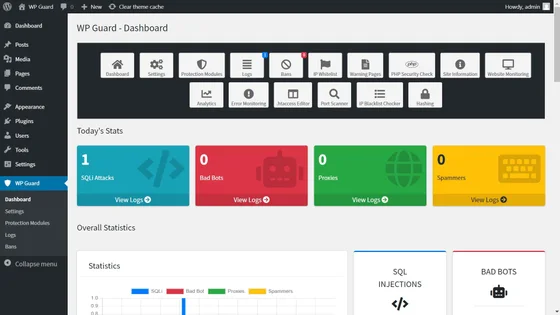
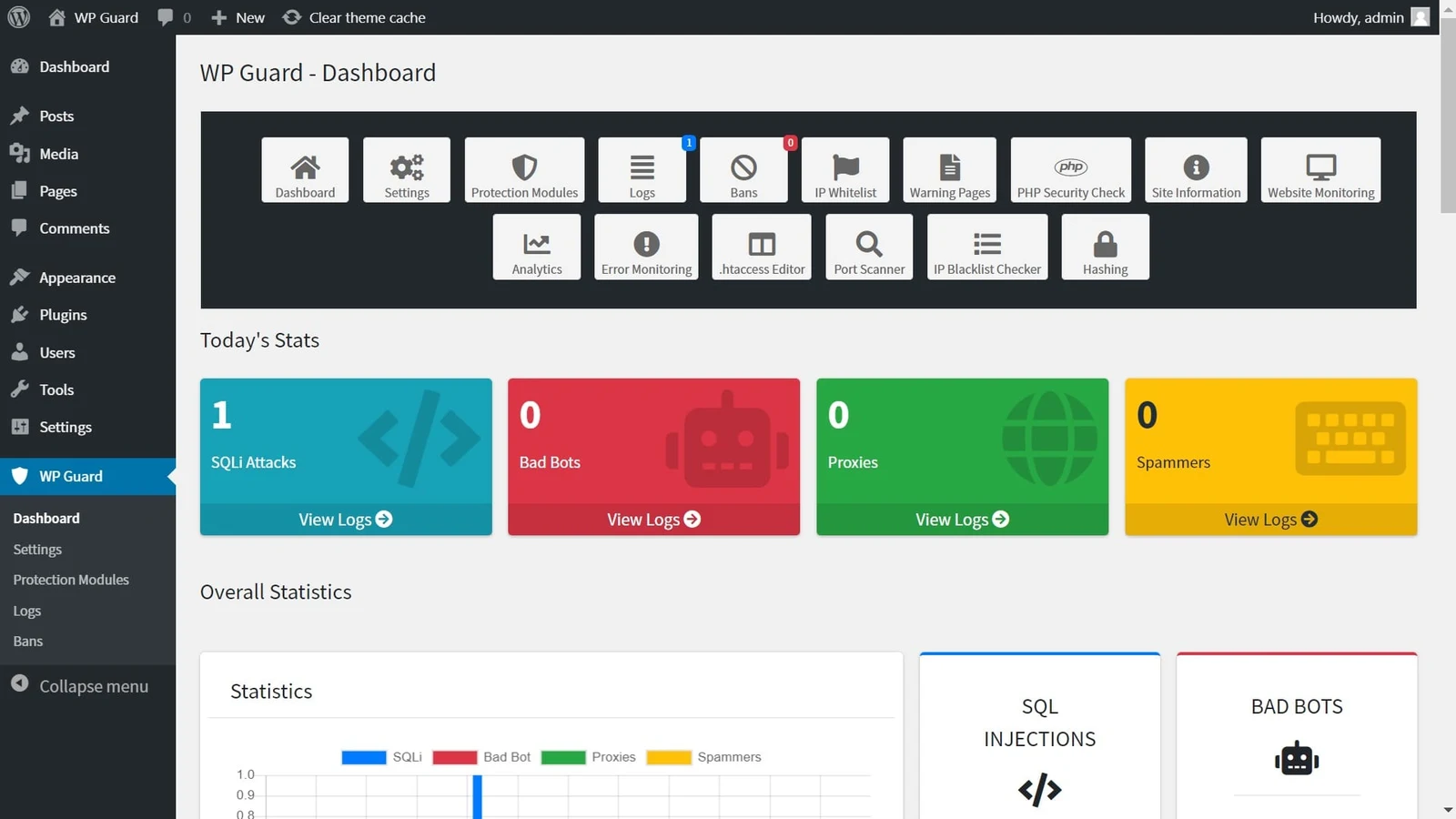 Official WP Guard dashboard with access to modules, logs, blocks and exclusions; counters from the developer’s demonstration. — Official image provided by Antonov_WEB.Open full-size screenshot ↗
Best forAn administrator wanting to examine filtering reasons and manage targeted blocks.
WP Guard is a paid suite of filtering, logs and blocks. Under Protection Modules, prepare a single rule on an isolated copy, then check the reason for a rejection in Logs and Bans before any exception. A visitor using a VPN or shared network is not necessarily malicious: avoid a blanket block without an identified need. Exclusion lists must remain targeted. Version 3.0.1 is announced on November 4, 2026. Commercial promises of detecting every attack do not constitute evidence of effectiveness; no penetration test or performance measurement is claimed.
Offer pricing
CodeCanyon Regular License: 49 USD recorded November 10, 2026.
Billing: Licence purchased upfront; no annual plugin subscription indicated.
Renewal and support: Future updates advertised as included; six months of support from Antonov_WEB. Paid support extension separate.
Price in USD excluding taxes and handling fees according to the listing.
Checked on .
Strengths
- Filtering modules, logs, IP and file exclusions advertised.
- Login attempt tracking and alerts according to configuration.
What to consider
- Replaces neither updates, 2FA nor intervention on an established intrusion.
- Country, proxy or ISP blocks may reject legitimate usage.
Pricing terms and compatibility
Understanding the offer
- Price at the time of review
- CodeCanyon Regular License: 49 USD recorded November 10, 2026.
- Currency
- USD
- Billing
- Licence purchased upfront; no annual plugin subscription indicated.
- Renewal and support
- Future updates advertised as included; six months of support from Antonov_WEB. Paid support extension separate.
- Taxes and fees
- Price in USD excluding taxes and handling fees according to the listing.
- Commitment and terms
- One end product for you or a client; check the licence suited to the project.
- Date checked
Compatibility and components
- Version 3.0.1 of November 4, 2026; recent listing declaring WordPress 7.1.x and WooCommerce 10.x.x among its compatibilities.
- PHP and MySQLi required; minimum PHP version unspecified. Proxy configuration, overlap with the existing firewall and recovery to assess on a copy. No actual WordPress test.
Password Protected
 Official Password Protected banner supplied by the developer; promotional content.
Best forA simple content access screen without a strong requirement for file confidentiality
Password Protected addresses content access, distinct from general website security. The free version places a shared password in front of WordPress. Basic adds protection by content type and attempt limits on this screen among other features; Professional allows targeting posts or pages, and Business adds categories and multiple passwords. This is not a sufficient solution to guarantee confidentiality of files accessible at their direct addresses. Choose it for simple access, after checking files, feeds and caches.
Offer pricing
Free; Basic 59.99 USD/year, Professional 79.99 USD/year and Business 99.99 USD/year for one website.
Billing: Annual for the three offerings cited
Renewal and support: Renewal terms and amount not established on the page consulted.
Tax treatment not established; check the total for the billing country.
Checked on .
Strengths
- Free: shared password in front of the website.
- Professional: protection of specific pages or posts; Business: categories and multiple passwords.
What to consider
- Does not automatically protect media through direct URLs.
- A shared password does not allow the same individual management as a member area with separate accounts.
Pricing terms and compatibility
Understanding the offer
- Price at the time of review
- Free; Basic 59.99 USD/year, Professional 79.99 USD/year and Business 99.99 USD/year for one website.
- Currency
- USD
- Billing
- Annual for the three offerings cited
- Renewal and support
- Renewal terms and amount not established on the page consulted.
- Taxes and fees
- Tax treatment not established; check the total for the billing country.
- Commitment and terms
- One website in the pricing selector; features also change with the tier, not only with website count.
- Date checked
Compatibility and components
- Check caches and intentionally excluded pages; do not confuse the content password with administrator passwords.
- Directory checked 2026-11-03: version 2.8.6, updated 2026-10-30, minimum WordPress 6.5, declared tested up to 7.1.4, minimum PHP 7.4. Publisher declarations, not tests performed here.
Really Simple Security
 Official Really Simple Security banner supplied by the developer; promotional content.
Best forAn administrator already using Really Simple who wants to combine HTTPS and hardening
Really Simple Security has expanded Really Simple SSL’s scope to hardening and access. The free version can help implement HTTPS, basic settings and vulnerability checks. Pro adds automated measures, a firewall and more extensive login protections among other features. It is an option if you already use this family and want to avoid several overlapping tools. However, an HTTPS wizard demonstrates neither certificate validity for each domain nor repair of an already compromised website.
Offer pricing
Free; Personal Pro at 49 USD for the first year for one domain.
Billing: Annual
Renewal and support: Discount limited to the first year; reference price displayed at 69 USD/year for Personal.
Tax treatment not established; check the total for the billing country.
Checked on .
Strengths
- Free: HTTPS configuration, basic hardening and vulnerability detection advertised.
- Pro: firewall, login protections, security headers and automated measures.
What to consider
- Certificate creation depends on hosting and domain control.
- Vulnerability detection and hardening do not constitute malware cleanup.
Pricing terms and compatibility
Understanding the offer
- Price at the time of review
- Free; Personal Pro at 49 USD for the first year for one domain.
- Currency
- USD
- Billing
- Annual
- Renewal and support
- Discount limited to the first year; reference price displayed at 69 USD/year for Personal.
- Taxes and fees
- Tax treatment not established; check the total for the billing country.
- Commitment and terms
- Professional: five domains at 99 USD for the first year, reference 119 USD/year; check network terms separately.
- Date checked
Compatibility and components
- Check the certificate and login journeys; multisite options must match the chosen licence.
- Directory checked 2026-11-03: version 9.8.4, updated 2026-10-26, minimum WordPress 6.6, declared tested up to 7.1.4, minimum PHP 7.4. Publisher declarations, not tests performed here.
Patchstack
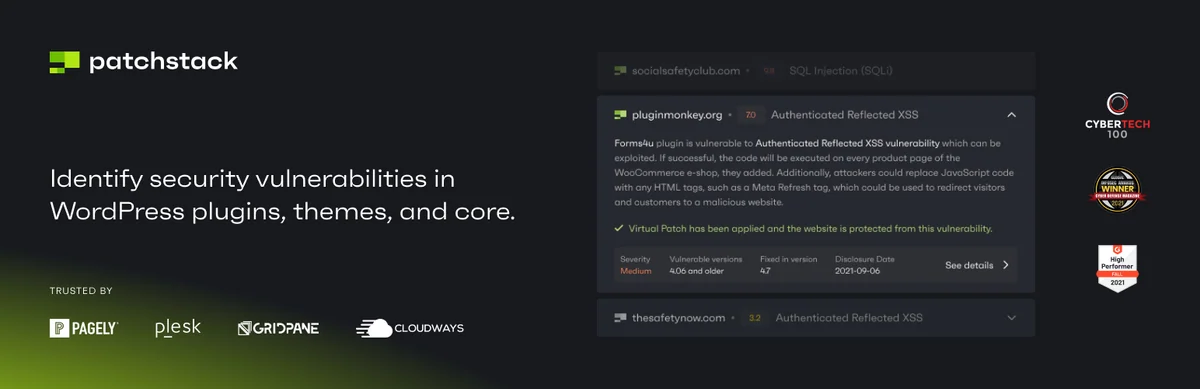 Official Patchstack banner supplied by the developer; promotional content.
Best forAn agency monitoring components across several websites and organising fixes
Patchstack is mainly intended for monitoring components and their vulnerabilities. Free alerts and paid protection rules address two different stages: knowing a flaw exists, then limiting exploitation while awaiting a fix. The Developer plan now targets professionals managing several websites; for a single website, the publisher also refers users to partners. Therefore examine protections already supplied by your host. A protection rule does not fix vulnerable code or replace cleanup of an infected website.
Offer pricing
Free alerts; Developer listed at 69 USD/month, billed 828 USD/year, for twenty-five website licences.
Billing: Annual; monthly equivalent displayed
Renewal and support: Renewal terms and amount not established on the page consulted.
VAT calculated at payment.
Checked on .
Strengths
- Free: reporting of known component vulnerabilities.
- Developer offering: RapidMitigate rules, component management and team integrations.
What to consider
- Do not attribute paid protections to free alerts alone.
- This service does not by itself provide restoration after infection.
Pricing terms and compatibility
Understanding the offer
- Price at the time of review
- Free alerts; Developer listed at 69 USD/month, billed 828 USD/year, for twenty-five website licences.
- Currency
- USD
- Billing
- Annual; monthly equivalent displayed
- Renewal and support
- Renewal terms and amount not established on the page consulted.
- Taxes and fees
- VAT calculated at payment.
- Commitment and terms
- Initial selector of twenty-five websites and three seats; additional websites and other seats billed separately. Individual offering through partners to compare.
- Date checked
Compatibility and components
- WordPress version declared tested up to 7.0.8 in the directory; 7.1.x compatibility not established by this declaration.
- Directory checked 2026-11-03: version 2.3.7, updated 2026-07-28, minimum WordPress 5.2, declared tested up to 7.0.8, minimum PHP 5.6. Publisher declarations, not tests performed here.
Anti-Malware Security
 Official Anti-Malware Security banner supplied by the developer; promotional content.
Best forScanning and correction supervised by someone able to recognise legitimate code
Anti-Malware Security suits someone able to interpret a file scan and check proposed corrections. Registration allows receipt of recent definitions; the free version retains manual scans and cleanup features. A contribution unlocks current premium features, including automatic definition updates and the login protection described by the author. Do not turn a flagged file into automatic deletion: retain the backup and examine quarantine. The product does not replace investigation of the initial cause.
Offer pricing
Free; one-time contribution of 29 $ advertised by the author for current premium features.
Billing: One-off contribution for the scope currently unlocked
Renewal and support: No subscription advertised for this contribution; future services could be billed separately.
Tax treatment not established; check the total for the billing country.
Checked on .
Strengths
- Free: manual scans and cleanup with definitions obtained after registration.
- Current premium features: automatic definition updates and additional controls.
What to consider
- The current scan requires an active browser window with JavaScript according to the author.
- A contribution does not guarantee free inclusion of every future premium service.
Pricing terms and compatibility
Understanding the offer
- Price at the time of review
- Free; one-time contribution of 29 $ advertised by the author for current premium features.
- Currency
- Unspecified. Confirm for the offer you choose.
- Billing
- One-off contribution for the scope currently unlocked
- Renewal and support
- No subscription advertised for this contribution; future services could be billed separately.
- Taxes and fees
- Tax treatment not established; check the total for the billing country.
- Commitment and terms
- Current features unlocked on websites registered under the same account. ISO currency for the $ symbol and taxes not established.
- Date checked
Compatibility and components
- Register websites under the same account for contribution-related entitlements; back up before correction.
- Directory checked 2026-11-03: version 4.23.92, updated 2026-10-27, minimum WordPress 3.3, declared tested up to 7.1.4, minimum PHP 5.6. Publisher declarations, not tests performed here.
CAPTCHA4WP
 Official CAPTCHA4WP banner supplied by the developer; promotional content.
Best forA form needing an anti-bot control compatible with its builder
CAPTCHA4WP adds an anti-bot control to forms rather than general WordPress security. The free version connects Google reCAPTCHA to native login, registration, comment and recovery forms. Premium adds hCaptcha, Turnstile and WooCommerce or form builder integrations among other features; Enterprise adds finer triggers and exclusions. Check the exact form before choosing. A misconfigured key or domain may prevent a legitimate visitor submitting a request; therefore plan a recovery solution and check journey accessibility.
Offer pricing
Free; Premium displayed as “39 per year” and Enterprise “59 per year” for one website, currency not established.
Billing: Annual
Renewal and support: Automatic renewal, cancellable from the account; future amount to confirm.
Tax treatment not established; check the total for the billing country.
Checked on .
Strengths
- Free: reCAPTCHA on native WordPress forms, with advertised v3-to-v2 fallback.
- Premium: Turnstile, hCaptcha and form integrations; Enterprise: exclusions and triggering after failures.
What to consider
- CAPTCHA service keys and terms are separate from the plugin licence.
- The public price consulted does not clearly specify its currency; confirm this before payment.
Pricing terms and compatibility
Understanding the offer
- Price at the time of review
- Free; Premium displayed as “39 per year” and Enterprise “59 per year” for one website, currency not established.
- Currency
- Unspecified. Confirm for the offer you choose.
- Billing
- Annual
- Renewal and support
- Automatic renewal, cancellable from the account; future amount to confirm.
- Taxes and fees
- Tax treatment not established; check the total for the billing country.
- Commitment and terms
- One website in the initial selector; any CAPTCHA provider cost separate.
- Date checked
Compatibility and components
- Check the exact form and service; in multisite, count websites where the control is enabled.
- Directory checked 2026-11-03: version 7.6.2, updated 2026-08-25, minimum WordPress 5.5, declared tested up to 7.1.4, minimum PHP 7.4. Publisher declarations, not tests performed here.
NinjaFirewall
 Official NinjaFirewall banner supplied by the developer; promotional content.
Best forFiltering before WordPress on Unix hosting with controlled PHP configuration
NinjaFirewall targets filtering before WordPress loads, at the PHP execution level. The free version already provides this architecture, firewall rules and file checks; WP+ adds controls by address, country or role, as well as extended logging capabilities. It suits compatible hosting whose administrator can check PHP configuration and rollback. WordPress administrator access is not always sufficient. The product requires a Unix-like system: do not follow this route for a Windows server.
Offer pricing
Free WP; WP+ Plan 1 at 99 USD per domain per year.
Billing: Annual licence
Renewal and support: Manual renewal through account credit; no recurring charge advertised.
Tax treatment not established; check the total for the billing country.
Checked on .
Strengths
- Free: PHP filtering before WordPress, integrity checking and modification monitoring.
- WP+: IP/country/role controls, rate limiting and centralised logging.
What to consider
- Windows unsupported; dependency on PHP configuration and MySQLi.
- Plan server configuration rollback before activation or removal.
Pricing terms and compatibility
Understanding the offer
- Price at the time of review
- Free WP; WP+ Plan 1 at 99 USD per domain per year.
- Currency
- USD
- Billing
- Annual licence
- Renewal and support
- Manual renewal through account credit; no recurring charge advertised.
- Taxes and fees
- Tax treatment not established; check the total for the billing country.
- Commitment and terms
- One licence for one domain or multisite installation.
- Date checked
Compatibility and components
- Unix, minimum PHP 7.1, minimum WordPress 4.9 and MySQLi extension declared; historical minimum requirements, not an invitation to retain obsolete PHP.
- Directory checked 2026-11-03: version 4.9.2, updated 2026-11-02, minimum WordPress 4.9, declared tested up to 7.1.4, minimum PHP 7.1. Publisher declarations, not tests performed here.
WP Cerber
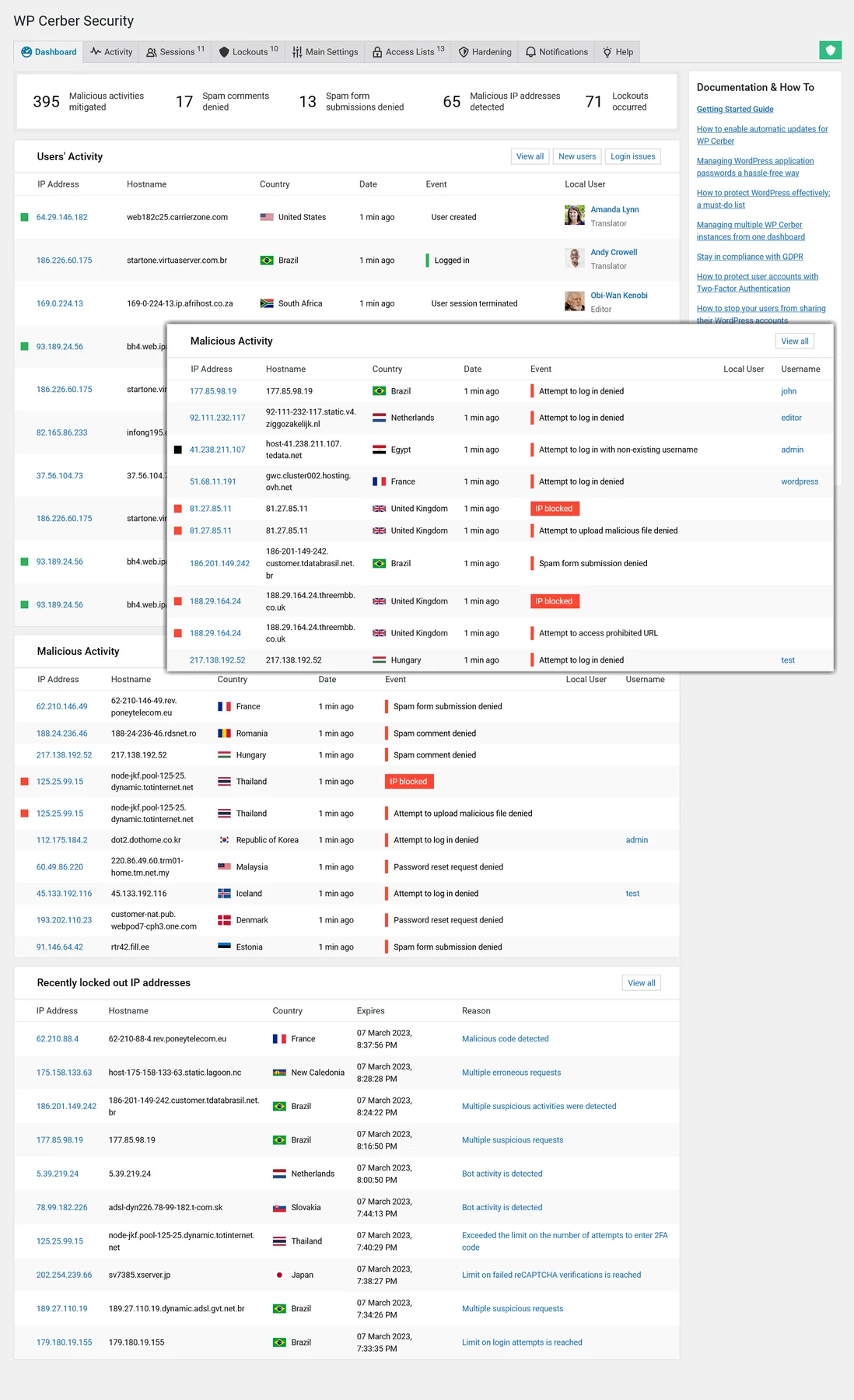 Promotional WP Cerber Security dashboard supplied by the developer; dated sample data, no test performed.Open full-size screenshot ↗
Best forA suite with local scans, provided the official update channel is followed
WP Cerber combines login restrictions, anti-spam protection and scans. The free version offers on-demand controls and scans; Pro adds the cloud layer, scheduling and more extensive geographical rules. Installation and updates use the official channel documented by the publisher. Version 9.10 fixes security issues among others and is advertised as the only maintained branch. Choose this suite only if you can ensure this monitoring, check legitimate journeys and interpret scan results.
Offer pricing
Free; Pro at 99 USD/year or 29 USD/quarter for one website.
Billing: Annual or quarterly
Renewal and support: Subscription automatically renewed unless cancelled during the period; future price not guaranteed.
Tax treatment not established; check the total for the billing country.
Checked on .
Strengths
- Free: local protection, anti-spam and on-demand scans.
- Pro: cloud layer, automatic scans and geographical rules.
What to consider
- Automatic scans and the cloud service are not included in the free base.
- Do not retain an old version merely because the plugin still works; only 9.10 is advertised as maintained.
Pricing terms and compatibility
Understanding the offer
- Price at the time of review
- Free; Pro at 99 USD/year or 29 USD/quarter for one website.
- Currency
- USD
- Billing
- Annual or quarterly
- Renewal and support
- Subscription automatically renewed unless cancelled during the period; future price not guaranteed.
- Taxes and fees
- Tax treatment not established; check the total for the billing country.
- Commitment and terms
- One website; Value Pack for five websites at 399 USD/year. Do not confuse total pricing with a per-site equivalent.
- Date checked
Compatibility and components
- Version 9.10 published October 13, 2026; the author declares testing up to WordPress 7.1 and PHP 8.5.9, without practical validation by us.
- Official download and update mechanism to configure according to WP Cerber documentation.
Security by CleanTalk
 Official Security by CleanTalk banner supplied by the developer; promotional content.
Best forA small website accepting a cloud subscription and verification of features retained after the trial
Security by CleanTalk combines a plugin with a cloud service paid after the trial. The subscription combines a firewall, scheduled scans, alerts and remote logs; expert cleanup remains a separate service. The directory FAQ also describes local protection against login attempts and a limited log after expiration, but its terminology is not consistent with the commercial presentation. Therefore do not choose this product as a permanently free cloud suite. Confirm the remaining features and data sent to the service before connecting.
Offer pricing
Limited local base according to the FAQ; Security service at 9 USD/year for one website after the trial.
Billing: Annual for one website; monthly for the unlimited plan
Renewal and support: Renewal terms and amount not established on the page consulted.
Tax treatment not established; check the total for the billing country.
Checked on .
Strengths
- Subscription: WAF, scheduled scans, IP/country restrictions and login alerts.
- Email 2FA and role-based policies advertised; cloud log for up to forty-five days.
What to consider
- The Security service is separate from CleanTalk Anti-Spam.
- Limited free base according to the FAQ: anti-brute-force and the last twenty entries over twenty-four hours; post-trial scope to confirm.
- Expert cleanup at 119 USD advertised separately; automatic corrections do not cover every case.
Pricing terms and compatibility
Understanding the offer
- Price at the time of review
- Limited local base according to the FAQ; Security service at 9 USD/year for one website after the trial.
- Currency
- USD
- Billing
- Annual for one website; monthly for the unlimited plan
- Renewal and support
- Renewal terms and amount not established on the page consulted.
- Taxes and fees
- Tax treatment not established; check the total for the billing country.
- Commitment and terms
- Three websites: 24 USD/year; five: 36 USD/year; unlimited websites: 27 USD/month. Human intervention separate.
- Date checked
Compatibility and components
- CleanTalk account and key for the remote service; check transferred data and IP identification.
- Directory checked 2026-11-03: version 2.191, updated 2026-10-27, minimum WordPress 5.0, declared tested up to 7.1.4, minimum PHP 7.2. Publisher declarations, not tests performed here.
WP Armour
 Official WP Armour banner supplied by the developer; promotional content.
Best forReducing spam on a compatible form without adding a visible challenge
WP Armour combats automated spam through a JavaScript-based honeypot. It may suit you when you want to avoid a visible challenge and your form appears among supported integrations. The free version covers comments and several form builders among other uses; Extended adds integrations, including WooCommerce, as well as logs and address blocks. It is not a general firewall or file scanner. Check a complete legitimate submission after activation and after changing cache or JavaScript optimisation.
Offer pricing
Free; Extended Personal at 19.99 USD/year for one website.
Billing: Annual
Renewal and support: Manual renewal advertised, without automatic renewal; future price to confirm.
Tax treatment not established; check the total for the billing country.
Checked on .
Strengths
- Free: honeypot mechanism for comments and compatible forms.
- Extended: submission log, IP controls and additional integrations including WooCommerce.
What to consider
- Does not replace a firewall, 2FA or malware scan.
- Depends on JavaScript and form integration; check actual submissions with the cache used.
Pricing terms and compatibility
Understanding the offer
- Price at the time of review
- Free; Extended Personal at 19.99 USD/year for one website.
- Currency
- USD
- Billing
- Annual
- Renewal and support
- Manual renewal advertised, without automatic renewal; future price to confirm.
- Taxes and fees
- Tax treatment not established; check the total for the billing country.
- Commitment and terms
- Business: five websites at 49.99 USD/year; Corporate: one hundred websites at 99.99 USD/year. One year of support and updates.
- Date checked
Compatibility and components
- Choose according to the exact form: some integrations belong only to Extended.
- Directory checked 2026-11-03: version 2.4.02, updated 2026-09-03, minimum WordPress 5.0, declared tested up to 7.1.4. Publisher declarations, not tests performed here.