

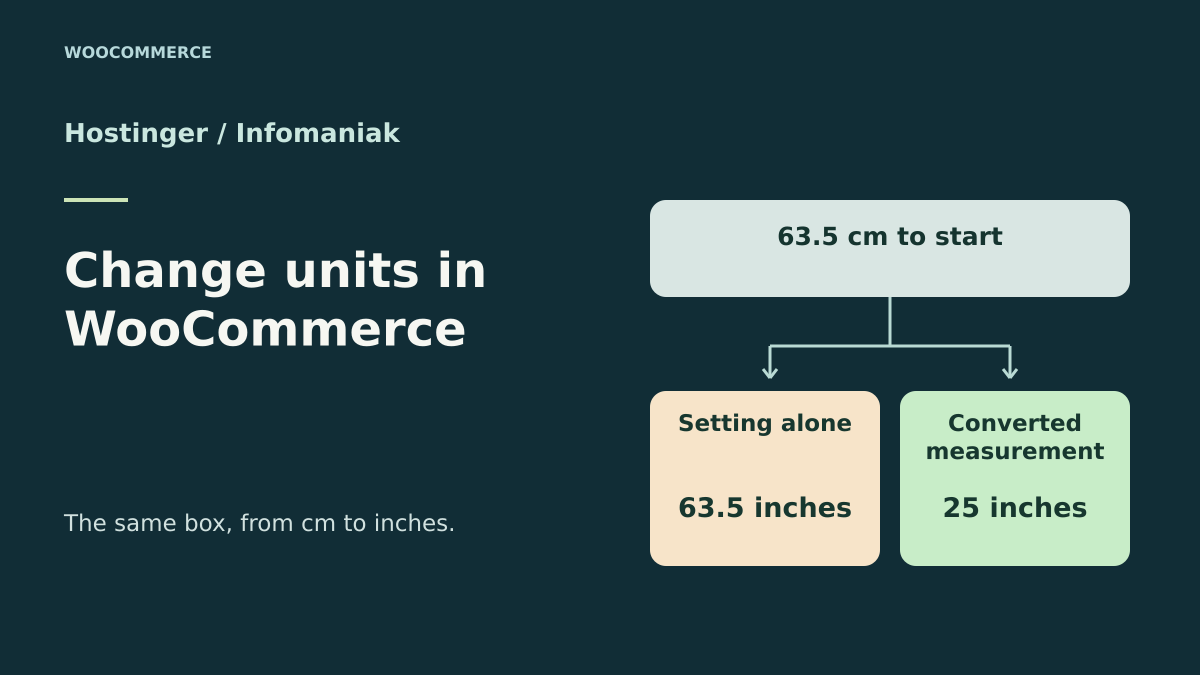
After switching to inches, a length of 63.5 cm becomes 63.5 inches
Dimension conversion takes place in WooCommerce data; choosing a host does not convert stored values. The Hostinger–Infomaniak comparison concerns the test copy and its isolation. First use the test environment already available, then compare plans only if that environment is missing or does not meet the need.
A store is preparing a catalog for a logistics provider that works in inches. It changes WooCommerce’s dimension unit from cm to in. On a product page that already has data, the numeric value 63,5 is still there. The global unit has changed, and a calculation that now interprets this length as 63.5 inches obtains 161.29 cm. To retain the same physical length, the stored value must become 25 inches.
The same mismatch can push an unchanged product over a size limit. In the acceptance test, a fictional rule accepts items measuring at most 60 cm. A small box measures 50.8 cm, a long one measures 63.5 cm and a control box measures exactly 60 cm. The three references let you check both sides of the threshold and its exact value. A fourth product has an empty length, representing a measurement still to be entered.
Hostinger Unlimited and Infomaniak Web Hosting offer two ways to prepare the copy used for this check. The choice mainly depends on access to the copy, its isolation and the ability to return to a consistent catalog. Product value behavior was checked in a local WordPress installation with WooCommerce. The configuration steps for the two accounts come from each host’s documentation.
- Record the current unit, the length of a known product and the threshold of the rule to test.
Compare before you choose
The offers at a glance
Find the use case and budget that fit, then read the details to see the limitations and any components you may need.
On smaller screens, the table scrolls horizontally. With a keyboard, press Tab to focus the table, then use the left and right arrow keys.
| Offer | Best for | Pricing and billing | Renewal and support |
|---|---|---|---|
 Hostinger UnlimitedRead the details | A store whose contract and installation provide access to the staging tool. | €143.52 excluding VAT paid for 48 months, equivalent to €2.99 excluding VAT per month. 48 months paid upfront at the displayed price Displayed prices exclude VAT; tax-inclusive total in the cart | Automatic renewal for the same duration at €16.99 excluding VAT per month, or €815.52 excluding VAT at this rate. |
 Infomaniak Web HostingRead the details | A store reserving a site slot and database for its test copy. | From CHF 10.91 excluding VAT per month at the public rate. Cycle and total to check in the cart configuration Public specification table excluding VAT | Amount to check in the summary or Manager |
Check the unit and fields actually read by the rule
In WooCommerce, open Product settings and record the dimension unit. Then open the Shipping section of a simple product page. Note length, width and height separately. Do the same for a variation if the store has any. Depending on the product configuration, a variation may use a measurement entered on the parent. An empty cell and a zero-valued cell require separate decisions before conversion.
Ask the team to specify which quantity each consumer uses. A plugin may read the raw length and the store’s unit. An export may send a value already converted to the recipient’s unit. For a service that always expects centimeters, compare the value actually transmitted before and after on the copy. A measurement on the product page does not prove that a package containing several items has the same dimension.
Reproduce a case before making any changes. For the small 50.8 cm box, record the stored data, declared unit, result converted back to centimeters and acceptance against the threshold. Repeat this check after changing only the unit. A difference by a factor of 2.54 between the two physical lengths provides a specific lead. If the value already changed along with the unit, find which tool converted it before planning another operation.
- Record the stored value, store unit and value expected by the integration separately.
Prepare a record that lets you restore the original measurements
Export the copy’s measurements before changing the setting. For each row, keep an identifier that remains stable within this catalog, the product type, the SKU where present and the three values before conversion. Also record the starting unit and the date of the record. For a variable-product catalog, document the relationship between the parent and its variations and the fields left empty. The measurement export is used to compare states and restore the intended values.
Choose a precision suited to the receiving system. In the acceptance test, lengths in inches are rounded to six decimal places. The fictional threshold uses a tolerance of 0.00001 cm to absorb rounding in both directions. A real integration may use a contractual rounding rule or classify an item using several dimensions. Reproduce its documented rule and check a product just below, exactly at and just above the threshold.
Also keep the starting export separate from the working file. Reverse conversion of values that have already been rounded can change the last digit. Retaining the original values lets you precisely restore the affected fields and the old setting. On the copy, pause imports, synchronizations and updates that could rewrite these measurements during the test. Check that an unknown length remains unknown through to the final record.
Hostinger Unlimited for preparing the copy from hPanel
Hostinger’s French page presents the Unlimited plan. The host says it has replaced Business on most of its commercial pages since July 2026. The staging guide still uses the Business name and says the feature is available from that level upward. Check that it is included in the contract or panel you will use. In hPanel, select the detected site, then open WordPress and Préproduction, or Staging depending on the panel language. The documented tool excludes WordPress multisite.
Once in the copy’s administration, record its URL and check that test changes do not alter the public catalog. For a store, block public access to the copy and disable emails, payments, catalog synchronizations and shipping integrations that could reach real services. The acceptance test requires no real order. You can check the effect with fictional product pages and a threshold rule run on the copy.
Unlimited lists 50 GB of NVMe storage and daily backups. Check the available space before creating a copy with its media. The integrated workflow makes it easier to create staging and access its administration. To apply the correction to an open store, prepare a targeted update of the measurements and their setting. Publishing the entire copy could replace data created on the store in the meantime, such as new orders.
- Open the site in hPanel, then WordPress and Staging.
- Check the copy’s URL and prepare an export of the reference dimensions.
Infomaniak Web Hosting for installing WordPress alongside the live site
Infomaniak documents installing WordPress alongside the live site. Create a separate site in the Manager and assign it a test domain name, such as a subdomain. To reproduce a real catalog, use a copy of its files and an independent database. The Duplicator transfer documentation describes one possible way to restore a WordPress package. An empty WordPress installation is sufficient to repeat the demonstration with the four fictional products.
Before starting installation or restoration, check the file destination and database settings. On first access, check that the administration address belongs to the subdomain and that the copy uses its own database. Protect this space and disable outbound actions that could affect a real service. If the copy uses a payment module, switch it to test mode or disable it before any simulation. Apply the same isolation to stock and shipping feeds.
The plan presents 250 GB SSD and twenty included sites for the displayed configuration. Check the slots and storage still available under your contract before adding the test site. A separate slot keeps the distinction between the store and its copy visible while recording results. During handover, specify the site name in the Manager, its URL and database identity, keeping passwords out of the file.
- Create the parallel site and identify its database before loading the test catalog.
- Open the subdomain’s administration and check its isolation before conversion.
Compare the billing cycle and the copy’s resources
As of November 11, 2026, Hostinger displays an introductory price of €2.99 excluding VAT per month, or €143.52 excluding VAT paid for 48 months. The page indicates automatic renewal at €16.99 excluding VAT per month for the same duration, or €815.52 excluding VAT for 48 months at that rate. The displayed monthly price expresses the monthly equivalent for the stated commitment. Check the tax-inclusive amount and billed period in the summary.
Infomaniak displays a starting price of CHF 10.91 per month for Web Hosting on the page consulted. The specification table presents prices excluding VAT. Record the currency, selected cycle and renewal amount in the configuration matching the billing address. “From” indicates a starting point. Additional storage or a different service configuration can change the total shown.
For a store already hosted, start with the cost of and access to a copy under the current contract. At Hostinger, check that the installation is detected and eligible for the staging tool. At Infomaniak, check the number of available site slots, storage and the copy’s database. If comparing two purchases, keep euros and Swiss francs in the table and use the full cart amount for the selected period. The duration of Hostinger’s displayed price and Infomaniak’s starting-price wording require two different readings.
Convert all three dimensions from the starting record
To convert from centimeters to inches, divide each length, width and height expressed in centimeters by 2.54. Thus, 63.5 cm becomes 25 inches, and 50.8 cm becomes 20 inches. Leave empty fields as they are. If the catalog uses values inherited from the parent product, preserve that relationship and convert the measurement where it was defined. Weight depends on its own setting and is outside this operation. As an easy control to check, 2.54 cm equals exactly 1 inch.
Check a small batch on a copy before expanding processing. In a real migration, apply updates through WooCommerce’s product interfaces or a validated import. Link each write to the initial record and product identifier, then compare the expected and modified row counts. A provider’s threshold may remain in centimeters even if the catalog switches to inches. The code or connector must then convert the data to the unit that provider expects.
Coordinate the measurement changes and global setting to avoid a transitional state where the catalog associates inches and centimeters with the same label. On the copy, repeat the calculations after both updates are complete. For a targeted deployment, agree the switchover time with the team and check systems that can modify product pages during the operation. Confirm the total number of affected references and keep the discrepancy record.
- Convert each populated measurement from its source value.
- Compare at least one product below, at and above the threshold.
Repeat the conversion and prepare to return to the previous unit
In the exercise, a second pass refuses conversion when the current unit is already in. On a real catalog, also record the source unit, target unit and progress by batch. An interrupted process may have changed several product pages before the global setting changed. After an interruption, resume from the saved record. For each reference, compare the expected and present measurements, then correct rows that differ. Dividing the current value again would shrink a product already converted.
To validate rollback, restore the three measurements from the targeted backup and reset the setting to the original unit. Check the same products on both sides of the threshold, then read the value sent to the integration. In production, a full database restore can undo orders or changes made after the backup. Prepare a rollback targeted at the changed fields and setting, checking catalog changes made since the record was taken.
If converting a batch does not bring dimensions within the agreed tolerance, first examine identifiers, starting unit, decimal separator and rounding rules. For a variation, also check the inherited value. Record the reason for the discrepancy in the acceptance-test report. An unknown measurement must remain identified as such in the report so the team can check it before using an automatic shipping rule.
Run the local acceptance test on the four fictional products
The acceptance test initializes a temporary SQLite database and loads WordPress and WooCommerce from folders extracted from official archives. It creates four simple products and uses WooCommerce functions to save and convert lengths. The ZIP contains the launcher, test script and instructions with links, versions and archive hashes. The test database is deleted on exit.
Initially, the 50.8 cm box and the 60 cm box pass the fictional threshold. The 63.5 cm box exceeds it. Changing only the setting leaves the numeric values unchanged and makes the long box equivalent to 161.29 cm. The small box is then classified as over the limit. After conversion, the stored lengths of these two boxes become 20 and 25 inches, restoring the original classification. The product without a length retains its unknown state.
The report also records the second pass and the exact return to the starting state. The threshold applies to a product length and a tolerance defined for the test. For a store, repeat the check with all three dimensions, relevant variations and the rule used by the integration. Compare a sample of shipping requests in test mode when the provider allows it, then check that the references and dimensions sent match the approved record. A second test on a copy converted a length of 2.54 cm to 1 inch and restored the 2.54 cm and initial unit. The fictional SKU, weight and price remained unchanged.
- Run the ZIP again and compare the starting state, the state after the setting change and the state after conversion.
Further reading
Sources and references
Use these references to check the features, requirements and limitations described. Reading documentation is not a practical test.
View 9 references
- Hostinger Unlimited — Initial price for 48 months ↗ — Documentation consulted:
- Hostinger Unlimited — Staging eligibility, multisite and operation ↗ — Documentation consulted:
- Hostinger Unlimited — Replacement of Business with Unlimited on most pages ↗ — Documentation consulted:
- Infomaniak Web Hosting — Displayed starting monthly price ↗ — Documentation consulted:
- Infomaniak Web Hosting — VAT-exclusive price list and scope ↗ — Documentation consulted:
- Infomaniak Web Hosting — Installing a parallel WordPress site ↗ — Documentation consulted:
- Infomaniak — Transferring WordPress with Duplicator ↗ — Documentation consulted:
- WooCommerce — Product settings ↗ — Documentation consulted:
- WooCommerce — Product measurements for shipping ↗ — Documentation consulted:
Uses, prices and what to check
2 offers in detail
Compare the features you need and the terms of each offer. The order of these entries does not indicate a ranking.
Hostinger Unlimited
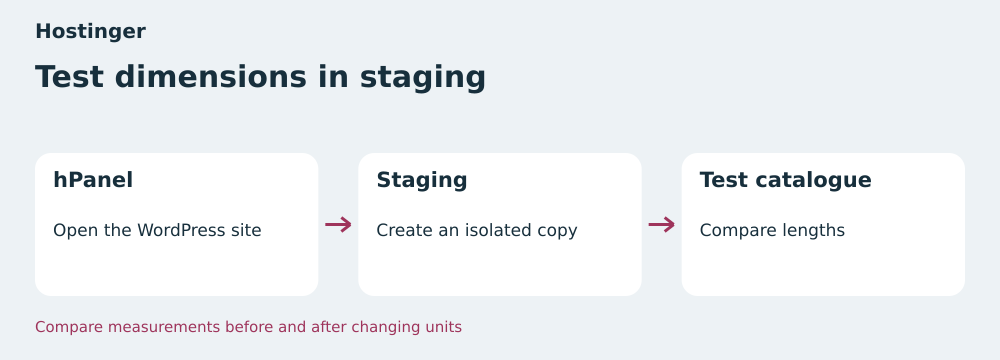 Test dimensions on staging — BlogPasCher editorial illustration.Open full-size illustration ↗
Best forA store whose contract and installation provide access to the staging tool.
Locate the store’s staging site in hPanel and isolate its copy. The sales page calls the plan Unlimited and the staging guide uses Business. Check access under your contract.
Offer pricing
€143.52 excluding VAT paid for 48 months, equivalent to €2.99 excluding VAT per month.
Billing: 48 months paid upfront at the displayed price
Renewal and support: Automatic renewal for the same duration at €16.99 excluding VAT per month, or €815.52 excluding VAT at this rate.
Displayed prices exclude VAT; tax-inclusive total in the cart
Checked on .
Strengths
- 50 GB NVMe and daily backups advertised
- Staging workflow documented in hPanel
What to consider
- WordPress multisite excluded from the documented tool
- Eligibility to check in the contract or hPanel
Pricing terms and compatibility
Understanding the offer
- Price at the time of review
- €143.52 excluding VAT paid for 48 months, equivalent to €2.99 excluding VAT per month.
- Currency
- EUR
- Billing
- 48 months paid upfront at the displayed price
- Renewal and support
- Automatic renewal for the same duration at €16.99 excluding VAT per month, or €815.52 excluding VAT at this rate.
- Taxes and fees
- Displayed prices exclude VAT; tax-inclusive total in the cart
- Commitment and terms
- 48 months for the displayed promotion
- Date checked
Compatibility and components
- WordPress
- WooCommerce
- hPanel
Infomaniak Web Hosting
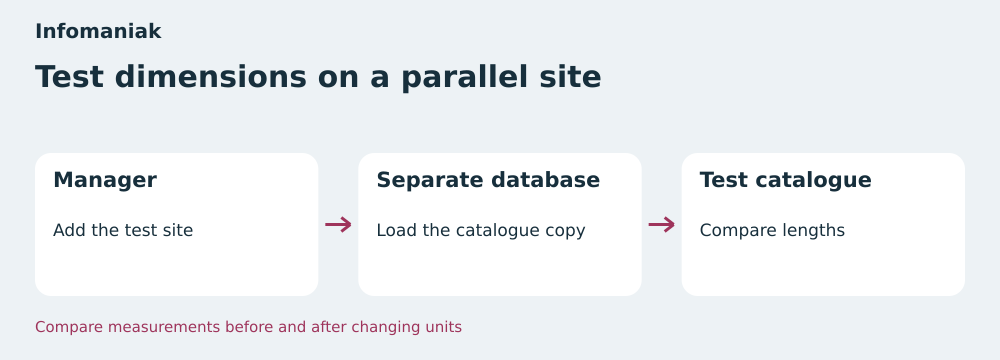 Test dimensions on a parallel site — BlogPasCher editorial illustration.Open full-size illustration ↗
Best forA store reserving a site slot and database for its test copy.
Create a parallel WordPress site in the Manager and load the catalog into a separate test database. Check the unit, threshold and return to the starting value on the same product.
Offer pricing
From CHF 10.91 excluding VAT per month at the public rate.
Billing: Cycle and total to check in the cart configuration
Renewal and support: Amount to check in the summary or Manager
Public specification table excluding VAT
Checked on .
Strengths
- 250 GB SSD and twenty sites included at the displayed rate
- Parallel WordPress installation documented
What to consider
- Prepare a site slot and test database
- Billing cycle and renewal price depend on configuration
Pricing terms and compatibility
Understanding the offer
- Price at the time of review
- From CHF 10.91 excluding VAT per month at the public rate.
- Currency
- CHF
- Billing
- Cycle and total to check in the cart configuration
- Renewal and support
- Amount to check in the summary or Manager
- Taxes and fees
- Public specification table excluding VAT
- Commitment and terms
- Period to confirm for the selected configuration
- Date checked
Compatibility and components
- WordPress
- WooCommerce
- Infomaniak Manager