

The timetable before booking
Someone searches for a class on a club’s website and finds three different answers: the home page advertises an old time, the coach’s profile gives another day and the weekly timetable still displays a cancelled session. The problem is not just visual. You need to define which information is authoritative, how to correct it and what the button next to a class means. GymBase and Gym Edge can be considered here, with documented presentations of classes, coaches and schedules.
GymBase highlights an integrated timetable with coach assignment and filters. Gym Edge presents profiles and timetables with WPBakery and Elementor variants; WPBakery is advertised as bundled. The former merits shortlisting when consulting schedules structures the site; the latter when the team wants to organise practical information with a familiar builder. These directions are not tool tests. They require verification of the chosen template and the components actually needed.
This comparison distinguishes three outcomes: viewing a session, requesting a place and obtaining a confirmed place. A timetable proves neither capacity tracking, account creation nor club access control. The proposed workflows therefore begin with ordinary content, without a new extension. They concern self-hosted WordPress with administration access. On multisite or a WordPress.com plan, the ability to install a theme and its components depends on permissions and the plan. Resolve this before choosing.
Compare before you choose
The offers at a glance
Find the use case and budget that fit, then read the details to see the limitations and any components you may need.
On smaller screens, the table scrolls horizontally. With a keyboard, press Tab to focus the table, then use the left and right arrow keys.
| Offer | Best for | Pricing and billing | Renewal and support |
|---|---|---|---|
 GymBaseRead the details | Making classes and schedules available to view | 79 USD — Regular Theme purchase; budget for necessary extensions, Pro editions or services that are not included. Excluding taxes and any handling fees. | Six months of support advertised; paid extension to be confirmed. Updates separate from support. |
 Gym EdgeRead the details | Structuring a gym’s practical information | 59 USD — Regular Theme purchase; budget for necessary extensions, Pro editions or services that are not included. Excluding taxes and any handling fees. | Six months of support advertised; paid extension to be confirmed. Updates separate from support. |
Prices and components actually documented
In the November 3, 2026 record, GymBase costs 79 US dollars with a Regular licence and Gym Edge 59 dollars. The base-price difference is therefore 20 dollars. It does not measure the cost difference for the complete project. Both listings distinguish advertised six months of support, an unpriced paid extension, taxes and any fees, and separate modules or services. Booking and membership are not considered included merely because a timetable is present.
Gym Edge advertises WPBakery, LayerSlider and WP Logo Showcase as bundled in the available documentation. The components used by the selected demo and their update channels still need identifying. Promotional values displayed for a plugin bundle are not calculable savings for your club: an unused component adds no operational benefit. GymBase, meanwhile, advertises included WPBakery, Slider Revolution and QuanticaLabs’ Cost Calculator. These bundles do not automatically provide a standalone licence or each publisher’s direct support; their update channels still need clarification.
The QuanticaLabs Cost Calculator mentioned by GymBase is not required to display classes and schedules. Its advertised one-off or recurring Stripe payments demonstrate neither place allocation nor activation of access rights. No payment is used in this comparison’s procedures. Similarly, WooCommerce or Elementor logos in marketing materials do not define a complete membership workflow. Before paying for an add-on, formulate the missing need: limiting places, managing a waiting list or collecting registration payment, for example. Each need may entail different rules and costs.
Defining a session unambiguously
A class refers to an activity; a session refers to its occurrence on a particular date and time. A permanent page can explain the activity and introduce the coach, while a session specifies the day, time, room and availability status. This distinction avoids changing a general introduction whenever a class moves. Prepare a sufficiently precise fictional example: a Tuesday workshop, room B, starting at 18, lasting 45 minutes, with the timetable applying over a clearly stated period.
Then choose the authoritative source. For a small club, a maintained schedule page may suffice. For a programme with several rooms and coaches, a structured timetable may be more appropriate. In both cases, appoint the person approving changes. A home-page announcement should draw on this source rather than become a second independent calendar. Displaying an understandable update date also helps identify old information when a link circulates long after creation.
Gather content in a theme-independent document: public title, location, time, applicable period, coach, cancellation information and contact method. Do not include member lists or personal data unnecessary for display. This document will let you transfer the same programme into GymBase or Gym Edge, then check differences without confusing an attractive demo with better data quality. It will also help when changing providers or themes.
Workflow 1: publish a readable timetable
This workflow suits a club wanting first to publish schedules without automating bookings. It requires an account authorised to create a page and a working copy of the site. You can prepare the page before any demo import. The expected result is simple: finding the next slot, its location and how to ask a question. The page must not imply that reading the timetable reserves a place.
The following paths concern ordinary WordPress pages. They do not describe proprietary GymBase or Gym Edge timetable menus, whose exact interfaces have not been tested. If a builder replaces the page editor, use the same information in its already documented elements. Do not add another tool solely to reproduce the appearance of a commercial screenshot.
- In Pages > Add New Page, create a “Classes and schedules” draft. First place the covered period, location and a sentence stating whether an advance request is required. Use explicit wording, without a “Book” button if places are not actually managed.
- Add sessions by day with start time, duration, activity and room. A short list with a heading for each day can serve as a starting point without an extension. Avoid publishing only an image of the timetable: its information must also be available as text.
- Add links to existing activity pages, then the way to contact reception. Keep permanent information on activity pages and times on the reference page to reduce repeated corrections.
- Use Preview and find a slot on a narrow screen. Check long labels, day order and presence of the location. Readers must be able to answer “when and where?” without opening every coach profile.
- If the timetable becomes too long for this presentation, keep the draft as a dataset for evaluating the chosen module. To undo, leave the page as a draft or remove its link from the working copy; do not erase the independent programme needed later.
Evaluating filters and class pages
GymBase documents days, times, coaches and filters in its timetable. This scope is interesting if visitors seek classes by availability or instructor. Prepare concrete searches: viewing Tuesday evening, finding a coach’s sessions and understanding the result when no class matches. The consulted documentation establishes advertised filters, but not their exact behaviour on your phone or their combination in the delivered version.
Gym Edge also describes classes, timetables and profiles. The issue is determining what comes from the theme, WPBakery or an additional component. A profile visually consistent with the rest of the site can be convenient for the team, but it does not guarantee that schedules update everywhere. Have the data source and method of linking one activity to several sessions identified. These answers matter more than a homepage count advertised on a banner.
Use the same small programme to compare both candidates. Include an activity with several times, a substitute coach and a week without a session for one class. The template must make these cases understandable without inventing availability. If information is unsupported, decide whether a textual note suffices or the need justifies another component. Do not turn this limitation into a promise of automatic development included in the theme.
Also examine the transition from timetable to profile: activity, location and contact method must remain consistent. Presentation photos may help recognise a coach but do not replace their name and role in text. Commercial badges or demo images must not become qualifications attributed to your team. Use only club-approved information and portraits you are authorised to publish.
Workflow 2: move or cancel a class
This workflow concerns a one-off session change. It requires content-editing permissions, a working copy and a list of places displaying the time. The fictional case is a Tuesday class moved to Thursday for one week. The aim is to correct public information while making the exception clear. If the club already manages registrations, correcting this page does not replace informing affected people through the designated system.
Start by distinguishing moving one occurrence from permanently changing the programme. Editing the general activity page for an exception risks making subsequent weeks incorrect. When the module does not manage exceptions, a clearly visible dated note may be preferable to an ambiguous change to the recurring timetable. Proprietary behaviour still needs confirmation before applying this method to a specific module.
- From Pages > All Pages, open the “Classes and schedules” reference page on the working copy. If a module generates the timetable, identify its source content in administration or the handover documentation before acting. Record the previous time.
- Change only the affected occurrence when the structure permits. State the week’s dates and new slot; for cancellation, write “session cancelled on…” instead of leaving an empty cell with an uncertain meaning.
- Check the home page, class page and coach profile if they displayed the old time. Point their mentions to the authoritative source or correct their independent texts. Do not change a shared template without identifying its other uses.
- In previews, first search for the old slot, then the new one. Readers must understand what changes this week and what resumes afterwards. If both times still seem valid, the correction is unfinished.
- To roll back, restore the retained text or an available revision of the targeted page. After the exceptional period, remove the temporary note and recheck the current programme. Keep the decision in internal tracking to prevent another editor from restoring the old announcement.
Place requests and their limits
A club can receive requests by phone or an existing contact method without automated booking. In that case, state what happens after the request: reception checks the slot, then replies. A button leading to contact must describe that action. “Request a place” is still insufficient if the following page displays final confirmation without any capacity check.
The evidence selected for GymBase and Gym Edge does not demonstrate complete management of places, cancellations, payments and waiting lists. WooCommerce appearing in compatibility lists does not answer these questions. If the club wants to automate these operations, prepare a separate requirements document and have the intended component, costs and rules documented. The theme choice can wait for this answer if it determines the club’s entire operation.
Also avoid creating several request channels without knowing who handles them. A request sent from a profile and another from the timetable may reach different recipients. For the initial website, a clearly explained single process is easier to follow. The site must distinguish corrected public information, a received request and an actually granted place. Each of these three states requires an owner; a theme presentation alone does not coordinate them.
Workflow 3: organise a request without false confirmation
This workflow suits a club that still validates places manually and already has a working contact method. It requires page-editing permissions and agreement from the person answering requests. No form or extension needs adding. Real sends must be neutralised on the working copy; the following steps mainly check text and destinations. No message was sent for this comparison.
The expected result is an honest journey: visitors know the requested slot, contact channel and confirmation stage. The page must not promise an available place simply because the session appears in the timetable. If an existing form is used, identify its extension and return message separately. Do not assume GymBase or Gym Edge manages this text.
- From Pages > All Pages, open the class page on the working copy. Add a sentence explaining that reception will review the request and a separate response confirms the place. Use the same vocabulary on the schedule page.
- Change the link or button to describe the actual action, for example “Contact reception about this slot”. Point it to the existing contact page or display the public phone number already approved by the club.
- On the destination page, specify useful information to provide: activity, desired date and time, then a reply method. Do not add health fields or information unrelated to the request.
- Open previews from the timetable and then from the class page. Check the link, consistent wording and absence of any statement that a place has already been allocated. For an existing form, also have its return message examined in its documented configuration, without triggering a real send on the copy.
- If the journey does not distinguish request from confirmation, restore the previous link and remove the ambiguous button from the copy. Keep a clear public contact until corrected. Rollback affects targeted texts and links, not deletion of a form used elsewhere.
Maintenance and seasonal information
The last update observed in the listings is dated September 14, 2026 for GymBase and September 8, 2026 for Gym Edge. The latest WordPress tag displayed in both is 7.0.x. This tag proves neither a compatibility ceiling nor incompatibility of unlisted versions. These indications do not replace checking your combination of theme, builder and extensions. WooCommerce version lists also differ; they do not constitute acceptance testing of a membership workflow. Have the selected versions specified if that workflow enters the project.
Plan a handover focused on the club’s routine changes: changing a time, replacing a coach, removing a session and preparing the following season. The provider must be able to show each piece of information’s source and the pages reusing it. If a change requires intervention in several manual blocks, record their locations in tracking. This constraint may weigh more in the choice than the 20-dollar difference between base licences.
Both reused images are actual commercial montages. GymBase appears in a grey and green composition with a preview of upcoming classes. Gym Edge appears in a white, black and orange composition with several previews and logos. Its quantity, version and price mentions belong to the original banner; they are not used to update the listings’ dated prices. These visuals were opened to verify identity, without installing the themes or testing their features.
Commercial information was checked against documentation on November 3, 2026. The three workflows prepare your content and checks on a copy; no theme was installed and no booking tested. Exact settings still need confirmation for the chosen template and components. Retain independent content, authorised photos and club rules so you can recover the programme if the theme or timetable component changes.
Choosing according to how the club operates
Shortlist GymBase if the weekly programme and its filters form the site’s core, then have the searches and exceptions important to your club checked. Shortlist Gym Edge if the team knows the builder of the selected variant, WPBakery or Elementor, and mainly wants to organise profiles, coaches and practical information; have the components required by that template specified. The 20-dollar Regular price difference cannot decide the choice without knowing this work and any separate services.
If the priority is booking with limited places, neither set of documentation suffices to validate purchase of the entire system. First clarify the booking workflow and its cost. If the club only wants to inform visitors and receive requests, start with a consistent schedule source and explicit contact. You can then examine the themes with the same programme and a simple rule: nobody should confuse a displayed session with a place obtained.
Sources and references
Use these references to check the features, requirements and limitations described. Reading documentation is not a practical test.
Uses, prices and what to check
2 offers in detail
Compare the features you need and the terms of each offer. The order of these entries does not indicate a ranking.
GymBase
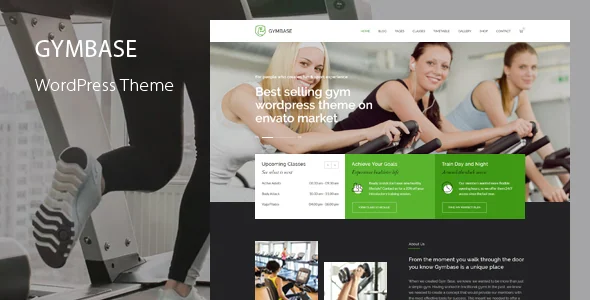 Official GymBase presentation from its developer’s portfolio; promotional claims and figures not measured by the workshop.
Best forMaking classes and schedules available to view
GymBase describes an integrated timetable with classes, coaches, days, times and filters. It suits a gym wanting to make this information available. WPBakery, Slider Revolution and QuanticaLabs’ Cost Calculator are advertised as included. The calculator describes one-off or recurring Stripe payments; these prove neither class availability nor activation of a member’s rights. Have the bundled version and club rules checked before selecting an automated workflow.
Offer pricing
79 USD — Regular
Billing: Theme purchase; budget for necessary extensions, Pro editions or services that are not included.
Renewal and support: Six months of support advertised; paid extension to be confirmed. Updates separate from support.
Excluding taxes and any handling fees.
Checked on .
Strengths
- Integrated timetable with classes, coach assignment and filters
- WPBakery, Slider Revolution and QuanticaLabs’ Cost Calculator advertised as included
What to consider
- Capacity, booking and access rights to be checked in the version actually delivered
- Account, Stripe fees and bundled-version terms to be confirmed
Pricing terms and compatibility
Understanding the offer
- Price at the time of review
- 79 USD — Regular
- Currency
- USD
- Billing
- Theme purchase; budget for necessary extensions, Pro editions or services that are not included.
- Renewal and support
- Six months of support advertised; paid extension to be confirmed. Updates separate from support.
- Taxes and fees
- Excluding taxes and any handling fees.
- Commitment and terms
- Regular licence for a freely accessible end product; a separate paid service alone does not require Extended. Check paid site access and component licences.
- Date checked
Compatibility and components
- WPBakery, Slider Revolution and QuanticaLabs’ Cost Calculator advertised as included; integrated timetable; one-off/recurring Stripe described
- Seller declarations: WooCommerce 10.x.x, WooCommerce 9.x.x, WooCommerce 8.x.x, WooCommerce 7.x.x, WooCommerce 6.x.x, WooCommerce 5.x.x, WPBakery Page Builder, WPML; latest displayed WordPress tag: 7.0.x, without testing this combination. Unlisted versions are not declared incompatible.
- Last displayed update: September 14, 2026. Recorded November 3, 2026.
Gym Edge
 Official Gym Edge presentation. Prices and badges belong to the original image; listing price recorded on 3 November 2026, without performance testing.
Best forStructuring a gym’s practical information
Gym Edge presents classes, timetables and profiles with WPBakery and Elementor variants. It may suit a gym wanting a coherent website in a familiar builder. WPBakery, LayerSlider and WP Logo Showcase are advertised as bundled: identify the components useful to the chosen template and their update channel. Old plugin promotional values are not used to calculate current savings; no booking or SEO improvement is inferred from these pages.
Offer pricing
59 USD — Regular
Billing: Theme purchase; budget for necessary extensions, Pro editions or services that are not included.
Renewal and support: Six months of support advertised; paid extension to be confirmed. Updates separate from support.
Excluding taxes and any handling fees.
Checked on .
Strengths
- WPBakery and Elementor variants described for club pages
- WPBakery, LayerSlider and WP Logo Showcase advertised as bundled
What to consider
- Choose a builder variant and identify its required components
- Timetable display is separate from verified place confirmation
Pricing terms and compatibility
Understanding the offer
- Price at the time of review
- 59 USD — Regular
- Currency
- USD
- Billing
- Theme purchase; budget for necessary extensions, Pro editions or services that are not included.
- Renewal and support
- Six months of support advertised; paid extension to be confirmed. Updates separate from support.
- Taxes and fees
- Excluding taxes and any handling fees.
- Commitment and terms
- Regular licence for a freely accessible end product; a separate paid service alone does not require Extended. Check paid site access and component licences.
- Date checked
Compatibility and components
- WPBakery or Elementor variant; LayerSlider and WP Logo Showcase advertised as bundled; classes, schedules and coaches
- Seller declarations: Elementor, WooCommerce 8.x.x, WooCommerce 7.x.x, WooCommerce 6.x.x, WooCommerce 5.x.x, WPBakery Page Builder, WPML, Bootstrap 4.x; latest displayed WordPress tag: 7.0.x, without testing this combination. Unlisted versions are not declared incompatible.
- Last displayed update: September 8, 2026. Recorded November 3, 2026.