

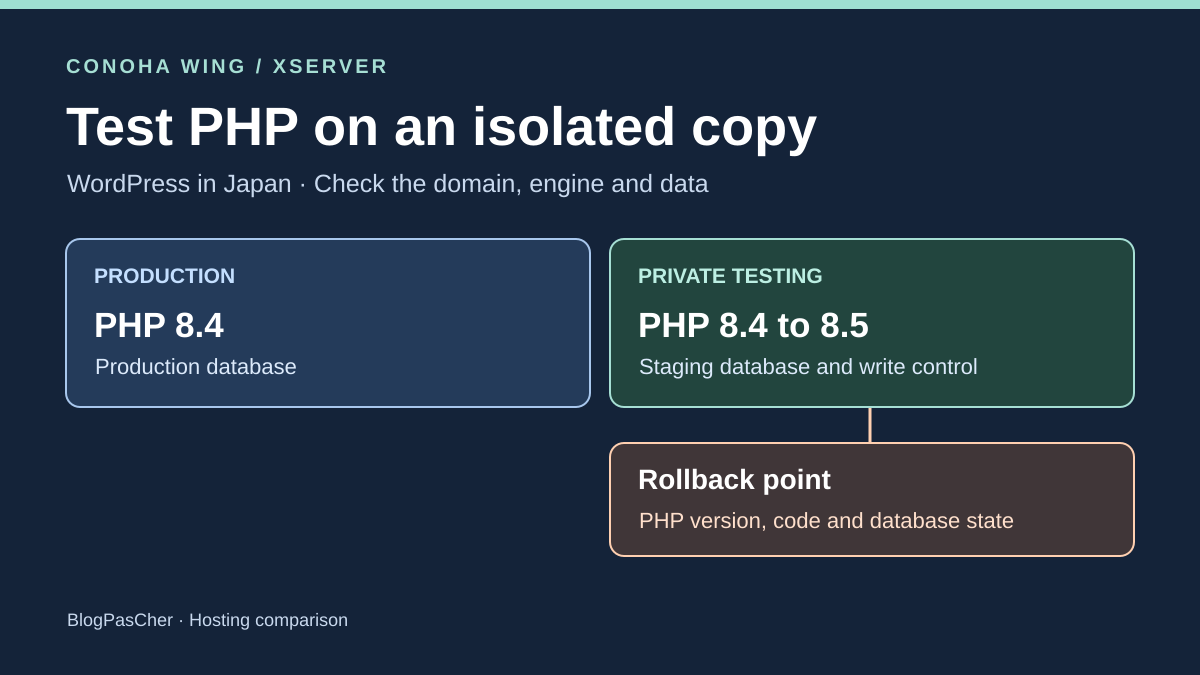
Prove that the PHP switch targets only the copy
A team maintains a WordPress site for a Japanese audience and is preparing a PHP version change. It first wants to test an editorial block used on several pages, then return to the initial state if updating its plugin changes settings. The public site must retain its version and database during the trial. Host choice depends on PHP-setting scope, site eligibility for the copy tool and the ability to verify rollback.
A different directory does not prove that a different PHP version will be used. A staging name may also be attached to the public domain and share its setting. Choose a staging domain appearing as a separate panel entry and confirm change scope before applying it. A same-server copy shares resources and may still access secrets. For the trial, treat its directory, database and outputs as separately isolated elements.
Before changing versions, record domain, root, database name, intended user and PHP version for both environments. Prepare a different marker in each. Take an initial web reading with the expected hostname because terminal PHP may use a different engine from web requests. Remove diagnostics afterward. A public PHP-information page exposes more details than the few values useful to the trial.
Compare before you choose
The offers at a glance
Find the use case and budget that fit, then read the details to see the limitations and any components you may need.
On smaller screens, the table scrolls horizontally. With a keyboard, press Tab to focus the table, then use the left and right arrow keys.
| Offer | Best for | Pricing and billing | Renewal and support |
|---|---|---|---|
 ConoHa WINGRead the details | A team able to prepare a separate domain and control the staging database within the copy process. | WING Pack Basic, 13,068 JPY including tax over twelve months Twelve prepaid months, equivalent to 1,089 JPY including tax per month. Tax-inclusive reference. Additional domain or option according to quote. | Automatic by default, payment thirty days before expiry if enabled. Confirm the account amount. |
 XserverRead the details | A team whose site appears in eligible installations or that understands controlled manual copying. | Xserver Standard, 13,200 JPY including tax over twelve months Equivalent to 1,100 JPY including tax per month, twelve months prepaid. Tax-inclusive table. Check domain and options separately. | Collection from the 20th to the end of the expiry month if enabled. Disable no later than the 19th of the collection month according to the manual. |
Prepare a representative copy with outputs disabled
Copy the files and database needed for testing. A theme-and-plugin template is insufficient when a fault depends on existing settings or content. Sensitive data and real accounts are not necessary to check a block, however. Prefer test data or a protected copy restricted to useful scope. Check database destination in configuration and the URL used by WordPress.
Protect access before placing data. An indexing setting does not block someone knowing the address. Check refusal without authentication and access with a test account. Disconnect email, webhooks and tasks affecting real services. Check a reference block’s links and outgoing requests. Text displaying in the correct place may conceal a dependency still calling production.
Record block results and a harmless database change under the starting version. Check that the write appears only on the copy. Repeat production reading before and after changing staging PHP. Prepare a staging-database export and file inventory before updating the plugin. This point allows measurement of what simply returning to the old PHP version restores.
ConoHa WING and per-domain PHP settings
ConoHa WING documents copying WordPress between two domains on the same server. In WING, open site management, settings and the WordPress tab. A full copy includes the content needed for testing. Template mode copies theme and plugins without posts or media. The guide asks for database, user and password. Check that the staging database user cannot write to the public database. The guide states that copying retains the original site’s WordPress credentials. Protect the directory before exposing the copy, then limit active accounts to those used for testing.
For PHP, the guide goes through site management, advanced settings and PHP. ConoHa documents per-domain PHP settings and gives priority to individual settings. The version-change procedure adds an AddHandler directive to the domain’s .htaccess file. Record the domain and check the copy’s configuration file before saving. The WING FAQ lists branches 8.4 and 8.5. The account panel and a web reading remain necessary to confirm availability and scope for the precise configuration. The copy guide asks users to check theme and plugin compatibility when using another PHP version.
ConoHa documents directory-based access restriction in security settings. Check protection of the staging root, files and administration routes. Help states fourteen days of automatic backups and distinguishes Web from database. Web-file recovery creates a copy in a backup directory the team must retrieve or use for targeted restoration. Generated files are temporary. For a reproducible trial, also retain the point created immediately before the change.
Xserver Standard and copy eligibility
On Xserver, the panel’s WordPress Site Copy function is under WordPress簡単インストール, then installation details. Its announcement specifies that integrated copying targets WordPress sites created with the service installer. Choose a full copy to test existing content. The manual notes that some backup-plugin data is excluded and some URLs may not be rewritten. After copying, open the reference block and check links still pointing to the public address.
If the site is not among eligible installations, verify a separate export/import route before choosing the offer for this need. Check database export, files and URLs on a private copy before adopting it for testing. To change engines, use PHP Ver.切替 in the panel. Getting-started help shows per-domain settings. The PHP guide lists 8.4 and 8.5 when Xアクセラレータ Ver.2 is active. Record this prerequisite, confirm the choice on the staging entry and read its version through the web.
The Xserver panel documents per-folder Basic authentication. The Web backup guide advertises fourteen days and mentions seven days on some older servers. Extraction creates a copy in userbackup. The manual states deletion after 24 hours and asks users to check disk space before extraction. The panel also offers a separate MySQL-data action. Confirm available points and destination for the selected offer. These procedures do not describe one button restoring PHP, files and database together to their previous state.
Compare twelve months and the next renewal
Over twelve months, the WING Pack Basic schedule published for the July 2026 revision gives 13,068 JPY including tax, equivalent to 1,089 JPY per month. For Xserver Standard, the current table states 1,100 JPY including tax per month over twelve prepaid months, totaling 13,200 JPY including tax. Both amounts are hosting references for the full duration. The 132 JPY difference excludes domains or paid options, without currency conversion or promotional assumptions.
The recorded ConoHa campaign ended November 5, 2026 at 16:00 Japan time. Its starting price of 659 JPY per month concerned a thirty-six-month contract. The Xserver campaign ending November 4, 2026 at 17:00 Japan time concerned initial signup. The maximum advertised discount depended on duration. These campaign prices are excluded from the November 10 calculation. Check promotion availability and the chosen term’s total on the order page.
WING Pack is prepaid with automatic renewal enabled by default. Documentation states renewal and collection thirty days before expiry when that setting remains active. Xserver automatic server renewal uses the configured duration and occurs between the 20th and the end of the expiry month. Initial card payment activates renewal for the selected duration. To stop it, the manual requires disabling the setting no later than the 19th of the collection month. Compare the regular rate for the chosen term and check account-specific amounts and dates. A domain option may have separate terms.
Check access and language before the test window
The examined panels and guides are in Japanese. ConoHa provides WING guides and a product-specific support form. The table mentions telephone and email. Xserver documents continuous acceptance of written requests and weekday telephone and chat with separate hours. Confirm the language and channel available to the team. A support section does not guarantee intervention during the chosen window.
A provider-side trial requires selecting both domains, copying files, reading database settings and managing access restrictions. Panel, WordPress and any DNS access may belong to different people. Also assign log reading. If another environment shares the account, identify it before touching a server setting or shared task. A copy on that account is not equivalent to full separation between two accounts.
If either PHP branch is missing, check the server setting or ask which configuration the account supports. If integrated copying is unavailable, require a method the team can replay and a readable export. Staging sharing production’s database, accepting anonymous visitors or still sending real notifications does not meet this trial’s conditions. Correct these discrepancies before changing the interpreter.
Read the PHP and SQLite exercise result
The ZIP actually launches two local executables, PHP 8.4.8 and PHP 8.5.12 for this article’s verification. Two temporary SQLite files carry different markers. A simulated unauthorized request is refused. When staging mistakenly points to the production file, the script checks the database marker before permitting a write. Another execution writes a reference marker in the correct database and confirms that the production file hash remains stable.
Version v2 of the fictitious block uses array_first(), a PHP 8.5 function. Under 8.4, the scenario fails before writing the new format. Under 8.5, the fictitious plugin converts its label into structured options and the block displays with the reference marker. Restoring PHP 8.4 alone leaves code calling an unavailable function. Also restoring v1 code leaves data it refuses to read. The scenario then restores the SQLite copy taken immediately before conversion.
The eleven checks verify recovery of the block and reference marker under the old engine and the absence of writes to the production database. The program launches CLI processes. Authorization and 401, 409 and 500 codes are modeled. SQLite databases are local reference fixtures. The mockup tests neither a WordPress installation nor providers’ web engines. To replay it, prepare both executables with PDO SQLite. Patch versions may differ from the supplied result.
- Download the ZIP under “Further Reading” and extract it into a test folder. Follow the command in LISEZ-MOI using two PHP executables loading PDO SQLite.
- Compare the eleven checks with attendu.json. Patch numbers may differ. Check refusal to write to the wrong database and the three rollback states: engine only, old code without the database, then the complete state.
Test the same journey in a browser on the host
To reproduce the exercise, record PHP through Site Health or a minimal protected diagnostic. Measure both domains before and after the change. Also check redirects and final URL because the browser may have left staging unnoticed. Compare logs in the same window and record the time zone. An old cached result may conceal the newly selected engine. Check a dynamic route with a distinct marker.
Test the block across several content items, in the editor and when reading. Save a staging change and reread it. Test the role allowed to edit and one that must not. Confirm that administration links and media do not point to production. If only one item fails, record its setting or old format and examine active dependencies before concluding an engine error.
If production changes version, the copy writes to the wrong database, a private route responds without authorization or a log shows a blocking error, stop the change. First return to the identified setting and destination. Export the resulting state before removing code or data. Isolation is demonstrated by before-and-after behavior with a trace the team can review.
Decide whether rollback concerns PHP, code or data
When only the engine changed, rollback may be limited to the previous branch if still listed in the panel. Check the block and logs afterward. If a plugin or theme was updated, retain both versions’ files. Then check whether data migration occurred. PHP rollback followed by file rollback may leave incompatible content. In that case, the database point must match the code and moment before conversion.
For staging, restore the necessary scope to a controlled destination and recheck reading and writing. In production, an old export may erase pages or settings published after the selected point. Identify these writes and their treatment before restoring. A dated independent copy allows inspection before deciding on replacement. Remove probes and test accounts when checks finish.
ConoHa WING suits a team able to prepare a separate domain and supply copy-database credentials through the integrated journey. Xserver Standard suits an eligible installation where the panel confirms the staging domain’s engine. For both, decisive elements are the account’s available branch, reference result without writes escaping isolation and block recovery after restoration.
Further reading
Sources and references
Use these references to check the features, requirements and limitations described. Reading documentation is not a practical test.
View 29 references
- ConoHa WING — WING Pack Basic and the non-promotional tax-inclusive twelve-month price list ↗ — Documentation consulted:
- ConoHa WING — ConoHa WING, public offer ↗ — Documentation consulted:
- ConoHa WING — ConoHa, WING pricing ↗ — Documentation consulted:
- ConoHa WING — ConoHa, commercial FAQ ↗ — Documentation consulted:
- ConoHa WING — ConoHa, WING Pack renewal ↗ — Documentation consulted:
- ConoHa WING — ConoHa, WordPress copy ↗ — Documentation consulted:
- ConoHa WING — ConoHa, configuring PHP ↗ — Documentation consulted:
- ConoHa WING — ConoHa, PHP setting scope ↗ — Documentation consulted:
- ConoHa WING — ConoHa, PHP branches ↗ — Documentation consulted:
- ConoHa WING — ConoHa, access restriction ↗ — Documentation consulted:
- ConoHa WING — ConoHa, backup status ↗ — Documentation consulted:
- ConoHa WING — ConoHa, restoring web files ↗ — Documentation consulted:
- ConoHa WING — ConoHa, support ↗ — Documentation consulted:
- ConoHa WING — PHP, array_first function ↗ — Documentation consulted:
- ConoHa WING — PHP, official Windows binaries ↗ — Documentation consulted:
- Xserver — Standard and the non-promotional tax-inclusive twelve-month price list ↗ — Documentation consulted:
- Xserver — Xserver, public offer ↗ — Documentation consulted:
- Xserver — Xserver, ended campaign ↗ — Documentation consulted:
- Xserver — Xserver, automatic renewal ↗ — Documentation consulted:
- Xserver — Xserver, initial card payment ↗ — Documentation consulted:
- Xserver — Xserver, WordPress copy ↗ — Documentation consulted:
- Xserver — Xserver, Site Copy eligibility ↗ — Documentation consulted:
- Xserver — Xserver, changing PHP ↗ — Documentation consulted:
- Xserver — Xserver, getting-started guide ↗ — Documentation consulted:
- Xserver — Xserver, private access ↗ — Documentation consulted:
- Xserver — Xserver, extracting a web restore point ↗ — Documentation consulted:
- Xserver — Xserver, panel features ↗ — Documentation consulted:
- Xserver — Xserver, support ↗ — Documentation consulted:
- Xserver — Xserver, support page ↗ — Documentation consulted:
Uses, prices and what to check
2 offers in detail
Compare the features you need and the terms of each offer. The order of these entries does not indicate a ranking.
ConoHa WING
 Publisher-provided presentation image.
Best forA team able to prepare a separate domain and control the staging database within the copy process.
WING Pack Basic documents copying between domains on the same server with database fields and per-domain PHP settings.
Offer pricing
WING Pack Basic, 13,068 JPY including tax over twelve months
Billing: Twelve prepaid months, equivalent to 1,089 JPY including tax per month.
Renewal and support: Automatic by default, payment thirty days before expiry if enabled. Confirm the account amount.
Tax-inclusive reference. Additional domain or option according to quote.
Checked on .
Strengths
- Full copy between domains on the same server
- Engine selection and PHP settings per domain
- Folder restrictions and separate Web and DB restore points
What to consider
- Check selected domain, database user and actually active branch.
- Examined help is in Japanese. Confirm intervention language.
- The extracted Web restore point is temporary.
- The copy retains the source site’s WordPress credentials. Check access before making staging available.
Pricing terms and compatibility
Understanding the offer
- Price at the time of review
- WING Pack Basic, 13,068 JPY including tax over twelve months
- Currency
- JPY
- Billing
- Twelve prepaid months, equivalent to 1,089 JPY including tax per month.
- Renewal and support
- Automatic by default, payment thirty days before expiry if enabled. Confirm the account amount.
- Taxes and fees
- Tax-inclusive reference. Additional domain or option according to quote.
- Commitment and terms
- Twelve-month duration selected. Historical promotion excluded from calculation.
- Date checked
Compatibility and components
- WordPress and WING Pack
- PHP 8.4 and 8.5 branches listed in help
- Separate Web and database restoration
Xserver
 Publisher-provided presentation image.
Best forA team whose site appears in eligible installations or that understands controlled manual copying.
Standard offers integrated copying for eligible installations and PHP selection in the server panel, with Xアクセラレータ Ver.2 for the examined branches.
Offer pricing
Xserver Standard, 13,200 JPY including tax over twelve months
Billing: Equivalent to 1,100 JPY including tax per month, twelve months prepaid.
Renewal and support: Collection from the 20th to the end of the expiry month if enabled. Disable no later than the 19th of the collection month according to the manual.
Tax-inclusive table. Check domain and options separately.
Checked on .
Strengths
- Full copy documented for supported installations
- PHP Ver.切替 and folder-based access control
- Separate file and MySQL recovery
What to consider
- WordPress Site Copy depends on the installer used for the source site.
- Some backup data is excluded and some URLs may remain old.
- Confirm PHP branches, retention and intervention language on the account.
Pricing terms and compatibility
Understanding the offer
- Price at the time of review
- Xserver Standard, 13,200 JPY including tax over twelve months
- Currency
- JPY
- Billing
- Equivalent to 1,100 JPY including tax per month, twelve months prepaid.
- Renewal and support
- Collection from the 20th to the end of the expiry month if enabled. Disable no later than the 19th of the collection month according to the manual.
- Taxes and fees
- Tax-inclusive table. Check domain and options separately.
- Commitment and terms
- Twelve months for the scenario. Expired promotion excluded from calculation.
- Date checked
Compatibility and components
- Xserver Standard and WordPress
- PHP 8.4 and 8.5 if Xアクセラレータ Ver.2 and the account are compatible
- Basic authentication per folder