

Choose between information to consult and quick add
CiyaShop and PressMart may suit a shop selling products with options, but their documented features offer two starting points. CiyaShop cites video, a size guide and a product-related form. PressMart highlights product views, quick add and recommendations. This does not mean either lacks the features cited for the other.
Describe the question your buyer needs to resolve. If they lack a measurement, explanation or detail before choosing, providing that information takes priority. If they already know the product and its options, quick add may be worth examining. The comparison aims to prepare these journeys, not to claim that a short interface automatically generates more sales.
Run the same fictitious product references through both scenarios. Base the choice on information quality, understanding of options and the maintenance work required. An extra button does not replace precise data; a long page does not necessarily help if essential information remains hard to find. Neither theme was installed for this article.
Compare before you choose
The offers at a glance
Find the use case and budget that fit, then read the details to see the limitations and any components you may need.
On smaller screens, the table scrolls horizontally. With a keyboard, press Tab to focus the table, then use the left and right arrow keys.
| Offer | Best for | Pricing and billing | Renewal and support |
|---|---|---|---|
 CiyaShop — PotenzaglobalsolutionsRead the details | Catalogue requiring product information and enquiries. | 59 USD — Regular License — recorded November 2, 2026 one-time theme purchase Taxes and processing fees excluded. | 6 months of support; optional extension, price not retained. |
 PressMart — PressLayoutsRead the details | Elementor shop with variations and detailed product information. | 39 USD — Regular License — recorded November 2, 2026 one-time theme purchase Taxes and processing fees excluded. | 6 months of support; optional extension, price not retained. |
What the available information allows us to compare
The prices and features cited were recorded on November 2, 2026. They are reused without revisiting the sales listings: check the price and terms offered before buying. The comparison distinguishes these claims from checks you can perform on a copy of your shop. Neither theme was installed for this article.
CiyaShop retains a caveat about the exact WooCommerce version supported for a new shop. PressMart has version declarations and technical tags that must not be confused with acceptance testing. An update date does not validate your gateways, checkout blocks or other extensions. These limits remain part of the comparison.
The two canonical images were copied unchanged and inspected. CiyaShop is represented by a promotional montage containing an old version indication; PressMart by a screenshot of an official demo. The service claims, prices, reviews and stock shown belong to those demos. They prove neither current commitments nor the results of a shop using the theme.
Prepare products that put the journey to the test
Assemble a small set of fictitious products with stable references. Include a simple item, an item with several combinations, an unavailable option and a long description. Also prepare information the customer needs to consult before buying, such as a format or a dimension table approved by the team. Keep this data in a file independent of the layouts.
Define what the buyer must know about each product before adding it to the cart. A photograph can show the item without specifying its contents, size or a useful limitation. The guide and text must match the product and its variations. Do not reuse demo examples or measurements as though they described your own collection.
Work on an isolated copy with backups of the files and database. Disable real payments, emails, webhooks and external connections before making changes. Compare the two themes from a known starting state. If several demo imports make the data difficult to follow, restore the copy instead of interpreting that difference as a theme advantage.
Assess the enriched information advertised for CiyaShop
The CiyaShop presentation cites video and a size guide among its presentation tools. Their usefulness depends on the question the customer actually asks. Prepare a product for which additional information is useful, then check where it appears, which reference it applies to and how the team corrects it. Advertising a tool does not create its content for you.
On the copy, open the product page from the catalogue, then look for this information without knowing its location in advance. The expected result is an explanation that can be found, matches the options offered and is readable on a small screen. If several products use the same guide, note the scope of a change. A global correction can help, but must not apply identical measurements to different items.
Demo media are not advertised as included for your use. Keep your originals and permissions, along with approved texts and tables. No video was played or acquired for this work. An attractive presentation demonstrates neither the accuracy of a guide nor understanding of the features; these remain to be checked with the shop content.
Check PressMart quick add and product views
PressMart advertises product views and quick add. First prepare the case where the buyer already knows the reference and the case where they still need to choose an option. If the demo allows adding from a list or panel, examine what the customer sees before confirming. A short action must not hide the format, quantity or essential information.
On the copy, use the prepared fictitious products. Add the simple product, then try the variable product and an unavailable combination. Record the information requested at each stage and check the result in the cart. If the journey opens a fuller product page, check that the context remains understandable and that returning to results allows shopping to continue.
The expected result is a cart matching the customer’s explicit choice. Do not take an animated button or changed counter as sufficient proof. Also run the scenario in CiyaShop to observe the available journey. The features highlighted in the PressMart record demonstrate neither measured superiority nor the absence of any comparable feature in the other candidate.
- On the isolated copy, open a category containing a simple product and a variable product. Note the path followed for each: adding from the list, opening a panel or visiting the product page.
- For the variable product, explicitly choose size or format and quantity. An essential option must not be inferred from a simple click on the photograph.
- Open the cart and compare the reference, variation and price with the previous choice. Change the quantity, then check the displayed amount again.
- Repeat with an unavailable combination. If it can be added although your rule prohibits it, record the case and check the product data before changing the theme.
Link an enquiry to the correct product reference
CiyaShop cites a product-related form. This deserves examination when customers need to request a detail before choosing. Prepare two references with similar names and write down the information the team must receive: product, possible option, question and reply method. The form must support this follow-up without collecting data that has no defined purpose.
From each product page on the copy, open the enquiry journey and check the context carried over. Identify the actual component, its recipient and the expected message with the person responsible for email. The documentation examined does not establish the settings menus for this form. If the package does not identify this configuration, retain the point as a caveat.
The expected result is an enquiry that identifies the correct product without interpreting an ambiguous title. Receipt must be checked through an authorised procedure before real use; no email was sent here. A success message does not prove delivery or storage. Keep the previous values and restore the copy if the import or component fails the scenario.
Check variations before shortening the journey
Quick add is useful only if the offer is unambiguous. Prepare the attributes that actually change the product and the combinations sold. Keep a stable reference and consistent information across guide, product page and cart. If an option does not exist or lacks a price, the buyer must understand that it does not match the intended offer.
The journey below follows the already documented classic WooCommerce product data interface. Work with a small number of known combinations. For a fictitious example, offer two formats, A4 and A3, but do not create a combination the shop does not sell. A variation without a price must not be confused with a discount or free item.
Then check the product page and adding from the list with the same data in both themes. The selected combination, amount and unavailability message must match the prepared catalogue. If the discrepancy comes from the data, correct it before concluding that a new presentation solves the problem.
- In Products > Add New on the copy, create a fictitious reference, then select Variable product under Product data.
- Under Attributes, add the format or size values, enable their use for variations in the interface that offers it, then save the attributes.
- Under Variations, create only the combinations sold. Enter a price for each. If you enable stock management at this level, also enter the corresponding quantity; do not combine conflicting rules at product and variation levels.
- Save the variations, then the product. Open its preview, select each combination, check its price and add only an available combination to the test cart.
Settle the builder and useful components
The CiyaShop evidence lists Elementor in compatibility and describes WPBakery and Slider Revolution in the features. It asks you to confirm the exact demo package. PressMart is presented as an Elementor environment, with PressMart Core and Revolution Slider mentioned in the changelog. These indications must not be turned into a complete inventory of standalone licences.
Ask the person responsible for the website to edit a description, shared information and a button on the copy. Note which screen holds each piece of content: WooCommerce product, builder, theme component or form. The expected result is a localised, reproducible correction. A large choice of templates is not useful if the team cannot maintain the necessary information.
Elementor Pro compatibility does not mean a subscription is included. The multivendor compatibility cited for PressMart also does not supply configured professional editions. Keep the modules required by the chosen journey and their terms separate. For a conventional shop, do not make a multivendor demo a mandatory installation simply to reproduce its appearance.
Read costs and terms without assuming they have been updated
The November 2, 2026 record states 59 USD for CiyaShop and 39 USD for PressMart, a 20 USD difference on the initial purchase. Both amounts exclude taxes and any handling fees. This difference does not represent the cost of an installed website: transferring content, form services and maintenance can change the actual budget.
Both offerings are described as Regular, with six months of support and an optional extension not priced here. Distinguish support, updates and component licences. A bundled extension does not automatically give all the rights of a direct purchase from its publisher. Media rights also remain separate; both records retain limits on demo content.
These prices match the November 2, 2026 record; they are not a quotation. Check amounts and terms on the official pages before buying. Note still-unknown items instead of costing them at zero, then build the budget around genuinely useful components. An extra module must address an identified request, without being added solely because a demo has a space for that feature.
The Regular licence described in the source article covers one end product. A freely accessible shop can sell merchandise without selling access to the website; several separate shops require checking the rights for each project. Six months of support does not mean the theme stops working afterwards. It also does not constitute installation services or a promise of perpetual updates. Separate these items in your request for a quotation.
Check the cart and checkout with the necessary information
A clear page and quick add do not validate the rest of the sale. The documentation distinguishes classic cart and checkout pages from their block versions. It does not provide acceptance testing of all gateways or extensions for these two themes. Record the mode used, critical components and information that must accompany each reference.
On the copy, add fictitious products from the product page, then from any available shortened journey. Check reference, option, quantity and amount in the cart. Prepare an input error and an unavailable combination to check whether correction is possible. The customer must find the same offer and understand the next step, without thinking an enquiry is already an order.
If a payment method or information is missing, identify the compatibility involved before changing several components. HPOS, the dedicated order storage system, remains a separate topic to examine. Keep the previous settings and restore the copy’s known state if necessary. No payment, email, stock or order result was tested for this comparison.
Check mobile, keyboard and demo content
On a phone, find the additional information, choose a variation, then view the cart. With a keyboard, check links, fields and correction messages without relying on hovering. Long descriptions and guides must remain understandable. The expected result is an explicit choice, not merely a page that fits the screen; no accessibility or speed test was performed here.
For the languages required, have units, options, questions and confirmation messages proofread. Translation compatibility does not produce this approved content. Shared information must also match every reference on which it appears. Prepare a correction and check the affected locations on the copy before applying the template to the entire collection.
The historical CiyaShop visual notably displays an old version and a demo count; this review does not update them. The PressMart screenshot contains demo service promises and commercial indicators. These elements identify the official presentations without becoming your terms, reviews or stock. The inspected images do not constitute interaction with those shops.
Decide and prepare a reversible transition
Shortlist CiyaShop initially if the journey primarily requires explanations and a product-linked enquiry, provided you check its components and content. Shortlist PressMart if already informed customers need to choose options and then add quickly. These directions do not replace checking the cart, maintenance and dependencies with the same data.
If the obstacle is an incomplete description or inconsistent attribute, another route is to correct that data in the existing shop before the redesign. If a critical feature remains undocumented, keep the decision pending. A shorter interface does not automatically solve missing information, and a longer page does not prove that it answers the customer’s questions.
Keep the original content, component inventory and a complete backup. Reactivating the old theme does not remove every imported page or setting. Restore the copy to return to its known state; for an active shop, prepare a targeted recovery that preserves recent orders.
Sources and references
Use these references to check the features, requirements and limitations described. Reading documentation is not a practical test.
View 11 references
- WooCommerce: official extension and engine scope ↗
- WooCommerce: categories and attributes ↗
- WooCommerce: classic or block cart and checkout ↗
- WooCommerce: HPOS storage ↗
- WooCommerce: test orders and side effects ↗
- ThemeForest: licence terms and GPL clauses ↗
- ThemeForest: support policy ↗
- Envato: bundled extensions and standalone licences ↗
- CiyaShop: official listing ↗
- PressMart: official listing ↗
- WooCommerce — Variable products ↗ — Documentation consulted:
Uses, prices and what to check
2 offers in detail
Compare the features you need and the terms of each offer. The order of these entries does not indicate a ranking.
CiyaShop — Potenzaglobalsolutions
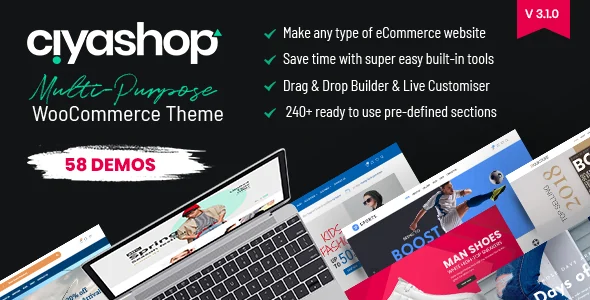 Official preview of CiyaShop — Potenzaglobalsolutions supplied by the developer. Visible text, figures and offers belong to the demo.
Best forCatalogue requiring product information and enquiries.
CiyaShop is an option when the decision requires product information and an enquiry. The local record cites video, a size guide and a product-related form. The builder and demo package need clarification. The 59 USD amount dates from November 2, 2026; no video playback, enquiry or order was executed in this comparison.
Offer pricing
59 USD — Regular License — recorded November 2, 2026
Billing: one-time theme purchase
Renewal and support: 6 months of support; optional extension, price not retained.
Taxes and processing fees excluded.
Checked on .
Strengths
- Enriched product information advertised
- Product enquiry form
What to consider
- Demo media not included
- Exact premium licence inventory to confirm
- For a new shop, confirm the exact WooCommerce version supported; updating a listing is not enough to validate a version absent from the material consulted.
Pricing terms and compatibility
Understanding the offer
- Price at the time of review
- 59 USD — Regular License — recorded November 2, 2026
- Currency
- USD
- Billing
- one-time theme purchase
- Renewal and support
- 6 months of support; optional extension, price not retained.
- Taxes and fees
- Taxes and processing fees excluded.
- Commitment and terms
- Regular offering; separate media rights and external services. Licence for one end product; check appropriate rights for any other project.
- Date checked
Compatibility and components
- Elementor appears in compatibility; WPBakery and Slider Revolution are described in the features. Check the exact template package.
- WooCommerce 8 to 10 appears in the technical fields; a later version is not guaranteed here.
- Elementor Pro licence and standalone module licences unconfirmed; no practical test.
- Last listing update: 2026-08-19. Latest displayed tags: WordPress 7.0.x, WooCommerce 10.x.x. Versions advertised in the text or changelog are stated separately above; no combination was tested here.
PressMart — PressLayouts
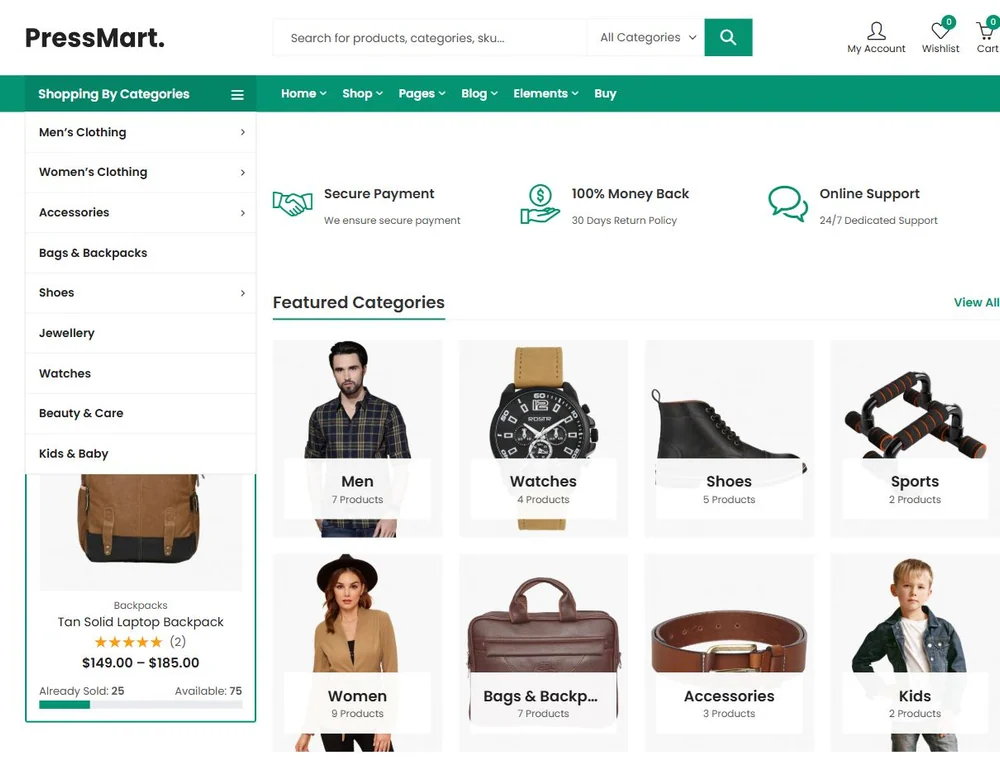 Screenshot of the official theme demo; demonstration products, prices and reviews.
Best forElementor shop with variations and detailed product information.
PressMart is an Elementor option for examining product views, variations and quick add, with PressMart Core and Revolution Slider mentioned in the changelog. Not all standalone premium rights are confirmed. The retained price of 39 USD dates from November 2, 2026; the journey must be checked with fictitious products before drawing conclusions about ease of purchase.
Offer pricing
39 USD — Regular License — recorded November 2, 2026
Billing: one-time theme purchase
Renewal and support: 6 months of support; optional extension, price not retained.
Taxes and processing fees excluded.
Checked on .
Strengths
- Product views and variations advertised
- Comparison and mini-cart
What to consider
- Demo images excluded
- Premium component rights not fully confirmed
Pricing terms and compatibility
Understanding the offer
- Price at the time of review
- 39 USD — Regular License — recorded November 2, 2026
- Currency
- USD
- Billing
- one-time theme purchase
- Renewal and support
- 6 months of support; optional extension, price not retained.
- Taxes and fees
- Taxes and processing fees excluded.
- Commitment and terms
- Regular offering; assess external premium modules separately. Licence for one end product; check appropriate rights for any other project.
- Date checked
Compatibility and components
- Elementor; PressMart Core and Revolution Slider mentioned in the changelog, without a guaranteed standalone key.
- The description advertises WordPress 7.0 and WooCommerce 11.2.x.
- Dokan, WCFM and other vendor modules compatible according to the author; professional editions and Elementor Pro are not assumed included.
- Last listing update: 2026-10-13. Latest displayed tags: WordPress 7.0.x, WooCommerce 10.x.x. Versions advertised in the text or changelog are stated separately above; no combination was tested here.