Web hosting
1984 Hosting for WordPress in Iceland: pricing and backups
1984 Hosting’s WordPress plans in Iceland, initial and renewal terms, migration, the Security Pack and backup limitations.
Read more →

Site appearance
Web hosting
Three WordPress offers in Armenian drams. MyWeb panel, Armenian support and an advertised first-year annual promotion.
Source published: · Source updated: · Editorial policy
Visit the official MyWeb.am website ↗
This profile is based on published offers and documentation. No new hosting benchmark or support test was performed for this translation.
Prices retain the market, currency and billing period described in the French source. Translation does not update a commercial quote. Confirm the final price, taxes and options before ordering.
| Plan | Price and billing | Resources and limits |
|---|---|---|
| Start | 3,500 AMD per month. 21,000 AMD displayed for the first year. Renewal: 3,500 AMD per month displayed after the first month. Crossed-out annual reference of 42,000 AMD. Confirm annual renewal. Prices recorded on 11 November 2026. Monthly and annual cards. Confirm annual charging schedule and taxes. | 10 GB SSD. Preinstalled WordPress, SSL, SFTP and database. Confirm absolute CPU and memory values and backup retention. |
| Turbo | 7,500 AMD per month. 45,000 AMD displayed for the first year. Renewal: Confirm renewal. Crossed-out annual reference of 90,000 AMD. Prices recorded on 11 November 2026. Monthly and annual cards. Confirm annual charging schedule and taxes. | 50 GB SSD. Preinstalled WordPress, SSL, SFTP and database. Confirm absolute CPU and memory values and backup retention. |
| Super | 11,500 AMD per month. 69,000 AMD displayed for the first year. Renewal: Confirm renewal. Crossed-out annual reference of 138,000 AMD. Prices recorded on 11 November 2026. Monthly and annual cards. Confirm annual charging schedule and taxes. | 100 GB SSD. Preinstalled WordPress, SSL, SFTP and database. Confirm absolute CPU and memory values and backup retention. |
MyWeb.am offers WordPress plans in Armenian drams. Its public page presents WordPress ready to administer, backups and a monitoring panel. The starting price and rate displayed after the first month must be distinguished when budgeting. Plan choice then depends on sites to operate, published resources and how the team wants to retain control of operations.
The profile follows an Armenian workshop publishing schedules and announcements. Its team wants to detect when a page no longer presents expected content even if the server responds. The local exercise combines response status with a visible site-specific marker. It uses fictional observations and helps define conditions triggering a human check. Hosting-panel capabilities and contract terms must be assessed separately.
The English, Armenian and Russian versions downloaded directly agree on the three monthly and annual cards. Start displays 3,500 AMD for the first month then 3,500 AMD per month on the English page. The 11 November review of all three versions gives the same monthly price. Cart prices and options must be reconciled with this record when ordering. For annual billing, cards show a 50% first-year discount with a crossed-out amount for each tier.
For Start, the English page specifies the price after the first month. For annual billing, crossed-out references indicate the price level without the first-year discount. The pages do not explicitly confirm that these three amounts will be charged at renewal. In a two-year budget, record the first cycle separately and leave the following cycle pending confirmation. The FAQ states that automatic renewal through a stored card is available. Monthly charging is also mentioned beneath the annual cards. Request the first-cycle total, charging schedule and next-cycle amount in the quote.
The general terms linked by the site distinguish price, payment schedule and order-specific details. To maintain the budget, note currency, possible taxes and the payment method actually accessible. The FAQ notably mentions Ameria Bank, Evoca Bank, IDram and Telcell. If the team already owns a domain, ask to attach it instead of ordering it again. Registration cost and a professional mailbox’s cost should appear on separate lines when applicable.
The grid gives 10 GB SSD on Start, 50 GB on Turbo and 100 GB on Super. Turbo and Super present processor and memory resources as higher without giving the reference core count or memory amount. Request absolute values for a project running long operations or serving a catalog. Start is presented for one WordPress site. A panel for multiple sites does not specify how many are covered by a single subscription.
The provider mentions 50,000 visitors per month for Start in its presentation and uses another designation for the measure in a comparison table. Clarify the counter definition, service level at this volume and what happens if the site exceeds it. The site’s speed comparisons concern historical measurements identified in a note. For a current project, testing the pages and connections actually used yields a measurement tied to its needs.
The public baseline advertises SSL, SFTP and database access. The page also presents some features as forthcoming, including the MyWeb CDN and private email. A separate note describes a Host24 CDN subject to domain conditions. Ask which service is actually available for the plan, which options are charged and whether backups occupy the advertised SSD space. For a brochure site, these questions can be checked using a sample domain and representative file volume.
Public pages are accessible in Armenian, English and Russian. The FAQ states technical assistance in Armenian is available around the clock. The page offers chat access. Languages and response times for other channels remain to be clarified. A multilingual publishing team can prepare an incident note with the address, time, page and observed result. Whoever contacts support must be able to distinguish a content problem from an interruption.
MyWeb presents its own management panel and WordPress access. Languages actually available after login have not been tested. For a team delegating maintenance, check which accounts provide domain, backup and file access. The publishing owner can work in WordPress without managing the payment method. When needed, SFTP access must be retrievable by the person responsible for recovery.
The terms designate a provider under Armenian law, and the page presents MyWeb’s own servers. Ask for the exact storage country of each instance and its copies for the chosen contract. For a service aimed at an Armenian audience, test the journey from connections that audience uses. Also record differences between a public page and an action loading the application. A hosting-status dashboard and access to a WordPress page may provide different indications during an incident.
MyWeb describes automatic site creation, backups and restoration through its interface. The FAQ advertises automatic backups and mentions SFTP file access. The selected sources give no detailed frequency, retention or scope for each tier. For recovery, ask for the latest copy’s age, database inclusion and export arrangements. The project must be able to reopen an independent copy before considering the procedure ready. An editorial export alone lacks all data needed to reconstruct plugins and files.
The page presents a monitoring panel and publishes availability figures. Super notably advertises 99.99%. The consulted sources do not detail the measurement window, exceptions or compensation for this figure. Clarify the scope in the contract. A status page may show infrastructure responding while the application serves a holding page or unexpected content. For a public announcement, the owner can agree on a page marker to examine after maintenance.
According to page notes, some cache settings are handled by the MyWeb system. The provider also mentions restrictions on activating certain plugins. Check compatibility of tools essential to your site. After a change, observe the version actually visible in a browser and, if necessary, compare it with the version loaded from the test site.
The MyWeb page presents templates, WordPress installation and plugins such as WooCommerce, Jetpack and Yoast. The consulted public pages quantify no generation credits and document no AI assistant included in Start, Turbo or Super. For a feature offered by a third-party plugin, check its plan, account owner, languages and data use. Caching and automatic installation are separately described services.
The workshop can draft an announcement from already approved opening hours. Review in the audience’s languages must check place names, links and opening days. Frequently changing text deserves a dated reference alongside the publishing account. If a generation plugin modifies content in bulk, plan a copy and a way to check what was actually written in WordPress. Also ask how to disable the tool and retrieve its files if the site moves.
The local exercise uses a technical marker associated with the expected page. Choose it from content controlled by the team. A string likely to change with every rewrite or language change may trigger alerts without a real incident. Choose an element stable for a defined period, then verify that it appears publicly, including from a session without an account. If visible text changes, update the criterion with the page owner and retain the reason in maintenance notes.
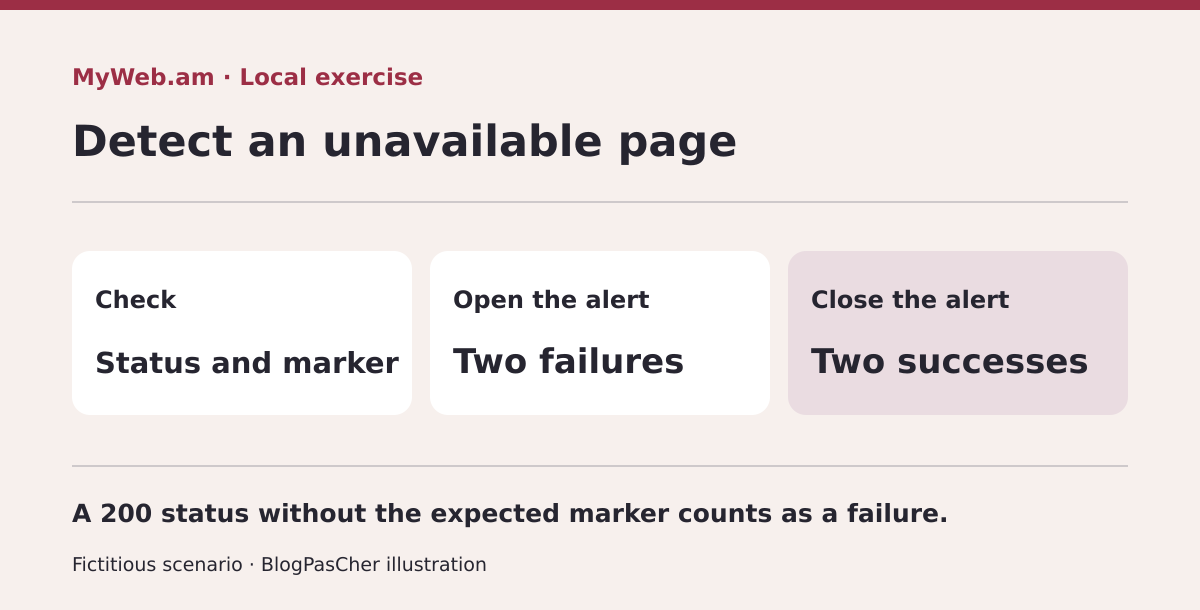 The model reads four sequences of fictitious responses and applies the same threshold to opening and closing. — Illustration by BlogPasCher.Open full-size illustration ↗
An Armenian organization publishes a program and wants to identify when the page serves different content. It simulates responses received one minute apart. Each observation has an HTTP status and short text. The exercise rule expects status 200 and the fictional marker PROGRAMME-OUVERT. It triggers an alert after two consecutive invalid observations and closes it after two consecutive valid ones. Thresholds belong to the local exercise. MyWeb’s public sources do not establish an identical panel feature.
Extract the ZIP and run this command in the extracted folder.
Four synthetic sequences are analyzed. An isolated 503 response is followed by a compliant page. A persistent outage contains two 503 responses. Another case retains two 200 statuses but loses the marker. The last simulates an outage followed by two compliant responses. Compare output with RESULTAT-MYWEB-AM.json. The first case triggers no alert. The other three open one at minute two. Only the last closes it, at minute four, after two consecutive compliant responses.
Replace the third scenario’s second incorrect marker with the expected one. The alert should no longer open. To prepare a real check, agree on a public page, stable marker and person interpreting changes. For a site stuck on a maintenance page, retain the time it appeared and operations performed immediately beforehand.
node EXERCICE-MYWEB-AM.cjsStart suits a brochure site whose files and database fit within 10 GB and whose team can use the advertised Armenian assistance. SFTP access and restoration availability deserve testing if the project depends on rapid recovery. For the most important pages, identify the address and content that should appear even during intervention. The workshop must be able to have a fault observed and request help from the contract-owning account. Provider speed figures are a starting point for service questions. A comparison on the workshop’s own site will measure the journey that matters.
Turbo and Super increase space and advertise relatively higher resources. Before selecting them, ask for absolute values, traffic-measurement rules and covered installation count. If a site has large media, record occupied size and what can be archived elsewhere. If visitors use a form or logged-in area, test those journeys with an acceptance-test account. Improving a public page does not reveal the behavior of a dynamic action. For Super, confirm clauses applying to the grid’s availability figure and the channel to use if the panel shows an interruption.
To compare cycles, ask for the amount actually charged and date of each payment. Record the crossed-out annual reference as an assumption until the corresponding renewal is written down. For monthly Start, retain the 3,500 AMD indication after the first month and grid date. Check taxes, plan-change rules and how to end automatic charging. The contractual order document must specify details of the chosen service. Also ask whether domain and email are included or must be priced elsewhere.
At acceptance, open the page from a browser without an account, compare the program marker, then check editorial access and a restoration copy. The team can record results with the date, tested address and name of the person handling an alert. To avoid confusing text changes with incidents, document the marker in the site notebook and revisit it when pages are reorganized. Someone taking over monitoring must be able to reconstruct the test without knowing the full project history. The local exercise gives a simple example of this check before considering automated monitoring.
Use these references to check the features, requirements and limitations described. Reading documentation is not a practical test.
English translation of the reviewed French edition. Code examples retain their original identifiers, comments and output strings for reproducibility. Linked exercise files and original screenshots may contain French. No new practical tests or price checks are implied by translation.
1984 Hosting’s WordPress plans in Iceland, initial and renewal terms, migration, the Security Pack and backup limitations.
Read more →Compare 34SP.com WordPress containers, shared memory, staging copies, downloadable snapshots and site migration.
Read more →Compare AEserver’s managed WordPress prices and check whether your network must be split into independent installations before migration.
Read more →