

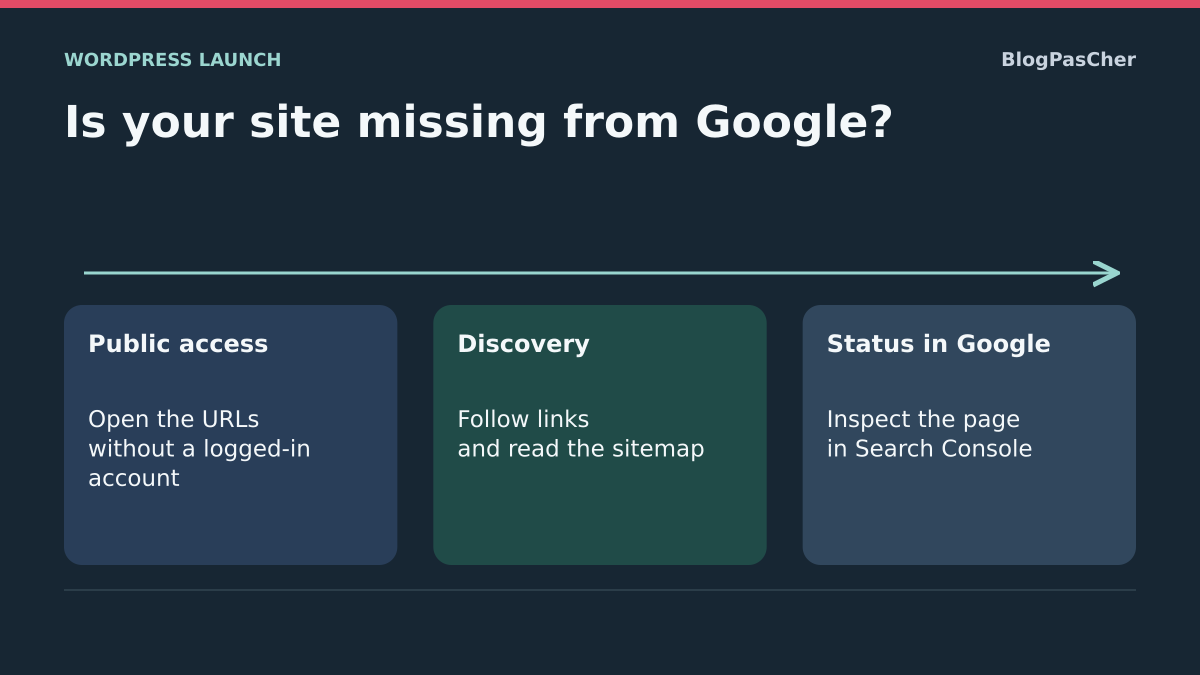
Distinguish missing indexing from limited visibility
You have just launched your WordPress site but cannot find it in Google. Start by distinguishing three stages: Google discovers an address, crawls its content and then may decide to index it. Display for a particular search comes afterward. An indexed page may remain difficult to find for a competitive phrase.
Searching for the site’s business name is therefore insufficient to conclude indexing has failed. The site: operator can provide clues, but its list is not exhaustive and its result count is not a reliable count of every indexed page. For an important address, use Search Console URL inspection when you have access.
The goal is to identify the stage essential pages have reached, correct a confirmed obstacle and help discovery. No procedure guarantees their inclusion or a ranking date. Do not buy a service promising immediate indexing before checking whether the page is simply new, inaccessible, deliberately excluded or already known under another address.
Choose a few reference pages and their final addresses
Prepare a small launch record: the homepage, an important service or introduction page and representative editorial content if the site has any. Use their final public addresses without preview links or session parameters. The number of pages in this sample is a working choice, not a Google requirement.
For each, record publication date, expected domain and what visitors should actually read. Distinguish HTTPS, any www prefix, subdirectory and language. An old redirecting address and the final page are not the same URL to inspect.
This record avoids mixing results from several variants during corrections. It also compares a general fault with one isolated page. Do not try to index every internal search result, archive or technical URL. Prioritize content answering a useful need that you actually chose to make public. Keep private areas and staging outside this scope.
Check what a logged-out visitor actually receives
Open reference pages in a session without WordPress login. Check complete content and the final address, not just a title or waiting page. An administrator may see a preview or bypass a restriction Google will encounter. A page accessible only after login does not meet public-access conditions needed for ordinary indexing.
In Pages, All Pages, or Posts, All Posts, confirm that every launch item is published rather than left as a draft, pending or private. If protection is intentional, retain it. Do not remove a confidential document’s password solely to increase indexed URL totals.
On self-hosted WordPress, also open Settings, Reading and record the discouragement-of-indexing setting. A checked box provides a configuration clue to address only for pages actually intended for the public. It is not a privacy mechanism. If the page displays an error, protection challenge or unexpected redirect, first fix that route before requesting recrawling.
Open the Search Console property matching the site
Search Console lets you consult information Google supplies about your site. You need authorized access to the relevant property. If a provider already manages it, ask for appropriate access instead of creating a competing property with an account the organization does not control.
In the property selector, choose the domain or prefix matching reference pages. A URL-prefix property is limited to the exact prefix, including protocol. A domain property more broadly covers protocols and subdomains. Missing data in an HTTP property proves nothing about an HTTPS page outside its scope.
If no suitable property exists, open the selector, then Add property and choose the type matching your access. This organizes monitoring; it does not publish the site or cause indexing. Retain the owner account’s identity and the access manager. Do not use a colleague’s Google credentials to complete a diagnosis.
Verify a new property without changing the domain destination
For a domain property, verification uses DNS. This approach suits users controlling the DNS zone or able to involve its manager. It adds ownership proof; it does not require moving the site to another server. Interfaces differ by DNS manager, so also follow its instructions for the Host or Name field.
If you lack these permissions, use a method offered for a URL-prefix property or obtain access to an existing property. Do not change mail records or the server address in an attempt to verify Search Console.
- On the verification screen, obtain the TXT record specific to your property when this method is offered.
- At the active DNS-zone manager, add a TXT record with the requested name; at the root, the provider may require @ or an empty field.
- Paste the complete Google-provided value without replacing another existing record.
- Save, then return to Search Console and click Verify. If proof is not yet detected, check the zone used and allow the necessary propagation time.
- Retain the verification record after success: removing it may lose ownership proof.
First consult a page’s last known state
In the correct property, paste a reference page’s full address into Search Console’s top inspection bar. Consult status and detailed non-indexing reason, then record the crawl date where available. This first result describes information known to Google; it does not automatically represent the current page.
Compare the date with launch. If it precedes removal of a waiting page, the result may still reflect that old state. Do not change the entire configuration again to fix a historical observation. Retain this comparison point before running the live test.
If Google indicates another canonical URL, record it instead of immediately submitting the same page under several variants. Inspection should help select a precise action. Then examine a second reference page to determine whether the reason affects the launch broadly or just one item.
Compare with the live URL test
From the inspection result, click Test live URL. Read the current result and compare it with the retained earlier result. If the tool lets you view the tested page, check that its content matches launch rather than a waiting page. Success only indicates that this check found no certain obstacles; it does not guarantee indexing.
Record the test date separately from the last known crawl date. If the historical obstacle disappeared, the next issue may be adoption of the new version. If the same block remains, correct it before repeated requests.
Keep final URLs stable during comparison. Changing domain, title and path on every test makes results difficult to interpret. If you discover a redirect, also identify its target by normally opening the public address; do not assume the live test necessarily describes the old address entered.
Choose a correction based on the confirmed reason
A noindex reason leads to finding the exclusion instruction still sent. If the only confirmed cause is the native Settings, Reading checkbox on a site truly ready for the public, uncheck the discouragement request and click Save Changes. Repeat the test; other page settings or headers may still exclude content. Keep the initial value to reverse this change alone if launch must be canceled.
A robots.txt block concerns crawling: examine the rule applicable to the path without replacing the entire file with a generic template. A redirect or another canonical page may explain why the inspected variant is not indexed separately. A server error requires restoring a normal response with hosting.
Prioritize the reason actually preventing processing of the reference page. Avoid combining a new SEO plugin, permalink change, robots.txt deletion and general purge. After each correction, check the same content and record its effect. Deliberate exclusion of a technical page must not become a launch incident.
Make a launch-ready WordPress.com site public
On WordPress.com, a page may appear ready in your account while the whole site remains Coming Soon or Private. This approach concerns only a site whose publication you approved. First check that no confidential content or working document will become accessible.
In the site dashboard, open Settings, Reading, then Site Visibility. If already launched, select Public and click Save Changes. If not yet launched, instead follow the launch action offered there. Do not choose a plan change as the default solution to simple nonpublic visibility.
Then open the homepage and reference pages without login to verify what visitors receive. If an old waiting page persists, first examine the relevant cache. To return to previous visibility, use the same screen, knowing visitors or bots may have seen content while it was open. Making the site private again does not instantly remove every already distributed trace.
Provide a discovery path to essential pages
If a page is public but not yet well known, check that it can be reached from an accessible site page. Content present only in administration or a private document does not offer the same discovery path as a public link. For this first launch check, choose a reader-useful link without turning the whole footer into a catalog.
The expected result is an ordinary link opening the correct page during a logged-out visit. This helps discovery without guaranteeing Google will retain it. Keep the source page’s initial text to undo this addition alone if its placement is unsuitable.
- In Pages, open a relevant public page visitors can already reach.
- In a Paragraph block, write a short sentence genuinely introducing the destination page.
- Select words describing that destination, use Link or Ctrl+K, then insert its final public address.
- Confirm the link and save the page with the usual update action.
- In a logged-out session, open the source page and follow the link. Correct its destination if you arrive at a preview, login or error.
Submit the sitemap already available
A sitemap is a file signaling URLs to crawl. It may help a new site, but reading it does not guarantee indexing of every page. WordPress has a native system, usually accessible at wp-sitemap.xml at the installation’s public root; a plugin or configuration may replace or disable it. Use the address actually available, not a supposedly universal name.
Open this sitemap without login and confirm it concerns the final domain. If an SEO system already manages it, retain that owner instead of installing a second generator. A reading error or staging URLs require correcting that system before submission.
In the appropriate Search Console property, open Sitemaps. With required owner permissions, enter the file address in Add a new sitemap, then click Submit. Return to read status and any details. Successful reading validates file processing, not every page. If you later remove a report entry to undo an incorrect submission, Google does not thereby forget URLs already discovered.
Request targeted crawling after checks
For a few important pages you control, URL inspection offers Request indexing. This requires an owner or user with full property access. Use it after checking content is public and the known obstacle corrected, rather than trying to bypass a still-active exclusion.
Select the final address in inspection, use Request indexing and read confirmation or rejection reason. Record the date in your launch record. Acceptance is a processing request, not a promise of inclusion. Crawling may take several days or weeks, and not every requested page will necessarily be indexed.
Individual requests are quota-limited; repeating them for the same URL does not accelerate crawling. For many addresses, prefer the existing sitemap. There is no undo button canceling a crawl already performed: therefore verify public content before submission. Never submit private preview links hoping to make a future page discoverable.
If the page is crawled but still not indexed
Crawled — currently not indexed means Google already visited the page without retaining it in the index at this stage. Discovered — currently not indexed means a known address not yet crawled. Do not turn either into an automatic penalty diagnosis or certainty that a plugin is missing.
When access works, reread the page as a visitor: does it answer a precise question with information promised by its title? A service page with only two placeholder sentences, a demonstration catalog or text duplicated from another site deserves editorial work before another request. Add information necessary for the reader’s decision, not text to reach a supposedly favorable word count.
Also compare similar variants: several nearly identical pages may have little reason to be indexed separately. Identify their roles before deleting or redirecting anything. Retain original content during analysis and have consolidations approved. No SEO score or arbitrary length guarantees a page will ultimately be selected.
Check specific restrictions without assuming a penalty
In Search Console, consult Manual Actions and Security Issues reports when a signal warrants it, particularly for a reused domain or older installation. A reported manual action requires reading its reason, correcting the problem and following the corresponding reconsideration process. An ordinary indexing request does not replace it.
A security issue calls for addressing the site and access before trying to accelerate discovery. Supplied example URLs are clues to examine, not necessarily a complete list of everything affected. Have evidence retained and use a private channel for sensitive information.
An empty report does not prove every ranking condition is met; it simply prevents inventing a reported action absent from that screen. For an ordinary launch without another clue, do not start by changing domains or reinstalling WordPress. Base each intervention on an observation and keep content, security and hosting owners informed within their scope.
Monitor launch with verifiable criteria
Revisit your record after corrections: each reference page must display the correct content without login, retain its final address and have consistent technical status. Record live tests, any sitemap submission and individual requests. Later check Google’s known state with its date instead of repeating identical actions minutes apart.
Technical resolution and the indexing decision are two results to record separately. You may have removed a waiting page and validated access while Google has not yet retained the content. Conversely, an old version may remain known while the current site has a new problem. This distinction makes monitoring more useful than a simple green counter.
To request help, provide reference pages’ final URLs, launch dates, property type, inspection reasons and changes made. Share neither a Google account, DNS access nor database backup. Specify whether the site is self-hosted, on WordPress.com or in multisite. This record addresses the actual obstacle without promising an indexing date or repeating already verified settings.
Test launch with three specific URLs
Use the homepage, a service page and a contact page. For example, record the domain root, /reparation/ and /contact/. Optionally add an intentionally restricted page as an exclusion control. For each public address, record the final response, first text actually received, presence of a noindex directive and whether the page is reachable through a link. Test without a logged-in account. A waiting page may return 200 and still be an incorrect response for this check.
If you have terminal access, replace the address below with the exact public URL. On Windows, use curl.exe if your shell interprets curl differently. The command performs GET, follows redirects, shows each response’s headers and saves final HTML in a local file. Read the last header block to find X-Robots-Tag. Then open the file as text to find the robots tag, canonical and expected text. This command uses ordinary visitor access. Search Console tests Google’s access to this URL.
curl -sS -L -D - -o page-temoin.html https://exemple.test/reparation/Repeat the same observations after each correction
On a copy, choose a fictional homepage and service page. Record noindex when the native setting discourages search engines. Change only that setting for the exercise and check disappearance of that instruction, native sitemap access and retention of the homepage link. Then restore the initial setting and verify its effect. These local checks do not prove Google indexing: observing that requires an authorized public URL and Search Console property.
Apply the same reasoning to your sample. If the homepage is normal but /reparation/ returns 404, correct that page’s address or publication. If several public pages all return an exclusion instruction, first identify the shared setting. If the contact page alone is missing from menus and everything else works, create a link from a useful public page and verify its destination. For every intervention, keep a copy of the previous rule, link or setting so you can restore that change alone.
Decide from inspection and its timestamp
In Search Console, open URL Inspection for the service page. If known status indicates exclusion by noindex but the live URL test now sees correct content and permits indexing, record the change time and last known crawl date. A difference between these observations may correspond to a historical state. With required permissions, you can request crawling for this important URL, then review the record after another examination.
If known status says “Discovered — currently not indexed,” check the link from an already accessible page and the final URL’s presence in the relevant sitemap. If Google reports having crawled this URL without indexing it, compare the page with another serving the same function. In particular, check that it meets a distinct need, presents expected content and identifies the correct canonical URL. Correct an observed problem before submitting another request. If already indexed, then use the property’s Performance report and page filters to examine available impressions. A URL may be indexed yet appear rarely for queries you track.
Check that robots.txt does not hide the noindex instruction
A page blocked in robots.txt may prevent Google from reading its noindex instruction. Therefore do not combine these methods assuming their effects add together. For a page intended for search, separately check crawling permission and absence of an exclusion instruction in HTML or headers.
For a confidential document, retain actual authentication: neither a robots rule nor noindex protects content from direct access. For a public page you want removed from the index, choose the appropriate exclusion process and verify that the crawler can observe the intended state. Keep the previous robots file and change only the confirmed path. Afterward, compare Search Console’s live test with the last known crawl; their timing difference may explain a discrepancy without requiring another change.
Sources and references
Use these references to check the features, requirements and limitations described. Reading documentation is not a practical test.
View 22 references
- Google: how crawling and indexing work ↗
- Google: technical requirements ↗
- Search Console: URL inspection ↗
- Search Console: reasons for non-indexing ↗
- Search Console: property selection ↗
- Search Console: ownership verification ↗
- Google: site operator limits ↗
- WordPress: Reading settings ↗
- WordPress.com: site visibility ↗
- Search Console: sitemaps report ↗
- Google: the role of sitemaps ↗
- Google: request recrawling ↗
- Google: helpful content ↗
- Google: crawlable links ↗
- WordPress: paragraph link ↗
- Search Console: manual actions ↗
- Search Console: security issues ↗
- Google: crawling diagnosis ↗
- WordPress: private and protected content ↗
- WordPress: native sitemap server ↗
- Google: search performance report ↗
- Google: block indexing with noindex ↗