

Identify the import’s first rejection
You selected an SQL backup in your hosting provider’s tool. Uploading stops, the browser displays an error or progress disappears. Record the first message with the time and stage reached. A transfer rejected before starting, a web response that stops waiting and an instruction rejected by the database engine require different interventions.
Start by confirming the format. An SQL file describes tables and their data. WordPress Tools → Import handles compatible content exports, including WXR in XML format. For an SQL file, choose phpMyAdmin, the hosting service’s database import or an authorized terminal. An archive may contain a database and several components. Read its inventory before choosing what to send.
Record the copy and database names, the declared source engine and the engine receiving the file. If the error mentions an unknown collation or syntax, retain that message as the primary cause. Reducing transfer size does not make a collation available. In multisite, the file may contain several sites’ tables and shared tables. Have this scope confirmed before choosing a test database.
Preserve the archive and establish the starting point
Keep the original file read-only in a private location and use an identified copy for testing. Record its hash and size, including SQL size if the archive is compressed. The database may contain addresses, access information or confidential settings. Share the message and context with the maintainer while omitting file content.
Prepare a separate database whose name and server you know. If the WordPress copy already exists, also back up its database and files. Identify a post, media item and setting that will let you recognize the pretest state. If failure occurs, you can compare these markers or restart in another empty database. This rollback must remain possible even if the dashboard no longer opens.
Check the copy’s external effects. A restored site may retain sending settings, scheduled tasks, subscriptions or integrations. Use your environment’s isolation procedure and perform checks with fictional data. A copy intended to examine an import does not need to receive visitors from the active installation.
Approach 1 — Handle a transfer rejected by the tool
If the screen displays a limit before import or the response is 413, record the request size and responding service. A proxy may reject the request before PHP. A PHP limit may also prevent the application from receiving the file. For a web import, upload_max_filesize concerns the file and post_max_size covers the entire request. The interface ceiling may also reflect a provider-specific rule.
In the browser’s Network tab, record the code, panel address and time of the single attempt already made. Ask the hosting manager which component rejected the request and what import method they offer for this volume. If the panel accepts compressed files, check the advertised format. A lighter transfer may reduce transmitted volume, while decompressed SQL, required space and engine limits still need checking.
If hosting offers to read a backup placed in a private location, follow its workflow for the correct test database. Check temporary storage limits and how to remove the archive after validation. If this route remains subject to the same ceiling or the panel provides no alternative, move to the command-line procedure or request a supervised import.
Approach 2 — Read database state after a timeout
A 504, 524 response or a page that stops waiting describes the web request. Correlate its time with tool and database logs. Ask whether an import task is still running and record its state before another attempt. An interruption may have left tables or rows even when the browser showed no confirmation.
On the copy, compare table lists before and after. Choose two expected tables and compare their rows with source reference points. A present table may still be incomplete. If the provider supplies a report or task identifier, correlate the last write time with the last SQL message. Wait for completion or use the documented stop procedure before restarting from another state.
If the database is partially populated and the tool documents no resumption from a reliable point, retain it during diagnosis. Restart in a new empty database or restore the copy’s starting point. A raw import may contain table creation or deletion instructions and writes committed in stages. Rerunning in the same database may cause conflicts or duplicate data that the file adds without a unique key.
Approach 3 — Import directly into the test database
The terminal suits users with access to the copy’s directory, database credentials and a compatible client. Check its configuration for the expected server, database and prefix. Confirm that the test database exists and the test account has the necessary permissions on it. Some files contain their own USE or database creation instructions. Have the maintainer examine those lines if the file was not exported for this destination.
From the copy, the first command displays the configured destination. The second reads SQL and sends it to the engine using that configuration. Replace the copy path and filename with those for the test. The database must have been prepared beforehand. This operation writes to the selected database and requires the rollback point prepared above.
The direct route removes the browser import request. It still depends on the SQL client, permissions, engine version and connection limits. Keep completion output and examine the first failure message instead of using an option that continues despite errors. If using the SQL client supplied by hosting, follow its authentication mechanism and keep the password out of the command line and shared files.
If the provider must perform this import, send the size, engine, backup set and test destination name through its private channel. Request completion output or the first error and the scope actually written. Have them confirm that the live database remains outside this operation.
wp --path="/chemin/vers/la-copie" config get DB_NAME
wp --path="/chemin/vers/la-copie" db import "./reprise.sql"
Examine the SQL ceiling if the engine rejects a packet
An explicit max_allowed_packet message points to the size of an instruction or data sent to the engine. Total file size is only a clue. A large file may contain thousands of small instructions, while a single grouped insertion may exceed the ceiling. A dropped connection without a detailed message may also have another cause.
In the test database’s SQL tab, you can read the database and effective server values again. The client-side size may differ. Execute these reads in the context actually used by your import and compare them with provider information before requesting a change.
If the export groups many rows into one insertion, the original tool may offer a new export with smaller groups. Preserve structure, dependency order and character set. Avoid splitting SQL at an arbitrary size. A split may fall in the middle of a statement or string, and a single very large value requires another approach. Have the SQL administrator size an appropriate limit only for an established need. The setting may affect several sites sharing the same instance.
SELECT DATABASE() AS base_courante,
       @@GLOBAL.max_allowed_packet AS limite_serveur,
       @@SESSION.max_allowed_packet AS limite_session;
Compare the three results on a copy
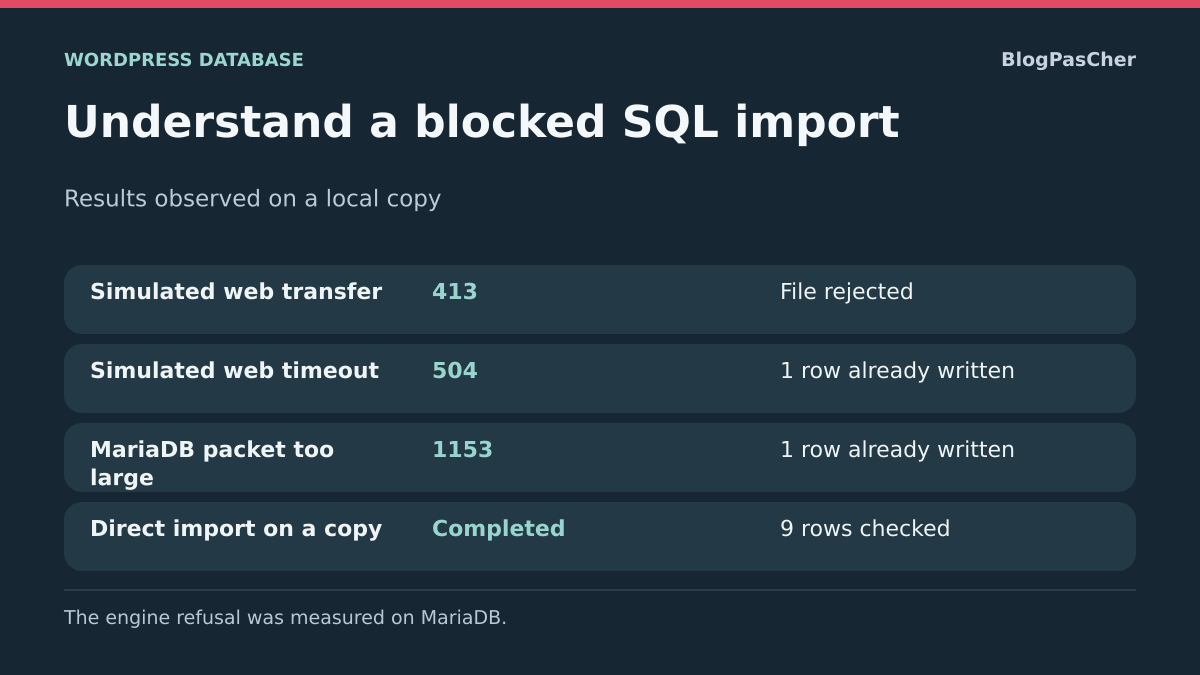
Distinguish three scenarios during diagnosis: file rejected before receipt, web response interrupted after writes, instruction rejected by the SQL engine. The symptoms below are illustrative and are not a recording executed on your hosting.
For each scenario, record the time and relevant database. Missing web confirmation does not indicate whether rows were already written. SQL client success still requires content checks. Retain useful evidence without exposing the dump or personal data.
Transfert refusé avant import       vérifier le plafond Web/PHP
Réponse Web interrompue             vérifier le traitement et les écritures
Instruction SQL refusée             conserver la première erreur du moteur
Import annoncé réussi              vérifier le jeu complet et ses relations
Verify restoration with concrete reference points
Compare expected tables and the WordPress prefix. Record useful accounts on the copy using only authorized access. Open two posts, a media item and a known business setting. A database import may restore a record and its address while the media bytes belong to the file backup. Check the actual image response and theme functionality before considering the site recovered.
For a sales or subscription site, also compare frequently changing data. An older restoration may remove orders, restore a payment state or change scheduled tasks. Keep the public site outside the test and have recovery of this data validated with the responsible person before any destination change.
If identifiers, tables or links differ from the expected result, return to the copy’s starting point and retain evidence of where processing stopped. Keep a partial test database while understanding the stopping point; always preserve the source file. On a copy already containing other work, restore the initial set or create a new destination instead of manually deleting tables.
Check the written scope with two simple reads
When the engine still responds, start with tables the set must restore. In the fictional example, the table is named wp_temoins and the last expected row has identifier 9. First check that the table exists, then read only row count and maximum identifier on a small reference table. These fictional names do not exist in WordPress by default.
On your copy, select a table and known source markers. A missing table may show that import stopped before its creation. A present table with only one of nine rows shows another state. Count and maximum identifier may also match despite an incorrect row. Open a few reference entries or compare them with the export report before validation. For a very large table, ask the responsible person to choose a targeted read of a few already known keys.
Keep these read outputs with the tool result. A message such as “queries were executed” indicates that the engine processed part of the file. The expected result is restoration of the complete set and its useful relationships. If a test database was empty before import, record tables present at the stopping point and restart in another clean database after correcting the cause.
First run the information_schema.TABLES read in the selected test database. Proceed to counting only if the expected table name appears, then adapt that name in both reads. Equality comparison avoids treating the _ character as a LIKE wildcard.
SELECT TABLE_NAME
FROM information_schema.TABLES
WHERE TABLE_SCHEMA = DATABASE()
  AND TABLE_NAME = 'wp_temoins';

SELECT COUNT(*) AS lignes, MAX(id) AS dernier_id FROM wp_temoins;
Reexport in batches when the source is still available
This method is useful if the import route works but a monolithic file or grouped insertion exceeds a confirmed limit. Ask the backup producer which export settings preserve table order, keys and character set. Some tools can group fewer rows per insertion. Others can export table sets accompanied by a recovery order.
Before dividing the set, record tables essential to the installation and dependencies between them. Exporting posts alone may omit their authors, metadata or media relationships. For a store, separate components may store orders, payments and tasks. Have files from the same recovery point validated together instead of mixing fragments from different origins.
Import the complete batch once on an empty copy. Record the order each part is applied and check reference points after the last part. If the source no longer exists and you have only one file, preserve it and have a copy examined. Mechanical splitting by byte count does not account for file syntax or dependencies.
Prepare a report for the hosting provider
Gather file type, compressed and decompressed sizes if different, engine and version, test destination name, time and first useful message. State whether processing remains active and which writes you confirmed. Also describe the successful route and reference points validating the result.
If your managed plan provides no separate database, ask the provider for a test environment or recovery service. A hosting restoration and manual SQL import may cover different components. Have the scope, date and rollback method confirmed before choosing an action on the live site.
Confirm the complete destination before a WP-CLI import
DB_NAME alone is insufficient if two servers have databases with the same name. Before importing, also compare DB_HOST and the copy’s directory with the hosting-prepared record. The test SQL account must target this destination. Keep the password out of screenshots and the report.
WP-CLI executes the SQL file’s contents; it does not automatically limit them to expected WordPress tables. Have USE, CREATE DATABASE and database-qualified names checked before execution. On a multisite network, --url does not turn a complete network database dump into an import limited to one subsite: the scope comes from the SQL file.
For beginners, a hosting-provided import may avoid the terminal, provided a test database is explicitly selected and a report obtained. A content import plugin does not replace this operation. After success, check tables and some useful relationships, then the restored site’s files. If partial failure occurs, retain the first error and restart from a clean destination; do not treat success of a new attempt as proof that no duplicates exist.
Sources and references
Use these references to check the features, requirements and limitations described. Reading documentation is not a practical test.