

Define what remains in English
You downloaded the French pack and a plugin button still displays ‘Review draft’. Record that exact label and its location. A dashboard menu, a button appearing in the editor after a few seconds and a message on the public page may be produced by different components. Also record the plugin version, WordPress version and target language code. Take a screenshot limited to the label if you need to send the case to the maintainer.
On the same screen, compare text provided by WordPress, such as a standard section label, with two texts from the plugin. If the whole dashboard is English for only one account, start with its profile. If the dashboard is French but all text from one plugin remains English, check its catalog. If only one button is English, that text's version, context or rendering script become more precise leads. Keep an example of a translated string from the same plugin. It serves as a control when making a change.
Some text is already entered or saved in plugin settings. Open the corresponding field if you find it, for example a form-button label someone entered. The text may be an editorial value saved in English while plugin menus translate correctly. In that case, change the value in its intended location, record the old one and open the public page to check output. A field accepting text by language must be filled for the French version. Downloading a catalog affects strings designed for translation.
Approach 1 — Compare account and site languages
Start here if the problem affects one account, a specific screen or an installation whose public site and dashboard have different languages. Each person can check their profile under Users → Profile. An administrator can also check the site's general setting under Settings → General → Site Language. On a network, record the subsite serving the screen or URL, then check its language.
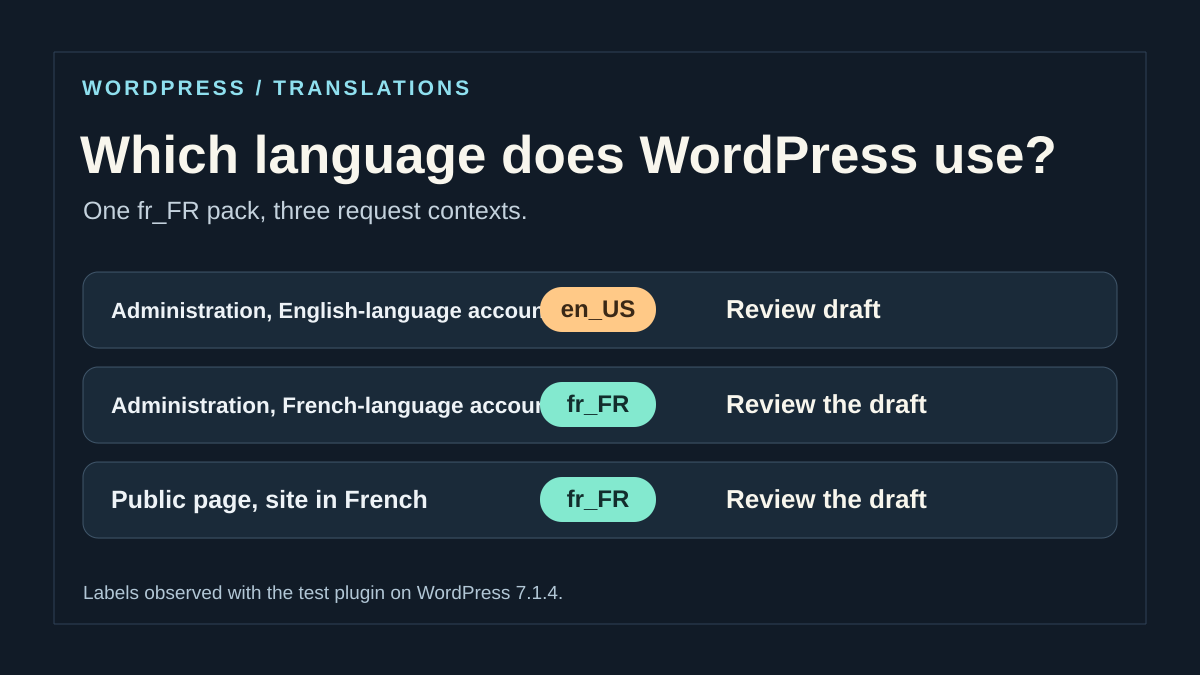
For ordinary administration requests, WordPress generally chooses the account language. For an ordinary public page, the site language is the baseline. A REST call, language switcher or plugin may choose another context. If the problem appears after an interaction without reloading, record the page address and identify whether the interaction starts a request. Checking the initial page is not always enough to determine that request's language.
The expected result after changing a profile is translation of available strings for that account. If the test does not explain the difference, restore the original profile choice and check the catalog. Change the site language only if that is the intended language for the whole site. Before changing it, record the starting value and check other affected screens and pages. Restore that value if the change exceeds the intended scope.
- Open your profile and record the Language field. An explicit choice such as English (United States) may keep administration in English while the site language is French. Selecting the site default follows the site's setting.
- If your account's dashboard should be French, choose French or the default language if the site is already French. Save the profile, reload the exact plugin screen and check the control label.
- Ask a second account with comparable permissions to open the same screen. Keep the same plugin, subsite and version. A difference between accounts helps locate the profile's effect.
- Open the public page in a private window. Compare the same location anonymously and, if relevant to the problem, with the logged-in account. Record the address and selected language on sites providing a selector.
Check the pack's exact language and location
Files are associated with a locale code. French for France uses fr_FR and French for Canada fr_CA. Record the variant chosen by the request or profile. Having some French pack does not guarantee one exists for the requested variant. If French for France is acceptable for this account, selecting it on the copy allows comparison. If the site must remain Canadian French, check what the publisher supplies for fr_CA.
Under Dashboard → Updates, check whether WordPress offers translation updates. With an authorized account on a copy, run the available update and revisit the same screen. For a WordPress-directory plugin, identify its precise listing and version. For a plugin distributed elsewhere, check publisher documentation and the delivered file's version. Two similarly named plugins may use different domains. The visible plugin name helps locate the listing, then the text domain identifies the catalog requested by code.
With file access, start at wp-content/languages/plugins/ on a standard installation. For the fictional domain atelier32-localisation and locale fr_FR, the expected filename may be atelier32-localisation-fr_FR.mo. Recent WordPress can also load a .l10n.php file. A plugin may supply catalogs in its own folder if it declares or registers the intended path. If the installation customizes the languages directory, start from WP_LANG_DIR. To determine which file served the screen, observe loading instead of concluding from the file list alone.
A .po file lets you read or prepare translations. Its presence alone is insufficient for normal PHP loading. Check that WordPress can read the expected file and that it matches the installed version. A pack downloaded before a button was added may contain almost the entire interface while missing that button. Then compare the exact English text, punctuation and, if the string uses context, the context stated in code. Catalog version and control text allow verification after an update.
On a copy, Loco Translate can open the catalog and search for the exact string with punctuation. Compare the displayed domain and locale with those just recorded. If the string is missing or its translation field empty, retain that finding before changing anything. For a string already translated in the file, continue with the loading diagnosis below. That diagnosis concerns native WordPress loading.
Approach 2 — Observe the domain in the affected request
This procedure is for the plugin maintainer or someone with file and log access on a local copy. Ask them to find the English text in the delivered code. In a PHP call such as __('Review draft', 'atelier32-localisation'), the second argument is the requested domain. Compare it with the plugin's Text Domain field and catalog name. If the call's domain differs, WordPress searches that other domain for the translation. A readable file containing ‘Review draft’ for the first domain does not resolve this mismatch.
The example below reads locale and PHP loading attempts for one domain. On a copy declared local through WP_ENVIRONMENT_TYPE, save the code in wp-content/mu-plugins/atelier32-trace.php. Create the directory if missing and replace atelier32-localisation with the domain to inspect. Use the copy's private PHP log. Add trace_locale=1 to the affected screen URL while keeping existing parameters, then reload with the account seeing the English string. If the label arrives through a separate request, this record covers only the request to which the marker was added.
Compare site, compte and requete in the summary line. Look for file lines with the expected locale. A line mentioning an unreadable or absent file describes an attempt. You may see one for .l10n.php followed by a successful read of the .mo file. The charge field indicates domain state at the end of the request. It does not confirm the catalog contained this string's translation. Remove the diagnostic file after comparison and reload the page to verify the trace no longer repeats.
This loading diagnostic requires WordPress 6.5 or later. The filter provides locale from WordPress 6.6. Under 6.5, the optional parameter avoids an argument error and the file line shows locale: null; the end-of-request summary still needs comparison. Before 6.5, this filter does not support this observation.
<?php
if (wp_get_environment_type() !== 'local' || ($_GET['trace_locale'] ?? '') !== '1') {
    return;
}
$domain = 'atelier32-localisation';
add_filter('load_translation_file', static function ($file, $current, $locale = null) use ($domain) {
    if ($current === $domain) {
        error_log('atelier-locale fichier ' . wp_json_encode([
            'locale' => $locale,
            'fichier' => basename($file),
            'lisible' => is_readable($file),
        ]));
    }
    return $file;
}, 10, 3);
add_action('shutdown', static function () use ($domain) {
    error_log('atelier-locale bilan ' . wp_json_encode([
        'site' => get_locale(),
        'compte' => is_user_logged_in() ? get_user_locale() : null,
        'requete' => determine_locale(),
        'charge' => is_textdomain_loaded($domain),
    ]));
});
Correct according to the evidence obtained
If the request locale does not match the pack, revisit the appropriate language setting. An installation may have a language selector or plugin-added filter. Compare the screen and request with those settings on a copy. If several teams use administration in different languages, retain individual preferences and correct only the affected account's setting. Other accounts must continue seeing their chosen language.
If locale and domain are correct but the expected file is missing, install the corresponding catalog through translation updates or the publisher's documented mechanism. For a custom plugin delivering files in a specific directory, the developer can register the path with load_plugin_textdomain() from init, before using translated strings in actions rendering them. For a distributed domain loaded automatically from the standard directory, an additional declaration is generally unnecessary. On recent WordPress, a translation triggered too early may also produce a premature-loading notice. If it names the domain, record where the string is evaluated and move evaluation to an appropriate moment, such as actually building the screen.
If the language is correct and the domain loaded, find the exact string in the catalog and compare it with installed code. A string with context, a plural form or parameters requires the matching entry. When the code's domain differs, the developer can correct it on the maintained branch and rebuild the catalog if necessary. For a third-party plugin, provide the label, language code, version and two-account comparison result. A manual change in the provider directory risks being overwritten by the next update. If you use a publisher-supported override location, keep the original and restore it if the correction affects other strings.
Check whether the string comes from the browser
If PHP menus translate but only an interactive panel remains English, record when the text appears. Find, with maintainer help if needed, the script rendering that panel and its registration handle in WordPress. JavaScript strings internationalized by WordPress use their own JSON catalogs. The script must request the correct domain. On the PHP side, wp_set_script_translations() associates translations with an already registered script. A working PHP catalog can therefore coexist with a missing JavaScript translation or one attached to the wrong script.
On the copy, compare the registered handle, JavaScript code's domain and locale actually used. Then check that a JSON catalog exists for the distributed script. When a plugin bundles compiled scripts, make sure translations match that version's files. In the browser, inspect loaded resources and HTML initializing translations. WordPress may have injected the JSON into the page. The absence of a separate network request for a JSON file is therefore insufficient to establish failure.
After correction, reload the screen using the same account, then repeat the interaction that displayed the text. Also compare a PHP string that already worked. If only one browser continues loading the old script version, check the served version and cache before changing the pack again. If the interaction receives English text directly in a request response, inspect that request's locale and server-side code. To roll back, restore the script's previous association and catalog, then repeat the check on the same screen.
Repeat the test with a control label
On your copy, choose short text whose translation you know and record its domain, locale and associated catalog. Compare its display for the affected account and a French-language account with identical permissions. If the text exists on the public site, also observe that page anonymously.
Change one thing at a time. A profile change should affect that account's administration context. A catalog correction should translate the control in a request already using the intended locale. Domain loading does not prove all its strings are translated: retain a second control with a known entry and check plural forms if the text uses them.
PHP traces describe loading attempts and domain state. They do not replace observation of a JavaScript panel. After comparison, remove the diagnostic file and verify no new trace lines appear. Keep a record of actually observed results; this protocol is not certification of testing a particular plugin.
Avoid a local translation being overwritten on update
Before entering a local translation, identify who maintains the catalog: WordPress.org, the product publisher or your team. A correction made directly in files delivered with the plugin may disappear when the package is replaced. Therefore keep the original text, translation and chosen path in your maintenance record.
In Loco Translate, open the exact plugin and the affected locale's catalog. Search for the complete string, compare its context and any plural forms. Do not translate markers such as %s, %d or variable names: preserve their role and count. After saving in a supported override location, reload the screen with the same account and also check a neighboring already translated string.
To roll back, restore only the affected override catalog from your backup copy. If the English comes from text entered in settings or a script without a loaded catalog, modifying a PHP catalog will not correct that case.
Sources and references
Use these references to check the features, requirements and limitations described. Reading documentation is not a practical test.
View 9 references
- WordPress — set the site language ↗
- WordPress — user language ↗
- WordPress — request language ↗
- WordPress — internationalize a plugin ↗
- WordPress — on-demand text-domain loading ↗
- WordPress — register the PHP translation path ↗
- WordPress — observe the translation file ↗
- WordPress — translations for registered scripts ↗
- Loco Translate — Official listing ↗