

Identify a write error rather than a general denial
You open Add New Post or try to save a new draft, then WordPress reports it cannot insert the post into the database. Old content may remain visible. The goal is to restore document creation and saving after identifying why the write was rejected.
Record the exact message, action and time. A general publishing error, invalid JSON response and database connection error do not identify the same stage. Do not conclude a table is damaged merely because the text includes ‘database’.
Creating new content and modifying existing content use different operations. WordPress may also create an automatic draft while preparing the editor. An error can therefore occur before you have even written the new post's title.
If database connection fails across the site, follow that specific troubleshooting procedure first. This guide mainly concerns a failing write in an environment still partly accessible. A public page served from cache does not prove the database responds normally at the same moment.
Preserve text and avoid repeated attempts
Keep the tab containing your writing and copy accessible text into a local file. Preserve the title, excerpt and important settings. If editor copying commands work, use them and check the newest passage, not just the first line.
Before retrying, open the administration post list in another tab. Look for an identifiable draft created despite the message. Do not save from several competing tabs. An incomplete response does not establish that no data was written.
Avoid opening Add New Post ten times or republishing a copy to see whether one works. Those attempts may create intermediate states and confuse diagnosis. Keep one clearly named control case when a write test becomes necessary.
Before any database or component intervention, request a recoverable backup of the database and files. On a live installation, record recent data to preserve. Restoring an entire old site to fix post creation could delete information unrelated to this failure.
Compare a new draft with an existing document
With necessary permissions, observe whether failure occurs when opening a new post or only on its first save. Also compare opening a page and existing content. Start by reading without editing a public page merely to test writing.
If a test is authorized, use a control draft containing an ordinary title and sentence. Keep it in draft status. Record whether creation, saving and reopening succeed. Success with this case does not exclude a problem tied to a block, field or particular processing in the original document.
Record self-hosted WordPress or WordPress.com, version, content type and latest change: migration, restoration, plugin change or hosting intervention. In multisite, identify the affected site; other sites do not prove its own table or configuration is correct.
Editing access does not grant database-server administration permissions. On WordPress.com or managed hosting, send these comparisons to support when technical checks are unavailable. Diagnosis can proceed without distributing database credentials to authors.
Check whether a draft was already saved with WP-CLI
If you have WP-CLI access, check the site-side result before recreating the post. From the WordPress directory, replace the address with the affected site's, especially in multisite. Search for a distinctive title. The command reads drafts and displays their IDs without creating content.
Compare title and ID with the editor. If you find the expected draft, open it from the post list and check it contains your text. The filter searches drafts and may return several matches. An empty list may also result from a changed title or another status. Then check other list filters before creating again.
wp --url=https://exemple.test post list --post_type=post --post_status=draft --s='Titre du brouillon' --fields=ID,post_title,post_statusChoose the procedure according to the demonstrated error
The first procedure confirms what the interface and request actually produced. It distinguishes session denial, a replaced response and an insertion failure reported by WordPress. It avoids modifying the database before identifying the failure stage.
The second examines a component involved in document creation. It becomes relevant if the problem follows an update, affects only one content type or appears with certain data. Tests take place on a separate copy.
The third belongs to hosting or database administration. Choose it when logs identify write permission, saturated storage, read-only mode or a structural anomaly. It requires someone able to preserve data and apply a correction appropriate to the actual server.
These procedures may intersect. A plugin may attempt a write to its own table and receive a server denial. Keep the table name and message to distinguish the failing step; changing an author's WordPress permissions does not automatically resolve a database-account permission.
Approach 1 — Read the failing editor request
This procedure suits the author or someone assisting them. First preserve already entered text. On the copy, use one draft with a distinct title. In the browser, open developer tools and Network before testing. Preserve the log across navigation, open Posts → Add New Post, then try saving the draft once. Record whether failure occurs on opening, before writing, or when saving.
If the editor opens, record the ID visible in its address or the post list. WordPress may already have created an automatic draft on opening. Under Network, locate the request at save time. For a native post in the block editor, it may target REST route /wp/v2/posts or a route ending in a post ID. An autosave route serves a different purpose. If opening itself fails, also inspect the administration document request. Keep method, relevant path, time, HTTP status and response type. Share neither authentication parameters nor post content.
Finally, check the post list for an existing matching draft. A response interrupted after writing may look like complete failure. If the draft exists, resume it and inspect its content before another attempt. If you find a session or access problem, repeat the test in a normal session using the same control. The expected result is an identifiable draft you can reopen with the intended test text and status.
- If the response contains a login or protection HTML page instead of the expected response, first check the session, correct domain or intermediary service rule with its administrator. An HTTP code alone can hide this difference.
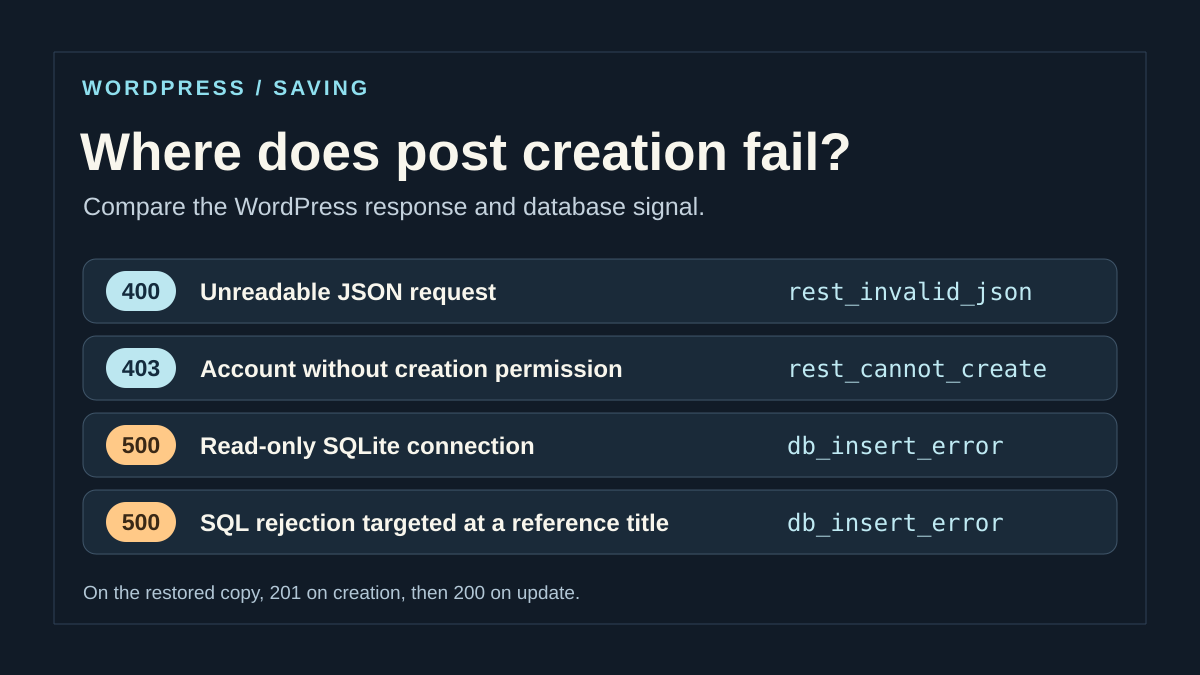
- If WordPress returns JSON with
rest_invalid_json, WordPress could not read the request JSON. The interface alert ‘invalid JSON response’ may also appear when the browser receives something other than expected JSON. Compare the actual response before connecting these messages. - If the response contains
rest_cannot_create, compare account and content type. With a 403 code and HTML page, the same number may come from protection before WordPress. Keep the WordPress code when present. - If the response contains
db_insert_error, correlate it with the WordPress trace or database log. This code indicates insertion failed in this path. Alone, it does not identify whether the cause is write denial, validation, a limit or a constraint.
Distinguish WordPress permission from database-connection permission
With the site administrator, compare the affected account with one authorized to create the same content type. Check using two separate sessions on the correct site with the same post type. Under Users, the administrator can record the role without changing it. On a site with customized capabilities, the role name is a clue. Have creation capability checked for the targeted content type. Creating a draft and publishing it are two distinct permissions.
If only the affected account receives rest_cannot_create while the other can save, correct access only if creation belongs to that role. Otherwise, have an already authorized person save the draft. Then check the same access and retain the old setting if a correction was applied. A general role change or temporarily making every account an administrator would not help identify the rejected write.
If an authorized account reaches the database and still encounters denial, send the trace to the hosting administrator. The SQL connection account may read a table while lacking insertion permission, or connect to an instance intended for reads. The administrator can check the destination and effective permissions of the connection serving WordPress. On MySQL or MariaDB, they must consider the actual account, any roles and the instance receiving the request. Testing with a more privileged SQL administration session is insufficient.
Confirm the SQL cause with a trace of the same write
For the technical administrator, the record must associate the save request with the correct database operation. Correlate time with its zone, site, content type, any ID and response code. Then find the engine or WordPress message for that test. A trace for another plugin or background task may occur in the same minute. If it concerns another table or action, keep it separate until its connection to the post is demonstrated.
If the trace indicates insertion denial or a read-only connection, identify the server receiving the write and verify that destination is intended to accept changes. Testing a read on the same connection helps distinguish complete access failure from a write restriction. For denial tied to a key, constraint or value size, instead compare minimal data and the expected schema. Start with inspection and backup. A data or structure correction requires a procedure tested on a copy based on the exact message and engine in service.
Have findings retained outside the public site. In the shared record, keep the code, operation type and table or field when useful to the administrator. Mask connection credentials and private text. For the next test, use a distinct draft after checking that the previous attempt left no document to resume. A successful test must be followed by reopening and a controlled modification of the same draft.
Approach 2: isolate a component on a copy
If failure follows a plugin change or affects only one content type, prepare separate staging with its own database. Protect access and disable emails and external integrations. Keep a backup before any component change.
First reproduce the minimal case in that environment. If the failure is absent there, compare versions, hosting rules and configuration without replacing production with the copy. An environmental difference may explain the result.
If the case reproduces, isolate the component identified by the log or recent change. Deactivate it normally, create a control draft and reactivate it before the next test. Do not delete its data. A plugin may add fields or write to its own tables; distinguish the main document from that additional processing.
If creation returns, send the result to the developer with versions and an authorized minimal example. The fix must address its write or compatibility, not merely hide the message. If nothing changes, restore the initial state and continue with the database administrator. General deactivation on the live site is unnecessary to begin this comparison.
Approach 3: check write permissions and destination
The hosting administrator must confirm the actual server and database used for this write. After migration or restoration, an application may reach a destination permitting reads but not intended for modifications. This check precedes permission changes.
The database account and WordPress account differ. Read, insert and update privileges are not identical. A correct result for an old post therefore does not prove creation of a new row is authorized.
If the message identifies a privilege denial, have the affected account and scope checked. Request permissions suited to the installation without giving the site global administration privileges to unblock one test. Keep initial values and the reason for correction.
If the server is intentionally read-only, identify that instance's role and the expected write path. Do not disable this mode on a replica to bypass the problem. The administrator must correct the appropriate destination or configuration, then verify other sites and processing retain their intended operation.
Have storage and actually reached limits checked
A storage error calls for checking available space and database-service quotas, not merely space advertised for site files. Logs, temporary files or tablespaces may depend on separate storage. Support must identify the resource actually saturated.
Behavior also depends on engine and server version. On MySQL, an out-of-space error in an InnoDB tablespace may roll back the affected operation. Other situations behave differently; do not assume reloading or a fixed wait resolves every case.
Do not delete posts, tables or server files to free space without inventory and backup. Have the host choose a targeted action. A capacity increase or documented cleanup must be followed by a write check, not merely a less-full gauge.
If logs identify an exchange or size limit, ask which value is actually reached and for which data. Short text succeeding while particular content fails provides a comparison case. Increasing every server limit without diagnosis could shift the problem without explaining its cause.
Inspect a field or structure only when the error identifies it
A rejected value may concern a specific field, type or allowed length. Keep the minimal example triggering the message without removing characters from the original document to force it to fit. The administrator must compare submitted data with the target field definition.
Fields do not all have the same role or limits. A plugin may write somewhere other than the post body. An error naming its own field does not justify enlarging every WordPress column or transforming every table.
After migration, a structure or key message requires comparison with the schema expected for the affected version and component. Confirm the correct database, table and prefix. Do not apply a change found for another installation, even if its table name looks similar.
Do not address a key error by deleting supposedly troublesome rows or renumbering IDs. Those values may connect other data to the document. If a structural fix is confirmed, test it on a copy with backup and rollback plan. Procedures must match the actual server, particularly its version and storage engine.
Prepare a limited correction and real rollback
Ask the administrator to describe the intended change: restore a privilege, correct a destination, free a resource or apply a documented migration. The result must answer the recorded error. General database optimization does not replace that choice.
Before intervention, preserve affected settings and data. For a structural change, a verified backup and copy test are essential. Simply deactivating a component or restarting does not automatically return the database to its previous state.
If data must be recovered from backup, first examine that copy in an isolated environment. Preserve recent live-site creations. Do not reimport an entire old database to replace a table without evaluating its relationships and information that would be lost.
Keep site protections during diagnosis. Do not enable a public repair page or forced recovery mode without an appropriate specialized procedure. If the error does not concern demonstrated corruption, those tools may be unnecessary. Rollback must undo the precise change with known consequences rather than attempt a global restoration after an ill-prepared test.
Compare four responses in local staging
To verify diagnosis, classify actually observed responses: unreadable JSON, denied creation capability, insertion error or successful save. Record the WordPress code in the response body as well as HTTP status. Two 500 responses may have different SQL causes.
Do not put the live database into read-only mode to manufacture an example. On a dedicated copy, a competent person may prepare controlled faults and remove them afterward; correlate the engine log with the exact request. An SQLite test does not certify production MySQL or MariaDB permissions.
After correction, create a minimal draft, reopen it, change one sentence and verify the same ID and retained text. If only one operation fails, keep both readings distinct. This protocol is proposed for your staging and is not a report of tests already executed on the site.
Verify creation and communicate remaining uncertainties
After correction, create one clearly named control draft with a title and sentence. Save it and reopen it from the administration list. Check that it has its own identity, retains text and is the same document on the next load.
Then add the representative element that triggered failure to this test case: field, block or authorized data. Check retention again. Successful simple creation does not automatically validate the original post's additional processing.
Reintroduce preserved writing into the appropriate document and check status before publishing or updating. Restore necessary components and remove temporary diagnostics. Have logs reviewed at the final test times to confirm the initial error does not return.
If the fault persists, send the sanitized message, time, content type, versions, latest change and comparisons performed. State what still works and what was restored to its initial state. Retain uncertainty until a cause is demonstrated. Going forward, check creation and saving after migrations or changes affecting data, with an appropriate backup and without publishing a control duplicate.
Prepare a ticket distinguishing creation from updating
To get a useful hosting response, describe two separate operations: opening a new post, then saving an existing draft. For each, provide time, HTTP status, WordPress code when present and returned ID. Denial limited to INSERT may leave UPDATE working; the reverse is also possible.
If no ID is visible, search for the control title in drafts and also check automatic drafts with the technical administrator. The command above intentionally filters draft; it does not claim to inventory auto-draft, private content or Trash. An empty list within this scope does not demonstrate absence of every write.
Do not install a database-repair plugin for this symptom alone. The native editor and logs locate the failure; a repair tool restores neither SQL-account permissions nor an incorrect connection destination. Request correction of the identified cause, then repeat creation, updating and rereading of the same draft.
Sources and references
Use these references to check the features, requirements and limitations described. Reading documentation is not a practical test.
View 19 references
- WordPress: inserting and updating a post ↗
- WordPress: creating the initial automatic draft ↗
- WordPress: result of a row insertion ↗
- WordPress: reference database structure ↗
- MySQL: separate read and write privileges ↗
- MySQL: read-only mode and exchange limits ↗
- MySQL: full disk and quota ↗
- MySQL: short text field limits ↗
- WordPress: diagnostics and private logs ↗
- WordPress: back up the database and files ↗
- WordPress.com: component conflicts and staging ↗
- WordPress.com: preserve writing before troubleshooting ↗
- MySQL: error handling with InnoDB ↗
- WordPress — decode JSON in a REST request ↗
- WordPress — authorize REST post creation ↗
- WordPress — handle REST creation and insertion failure ↗
- SQLite — connection query_only mode ↗
- SQLite — temporary trigger and RAISE ↗
- WP-CLI: scope of post list ↗