Web hosting
1984 Hosting for WordPress in Iceland: pricing and backups
1984 Hosting’s WordPress plans in Iceland, initial and renewal terms, migration, the Security Pack and backup limitations.
Read more →

Site appearance
Web hosting
The Argentine page combines shared hosting and Cloud plans. Prices exclude IVA and include an introductory discount; documentary discrepancies about cycles and traffic must be resolved before purchase.
Source published: · Source updated: · Editorial policy
Visit the official WNPower website ↗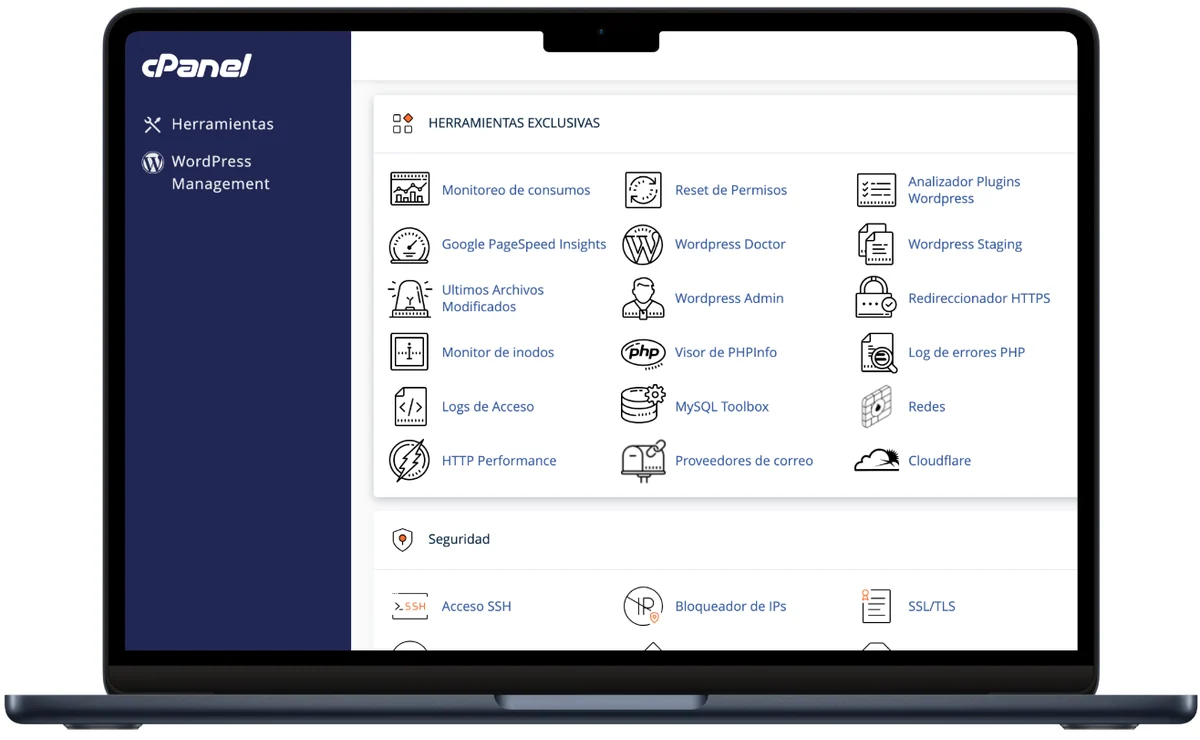 Developer presentation image. The tools shown do not constitute a tested account or guarantee availability on every subscription.
This profile is based on published offers and documentation. No new hosting benchmark or support test was performed for this translation.
Prices retain the market, currency and billing period described in the French source. Translation does not update a commercial quote. Confirm the final price, taxes and options before ordering.
| Plan | Price and billing | Resources and limits |
|---|---|---|
| Hosting Ilimitado | 9,920 ARS/month displayed with a 69% introductory discount, against a crossed-out 31,999 ARS/month at review. Renewal: FAQ: 31,999 ARS/month excluding IVA at review, without the first-order discount; future invoice and cycle must be confirmed. Excludes IVA. Commercial link has billingcycle=monthly but shared-hosting terms specify six-month/annual payment; duration and initial total must be confirmed, no annual extrapolation. | Shared CPU/RAM, SSD/NVMe space advertised without limit, cPanel, WordPress tools, daily S3 backup. FAQ lists 60 GB/month traffic despite unmetered cards; resources and fair use must be clarified. |
| Cloud Hosting Starter | 32,145 ARS/month displayed with a 50% introductory discount, against a crossed-out 64,290 ARS/month at review. Renewal: FAQ: 64,290 ARS/month excluding IVA at review, without the first-order discount; future rates not guaranteed. Public link uses a monthly cycle; prices exclude IVA, annual discount advertised without a verified order total. | 2 CPU cores and 2 GB RAM advertised as allocated to the plan; 40 GB SSD/NVMe; cPanel and WordPress tools. FAQ advertises 90 GB/month despite an unmetered card; account location and limits must be clarified. |
WNPower presents a WordPress offering for the Argentine market, with Spanish pages and prices in Argentine pesos. The service may interest a local business seeking administration tools through cPanel rather than infrastructure to configure entirely itself. The team must nevertheless distinguish the packages: the same page offers shared hosting and several Cloud plans with different resources.
Argentina here describes the commercial version reviewed. The cards advertise hosting on AWS and backups in Amazon S3; this does not demonstrate that the instance, backups and all processing are located in Argentina. Clarify the region actually assigned to the service if location matters to the project. No latency or uptime measurement was performed.
The first choice is whether shared resources suffice or an identified CPU and memory allocation is needed. Also check data volume, regular tasks and installation count. Useful WordPress tools cannot compensate for a package whose limits or billing cycle remain unclear. Two discrepancies between commercial pages and terms specifically require confirmation before ordering.
At the November 3, 2026 review, Hosting Ilimitado displays 9,920 ARS per month with a 69% introductory discount against a crossed-out 31,999 ARS per month. Cloud Hosting Starter displays 32,145 ARS per month with a 50% discount against a crossed-out 64,290 ARS. ARS means Argentine peso; these amounts exclude IVA, the tax stated by the provider.
Both card links contain a monthly cycle and a promotional code. However, the general terms state that shared web hosting plans are paid only every six months or annually. For Ilimitado, the display therefore does not establish the cycle actually permitted or the initial amount payable. This must be resolved in an explicit summary before payment.
The page also advertises two months saved for annual payment. The annual total is not reconstructed here by automatically combining that benefit with the promotional percentage: their exact terms are not established by the card alone. Keeping plan, term, discount and total on the same document allows comparison of equivalent spending. The displayed monthly rate and first invoice may represent different information.
The public FAQ specifies that introductory discounts do not renew. It currently lists 31,999 ARS per month for Ilimitado and 64,290 ARS for Starter, excluding IVA. These reference amounts guarantee neither future rates nor the cycle actually billed. For budgeting, compare the same plan on the same cycle with and without discount, then confirm possible rate changes. Keeping notifications and tracking the service date avoids confusing a temporary reduction with a lasting expense.
The terms provide for automatic extension for an identical term and prepaid services. An automatic-payment subscription must therefore be tracked under account rules. To change cycles, the terms require a ticket at least five days before renewal. Cancellation follows a separate procedure; moving the site does not necessarily disable scheduled payment.
The FAQ states 21% IVA for Argentina and a type A or B invoice. Tax treatment and the final amount for a French account holder have not been validated. Conversion or payment-method fees must also be examined. The Argentine version must not be confused with the same provider’s international offerings. A business needing a French invoice or foreign registration must confirm eligibility and required details rather than infer those rights from publicly accessible pages.
The site reviewed and offered help resources are in Spanish. cPanel handles files, databases, email and the provider’s own tools; the customer area tracks services and tickets. WordPress administration retains its separate users. A French interface or French-speaking human support has not been verified. For a French-speaking team without a local contact, reading renewal and restoration messages remains a practical need to anticipate.
The account holder should retain the main account and recovery address. Someone assigned a post can work with a suitable WordPress role without receiving rights to change every site or invoice. Advertised administrator-management and temporary-access tools may simplify an intervention, but their availability and scope must be checked on the actual service.
Before handing work to an agency or provider, list affected domains, databases and mailboxes. The financial contact’s name alone does not establish all account rights; the terms require an account-holder change procedure. Planning access the customer will retain after the assignment avoids making renewal or recovery depend on a single external person.
The commercial page provides for an installer in cPanel. If the account offers Softaculous Apps Installer, the process documented by Softaculous applies; otherwise ask for the path corresponding to the tool actually supplied. It suits a new WordPress site on a domain and folder the account holder may use. An existing installation to transfer must follow migration: reinstalling an empty WordPress does not transfer posts, media or orders.
Before starting, identify what already occupies the folder and retain necessary data. Define the desired language and dedicated administration access. A theme or plugin offered by default still requires checking against the project. The following steps follow Softaculous documentation, subject to its presence in the account. No installation was performed for this profile.
Hosting Ilimitado advertises shared SSD/NVMe space without limit and unlimited WordPress installations. CPU and memory remain shared. Cloud Hosting Starter lists two CPU cores, 2 GB RAM allocated to the plan and 40 GB storage. These formulations justify neither unlimited capacity for each installation nor dedicated-server performance.
Traffic contains a contradiction worth understanding: the cards state unmetered bandwidth, while the same page’s FAQ gives 60 GB per month for Ilimitado and 90 GB for Starter. Confirm the selected plan’s applicable rule and consequences of exceeding it before preparing a campaign. Neither figure should be silently removed in favor of the more advantageous claim.
Recording site size, temporary files and demanding tasks helps clarify the need. A cache can reduce some computation without making a public page, search and cart equivalent. Usage policy and practical account limits must also be clarified for several sites. The provider’s consumption measurements can help observe actual load; they are not presented here as load-test results or admissible visitor counts.
The cards advertise daily backups in Amazon S3. This establishes an advertised frequency and storage service without itself specifying how many points each account will have. Confirm retention, included elements and download rights. Recovery of a file, database or full account depends on the tool actually supplied on the node.
Before a major change, keep an independent copy of files and database in the same state. An older daily point does not necessarily capture orders received on the morning of the intervention. Compare its date with recent activity and prepare an appropriate copy if the gap is too large. Distinguish a copy present on the server from one retrieved outside the service.
If the account provides JetBackup 5 access, open it and then the category for the data to retrieve. Its documentation describes Full Account for the complete account, Home Directory for files and Databases for databases; labels or permissions may vary. Choose the dated point, Download, then Download Selected Items, follow Queue until Completed, then retrieve the file from Downloads. This downloads an existing backup rather than guaranteeing immediate creation of a new point.
If a category is missing or the tool refuses the request, do not assume the account has that right: ask support to clarify the downloadable scope and proposed method. Do not multiply large tasks to bypass refusal. Check retrieved archives and their contents before relying on them; recovery in a separate environment is the useful check, without replacing the public site.
In JetBackup 5, open Home Directory and choose the date. For an incremental backup, Change Files Selection allows selection of files or folders, then Select Files saves that selection. This fine-grained selection is not available in the same way for a compressed archive: if absent, stop and request suitable recovery rather than restoring the whole account by default. Review the scope, then choose Restore and Restore Selected Items; follow the task in Queue.
A database belongs under Databases: identify its exact name from WordPress configuration without revealing the password, then choose the right point. Restoring a database does not automatically restore its MySQL users; if they are genuinely missing, their recovery belongs under Database Users and must be coordinated with current access. Do not routinely replace working users. Files alone do not recover WordPress data from MySQL: for full recovery, choose a consistent state and preserve recent writes before confirmation.
Full Account covers a much broader scope. Clarify replaced components and possible access interruption before launching it, with a recoverable copy of the current state. A JetBackup data-merging option must never be interpreted as reconciliation of orders in a WordPress database.
After the task, check recovered items, administration and expected business data. If the result differs, keep the task date and reference and examine the prior copy. Do not chain global restorations to recover a single item.
PowerTransfer is the advertised automatic tool for moving a site to WNPower. Its presentation describes choosing the destination service, method and source details. After the work, it provides for previewing before delegating the domain. Compare this process with the old panel, accessible data and actual project scope.
Automatic transfer and any migration handled by the team have different scopes. Obtain written confirmation of eligibility, request deadline, possible fees and transferred elements. Transferring WordPress does not establish that mailboxes, messages, scheduled tasks or other applications will move. Because detailed help was inaccessible during this verification, no general free service or precise contractual timeframe is guaranteed here.
Keep a dated copy and the source active during transfer. If the destination already contains data, determine what would be replaced before providing access. Before opening or activating the preview copy, disable email, payments, webhooks and tasks that could act on real services; also isolate its database from the source. Then compare pages, media and business data without a real order; account for new writes between copying and changing routing.
If the result is incomplete, postpone cutover and correct the discrepancy. Reverting DNS to the old server will not combine new orders recorded at the destination. The account holder must accept the site and email transfer before the old hosting is permanently stopped.
The WordPress page describes several tools as AI: HTTP Performance analysis, WordPress Doctor and malware scanning. It associates them with diagnostic, component-checking or protection tasks. This commercial description cannot measure diagnostic accuracy or establish that every failure will be repaired automatically.
The public page describes WordPress Doctor as analyzing installations and components to update or fix. It does not justify launching a specific repair without examining the action proposed in the account. A modified file can result from legitimate work; an indicator does not replace contextual analysis. Fixing core files would not prove that every plugin, user or database element is healthy. No detection or repair was tested here.
Constructor Web con IA is presented separately, generating structure and content from instructions. Its page advertises inclusion in all Hosting plans, but this does not establish unlimited generation inside WordPress. Choosing this builder does not prove that the resulting site is exportable WordPress or that an unlimited generation licence is included in CMS tools. Clarify output format, data retention, quotas and terms before depending on it.
For existing WordPress, identify the desired action: technical diagnostics and content writing are different needs. A proposed change must be checked on a suitable copy, with a recoverable state before applying it to production.
Advertised cloning and staging allow preparation of a change in another folder or subdomain. Arrange to disable email, payments and external tasks before activating the copy. Then check its address and separate database before changing theme or plugins. Plan what must be transferred to the live site; replacing the whole database with an old copy could erase new orders.
The official visual shows WordPress Doctor in cPanel’s Herramientas Exclusivas. If the tool is present in the account, open that section for a technical check. Select the relevant installation and read results before triggering repair. Keep a copy and record the chosen change. After intervention, check the original symptom and useful features; a check without alerts is not by itself complete functional validation.
The provider offers tickets, help, an app and service-status tracking. The terms designate the account ticket as the formal channel for inquiries and complaints. The case should identify domain, time, message and recent intervention, with private screenshots stripped of secrets. A status page helps identify an infrastructure incident without proving that the customer’s application works.
Human response times and French-language support have not been verified. Administrative tools do not turn every plugin-code correction into an included intervention.
Closure first requires a usable handover: WordPress files, a consistent database, domains, email and necessary tasks. Downloaded copies must remain accessible to the account holder independently of the WNPower account. An automatic backup at the provider must not be the only recovery method after departure.
The terms state that ordinary cancellation takes effect according to the committed period, without automatic refund for unused time, and that data and backups are deleted at closure. The thirty-day commercial guarantee falls under a separate refund policy to check for the relevant service. Do not equate that period with a permanent right to a refunded departure.
Before the due date, record the plan, cycle, date, options and active automatic payments. Nonpayment can suspend data access, making a late export harder. Any recovery after deletion would depend on what remains and specific terms; it is not a retention strategy.
After recovery at the destination, check the latest data and email routing, then retain closure confirmations. The domain may stay with another provider or have another due date. Tracking each service separately completes departure without dependence on an old account or an overlooked renewing subscription.
Use these references to check the features, requirements and limitations described. Reading documentation is not a practical test.
English translation of the reviewed French edition. Code examples retain their original identifiers, comments and output strings for reproducibility. Linked exercise files and original screenshots may contain French. No new practical tests or price checks are implied by translation.
1984 Hosting’s WordPress plans in Iceland, initial and renewal terms, migration, the Security Pack and backup limitations.
Read more →Compare 34SP.com WordPress containers, shared memory, staging copies, downloadable snapshots and site migration.
Read more →Compare AEserver’s managed WordPress prices and check whether your network must be split into independent installations before migration.
Read more →