Web hosting
1984 Hosting for WordPress in Iceland: pricing and backups
1984 Hosting’s WordPress plans in Iceland, initial and renewal terms, migration, the Security Pack and backup limitations.
Read more →

Site appearance
Web hosting
HostPro advertises cPanel, LiteSpeed and a generator producing a WordPress website with Astra and Spectra. Monthly catalog amounts are separate from longer promotions; renewal and actual backup points remain to be confirmed.
Source published: · Source updated: · Editorial policy
Visit the official HostPro website ↗
This profile is based on published offers and documentation. No new hosting benchmark or support test was performed for this translation.
Prices retain the market, currency and billing period described in the French source. Translation does not update a commercial quote. Confirm the final price, taxes and options before ordering.
| Plan | Price and billing | Resources and limits |
|---|---|---|
| Start | From EUR 8.50 per month in the public euro catalog, recorded on November 3, 2026. Separate long-term promotion: contractual amount unconfirmed. Renewal: Separate amount not established. No crossed-out price or campaign code used as a future rate. EUR confirmed in the monthly catalog; currency, taxes and promotional cycle total to clarify before commitment. | 5 WordPress installations, 20 GB SSD, 512 MB memory for PHP, 300,000 inodes, cPanel, Softaculous, LiteSpeed and AI Sitebuilder advertised. The AI Sitebuilder page advertises two generations per website with no confirmed reset frequency. No visitor quota inferred. Several websites share account resources. Copy retention and scope to confirm. |
| Pro | From EUR 11.20 per month in the public euro catalog, recorded on November 3, 2026. Separate long-term promotion: contractual amount unconfirmed. Renewal: No confirmed recurring schedule for the selected cycle. EUR in the monthly catalog; check cycle total, tax treatment and benefits actually applicable. | 15 WordPress installations, 30 GB SSD, 1,024 MB memory for PHP, 500,000 inodes, cPanel and advertised generator. The AI Sitebuilder page advertises two generations per website with no confirmed reset frequency. Advertised allocations are not per website; no CPU cap or measured load result. |
HostPro markets a WordPress range for the Ukrainian market. Start and Pro, the two plans examined, combine cPanel, a Softaculous installer and LiteSpeed. The provider also presents a WordPress Manager in the customer area and an AI website generator. These tools address separate needs: managing an installation, accelerating server responses or proposing an initial website structure.
Do not mix this offer with VPS, standard Linux shared hosting, cloud or the former Site.pro builder. Panels and recovery rules vary by service. For example, a restoration procedure requiring a VPS shutdown is not a step in the cPanel WordPress workflow.
The WordPress page cites locations in Ukraine, the Netherlands, Poland and the United States. This does not establish where a particular installation or its backups will reside. A holder with a location obligation must identify both scopes before choosing.
In the November 3, 2026 review, the public WordPress catalog displays Start from €8.50 per month and Pro from €11.20 per month. These are advertised monthly-cycle amounts, not proof of a renewal rate. The catalog also mentions Business, but its resources and price must not be assigned to Start or Pro.
The WordPress storefront also presents a thirty-six-month promotion; the generator page selects twelve months in the review. These displays must not be compared as though they described the same commitment. Record the applied currency, actual billed term and final amount of each promotion together. Without a confirmed contractual total, promotional amounts are not used here to price a multiyear commitment.
Before comparing two commitments, ask for the first-period total, currency, taxes and next payment deadline. A discount displayed until November 30, 2026 on the storefront is not a promise for the following cycle. Tax treatment and conditions for a French holder have not been validated. Also clarify holder admission, accepted documents and payment methods. An English page and a European data center option do not establish these conditions.
No separate recurring price is established in the selected sources for either plan. A prediscount value describes a pricing context; it does not demonstrate the following period’s invoice. For a multiyear comparison, retain two lines: the documented initial amount and renewal amount to confirm. This prevents a long discount from obscuring the budget’s most important unknown.
The page specifies a free .com.ua domain for twelve months with a subscription of at least one year. It also advertises a commercial Certum certificate for one year with a WordPress plan of at least one year, requiring contact with sales. Check eligibility and distinguish subsequent years’ costs. A commercial certificate included for a limited term is not the same as the Let’s Encrypt support listed in the features.
If the website is already available under another name, domain transfer is not necessarily required to change hosting. Check the name holder, dates and authority managing the DNS zone. A project may retain registration and change only technical routing, subject to its own settings and access.
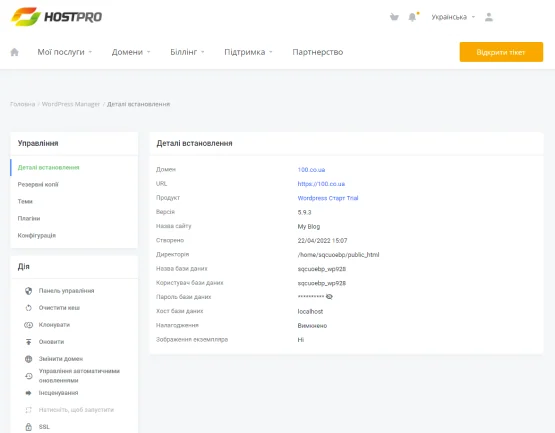 Older official WordPress Manager screenshot (WordPress 5.9.3 visible). The current interface may differ.Open full-size screenshot ↗
The website publishes pages in Ukrainian and English and also offers Russian in navigation. The official WordPress Manager screenshot shows a Ukrainian interface. It illustrates actions grouped by installation, but its date and the old visible WordPress version prevent it from proving every account’s current appearance. French panel availability and a French-speaking contact remain to be confirmed.
The commercial account handles services, payment and help requests. cPanel manages files, databases and emails. The WordPress administrator account handles website configuration and content. Recording these three access points and their responsible people avoids dependence on the password of someone unreachable on incident day.
The provider advertises round-the-clock technical support and describes channels such as tickets, chat and telephone. Its support page ties operations to the plan’s scope; custom development is not automatically included. For a request, provide the domain, time, error and expected result. Use the designated account-identification channel and remove secrets from attached logs or screenshots.
Start specifies five installations, twenty gigabytes SSD, 512 MB memory for PHP and 300,000 inodes. Pro increases these to fifteen installations, thirty gigabytes, 1,024 MB for PHP and 500,000 inodes. PHP memory represents neither all account RAM nor the memory of a reserved machine. An installation count does not mean each receives the whole disk.
Examine volumes before transferring a website. Media and messages accumulate files; a working copy may increase space and inodes simultaneously. A store with few images may have a more demanding database or processing workload than a larger brochure website. Published parameters do not establish supported visits, orders or requests per minute.
For an already live website, ask about the limit associated with the observed symptom before changing offers. If an import fails, distinguish file size, processing memory and account permissions. Increased storage does not necessarily solve a PHP limit. The published version range includes old branches: choose a maintained version compatible with the project and verify the result on a copy where possible.
The WordPress pages advertise daily copies. The general knowledge base mentions seven-day retention and an authenticated recovery request. The generator page refers to backups available for thirty days. These two statements do not guarantee thirty points for Start or Pro. Confirm scope, visible dates and recovery arrangements before making the project depend on this copy alone.
HostPro’s cPanel guide describes another operation: producing a personal archive. This route is useful before intervention or migration. It requires account access and enough space to prepare the archive. Plan protected external storage and account for confidential data a copy may contain.
If a partial copy was prepared with cPanel, the same screen can restore supported types. First choose the correct category and corresponding archive. A database file is not loaded as a home directory. Before any replacement, copy the present state and identify what would be lost since the selected date. For complete WordPress recovery, restore consistent files and database.
A full archive cannot be restored by an ordinary cPanel user in the documented workflow. HostPro’s guide refers to its support. For a provider copy, supply the domain, folder, database name and desired date. Confirm the available point and recovery conditions, especially when the request also affects emails or newer data. Help specifies an identity check; use the account’s designated method.
After intervention, verify the requested data, media loading and administration login. For a store, check order status on both sides of the recovery date before resuming operation. If the resulting state is incomplete, examine the prior copy and intervention log instead of blindly starting broader restoration.
HostPro presents assistance transferring files, databases and essential settings. Its public form describes an archive-based route for website and database, and another using source-panel access. The advertised service is limited to PHP and MySQL websites; do not automatically include an external application, different database or another project service. Prefer archives when sufficient: retain source-account protections and transmit data through an access-controlled channel. A WordPress archive can contain secret settings; do not make it public to simplify transfer.
Before moving the domain, inventory files, databases and ancillary services. Clarify handling of mailboxes, licenses and scheduled tasks. Website transfer does not mean message history and all external configurations followed. Keep the source service active and note the point from which writes changed.
At the destination, check pages, media, certificates and access. For a store or booking website, plan final synchronization before switching and control writes during the operation. Disable payments and emails on a preparation copy. If the destination is unsuitable, preserve data created there before rerouting the domain. DNS rollback does not merge the two servers’ data.
HostPro’s generator proposes a WordPress-based website from a description and project details. The official page states that the result uses Astra and Spectra. The former Site.pro is presented as an archived service; its portability terms do not automatically describe the new generator. Editing the result in WordPress is advertised. The FAQ describes free versions of Astra and Spectra with optional Pro upgrades: paid licenses must not be counted as included. Generator cards specify two generations per website for Start and Pro. They do not establish whether this quota resets or how frequently. Overage costs, what happens to credits after migration and retention of submitted descriptions remain to be confirmed.
The provider’s guide locates administration access in WordPress Manager among installation actions. In WordPress, it specifies Appearance, then AI Builder. On an empty working website, the workflow collects name, topic, language and a description, then proposes images and variants. Preview the result and choose features before starting construction. The resulting website must then be checked on desktop and phone, reviewing text, images, rights and forms.
For an existing website, keep a copy and avoid direct generation in production. If the result is unsuitable, work on another variant or return to the saved state on the copy. The marketing promise of a website generated in sixty seconds does not replace time spent checking project content and functions.
The advertised WordPress Manager provides maintenance operations. Before an update or PHP change, record the URL and version of the relevant installation. Without terminal access, consult information in the WordPress dashboard and record components to verify. A plugin intervention should include a copy and a check of the workflow depending on it.
HostPro also advertises WP-CLI. With authorized SSH access and the tool available, the command below reads the core version without starting an update. Replace the path in single quotes with the actual folder containing the intended website’s WordPress files; do not automatically use the main domain’s folder if the account hosts several. The expected result is a version number. If the tool or installation is not found, check the folder and return to the graphical workflow instead of changing permissions.
The resulting number identifies the version at the time of a help request. It demonstrates neither website integrity nor theme compatibility. No rollback is needed for this read operation; prepare recovery before any actual modification.
wp core version --path='/chemin/vers/wordpress'Start is an option for a small group of websites with consumption compatible with twenty gigabytes and PHP limits. Pro increases storage, installation count and file allocation. Do not choose Pro for a store simply because its card targets commerce. First measure needs and identify who will check backups and plugins.
The budget must keep the catalog monthly rate, actual long-term amount and renewal on separate lines. Before choosing, also obtain copy dates and recovery arrangements specific to the account. The uncertainty between seven and thirty days changes the time available to discover and repair an error; a dated external copy reduces that dependency.
Before departure, retrieve useful files, databases and emails while access works, then verify restoration at the new provider. Identify Astra, Spectra or other components that must continue working and licenses to transfer. Track the domain separately from hosting. No post-closure retention period is established here; exports must not wait until the account disappears. Finally, keep commercial departure confirmation and remove access no longer needed.
Use these references to check the features, requirements and limitations described. Reading documentation is not a practical test.
English translation of the reviewed French edition. Code examples retain their original identifiers, comments and output strings for reproducibility. Linked exercise files and original screenshots may contain French. No new practical tests or price checks are implied by translation.
1984 Hosting’s WordPress plans in Iceland, initial and renewal terms, migration, the Security Pack and backup limitations.
Read more →Compare 34SP.com WordPress containers, shared memory, staging copies, downloadable snapshots and site migration.
Read more →Compare AEserver’s managed WordPress prices and check whether your network must be split into independent installations before migration.
Read more →