Web hosting
1984 Hosting for WordPress in Iceland: pricing and backups
1984 Hosting’s WordPress plans in Iceland, initial and renewal terms, migration, the Security Pack and backup limitations.
Read more →

Site appearance
Web hosting
MINI and PLUS provide WordPress on cPanel. Introductory prices apply to a 36-month commitment; the special terms give another schedule. Quotas, renewal and the applicable backup system remain to be confirmed before signup.
Source published: · Source updated: · Editorial policy
Visit the official Hostnet website ↗
This profile is based on published offers and documentation. No new hosting benchmark or support test was performed for this translation.
Prices retain the market, currency and billing period described in the French source. Translation does not update a commercial quote. Confirm the final price, taxes and options before ordering.
| Plan | Price and billing | Resources and limits |
|---|---|---|
| MINI | As of November 3, 2026: €2.99 excluding tax per month displayed in the 36-month tab; €5.99 excluding tax in the 1-month tab. MINI-2025: €54.44 for one year and €127.75 for three years in the special terms, tax basis unspecified. Renewal: Separate renewal schedule not found in the sources consulted. EUR. The storefront excludes VAT of 21%. Total for the term, actual prepayment and invoice for a French holder to confirm; no contractual total inferred from the two schedules. | 20 GB SSD, 1 domain, 1 database, 3 mailboxes, cPanel, Softaculous and JetBackup. The storefront advertises 400,000 inodes. MINI-2025 terms specify 250,000 files and 150 simultaneous processes. Confirm the quota actually applied. |
| PLUS | As of November 3, 2026: €5.99 excluding tax per month displayed in the 36-month tab; €11.99 excluding tax in the 1-month tab. PLUS-2025: €109.02 for one year and €255.92 for three years in the special terms, tax basis unspecified. Renewal: Next-term price not specified. The public monthly amount cannot establish a multiyear renewal. EUR. The storefront excludes VAT of 21%. Free .lv domain subject to conditions on eligible commitments; benefit duration and renewal to confirm. | 50 GB SSD, 5 domains, 5 databases, 10 mailboxes, cPanel, Softaculous and JetBackup. The storefront advertises 600,000 inodes. PLUS-2025 terms specify 250,000 files and 150 simultaneous processes. Same CPU and RAM displayed as MINI in the storefront. |
 Official hosting provider logo.
Hostnet offers three cPanel WordPress plans in Latvia: MINI, PLUS and PRO. This profile focuses on MINI and PLUS. The range advertises Softaculous for installing the CMS, Imunify360 for account protection, AccelerateWP for optimization and JetBackup for copies. These features chiefly interest a holder wanting to retain access to website files and databases.
MINI covers one domain with one database. PLUS provides more space for several domains and their mailboxes. For an editorial website with one team, installation and backups can remain straightforward to manage. For several independent projects, identify who needs access to databases and messages before combining all domains in one account. A WordPress editor’s permissions and a cPanel holder’s rights have different scopes.
The company gives an address in Riga and presents infrastructure in the Baltic states. Account and copy locations and transfer conditions need confirmation for a project with a location requirement. These advertised locations guarantee neither an intervention time nor a particular WordPress website’s speed.
In the November 3, 2026 review, the sales page distinguishes two tabs. Under “For 36-month term,” MINI displays €2.99 per month and PLUS €5.99. Under “For 1-month term,” the amounts are €5.99 and €11.99 respectively. The page presents them excluding VAT of 21%. The discount is therefore tied to a thirty-six-month commitment; it does not describe a monthly subscription cancellable at that price.
The special terms publish a separate table for MINI-2025 and PLUS-2025. The one-year rows are €54.44 and €109.02. The three-year rows are €127.75 and €255.92. The tax basis is not specified in this table. These values do not correspond to simply multiplying introductory prices by thirty-six. The public text does not establish which schedule will govern a particular signup. Ask the provider to specify the first-term total, payment schedule and applicable rates; no overall contractual budget is established here.
The storefront advertises free setup and an included .lv domain for commitments of one, two or three years. The Domains page describes the benefit for one year. Check the actual free period, name renewal price and options before choosing. A public domain registration rate does not prove its renewal price.
The terms provide for identification and an operator decision on customer acceptance. They are insufficient to guarantee admission of a French holder or their payment methods. Clarify required information and invoice tax treatment without assuming Latvian residence is mandatory or automatically applying local VAT to every situation.
The storefront prices and special-term amounts do not establish renewal for every term. Ask for the next-period amount and nonrenewal procedure before choosing a long commitment. Keep a reference to the exact plan and cycle. Two accounts with the same commercial name may have different terms depending on their date or configuration.
Track the domain independently of the website. Check the holder’s identity, the account managing DNS and email renewal dates. A name included for the first year may become a recurring expense even if hosting moves elsewhere. The Domains page describes manual or automatic renewal options depending on the name. Identify the mechanism actually active in the account.
The general terms allow suspension after a prolonged delay on a prepayment invoice. An organized departure uses a copy retrieved while access remains available. Schedule the export start date, time needed to validate the new server and commercial expiry. This schedule is particularly useful if the organization’s mailboxes depend on the same account as the website.
The storefront exists in Latvian and English, with a Russian version offered. The special terms consulted are in Latvian. cPanel and WordPress have their own interfaces. The team therefore needs to check the labels used to open the panel, locate a domain and distinguish databases. WordPress configured in French can work while technical tickets and provider instructions remain in another language.
The contact page separates technical and sales requests. It displays 9–17 Monday through Thursday and 9–16 on Friday. A help article advertises technical assistance around the clock. Clarify the channel and response time applicable to the chosen plan, especially for intervention outside contact hours. A recovery request benefits from specifying the domain, desired point and data type to restore. Preparing this information before an outage avoids choosing an excessively broad scope under pressure.
Keep separate access for the commercial account, cPanel and WordPress dashboard. Identify who can view an invoice, reset access or retrieve an archive. The recovery address must remain reachable if domain email stops responding. For interventions, share service references without publishing passwords or configuration files.
MINI advertises 20 GB SSD, one domain, one database and three mailboxes. PLUS increases to 50 GB, five domains, five databases and ten mailboxes. The sales table displays 2,048 MB RAM, a CPU limit of 100% and 150 simultaneous connections for both. In this table, changing plans therefore mainly increases storage and consolidation capacity. Before buying PLUS to address slowness, identify the saturated resource.
The storefront publishes 400,000 inodes for MINI, 600,000 for PLUS and 750 processes for both. The special terms state 250,000 files and 150 simultaneous processes in the two corresponding rows. The terms table also mentions 2,028 MB RAM, compared with 2,048 MB in the storefront. Terms and values differ; the two sets must not be merged. Ask which counters and caps apply to the service before preparing an import or several working copies.
To prepare migration, record volume and file count per website, then add mailboxes and temporary space needed for archives. The general terms also mention a restriction on files larger than 1 GB and storage of backups of other websites. For a large archive, check the planned transfer method with the provider. A plan can have free disk space yet remain unsuitable for an oversized individual file.
Start with the domain already assigned to the account and an available destination. In cPanel, open Softaculous and search for WordPress. The developer’s guide documents the Install button and protocol, domain and folder settings. For the root, leave In Directory empty. For a temporary website, check that its name and database are distinct and that a database remains available.
MINI advertises only one database. An account already using it needs examination before a second WordPress installation is created. Choose another preparation location compatible with the project when necessary resources or isolation are lacking. For an existing website, prepare migration of its data and reserve the installer for cases where a new instance is actually needed.
The offer cards advertise JetBackup and the table specifies daily copies. Another passage on the same page cites R1Soft. The general backup page also describes R1Soft and indicative retention of seven to thirty days depending on service. These references do not establish which tool and dates will be available on a MINI or PLUS account. Confirm the active system, copy scope and rights after suspension before relying on a specific recovery.
The following workflow applies when JetBackup 5 is actually present and the account has the necessary permissions. For an archive that could exceed 1 GB, first confirm the permitted method under the contract’s storage restriction. Compare the point’s date with the last useful change. A one-day-old copy may suit a static page and miss orders. Separately plan preservation of data added since the selected point. In Full Account, only objects backed up and authorized for the holder are included: the section name does not guarantee a comprehensive archive.
Restoration modifies the account. Before starting, keep a copy of the current state and identify files, database and recent writes to preserve. The scope must match the failure. If a deleted image is the only object required, do not select the entire account or email.
If the panel does not offer the required point or scope, give support the service, desired date and data it may replace. Ask whether the intervention is included or charged. If recovery is unsuitable, use the export retained before the operation to prepare an appropriate rollback. Do not chain increasingly broad restorations without examining data created in the meantime.
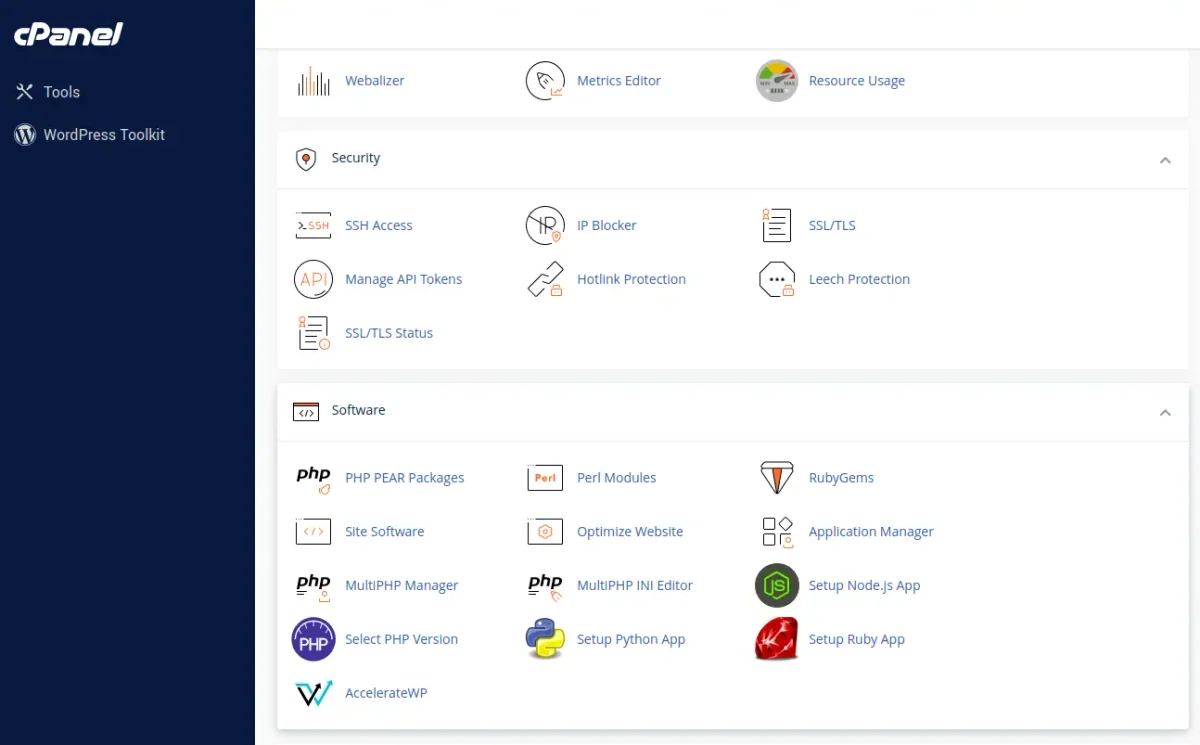 Screenshot from CloudLinux documentation. It illustrates the manufacturer’s tool; it is not a Hostnet session.Open full-size screenshot ↗
Hostnet advertises AccelerateWP in its WordPress range. CloudLinux places the application under Software in cPanel when the provider has enabled it. Its screen lists detected websites. To examine advice, choose the relevant domain and record caching layers already in place. The screenshot presented comes from CloudLinux documentation; it illustrates the tool’s location, not a Hostnet session.
The documentation distinguishes standard and Premium features, including object caching. Active entitlements and possible extras must be confirmed for the offer. The pages document optimizations and performance advice; they establish neither an AI generator nor generation credits included in MINI or PLUS. Do not equate cache automation with a content creation service.
Before transfer, inventory the domain, database, files and email addresses. Compare the required database count with plan entitlements and check file quotas. A website fitting within 20 GB may require another choice if several databases must run simultaneously. Clarify the accepted channel for large archives and conditions for assisted migration.
For a rarely modified website, prepare a copy and check pages, media and administration before rerouting the domain. For a website receiving registrations or orders, define the final synchronization window and who authorizes writes to resume. Also identify email records. Switching the website can leave mailboxes where they are if the DNS zone and the organization’s operation permit it.
After the change, observe access and check data added around the switch. Keep the source during validation. If a critical page fails, decide whether a limited fix suffices or the domain must be rerouted. Preserve data created on the new installation before any rollback. Later writes must remain identifiable for reconciliation.
The commercial offer displays data availability of 99.99%. The general terms advertise 99.50% annual service availability and detail interruption and claim rules. These indicators have different labels. Ask which measurement applies to the service and account contract. A project sensitive to interruptions must also arrange its own monitoring of critical functions and a way to contact the person responsible for recovery.
For MINI, chiefly check whether one database and three mailboxes meet the project’s needs. PLUS provides more space and several databases. Technical caps must be confirmed before combining several websites. Ask for retention and renewal alongside service details, especially if the decision rests on a multiyear commitment.
On departure, check archive scope and prepare message recovery independently of WordPress. Check the domain, certificates and accounts at the recipient. Retrieve data while the commercial session and panel remain available, then obtain confirmation of the expiry date and closure procedure. Keep a usable external copy until the destination and recent writes are validated.
Use these references to check the features, requirements and limitations described. Reading documentation is not a practical test.
English translation of the reviewed French edition. Code examples retain their original identifiers, comments and output strings for reproducibility. Linked exercise files and original screenshots may contain French. No new practical tests or price checks are implied by translation.
1984 Hosting’s WordPress plans in Iceland, initial and renewal terms, migration, the Security Pack and backup limitations.
Read more →Compare 34SP.com WordPress containers, shared memory, staging copies, downloadable snapshots and site migration.
Read more →Compare AEserver’s managed WordPress prices and check whether your network must be split into independent installations before migration.
Read more →