Web hosting
1984 Hosting for WordPress in Iceland: pricing and backups
1984 Hosting’s WordPress plans in Iceland, initial and renewal terms, migration, the Security Pack and backup limitations.
Read more →

Site appearance
Web hosting
A WordPress offer aimed at Chile, with several billing cycles in Chilean pesos and documented cPanel tools; renewal and French signup remain to be confirmed.
Source published: · Source updated: · Editorial policy
Visit the official HostingPlus website ↗
This profile is based on published offers and documentation. No new hosting benchmark or support test was performed for this translation.
Prices retain the market, currency and billing period described in the French source. Translation does not update a commercial quote. Confirm the final price, taxes and options before ordering.
| Plan | Price and billing | Resources and limits |
|---|---|---|
| Hosting WordPress NVMe — 1 month | CLP 22,900 + IVA per month; CLP 27,251 if Chilean tax of 19% applies. Renewal: Future amount not published separately; adjustment possible with a pro forma invoice advertised ten days before expiry. Automatic renewal; departure notice of at least fifteen days in the public terms. Monthly period paid in advance. Twelve periods at the current price would total CLP 274,800 excluding IVA; no guaranteed freeze on future prices. | 60 GB NVMe, 4 GB RAM, 2 websites advertised; 350,000 inodes and 300 outgoing emails per hour according to public details. cPanel, Softaculous, LiteSpeed and JetBackup documented. Conflicting CPU figures: 2 vCore in the comparison, 2.5 in the details on the same page. Independent copies needed; contractual retention and actual limits to confirm. Free domain not established for the monthly cycle. |
| Hosting WordPress NVMe — 12 months | CLP 99,900 + IVA for 12 months; CLP 118,881 if Chilean tax of 19% applies. Renewal: Future amount not published separately; adjustment possible with a pro forma invoice advertised ten days before expiry. Automatic renewal; departure notice of at least fifteen days in the public terms. CLP 99,900 excluding IVA for the entire term, equivalent to CLP 8,325 per month, without monthly payment at that amount. | 60 GB NVMe, 4 GB RAM, 2 websites advertised; 350,000 inodes and 300 outgoing emails per hour according to public details. cPanel, Softaculous, LiteSpeed and JetBackup documented. Conflicting CPU figures: 2 vCore in the comparison, 2.5 in the details on the same page. Independent copies needed; contractual retention and actual limits to confirm. Included domain and domain renewal to confirm for the order. |
| Hosting WordPress NVMe — 24 months | CLP 167,900 + IVA for 24 months; CLP 199,801 if Chilean tax of 19% applies. Renewal: Future amount not published separately; adjustment possible with a pro forma invoice advertised ten days before expiry. Automatic renewal; departure notice of at least fifteen days in the public terms. Amount paid for two years of the same plan. No prorated refund for early departure guaranteed by the public terms. | 60 GB NVMe, 4 GB RAM, 2 websites advertised; 350,000 inodes and 300 outgoing emails per hour according to public details. cPanel, Softaculous, LiteSpeed and JetBackup documented. Conflicting CPU figures: 2 vCore in the comparison, 2.5 in the details on the same page. Independent copies needed; contractual retention and actual limits to confirm. Duration of any domain inclusion and international tax treatment unknown. |
| Hosting WordPress NVMe — 36 months | CLP 229,900 + IVA for 36 months; CLP 273,581 if Chilean tax of 19% applies. Renewal: Future amount not published separately; adjustment possible with a pro forma invoice advertised ten days before expiry. Automatic renewal; departure notice of at least fifteen days in the public terms. Amount paid for three years of the same plan, not three annual installments. No renewal price is guaranteed here. | 60 GB NVMe, 4 GB RAM, 2 websites advertised; 350,000 inodes and 300 outgoing emails per hour according to public details. cPanel, Softaculous, LiteSpeed and JetBackup documented. Conflicting CPU figures: 2 vCore in the comparison, 2.5 in the details on the same page. Independent copies needed; contractual retention and actual limits to confirm. Substantial advance payment; free domain duration and applicable guarantees to confirm. |
You are preparing WordPress for Chilean visitors and want billing in Chilean pesos with cPanel administration. HostingPlus offers a Hosting WordPress NVMe plan combining storage, email, databases and recovery tools. Its appeal is an environment documented in Spanish for this market. However, you still need to verify the region assigned to the account and signup conditions when the owner is based in France.
Here, WordPress refers to hosting on which you manage your own installation. The provider advertises automatic WordPress and plugin updates. However, their scope, the ability to defer them and recovery after a conflict are not detailed in the offer examined. This announcement does not prove that a technician will handle every theme setting or incompatibility. Determine who will monitor the application and who can intervene in cPanel. For an association or small business, this allocation of access is as important as disk capacity.
Our review covers public pages consulted on November 3, 2026. We did not subscribe to any service or perform a speed test, contact support or restore anything. Marketing figures help explain the proposed scope; they do not describe measured behavior of your future website. Reservations about renewal, copy retention and French billing are retained in this presentation.
The WordPress NVMe plan page lists CLP 99,900 plus IVA for one year, CLP 167,900 plus IVA for twenty-four months and CLP 229,900 plus IVA for thirty-six months. The monthly cycle is listed at CLP 22,900 plus IVA. These are different terms for the same plan, not four resource tiers. The two- and three-year amounts cover the whole period: the advertised monthly equivalent does not authorize paying that smaller amount each month.
First choose how long you are prepared to fund the service. One year allows you to assess operation without advancing three years of spending. A longer term reduces the displayed average cost but ties up more money. For a project still being validated, the monthly cycle can avoid a large advance while remaining substantially more expensive if extended.
At unchanged prices, twelve monthly payments of CLP 22,900 would total CLP 274,800 excluding IVA, compared with CLP 99,900 for the current annual cycle. The initial difference is therefore CLP 174,900 excluding tax. This calculation compares payment methods, not the quality of two different servers or a guaranteed renewal. The thirty-six-month term mainly suits an enduring project whose technical constraints have already been clarified.
An official PDF proposal repeats these prices and presents an included domain on certain cycles. However, it was issued in May 2026 and was valid for thirty days. It therefore does not constitute a personal quote still valid in November. Confirm conditions for the chosen domain, its inclusion period and renewal. The domain, email and hosting must remain identifiable in your order summary.
The PDF also proposes a six-month cycle absent from the current pricing block examined. We do not include it among current offers. Request a dated proposal if this term interests you instead of ordering solely on the basis of that older document.
No separate renewal amount for the WordPress plan is established on the sales page examined. It would therefore be incorrect to present the introductory price as a guaranteed rate for the next term. The public terms document allows prices to be adjusted. Before paying for several years, request a summary separating the initial amount, term and method for determining the next renewal.
The terms announce a new pro forma invoice ten days before expiry but require departure notice of at least fifteen days. These two deadlines warrant written clarification: do not wait for the invoice to decide to leave. Set a reminder well before the notice deadline and keep the sales response with your contract.
Displayed amounts are in CLP with the wording plus IVA, meaning before the indicated local tax. The Chilean tax authority sets the general rate of this tax at 19%. If this rate applies to the order, the year at CLP 99,900 costs CLP 118,881 including tax. Offer totals are conditional calculations; we do not turn them into French tax-inclusive prices. An individual customer and a business must not be assumed to receive the same tax treatment. Clarify the billing document, required identification data and total applicable to your actual situation. An indicative euro conversion would not replace the payment method’s rate and possible fees either.
The payment page mentions WebPay, bank transfer through Banco de Chile and PayPal. The FAQ also cites international cards, and the public form offers France in its country list. These are concrete signs of international access; they do not prove that a complete French signup will be accepted without further formalities. We did not complete or submit this form. Confirm the usable payment method, charged currency and supporting documents before moving your website.
The page advertises 60 GB NVMe, 4 GB RAM and two permitted websites for the WordPress plan. MySQL-compatible MariaDB databases and email boxes are presented without numerical limits. This wording does not mean messages, files and databases each have infinite storage. Have the space needed for content, attachments and archives checked before deciding the account can hold everything.
The processor contradiction exists within the current page itself: the comparison table assigns 2 vCore to WordPress, while its technical details specify 2.5 vCPU. The sales PDF repeats 2.5 vCore. We do not arbitrarily select a value: ask which will appear in your order and be applied to your account. The provider’s dedicated-resource wording does not turn this shared product into a physical server reserved for your business. Permitted concurrent operations and overage conditions must be confirmed for the relevant account.
The public details also set 350,000 inodes and 300 outgoing emails per hour; the terms describe the email cap per domain. Many small files, caches or messages can reach a numerical limit before filling the disk. Unlimited mailboxes therefore do not authorize an unlimited campaign. For a high-volume newsletter, the provider recommends an external sending service.
To size your needs, measure WordPress media, the database and retained messages separately. Add space for a working copy. An image-heavy store and a brochure website with a few pages have different constraints even with comparable audiences. The 60 GB alone does not establish a supported number of visitors or orders.
The terms PDF also mixes in older provisions, including a 48 MB per-process cap and a PHP version list ending at 8.1. We do not present these as current plan settings. Their presence requires clarification of PHP limits, simultaneous processes and clauses actually applicable. The account must not serve as general storage for files or backups unrelated to the hosted websites.
The offer and support articles are in Spanish. The customer portal offers a French selector, but opening a translated interface does not turn Spanish articles into French documentation. Nor does it prove the presence of a French-speaking adviser. The provider advertises human support in Spanish from Chile.
Distinguish three environments as soon as access arrives. The customer area provides services, payments and tickets. cPanel manages the hosting account, files, mailboxes and technical tools. WordPress administration creates content and configures the application. A password change in one of these environments should not be assumed to change all the others.
The tutorials use Spanish and English labels, including Archivos, Files and Restore & Download. The language actually available in your cPanel needs checking in the delivered account. Keep the activation message securely and identify the official login before entering credentials. For a French team delegating technical work to a Spanish-speaking contributor, prepare shared terminology for operations and an access inventory. This document will help during an outage or provider replacement.
The FAQ distinguishes an address in Providencia used as an office and technical room, a data center in Ñuñoa in Santiago, and a location in Tampa in the United States. It describes Asenti Quilicura Tier III as being implemented. Other pages already use a Tier III marketing argument. These references do not identify the building that will host your account, let alone personally certify your future server.
For a mainly Chilean audience, ask for the production country and region as well as those of backups. An office in Santiago does not prove the location of all copies. If you also target France, plan checks after delivery from both markets using your real pages, without inferring speed from location alone. No response time from these countries was measured for this profile.
The official workflow goes through cPanel, Softaculous, then WordPress and Install Now. The tutorial asks you to select the domain, protocol and directory. To install directly at the root, leave the directory field empty; for a blog in a subfolder, enter the desired name. Check this choice before confirming, since it determines your installation’s address.
Use a domain whose destination and certificate are ready. Choose a maintained version compatible with your project, an administrator account and a recovery address you control. An old version number visible in a tutorial is a historical example, not the version to seek today.
Before migration, ask which PHP versions are actually available and maintained, then verify your components’ compatibility. The advertised PHP selector does not guarantee that every desired version can be enabled. After installation, open the public address and dashboard, then verify HTTPS, the title and administrator access.
If the domain already contains a website, do not start a new installation in its directory to fix an error. First preserve existing files and database. An installation failure should lead to examining the destination and returned message rather than restarting in several folders. Then create WordPress accounts suited to writers’ tasks; reserve cPanel for people who actually administer the hosting. This separation reduces accidental changes to email or backups.
The plan highlights LiteSpeed and its associated WordPress cache. The server can reuse the output of certain pages instead of recalculating every view. This does not remove the need to check website operation: a public presentation page and a personalized cart should not be treated identically. The engine’s presence does not show that your installation already has every desired setting.
Begin by observing a page while logged out, then administration and an important dynamic function. Note the difference between persistent slowness and a slowdown after a change. Before combining optimization tools, identify the one already managing cache. When changing a setting, retain its previous value and check the website in a new session. If a function regresses, return to that value and examine the change in isolation.
The provider also advertises SSL and several hosting protections. These measures do not guarantee automatic repair of an abandoned theme or compromised WordPress account. The owner must maintain components and limit access rights. Do not treat advertised speed multipliers as measurements of your website. The server’s precise region and behavior from your main audience countries must be evaluated on the environment actually delivered.
HostingPlus advertises automatic backups and documents JetBackup in cPanel. The FAQ mentions daily and weekly copies, but we have not established a precise contractual retention period for the WordPress plan. Dates visible in a screenshot, including an older monthly row, do not guarantee that the restoration point will be available in every account.
The terms also cite a monthly schedule without specifying accessible history for each account. Before depending on it, note the dates actually visible in JetBackup and ask about the number of retained points, their location and the effect of exceeding a quota. A copy’s creation date and retention period are two different pieces of information.
Build protection around changing data. A rarely edited brochure website may be restored from a relatively old copy; a recent booking, quote request or order requires more precise recovery. Decide who will check copies and where to keep an independent archive. Disk redundancy protects against certain hardware incidents; it does not replace an earlier version after deletion or an application error.
To retrieve an archive without modifying production, the tutorial specifies cPanel, Archivos or Files, then JetBackup 5. In Home Directory, choose the date and Download, then Download Selected Items. Monitor the task before finding the archive under Downloads and Direct Download. Then verify that the file was saved and contains the expected elements. Also retrieve the database through Databases: files alone cannot reconstruct WordPress content and settings.
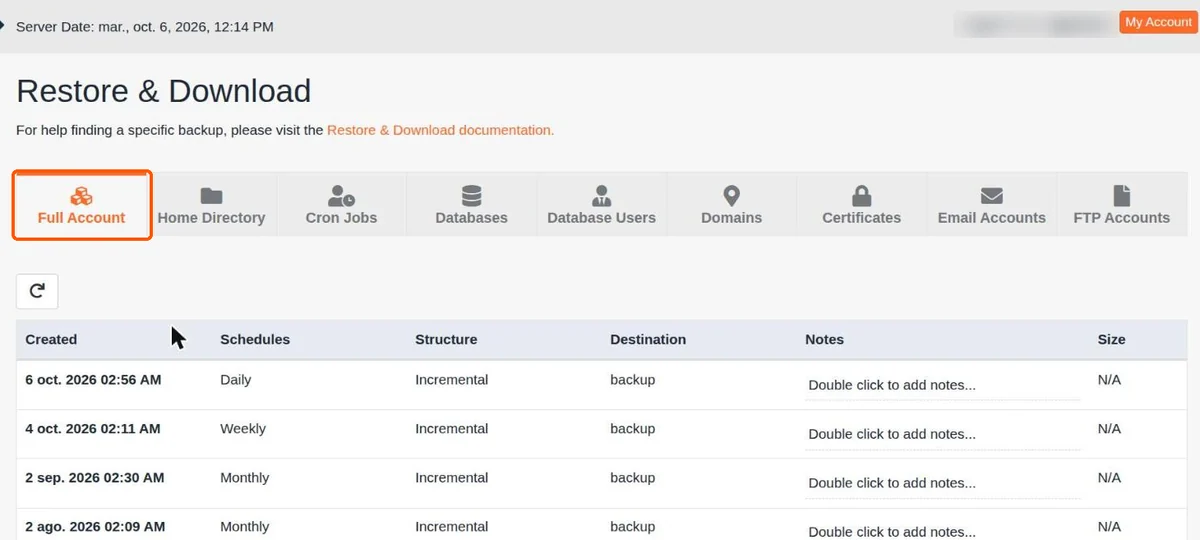 Screenshot supplied by HostingPlus in its JetBackup 5 help. The points dated August to October 2026 illustrate this demonstration account without guaranteeing your plan’s retention. No restoration performed by our editorial team.Open full-size screenshot ↗
The website advertises free migration; preparation help specifies assistance at no cost in most cases. Do not assume all volumes, applications and email transfers automatically fall within this scope. Describe the websites, databases and mailboxes to transfer, then obtain confirmation of coverage before cancelling the old service.
The official checklist begins with a backup of the current website and messages, plus identifying where the domain is managed. The copy must be sent to the new account and checked before changing DNS. These settings determine where visitors and emails are routed. Retain their original state, including email destinations, to avoid unintentionally moving email hosted elsewhere.
Check pages, images, administration and a representative function, then validate receipt and sending from each important mailbox. Switching a store or member area also requires handling writes received during copying. Old and new orders must not remain split between two databases. Keep the old account accessible until checks are complete. An estimated DNS propagation time in a tutorial does not prove migration is finished: observed results on the website and email remain decisive.
HostingPlus advertises a builder generating a page structure, text and images from a business description. Its page states that it is included in hosting plans without credits or extra usage charges. This announcement covers the builder presented by the provider; it does not demonstrate that every future feature or external service will be included.
The corresponding tutorial places the tool in cPanel under Creador Web Pro (Premium), then Edit Website. The user selects the domain or subdomain, opens Plantillas, then Crea con IA and Generar (IA), customizes the proposal and uses Publicar. This workflow does not use the WordPress post editor. We have no evidence of native integration capable of automatically modifying an existing WordPress website, its theme or plugins.
For a new simple brochure website, the builder may be an option to examine. To preserve an existing WordPress website, do not rely on automatic conversion. Clarify the export format and what remains editable after changing hosts. Before publishing, also check that the target domain does not already serve production that must be preserved. French quality, languages actually offered and technical generation limits were not tested. Review every text and image: generated content may describe services your business does not provide.
A WordPress owner must retain a maintenance method even when the offer advertises enhanced security. For a major update, work first on an isolated copy with protected access and external actions disabled. This profile does not consider a dedicated staging environment included: its presence and possible cost remain to be confirmed. After validation, back up production and apply the targeted change, checking the result and identifying a rollback copy.
The provider advertises tickets and emergency assistance available at all times. This proves neither a specific response time nor included correction of every plugin conflict. Describe an incident with its domain, time, exact message and recent changes. A billing or new-feature request should be distinguished from critical unavailability. French-speaking human support is not established.
The FAQ advertises a thirty-day guarantee for annual plans and one month for monthly plans, excluding domains. The PDF also excludes certain additional services and does not guarantee a refund of unused months for early departure. Check how the guarantee applies to two- or three-year cycles and options, without confusing an initial refund with prorated cancellation. For departure, the public terms PDF describes automatic renewal and at least fifteen days’ notice through a notification identifying the customer. Confirm the version applicable to your contract; nonpayment is not an organized departure method.
Export files, database and messages before expiry, then verify recovery with the new operator. Also retain access to the domain and required licenses. An archive available only in an inaccessible account is no longer a fallback. Renewal pricing and French billing must be clarified before signup; backup retention must be clarified before relying on it as your only protection.
HostingPlus chiefly merits consideration for a small business focused on Chile, assisted by someone able to work in Spanish. The cPanel tools, email and recovery procedures provide a concrete foundation. For a very active store, conflicting limits and actual backup frequency must be resolved before a three-year commitment. For a primarily French project without a Chilean need, international billing and support language add constraints to weigh against the price.
Use these references to check the features, requirements and limitations described. Reading documentation is not a practical test.
English translation of the reviewed French edition. Code examples retain their original identifiers, comments and output strings for reproducibility. Linked exercise files and original screenshots may contain French. No new practical tests or price checks are implied by translation.
1984 Hosting’s WordPress plans in Iceland, initial and renewal terms, migration, the Security Pack and backup limitations.
Read more →Compare 34SP.com WordPress containers, shared memory, staging copies, downloadable snapshots and site migration.
Read more →Compare AEserver’s managed WordPress prices and check whether your network must be split into independent installations before migration.
Read more →