Web hosting
1984 Hosting for WordPress in Iceland: pricing and backups
1984 Hosting’s WordPress plans in Iceland, initial and renewal terms, migration, the Security Pack and backup limitations.
Read more →

Site appearance
Web hosting
A Romanian host with a translated French website, cPanel shared hosting and LiteSpeed variants. Displayed currencies, the discounted first term and restoration by the technical team require careful reading.
Source published: · Source updated: · Editorial policy
Visit the official Hostico website ↗ Official Hostico image: brand symbol on a red background.
This profile is based on published offers and documentation. No new hosting benchmark or support test was performed for this translation.
Prices retain the market, currency and billing period described in the French source. Translation does not update a commercial quote. Confirm the final price, taxes and options before ordering.
| Plan | Price and billing | Resources and limits |
|---|---|---|
| Start | €1.99/month displayed on hostico.fr; reference price excluding tax according to the range announcement Renewal: €2.99/month displayed at renewal; future price not guaranteed Discounted first term, monthly or annual depending on selection; payment in advance; the terms reviewed specify invoicing/payment in RON at the BNR rate +2%; confirm total and taxes before payment | 10 GB SSD; 200% CPU; 2 GB RAM; domains: 1; Apache; cPanel Resources shared between websites in the account; nProc 50; EP 25; I/O 10 MB/s; 1024 IOPS; customer VAT to confirm; remote copies restored by support; AI quotas not established |
| Business | €4.99/month displayed on hostico.fr; reference price excluding tax according to the range announcement Renewal: €7.99/month displayed at renewal; future price not guaranteed Discounted first term, monthly or annual depending on selection; payment in advance; the terms reviewed specify invoicing/payment in RON at the BNR rate +2%; confirm total and taxes before payment | 25 GB SSD; 300% CPU; 4 GB RAM; domains: unlimited; Apache; cPanel Resources shared between websites in the account; nProc 75; EP 50; I/O 20 MB/s; 1024 IOPS; customer VAT to confirm; remote copies restored by support; AI quotas not established |
| Enterprise | €14.99/month displayed on hostico.fr; reference price excluding tax according to the range announcement Renewal: €19.99/month displayed at renewal; future price not guaranteed Discounted first term, monthly or annual depending on selection; payment in advance; the terms reviewed specify invoicing/payment in RON at the BNR rate +2%; confirm total and taxes before payment | 100 GB SSD; 400% CPU; 6 GB RAM; domains: unlimited; Apache; cPanel Resources shared between websites in the account; nProc 100; EP 75; I/O 30 MB/s; 1024 IOPS; customer VAT to confirm; remote copies restored by support; AI quotas not established |
| Premium Start | €2.99/month displayed on hostico.fr; reference price excluding tax according to the range announcement Renewal: €3.99/month displayed at renewal; future price not guaranteed Discounted first term, monthly or annual depending on selection; payment in advance; the terms reviewed specify invoicing/payment in RON at the BNR rate +2%; confirm total and taxes before payment | 10 GB NVMe; 200% CPU; 2 GB RAM; domains: 1; LiteSpeed; cPanel Resources shared between websites in the account; nProc 50; EP 25; I/O 10 MB/s; 1024 IOPS; customer VAT to confirm; remote copies restored by support; AI quotas not established |
| Premium Business | €5.99/month displayed on hostico.fr; reference price excluding tax according to the range announcement Renewal: €9.99/month displayed at renewal; future price not guaranteed Discounted first term, monthly or annual depending on selection; payment in advance; the terms reviewed specify invoicing/payment in RON at the BNR rate +2%; confirm total and taxes before payment | 25 GB NVMe; 300% CPU; 4 GB RAM; domains: unlimited; LiteSpeed; cPanel Resources shared between websites in the account; nProc 75; EP 50; I/O 20 MB/s; 1024 IOPS; customer VAT to confirm; remote copies restored by support; AI quotas not established |
| Premium Enterprise | €15.99/month displayed on hostico.fr; reference price excluding tax according to the range announcement Renewal: €24.99/month displayed at renewal; future price not guaranteed Discounted first term, monthly or annual depending on selection; payment in advance; the terms reviewed specify invoicing/payment in RON at the BNR rate +2%; confirm total and taxes before payment | 100 GB NVMe; 400% CPU; 6 GB RAM; domains: unlimited; LiteSpeed; cPanel Resources shared between websites in the account; nProc 100; EP 75; I/O 30 MB/s; 1024 IOPS; customer VAT to confirm; remote copies restored by support; AI quotas not established |
Hostico is operated by Awesome Projects SRL, a Romanian company. Its hostico.fr website provides an interface and documents in French, while the advertised data center is in Bucharest. The marketing title referring to hosting in France must not be used to claim that the servers are French. The customer’s country, portal language and technical location are three separate pieces of information.
The catalog includes Standard, Premium and Reseller shared hosting, as well as VPS and application services. This profile focuses on the six Standard and Premium shared plans for WordPress. Resources and responsibilities from other ranges do not automatically carry over to these packages. Server management by the provider does not mean complete responsibility for website development.
The research covers official pages available on November 3, 2026. No account was opened and no purchase, support contact, transfer or load test was performed. Customer comments and speed promises remain marketing material; they are not used here to assign a rating or claim firsthand experience.
The French portal lists Start at €1.99 per month initially, then €2.99 at renewal; Business at €4.99 then €7.99; Enterprise at €14.99 then €19.99. The French wording la réinitialisation is awkward: the English version does refer to renewal. This is therefore not a charge for resetting files.
The February 2026 restructuring announcement specifies that range prices exclude VAT and that the promotion applies to the first billed term. The term can be a month or a year. A discount observed on a monthly rate must not be extended to a whole year at that amount if the customer initially pays for only one month.
For an annual term at the same monthly equivalent, Start comes to €23.88 excluding tax initially, then €35.88 excluding tax; Business, €59.88 then €95.88; Enterprise, €179.88 then €239.88. These calculations provide budget references for comparison. The actual total depends on the selected billing cycle, taxes and billing currency specified in the terms.
Premium Start is listed at €2.99 per month then €3.99; Premium Business at €5.99 then €9.99; Premium Enterprise at €15.99 then €24.99. The same first-term and tax precautions apply. At the current regular rate, twelve months total €47.88, €119.88 and €299.88 excluding tax respectively, before any invoice currency conversion.
The technical change highlighted is the move from SSD storage and Apache in Standard to NVMe and LiteSpeed in Premium. Corresponding tiers retain the same advertised capacities and CPU/RAM allocations. Premium Start therefore does not automatically add storage over Start. The choice should begin with the website’s workload and the tools actually used.
These differences do not prove a specific loading time or guarantee an increase in visitor capacity. First compare the regular cost and the resources constraining your project. If the problem stems from oversized images, external calls or a poorly designed component, a different web server does not remove the need to fix that cause. No comparative Standard/Premium benchmark was performed.
The French portal used for this profile displays euros. Compare prices in the same currency and for the same term; another currency displayed according to portal or session is not an additional discount. The EUR prices quoted come directly from the French page. The general terms reviewed specify invoicing and payment in RON at the BNR rate plus 2% on the invoice date. Euro bank details on the contact page do not override this clause: request a summary applicable to your order.
The range announcement mentions a VAT reference of 21%. This is not a personalized invoice for an individual or business in France. The treatment applicable to the account holder and their country must be established in the order summary. This profile retains that uncertainty without displaying a French tax-inclusive total calculated as though the provider had accepted it.
Before payment, note the final currency, conversion rate, tax amount, term and options. If necessary, add currency conversion fees charged by your payment method, which depend on your bank. Keep the pro forma and tax invoice. The contract protects the already paid term against price changes, but not future renewals; affected customers must be notified at least thirty days before a price change. This check turns an introductory price into a usable cost and avoids comparing a displayed EUR amount excluding tax with a tax-inclusive invoice in another currency.
Some guides and headings still available refer to a free domain with a year of hosting. The 2026 restructuring announcement instead explains that this offer was replaced with a direct discount on the first term. This profile therefore does not automatically combine a free domain with the new promotional rate. The cart must specify the services actually included.
The domain can be registered with Hostico or kept with a separate registrar. In the latter case, the relevant records must be updated to route the website while preserving email. An initial registration price and an annual renewal price are two more separate items from hosting.
To prepare the order, list the existing domain, expiry date, holder and DNS manager. If a transfer is planned, retain access and check the extension’s conditions. For a simple new installation, a DNS change may suffice without moving the domain. The expected outcome is a clear management choice with its recurring cost, rather than an assumed gift based on old documentation.
Start and Premium Start advertise 10 GB, one hosted domain, 200% CPU and 2 GB RAM. Business and Premium Business increase this to 25 GB, domains without a numerical quota, 300% CPU and 4 GB RAM. Enterprise and Premium Enterprise list 100 GB, domains without a numerical quota, 400% CPU and 6 GB RAM.
These allocations apply to the hosting account. Several websites in the same package therefore share its resource budget. Unlimited domains do not mean infinitely many active stores or completely independent client accounts. Storage holds the service’s data; leave space for exports and temporary operations.
The table specifies, for the three tiers in each range, 50, 75 or 100 nProc processes, 25, 50 or 75 simultaneous EP entries and 10, 20 or 30 MB/s of I/O. The advertised ceiling is 1,024 IOPS in all six cases. These values are not visitor counts: concurrent processing can reach a limit despite low traffic. CloudLinux regulates resources between accounts. The CPU percentage does not promise exclusively reserved physical processors. To size a store, measure utilization and application requirements, then compare them with the chosen tier. The Enterprise name alone does not guarantee any particular commercial capacity.
The data center presentation names GTS Telecom in Electromagnetica Business Park in Bucharest, Romania. This is the declared location of the infrastructure examined. Documentation referring to Europe or a national portal must not be taken to mean that a center can be selected in every country. Keep the exact location of the ordered service with its configuration.
The international announcement states that content is translated into many languages, but chat, telephone and email support remain available in Romanian and English. A translated French website therefore does not mean French-speaking support. cPanel is the advertised control panel; its actual language was not checked inside an account.
The contact table lists online technical support twenty-four hours a day, every day. Technical telephone support is advertised from 8 a.m. to midnight Monday through Saturday, closed on Sunday; sales and xCMS services have different hours again. The page adds an exception for statutory holidays below both tables. Confirm the time zone if a specific appointment is needed. These hours are not response times measured on a real request.
This procedure suits a new website whose owner has the cPanel credentials supplied for the hosting. Open cPanel, then Software and Softaculous Apps Installer. Search for WordPress, select the application and then Install Now to open its form. The website also mentions WordPress Manager by Hostico as a possible entry point; use the tool actually offered in your account.
Next, complete the form, checking the destination before anything is written.
The expected result is WordPress accessible over HTTPS at the right location, with a working administrator login. Check a published page and the general settings before adding content. To abandon a trial, identify this installation in Softaculous and export anything worth keeping before removing it. Do not delete the entire hosting account just to remove a test WordPress installation.
The range advertises WordPress Toolkit, automatic updates and a staging feature. Softaculous is also documented with backup, restoration and working-copy tools. These controls give customers ways to manage WordPress. Their presence does not prove that a technician will functionally validate every change.
Before a major update, create a recovery point and then a working copy with the available features. Disable real emails, payments and synchronization on this copy. Change one component at a time and check login, pages and business functions. The expected result is a verified change before replacing the production state.
If the test fails, discard the copy or restore its previous state. To publish a validated copy, handle separately any new orders and other writes received on the live website in the meantime. Paid licenses and custom code still need management. Hostico also presents xCMS as a separate service: its presence in the catalog does not mean all its interventions are included with basic shared hosting.
The current plan cards list AI Sitebuilder among package features. However, the pages examined establish neither generation quotas, the model used, nor the precise scope of creation or actions on WordPress. This mention must remain an advertised feature to clarify, rather than becoming an unlimited subscription for writing, images or automated maintenance.
The Sitebuilder page documents SitePad: a visual editor that produces static pages with themes and widgets. It is another creation method, separate from a WordPress installation. Choosing this editor can change how the website is edited and exported; check suitable export options for your project before building all the content.
The separately offered n8n service creates automations. Its announcement specifies that the environment and workflows remain the customer’s responsibility under this offer. It does not automatically provide AI model credits with the WordPress package. For any generative tool added, check costs, data sent and permissions; review content and prepare a rollback before an action that modifies the website.
The dedicated page describes remote incremental backups performed at least daily, sometimes more often depending on the case. It advertises the last fourteen calendar days, but specifies that maintenance rotation can reduce available history to five or ten days. You should therefore not promise fourteen guaranteed daily points for every date.
This documentation does not offer customers direct access to the provider’s copies: restoration goes through the technical team. The page allows three free restorations per day for the same data group or subgroup; additional requests incur paid support hours. Distinguish this rule from a self-service recovery button in the panel.
The provider itself recommends keeping an independent copy and does not guarantee the existence or validity of a point on a specific date. Before a risky operation, export files and the database in a consistent state and store them outside the account. Useful retention must match when an error might be discovered: a three-week-old problem may already exceed the advertised history. The policy also limits backups kept in a shared account or VPS to one copy of the website, application or database. Archive dated versions in external storage after checking their contents.
 Historical screenshot from the official tutorial, dated 2017 in the image. It illustrates the Backup button; the visible WordPress 4.8.3 and HTTP address are not settings recommended today.Open full-size screenshot ↗
For WordPress installed and listed in Softaculous, the help describes an export independent of Hostico’s remote copies. It lets you prepare maintenance or departure without waiting for restoration by the technical team. If the installation does not appear in the list, do not use this procedure to reinstall the website: first identify how it is managed.
This archive covers the selected application. It is not automatically a backup of email boxes, other websites or the entire DNS configuration. On an active store, coordinate the export with recent writes to obtain consistent files and database; always preserve orders placed after the backup point.
To recover a state from Hostico’s copies, prepare the domain, affected account, desired date and required files or databases, then send the request to technical support. Specify whether you need a particular file or a rollback of an entire WordPress installation. Have the available point and intervention scope confirmed before anything is overwritten.
First keep an export of the current state. For WordPress, request consistency between files and database; restoring only files can leave settings or content that no longer match the recovered version. If a verification copy is possible, disable its messages, payments and connections to live services before checking the result.
After the intervention, check the required data, administration and relevant business workflows. If the result is incorrect, the export taken before the operation is the recovery point to reimport into a compatible environment. Recovery is not validated by the home page alone. No restoration or support order was performed for this profile; the procedure is based on documentation.
The terms provide an initial transfer at no charge to certain shared, Reseller or managed VPS services, subject to technical analysis. Manual or customized transfers, transfers restarted after actions contrary to instructions, or transfers involving other websites may be billed under the clauses. A card stating migration therefore does not mean universal transfer of every application and mailbox.
Transfer Wizard lets you prepare a request without first starting a support conversation. The form collects email, domain, package, schedule and access method. You can provide an archive, backup link or source panel credentials. The file upload method accepts zip, tgz or tar.gz archives up to 10 GB; this threshold applies to that upload, not necessarily to every assisted migration.
Before sharing access, verify the destination and accepted scope, then keep the source active. Prepare databases and email separately if their transfer is not included in the archive. The expected result is an actionable request with a clear schedule. Refund clauses following a migration include deductions to clarify before ordering; these are detailed below.
After copying, check the website in the destination environment before changing DNS. Check PHP, files, database and configuration, then media, administration and required functions. Disable emails, payments, scheduled tasks and synchronization on this test destination. For a store, arrange a brief freeze or final synchronization to preserve new orders.
Keep the original DNS zone. At the agreed time, change web records without overwriting email records still hosted elsewhere. After switching, check HTTPS and website workflows on the destination. Message migration and email client configuration remain tasks to identify explicitly.
If rollback becomes necessary, restoring old addresses will not merge data created since the switch. Retrieve new orders, files and messages before returning to the source. The goal is a complete website on identified hosting, with both states preserved during validation. Wait until this check is complete before terminating the old contract.
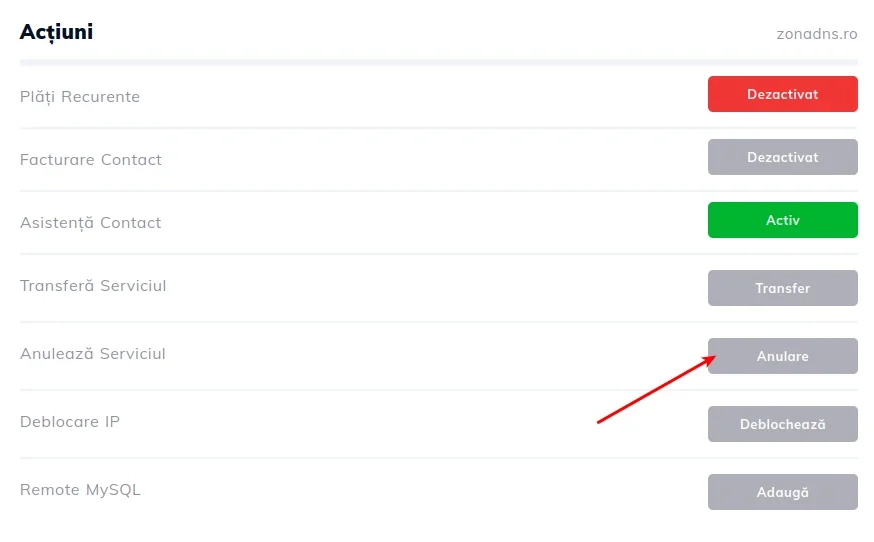 Official screenshot in Romanian. The cancellation request also needs email confirmation; export your data beforehand.Open full-size screenshot ↗
The departure guide goes through the customer account, Services, the website name, then Actions and Cancel Service. Choose immediate closure or closure at expiry, confirm, then validate the request received by email. So-called immediate closure is described as deletion the following morning; at expiry, the panel remains available until then. Export data before making this request.
The terms provide a refund within thirty calendar days after activation, with a possible deduction for external migration work. Another clause provides for one month of service to be withheld if departure occurs within thirty days of purchase and migration. The text does not clarify whether these deductions replace each other or accumulate: request a written calculation without assuming a full refund.
Beyond that period, the calculation covers remaining full prepaid months, subject to conditions. Third-party services, including domains and licenses, are excluded or deducted. Advertised processing may take fifteen business days, plus bank processing times.
Hostico can be considered for WordPress managed by someone fluent in English or Romanian who wants a Romanian location. Standard and Premium should be selected according to resources, web server and recurring cost; several websites share the account limits. Before choosing a package, clarify VAT, RON invoicing and expected AI features. A small brochure website can begin with Standard resources; Premium becomes relevant if your configuration uses LiteSpeed and its renewal cost suits you. If you require a French-speaking contact, servers in France or self-service restoration of the provider’s copies, the verified information does not meet those criteria.
Use these references to check the features, requirements and limitations described. Reading documentation is not a practical test.
English translation of the reviewed French edition. Code examples retain their original identifiers, comments and output strings for reproducibility. Linked exercise files and original screenshots may contain French. No new practical tests or price checks are implied by translation.
1984 Hosting’s WordPress plans in Iceland, initial and renewal terms, migration, the Security Pack and backup limitations.
Read more →Compare 34SP.com WordPress containers, shared memory, staging copies, downloadable snapshots and site migration.
Read more →Compare AEserver’s managed WordPress prices and check whether your network must be split into independent installations before migration.
Read more →