Web hosting
1984 Hosting for WordPress in Iceland: pricing and backups
1984 Hosting’s WordPress plans in Iceland, initial and renewal terms, migration, the Security Pack and backup limitations.
Read more →

Site appearance
Web hosting
A Norwegian host whose new customers have used a separate platform since June 2026. Web and cPanel plans, their email quotas and the old AI service must be examined separately.
Source published: · Source updated: · Editorial policy
Visit the official Domeneshop website ↗
This profile is based on published offers and documentation. No new hosting benchmark or support test was performed for this translation.
Prices retain the market, currency and billing period described in the French source. Translation does not update a commercial quote. Confirm the final price, taxes and options before ordering.
| Plan | Price and billing | Resources and limits |
|---|---|---|
| Web Light — new platform | 468 NOK/year, including Norwegian VAT of 25% for customers in Norway. Renewal: Current public price, with no separate introductory promotional price established. Renewal may vary according to the price applicable at that time. Annual cycle displayed; domain costs extra. Initial fees and tax treatment of a French address not established. | 1 GB of Web storage; 1 database; 1 linked domain; 1 mailbox. 1 GB per mailbox advertised. One database is advertised; PHP capabilities and availability of the WordPress assistant must be confirmed for Web Light. Do not apply the old Light specifications. |
| Web Standard — new platform | 828 NOK/year, including Norwegian VAT of 25% for customers in Norway. Renewal: Current public price, with no separate introductory promotional price established. Renewal may vary according to the price applicable at that time. Annual cycle displayed; domain costs extra. Initial fees and tax treatment of a French address not established. | 25 GB of Web storage; 10 databases; 10 linked domains; 5 mailboxes. Cards: 1 GB per mailbox; table: 5 GB per mailbox, a contradiction to clarify. CPU, PHP processes and backup retention not specified on the card. The AI in the old Pro/Max plans is not attributed to this plan. |
| Web Pro — new platform | 1,188 NOK/year, including Norwegian VAT of 25% for customers in Norway. Renewal: Current public price, with no separate introductory promotional price established. Renewal may vary according to the price applicable at that time. Annual cycle displayed; domain costs extra. Initial fees and tax treatment of a French address not established. | 50 GB of Web storage; 25 databases; 25 linked domains; 25 mailboxes. Cards: 1 GB per mailbox; table: 25 GB per mailbox, a contradiction to clarify. CPU, PHP processes and backup retention not specified on the card. The AI in the old Pro/Max plans is not attributed to this plan. |
| Web Max — new platform | 1,548 NOK/year, including Norwegian VAT of 25% for customers in Norway. Renewal: Current public price, with no separate introductory promotional price established. Renewal may vary according to the price applicable at that time. Annual cycle displayed; domain costs extra. Initial fees and tax treatment of a French address not established. | 100 GB of Web storage; 50 databases; 50 linked domains; 50 mailboxes. Cards: 1 GB per mailbox; table: 50 GB per mailbox, a contradiction to clarify. CPU, PHP processes and backup retention not specified on the card. The AI in the old Pro/Max plans is not attributed to this plan. |
| cPanel Light — new platform | 804 NOK/year, including Norwegian VAT of 25% for customers in Norway. Renewal: Current public price, with no separate introductory promotional price established. Renewal may vary according to the price applicable at that time. Annual cycle displayed; domain costs extra. Initial fees and tax treatment of a French address not established. | 1 GB of Web storage; 1 database; 1 linked domain; 1 mailbox. 1 GB per mailbox advertised. cPanel and WP Toolkit documented; WordPress installation and PHP settings advertised. Toolkit backup limited to the selected site; no automatic retention inferred. |
| cPanel Standard — new platform | 1,164 NOK/year, including Norwegian VAT of 25% for customers in Norway. Renewal: Current public price, with no separate introductory promotional price established. Renewal may vary according to the price applicable at that time. Annual cycle displayed; domain costs extra. Initial fees and tax treatment of a French address not established. | 25 GB of Web storage; 10 databases; 10 linked domains; 5 mailboxes. Cards: 1 GB per mailbox; table: 5 GB per mailbox, a contradiction to clarify. cPanel and WP Toolkit documented; WordPress installation and PHP settings advertised. Toolkit backup limited to the selected site; no automatic retention inferred. |
| cPanel Pro — new platform | 1,500 NOK/year, including Norwegian VAT of 25% for customers in Norway. Renewal: Current public price, with no separate introductory promotional price established. Renewal may vary according to the price applicable at that time. Annual cycle displayed; domain costs extra. Initial fees and tax treatment of a French address not established. | 50 GB of Web storage; 25 databases; 25 linked domains; 25 mailboxes. Cards: 1 GB per mailbox; table: 25 GB per mailbox, a contradiction to clarify. cPanel and WP Toolkit documented; WordPress installation and PHP settings advertised. Toolkit backup limited to the selected site; no automatic retention inferred. |
| cPanel Max — new platform | 2,004 NOK/year, including Norwegian VAT of 25% for customers in Norway. Renewal: Current public price, with no separate introductory promotional price established. Renewal may vary according to the price applicable at that time. Annual cycle displayed; domain costs extra. Initial fees and tax treatment of a French address not established. | 100 GB of Web storage; 50 databases; 50 linked domains; 50 mailboxes. Cards: 1 GB per mailbox; table: 50 GB per mailbox, a contradiction to clarify. cPanel and WP Toolkit documented; WordPress installation and PHP settings advertised. Toolkit backup limited to the selected site; no automatic retention inferred. |
Domeneshop AS is a Norwegian provider of domains, hosting and email. It advertises Web servers in central Oslo and a direct connection to the NIX exchange point. For WordPress, its value mainly depends on the platform actually sold, the access available and backup responsibilities. A package name is not enough to identify all of these details.
Since the launch on June 8, 2026, new customers have been directed to a new platform, while existing customers have a separate login. The website explicitly states this. The documentation therefore includes guides for the old account area, the new Essential hosting and cPanel services. A procedure that works in one may be unusable in another.
This profile, prepared on November 3, 2026, focuses on the new catalog. It retains details of the old environment where they explain a specific difference, particularly AI and backups. No account or order was created. The caveats concern observed discrepancies and are not practical test results.
The new Web range displays four annual amounts: Light at 468 NOK, Standard at 828 NOK, Pro at 1,188 NOK and Max at 1,548 NOK. The page states that its prices include 25% VAT and apply to customers in Norway. The cards show an annual cycle; dividing the amount by twelve provides a budgeting reference, not proof of monthly payment.
No separate introductory promotional price appears for these four packages. These amounts therefore serve as current renewal references, subject to the terms governing changes. The domain costs extra. The first invoice must confirm any fees, the billing address and tax treatment; a French buyer cannot reuse the Norwegian tax-inclusive total without checking.
A separate cPanel range displays 804, 1,164, 1,500 and 2,004 NOK per year for Light, Standard, Pro and Max. Compare these plans according to the panel you need, rather than assuming cPanel is a feature included in every Web package. The cPanel page also states that Norwegian VAT of 25% is included for customers in Norway. The quote must specify which of the two services is ordered and how your billing address is treated. No French checkout was validated.
On the new platform, Light advertises 1 GB for the Web, one database and one linked domain. Standard increases this to 25 GB, ten databases and ten domains; Pro to 50 GB, twenty-five databases and twenty-five domains; Max to 100 GB, fifty databases and fifty domains. Domain limits are not a guarantee of fifty simultaneously active WordPress sites: they must be assessed against execution resources.
The old catalog remains visible with different figures: 5, 20, 100 and 500 GB for the four package names. Its guide requires at least Web Standard for WordPress because the old Light lacks PHP and MySQL. The new Light advertises a database, but that alone does not certify all the PHP capabilities your installation needs.
Before choosing, record media volume, database sizes and plugin dependencies. Have the PHP limit and process restrictions confirmed for the product being sold. The new profile does not publish CPU capacity or guaranteed throughput per site here. Traffic described as unrestricted remains subject to the usage and stability limits in the contract; it is not unlimited processing power. Applying the old Max’s 500 GB to the new Max would be a significant sizing error.
The new Web cards advertise one, five, twenty-five or fifty mailboxes depending on the package. They all state 1 GB per mailbox and a standard size of 1 GB. Further down, however, the comparison table displays per-mailbox capacities of 1, 5, 25 and 50 GB. This is a discrepancy on the same page, not additional capacity that can be taken for granted.
The general text also retains wording about an unlimited number of addresses, while the cards count mailboxes. A forwarding address, an alias and a mailbox storing messages are three different uses. To prepare a transfer, inventory each mailbox, its volume and essential forwarding rules, then obtain the contractual quota actually available.
The old environment still advertises 15 GB accounts and higher mailbox counts. Those values are not used to artificially supplement the new package. A migration from an old account to the new range must be checked as a resource change. If in doubt, keep an independent message archive before changing the product or incoming-mail settings.
The login guide asks you to choose the access corresponding to when the customer was created, before or after the June launch. Start with this check if a documentation screenshot does not match your screen. The new account area shows active products; some provide cPanel access, while others provide the Essential service assistant. The presence of cPanel guides in the help center does not give that panel to every customer. The cPanel installation guide even contains an isolated mention of Plesk in its introduction, although its title and steps concern cPanel: this inconsistency does not prove that a second panel is supplied.
The commercial pages examined are mainly Norwegian, and the help center also offers articles in English. This provides a documentation route for a non-Norwegian team without establishing a support commitment in every language. No complete French workflow was confirmed. For a customer in France, requested identification, eligibility and invoicing still need to be clarified before purchase.
The contract leaves customers responsible for maintaining the software they install. Assign someone to WordPress, themes, plugins and licenses. Any automatic updates do not prove that a human checks forms or orders. A managed Cloud plan mentioned in the terms is a different service: its guarantees do not automatically extend to the Web packages examined.
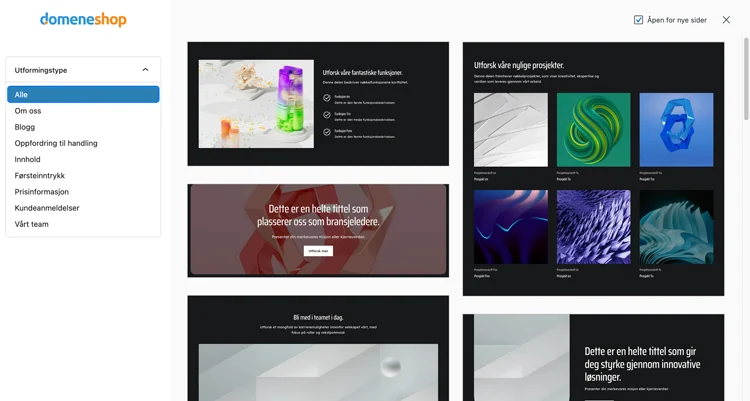 Screenshot published by Domeneshop for Sidebygger AI in the former environment. It illustrates its template library, not the new account or cPanel; no test performed for this profile.
The old catalog offers Sidebygger AI for WordPress with Web Pro and Web Max. Its getting-started guide describes choosing the product during quick installation, followed by questions about the site’s title, description, tone, goals and structure. Generated pages can then be edited in WordPress. The official visual associated with this section shows the template library of that old environment, not an account opened for this profile. This workflow must not be presented as a feature already confirmed in each new package.
The usage documentation shows a site assistant, template library, chatbot and text or image creation. It explicitly limits generated images to ten per day. No unlimited text quota, guaranteed model or right to retain assistance after leaving is established here. Access to library photographs also requires checking their license.
For an eligible old account, the documented route is Webhosting > Kom i gang, then selecting Sidebygger AI for WordPress, the address and credentials. A new installation at a separate destination remains preferable for exploring the result. Review content before publication and keep its previous version before replacement. On the new platform, have inclusion and activation confirmed instead of assuming that the Pro name alone guarantees them.
The old hosting guide is explicit: infrastructure copies protect the servers against their own incidents and do not guarantee recovery of an individual Web account or mailbox. Customers must keep their files, databases and important email. This caveat must not be converted into a guarantee of daily backups that can be restored on demand.
In the old Min konto, exporting a database without a plugin follows Mine domener > domain > Webhotell > Se på/endre on the MySQL line, then the database menu and Eksporter. The download contains an SQL file in an archive. Pair it with a copy of files and media kept outside the account. The guide notes that a very large database may require another method.
The new cPanel environment has a guide for WordPress copies through WP Toolkit. It concerns the selected site and does not automatically archive all email or the entire account. For the new Web Essential, automatic retention and recovery service must be confirmed separately. Do not select a plan based on a number of backup days that its documents do not establish.
The old-environment documentation separates two lists. Updraft (Plus) and BackWPup appear among explicitly prohibited software; All-in-One WP Migration and Wordfence appear in the section asking customers not to install them, titled “software to avoid.” These assessments are the provider’s, within this specific scope, and do not constitute our audit of those plugins. The document names Duplicator and Akeeba Backup as alternatives. Before transfer, have the destination product’s rules confirmed; do not automatically apply this list to the new Web service or cPanel.
The plugin-free route consists of preserving files and the database, preparing a separate destination, importing data into an identified database and adapting the configuration using the supplied credentials. The old guide states that the MySQL server is not necessarily localhost. Do not reuse credentials from another platform or blindly replace addresses stored in the database.
Check the copy before changing DNS and transfer email separately. The scope and price of a migration performed by Domeneshop have not been established for the packages examined; a domain-transfer button does not prove that website migration is free. Keep the source until validation and organize final writes. Reverting DNS does not merge new data.
The new contact page provides a customer-service address and a number usable from abroad. Listed sales hours are Monday to Friday from 9 to 11 and then from 12 to 16. The old footer displays 8–17 for the general number. These statements do not guarantee continuous technical coverage or identical hours for every team.
The terms revised on June 6, 2026 state that written requests receive a response within two business days. This is a documentary commitment, with no measurement performed for this profile and no promise of resolution within that time. Sensitive changes to contact details or DNS must be made while logged in; the contact page refuses to accept them simply by phone or email.
Unless otherwise stated, the contract specifies a one-year term renewed annually, with an invoice generally sent thirty to sixty days before expiry. It requires at least thirty days’ written notice to end the agreement and does not advertise a general prorated refund. Keep the dates and effective confirmation before arranging departure; the current rate is not a permanent guarantee.
Before cancellation, keep files, databases, useful messages and DNS settings, then verify that everything works at the destination. The old guide asks customers to contact the provider to stop or downgrade services linked to a domain. For the new account, identify the relevant product and have its end date confirmed; do not automatically use a menu described for the old environment.
One contractual point needs particular attention: transferring a domain to another provider is considered cancellation of associated services unless advance notice requests that they remain active. Moving only the address can therefore affect hosting or email. Define in writing what must remain active until the switchover ends, and keep the response.
Domeneshop may suit a Norwegian project that wants to retain control of its data and administration. Choosing nevertheless requires distinguishing platform, panel and contract, then clarifying contradictory email quotas and recovery capabilities. For a small WordPress site, first compare Web Standard and cPanel Standard: the latter currently costs 336 NOK more per year and provides access to the documented cPanel workflow. This extra cost should meet a real management need, without inventing a speed benefit. Web Light needs confirmation of its WordPress scope; a store also needs commitments on resources and recovery. AI should not determine the purchase of a new Pro or Max until its inclusion is confirmed.
Use these references to check the features, requirements and limitations described. Reading documentation is not a practical test.
English translation of the reviewed French edition. Code examples retain their original identifiers, comments and output strings for reproducibility. Linked exercise files and original screenshots may contain French. No new practical tests or price checks are implied by translation.
1984 Hosting’s WordPress plans in Iceland, initial and renewal terms, migration, the Security Pack and backup limitations.
Read more →Compare 34SP.com WordPress containers, shared memory, staging copies, downloadable snapshots and site migration.
Read more →Compare AEserver’s managed WordPress prices and check whether your network must be split into independent installations before migration.
Read more →